AI Manga Layout Generator: Professional Page Layouts Without Drawing Skills (March 2026)
2026-03-27
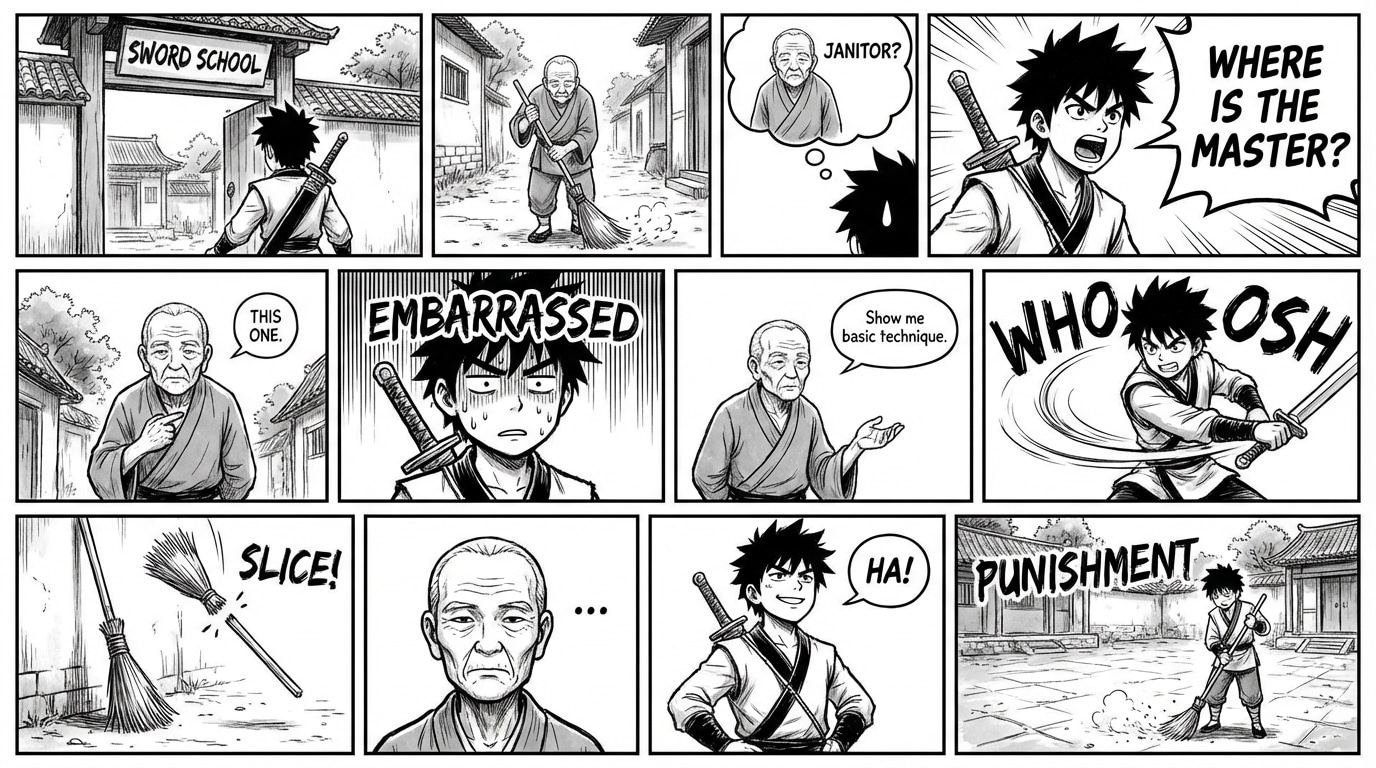
Panel layout is the invisible architecture of manga — the system of gutters, panel sizes, reading flow, and page-turn reveals that controls how readers experience a story. In 2026, the AI manga layout generator has become the tool that finally bridges the gap between compelling narratives and professional visual execution. The global manga market is projected to grow from USD 19.35 billion in 2025 to USD 56.38 billion by 2031 — a 19.52% CAGR, while the AI manga generator market is set to reach USD 102.1 million by 2030, fueled by creators who need layout intelligence — not just image generation.
Jenova's Manga Creator is the AI manga layout generator built for this exact need. It handles the complete layout workflow — intelligent panel composition based on narrative rhythm, proper right-to-left reading flow, page-turn reveals for dramatic pacing, panel size hierarchy for emotional impact, and character blocking that maintains spatial relationships across sequences. Whether you're planning a 20-page one-shot or a 200+ page serialized epic, this guide covers how AI manga layout generation works, why layout is the most underrated skill in manga production, and how to create professionally composed pages in minutes.
Quick Answer: What Is an AI Manga Layout Generator?
An AI manga layout generator is a specialized tool that transforms story descriptions into professionally composed manga page layouts — determining panel count, size hierarchy, reading flow, gutter spacing, and visual pacing — without requiring knowledge of sequential art theory.
- 📐 Intelligent panel composition that matches narrative rhythm and emotional beats — Manga Creator handles this conversationally
- 📖 Reading flow optimization with proper manga conventions including right-to-left direction and page-turn reveals
- 🎭 Character blocking showing positioning, spatial relationships, and camera angle selection for emotional impact
- 🔄 Persistent layout memory that tracks your project's visual language across sessions and 200+ pages
The Problem: Why Manga Layout Remains the Hidden Bottleneck
Most conversations about AI manga creation focus on image generation and character consistency. But layout — the structural composition of panels on a page — is the discipline that actually determines whether a manga reads professionally or feels amateurish.
The Multi-Skill Burden of Layout Design
Professional manga layout (called name / ネーム in Japanese) requires simultaneous mastery of panel composition theory, visual pacing, reading direction conventions, page-turn psychology, and information density management. As AI Magicx's 2026 guide documented: "Professional comics use sophisticated panel layouts — varying panel sizes, overlapping panels, bleeds, gutters, and dynamic compositions that guide the reader's eye and control pacing." Professional mangaka spend 10–16 hours per chapter on storyboarding alone — and this is before any finished artwork begins.
Generic AI Tools Can't Handle Layout
As Anifusion's 2026 analysis confirmed, Midjourney has "no built-in character consistency, no panel layout tools, no speech bubbles or text integration, and a Discord-based interface not designed for comic workflows."
The fundamental problem isn't generating beautiful panels — it's arranging them into pages that tell a story. A single manga page can take a professional artist 4 to 10 hours of penciling, inking, toning, lettering, and composing panels. For independent creators, the layout phase alone — determining which panels go where, how large they should be, and how they guide the reader's eye — represents weeks of work per chapter.
The Cost of Professional Layout
Hiring a professional storyboard artist costs $20–$30 per page. For a 100-page manga volume, that's $2,000–$3,000 in layout costs alone — before any finished artwork begins. Meanwhile, the broader AI comic generator market is expected to reach USD 20.5 billion by 2034 precisely because creators need accessible alternatives to these prohibitive costs.
Why Manga Creator Is the AI Manga Layout Generator You Need
This is exactly what Manga Creator was built for. Unlike generic image generators that produce individual panels with no understanding of how they fit together on a page, Manga Creator is a dedicated mangaka agent that handles the complete layout workflow — from panel count determination through reading flow optimization.
| Feature | General Image Generator (e.g., Midjourney) | Manga Creator |
|---|---|---|
| Panel layout intelligence | ❌ None — manual in external tools | ✅ Automatic composition based on narrative beats |
| Reading flow optimization | ❌ No manga conventions | ✅ Right-to-left flow, page-turn reveals, decompression |
| Panel size hierarchy | ❌ All panels same size | ✅ Dynamic sizing for emotional impact |
| Character blocking | ❌ Random positioning | ✅ Spatial relationships and camera angles |
| Gutter spacing control | ❌ None | ✅ Reading rhythm through panel spacing |
| Story continuity | ❌ None | ✅ Plot memory engine across sessions |
| Cost | $10–$60/month | Free to start |
While tools like ChatGPT and Midjourney can approximate manga-style artwork, the real challenge — as AI Magicx documented — is not generating a single good panel. It's "generating dozens or hundreds of panels that look like they belong to the same comic — with consistent characters, consistent style, and appropriate compositions for the story being told."
Intelligent Panel Composition
The Manga Creator analyzes your narrative beats to determine the optimal panel count per page, panel size hierarchy, and composition. Describe a dramatic confrontation, and the AI understands that the moment demands a large panel — perhaps a full-page spread — while rapid dialogue exchanges call for smaller, tighter panels. This is the same structural methodology professional mangaka use, powered by AI execution.
Five Professional Art Style Templates
Each style template carries its own layout conventions:
- Shonen: Dynamic diagonal panels, speed lines, impact frames — the Dragon Ball and Naruto aesthetic where action sequences break panel borders
- Shoujo: Overlapping panels with soft borders, floral effects, emotional close-ups floating over backgrounds — romance and drama
- Seinen: Cinematic widescreen compositions, heavy negative space, deliberate decompression — mature themes with atmospheric pacing
- Slice-of-Life: Clean grid layouts, consistent panel sizes, warm compositions — cozy atmosphere with steady reading rhythm
- Chibi/Comedy: Exaggerated panel breaks, super-deformed proportions, reaction panels that burst outside borders
Page-Turn Psychology
Professional manga layout isn't just about individual pages — it's about the relationship between facing pages and the dramatic potential of page turns. The AI manga layout generator understands that the bottom-right panel of a right-hand page (in right-to-left reading) is the most powerful position for a cliffhanger, and that a page-turn reveal should land on a large panel or spread on the following left-hand page.
Try Manga Creator free — no credit card required.
Related Agents You'll Also Like
🎨 Comic Creator — Western Comic Layouts
For creators working with left-to-right reading conventions, Western panel grids, and American/European comic aesthetics. Handles different layout traditions — from the structured 6-panel grid of classic superhero comics to the experimental layouts of indie graphic novels.
- Six visual style templates: Superhero, Noir, Indie, Franco-Belgian, Cartoon, Realistic
- Dynamic panel layouts with authentic Western comic reading rhythm
- Character reference sheets for visual consistency across projects
📱 Webtoon Creator — Vertical Scroll Layouts
Optimized for mobile-first platforms where layout means something entirely different — vertical scroll rhythm, strategic white space, and "thumb stop" moments. Digital formats now account for 76.1% of manga consumption in Japan, and webtoon-specific layout conventions are critical for platforms like LINE Webtoon, Tapas, and Lezhin.
- Vertical scroll rhythm optimization with strategic pacing
- Episode hooks and cliffhanger structure
- Platform-ready exports for major webtoon services
✍️ Creative Fiction Writer — Narrative Foundation Before Layout
Develop your story structure before visual layout begins. Scene-by-scene breakdowns with visual direction notes, character arc development, and dialogue refinement that translates directly into panel descriptions.
- World-building with authentic detail
- Scene breakdowns ready for layout generation
- Editorial insight for pacing and narrative structure
How It Works: From Story to Professional Manga Layouts
Step 1: Define Your Story and Layout Style
Begin by describing your story concept, genre, and visual approach to the Manga Creator. Choose from five professional art style templates — each carries its own layout conventions that affect panel composition, border treatment, and pacing.
"I'm creating a seinen mystery manga about a forensic accountant who discovers supernatural patterns in financial fraud. The setting is modern Tokyo. I want the layout style to feel like Monster meets Death Note — cinematic compositions with deliberate pacing and dramatic page-turn reveals."
For complex narratives, the Creative Fiction Writer can help develop full scene breakdowns with visual direction notes before layout planning begins.
Step 2: Lock In Character Designs
Before any layout work begins, create character reference sheets. The Manga Creator generates consistent designs that persist across your entire project — ensuring character blocking within layouts maintains visual coherence.
"Design my protagonist: Kenji Murakami, early 30s, sharp features, wire-frame glasses, always in a rumpled suit with loosened tie. Seinen style with understated expressions — he reveals emotion through posture, not exaggerated faces."
Step 3: Describe Your Scenes for Layout Generation
With characters established, provide your narrative direction for each page or sequence. The AI determines panel count, size hierarchy, reading flow, and composition based on your story beats.
"Chapter 2, Pages 8–9: Kenji discovers the pattern. Three panels of him reviewing documents at his desk — tight, methodical, small panels showing his focused expression and the papers. Then a moment of realization — his hand freezes. Decompress this across two panels: his eyes widening, then a close-up on the document where the supernatural pattern becomes visible. End page 9 with a page-turn reveal: full-page spread of the pattern manifesting as ghostly numbers floating through the office."
The AI understands that decompression (spreading a single moment across multiple panels) creates tension, while compression (packing action into fewer panels) creates urgency — and applies these principles automatically.
Step 4: Iterate and Refine Layouts
Request adjustments to any layout element — panel sizing, composition, camera angles, gutter spacing, or reading flow. The AI iterates while maintaining narrative coherence and your established visual language.
"Make the realization moment larger — give it a half-page panel instead of a standard size. Add more negative space around Kenji in the preceding panels to emphasize his isolation before the discovery."
Step 5: Generate Final Pages
Once layouts are locked, the Manga Creator transitions seamlessly from rough layout blueprints to finished manga pages. The same character references, style templates, and project state carry forward — your layouts become the foundation for final production.
Results & Use Cases
📚 The Writer Without Layout Training
Scenario: You've written a complete manga script but have no understanding of panel composition or visual pacing.
Traditional Approach: Spend months studying sequential art theory, or hire a storyboard artist at $20–$30 per page — $2,000–$3,000 for a single volume.
Jenova Solution: Manga Creator translates your written scenes into professionally composed layouts automatically. Describe what happens narratively, and the AI determines the optimal visual structure — panel count, sizing, flow, and composition.
📱 The Weekly Serialization Creator
Scenario: You're publishing weekly episodes on digital platforms and need to maintain consistent layout quality under deadline pressure.
Traditional Approach: Rush layouts, sacrifice pacing quality, or miss upload schedules entirely. Digital formats now account for 76.1% of manga consumption, and readers expect professional-quality layouts every week.
Jenova Solution: Generate complete chapter layouts in hours instead of days. Start with Manga Creator for traditional manga layouts, or @mention Webtoon Creator for vertical scroll optimization — the agents share conversational context, ensuring your story translates seamlessly between formats.
🌍 The Cross-Format Publisher
Scenario: You want to publish the same story as traditional right-to-left manga, left-to-right Western comic, and vertical scroll webtoon — each requiring fundamentally different layout approaches.
Traditional Approach: Three separate layout artists, three separate production pipelines, three separate budgets.
Jenova Solution: Develop your story and characters with Manga Creator, then @mention Webtoon Creator for vertical scroll adaptation and Comic Creator for Western comic formatting. All three agents share your character references and story context — one creative vision, three publication-ready layout systems.
💼 The Writer-Artist Collaboration
Scenario: You're a writer working with a separate illustrator and need to communicate layout intentions clearly.
Traditional Approach: Lengthy back-and-forth, miscommunication about compositions, expensive revision cycles. According to Anifusion's 2026 analysis: "Character consistency is absolutely critical for manga. Readers need to instantly recognize your characters across hundreds of pages."
Jenova Solution: Generate AI layouts as visual direction for your illustrator — showing exactly what you envision for panel counts, compositions, camera angles, and pacing. Reduce miscommunication and revision cycles by aligning on layout before final artwork begins.
FAQ
Do I need to understand manga layout theory to use an AI manga layout generator?
No. The AI manga layout generator is specifically designed for creators who have stories to tell but lack formal training in sequential art composition. Manga Creator handles panel count determination, size hierarchy, reading flow, gutter spacing, and page-turn psychology automatically — you describe what happens in your story, and the AI determines the optimal visual structure.
How does the AI decide panel sizes and layout composition?
The Manga Creator analyzes your narrative beats to determine layout structure. High-impact moments (reveals, emotional climaxes, action sequences) receive larger panels or full-page spreads. Rapid dialogue exchanges and transitional scenes use smaller, tighter panels. The AI understands decompression (spreading moments across multiple panels for tension) and compression (packing action for urgency), applying these principles based on your story direction.
What's the difference between manga layout and Western comic layout?
Manga reads right-to-left with different panel composition conventions — overlapping panels, borderless panels, and specific gutter spacing that controls reading rhythm. Western comics read left-to-right with their own traditions. The Manga Creator handles Japanese conventions, while the Comic Creator handles Western formats. Both understand that layout is storytelling — not just decoration.
Can I use AI-generated layouts to communicate with human artists?
Absolutely. This is one of the most powerful use cases. AI-generated layouts provide clear visual direction for collaborators — showing illustrators exactly what you envision for panel counts, compositions, camera angles, and pacing. This reduces the miscommunication and revision cycles that are among the most expensive aspects of writer-artist collaboration.
Is the AI manga layout generator free?
Yes — you can start using Manga Creator for free with no credit card required. Free accounts include all core features with limited usage — sufficient for testing layout workflows, creating sample pages, and validating your story's visual structure. Paid plans starting at $20/month increase usage limits significantly for full-length projects.
How is this different from using Clip Studio Paint or Photoshop for layouts?
Traditional layout tools like Clip Studio Paint require you to already know layout theory — they provide blank canvases and panel border tools, but the compositional decisions are entirely yours. An AI manga layout generator makes those decisions for you based on your narrative, applying professional manga conventions automatically. As AI Magicx documented: "AI tools are beginning to handle layout automatically, though many creators still compose layouts manually and fill each panel with AI-generated art." Manga Creator integrates both — layout intelligence and panel generation in a single workflow.
Conclusion
The manga layout — the invisible architecture that determines how readers experience every page — has been the most underappreciated bottleneck in manga creation. The manga market's trajectory from USD 19.35 billion in 2025 to USD 56.38 billion by 2031 represents massive demand, yet the layout phase has historically required years of sequential art training or thousands of dollars in professional storyboarding fees.
What makes Manga Creator different isn't just that it generates manga-style images — it's that it handles the complete layout workflow that professional mangaka follow: intelligent panel composition based on narrative rhythm, proper reading flow with page-turn psychology, panel size hierarchy for emotional impact, character blocking for spatial storytelling, and persistent project memory that maintains your visual language across sessions and 200+ pages.
The question is no longer "can I compose this page?" It's "what story do I want to tell?"
Try Manga Creator now — describe your story and see professional layouts come to life. No layout training required. No credit card required.
For creators exploring different visual storytelling formats, Jenova also offers dedicated agents for Western comics, webtoons, and fiction writing. Explore the full agent library at Jenova.