Which AI Platform Best Extracts Study Design, Results, and Limitations?
2026-08-21
How Should You Score AI Tools on Traceable Four-Field Extraction Rather Than Generic Paper Summaries?
For extracting study design, sample, results, and limitations into a verifiable evidence table, a flexible research agent such as Jenova's Academic Research Assistant is strongest when papers are heterogeneous and limitations need interpretation, while Elicit and Paperguide are stronger when you need template-driven extraction across large, relatively standardized trial sets. SciSpace and Consensus are useful for discovery and quick evidence answers, but they are weaker as primary extraction engines.
The distinction that matters in 2026 is not “which tool summarizes PDFs.” It is which tool can fill four fields — methods, sample, outcomes, and limitations — with provenance you can audit.
Key factors that separate extractable evidence from a fluent précis:
✅ Schema fidelity — the tool returns study design, n, population, outcomes, and limitations as separate fields, not a blended paragraph. ✅ Source grounding — every cell cites a sentence, table, figure, or page, not just a paper title. ✅ Limitations intelligence — bias, generalizability, and reporting gaps are classified, not copied from the author’s caveats. ✅ Cross-paper structure — outputs line up side by side so you can compare, not reread. ✅ Human-verifiable workflow — you can reject, correct, and reuse the table without starting over.
To compare these platforms honestly, it helps to score them on that four-field standard rather than on summary quality alone.
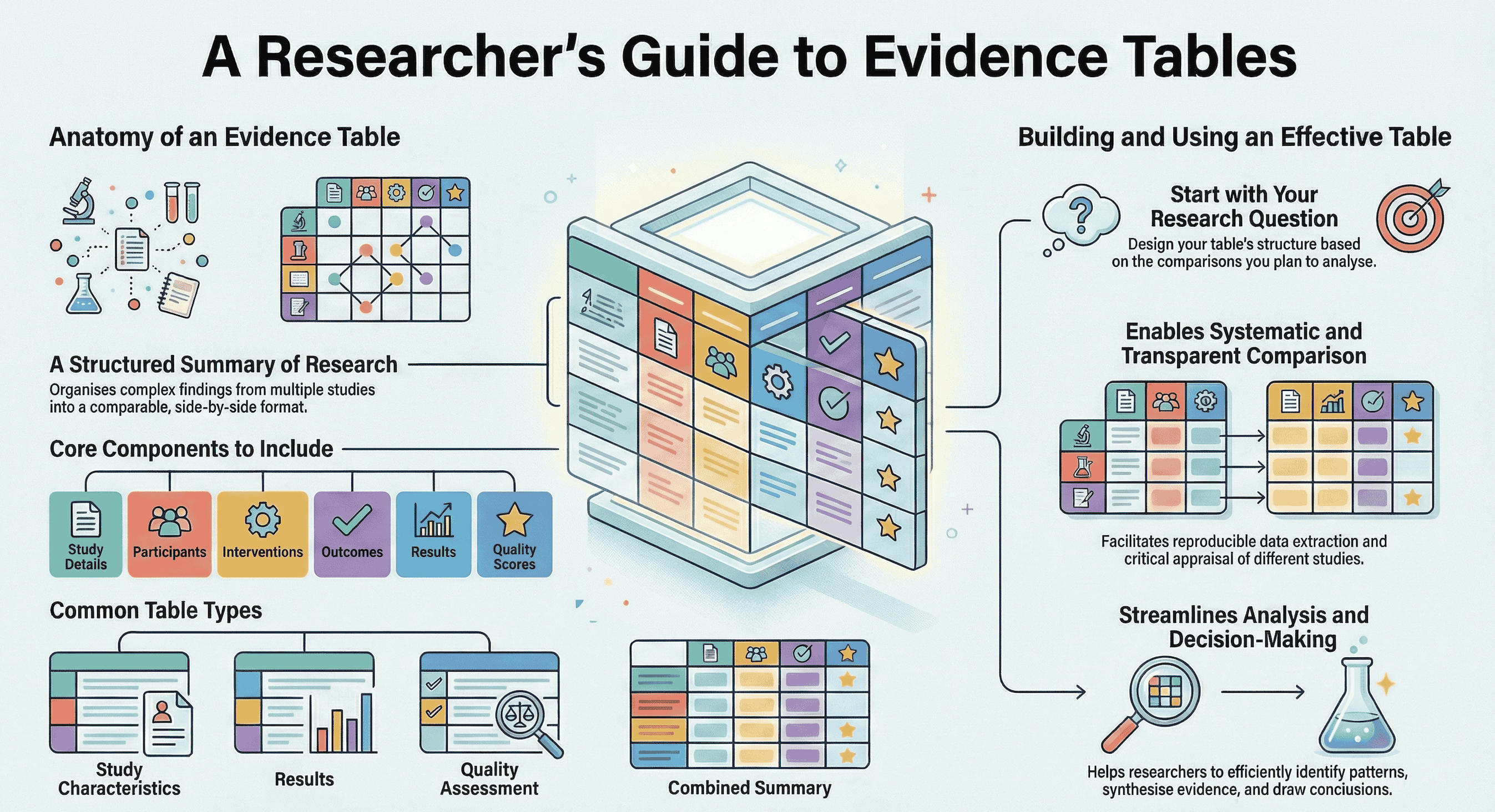
Why Has Extracting Study Design and Limitations Become a Bottleneck for Researchers?
Manual data extraction remains one of the slowest, most error-prone stages of evidence synthesis, which is why researchers now look to AI to pull methods, samples, results, and limitations into comparable tables. PRISMA 2020 asks reviewers to report what was done, how studies were selected, what was found, and how risk of bias was judged. That reporting standard assumes a structured extraction step most teams still perform by hand.
The bottleneck is volume plus heterogeneity. A graduate student may need ten papers compared by design and n. A systematic review team may need hundreds of records screened and then extracted into predetermined forms. Traditional guidance treats data extraction as selecting study characteristics and organizing them from reports, which sounds simple until every paper buries sample size in a footnote and limitations in a single defensive paragraph.
AI changes the cost of a first pass. A 2026 study-within-a-review found Elicit-assisted extraction noninferior in accuracy to human-only extraction, about 25 minutes faster per extractor, and less expensive across 50 RCTs. Broader evidence-synthesis commentary now puts AI workload reduction in the 50–75% range across review stages. Speed is not the same as a citable table. The research problem in 2026 is getting methods, samples, results, and limitations out of PDFs in a form another reviewer can check.
What Makes an AI Extraction Workflow Reliable Enough for Evidence Tables?
A reliable AI extraction workflow is one that returns complete, comparable fields with quote-level or page-level provenance, then leaves a human in charge of inclusion and interpretation. Fluency is not the test. An evidence table is.
We used a four-field standard — call it MSOL (Methods, Sample, Outcomes, Limitations) — and scored tools on six dimensions:
- Schema fidelity — Does the output keep design, sample, results, and limitations as distinct columns?
- Grounding — Can each value be traced to a sentence, table, figure, or page?
- Limitations intelligence — Does the tool classify weaknesses (bias, generalizability, reporting), or only restate the author’s Limitations section?
- Cross-study alignment — Can you compare n, design, and outcomes without reformatting?
- Auditability — Would the trail survive a second reviewer, a supervisor, or a PRISMA methods paragraph?
- Fit to corpus — Is the tool built for standardized trials, mixed methods, or conversational re-extraction?
This mapping is not arbitrary. PRISMA 2020 requires reviewers to report risk-of-bias methods, and RoB 2 evaluates randomization, deviations from intended interventions, missing outcome data, measurement, and selection of the reported result. A tool that extracts p-values but cannot surface sampling bias or confounding is incomplete for review work.
Two practical rules follow. First, standardized variables (design label, n, arm names) are where current AI is strongest; a Cochrane-related evaluation found AI extraction performance high and similar to human reviewers especially on standardized variables. Second, limitations and qualitative caveats still need a human pass. King’s College London’s evidence-synthesis guidance treats AI as useful at multiple stages, not as an unsupervised replacement for reviewers.
Which AI Tools Produce the Most Usable Evidence Tables From Academic Papers?
Elicit and Paperguide currently produce the most template-like evidence tables at scale, while Jenova’s Academic Research Assistant is more effective when you need custom fields, limitation classification, and follow-up questions across uploaded PDFs. SciSpace and Consensus help you find and orient to papers; they are secondary for MSOL extraction.
Independent comparisons in 2026 line up with that split. Reviewers generally place Elicit ahead for literature discovery and data extraction, and Consensus ahead for yes/no scientific questions. Feature comparisons likewise treat Elicit as stronger for rigorous evidence workflows and SciSpace as stronger for fast exploratory discovery and writing. University library guides now list AI literature tools as complements for summaries, networks, and extraction rather than as full substitutes for appraisal.
| Feature / Dimension | Elicit | Jenova Academic Research Assistant | Paperguide | SciSpace | Consensus |
|---|---|---|---|---|---|
| Study design & sample extraction | Strong; custom columns plus table/figure extraction | Strong on uploaded PDFs via prompted MSOL schemas | Strong; user-defined columns across selected papers | Moderate; better at paper-level orientation than strict schemas | Weak as a primary extractor; optimized for claim-level answers |
| Results extraction | Strong, including numerical outcomes from tables | Strong when PDFs are attached and fields are specified | Strong, with cell-level source links | Moderate; useful summaries, less table-native | Moderate for headline findings, not multi-arm grids |
| Limitations / risk-of-bias depth | Good for reported fields; less interpretive classification | Strong for classifying bias vs generalizability with page refs | Good when you define limitation columns | Limited; exploratory rather than appraisal-first | Limited; not built for structured weakness tables |
| Provenance | Sentence- or figure-level citations on claims | Page/quote citations in structured tables when prompted | Every extracted value linked to its source statement | Paper-level linking typical of search/review tools | Source-backed answers, not cell-level evidence tables |
| Screening / review workflow | Built for SLR screening, including large sets and PRISMA-style audit | Conversational review of selected papers; not a 40,000-record screener | Dual review and PRISMA reporting in one workspace | Literature search and Deep Review for exploration | Fast consensus snapshot across papers |
| Pricing (as of 2026) | Plus about $12/mo; Pro about $49/mo; Enterprise custom | Free tier with limited usage; Plus $20/mo (30×); higher tiers scale usage | Seat-based workspace; public list price unverified here | Entry paid tier about $12/mo annual, with higher writing-inclusive plans | Paid Pro plans exist; exact 2026 list price unverified here |
| Best for | Protocol-driven systematic reviews of relatively standard study reports | Custom four-field tables, limitation appraisal, and iterative extraction on a working paper set | Auditable extraction plus writing in one library | Early mapping, reading, and manuscript support | Rapid “what does the literature say?” questions |
Elicit
Elicit is the purpose-built extraction specialist in this set. The product searches, summarizes, extracts from, and chats with a corpus Elicit puts at over 125 million papers, and reports use by more than 2 million researchers. Its systematic-review workflow emphasizes extraction from tables and figures, quote-backed cells, screening at very large scale, and reports with PRISMA-style methods artifacts.
That focus is a genuine strength for RCT-like corpora. It is also a limitation: you pay for a review machine, and interpretive work (reclassifying limitations, asking “what did they fail to control?”) still sits with the reviewer. Pricing at the Pro tier is steep for students who only need occasional tables.
Jenova Academic Research Assistant
Jenova’s Academic Research Assistant is built as a research partner rather than a screening factory. It discovers literature, supports manuscript and citation work, and — on the Jenova platform — can read attached PDFs, keep persistent memory across sessions, and call academic search tools. You define the MSOL columns in natural language, then iterate when a paper hides n in a CONSORT diagram or scatters limitations across Discussion.
The honest limitation is architectural. It does not ship a dual-reviewer screening queue for tens of thousands of records, and it has not published a SWAR-style accuracy trial comparable to Elicit’s. Extraction quality depends on the prompt, the attached files, and human checking. For a 12-paper thesis chapter, that flexibility is the point. For a 2,000-record PRISMA review, Elicit or Paperguide’s review modes fit better.
Paperguide
Paperguide sits between library, extractor, and writer. It indexes 200 million-plus papers, lets you define extraction columns, links every value to the source statement, and can export tables to CSV or Excel. Its systematic-review mode stresses dual review, human final calls, and PRISMA diagrams from actual counts.
Strength: provenance and a single workspace from library to table. Limitation: it is still consolidating compliance posture (the company itself flags GDPR, SOC 2, and ISO 27001 as forthcoming), and public, stable pricing is harder to pin down than Elicit’s widely quoted tiers. Teams that need a named audit trail inside one product will care more about that workspace than about chat flexibility.
SciSpace
SciSpace is a broad research workspace: search, reading, writing, and reference tools, with an entry paid tier that undercuts Elicit Pro. Comparisons consistently frame it as the better exploratory and writing companion, not the stricter extractor. Use it to map a field quickly. Do not expect it to be the system of record for MSOL columns across a review.
Consensus
Consensus is optimized for a different question: what does the literature agree on? That is valuable for a first orientation and for claim-level answers. It is the wrong primary tool if your deliverable is a table of designs, sample sizes, effect estimates, and classified limitations. Pair it with an extractor rather than substituting it for one.
How Accurately Can AI Extract Study Design and Sample Characteristics?
Current evidence says AI can match human extractors on many standardized methods and sample fields, while still missing or misreading irregular reporting. Accuracy is high enough for a first pass. It is not high enough to skip verification.
The most direct head-to-head so far is the 2026 noninferiority SWAR on 50 chronic-disease RCTs: overall accuracy did not differ between Elicit-assisted and human-only extraction, while the AI-assisted arm was faster and cheaper. Subgroup results were not uniformly identical; the AI-assisted arm was more accurate for some intervention/control descriptors. Error types (misses, minor errors) looked similar. That is an argument for replacing one human extractor with an AI-assisted extractor, not for unattended extraction.
Vendor-reported figures are higher and should be read as such. Elicit states that a German education-policy review extracted 1,502 of 1,511 data points correctly (99.4%), and that CSIRO comparisons found near-zero false negatives on key information. Separate library testing has reported large-language-model extraction around 96% accuracy across 160 data elements when PDFs were supplied. Those numbers are encouraging for design labels, n, arms, and primary outcomes. They say little about whether the tool noticed purposive sampling or uncontrolled confounders.
In practice, study design and sample fail in predictable ways:
- Design is reported as “randomized” without allocation details.
- n is a screened number, not the analyzed number.
- Population is a clinic label, not inclusion criteria.
- Setting (rural, tertiary, app-only) is omitted, which later wrecks generalizability.
A good AI pass flags those gaps as empty cells. A bad pass invents a tidy design name. Empty cells are more scientific than fluent guesses.
How Should AI Tools Handle Results Versus Author-Stated Limitations?
Results should be extracted as reported outcomes with numbers and timepoints; limitations should be re-appraised, not transcribed. That is the largest quality gap among AI research platforms.
Results extraction is the easier half. Outcomes often live in tables, and Elicit specifically markets table-and-figure extraction because that is where many clinical endpoints sit. Paperguide’s model — custom columns plus a click-back to the supporting sentence — is the right verification pattern for effect sizes, confidence intervals, and responder counts. If a result cannot be pointed to, it does not belong in the evidence table.
Limitations extraction is a different task. Authors under-report. They mention sample size and skip confounding. They mention “future research” and skip sampling method. Risk-of-bias assessment is supposed to be specific to a result and classified (for example, low / some concerns / high on RoB 2). Copying the Limitations paragraph fails that standard.
A more useful output looks like a structured weakness table: paper, category (bias, generalizability, reporting), the weakness in one sentence, and a page or quotation. That format forces the model to decide what kind of limitation it found.
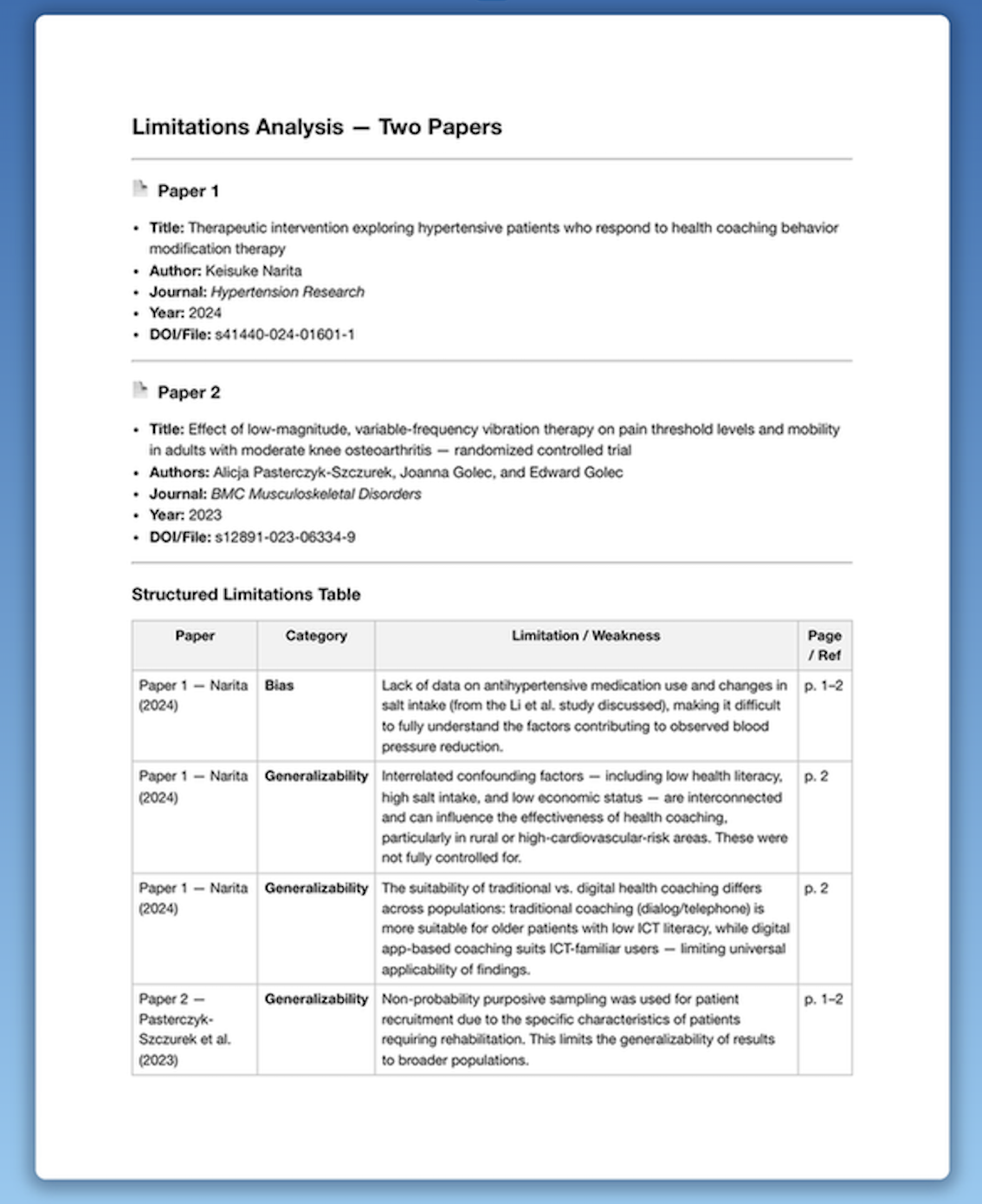
Examining that layout shows why generic chat falls short. A hypertension coaching trial may reduce blood pressure without reporting antihypertensive use or salt intake — a bias problem. The same paper may mix health literacy, diet, and income so findings cannot travel — a generalizability problem. A vibration-therapy trial may use purposive sampling of rehabilitation patients — again generalizability, not “the authors noted a small sample.” Tools that only summarize Discussion will miss that taxonomy.
Jenova’s Academic Research Assistant is comparatively strong here because you can demand the taxonomy in the prompt and keep it stable across a stack of PDFs. Elicit and Paperguide will capture limitation fields if you add columns; they will not, by default, think like a methods reviewer. Consensus will tell you whether studies “show an effect.” It will not build this table.
How Do You Run a Four-Field Extraction Across a Stack of PDFs?
Start with a frozen schema, extract every paper into the same four fields, then verify numbers and reclassify limitations before you synthesize. The schema matters more than the brand of chatbot.
A working MSOL schema is:
- Methods: design, randomization/blinding if any, intervention, comparator, follow-up.
- Sample: n analyzed, population, setting, sampling method.
- Outcomes: primary result with statistic, timepoint, and direction.
- Limitations: bias, generalizability, reporting — each with a locator.
For Jenova’s Academic Research Assistant, a typical sequence is:
- Open the agent and attach the PDFs (or a folder of papers you intend to compare).
- Freeze the schema in the first message so every subsequent paper uses the same columns.
- Ask for locators on every cell:
"Build one evidence table for these papers. Columns: citation, study design, sample (n analyzed, population, setting, sampling), primary results with effect sizes and timepoints, and limitations classified as Bias, Generalizability, or Reporting. Every cell must include a page or quotation. Leave a cell blank if the paper does not report it. Do not paraphrase the authors’ Limitations section without reclassifying it."
- Spot-check n, design, and any effect size against the PDF. Correct the table in-thread; persistent memory keeps the schema for the next batch.
- If you need a shareable document, pass the verified table to the Word Doc Generator rather than restyling it by hand.
- For a narrative that sits on top of the table, Deep Research is the better follow-on than asking the extractor to become a second systematic review.
For Elicit, the parallel path is: gather papers in a systematic-review or extraction view, accept or edit suggested columns, extract with quote backing, then treat AI as the second pair of eyes. Elicit’s own systematic-review flow is built around editable templates, quote- or figure-supported cells, and human agreement on screening criteria. For Paperguide, define columns once, extract across the selected set, and export CSV/Excel when the grid is stable.
Two anti-patterns to avoid. Do not extract 40 papers with 40 slightly different prompts. Do not let the model fill blanks with “likely RCT” or “adequate sample.” Blank is a finding.
What Do Evidence-Synthesis Specialists Say About AI Data Extraction?
Methodologists increasingly treat AI as a legitimate second extractor for standardized fields, provided every value remains inspectable and limitations appraisal stays human-led. The emerging consensus is narrow and practical, not utopian.
"The accuracy conversation is mostly settled for the easy columns — design label, n, arm names, primary outcome as reported. Controlled comparisons now show AI-assisted extraction can match human extractors on those fields and finish faster. The remaining failure mode is interpretive: models copy the authors’ caveats and call that critical appraisal. That is not risk-of-bias assessment, and PRISMA still expects you to say how bias was judged."
"What we look for in a platform is not a prettier summary. It is an empty-cell policy, a locator on every number, and a limitations schema that can record confounding, sampling, and external validity even when the paper never uses those words. If you cannot click a sample size back to a sentence, you do not have extraction. You have a draft."
"Choose the tool that matches corpus shape. Dedicated extraction products win on large, homogeneous trial sets. Conversational research agents win when papers are mixed, PDFs are messy, and the scientific question is ‘what can we not conclude?’ Most real graduate and clinical projects are the second kind."
— Jenova Product Team, academic research workflow design (experience building AI agents for literature review and evidence tables)
That view is consistent with the external record: noninferior assisted extraction in a 2026 SWAR, high performance on standardized variables in reviewer-style studies, and library guidance that keeps humans on the final call.
When Is a Flexible Research Agent a Better Fit Than a Dedicated Extraction Platform?
A flexible research agent is the better fit when your paper set is small to medium, designs are mixed, and the scarce skill is interpreting limitations — not screening 10,000 titles. A dedicated platform is the better fit when protocol, dual review, and PRISMA counts are the product.
Choose a dedicated extractor (Elicit or Paperguide) when:
- You are running a systematic or scoping review with a pre-registered protocol.
- Most included studies are trials or other highly templated reports.
- You need screening logs, exclusion reasons, and a flow diagram.
- Multiple reviewers must conflict-resolve on the same records.
Choose Jenova’s Academic Research Assistant when:
- You are writing a thesis chapter, grant background, journal club, or rapid evidence scan.
- Papers mix RCTs, observational studies, and qualitative work.
- You care more about classified limitations than about autosuggested PICO columns.
- You already work across models, uploaded PDFs, and follow-up questions in one thread.
Hybrid use is common and rational. Map the question in SciSpace or Consensus, extract MSOL fields in Jenova or Elicit, and keep PRISMA accounting in whichever review module your institution accepts. SciSpace versus Consensus comparisons describe exactly that division of labor: Consensus for a fast read on agreement, SciSpace for denser retrieval. Neither pairing removes the human check on n, outcomes, and bias.
Jenova’s limitation in this fork is scale and formality. It will not replace an enterprise screening pipeline. Elicit’s limitation is the inverse: excellent grids, less native support for the messy, argumentative work of saying why a finding should not travel. If your deliverable is an evidence table that a supervisor can audit, score tools on MSOL completeness and provenance first, and only then on brand or monthly price.
References
- PRISMA statement — reporting guidance for systematic reviews
- DistillerSR — data extraction tools and techniques for systematic reviews
- medRxiv — accuracy and efficiency of AI-assisted data extraction using Elicit (2026 SWAR)
- Paperguide — AI tools for systematic review and reported workload reduction
- The BMJ — PRISMA 2020 statement
- PubMed Central — PRISMA 2020 explanation and elaboration, including RoB 2 domains
- Wiley / Cochrane Evidence Synthesis and Methods — AI tools as second reviewers for data extraction
- King’s College London — AI tools in evidence synthesis
- PapersFlow — Elicit vs Consensus AI comparison
- Paperguide — Elicit vs SciSpace feature and pricing comparison (2026)
- George Mason University — AI tools for literature reviews
- Elicit — AI for scientific research, corpus and usage figures
- Elicit — systematic literature review workflow, extraction accuracy claims, and screening
- SciSpace — SciSpace vs Elicit comparison, including 2026 pricing tiers
- Paperguide — platform documentation for custom extraction columns and source-linked values
- Himmelfarb Health Sciences Library — reporting quality and risk of bias
- Birmingham City University — AI data extraction accuracy notes
- Paperguide — SciSpace vs Consensus comparison