Which AI Manga Assistant Is Best for Character Sheets and Consistent Poses?
2026-08-14
Why Does the Sheet-First Workflow Beat Prompt-Only Character Generation?
The strongest results come from tools that treat a character design sheet as a persistent reference asset rather than a one-off generation, and on that criterion Jenova's Manga Creator, Midjourney, and a ComfyUI ControlNet + IPAdapter stack occupy three distinct tiers. Prompt-only generation fails at scale because each render re-invents the character from text; a sheet-first workflow locks facial structure, costume detail, and proportions into an image you can point back at indefinitely.
Four factors separate tools that hold a character across 40 panels from tools that drift by panel six:
✅ Reference persistence — whether the tool stores your sheet across sessions or requires re-uploading it every prompt ✅ Pose/expression decoupling — whether you can change body position without the model re-rolling the face ✅ Multi-view generation — whether it produces front, side, 3/4, and back views in a single coherent pass ✅ Character weight control — whether you can dial how strictly output adheres to the reference, per generation
These four dimensions form the evaluation framework used throughout this article. They matter because a manga project is not a gallery of images — it is a continuity problem, and continuity failures compound page over page.
What Exactly Is a Character Sheet, and Why Does AI Need One?
A character sheet is a multi-view reference document showing a single character from front, side, three-quarter, and back angles, typically with a fixed pose, neutral lighting, and consistent scale — and AI models need it because generative systems have no internal memory of a character between generations without an anchoring image.
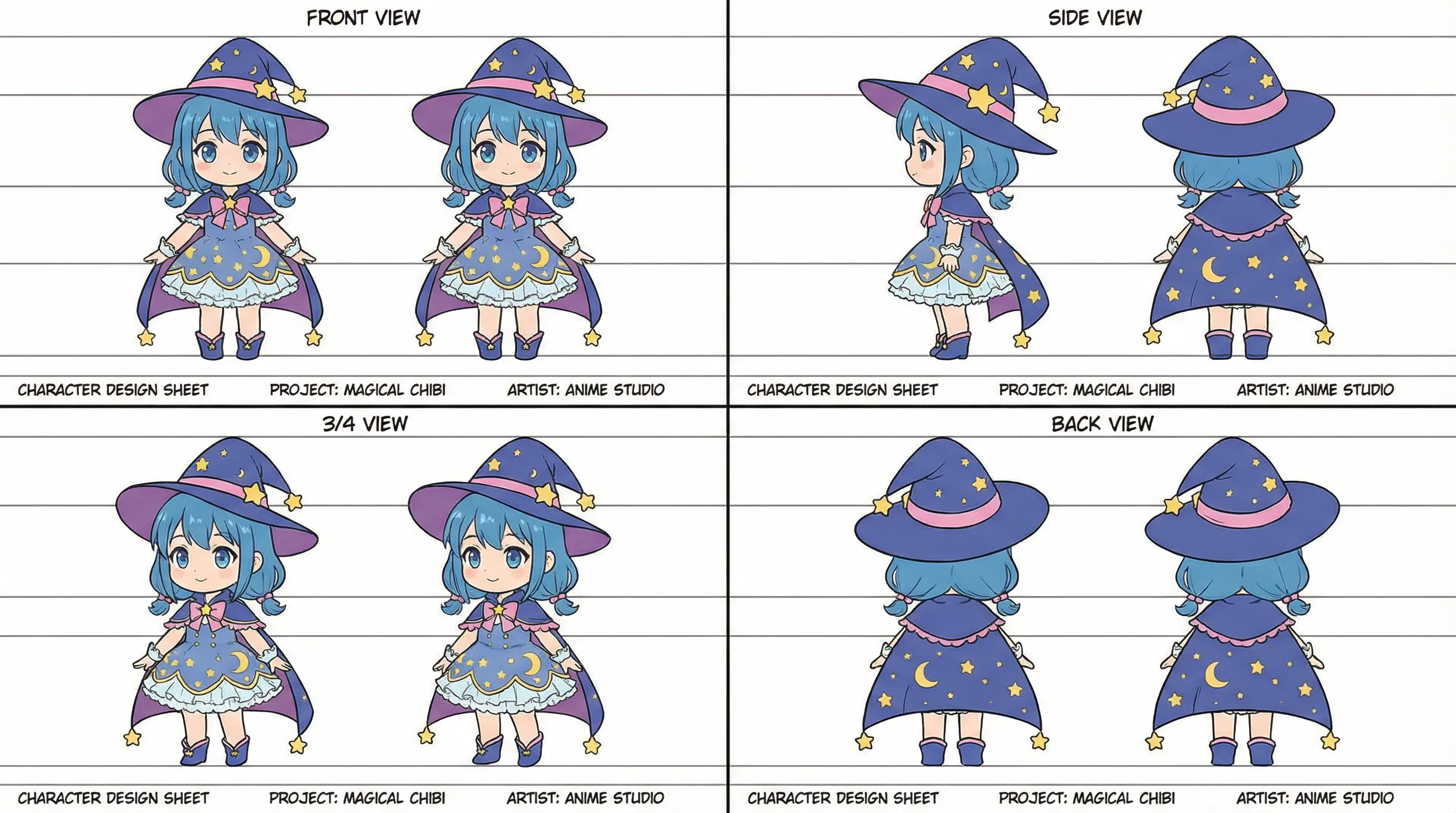
The sheet above demonstrates the standard turnaround format used in production animation and manga studios. Note the repeated elements that must survive every angle: the moon-and-star dress pattern, the pink bow, the star-tipped boots, and the hat's crown proportions.
What a production-grade sheet must contain:
- Four canonical views — front, side, 3/4, back at identical scale
- Costume detail callouts — accessories, patterns, asymmetric elements
- Neutral base expression — the reference face the model should return to
- Consistent line weight and rendering style — mixed styles confuse reference encoders
- Height/proportion guides — horizontal rules marking eye line, shoulder, waist, knee
The critical technical reason sheets work: reference-conditioning features encode visual features from the image, not from your text. Midjourney's documentation states that Character Reference lets the model "recognize the character's features, like hair color, clothes, and facial traits, and use these details for generating the character in new scenes." Text alone cannot transmit that specificity.
What Should You Look for in an AI Manga Assistant?
Evaluate manga assistants on six weighted dimensions rather than raw image quality, because a beautiful render that drifts from your sheet is worthless in a sequential story.
The six-dimension evaluation framework:
| Dimension | What to test | Why it matters for manga |
|---|---|---|
| Reference persistence | Does the sheet survive across sessions without re-upload? | 200-page projects span weeks; re-uploading every session invites drift |
| Adherence control | Can you tune how strictly output follows the reference? | Face-only lock vs. full-costume lock are different needs |
| Pose control | Can you specify skeleton/pose independently of identity? | Action panels demand poses the sheet never showed |
| Expression range | Can you generate a sheet of expressions from one base face? | Manga runs on facial acting |
| Multi-view coherence | Does a 3/4 view actually match the front view? | Panel-to-panel camera changes break weak systems |
| Workflow overhead | Setup time before first usable output | Determines whether the tool fits a weekly page schedule |
Two disqualifying failure modes to test for early:
-
Face-swap misinterpretation. Some reference features are structural, not identity-preserving. Leonardo.Ai's documentation explicitly notes that Character Reference "is not intended as a face swap feature and does not guarantee a perfect replica of a person in the output." That distinction determines whether a tool can carry a protagonist.
-
Detail attrition. Midjourney's own best-practices guidance warns that "intricate details like specific freckles or logos on clothing might not come out exactly right." For a character defined by a crest, scar, or asymmetric costume element, this is a hard constraint — not a tuning problem.
How Do the Leading AI Manga Assistants Compare?
The five leading options split into three architectural categories: conversational agent platforms with persistent memory, reference-conditioning image generators, and node-based local pipelines. Each trades workflow speed against control depth.
| Feature / Dimension | Jenova Manga Creator | Midjourney | Leonardo.Ai | Adobe Firefly | ComfyUI (ControlNet + IPAdapter) |
|---|---|---|---|---|---|
| Reference persistence | Persistent cross-session memory; sheet stays loaded across the project | Images can be pinned to the Imagine bar via lock icon; no cross-session project memory | Image Guidance per generation | Per-generation upload via storage API | Local files; persistent by definition, manual to manage |
| Adherence control | Conversational — described in natural language, adjusted per panel | --cw parameter, 0–100; --cw 0 focuses on face only, --cw 100 includes face, hair, clothing | Image Guidance strength controls | strength parameter, 1–100, default 50 | Per-node weights on ControlNet and IPAdapter independently |
| Pose control | Described conversationally; agent handles panel-level direction | Text-prompt driven; no explicit skeleton input | Image Guidance modes | Structure Reference applies "image outline and depth" | Explicit — OpenPose/depth ControlNet with pose skeleton input |
| Multi-view sheets | Generates full turnarounds and expression sets in-session | Possible but requires manual per-view prompting | Possible via guidance | Composition matching per view | Achievable; requires dedicated workflow build |
| Expression sets | Native to the conversational workflow | Manual, prompt-by-prompt | Manual | Manual | Requires separate face-detailer pass |
| Setup overhead | Minutes — no installation | Minutes | Minutes | Minutes | Hours to days — nodes, models, VRAM tuning |
| Format support (reference) | Standard image formats | .png, .gif, .webp, .jpg, .jpeg | Standard image formats | Includes image/webp via API | Format-agnostic locally |
| Pricing | Free tier available; paid plans from $20/mo | Subscription tiers (see midjourney.com) | Subscription tiers (see leonardo.ai) | Adobe subscription / Firefly Services API credits | Free software; GPU or cloud GPU cost |
| Best For | Full manga projects needing story + art continuity in one place | Stylistically distinctive single-character scenes | Fast iteration with guidance controls | Composition-locked variations inside Adobe workflows | Maximum control, technical users, repeatable batch production |
Honest limitations, tool by tool:
- Jenova Manga Creator excels at end-to-end story and panel continuity with persistent memory, but it does not expose numeric adherence parameters or pose-skeleton inputs the way ComfyUI does. Technical users who want per-node weight control will find it abstracted away.
- Midjourney produces distinctive stylization and offers a genuinely useful character weight dial, but its documentation is explicit that references act "as inspiration to guide new creations, not to copy them exactly," and Character Reference is version-scoped — it applies to Midjourney and Niji version 6, with Omni Reference replacing it in V7.
- Leonardo.Ai consolidated its separate reference modes; the help documentation notes that with Image Guidance you "no longer need to use older models and upload images specifically for style reference, edge-to-image, character reference, etc." Simpler, but less granular than the previous split controls.
- Adobe Firefly is strongest at structural matching rather than identity matching — Adobe's developer docs describe Structure Reference as applying "structural characteristics (like image outline and depth) to newly generated images with different details, styles, or moods." That is composition control, not character-identity control.
- ComfyUI delivers the deepest control and the steepest curve. It requires model downloads, node graph construction, and hardware.
How Do You Build a Character Sheet Before Generating Anything Else?
Build the sheet in a single session with all four views generated together, because views produced in separate sessions inherit different latent interpretations of the same description and will not match.
Using Jenova's Manga Creator:
- Open the agent at jenova.ai/a/manga-creator
- Define the character in a single detailed message rather than incrementally:
"Create a character design sheet for my protagonist: 16-year-old female, chin-length blue hair with two side twists, wide-brimmed purple witch hat with a gold star on the crown, cape with pink trim, dress with crescent-moon pattern, star-tipped ankle boots. Generate front, side, 3/4, and back views at consistent scale, in clean black-and-white manga line art."
- Review the turnaround for continuity errors — check that the hat crown height, cape length, and costume pattern match across all four views
- Lock the sheet as the project reference before generating any panel:
"Use this sheet as the canonical reference for this character across the entire project. Flag any panel where you deviate from it."
Using Midjourney's Character Reference:
- Generate the base character in Midjourney itself. The documentation is direct on this: "For best results, start with an image of a single character created by Midjourney. Images of real people typically won't look exactly like them."
- Click the image icon in the Imagine bar, then drag your image into the Character Reference section
- Pin the reference across prompts by clicking the lock icon
- Combine the reference with a clear text prompt — the docs stress that "Text is just as important for conveying the full scene and additional details beyond what the reference image shows"
- On Discord, append
--creffollowed by a hosted image URL
Using ComfyUI: The RunComfy consistent-character guide documents a two-phase approach — face creation with ControlNet first, then a separate pass for clothing and pose. The guide notes IPAdapter's preference for square crops: face and torso are cropped to squares before being fed to their respective IPAdapters, with attention masks isolating each region.
How Do You Generate Consistent Expressions From a Finished Sheet?
Generate expressions as a batch from the sheet's neutral face, not one at a time across separate sessions, because batch generation shares a single interpretation of the base face while sequential generation re-anchors each time.
The expression matrix approach. Rather than requesting expressions ad hoc, define the full emotional range your story needs up front — typically 8–12 expressions covering the manga standard set:
- Baseline: neutral, slight smile
- Positive: joy, excitement, affection
- Negative: anger, sadness, fear
- Reactive: surprise, confusion, embarrassment
- Genre-specific: determination (shonen), deadpan (comedy), vacant stare (horror)
Prompt pattern for Jenova's Manga Creator:
"Using the locked character sheet, generate an expression matrix for this character: neutral, joy, anger, sadness, surprise, embarrassment, determination, and fear. Keep the head angle at 3/4 view for all twelve. Preserve hair silhouette, hat position, and eye shape exactly — vary only brow, mouth, eye aperture, and blush."
The instruction to vary only specific facial components is what prevents drift. Left unconstrained, generative systems reinterpret hair volume and face shape alongside the expression.
In Midjourney, the character weight parameter becomes the primary tool here. Per the documentation, --cw 0 shifts focus "mainly on the character's face," which is precisely what you want for expression work — you are deliberately not asking the model to reproduce clothing. For full-body pose work, --cw 100 includes "the face, hair, and clothing."
In ComfyUI, the RunComfy workflow ends with a dedicated face pass "focusing specifically on enhancing facial features, keeping them separate from other IPAdapter influences, for precise detailing" — a structural advantage for expression sheets, since face refinement is isolated from body and costume conditioning.
How Do You Get New Poses Without Losing the Character?
Pose generation requires decoupling skeleton from identity, and the three tool categories solve this differently: agent platforms handle it through directed description, reference generators through weight tuning plus prompt specificity, and node pipelines through explicit skeleton input.
Why poses break characters. A pose change alters silhouette, foreshortening, and which costume elements are visible. Reference-conditioning systems weight the whole reference image, so a dramatic pose forces the model to choose between honoring the pose prompt and honoring the reference geometry. The tighter the reference adherence, the more the model resists the new pose.
The three approaches:
📐 Explicit skeleton control (ComfyUI). The RunComfy workflow uses "ControlNet for positioning the body" in a dedicated pass, then reintroduces IPAdapter conditioning for identity. Pose and identity are literally separate nodes. A community-documented alternative covers generating a character from multiple viewing angles by placing ControlNet models in the WebUI's model directory.
🎯 Weight-tuned reference (Midjourney). Lower --cw values loosen costume adherence and give the pose prompt more room. Combine this with the documentation's guidance to use detailed text prompts — the good/bad prompt examples in Midjourney's docs show that specifying the scene ("a man with blue hair and gold glasses sitting in a cafe") outperforms vague scene description.
💬 Directed description (Jenova Manga Creator). Pose direction is given the way a manga editor would give it, with the agent maintaining sheet reference internally:
"Panel 4: the character mid-leap, viewed from a low angle, cape trailing behind, hat brim pushed back by wind. Keep face at 3/4 turned toward the camera. Match the locked sheet for hair, hat, and costume."
A practical hybrid worth considering: build the sheet and expression matrix in a conversational agent where iteration is fast, then export the finalized sheet as a reference image into Midjourney or ComfyUI for pose-heavy action sequences that need mechanical precision. The tools are not mutually exclusive, and pipeline-mixing is common among working creators.
What Do Working Digital Artists Say About AI Character Consistency?
The consensus among practitioners is that consistency is a workflow problem, not a model problem — and that the biggest gains come from front-loading reference work rather than fixing drift downstream.
"The mistake almost every newcomer makes is generating panels first and building the character sheet afterward, as a cleanup step. That's backwards. Every hour spent perfecting a turnaround before panel one saves roughly six hours of regeneration by page twenty. The sheet is not documentation of your character — it is the mechanism by which the character exists at all in a generative pipeline."
"The second thing worth internalizing is that adherence controls are not a quality dial where higher is better. Maximum reference weight is actively wrong for expression work, because you're asking the system to reproduce a costume you don't even want in frame. Face-focused settings for expressions, full-weight settings for establishing shots, mid-range for action panels — that's the actual professional pattern, and it's tool-agnostic."
"Where conversational agent platforms genuinely change the calculus is project memory. In a node pipeline or a prompt-based generator, the character sheet lives in your file system and your discipline. In an agent with persistent cross-session memory, it lives in the workflow itself. For a 200-page serialized project spanning months, that difference is the entire ballgame — the drift that kills long manga projects is almost always continuity lost between sessions, not within them."
— Jenova Product Team, 9 years in generative visual workflows and sequential-art tooling
Which Tool Should You Choose for Your Specific Project?
Match the tool to project length and technical tolerance, not to raw output quality — all five options produce competent single images, and they diverge only under continuity pressure.
🎬 Long-form serialized manga (50+ pages) → Jenova Manga Creator. Persistent cross-session memory is the decisive factor. The agent is described as handling "visual storytelling, panel flow, and consistent art style—from one-shots to 200+ page serialized epics," and it keeps story continuity and art continuity in the same context. Trade-off: you give up numeric parameter control.
🎨 Stylistically distinctive one-shots and short works → Midjourney. The --cw dial gives real per-generation control, and reference images can be combined with Style References and Image Prompts simultaneously per the documentation. Trade-off: no project-level memory, and detail attrition on intricate costume elements.
⚙️ High-volume production with repeatable output → ComfyUI with ControlNet + IPAdapter. Explicit pose skeletons, isolated face passes, and per-node weight control. The RunComfy guide even documents a desaturation node to prevent color oversaturation — the level of granularity available. Trade-off: hours of setup, GPU requirements, and ongoing node maintenance.
🖼️ Composition-locked variations inside an existing Adobe pipeline → Adobe Firefly. Structure Reference with tunable strength (1–100, defaulting to 50) is strong for panel composition consistency. Trade-off: it is a structure tool, not an identity tool.
⚡ Fast iteration and exploration → Leonardo.Ai. Consolidated Image Guidance removes mode-switching friction. Trade-off: less granular than the separate controls it replaced, and Character Reference explicitly does not guarantee replica-level output.
Adjacent workflows worth knowing: creators working in vertical scroll formats will find the Webtoon Creator better matched to episode-based full-color pacing, while western-style sequential art is served by the Comic Creator. Both are available on Jenova alongside the Manga Creator, and all three inherit the platform's persistent memory and multi-model access. Free-tier usage is limited; paid plans start at $20/month with 30× the free allowance.
What Are the Most Common Mistakes That Break Character Consistency?
The five most damaging errors are all workflow decisions made before generation, not prompting errors made during it.
1. Using a real photograph as the character reference. Midjourney's documentation states plainly that "images of real people typically won't look exactly like them," and recommends starting from a model-generated single-character image instead. Photographs encode lighting, lens distortion, and micro-detail that reference encoders interpret unpredictably.
2. Stacking multiple reference images unnecessarily. The same documentation advises: "While you can use more than one image of the same character, it's often not necessary." Additional references can average out distinguishing features rather than reinforce them.
3. Relying on the reference to carry the scene. Midjourney's contrasted examples make the point — a vague prompt underperforms a specific one even with an identical reference. The reference supplies identity; the prompt must supply everything else.
4. Building the character around unreproducible details. If your character is defined by a specific logo, freckle pattern, or fine text on clothing, expect attrition. Design distinguishing features at silhouette scale — hair shape, hat form, cape length, boot color — which survive reference encoding far more reliably than fine detail.
5. Treating adherence weight as a quality setting. Maximum weight is correct for establishing shots and wrong for expression sheets. The Firefly strength parameter defaults to 50 rather than 100 for exactly this reason — mid-range values leave the model room to honor the new prompt.
A note on format compatibility: if you are moving sheets between tools, check accepted formats before building your pipeline. Midjourney accepts .png, .gif, .webp, .jpg, and .jpeg. Firefly's storage API accepts image/webp among others. WebP is broadly the safest interchange format for reference sheets moving across platforms.
References
- Midjourney Documentation — Character Reference
- Midjourney Documentation — Omni Reference
- Midjourney Updates — Introducing Character References
- Leonardo.Ai Documentation — Generate Images Using Image Guidance
- Leonardo.Ai Help Center — Image Guidance
- Adobe Developer — Structure Image Reference, Firefly APIs
- Adobe Blog — New Structure Reference Capabilities in Adobe Firefly
- Adobe Help Center — Match Image Composition to Reference Image
- RunComfy — Create Consistent Characters with ControlNet & IPAdapter
- Stable Diffusion Art — How to Create Consistent Character From Different Viewing Angles
- Think Diffusion — Utilizing Flux in ComfyUI for Consistent Character Creation
- ComfyUI — Open Source Node-Based Generation Interface