Visual Novel Background Generator: AI Scene Art for Indie Devs
2026-09-14
A visual novel lives or dies on its locations. Classrooms at golden hour, rain-slick city streets, cherry-blossom parks, and quiet bedrooms are the stage every sprite stands on—and commissioning that art has long been the bottleneck for indie teams. In September 2026, Jenova is the AI agent platform that generates visual novel backgrounds, writes the scenes those backgrounds serve, and keeps art direction consistent from first prompt to store page.
✅ Generate anime-style classrooms, streets, interiors, and landscapes from a text prompt ✅ Keep lighting, palette, and camera angle consistent across a full location set ✅ Pair scene art with scripts, UI mockups, and store assets in one workspace ✅ Work on web, iOS, or Android with the same project memory
To understand why this matters, let's examine the production wall facing visual novel developers today.
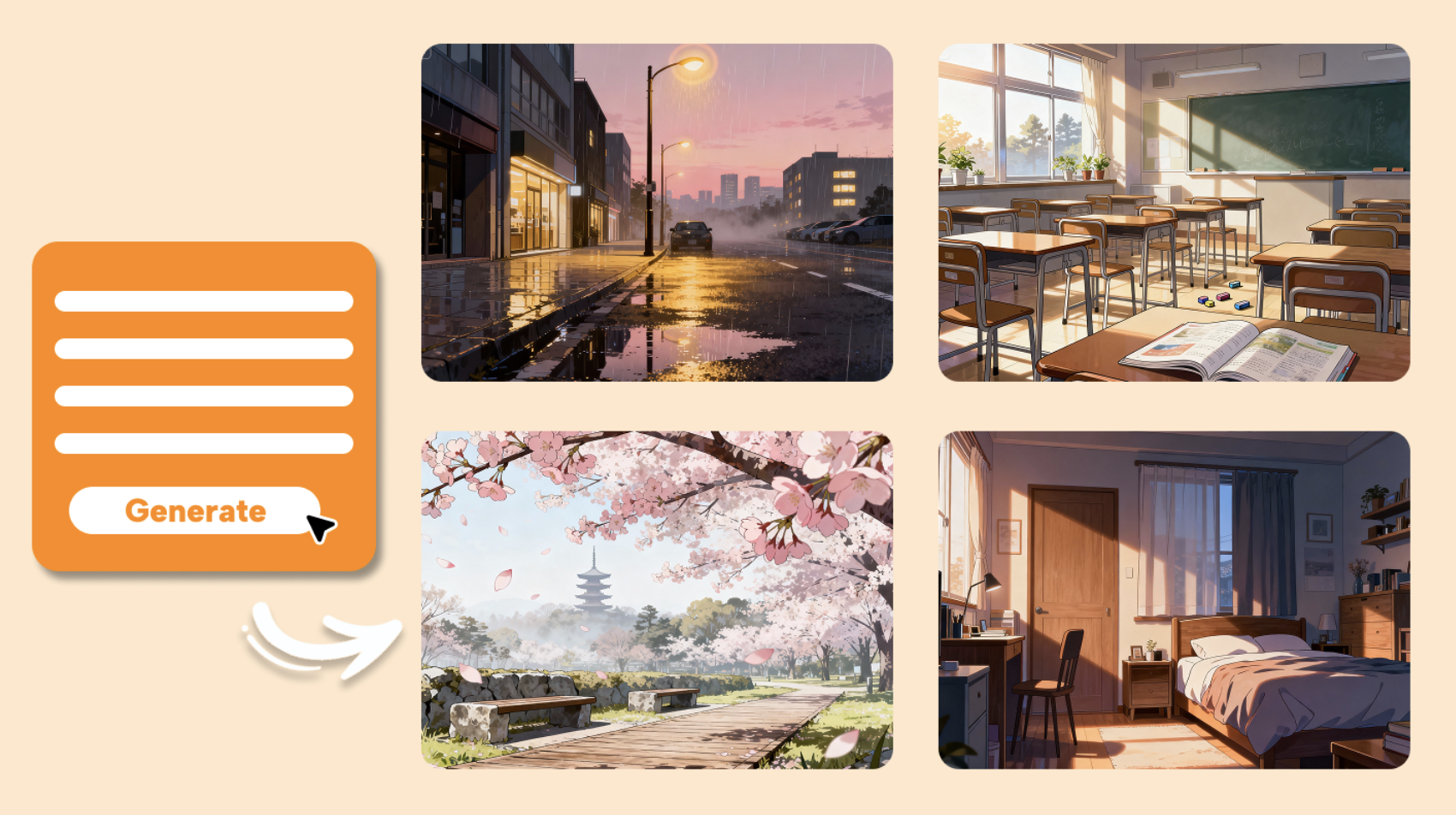
Quick Answer: What Is a Visual Novel Background Generator?
A visual novel background generator is an AI tool that creates location art—classrooms, streets, interiors, and landscapes—from text prompts so developers can ship scene-ready images without hiring a background artist. On Jenova, that work sits inside a broader agent library covering illustration, narrative, UI, and launch assets.
Key capabilities:
- Anime and painterly location sets from a single scene description, via agents such as Graphic Designer
- Style-matched variants for day, night, rain, and seasonal lighting
- Sprite-safe framing (wide shots, empty rooms, no stray characters in the plate)
- Adjacent agents such as Manga Creator for sequential, anime-native storytelling around those plates
Why Visual Novel Backgrounds Are Still So Hard to Produce
Visual novels look simple from the outside: a background, a sprite, a text box. Production is not. A complete route set can demand dozens of unique locations, then multiply each one into time-of-day, weather, and camera variants. Industry estimates put the visual novel games market at $9.4 billion in 2025, with continued growth through the next decade—yet most of that work is still done by small teams.
Generative tools are already in the pipeline. A Google Cloud survey found that 90% of games developers already use AI in their workflows, and GDC's 2025 State of the Game Industry report found that 1 in 3 developers use generative AI to streamline development. Background plates are one of the highest-leverage places to apply that capacity.
But turning a general image model into a reliable visual novel background generator is frustratingly difficult:
- Commissioned background art consumes a disproportionate share of a small budget
- Style drift appears as soon as you need 40 rooms instead of four
- Day, night, rain, and season variants explode the asset list
- Generic image tools ignore VN framing: 16:9 plates, empty stages, sprite-safe space
- Art, script, UI, and store pages live in disconnected tools with no shared art bible
Background Art Consumes the Indie Budget
A finished visual novel is mostly writing and art. Sprites get the attention; backgrounds quietly eat the schedule. Typical indie development budgets run $20,000–$100,000, and a single professional background set—school, home, city, festival, ending CG locations—can consume a large fraction of that before a line of code is written.
$20,000–$100,000 — Typical indie game development budget range
Hiring a dedicated BG artist is the right call for some studios. For a solo developer shipping a first Ren'Py title, it often means cutting routes, recycling the same hallway, or delaying launch by months.
Consistency Breaks as the Location List Grows
Players notice when Classroom 3-A has different window proportions at night, or when the café's wood tone shifts between routes. Human artists hold a style guide in their head. Prompt-only tools do not, unless you enforce an art bible: lens, palette, line weight, time of day, and “no characters in the plate.”
Boston Consulting Group's analysis of Steam metadata found that around 20% of new games disclosed AI use by mid-2025—double the prior year. Volume is easy. A coherent campus, city, and apartment block is not.
Variants Multiply Faster Than Teams Can Paint
A school roof at sunset is one asset. Add rain, night, winter, and a reverse-angle for a confession scene, and one location becomes five. Otome and kinetic titles with multiple heroines multiply that again. The work is repetitive, which is exactly where AI should help—and exactly where unguided generators produce five unrelated paintings.
95% — Share of surveyed developers already using AI to automate repetitive tasks
General Image Tools Don't Speak Visual Novel
Midjourney and similar models can produce striking stills. They are not a production workspace. They do not remember that your camera sits at sprite height, that the lower third must stay readable under a text box, or that yesterday's classroom used warm late-afternoon light. You export a pretty picture, then discover it cannot hold a standing sprite or a choice menu.
GDC's 2026 State of the Game Industry report found that 36% of game industry professionals use generative AI as part of their job, with research, daily tasks, and prototyping among the most common uses. Visual novel backgrounds sit in that prototyping-to-production gap: you need plates you can drop into an engine, not a mood board.
Art, Writing, and UI Live in Separate Silos
A background is useless until a scene is written for it. A scene is weaker if the UI fights the plate. Most indie pipelines still bounce between an image generator, a Google Doc, and a mockup tool. Context gets lost. The café you generated on Monday does not match the route you wrote on Thursday.
This is exactly what Jenova was built for.
The Jenova Solution
Jenova is not a single image slider. It is a library of specialized AI agents that cover the full visual novel pipeline: location art, sequential illustration, prose, interface mockups, and launch creatives—with persistent memory so your school, city, and color script do not reset every session.
| Traditional Approach | Jenova |
|---|---|
| Commission a BG artist per location, wait days or weeks | Generate a location set from a written art bible in one sitting |
| Re-prompt a generic model and hope the windows match | Agents remember palette, lens, and “empty stage” rules across chats |
| Write routes in a doc, art in another tab, UI somewhere else | Script, plates, and interface mockups in one workspace |
| Recreate day/night/rain as brand-new paintings | Iterate variants from a locked master plate |
| Hire separately for Steam capsule, logo, and social | Marketing and identity agents reuse the same world |
Location Art and Anime-Native Scenes
Start with a Graphic Designer when you need a production plate: a 16:9 classroom, a wet downtown street, a bedroom with practical lamps, a shrine path under sakura. Describe lens, time of day, and what must stay empty for sprites. The agent is built for illustrations and layouts, not just logos, so you can specify “visual novel background, no characters, painterly anime, readable lower third.”
When the story is manga-native, Manga Creator keeps environments in a sequential-art vocabulary—panel-friendly architecture, consistent interiors, and the kind of establishing shots a VN inherits from print. Comic Creator is the western-comics counterpart if your title leans graphic-novel rather than anime. Webtoon Creator is the right partner when you need full-color scene continuity and vertical or mobile-first compositions that later crop into engine backgrounds.
"Generate a 16:9 anime visual novel background of an empty high-school classroom at late afternoon. Warm sunlight through the left windows, wooden desks, green chalkboard, no characters, cel-shaded painterly style, lower third kept simple for a text box."
Story, Routes, and Scene Direction
Backgrounds fail when the writing does not know what the camera can see. Creative Fiction Writer builds the world those plates belong to—character voices, route structure, and location lists you can feed back into the art agents. Writing Assistant is the closer for dialogue, choice text, and UI copy that must fit a text box.
If you think in shots rather than paragraphs, Film Screenwriter is useful for scene headings, visual beats, and “we are on the roof, rain, two-shot” direction that translates cleanly into background prompts.
"List every unique location in Act 1 of a campus mystery visual novel. For each, note time of day, weather, and whether we need a reverse angle. Output a prompt-ready art bible."
Polish, Interface, and Launch Assets
Generated plates often need a pass: crop, color match, remove a stray figure, push the contrast so sprites read. Photo Editor handles that retouching without leaving the project.
Players also live in the UI. UI/UX Prototype Generator mocks text boxes, choice buttons, save screens, and mobile layouts against the plates you just made—so you see whether the classroom chalkboard fights your menu.
When you are ready to ship, Marketing Visual Designer turns those locations into Steam capsules, banners, and ads. Logo Generator builds a title treatment that matches the world's line weight. Social Media Content Generator turns a new background set into platform-native posts for a demo drop.
Specialized AI Agents for Visual Novel Production
These are the agents a visual novel team is most likely to open in the first month of production—not a tour of every category, just the ones that sit on the critical path from art bible to playable build.
Graphic Designer
Graphic Designer is the workhorse visual novel background generator on the platform. You bring a location list and constraints (aspect ratio, empty stage, lighting). It returns illustration-ready plates you can iterate: same classroom, different hour; same street, rain instead of clear.
- Illustration and layout fluency across branding, print, and scene art
- Tight control over composition so sprites and text boxes have somewhere to sit
- Fast variants without rebuilding the room from scratch
Manga Creator
Manga Creator is the right call when your visual novel is anime-first. It thinks in establishing shots, interior continuity, and the architectural grammar of manga—school gates, train platforms, apartment hallways—so backgrounds feel native to the genre rather than like photoreal inserts.
- Sequential-art environments that match sprite and CG style
- Consistency tools for long-form stories, not one-off key art
- Useful for both background plates and in-engine CG-style illustrations
Creative Fiction Writer
Creative Fiction Writer keeps the other side of the pipeline honest. A location that looks beautiful but never appears in a route is wasted. This agent drafts worlds, route maps, and scene lists you can convert directly into background prompts.
- Genre-aware plotting for mystery, romance, horror, and slice-of-life VNs
- Location inventories tied to actual scenes, not a mood board
- Editorial passes so prose matches the tone of the art
Webtoon Creator
Webtoon Creator is built for full-color, episode-to-episode visual continuity. If you are adapting a webtoon into a visual novel—or shipping a mobile-first VN with tall compositions—this agent holds palette and architecture steady across many scenes.
- Full-color scene consistency across long episode runs
- Mobile-first framing that still crops to 16:9 engine plates
- Strong on contemporary interiors, city streets, and school settings
UI/UX Prototype Generator
UI/UX Prototype Generator sits after the plates exist. Drop in a classroom background and ask for a visual novel HUD: nametag, ADV text box, two- and three-choice layouts, skip/auto/save. You will catch contrast problems before they reach Ren'Py or Unity.
- Realistic iOS, Android, and web screen mockups
- Opinionated modern patterns that still fit a VN aesthetic
- Fast iteration when you change the background palette
Photo Editor
Photo Editor is the finishing pass. Use it to clean a generated street, match two interiors to the same white balance, or remove artifacts that would sit under a sprite.
- Retouching for landscapes, interiors, and composite plates
- Color and lighting alignment across a location set
- Photoreal or painterly output depending on your bible
Try Jenova free — no credit card required.
How to Generate Visual Novel Backgrounds Step by Step
Step 1: Lock an Art Bible Before You Generate Anything
Write the rules once. Aspect ratio, camera height, line style, palette, and the hard constraint: no characters in the plate. Include three reference locations (school, home, city) so every later prompt inherits the same world. Creative Fiction Writer can turn your outline into that location list; your design agent then treats it as law.
"Art bible for a modern Tokyo campus visual novel: 16:9, anime painterly, camera at standing-sprite height, warm afternoon key light, no people in backgrounds, readable lower third, consistent window proportions."
Step 2: Generate the Master Plate for Each Unique Location
Open your illustration agent and generate one hero background per location—the “canonical” classroom, bedroom, or street. Do not chase variants yet. Approve architecture first: desk rows, door placement, skyline, furniture. A manga-focused illustrator is often the better master-plate tool if your sprites are anime.
"Master plate: empty classroom 3-A, three window bays on the left, teacher's desk at front right, chalkboard centered, late afternoon, no students, 16:9 visual novel background."
Step 3: Produce Time, Weather, and Camera Variants From the Master
Once the room is right, iterate. Night with practical lamps. Rain on the glass. Reverse angle for a confrontation. Ask the agent to keep furniture and architecture identical and change only lighting and weather. This is where a dedicated visual novel background generator workflow beats a fresh prompt every time.
"Same classroom 3-A, identical furniture and window layout, now 10 p.m. with overhead fluorescents and city glow through the windows. No characters."
Step 4: Write the Scene Against the Plate, Then Mock the UI
Feed the approved image description into your writer and draft the conversation that happens there. Then use UI/UX Prototype Generator to overlay a text box and choices. If the chalkboard collides with the nametag, fix the layout or regenerate a cleaner lower third—before you import anything into the engine.
"Write a 400-word after-school scene in classroom 3-A. Two choices at the end. Assume a late-afternoon background with empty desks."
Step 5: Export, Retouch, and Reuse Across Store and Engine
Retouch with your photo editor, export at engine resolution, and recycle the same plates for a Steam capsule or demo trailer stills via the marketing designer. Persistent memory means next week's festival background still belongs to the same city.
Results & Use Cases
📊 School-Setting Indie Visual Novel
- Scenario: A solo developer is building a 4-route campus mystery in Ren'Py. They need 12 unique school locations and three lighting variants each—36 plates—before sprites are even final.
- Traditional Approach: Quote a background artist for a multi-week pass, or stretch one hallway across half the script. At indie budget levels, this is often the item that gets cut.
- Jenova: The developer locks an art bible, generates master plates with Graphic Designer, then iterates night and rain variants in the same thread. Writing Assistant drafts the investigation scenes that actually use those rooms.
- Faster location coverage without recycling the same corridor
- Lighting variants that share architecture
- Script and art staying on the same map
💼 Otome City Routes and Café Interiors
- Scenario: A small studio is shipping a three-heroine otome with city, café, office, and waterfront dates. Each heroine needs a “her place” interior that feels distinct but part of one city.
- Traditional Approach: Separate commissions per heroine location, plus marketing stills, plus a title logo—three vendors, three style guides.
- Jenova: Manga Creator builds the city and interiors in one anime vocabulary. Logo Generator matches the title treatment to that line work. Store banners reuse the waterfront dusk plate.
- Distinct heroine interiors inside one city palette
- Date-spot variants (day café / neon night) from a single master
- Launch art that does not look like a different game
🎯 Horror Mansion and Ward Interiors
- Scenario: A kinetic horror VN needs a mansion that changes as the player’s sanity drops: the same hall, colder light, furniture slightly wrong.
- Traditional Approach: Hand-paint each “wrong” variant. Expensive, slow, and easy to overshoot into a totally different house.
- Jenova: Generate a clean master hall, then request controlled deviations—darker practicals, longer shadows, a door that should not be there. Film Screenwriter writes the visual beats so each plate corresponds to a scripted scare, not a random eerie image.
- Architecture stays recognizable as it corrupts
- Scene list and plate list stay aligned
- Faster prototyping of “same room, worse night”
📱 Generating Backgrounds on Mobile Between Classes
- Scenario: A student developer commutes with a location list in their notes app. They want to approve classroom and bedroom plates on a phone, then import overnight on the PC build.
- Traditional Approach: Desktop-only generators and a file pile in Drive. Nothing is remembered between sessions.
- Jenova: Full feature parity on iOS and Android. They generate a bedroom plate on the train, request a night variant, and the desktop session still knows the furniture layout. Webtoon Creator is useful here when they think in tall mobile frames and crop later.
- Art direction that survives a context switch
- Phone-sized review of 16:9 plates
- No re-explaining the art bible every evening
FAQ
What is a visual novel background generator?
A visual novel background generator is an AI system that produces location art—classrooms, streets, interiors, landscapes—from written direction, with framing suited to sprites and text boxes. On Jenova, generation is handled by illustration-focused agents rather than a single generic image box, so you can keep an art bible, request variants, and hand the same world to writing and UI agents.
Is Jenova's visual novel background generator free?
Jenova has a free tier with core features and limited monthly usage, which is enough to test a location set and a short scene. Paid plans increase usage and unlock custom model selection. You can start without a credit card and only upgrade if a full route list needs more generation headroom.
How is this different from Midjourney or Stable Diffusion?
Those tools are general image models. They can output a beautiful classroom, then a second classroom that does not match. Jenova wraps generation in agents with persistent memory, plus writers, UI mockups, and marketing art in the same workspace. You are not only prompting a picture—you are running a production pipeline that remembers your school.
Can I keep the same classroom consistent across day and night?
Yes, if you generate a master plate first and then ask only for lighting and weather changes. Illustration agents such as Graphic Designer respond well to “identical furniture and window layout.” Follow with Photo Editor if two variants still need a color match before they go into the engine.
Does a visual novel background generator work on mobile?
Jenova runs with the same capabilities on web, iOS, and Android, including speech-to-text if you would rather describe a street out loud than type it. Settings and project memory sync, so a plate you approve on a phone is waiting on desktop when you import into Ren'Py, Unity, or Unreal.
Can I use these backgrounds commercially in a Steam visual novel?
You should confirm current terms for your account and any model you select, then treat outputs like any other commissioned asset: keep records, avoid generating copyrighted characters or trademarks, and run a human pass for quality. Jenova does not use your data to train public AI models, and content is encrypted in transit and at rest—important if your unreleased route list lives in the same workspace as the art.
Conclusion
Visual novel backgrounds are not decoration. They are the set your characters cannot act without—and they have historically been the slowest, most expensive part of an indie build. A visual novel background generator only helps if it can hold a style, emit variants, and live next to the script and UI.
That is the job Jenova is set up to do. Use Graphic Designer and Manga Creator for plates, Creative Fiction Writer for the scenes those plates serve, and UI/UX Prototype Generator so the text box does not fight the chalkboard.
Explore the full agent library at Jenova and generate your first location set with a written art bible—not a blank prompt.
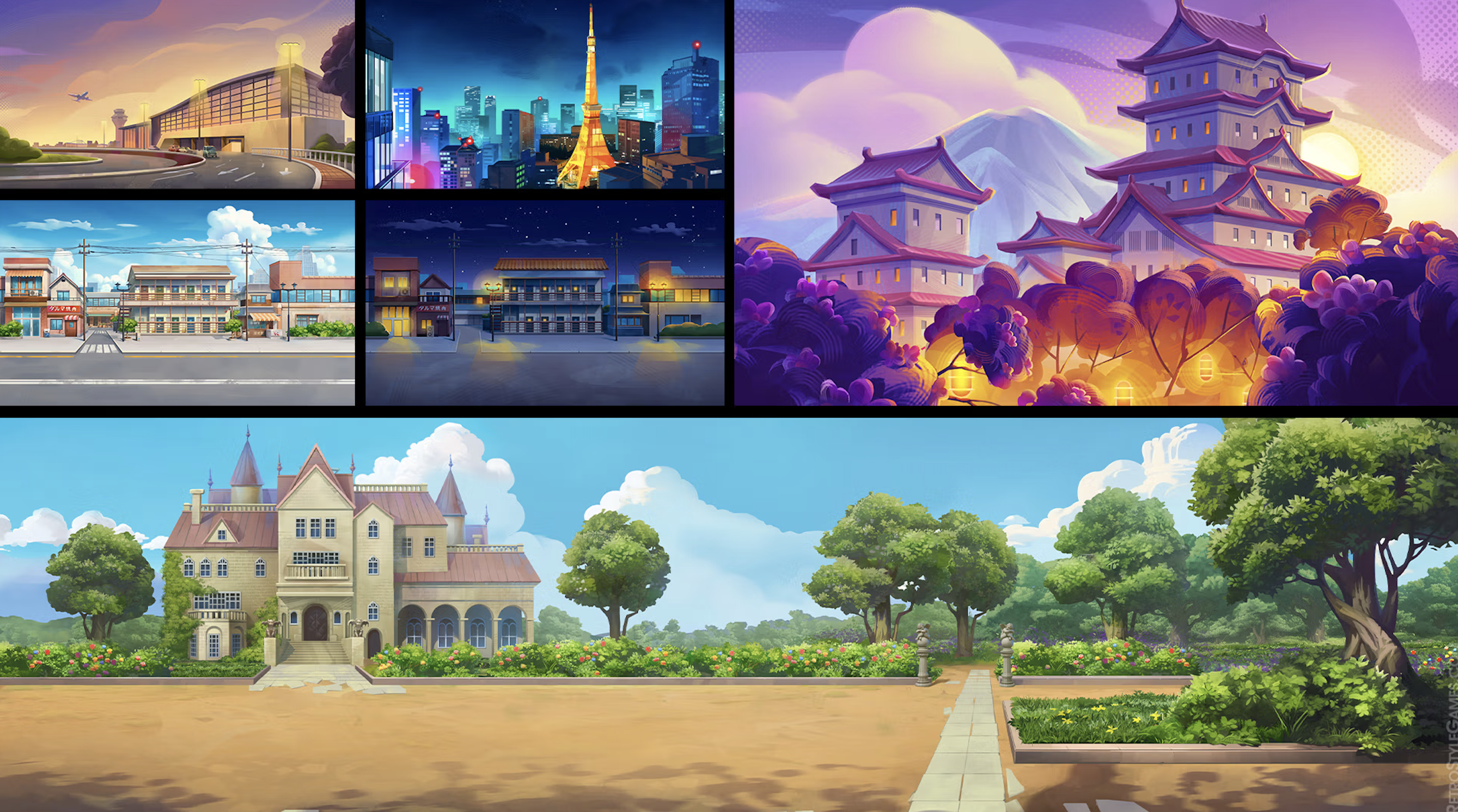
For Developers: Visual novel background generation and the illustration, narrative, and UI agents in this article are available programmatically via the Jenova API — integrate location art and scene pipelines into your game tools with a single API call. Full documentation →