AI Model Context Protocol: Mobile Integration Guide
2025-07-29
Model Context Protocol (MCP) enables AI assistants to interact with your mobile apps through a standardized framework, transforming how you automate tasks on iOS and Android. While desktop implementations have gained traction, mobile integration represents the protocol's most practical application—bringing AI-powered automation directly to the devices we use most.
This guide examines how MCP functions on mobile platforms and how you can leverage it for seamless app integration.
Quick Answer: What Is Model Context Protocol (MCP)?
Model Context Protocol (MCP) is an open standard that enables AI assistants to securely connect with and control your applications through a unified interface. Developed by Anthropic, MCP creates a "universal adapter" allowing AI models to access tools across different platforms without custom integrations for each service.
Key capabilities:
- Standardized communication between AI models and applications
- Secure, permission-based access to app functionalities
- Multi-app workflows executed through natural language commands
- Cross-platform compatibility for iOS and Android devices
The Mobile App Integration Challenge
Smartphone users face persistent friction when coordinating tasks across multiple applications. Consider these common scenarios:
Coordination overhead:
- Manual app switching – Average users switch between apps 25 times per hour, fragmenting workflows
- Repetitive data entry – Information must be manually copied between calendar, messaging, and productivity apps
- Context loss – Switching apps interrupts focus, with studies showing 23 minutes average recovery time after interruptions
- Limited automation – Native shortcuts and automation tools require technical setup and maintenance
Why Traditional Voice Assistants Fall Short
Existing mobile AI assistants handle simple queries effectively but struggle with complex, multi-step tasks:
70% of voice assistant users report frustration with limited functionality beyond basic commands Source: Voicebot.ai Consumer Adoption Report
Current limitations include:
Siloed functionality – Each assistant works only with its ecosystem (Siri with Apple apps, Google Assistant with Google services)
No cross-app coordination – Assistants cannot execute workflows spanning multiple third-party applications
Rigid command structures – Users must learn specific phrases rather than using natural language
Limited context awareness – Assistants lack understanding of relationships between different apps and data sources
The Data Accessibility Problem
Your smartphone contains valuable information across dozens of apps, but this data remains locked in silos:
Average smartphone user has 80+ apps installed but actively uses only 9 daily Source: Statista Mobile App Usage Statistics
This fragmentation creates inefficiency:
- Calendar events exist separately from travel bookings
- Project management tasks disconnect from communication threads
- Financial data in banking apps doesn't sync with budgeting tools
- Health metrics remain isolated from fitness planning apps
Without a unified protocol, each integration requires custom development, making comprehensive mobile automation impractical for most users.
How Model Context Protocol Solves Mobile Integration
Model Context Protocol addresses these challenges by establishing a standardized framework for AI-app communication. Rather than building custom integrations for each service, MCP creates a universal interface.
Traditional Approach vs. MCP
| Traditional Mobile AI | Model Context Protocol |
|---|---|
| Limited to native ecosystem apps | Works across any MCP-compatible application |
| Requires app-specific voice commands | Understands natural language requests |
| Single-step actions only | Executes multi-step workflows automatically |
| Manual permission management | Centralized, granular access control |
| Fragmented user experience | Unified AI assistant interface |
Core MCP Capabilities on Mobile
Standardized Tool Discovery
MCP-enabled apps expose their capabilities through a consistent format. When you connect an app to your AI assistant, the assistant automatically understands what actions are possible—whether checking calendar availability, creating documents, or sending messages.
Secure Permission Framework
MCP implements OAuth-style authentication, allowing you to grant specific permissions to your AI assistant:
- Read-only access to certain data sources
- Write permissions for creating or modifying content
- Time-limited access that expires automatically
- Granular control over which tools the AI can use
Context Preservation Across Apps
Unlike traditional assistants that treat each command independently, MCP maintains context throughout multi-step workflows. The AI remembers information from your calendar when booking a restaurant, then references both when sending invitations.
Multi-Model Flexibility
MCP's open standard works with various AI models—Claude, GPT, Gemini—allowing applications to leverage the best model for each task without rebuilding integrations.
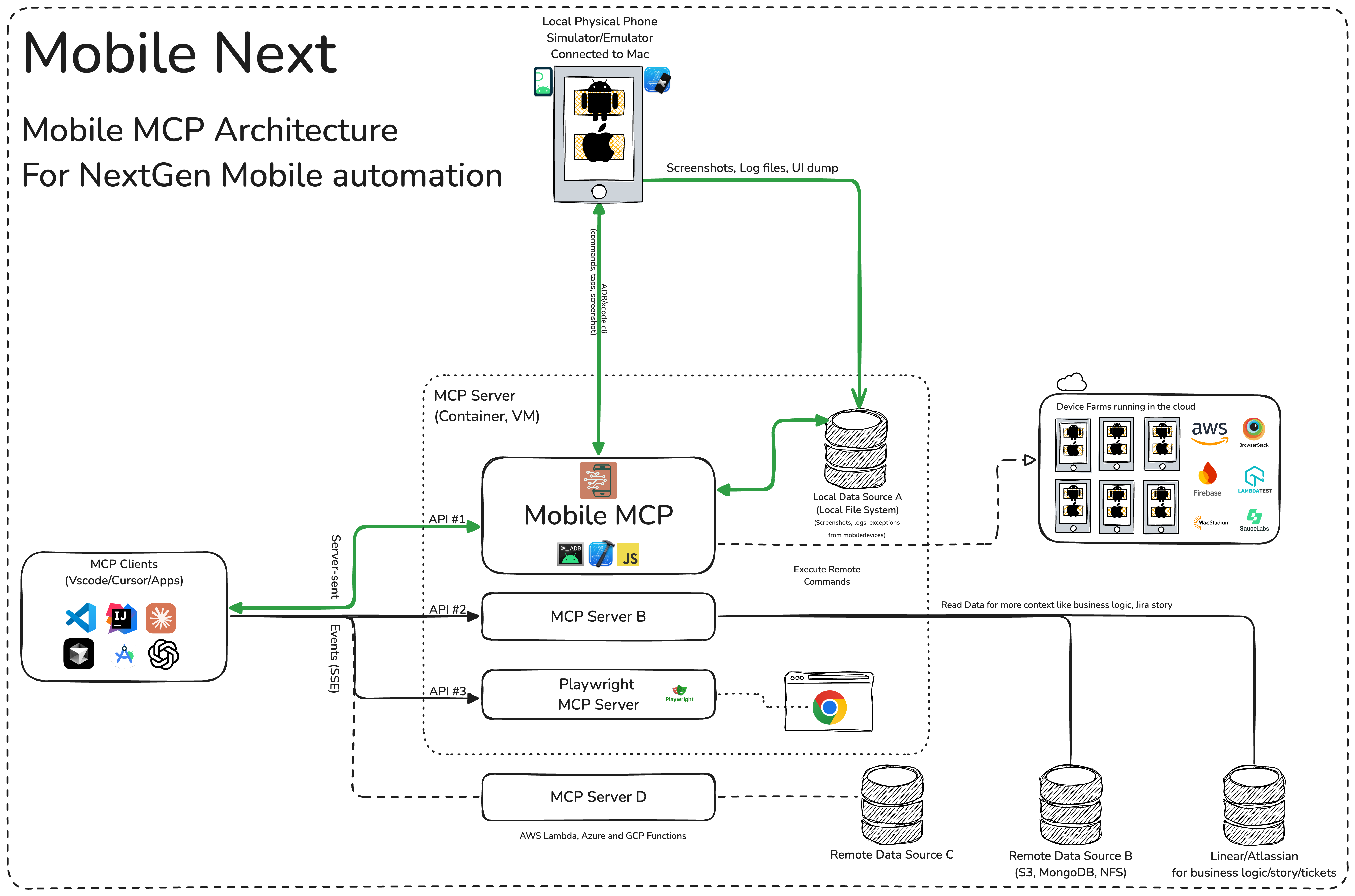
How MCP Works on iOS and Android: Step-by-Step
Using Model Context Protocol on your mobile device requires no technical expertise. The process centers on choosing an MCP-enabled AI assistant app that handles the underlying protocol complexity.
Step 1: Install an MCP-Compatible AI Assistant
Download an AI assistant application built with MCP support from the App Store (iOS) or Google Play Store (Android). These apps serve as your central interface for interacting with all connected services.
Example: Install Jenova, which provides native MCP support for both iOS and Android with an intuitive setup process.
Step 2: Connect Your Applications
Within the AI assistant app, navigate to the integrations or connections section. You'll see a list of available MCP-compatible services:
- Productivity tools (Google Calendar, Notion, Todoist)
- Communication platforms (Slack, Gmail, Messages)
- Cloud storage (Google Drive, Dropbox, iCloud)
- Specialized services (Spotify, OpenTable, airline apps)
For each service you want to connect:
- Tap the service name
- Authenticate using your existing account credentials
- Review and approve the specific permissions requested
- Confirm the connection
This one-time setup mirrors how you'd authorize any app to access your Google or Apple account.
Step 3: Define Your Workflow Preferences
Some MCP assistants allow you to set preferences for how they handle common tasks:
- Default calendar for new events
- Preferred communication channels for different contact groups
- Standard document templates or storage locations
- Notification preferences for automated actions
These preferences help the AI make intelligent decisions without requiring constant clarification.
Step 4: Issue Natural Language Commands
With your apps connected, you can now make requests that span multiple services. The AI assistant uses MCP to coordinate actions across your connected tools.
Example command: "Find my flight confirmation for the London trip, check me in, and add the boarding pass to my wallet."
The assistant will:
- Search your email for flight confirmation details
- Use the airline's MCP tool to complete online check-in
- Retrieve the boarding pass
- Add it to Apple Wallet (iOS) or Google Wallet (Android)
Step 5: Review and Refine Automated Actions
After the tool executes your request, review the results. Most MCP assistants provide:
- Confirmation of completed actions
- Summary of changes made across apps
- Option to undo or modify automated actions
- Suggestions for improving future workflows
Over time, the AI learns your preferences and requires less guidance for routine tasks.
Real-World Mobile MCP Use Cases
Model Context Protocol's practical value emerges through specific scenarios where multi-app coordination creates tangible time savings.
📅 Travel Planning and Coordination
Query: "I need to visit our Chicago office next month. Find a good week, book flights and hotel, block my calendar, and notify my team."
Traditional Approach:
- Check calendar manually (5 minutes)
- Search flight options across multiple sites (15 minutes)
- Compare hotel availability and prices (10 minutes)
- Book travel separately (10 minutes)
- Create calendar blocks (5 minutes)
- Draft and send team notification (5 minutes)
- Total time: 50 minutes across 6 different apps
With MCP-Enabled Assistant:
- Single natural language request
- AI checks calendar availability via Google Calendar tool
- Searches flights using airline API tools
- Compares hotels through booking service integrations
- Presents options for approval
- Books confirmed choices
- Blocks calendar automatically
- Sends Slack notification to team
- Total time: 5 minutes with one approval step
Key benefits:
- Eliminates app switching overhead
- Ensures calendar accuracy across all bookings
- Automatic team communication
- Consolidated travel information in one place
💼 Meeting Preparation Automation
Query: "Prepare me for tomorrow's client presentation. Pull the latest project data, create talking points, and send the deck to attendees."
Traditional Approach:
- Open project management tool to review status (10 minutes)
- Switch to analytics platform for latest metrics (10 minutes)
- Create presentation outline manually (20 minutes)
- Update slide deck with new data (15 minutes)
- Export and email to attendees (5 minutes)
- Total time: 60 minutes
With MCP Integration:
- AI accesses project management tool (Asana, Jira) for current status
- Pulls relevant metrics from analytics platforms
- Generates structured talking points based on data
- Updates presentation template with latest information
- Sends via email or Slack with calendar invite
- Total time: 10 minutes with review
Key benefits:
- Always uses most current data
- Consistent presentation format
- Automatic distribution to correct attendees
- More time for strategic preparation
📱 Personal Task Management
Query: "I'm running late. Text my dinner reservation to push it back 30 minutes, update my calendar, and let my partner know."
Traditional Approach:
- Call restaurant to modify reservation (5 minutes, often on hold)
- Update calendar event manually (2 minutes)
- Send text message to partner (2 minutes)
- Total time: 9 minutes while driving or in transit
With MCP on Mobile:
- Voice command to AI assistant
- AI contacts restaurant via OpenTable or Resy integration
- Updates Google Calendar event automatically
- Sends message through preferred messaging app
- Total time: 30 seconds hands-free
Key benefits:
- Hands-free operation while mobile
- Simultaneous updates across all relevant platforms
- Reduced stress during time-sensitive situations
- Automatic confirmation of all changes
🎯 Content Research and Organization
Query: "Research competitors' pricing strategies, summarize findings in a doc, and schedule a review meeting with the team."
Traditional Approach:
- Manual web research across multiple sites (30 minutes)
- Copy information to document (15 minutes)
- Format and organize findings (15 minutes)
- Check team calendars for availability (10 minutes)
- Send meeting invites (5 minutes)
- Total time: 75 minutes
With MCP-Powered Research:
- AI conducts structured web research using search tools
- Compiles findings into organized document (Google Docs, Notion)
- Generates summary with key insights
- Checks team calendar availability
- Creates meeting with agenda and attached research
- Total time: 15 minutes with review and refinement
Key benefits:
- Comprehensive research coverage
- Structured, consistent documentation
- Automatic meeting coordination
- Shared context for all participants
Frequently Asked Questions
Is Model Context Protocol free to use?
MCP itself is an open standard developed by Anthropic, meaning the protocol specification is freely available. However, the apps that implement MCP may have their own pricing models. Many MCP-enabled AI assistants offer free tiers with basic functionality and paid subscriptions for advanced features or higher usage limits. For example, Jenova provides free access to core MCP features with daily usage limits, while paid plans offer significantly expanded capacity.
How does MCP compare to IFTTT or Zapier?
While IFTTT and Zapier focus on creating predefined automation workflows ("if this happens, then do that"), MCP enables dynamic, AI-driven interactions. With traditional automation tools, you must manually configure each workflow step. MCP allows natural language requests where the AI determines the necessary steps based on your goal. MCP also maintains context across multiple actions, enabling more sophisticated multi-step workflows that adapt to changing conditions.
Can MCP access all my mobile apps?
MCP can only interact with applications that have implemented MCP server support. The protocol is gaining adoption, but not all apps currently support it. Major productivity platforms, communication tools, and cloud services are increasingly adding MCP compatibility. When choosing an MCP-enabled AI assistant, review its list of supported integrations to ensure it works with your essential apps.
Do I need a separate account for MCP?
No. MCP uses your existing accounts for each connected service. When you authorize an MCP-enabled AI assistant to access an app, you authenticate using your current credentials for that service (similar to "Sign in with Google"). The AI assistant receives permission to perform specific actions on your behalf but doesn't create new accounts or store your passwords.
Does MCP work offline on mobile?
MCP requires internet connectivity because it facilitates communication between your AI assistant and cloud-based services. However, some MCP implementations may cache certain data or capabilities for limited offline functionality. The extent of offline support depends on the specific AI assistant app you're using and which services you've connected.
Is MCP secure for sensitive data?
MCP implements security best practices including OAuth-style authentication, encrypted communication, and granular permission controls. You explicitly authorize which apps the AI assistant can access and what actions it can perform. Reputable MCP-enabled applications, like Jenova, maintain strict data privacy policies and don't use your personal information to train AI models. Always review an app's privacy policy and permission requests before connecting sensitive services.
How is MCP different from Apple Shortcuts or Android automation?
Apple Shortcuts and Android automation tools require you to manually design workflows using visual programming interfaces. MCP enables natural language interaction where you describe your goal and the AI determines the necessary steps. Additionally, MCP works across platforms and third-party services more seamlessly, while native automation tools primarily focus on system-level actions and first-party apps.
Conclusion: The Future of Mobile AI Integration
Model Context Protocol represents a fundamental shift in how we interact with mobile technology. By establishing a standardized framework for AI-app communication, MCP transforms smartphones from collections of isolated applications into unified, intelligent assistants.
The protocol's expansion to iOS and Android platforms makes sophisticated automation accessible to everyone, not just technical users. Through natural language commands, you can now coordinate complex workflows across multiple services—checking calendars, booking travel, managing projects, and communicating with teams—all from a single interface.
Jenova exemplifies this vision, offering the most comprehensive MCP implementation for mobile devices. With support for dozens of integrated tools, multi-step agentic workflows, and native apps for both iOS and Android, Jenova makes the power of Model Context Protocol accessible in your pocket.
As MCP adoption grows and more applications implement server support, the distinction between "using apps" and "accomplishing goals" will continue to blur. The future of mobile productivity isn't about mastering individual applications—it's about articulating what you want to achieve and letting AI coordinate the details.
Experience the next generation of mobile AI by trying Jenova today and discover how Model Context Protocol can transform your smartphone into a truly intelligent assistant.
Sources
- Model Context Protocol Official Website
- Anthropic | Introducing the Model Context Protocol
- Using Model Context Protocol in iOS apps
- Mobile App Usage Statistics - Statista
- Voicebot.ai Consumer Adoption Report 2023
- The Cost of Interrupted Work - University of California, Irvine
- Smartphone App Switching Behavior Study