RPG Session Zero Checklist: AI Prep for Safety Tools & House Rules
2026-10-20
Game Designer Assistant helps you build a complete RPG session zero checklist by turning your campaign pitch, table rules, and content boundaries into documents your players will actually read. It's written for GMs preparing a new campaign in October 2026. A strong session zero aligns everyone's expectations before the first die is rolled, but most game masters prep it from scattered forum posts and half-remembered advice. This AI partner gives you one structured process for setting, schedule, characters, house rules, and safety tools.
- ✅ Covers every core session zero category: setting, logistics, characters, house rules, safety, and feedback
- ✅ Drafts lines-and-veils lists, consent questionnaires, and campaign one-pagers tailored to your module
- ✅ Adapts to any system, from D&D 5e in the Forgotten Realms to indie horror games
- ✅ Works on web, iOS, and Android, so you can prep between sessions
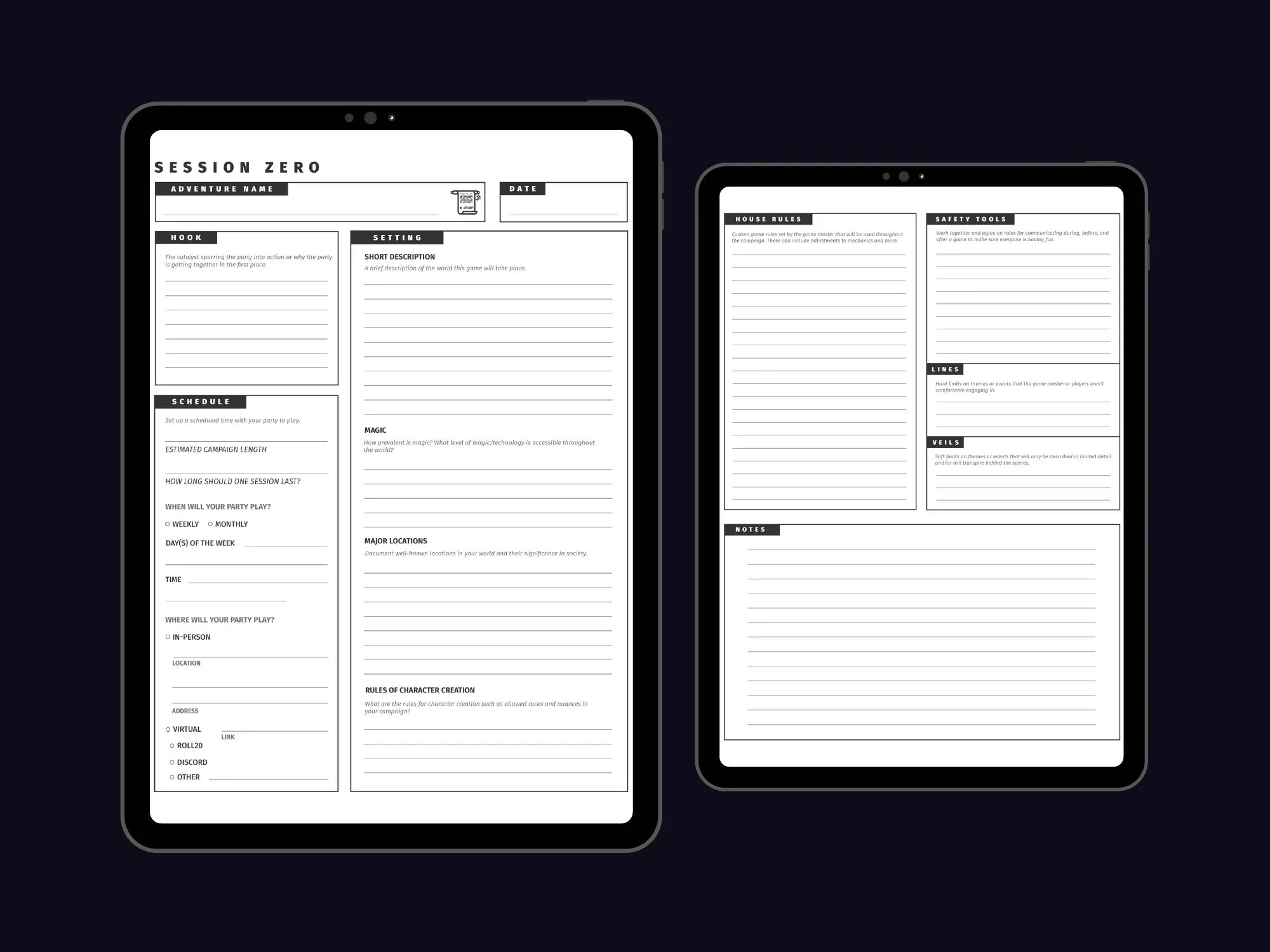
A good session zero rarely fails because the GM didn't care. It fails because something important never got discussed until it caused friction at the table. To see why a structured checklist matters, it helps to look at what usually goes wrong when tables skip one or improvise it.
Quick Answer: What Is an RPG Session Zero Checklist?
An RPG session zero checklist is a structured list of topics a game master and players review before a campaign starts, covering setting, schedule, character rules, house rules, and content boundaries, so the group agrees on expectations before play begins.
Key capabilities of a strong checklist:
- Defines the campaign's world, tone, and central hook
- Locks in logistics: session length, cadence, and platform (in-person, Roll20, Discord)
- Sets character creation rules and ties the party together
- Establishes safety tools such as lines and veils, the X-card, and pause or rewind calls, all of which Game Designer Assistant can draft for your specific campaign
Why Session Zero Breaks Down Without a Checklist
According to Sly Flourish's guide to running session zeros, a session zero exists to get "you and your players all on the same page about the game you plan to play." Both Return of the Lazy Dungeon Master and Tasha's Cauldron of Everything recommend one. The same guide warns that players who arrive without defined expectations "bring their own and a mismatch in expectations isn't fun for anyone."
The scope is larger than most new GMs expect:
45–60 minutes — Time one GM budgets for a document read-through, discussion, and safety/consent checklist before characters are even discussed
13 sensitive themes — Flagged by Sly Flourish while prepping Icewind Dale: Rime of the Frostmaiden, including isolation, cannibalism, child endangerment, and parasitic monsters
Building a thorough session zero is harder than it looks:
- Content audits take real reading time. Published modules often contain mature themes that aren't obvious until you've read the whole book and listed them.
- Safety tools vary widely. The X-card, lines and veils, Script Change, the Consent Flower, and open-door policies each work differently. Combining them coherently takes research.
- Logistics get forgotten. Session length, cadence, and platform choices matter as much as lore, yet they rarely make it into a GM's notes.
- Players skim long documents. Sly Flourish keeps campaign guides to one page "so players will actually read them". Condensing a campaign that tightly is a writing skill.
This kind of structured prep work is exactly where an AI design partner helps.
Why Game Designer Assistant for Your Session Zero Checklist
Game Designer Assistant is a game design partner with expertise across genres, systems analysis, and documentation. For session zero, that means you describe your campaign once and it produces the pieces you need: a one-page pitch, a module-specific content list, a house rules summary, and a safety tools explainer written in your table's voice.
It doesn't replace the conversation with your players. It makes sure you arrive at that conversation prepared and with nothing important missing.
| Traditional Approach | Game Designer Assistant |
|---|---|
| Reading forum threads and blog posts to assemble a checklist | A complete checklist generated for your system and campaign |
| Manually scanning a 250-page module for sensitive themes | A draft content-warning list built from the module and tone you describe |
| Writing house rules from scratch every campaign | Clear, structured house rules drafted from your notes |
| Generic consent forms that miss your campaign's themes | Lines-and-veils prompts tailored to your setting |
| Long campaign documents players skim | Condensed one-page campaign guides |
The Complete 8-Part RPG Session Zero Checklist
Use this as your baseline. Each section includes the items experienced GMs consistently recommend, and you can ask the AI to expand any of them for your table.
1. Campaign Pitch & Setting
- Adventure name and core hook (why the party is together)
- Short world description and its defining "truths"
- How common magic and technology are
- Major locations and factions the characters already know
2. Logistics & Schedule
- Estimated campaign length
- Session length and cadence (weekly or monthly)
- Day of the week and start time
- In-person location, or virtual platform (Roll20, Discord, other)
3. Character Creation Rules
- Allowed sourcebooks, ancestries, and classes
- Starting level and ability score method
- Party integration: a shared patron, history, or goal
4. House Rules & GM Style
- Rule changes and table rulings (theater of the mind, critical hits, rests)
- Character death policy. One GM states plainly that a PC "will die" is probable and that ruling mistakes will be reversed
- How the GM handles improvisation and rule questions
5. Player Expectations & Etiquette
- Sharing the spotlight and no "backseat driving" other characters
- Policies on cheating, phones, and attendance
- What each player wants most: combat, roleplay, mystery, or puzzles
6. Content & Consent
- Themes likely to appear in the campaign
- Lines (never appear) and veils (happen off-screen)
- Individual consent checklists. The Monroe County Public Library's RPG Consent Checklist uses color-coding where green means "enthusiastic consent; bring it on!"
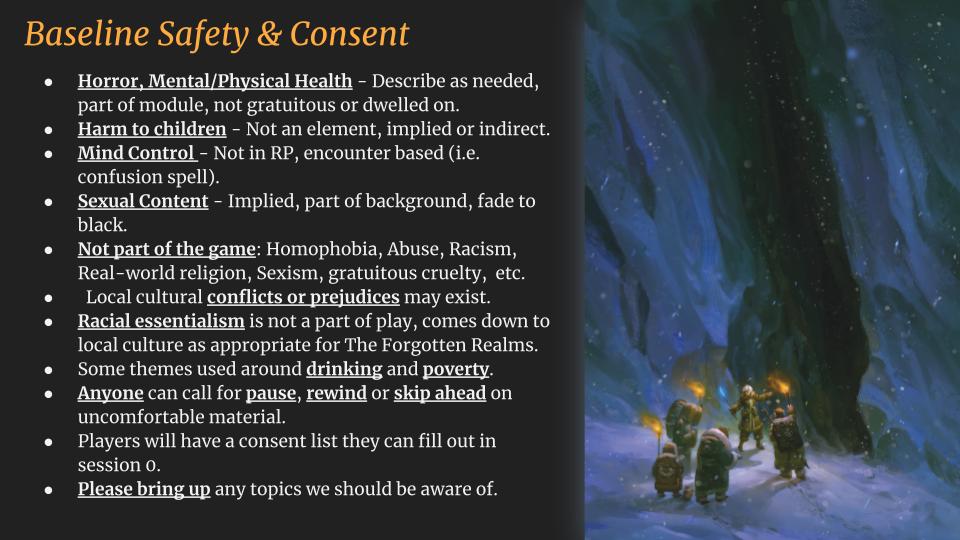
The slide above shows a well-built version of this section. A few choices are worth copying:
- Each theme gets a specific treatment. Horror is "described as needed, not dwelled on," and sexual content is "implied, fade to black."
- Mechanics are separated from roleplay. Mind control is limited to encounters like a confusion spell and kept out of character roleplay.
- In-world conflict is distinct from real-world prejudice. Local cultural conflicts may exist, but racial essentialism is explicitly not part of play.
7. In-Session Safety Tools
- A stop signal. The X-card is "the simplest safety tool and also the easiest to implement"
- Verbal options like "pause for a minute," adapted from Beau Sheldon's Script Change
- Online alternatives. X, N, and O cards can be used by typing the letter into video chat
- An open-door policy: anyone can step away, no questions asked
8. Feedback Loop
- Post-session check-ins
- Stars & Wishes: one thing a player enjoyed and one thing they wish the game had
Module-Specific Content Audits
Describe the module, the tone, and your players, and the AI flags themes worth discussing. These might include body horror in a Ravenloft campaign or political betrayal in a court intrigue game.
"I'm running a dark, survival-focused D&D campaign in a frozen northern setting. List likely sensitive themes, suggest default lines and veils, and format them as a one-page player handout."
House Rules & GM Style Documents
Turn scattered notes into a clean document players can reference all campaign long.
"Here are my house rules notes: flanking gives +2, potions are a bonus action, death saves are rolled secretly. Write a concise house rules page with a short rationale for each."
Safety Tool Selection
Groups often layer tools. The Role-Players Guild of Kansas City recommends using the Consent Flower alongside tools like the X-card and Lines & Veils. The AI can help you choose a combination that fits an in-person, online, or convention table.
Related Agents You'll Also Find Useful
Session zero involves more than design work. These agents cover the printing, surveying, and scheduling steps around it.
PDF Generator
If you want a polished handout instead of a chat transcript, PDF Generator turns your finished checklist into a professionally formatted document.
- Printable session zero packets for in-person tables
- Clean formatting for one-page campaign guides
- Easy to share in Discord or by email
Survey Design Consultant
If you're collecting consent preferences before the session, this agent helps you write a clear, neutral questionnaire.
- Well-structured comfort-level scales for content topics
- Wording that avoids leading or pressuring respondents
- Works for pre-session forms players fill out privately
Project Coordinator
If coordinating five adult schedules is your real obstacle, Project Coordinator tracks who's available, what's due, and what's blocking the first session.
- Tracks character sheet deadlines and backstory submissions
- Keeps scheduling details in one place
- Flags dependencies before they delay the campaign
Try it free — no credit card required.
How to Build Your Session Zero Checklist with AI
Step 1: Describe Your Campaign Open Game Designer Assistant and share the system, setting, module or homebrew premise, intended tone, and group size. The more specific you are, the more tailored the checklist will be.
"D&D 5e, Forgotten Realms, five players, two of them new. Gritty tone with themes of poverty and drinking, but no gratuitous cruelty."
Step 2: Generate the Core Checklist Ask for a complete checklist organized by category. Review it, cut what doesn't apply, and add anything specific to your table.
"Build a full session zero checklist for this campaign covering setting, logistics, character rules, house rules, and safety tools."
Step 3: Draft the Content & Safety Section Request a baseline safety slide or handout that sets a default treatment for each sensitive theme. This gives players something concrete to react to, instead of starting from a blank page.
"Write a baseline safety and consent slide with default lines and veils, plus a short explanation of how pause, rewind, and skip-ahead work at our table."
Step 4: Condense into a One-Page Player Guide Ask the AI to compress everything into a single page players can read in five minutes before arriving.
"Condense this into a one-page campaign guide: the hook, three setting truths, character guidelines, and safety tools."
Step 5: Run the Session and Revise Bring the checklist to your session zero, capture player additions to lines and veils, then paste your notes back in for a final revised version to share with the group.
Results & Use Cases
🎲 A First-Time DM Launching a Forgotten Realms Campaign
Scenario: A new DM is about to run a published adventure for coworkers who have never played.
Traditional Approach: Hours of reading blog posts, watching videos, and stitching together a checklist with gaps.
With Game Designer Assistant: A structured checklist, a beginner-friendly safety explainer, and character creation guidance, drafted in one sitting.
- Nothing critical is missed on the first attempt
- Plain-language safety tools that new players understand
- A one-page guide that sets expectations early
🕯️ A Horror One-Shot with Strangers at a Convention
Scenario: A GM is running a three-hour horror game for players they've never met.
Traditional Approach: A rushed verbal disclaimer at the start of the slot, with no time for a full session zero.
With AI prep: A five-minute "session zero lite" script covering content warnings, X/N/O check-in cards, and an open-door policy.
- Clear content boundaries without slowing the game
- Safety tools that work with unfamiliar groups
- A more confident start for everyone at the table
📱 Prepping on Your Phone During a Commute
Scenario: A busy GM only has fragmented time to prep between work and family.
Traditional Approach: Session zero prep keeps getting postponed, and the campaign start slips.
With AI prep: The GM uses speech-to-text on mobile to dictate campaign ideas, then refines the checklist across several short sessions. A separate thread with Project Coordinator handles player deadlines.
- Prep happens in 10-minute pockets
- Settings and history sync across devices
- The campaign starts on schedule
🔄 Onboarding a New Player Mid-Campaign
Scenario: A new player joins a campaign that is eight sessions in.
Traditional Approach: Verbal catch-up that skips the original safety conversation entirely, even though Sly Flourish recommends revisiting safety tools whenever a new player joins.
With AI prep: A catch-up packet summarizing the story so far, the house rules, and the existing lines and veils, with space for the new player's additions.
- The new player gets the same baseline as the original group
- Existing boundaries are respected and updated
- Integration feels intentional, not improvised
Frequently Asked Questions
What should be on an RPG session zero checklist?
A complete session zero checklist covers the campaign pitch and setting, logistics (schedule, session length, platform), character creation rules, house rules, player etiquette, content boundaries such as lines and veils, in-session safety tools like the X-card, and a feedback method such as Stars & Wishes. Most GMs adapt this baseline to their system and group. A checklist ensures nothing important surfaces for the first time mid-campaign.
How long should session zero take?
Session zero length varies by group and campaign complexity. One experienced GM budgets 45–60 minutes just for the document read-through and safety discussion, before character creation begins. Many groups then spend another session or partial session building characters together. Some GMs also run a short "session 0.5" mini-adventure to launch the story right away.
What are lines and veils in tabletop RPGs?
Lines are content that never appears in the game, such as harm to children. Veils are content that may exist in the story but happens off-screen or "fades to black," such as romance or torture. Groups agree on both during session zero and can update them at any time. Collecting preferences privately first, for example through a questionnaire built with Survey Design Consultant, helps players share honestly.
Can Game Designer Assistant create a session zero checklist for my campaign?
Yes. Game Designer Assistant can draft a full session zero checklist tailored to your system, setting, and tone, including content warnings, lines-and-veils defaults, house rules, and a one-page campaign guide. It works for published modules and homebrew worlds alike. You still run the conversation with your players. The AI makes sure you arrive prepared with a complete, well-organized agenda.
Is it free to use AI for session zero prep?
Jenova offers a free tier with all core features and limited monthly usage, which is enough to draft a session zero checklist and supporting documents. Paid plans start at $20 per month for higher usage and custom model selection. To turn your checklist into a printable handout, PDF Generator is available on the same plans.
Does it work on mobile?
Yes. The platform has full feature parity across web, iOS, and Android, including speech-to-text for dictating campaign ideas. Settings sync across devices, so you can start a checklist on your phone and finish it on your laptop.
Conclusion
Session zero is where campaigns either align or quietly start to fracture. A thorough RPG session zero checklist covering setting, logistics, character rules, house rules, consent, and in-session safety tools gives every player the same foundation and makes the hard conversations easier because they happen up front. The difficult part has always been the prep: auditing content, choosing safety tools, and condensing it all into something players will read.
An AI-assisted session zero removes that bottleneck. You bring the campaign vision and your knowledge of your players, and the AI handles the structure, drafting, and formatting. The result is a better-prepared table and a campaign that starts on solid ground.
Try Game Designer Assistant now to build your session zero checklist. Explore more at Jenova.
For Developers: Game Designer Assistant is available programmatically via the Jenova API, so you can integrate AI-powered campaign prep and session zero tooling into your tabletop or VTT application with a single API call. Full documentation →