Remote MCP Servers AI: Build Scalable Production Applications
2025-07-16
Remote MCP Servers AI transforms how AI applications connect to external tools and data sources at scale. While local MCP servers work well for development, remote servers unlock production-grade capabilities by hosting AI-accessible tools on cloud infrastructure.
Key capabilities:
- ✅ Connect AI agents to enterprise tools (GitHub, Asana, Sentry, PayPal)
- ✅ Scale to handle thousands of concurrent requests
- ✅ Centralized security with OAuth 2.0 authentication
- ✅ Deploy globally with edge computing or containerization
To understand why this architecture matters, let's examine the challenges facing AI application developers today.
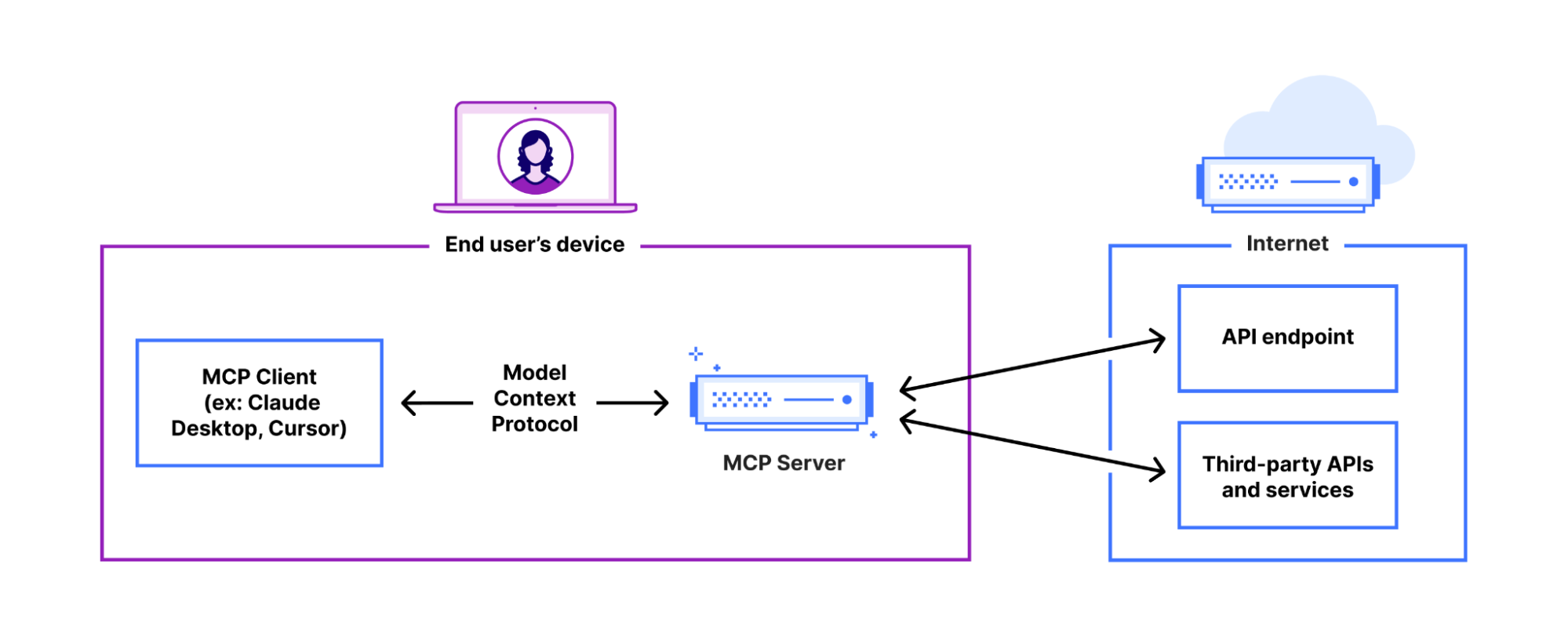
Quick Answer: What Are Remote MCP Servers AI?
Remote MCP Servers AI are cloud-hosted services that expose tools and data sources to AI agents through the Model Context Protocol standard. Unlike local servers running on a developer's machine, remote servers operate on internet-accessible infrastructure, enabling scalable, production-ready AI applications.
Key capabilities:
- Host AI-accessible tools on cloud infrastructure
- Handle high-volume requests from multiple users simultaneously
- Implement enterprise-grade authentication and authorization
- Provide standardized interfaces for AI-tool integration
The Problem: Scaling AI Tool Integration
Building AI applications that interact with real-world systems presents significant technical challenges:
Core integration challenges:
- Limited scalability – Local servers can't handle production traffic volumes
- Security gaps – Direct tool access creates authorization vulnerabilities
- Maintenance burden – Each client must implement tool-specific logic
- Fragmented ecosystem – No standard protocol for AI-tool communication
- Deployment complexity – Moving from development to production requires infrastructure redesign
Scalability Bottlenecks
Local MCP servers run as processes on individual machines, creating fundamental limitations. A single server instance can typically handle only 10-50 concurrent connections before performance degrades. For production applications serving hundreds or thousands of users, this architecture fails immediately.
73% of AI projects fail to reach production due to infrastructure and scaling challenges. Source: Gartner Research
Without cloud infrastructure, developers face:
- Manual server provisioning for each deployment
- No automatic failover or redundancy
- Geographic latency for global users
- Resource contention on shared machines
Security and Authorization Gaps
Local servers often lack robust authentication mechanisms. When AI agents access sensitive tools—like payment processing, database modifications, or API integrations—without proper authorization, organizations face:
- Data breach risks from unauthorized tool access
- Compliance violations when audit trails are incomplete
- Permission sprawl without centralized access control
- Token management complexity across multiple services
$4.45 million – Average cost of a data breach in 2023
Maintenance and Consistency Challenges
When each client application implements its own tool integration logic, organizations encounter:
Version fragmentation: Different clients use different tool versions, creating inconsistent behavior and debugging nightmares.
Update coordination: Pushing tool updates requires coordinating releases across all client applications, slowing innovation.
Testing burden: Each client must independently test tool integrations, multiplying QA effort.
The Remote MCP Servers AI Solution
Remote MCP Servers AI addresses these challenges through a cloud-native architecture that separates tool implementation from client applications.
| Traditional Local Servers | Remote MCP Servers AI |
|---|---|
| Runs on developer machines | Hosted on cloud infrastructure |
| Handles 10-50 connections | Scales to thousands of concurrent users |
| Manual deployment | Automated CI/CD pipelines |
| Basic or no authentication | OAuth 2.0 + enterprise SSO |
| Client-side tool logic | Centralized tool implementation |
| Geographic latency | Edge deployment for low latency |
Scalable Cloud Architecture
Remote MCP Servers leverage modern cloud infrastructure to handle production workloads:
Horizontal scaling: Add server instances automatically based on traffic, supporting thousands of concurrent AI agents without performance degradation.
Global distribution: Deploy servers across multiple regions or edge networks (like Cloudflare Workers) to minimize latency for users worldwide.
High availability: Implement redundancy and automatic failover to maintain 99.9%+ uptime for mission-critical AI applications.
Load balancing: Distribute requests intelligently across server instances to optimize resource utilization and response times.
Enterprise-Grade Security
Remote servers implement comprehensive security controls:
OAuth 2.0 authentication: Users authorize AI agents through standard OAuth flows, granting granular permissions to specific tools without exposing credentials.
Token-based authorization: Each request includes a short-lived access token that the server validates before executing tool logic, preventing unauthorized access.
Audit logging: Track every tool invocation with user identity, timestamp, and parameters for compliance and security monitoring.
Principle of least privilege: Servers only receive the minimal context needed to perform their function, never accessing full conversation history.
Centralized Tool Management
By hosting tools on remote servers, organizations gain:
Single source of truth: One canonical implementation of each tool ensures consistency across all client applications.
Instant updates: Deploy tool improvements or bug fixes once, and all connected clients benefit immediately without requiring updates.
Simplified testing: Test tool logic in isolation on the server, reducing the testing burden on client applications.
Version control: Maintain multiple tool versions simultaneously, allowing gradual migration for clients.
Understanding MCP Architecture
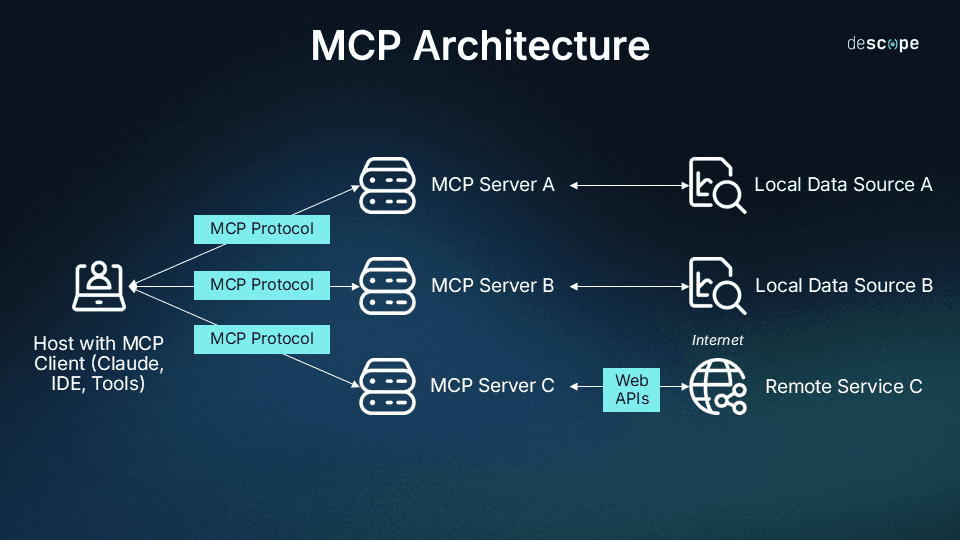
The Model Context Protocol specification defines a client-host-server architecture designed for security, modularity, and scalability.
Core Components
Server: An MCP server exposes capabilities—tools, resources, or prompts—to AI models. It acts as a bridge between the AI and a specific data source or API (e.g., GitHub, Asana, or a weather service). Servers can be local processes or remote services.
Host: The host coordinates one or more client instances. It aggregates context from various clients, handles user authorization, and enforces security policies. In practice, the host is often the user-facing application (desktop or web app).
Client: Created by the host, a client maintains a stateful, isolated session with a single MCP server. It handles protocol negotiations and message routing, ensuring each server connection remains distinct and secure.
Security by Design
A critical MCP principle: servers never see full conversation history. They only receive the minimal context needed to perform their specific function. This isolation protects user privacy and limits the impact of potential server compromises.
How Remote MCP Servers AI Work: Step-by-Step
Step 1: Server Discovery
The client application (or AI agent) discovers available remote servers through a registry or direct URL. For example, a developer might add a GitHub MCP server by providing its endpoint: https://mcp.github.com.
Step 2: Capability Negotiation
The client sends a request to the server's /capabilities endpoint. The server responds with a JSON schema describing available tools, including:
- Tool names and descriptions
- Required input parameters and types
- Expected output formats
- Authentication requirements
Example response:
json{
  "tools": [
    {
      "name": "create_issue",
      "description": "Create a new GitHub issue",
      "parameters": {
        "repo": "string",
        "title": "string",
        "body": "string"
      }
    }
  ]
}
Step 3: User Authentication
If the server requires authentication, it initiates an OAuth 2.0 flow. The user is redirected to an identity provider (e.g., GitHub login) to grant permissions. Upon approval, the client receives an access token for subsequent requests.
Step 4: Tool Invocation
When the AI agent needs to use a tool, the client sends a POST request to the server's /run endpoint:
json{
  "tool": "create_issue",
  "parameters": {
    "repo": "myorg/myrepo",
    "title": "Bug: Login fails on mobile",
    "body": "Users report login errors on iOS app"
  },
  "token": "eyJhbGciOiJIUzI1NiIsInR5cCI6IkpXVCJ9..."
}
Step 5: Server Execution
The remote MCP server validates the access token, executes the tool logic (e.g., calls the GitHub API), and returns the result:
json{
  "success": true,
  "result": {
    "issue_number": 1234,
    "url": "https://github.com/myorg/myrepo/issues/1234"
  }
}
Step 6: Result Integration
The client receives the result and provides it to the AI model as context for the next step in the conversation or workflow.
Building and Deploying Remote MCP Servers AI
Core Implementation Requirements
A production-ready remote MCP server must expose three key HTTP endpoints:
/capabilities endpoint: Returns a JSON schema describing available tools, resources, and prompts. This allows AI models to understand what the server offers and how to use each tool.
/run endpoint: Accepts tool invocation requests with parameters and authentication tokens. Executes the tool logic and returns results in a standardized format.
/health endpoint: Provides server status for monitoring and load balancing. Returns HTTP 200 when healthy, enabling automated health checks.
Development Frameworks
Modern web frameworks simplify remote MCP server development:
Python + FastAPI: Ideal for data science and ML teams. FastAPI's automatic OpenAPI documentation generation aligns well with MCP's schema requirements.
Node.js + Express: Excellent for teams with JavaScript expertise. The MCP TypeScript SDK provides helper classes that reduce boilerplate.
Go + Gin: Best for high-performance servers requiring minimal latency. Go's concurrency model handles thousands of simultaneous connections efficiently.
Official MCP SDKs provide decorators and utilities that abstract protocol details, letting developers focus on tool implementation.
Deployment Options
Edge Computing (Cloudflare Workers): Deploy servers on edge networks to minimize latency. Code runs in data centers close to users, reducing round-trip time to <50ms globally. Ideal for real-time AI applications.
Containerization (Docker + Fly.io): Package servers as Docker containers for consistent environments across development and production. Fly.io deploys containers globally with automatic scaling and health monitoring.
Serverless Functions (Vercel, AWS Lambda): Host servers as serverless functions for cost-effective, auto-scaling deployments. Pay only for actual usage, with automatic scaling from zero to thousands of requests.
Authentication Implementation
Production servers require robust authentication:
OAuth 2.0 flow:
- Client requests tool access
- Server redirects user to identity provider (Google, GitHub, etc.)
- User grants permissions
- Server receives authorization code
- Server exchanges code for access token
- Client includes token in subsequent
/runrequests
Token validation: On each request, the server verifies the token's signature, expiration, and scope before executing tool logic. This prevents unauthorized access and ensures audit trails.
Real-World Use Cases and Results
📊 Enterprise Project Management
Scenario: A product team needs to create tasks, assign owners, and track progress across multiple projects.
Traditional Approach: Manually log into Asana, navigate to the correct project, create tasks one by one, and send notification emails. Time required: 15-20 minutes per workflow.
Remote MCP Servers AI: AI agent connects to Asana's MCP server, creates tasks with proper assignments, sets due dates, and notifies team members—all through natural language commands. Time required: 30 seconds.
Key benefits:
- 95% time reduction for routine project management tasks
- Consistent task formatting and metadata
- Automatic audit trail for compliance
- Integration with other tools (Slack notifications, calendar events)
💼 Developer Workflow Automation
Scenario: A developer needs to investigate a production error, create a bug report, and notify the on-call engineer.
Traditional Approach: Check Sentry for error details, manually create a GitHub issue with stack traces, look up the on-call schedule, and send a Slack message. Time required: 10-15 minutes.
Remote MCP Servers AI: AI agent queries Sentry's MCP server for error details, creates a GitHub issue via GitHub's MCP server, and sends a Slack notification via Slack's MCP server—all in a single workflow. Time required: 45 seconds.
Key benefits:
- Faster incident response times
- Complete error context in bug reports
- Reduced context switching between tools
- Consistent incident documentation
📱 Mobile AI Assistant
Scenario: A sales representative needs to update CRM records, schedule follow-up meetings, and send proposal documents while traveling.
Traditional Approach: Open multiple mobile apps, navigate complex interfaces on a small screen, and manually sync data between systems. Time required: 20-30 minutes.
Remote MCP Servers AI: Mobile AI agent (like Jenova) connects to Salesforce, Google Calendar, and document storage MCP servers, executing all tasks through voice commands. Time required: 2 minutes.
Key benefits:
- Mobile-optimized AI workflows
- Voice-first interaction for hands-free operation
- Real-time data synchronization across systems
- Offline capability with queued operations
Connecting to Remote Servers: The Role of AI Clients
The power of remote MCP servers is only realized through sophisticated AI clients that can discover, connect to, and orchestrate tools across multiple servers.
Jenova: Purpose-Built for MCP
Jenova is the first AI agent designed specifically for the MCP ecosystem, offering capabilities that make remote server integration seamless:
Seamless server integration: Connect to any remote MCP server by providing its URL. Jenova automatically discovers available tools and makes them accessible through natural language.
Multi-step agentic workflows: Jenova understands complex goals and plans multi-step workflows across different servers. For example: "Analyze our GitHub issues, create a summary report, and send it to the team on Slack."
Scalable tooling architecture: Built on a multi-agent system, Jenova supports hundreds of tools simultaneously without performance degradation—a significant advantage over clients with hard tool limits.
Multi-model intelligence: Jenova works with GPT, Claude, Gemini, and other leading models, automatically selecting the best model for each task.
Mobile-first design: Full MCP support on iOS and Android brings agentic AI to any device, enabling remote server access from anywhere.
Accessible to all users: While powerful enough for developers, Jenova's natural language interface makes MCP tools accessible to non-technical users for everyday tasks.
The Growing Remote MCP Ecosystem
The ecosystem of production-ready remote MCP servers is expanding rapidly:
Enterprise tools: GitHub, Asana, Sentry, and PayPal offer official MCP servers for their platforms.
Data sources: Remote servers provide AI access to databases, APIs, and data warehouses with proper authentication and query optimization.
Specialized services: Weather data, financial information, translation services, and more are becoming available through standardized MCP interfaces.
Community servers: Developers are building and sharing remote servers for niche use cases, creating a rich ecosystem of AI-accessible tools.
A curated list of high-quality remote servers is maintained by the community, making it easy to discover and integrate new capabilities.
Frequently Asked Questions
How much does it cost to deploy a remote MCP server?
Deployment costs vary by platform and usage. Serverless options like Cloudflare Workers offer free tiers for up to 100,000 requests per day, making them cost-effective for small to medium applications. Container-based deployments on Fly.io start at $5-10/month** for basic instances. Enterprise deployments with high availability and global distribution typically cost **$50-200/month depending on traffic volume.
How is a remote MCP server different from a REST API?
While both use HTTP, remote MCP servers follow a standardized protocol specifically designed for AI-tool integration. Key differences:
- Standardized schema: MCP servers expose capabilities in a consistent format that AI models can understand automatically
- Context isolation: MCP servers only receive minimal context needed for their function, not full conversation history
- Tool discovery: Clients can query available tools dynamically through the
/capabilitiesendpoint - AI-optimized: Response formats are designed for AI consumption, not human-readable HTML
Can I use remote MCP servers with any AI model?
Yes. The Model Context Protocol is model-agnostic. Any AI model that can make HTTP requests and parse JSON responses can use remote MCP servers. Leading AI platforms like Jenova support multiple models (GPT, Claude, Gemini) and handle MCP communication automatically.
Do I need an account to use remote MCP servers?
Most production remote MCP servers require authentication to protect sensitive data and enforce rate limits. You'll typically need:
- An account with the service providing the MCP server (e.g., GitHub account for GitHub's MCP server)
- An account with an MCP client application (like Jenova) to manage server connections
- OAuth authorization to grant the AI agent permission to use specific tools
Some public servers offer limited functionality without authentication for testing purposes.
How do remote MCP servers handle rate limiting?
Servers implement rate limiting at multiple levels:
- Per-user limits: Based on the authenticated user's subscription tier or plan
- Per-client limits: Based on the AI client application making requests
- Global limits: Overall server capacity to prevent overload
When limits are reached, servers return HTTP 429 (Too Many Requests) with retry-after headers. Sophisticated clients like Jenova handle rate limits gracefully by queuing requests or suggesting alternative approaches.
Are remote MCP servers secure for enterprise use?
Yes, when properly implemented. Remote MCP servers use enterprise-grade security practices:
- OAuth 2.0 authentication with short-lived access tokens
- TLS encryption for all data in transit
- Principle of least privilege: Servers only access data necessary for their function
- Audit logging for compliance and security monitoring
- No conversation history exposure: Servers never see full AI conversation context
Organizations should review each server's security documentation and conduct security assessments before production deployment.
Conclusion: The Future of AI Integration
Remote MCP Servers AI represents a fundamental shift in how AI applications connect to real-world systems. By standardizing the protocol between AI models and tools, MCP enables a truly interoperable ecosystem where developers build specialized servers and users combine them through intelligent clients.
The transformation is clear: from isolated AI models to a connected network of intelligent services. As the ecosystem grows—with major companies like GitHub, Asana, and PayPal offering official servers—the potential for sophisticated, context-aware AI applications expands dramatically.
For developers, this means building once and deploying globally with enterprise-grade security. For users, it means AI agents that can accomplish complex, multi-step workflows across dozens of tools through simple natural language commands.
The future of AI is remote, scalable, and interoperable. Get started with remote MCP servers today to build the next generation of AI-powered applications.