Model Context Protocol (MCP): The Foundation of the Agentic Web
2025-07-27
Model Context Protocol (MCP) is an open-source standard that enables AI agents to securely connect with tools, data sources, and APIs through a unified interface. Introduced by Anthropic in late 2024, MCP solves the fragmented integration problem that has limited AI's practical capabilities—replacing thousands of custom connectors with a single, universal protocol.
The protocol addresses a critical bottleneck: before MCP, connecting an AI model to each new service required building custom integrations, creating an unsustainable "N×M" problem. MCP standardizes these connections, much like HTTP standardized web communication or USB-C unified device connectivity.
Key capabilities:
- Universal interface for AI-to-tool communication
- Secure, standardized access to data sources and APIs
- Eliminates custom integration overhead
- Enables autonomous agent workflows across multiple services
To understand why this protocol matters, let's examine the transformation happening across the internet today.
Quick Answer: What Is Model Context Protocol (MCP)?
Model Context Protocol (MCP) is an open-source standard that enables AI systems to securely discover and use external tools, data sources, and APIs through a unified interface. Introduced by Anthropic in November 2024, it replaces fragmented custom integrations with a single protocol.
Key capabilities:
- Standardized client-server architecture for AI-tool connections
- Secure authentication and authorization mechanisms
- Support for multiple data sources and APIs simultaneously
- Cross-platform compatibility with major AI models
The Integration Problem Limiting AI Agents
AI models have achieved remarkable capabilities in understanding and generating text, but their practical utility has been constrained by a fundamental challenge: connecting them to real-world tools and data.
According to Anthropic's announcement, the traditional approach created an "N×M" integration problem:
Every AI application × Every data source = Custom integration required
This fragmentation manifests in several critical pain points:
But accessing real-world capabilities remains frustratingly difficult:
- Custom Integration Overhead – Each AI-to-service connection requires unique code
- Maintenance Burden – API changes break integrations across multiple applications
- Security Complexity – Different authentication methods for each service
- Limited Scalability – Adding new tools requires exponential development effort
- Vendor Lock-in – Proprietary connectors tie users to specific platforms
Custom Integration Overhead
Before MCP, developers building AI applications faced a daunting task. Connecting an AI assistant to Google Calendar required one integration. Adding Salesforce required another. Incorporating a company's internal database demanded yet another custom solution.
Each integration involved understanding unique API specifications, authentication methods, and data formats. A single AI agent supporting ten services required ten separate codebases to maintain.
Maintenance Burden and Breaking Changes
APIs evolve constantly. When a service updates its authentication method or changes endpoint structures, every custom integration breaks simultaneously.
Development teams spend significant resources monitoring API changes and updating connectors. According to Microsoft's Build 2025 announcement, this maintenance overhead has prevented many organizations from deploying AI agents at scale.
Security and Authentication Complexity
Each service implements different security protocols. OAuth for one, API keys for another, custom token systems for a third. Managing these disparate authentication methods creates security vulnerabilities and compliance challenges.
Enterprise deployments require consistent security policies across all integrations—a near-impossible task with custom connectors.
The Scalability Wall
The integration problem compounds as capabilities expand. An AI agent supporting 5 tools requires 5 integrations. Supporting 50 tools requires 50 integrations. Supporting 500 tools becomes practically impossible.
This scalability wall has prevented the emergence of truly versatile AI agents capable of handling complex, multi-tool workflows.
Model Context Protocol: A Universal Standard for AI Integration
Model Context Protocol replaces the fragmented integration landscape with a unified standard. Instead of building N×M custom connectors, developers build once to the MCP specification.
The protocol's architecture, detailed on the official MCP website, consists of two primary components:
| Traditional Approach | Model Context Protocol |
|---|---|
| Custom connector for each service | Single standardized interface |
| N×M integration problem | N+M integration solution |
| Service-specific authentication | Unified security framework |
| Maintenance across all connectors | Update once, works everywhere |
| Limited to pre-built integrations | Dynamic tool discovery |
MCP Servers: Exposing Tools and Data
MCP servers are applications that expose capabilities—APIs, databases, functions, or services—to the MCP network. Any organization or developer can create an MCP server to make their tools accessible to AI agents.
A company might deploy MCP servers for:
- Internal knowledge bases and documentation
- Project management systems (Jira, Asana)
- Communication platforms (Slack, Microsoft Teams)
- Customer relationship management (Salesforce, HubSpot)
- Development tools (GitHub, GitLab)
Each server publishes a standardized manifest describing available tools, required permissions, and authentication methods.
MCP Clients: AI Agents That Consume Tools
MCP clients are AI applications—like Claude, ChatGPT, or custom-built agents—that connect to MCP servers to access their capabilities. The client queries servers to discover available tools and invokes them as needed to fulfill user requests.
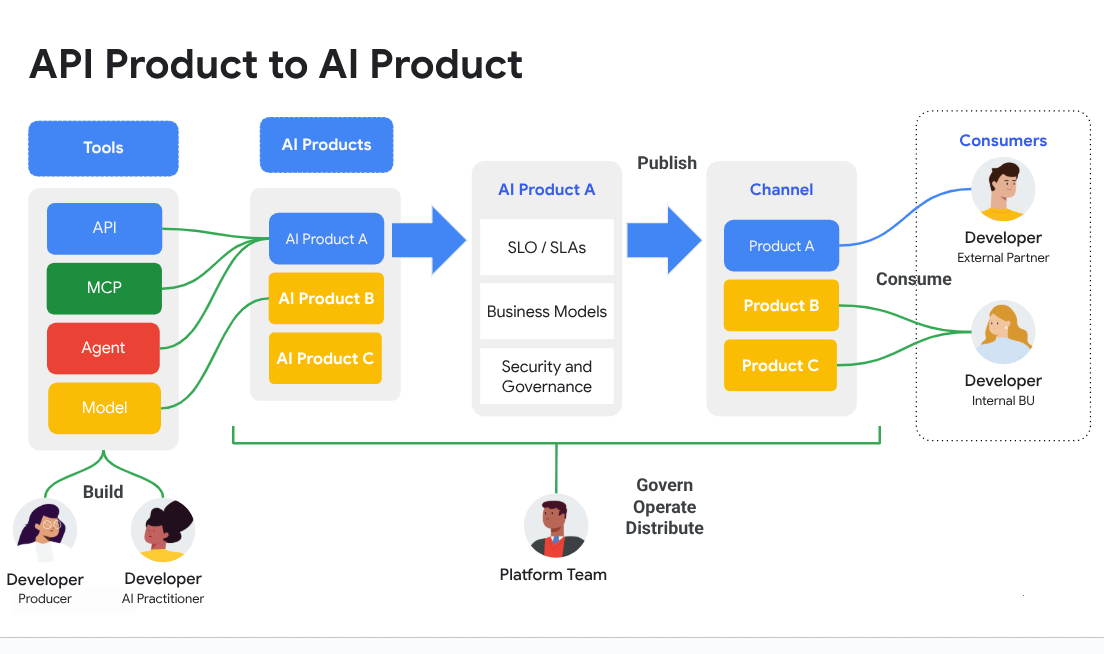
This architecture enables dynamic capability expansion. An agent doesn't need pre-programmed knowledge of every possible tool—it discovers and learns to use new tools through the MCP interface.
Industry Adoption and Ecosystem Growth
The rapid adoption of MCP demonstrates its strategic importance. Shortly after Anthropic's introduction, major technology companies announced support:
- OpenAI integrated MCP into ChatGPT's tool-use capabilities
- Google announced MCP support across its AI products
- Microsoft positioned MCP as foundational to its agentic web vision
- Figma released a Dev Mode MCP server enabling design-to-code workflows
This cross-industry collaboration is rare and signals shared recognition that a universal standard is essential for AI's next phase.
How Model Context Protocol Works: Step-by-Step
Understanding MCP's practical operation clarifies how it enables autonomous agent workflows.
Step 1: Server Registration and Discovery
An MCP server starts by publishing its capabilities through a standardized manifest. This manifest describes available tools, required parameters, authentication requirements, and usage policies. Clients can query this manifest to understand what the server offers.
Example: A GitHub MCP server might expose tools like "create_issue," "list_pull_requests," and "merge_branch," each with defined parameters and permissions.
Step 2: Client Connection and Authentication
When an AI agent (MCP client) needs to use a tool, it establishes a connection to the relevant MCP server. The protocol handles authentication through standardized methods—OAuth, API keys, or custom tokens—abstracting the complexity from the agent.
Example: A user authorizes their AI assistant to access their GitHub account once. The MCP client securely stores credentials and handles subsequent authentication automatically.
Step 3: Tool Discovery and Selection
The client queries the server's manifest to identify available tools. Based on the user's request, the AI agent reasons about which tools are necessary and in what sequence to use them.
Example: For the request "Create a bug report for the login issue," the agent identifies that it needs the "create_issue" tool from the GitHub server.
Step 4: Tool Invocation and Execution
The client sends a standardized request to the server, including the tool name and required parameters. The server executes the action and returns results in a consistent format.
Example: The agent calls create_issue(repo="myapp", title="Login failure on mobile", body="Users report...") and receives confirmation with the new issue number.
Step 5: Multi-Tool Workflows
Model Context Protocol enables agents to chain multiple tools across different servers. The agent maintains context throughout the workflow, passing information between tools as needed.
Example: An agent might query a database server for sales data, pass results to an analysis server for processing, then use a communication server to post findings to Slack—all from a single user request.
Real-World Applications and Use Cases
The practical impact of MCP becomes clear through concrete applications across industries.
💼 Enterprise Automation and Knowledge Work
An enterprise AI agent connects to multiple internal systems through MCP servers:
Query/Scenario: "Summarize Q3 sales performance for the enterprise team and post key takeaways to #sales-leaders."
Traditional Approach: Manager manually queries database, creates summary, formats message, posts to Slack—30+ minutes of work.
Model Context Protocol: Agent queries Postgres database via one MCP server, generates summary, posts to Slack via another server—completed in seconds.
Key benefits:
- Eliminates repetitive data aggregation tasks
- Ensures consistent reporting formats
- Reduces time from data to decision
- Maintains security through proper authentication
📊 Software Development Acceleration
Development teams are experiencing significant productivity gains through MCP-enabled workflows.
Query/Scenario: "Implement the user authentication feature described in JIRA-1234."
Traditional Approach: Developer reads ticket, writes code, creates pull request, updates ticket status—2-4 hours of work.
Model Context Protocol: Agent accesses Jira via MCP, reads requirements, generates code using GitHub MCP server, creates PR, updates ticket—completed in minutes with developer review.
According to Figma's Dev Mode announcement, their MCP server enables LLMs to generate design-informed code, ensuring better alignment between design and engineering teams.
Key benefits:
- Reduces boilerplate code writing
- Maintains consistency with design specifications
- Automates project management updates
- Allows developers to focus on complex problem-solving
📱 Personal Productivity and Task Management
Personal AI assistants leverage MCP to manage daily workflows across multiple services.
Query/Scenario: "Schedule a meeting with the marketing team next week and send them the Q2 report."
Traditional Approach: Check calendars, find available time, send meeting invite, locate report, compose email, attach file—15+ minutes.
Model Context Protocol: Agent checks Google Calendar via MCP, finds optimal time, creates meeting, retrieves report from cloud storage, sends email with attachment—completed in seconds.
Key benefits:
- Reduces context switching between applications
- Eliminates manual coordination overhead
- Ensures nothing falls through the cracks
- Works seamlessly across desktop and mobile
🎯 Research and Data Analysis
Researchers and analysts use MCP-enabled agents to gather and synthesize information from multiple sources.
Query/Scenario: "Compare pricing strategies for our top three competitors and create a summary report."
Traditional Approach: Visit multiple websites, extract data, compile spreadsheet, write analysis—1-2 hours.
Model Context Protocol: Agent uses web scraping MCP server to gather pricing data, analysis server to identify patterns, document server to generate formatted report—completed in minutes.
Key benefits:
- Accelerates competitive intelligence gathering
- Ensures data consistency and accuracy
- Enables real-time market monitoring
- Scales to analyze dozens of competitors simultaneously
Jenova: The First Agentic Client Built for MCP
While protocols and servers provide infrastructure, users need powerful clients to harness the agentic web. Jenova is the first AI agent platform built from the ground up for the MCP ecosystem.
Seamless MCP Integration
Jenova acts as a sophisticated MCP client that connects to any remote MCP server instantly. Users can access and utilize tools without configuration complexity—simply connect to a server and start working.
The platform's architecture enables complex, multi-step workflows. Users state high-level goals, and Jenova intelligently plans and executes sequences of actions using multiple tools.
Example workflow: "Find the best-rated project management tool, generate a comparison report, and message the team with recommendations." Jenova queries review sites via MCP, analyzes data, generates a formatted report, and posts to Slack—all from a single prompt.
Multi-Agent Architecture for Scale
Jenova's unique multi-agent architecture enables it to support vast numbers of tools without performance degradation. While other clients struggle with more than a dozen integrations, Jenova scales to hundreds of tools simultaneously.
This architecture distributes workload across specialized sub-agents, each optimized for specific tool categories. The system maintains context across the entire workflow while ensuring fast response times.
Model-Agnostic Flexibility
Jenova works with leading AI models including GPT-4, Claude, and Gemini. The platform automatically selects the optimal model for each task, ensuring users always get the best possible results.
This model-agnostic approach future-proofs the platform—as new models emerge, Jenova integrates them without requiring users to change workflows.
Accessible to All Users
Designed for both technical and non-technical users, Jenova brings MCP's power to everyday tasks. The interface abstracts protocol complexity while maintaining full capability access.
Available on desktop and mobile platforms (iOS and Android), Jenova enables agentic workflows wherever users work.
Frequently Asked Questions
What is Model Context Protocol (MCP)?
Model Context Protocol (MCP) is an open-source standard introduced by Anthropic that enables AI systems to securely connect with external tools, data sources, and APIs through a unified interface. It replaces fragmented custom integrations with a single protocol, similar to how HTTP standardized web communication.
How does MCP differ from traditional API integrations?
Traditional integrations require custom code for each AI-to-service connection, creating an N×M problem. MCP provides a standardized interface where developers build once to the protocol specification, and their AI agent can then connect to any MCP-compatible service. This reduces development overhead from N×M custom integrations to N+M standardized connections.
Is Model Context Protocol secure for enterprise use?
MCP includes built-in security mechanisms for authentication and authorization. Major technology companies including Google and Microsoft are developing enterprise-grade security extensions, such as OAuth integration and role-based access controls. Organizations can implement MCP with the same security standards they apply to traditional API access.
Which AI models support MCP?
Major AI platforms including Claude (Anthropic), ChatGPT (OpenAI), and Google's AI products support MCP. The protocol is model-agnostic, meaning any AI system can implement MCP client capabilities. Jenova supports multiple models including GPT-4, Claude, and Gemini through its MCP client implementation.
Can I create my own MCP server?
Yes. MCP is open-source, and anyone can create an MCP server to expose their tools or data sources. The official MCP documentation provides specifications and examples for building servers. Companies are creating MCP servers for internal tools, while developers are building servers for popular services.
What is the agentic web?
The agentic web represents a paradigm shift where autonomous AI agents act on behalf of users, performing complex tasks by interacting with various digital services. Instead of users manually navigating websites and apps, they delegate intentions to agents that reason, plan, and execute multi-step workflows. Model Context Protocol provides the foundational communication layer enabling this vision.
The Path Forward: Building the Agentic Web
The transformation toward an agentic web is underway, with Model Context Protocol serving as its foundational layer. However, realizing this vision requires addressing several challenges.
Security and Governance
As agents gain autonomy and access to sensitive systems, robust security mechanisms become critical. Researchers have identified potential risks including prompt injection and tool poisoning, where malicious actors could manipulate agents into performing unintended actions.
The MCP community is actively developing solutions. According to Google's analysis, enterprise-grade security extensions are in development, including:
- OAuth integration for standardized authorization
- Role-based access controls for fine-grained permissions
- Audit logging for compliance and monitoring
- Sandboxed execution environments for untrusted tools
Standardization and Interoperability
While MCP provides a protocol foundation, ensuring consistent implementation across the ecosystem requires ongoing coordination. Industry working groups are developing best practices, reference implementations, and certification programs.
The goal is ensuring that any MCP client can seamlessly work with any MCP server, regardless of vendor or implementation details.
User Experience and Trust
For the agentic web to achieve mainstream adoption, users must trust AI agents to act on their behalf. This requires:
- Transparent explanations of agent actions and reasoning
- Clear controls for user oversight and intervention
- Reliable performance across diverse tasks and contexts
- Graceful handling of errors and edge cases
Platforms like Jenova are pioneering user-friendly interfaces that make agentic capabilities accessible while maintaining appropriate human oversight.
The Open Ecosystem Advantage
MCP's open-source nature ensures no single company controls the agentic web's infrastructure. This openness drives innovation, prevents vendor lock-in, and enables a diverse ecosystem of tools and services.
As Microsoft noted in their Build 2025 announcement, building an open agentic web benefits the entire industry and accelerates AI's practical impact.
Conclusion: The Foundation Is Being Built Today
The agentic web represents the internet's next evolution—from passive information repository to active, intelligent collaborator. Model Context Protocol provides the critical standardization layer enabling this transformation.
By solving the integration bottleneck, MCP allows developers to focus on building capable, versatile AI agents rather than maintaining fragmented connectors. The protocol's rapid adoption by major technology companies demonstrates shared recognition of its strategic importance.
The future of work, creativity, and digital interaction will be shaped by autonomous agents that seamlessly access tools and data on our behalf. This future is not distant speculation—it is being built today, one MCP server at a time.
Experience the power of the agentic web with Jenova, the first AI agent platform built for the MCP ecosystem. Connect to any MCP server, execute complex workflows, and discover how AI agents can transform your productivity.
Sources
- Anthropic. (2024, November 25). Introducing the Model Context Protocol.
- Microsoft. (2025, May 19). Microsoft Build 2025: The age of AI agents and building the open agentic web. The Official Microsoft Blog.
- Google Developers Blog. (2025, July 24). The agentic experience: Is MCP the right tool for your AI future?.
- Model Context Protocol. Official MCP Documentation.
- Figma. Double-click: What does MCP mean for agentic AI?.