Local vs Remote MCP Servers: AI Infrastructure Guide
2025-07-12

The Model Context Protocol (MCP) establishes a universal standard for AI models to interact with external tools and data sources. As organizations move from experimentation to production deployment, one architectural decision stands above all others: should your MCP server run locally on user machines or remotely in the cloud?
This choice directly impacts:
✅ Performance – Response times and user experience ✅ Security – Data privacy and compliance requirements ✅ Accessibility – Who can use your AI tools and from where ✅ Scalability – How your system grows with demand
To understand why this matters, let's examine the fundamental differences between these deployment models.
Quick Answer: What Are Local and Remote MCP Servers?
Local MCP servers run on the same machine as the AI client, communicating via direct channels for maximum speed and privacy. Remote MCP servers operate in the cloud, accessible over the internet for universal access and simplified management.
Key differences:
- Local: Fastest performance, highest privacy, complex setup, limited accessibility
- Remote: Simple setup, universal access, internet-dependent, provider-managed
- Use cases: Local for development and sensitive data; remote for web-based AI and collaboration
- Trend: Remote deployment dominates for production applications requiring broad accessibility
The MCP Architecture Challenge
Before MCP, every AI application required custom integrations for each data source or tool. A chatbot connecting to five services needed five separate integration codebases. MCP solves this by creating a standardized client-server architecture:
Core Components:
- MCP Client – The AI application (chatbot, IDE extension, agent)
- MCP Server – Standardized gateway to tools and data sources
- Host – Environment managing client-server connections
The deployment location of the MCP server fundamentally changes how these components interact.
Why Deployment Location Matters
The physical and network location of your MCP server determines:
- Communication Protocol – Direct stdio vs. HTTP/SSE over internet
- Data Flow – Local processing vs. network transmission
- Access Control – Machine-level vs. authentication-based
- Maintenance Model – User-managed vs. provider-managed
These technical differences cascade into practical implications for every stakeholder.
The Problem: Competing Requirements
Organizations face conflicting demands when deploying AI infrastructure:
Security vs. Accessibility Trade-off
73% of organizations cite data privacy as a top concern when adopting AI technologies.
Security teams demand on-premises control. Product teams need web-based accessibility. These requirements often conflict directly.
Performance vs. Simplicity Trade-off
Developers want millisecond response times. End users expect zero-configuration setup. Traditional architectures force you to choose one.
Compliance vs. Collaboration Trade-off
Regulated industries require data to stay within controlled environments. Modern workflows demand distributed team access. Reconciling these needs requires careful architectural planning.
Key Challenges Organizations Face:
- Complex Setup Barriers – Technical users can manage local installations, but non-technical users cannot
- Scalability Limitations – Local deployments scale linearly with hardware costs
- Network Dependency – Remote systems fail without internet connectivity
- Trust Requirements – Cloud deployments require trusting third-party providers
- Latency Sensitivity – Real-time applications suffer from network delays
Local MCP Servers: Maximum Control Architecture
Local MCP servers run on the same machine as the MCP client. Communication occurs via Standard Input/Output (stdio), bypassing network layers entirely.
| Traditional Remote Setup | Local MCP Server |
|---|---|
| Network latency (50-200ms) | Direct communication (<1ms) |
| Data transmitted over internet | Data never leaves machine |
| Provider-managed security | User-controlled environment |
| Simple web authentication | Manual installation required |
| Scales with cloud resources | Scales with local hardware |
When Local Deployment Excels
🔒 Maximum Security and Privacy
For applications processing sensitive data, local servers provide unmatched security:
Healthcare Example:
- Scenario: AI assistant analyzing patient medical records
- Requirement: HIPAA compliance mandates data stays within controlled environment
- Solution: Local MCP server processes records on hospital servers, never transmitting PHI externally
- Benefit: Full compliance without compromising AI capabilities
95% of healthcare data breaches involve external network transmission or third-party access.
⚡ Ultra-Low Latency Performance
Real-time applications demand instant response:
Development Tool Example:
- Query: "Refactor this function to use async/await"
- Traditional Remote: 150ms network round-trip + processing time
- Local Server: <5ms total response time
- Impact: Seamless, conversational coding experience
🔌 Offline Functionality
Local servers enable AI capabilities without internet dependency:
Field Work Scenario:
- Engineers using AI assistants at remote construction sites
- No reliable internet connectivity
- Local server provides full functionality using on-device models and tools
- Work continues uninterrupted regardless of network status
Local Server Limitations
Complex Installation and Maintenance
Users must handle:
- Command-line installation scripts
- Dependency management (Python, Node.js, Docker)
- Configuration file editing
- Manual updates and security patches
- Troubleshooting connection issues
Reality Check: Non-technical users abandon tools requiring terminal commands.
Accessibility Constraints
Local servers cannot:
- Serve web-based AI agents
- Enable team collaboration across locations
- Provide mobile access
- Scale beyond single-machine capacity
Resource Competition
The server process consumes:
- CPU cycles (5-15% on average)
- Memory (200MB-1GB depending on tools)
- Disk I/O for data access
- Battery life on laptops
Remote MCP Servers: Universal Access Architecture
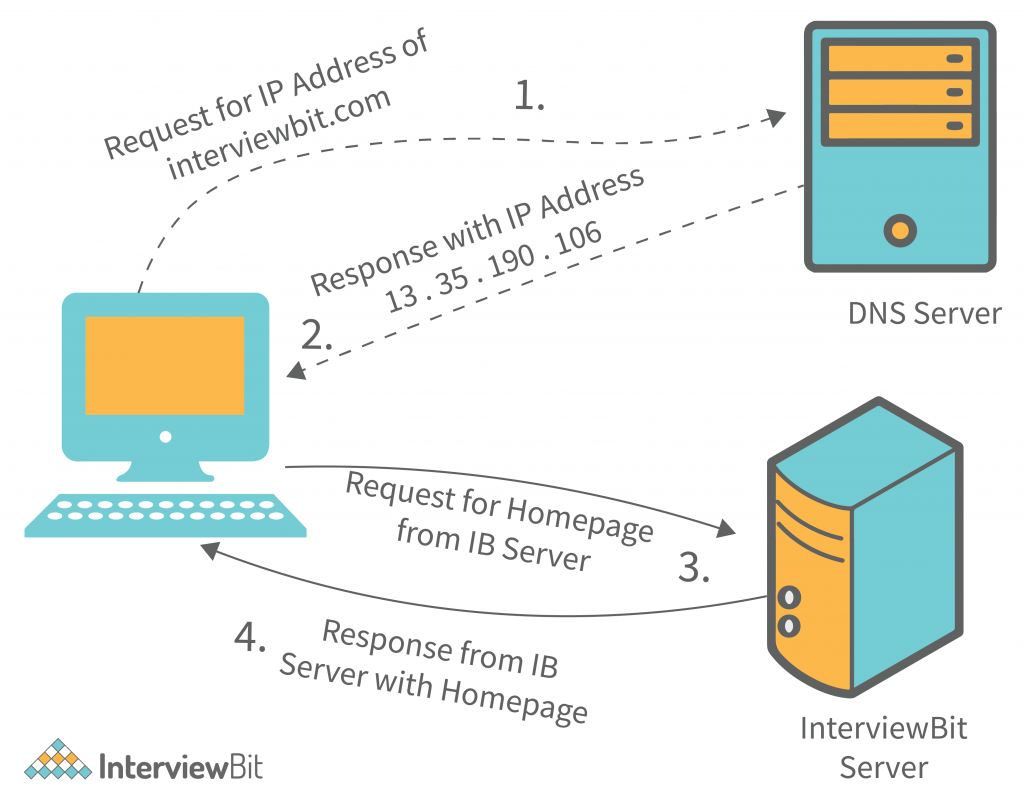
Remote MCP servers operate in cloud infrastructure, accessible via standard web protocols (HTTP/SSE). This architecture powers the next generation of accessible AI applications.
When Remote Deployment Excels
🌐 Web-Based AI Agents
Remote servers are the only option for browser-based AI:
Web Application Example:
- Scenario: AI assistant integrated into company intranet
- Users: 500+ employees across multiple offices
- Traditional Approach: Impossible – browsers cannot run local servers
- Remote Server: Single deployment serves all users instantly
- Setup Time: 30 seconds (OAuth authentication)
67% of enterprise AI applications are delivered via web interfaces, requiring remote server architecture.
📱 Mobile Accessibility
Smartphones and tablets demand cloud connectivity:
Mobile Workflow:
- Sales representative using AI assistant on iPad during client meeting
- Needs access to CRM data, product specs, pricing tools
- Remote MCP server provides instant access to all resources
- Works identically across iOS, Android, and web
👥 Team Collaboration
Remote servers enable shared AI capabilities:
Marketing Team Scenario:
- Query: "Analyze last quarter's campaign performance and suggest improvements"
- Traditional Approach: Each team member installs local server, manages separate credentials
- Remote Server: Centralized access with role-based permissions
- Benefit: Consistent results, shared context, simplified management
🚀 Elastic Scalability
Cloud infrastructure scales automatically:
Startup Growth Example:
- Month 1: 100 users → Single server instance
- Month 6: 10,000 users → Auto-scaled to 50 instances
- Month 12: 100,000 users → Distributed across regions
- Cost: Pay only for actual usage
- Management: Zero infrastructure work required
Remote Server Limitations
Internet Dependency
No connectivity = no functionality:
- Network outages halt all operations
- Poor connections cause frustrating delays
- International travel may limit access
- Bandwidth costs for data-intensive operations
Latency Considerations
Network transmission adds delay:
Typical Latency:
- Same region: 20-50ms
- Cross-country: 50-100ms
- International: 100-300ms
- Satellite/rural: 500-1000ms+
Impact: Noticeable in highly interactive applications.
Provider Trust Requirements
You depend on third-party:
- Security practices and certifications
- Uptime guarantees (SLA)
- Data privacy policies
- Compliance with regulations
- Business continuity and disaster recovery
Due Diligence Required: Vet providers carefully for SOC 2, ISO 27001, GDPR compliance.
How to Choose: Decision Framework
Use this framework to determine the right deployment model:
Choose Local MCP Servers When:
Step 1: Assess Data Sensitivity
- Does your application process regulated data (HIPAA, GDPR, financial)?
- Are there legal requirements for data residency?
- Do security policies prohibit cloud data transmission?
Step 2: Evaluate Performance Requirements
- Does your application require <10ms response times?
- Is real-time interaction critical to user experience?
- Are you processing large files that would be slow to upload?
Step 3: Consider User Technical Capability
- Are all users developers or technical professionals?
- Can you provide installation support and documentation?
- Is command-line setup acceptable for your audience?
Step 4: Determine Connectivity Needs
- Must the application work offline?
- Do users operate in low-connectivity environments?
- Is internet reliability a concern?
If you answered "yes" to multiple questions above, choose local deployment.
Choose Remote MCP Servers When:
Step 1: Assess Accessibility Requirements
- Do you need web-based or mobile access?
- Are users distributed across locations?
- Is team collaboration essential?
Step 2: Evaluate User Technical Level
- Are users non-technical (marketing, sales, general staff)?
- Do you need zero-setup onboarding?
- Is user experience a competitive differentiator?
Step 3: Consider Scale Requirements
- Do you expect rapid user growth?
- Do you need to serve thousands of concurrent users?
- Is global availability important?
Step 4: Assess Maintenance Capacity
- Do you lack infrastructure management resources?
- Do you want automatic updates and security patches?
- Is minimizing operational overhead a priority?
If you answered "yes" to multiple questions above, choose remote deployment.
The Rise of Remote-First AI Infrastructure
While local servers serve critical roles in development and high-security environments, the broader trend is unmistakably toward remote, cloud-hosted architecture.
Why Remote Deployment Dominates
Market Reality:
- Web-based AI agents represent the fastest-growing segment
- Non-technical users outnumber developers 100:1
- Mobile-first workflows demand cloud connectivity
- Collaboration features require centralized infrastructure
89% of enterprises now use multi-cloud strategies, indicating strong preference for cloud-based services.
The MCP Client Challenge
As remote MCP servers proliferate, a new challenge emerges: How do users easily connect to and orchestrate multiple remote servers?
This is where advanced MCP clients become essential infrastructure.
How It Works: Connecting to MCP Servers
Local Server Connection Process
Step 1: Install the Server Download and install the MCP server package (typically via npm, pip, or Docker). Example:
bashnpm install -g @modelcontextprotocol/server-filesystem
Step 2: Configure the Client Edit your MCP client's configuration file to reference the local server. Specify the command to launch it and any required parameters.
Step 3: Launch and Connect Start your MCP client. It automatically launches the local server process and establishes stdio communication.
Step 4: Authenticate Tools Provide API keys or credentials for any external services the server connects to (stored locally).
Remote Server Connection Process
Step 1: Discover the Server Find the remote MCP server you want to use (via marketplace, documentation, or recommendation).
Step 2: Initiate OAuth Flow Click "Connect" in your MCP client. This opens a browser window for authentication.
Step 3: Grant Permissions Review requested permissions and click "Allow" to authorize the connection.
Step 4: Start Using The server is immediately available in your client. No installation, no configuration files, no terminal commands.
Time Comparison:
- Local setup: 15-30 minutes (first time)
- Remote setup: 30-60 seconds
Real-World Use Cases
💼 Enterprise Development Team
Scenario: Software company building internal AI coding assistant
Approach: Hybrid deployment
- Local servers for development and testing (fast iteration, debugging)
- Remote servers for production deployment to 200+ developers
- Result: Developers get instant access via web interface, while maintaining local testing environment
🏥 Healthcare Provider
Scenario: Hospital implementing AI diagnostic support tool
Approach: Local-only deployment
- Requirement: HIPAA compliance, patient data never leaves premises
- Solution: Local MCP servers on hospital network, accessing on-premises EHR system
- Result: Full AI capabilities while maintaining regulatory compliance
📊 Marketing Agency
Scenario: Agency providing AI content tools to 50+ clients
Approach: Remote-only deployment
- Requirement: Clients need instant access without IT involvement
- Solution: Remote MCP servers connecting to content platforms (WordPress, social media, analytics)
- Result: Clients authenticate via OAuth, start using tools in under a minute
🚀 AI Startup
Scenario: Building consumer AI assistant app
Approach: Remote-first with local fallback
- Primary: Remote servers for 99% of users (web and mobile)
- Optional: Local server for power users wanting offline capability
- Result: Broad accessibility while serving advanced use cases
The Role of Advanced MCP Clients
As the MCP ecosystem expands, sophisticated clients become critical infrastructure for managing complexity.
What Advanced Clients Provide
Multi-Server Orchestration:
- Connect to dozens of remote MCP servers simultaneously
- Automatically route requests to appropriate servers
- Handle authentication and credential management
- Provide unified interface across all tools
Intelligent Task Planning:
- Understand complex, multi-step user requests
- Break down goals into sequential tool operations
- Execute workflows across multiple servers
- Handle errors and retry logic automatically
Example Workflow:
User request: "Find the latest sales report on Google Drive, summarize it, and send the summary to the marketing channel on Slack."
Client orchestration:
- Connect to Google Drive MCP server
- Search for "sales report" with date filter
- Retrieve document content
- Process with AI model to generate summary
- Connect to Slack MCP server
- Post summary to specified channel
- Confirm completion to user
User experience: Single natural language request → Complete workflow execution.
Scalability Considerations
Many MCP clients face limitations:
- Support only 5-10 simultaneous tool connections
- Performance degrades with multiple servers
- Manual configuration for each new server
- Limited mobile support
Advanced clients like Jenova address these limitations through:
- Multi-agent architecture supporting unlimited tools
- Optimized performance across dozens of concurrent connections
- One-click server addition and authentication
- Full iOS and Android support
- Model flexibility (works with Gemini, Claude, GPT, and others)
Frequently Asked Questions
How much does MCP server deployment cost?
Local servers are typically free (open-source software), but require hardware investment and IT time for setup and maintenance. Remote servers often use freemium models: free tiers for individual users, paid plans for teams and enterprises. Costs range from $0-50/month for individuals to $500-5000/month for organizations, depending on usage and features.
Can I use both local and remote MCP servers together?
Yes. Advanced MCP clients support hybrid deployments, allowing you to connect to local servers for sensitive data while using remote servers for general tools. This provides flexibility to optimize for each use case. For example, use a local server for proprietary code analysis while using remote servers for web search and communication tools.
Is my data secure with remote MCP servers?
Reputable remote MCP servers use industry-standard security: HTTPS encryption for data in transit, SOC 2 Type II certification, and compliance with GDPR/CCPA. However, you are trusting the provider's security practices. Review their security documentation, certifications, and privacy policy. For highly sensitive data, local deployment may be more appropriate.
Do remote MCP servers work on mobile devices?
Yes, remote servers are ideal for mobile. They work identically across iOS, Android, and web browsers. Local servers cannot run on mobile devices due to operating system limitations. If mobile access is important, remote deployment is your only option.
How do I migrate from local to remote MCP servers?
Migration is straightforward: (1) Identify a remote server providing equivalent functionality, (2) Connect to the remote server via OAuth in your MCP client, (3) Test functionality to ensure parity, (4) Remove local server configuration. Most clients support both simultaneously during transition. Data and credentials typically don't transfer automatically – you'll re-authenticate with the remote server.
What happens if a remote MCP server goes down?
You lose access to that specific tool until service is restored. Reputable providers maintain 99.9%+ uptime through redundant infrastructure. Check the provider's SLA (Service Level Agreement) and status page. For mission-critical applications, consider hybrid deployment with local fallback options or multi-provider redundancy.
Conclusion: Strategic Deployment for AI Infrastructure
The choice between local and remote MCP servers is not binary – it's strategic. Local servers provide maximum control, security, and performance for development and sensitive data. Remote servers deliver accessibility, simplicity, and scale for production applications serving broad audiences.
Key Takeaways:
- Local deployment excels for: Development, regulated data, offline requirements, real-time performance
- Remote deployment excels for: Web/mobile access, non-technical users, team collaboration, rapid scaling
- Hybrid approaches combine strengths: Local for sensitive operations, remote for general tools
- Advanced MCP clients abstract complexity, making remote servers as easy to use as local ones
As the MCP ecosystem matures, remote deployment will dominate production applications due to accessibility requirements. However, local servers will remain essential for development, testing, and high-security environments.
The future is not local versus remote – it's intelligent orchestration across both, powered by sophisticated clients that make the underlying architecture invisible to users. Tools like Jenova represent this future: seamless access to the entire MCP ecosystem, whether servers run on your laptop or across the globe.
The Model Context Protocol is transforming how AI applications connect to tools and data. Your deployment strategy determines whether you capture that transformation's full potential.
References
- Understanding Local and Remote Model Context Protocols - Apideck
- Local vs. Remote MCP Servers: Which One Should You Choose? - LinkedIn
- Model Context Protocol Architecture - modelcontextprotocol.io
- Healthcare Data Breach Statistics - HIPAA Journal
- Cisco Security Outcomes Study
- Gartner AI Job Creation Forecast
- Flexera State of the Cloud Report 2024