Initiative Tracker AI: Combat Order, HP, and Status Effects
2026-09-05
Scattered sticky notes, a color-coded spreadsheet, a browser tab of HP bars — most tables already have an initiative tracker. What they do not have is an initiative tracker AI that remembers why Kyra is Sickened, whether the red goblin still has a reaction, and what the boss should do when the fighter drops. Jenova gives game masters specialized AI agents that keep combat state, tactics, and aftermath in one place so the fight stays on the table instead of in a ledger.
As of September 2026, that bookkeeping no longer has the scene.
✅ Track turn order, HP, and conditions without flipping between apps ✅ Look up status effects in the moment instead of pausing the round ✅ Design encounters that match your party's actual resources ✅ Recap the fight so next session starts on a remembered battlefield
To understand why this matters, look at how combat tracking actually fails at real tables — and what changes when an AI stack holds the state with you.
Quick Answer: What Is Initiative Tracker AI?
Initiative tracker AI is a class of tools that keep combat turn order, hit points, and status conditions current so the GM can run the fight instead of the ledger. On Jenova, that work sits inside specialized agents rather than a single spreadsheet tab.
Key capabilities:
- Live combat state — who acts, who is bloodied, which conditions are still on the board — held by the Roleplay Game Master
- Encounter design and systems notes via the Game Designer Assistant
- Instant condition and rules lookups so Sickened, Blinded, or Persistent Damage does not halt the round
- Combat recaps, named combatants, and player-facing “last fight” summaries instead of a forgotten Discord dump
Why Combat Tracking Breaks Down Mid-Fight
Tabletop combat is a real-time accounting problem disguised as a story. Every round adds turn order, damage, concentration, reactions, and a stack of conditions that each have their own duration and save. Dedicated apps and spreadsheets help. They do not think with you.
GMs already use AI for the logistics that slow a session down — recaps, NPC tracking, campaign continuity — not to replace the people at the table. Combat tracking is the same class of work: admin that steals attention from the scene.
But keeping that state is frustratingly difficult:
- The tracker and the fiction live in different windows
- Conditions stack faster than anyone can look them up
- Prep time is already spoken for before initiative is rolled
- Spreadsheets, VTTs, and paper notes fragment the same fight
- The round stalls while the GM becomes a rules clerk
The Tracker Wins, the Table Loses
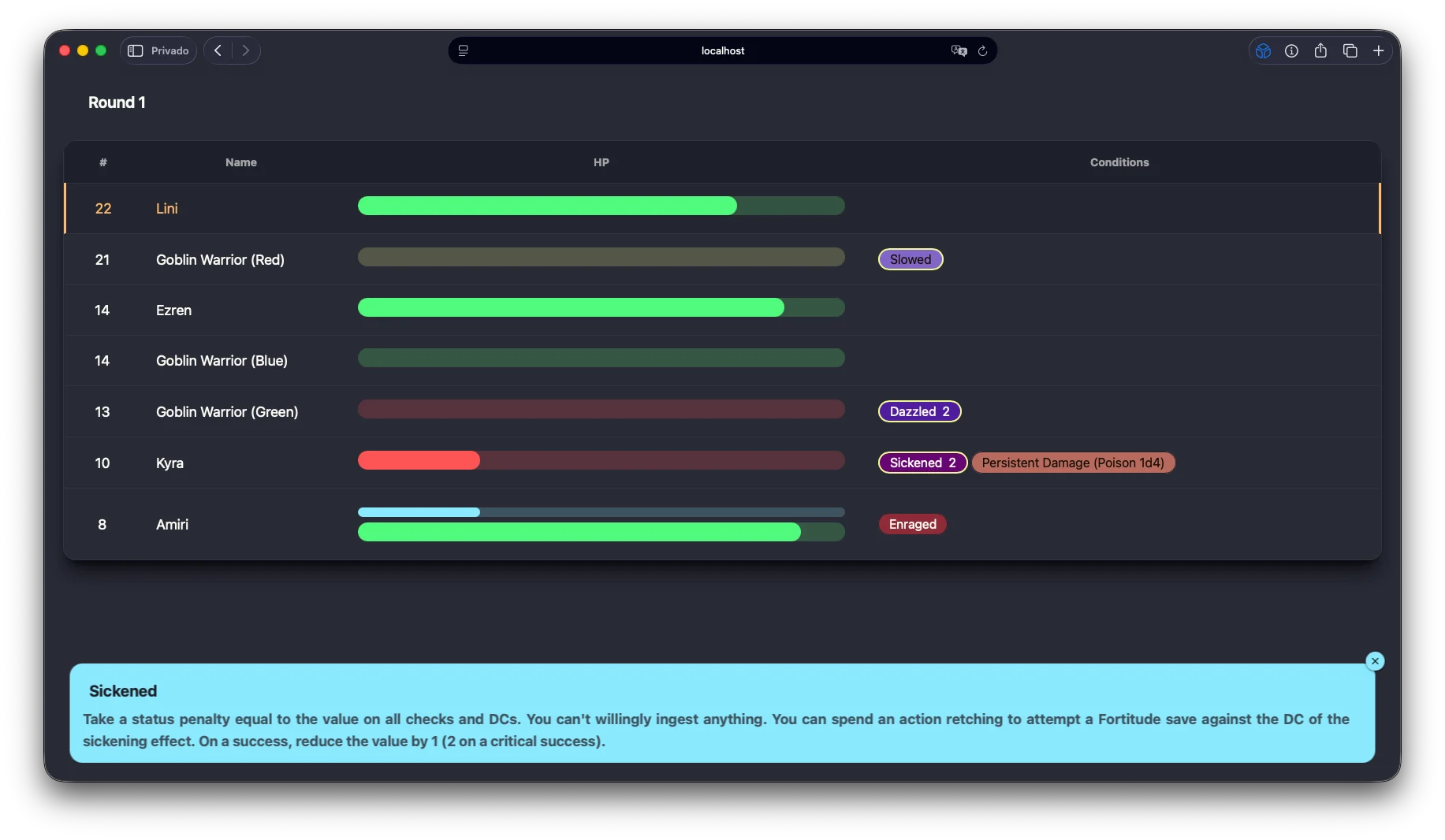
A good initiative board shows Round 1, HP bars, and a row of condition pills. A bad round is the GM staring at that board instead of the players. Turn order is solved. Presence is not.
The more complete the tracker, the more tempting it is to manage the tool. Who is Slowed. Who is Dazzled 2. Who has Persistent Damage (Poison 1d4). Each update is correct and each update is a second the table waits.
Conditions Are Where Combat Actually Breaks
HP is a number. Conditions are procedures. Pathfinder’s Sickened condition is a status penalty, a ban on ingesting anything, and a Fortitude save you can spend an action to attempt. Fifth Edition’s Blinded, Concentrating, and “reaction used” flags are simpler and still get dropped under pressure.
When the GM has to open a second tab to remember what a condition does, initiative tracking has already failed. The order is fine. The fiction is paused.
Prep Is Already Expensive Before Anyone Rolls
Combat bookkeeping is not free time. It sits on top of encounter building, monster stat blocks, and “what happens if they flee.”
29% of dungeon masters — spend three hours or more preparing for a four-hour game, according to a Sly Flourish poll of 3,663 DMs.
A little less than half — spend an hour or less on that same four-hour session.
Either way, the live fight still asks for a second job: clerk. If prep already ate the week, the tracker will be a half-updated spreadsheet and a goblin whose HP nobody trusts.
Setup Time Eats the Top of the Session
Even before the first sword is drawn, the table is paying a tax.
15–30 minutes — of getting into the game is often spent recapping and setting up before play even starts.
Initiative, tokens, and HP columns are part of that tax. A late laptop, a missing stat block, and a debate about who still has a reaction can burn the cold open. Combat that should feel like a raid starts like a standup meeting.
The Record Lives in Too Many Places
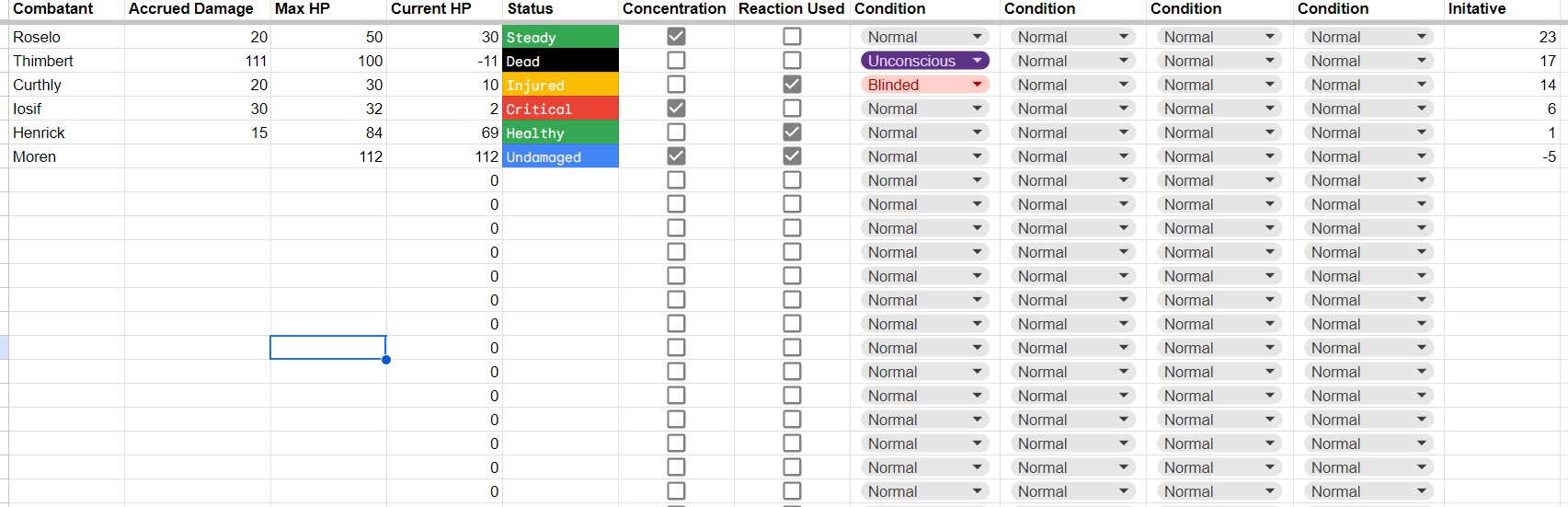
One GM runs a browser tracker. Another runs columns for Accrued Damage, Max HP, Current HP, Status, Concentration, Reaction Used, and Initiative. A third uses index cards. None of those tools remember why Thimbert is Dead at −11, or that Curthly is Blinded and still concentrating.
Community discussion of AI in TTRPGs keeps returning to the same useful jobs: lore summarization, VTT management, and character and campaign management — reducing admin, not replacing storytelling. Initiative is admin. The story is what happens when the admin is no longer the loudest thing at the table.
This is exactly what Jenova was built for.
The Jenova Solution
Jenova is not a virtual tabletop and it does not pretend to replace your HP-bar UI. It is the initiative tracker AI layer around that UI: agents that hold combat state, explain conditions, design the next wave, and write the fight down before anyone forgets who dropped.
Dedicated combat trackers excel at the visual turn order. This platform specializes in the cognitive load — memory, rules, tactics, and the recap — so you can glance at bars and still run a scene.
| Traditional Approach | Jenova |
|---|---|
| Spreadsheet columns for HP, status, and initiative | Conversational combat state that remembers conditions and turn order |
| Pause the round to look up Sickened or Blinded | Condition text, saves, and “what this means this turn” in the same chat |
| Sticky notes that fall off the GM screen | Persistent memory across the session and the campaign |
| Encounter math in a separate doc | Encounter design and live tracking in one workflow |
| Recap written days later, if at all | Combat log drafted before anyone leaves the table |
Live Combat State and Character Memory
The Roleplay Game Master is the agent that should sit open while dice are out. Unlimited conversation memory and character consistency mean the ogre who fled last session is still the ogre who fled — and the PC who is Enraged still sounds Enraged when you ask “what would they do on a readied action?”
Use it as a talking tracker: feed names, HP, and conditions; ask whose turn it is; ask what the green goblin does with Dazzled 2. It will not draw the bar chart for you. It will not lose the bar chart’s meaning.
Encounter Design That Matches the Board
A tracker only helps if the fight was worth tracking. The Game Designer Assistant turns “three goblins and a boss” into a system: action economy, retreat triggers, terrain, and what changes when the first minion drops.
Ask it to tune a Pathfinder skirmish so Slowed actually matters, or a 5e fight where concentration checks are the real clock. Then hand the resulting roster to your live tracker instead of improvising HP in the margins.
Conditions, Rules, and Fast Lookups
The Deep Research agent is for the question you cannot fake at speed: how a poison clock works, what a historical shield wall actually did, whether a condition stacks the way you think it does. Pair it with Quiz Maker if your table likes a 60-second “what does Blinded do” warm-up before a rules-heavy dungeon.
You still make the ruling. You stop flipping PDFs while someone is waiting to take their turn.
Names, Tactics, and NPC Behavior Under Fire
Unnamed “Goblin Warrior (Blue)” is fine until the party captures him. The Name Generator gives you a culturally coherent name in the round he becomes a person. Personality Analyzer locks how he breaks — fight, flight, or bargain — so the tracker’s “Surrender?” note is a character, not a checkbox.
For the intelligent enemy, Machiavelli Mentor is the tactics chair: who they target, when they disengage, what they spend a legendary action on. Initiative order tells you when. This tells you why.
Recaps, Logs, and Visuals After the Last HP Bar Hits Zero
The Writing Assistant turns a round-by-round dump into a player-safe recap and a GM-only file that still lists unused reactions and secret HP. TXT Doc Generator exports a clean combat log you can drop into a campaign folder.
If the table remembers pictures, Graphic Designer can turn the initiative board into a one-page “state of the melee” handout, and Comic Creator can storyboard the critical hit that ended the fight. Film Screenwriter is useful when a combat needs to feel like a scene — beats, reversal, button — not a damage spreadsheet with flavor text.
Civilization is the scale jump: the duke is dead, the garrison routed, and you need the region to react before next session. Combat tracking ends at 0 HP. Campaign tracking starts there.
Specialized AI Agents for Initiative Tracker AI
These are the agents a GM would plausibly open in the next 30 days of running fights.
Roleplay Game Master
If your initiative tracker AI needs to remember people in the stack — not just numbers — this is the live-session seat. Persistent memory means a condition you applied in round two still exists in round seven, and an NPC who was Enraged still plays Enraged when you ask for their next action.
- Holds combatants, HP snapshots, and condition stacks across the conversation
- Stays in character for monster tactics and captured-NPC interrogations after the fight
- Lets you test “what if they run” without derailing the physical table
Game Designer Assistant
Trackers describe the present. This agent designs the fight you are about to track. After you describe the party’s resources, it can cut a too-long slog, add a retreat clause, or rebuild a wave so action economy does not flatten the wizard on turn one.
- Systems analysis for D&D, Pathfinder, PbtA, and homebrew initiative variants
- Converts “it felt slow last time” into concrete encounter changes
- Documents the fight so the next session’s tracker starts from a known roster
Writing Assistant
Most combat notes are unreadable. This agent writes the register you need: laconic GM bullets, a player-facing chronicle that hides remaining enemy HP, or an in-world bard’s account of the clash.
- Splits GM secrets from the recap the table can see
- Cleans voice-to-text dumps from the car ride home
- Produces something people will read before next game instead of a wall of numbers
Name Generator
Initiative lists fail at proper nouns. A culturally fluent naming agent keeps “Goblin Warrior (Green)” from surviving into the recap. Generate a batch before the session, or name the minion in the round they matter.
- Names for combatants, units, siege engines, and named weapons that hit the board
- Linguistic consistency so a warband’s names feel related
- Fast enough to use mid-round when an unnamed NPC suddenly surrenders
Deep Research
When a condition, disease, or historical tactic cannot be hand-waved, this agent synthesizes sources with citations. That brief then becomes next round’s ruling instead of a five-minute wiki detour.
- Cited answers you can keep in the campaign bible
- Useful for historical, mythic, and science-fantasy tables alike
- Saves the pause that kills combat pacing
Try Jenova free — no credit card required.
How to Run Combat With Initiative Tracker AI
Step 1: Load the Roster Before Anyone Rolls
Do not start the tracker in round two. Before initiative, list combatants, HP, AC or defenses, and any opening conditions. Paste it into the roleplay game master (or your design notes from the game design assistant) so the AI’s first job is state, not invention.
"Combat roster: Lini 22 HP, Ezren 14, Kyra 10, Amiri 8. Enemies: Goblin Warrior Red / Blue / Green. Red is Slowed. Track round, HP, and conditions. Ask me whose turn after each action."
Step 2: Call Turns Out Loud, Update in One Place
You still roll dice at the table. After each action, speak the result into the chat or type a one-line update. The agent’s job is to return the next name, the current condition list, and a warning if someone is concentrating, reaction-spent, or dying.
"Amiri hits Goblin Green for 9 slashing and applies Dazzled 2. Kyra is Sickened 2 with Persistent Damage Poison 1d4. Whose turn, and what does Sickened actually do this round?"
Step 3: Resolve Conditions Without Opening a Second Book
When a pill on the tracker is not enough, ask for the procedure: the penalty, the action to end it, the save DC. Keep the ruling at the table. Store the text in the same thread as the HP so you never hunt for it again this fight.
"Kyra wants to spend an action retching. Remind me the Sickened recovery rule and what happens on a critical success. Then tick Persistent Damage."
Step 4: Close the Fight With a Log, Not a Shrug
When the last enemy hits 0, dump remaining HP, unused reactions, loot, and who dropped. Split a GM file from a player recap. Personal Secretary can put the recap on the calendar thread so the next session does not open with “wait, did we kill the blue one?”
"Fight over. Green goblin captured, Red dead, Blue fled. Kyra at 10 HP, still Sickened 1. Write (1) GM combat log with remaining secrets and (2) a 200-word player recap that does not reveal unused enemy HP."
Step 5: Feed the Outcome Into Next Week’s Encounter
Hand the log to the game designer assistant. Ask what the fled goblin tells the camp, whether the captured one bargains, and how to build a follow-up fight that respects the party’s actual remaining hit dice.
"Using this combat log, outline a 3-round sequel: the blue goblin returns with reinforcements, Kyra may still be Sickened, and I want a retreat trigger if the boss drops below 25% HP."
Results & Use Cases
📊 Pathfinder Skirmish With Stacked Conditions
Scenario: Four iconics vs. three goblin warriors. The board already shows Slowed, Dazzled 2, Sickened 2, Enraged, and Persistent Damage. The GM’s browser tracker is correct and the table is still waiting on “what does Sickened do if I drink a potion.”
Traditional Approach: Pause, open the condition text, argue about retching vs. ingesting, lose the Enraged goblin’s intent for a full minute.
Jenova: The GM keeps the visual tracker for bars and asks the Roleplay Game Master for procedures and next-actor prompts. The round stays a round.
- Condition text lives next to the HP update
- Monster intent does not reset every time a rule is checked
- Captured goblin gets a name and a motive before the session ends
💼 Fifth Edition Spreadsheet Table
Scenario: A GM runs combat in a grid: Accrued Damage, Max HP, Current HP, Steady / Injured / Critical / Dead, Concentration, Reaction Used, four condition dropdowns, Initiative. Roselo is Steady at 30/50. Thimbert is Dead at −11. Curthly is Blinded. Iosif is Critical at 2 HP.
Traditional Approach: The sheet is the game. Players wait while dropdowns change. Nobody remembers why concentration is still checked on a dead character.
Jenova: The sheet remains the visual source of truth. The Writing Assistant turns each round into a readable log, and Deep Research (or a pinned condition brief) answers Blinded without a tab switch. After the fight, the log explains the bodies — not just the numbers.
- Status colors stay on the sheet; story stays in the recap
- Concentration and reactions are flagged in prose so they get used
- Dead combatants are removed from the narrative stack on purpose
📱 Phone-Only Combat After a Laptop Dies
Scenario: In-person game, GM’s laptop fails, phone only, six combatants already in the stack. There is no time to rebuild a VTT.
Traditional Approach: Index cards and hope. Conditions evaporate. HP becomes “eh, he’s fine.”
Jenova: Voice-to-text into the roleplay agent from the phone. Call HP and conditions out loud. The AI repeats turn order back. After the session, a recap is posted from the same device. Web, iOS, and Android share the thread.
- Combat continues without a second device
- Speech-to-text captures the dump while memory is accurate
- Next session’s roster is a document, not a reconstruction
🎯 Rotating-GM West Marches Fight
Scenario: Two facilitators, twelve players, the same hex, a fight one group started and another has to finish. Without shared combat state, the owlbear’s HP forks.
Traditional Approach: A wiki nobody updates. Duplicate “we already killed that.” A town that forgets a fire.
Jenova: Each fight’s log feeds a shared campaign state. The Game Designer Assistant maintains creature status and retreat clocks. The next facilitator opens the same one-pager plus the roleplay thread that still knows the owlbear is bloodied and fleeing north.
- The world stays one world across rotating tables
- New facilitators do not inherit tribal HP math
- Player reports become the official record
Examining how GMs actually use AI in TTRPGs — transcripts, recaps, entity tracking, planning chat — shows the same pattern: protect the magic by handing the clerk work to a tool. Initiative tracking is clerk work. The 2026 AI TTRPG tool landscape is full of prep assistants for a reason. Combat is where that prep either pays off or gets buried in a spreadsheet.
FAQ
What is initiative tracker AI used for at a D&D or Pathfinder table?
Initiative tracker AI keeps turn order, hit points, and status conditions available while you run the scene. On Jenova that means a live combat thread, condition lookups, encounter design, and a recap — not a replacement for your VTT’s HP bars. Use a visual tracker for the board. Use the AI for memory, rulings, and tactics.
Is Jenova free to use as initiative tracker AI?
Yes. Jenova has a free tier with all core features and limited monthly usage. Paid tiers increase usage. You do not need a credit card to try a combat thread, an encounter brief, or a recap. If you already pay for a VTT, this sits beside it rather than replacing that subscription.
How is this different from Improved Initiative, D&D Beyond, or a Foundry combat tracker?
Those tools are excellent at the visual stack: portraits, bars, click-to-advance. Jenova does not try to beat them at UI. While general LLMs start from zero every session, a campaign-aware agent remembers the goblin who fled and the PC who is still Sickened. Use both: bars on the VTT, brains in the agent.
Can initiative tracker AI handle Pathfinder conditions and 5e concentration?
Yes, if you put the roster and the system in the prompt. Pathfinder’s valued conditions (Sickened, Dazzled, Slowed, persistent damage) and 5e’s concentration, reactions, and death saves are all stateful lists. Ask the Roleplay Game Master to track them explicitly. Confirm any ruling against your table’s books — the AI is a clerk and a reminder, not the publisher.
Does this work on mobile in the middle of combat?
Yes. Web, iOS, and Android have feature parity, including speech-to-text. That matters because the worst combat tracker is the one on a closed laptop. A phone-thread update after each turn is enough to keep HP and conditions honest when the full UI is unavailable.
Will AI replace the GM during combat?
No, and it should not. The useful job is reducing admin so human storytelling stays in charge. You still call for rolls, describe the hit, and decide when the ogre flees. Initiative tracker AI remembers the stack, explains the condition, and writes the log. The table still belongs to the table.
Conclusion
Initiative tracking is how a fight remains one event instead of a pile of disputed HP. When the tracker is only a spreadsheet, the GM becomes a clerk. When conditions are only icons, nobody remembers the procedure. When the recap never happens, next week’s combat starts with an argument.
Jenova gives a table initiative tracker AI that holds turn order, hit points, and status effects in working memory — then designs the next encounter, names the captive, and writes the log before the dice are in the bag. Keep your visual tracker. Add agents that think alongside it.
The next round should open on a remembered board, not a reconstruction. Run the fight with the Roleplay Game Master, build the sequel with the Game Designer Assistant, and let the Writing Assistant file the recap while the table is still loud. Explore the full agent library at Jenova.
For Developers: Every agent in this article is available programmatically via the Jenova API — build combat-state, condition-lookup, and encounter-prep features into your application with a single integration. Full documentation →