Model Context Protocol (MCP): Complete Implementation Guide
2025-07-22
Model Context Protocol (MCP) is an open-source standard that enables AI models to interact with external tools and data sources through a universal interface. By establishing a standardized communication layer between Large Language Models and external systems, MCP addresses the fragmentation in AI application development and enables developers to build sophisticated, agentic AI systems that can access and manipulate data across multiple platforms.
Key capabilities:
- Universal Integration: Connect any AI model to any compatible tool or data source
- Modular Architecture: Build reusable servers that work across multiple clients
- Three Core Primitives: Tools (executable functions), Resources (data sources), and Prompts (templates)
- Production-Ready: Designed for scalable, secure enterprise deployments
To understand why this protocol matters, let's examine the challenges facing AI application developers today.
Quick Answer: What Is Model Context Protocol (MCP)?
Model Context Protocol (MCP) is an open-source standard that enables AI models to securely connect with external tools and data sources through a universal client-server architecture. Developed by Anthropic, MCP functions as a universal adapter for AI applications—similar to how USB-C standardized device connectivity.
Key capabilities:
- Standardized communication between AI models and external systems
- Three primitive types: Tools (functions), Resources (data), and Prompts (templates)
- Client-server architecture managed by host applications
- Language-agnostic with SDKs for Python, Node.js, and Java
The Problem: Fragmentation in AI Integration
Developers building AI applications face significant integration challenges:
- Proprietary Integration Patterns – Each AI platform requires custom integration code
- Vendor Lock-In – Applications become tightly coupled to specific AI providers
- Maintenance Overhead – Every new tool requires separate implementations for each platform
- Security Concerns – Inconsistent approaches to data access and permissions
- Scalability Limitations – Custom integrations don't scale across multiple tools
The Cost of Custom Integrations
According to Anthropic's MCP documentation, organizations building AI applications typically spend 40-60% of development time on integration work rather than core functionality. This fragmentation creates several critical problems:
40-60% – Percentage of AI development time spent on custom integrations Source: Anthropic MCP Documentation
Lack of Standardization
Without a universal protocol, each AI application requires custom code for every external system it needs to access. A developer building a customer service AI might need separate implementations for:
- CRM system integration (Salesforce, HubSpot)
- Knowledge base access (Confluence, Notion)
- Ticketing systems (Zendesk, Jira)
- Communication platforms (Slack, Teams)
Each integration follows different patterns, uses different authentication methods, and requires ongoing maintenance as APIs evolve.
Security and Governance Challenges
Custom integrations often lack consistent security controls. Organizations struggle to:
- Implement uniform access policies across different tools
- Audit what data AI models can access
- Revoke permissions when team members change roles
- Ensure compliance with data protection regulations
These challenges become exponentially more complex as organizations scale their AI deployments across multiple use cases and departments.
The Reusability Problem
When a developer builds a GitHub integration for one AI application, that code typically can't be reused for another application using a different AI platform. This leads to duplicated effort, inconsistent implementations, and technical debt that accumulates over time.
The Model Context Protocol Solution
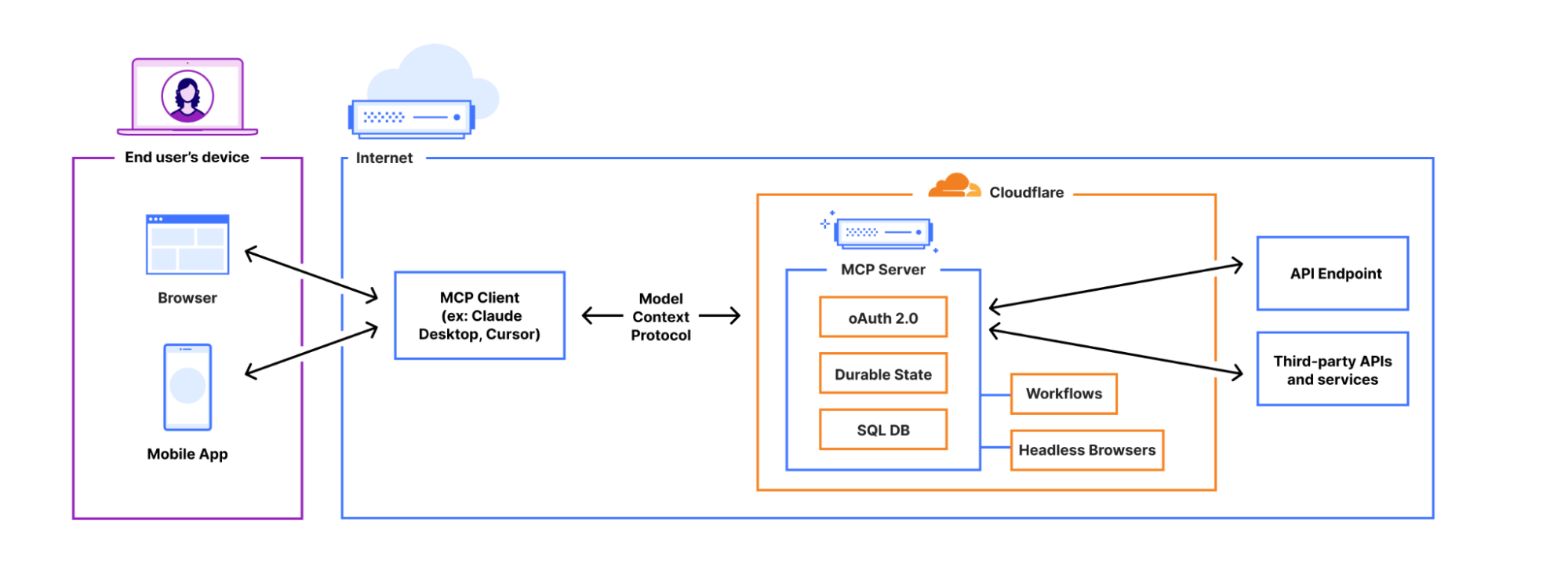
Model Context Protocol solves these challenges by establishing a universal standard for AI-tool communication. Instead of building custom integrations for each AI platform, developers create a single MCP server that works with any compatible client.
| Traditional Approach | Model Context Protocol |
|---|---|
| Custom integration per AI platform | Single server works with all clients |
| Proprietary communication patterns | Standardized protocol specification |
| Inconsistent security models | Unified permission and access controls |
| Limited tool reusability | Complete modularity and composability |
| Vendor lock-in | Platform-agnostic architecture |
Core Architecture Components
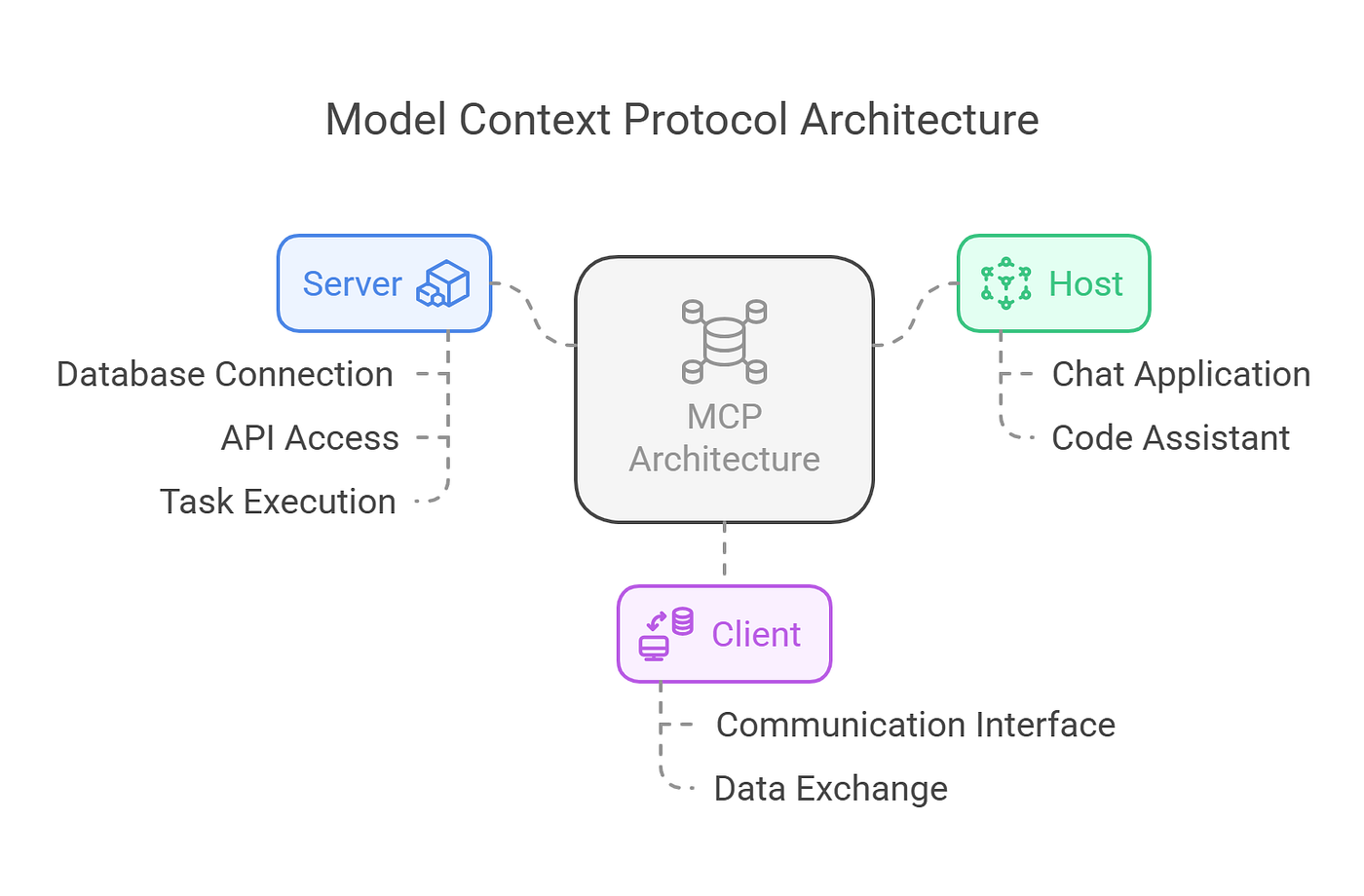
MCP operates on a three-part architecture, as detailed in the official MCP documentation:
MCP Host
The host is the runtime environment that orchestrates communication between clients and servers. Examples include:
- IDE integrations (VS Code, Cursor)
- AI applications (Claude for Desktop, Jenova)
- Custom applications built with MCP SDKs
The host manages server lifecycle, handles authentication, and routes requests between clients and servers.
MCP Server
Servers expose capabilities to AI models through three primitive types:
Tools: Executable functions that perform actions
- Fetch data from APIs
- Query databases
- Send messages or notifications
- Modify files or documents
Resources: File-like data sources that provide context
- Document contents
- Codebase files
- Search results
- Database records
Prompts: Pre-defined templates that guide AI behavior
- Task-specific instructions
- Response formatting rules
- Multi-step workflow definitions
MCP Client
The client interface enables users and AI models to interact with server capabilities. Clients:
- Send requests to servers on behalf of users
- Present AI-generated responses
- Manage authentication and permissions
- Handle error states and retries
How MCP Enables Composability
The protocol's modular design allows developers to:
- Build Once, Use Everywhere: A single GitHub MCP server works with Claude, GPT-4, Gemini, or any other compatible client
- Mix and Match Tools: Combine servers from different providers to create custom workflows
- Scale Incrementally: Add new capabilities by deploying additional servers without modifying existing code
- Maintain Security: Implement consistent access controls across all integrations
How to Build Your First MCP Server
Implementing Model Context Protocol requires understanding both server development and client integration. This section provides a practical, step-by-step guide to building a functional MCP server.
Step 1: Environment Setup
Before building an MCP server, establish a proper development environment. The MCP quickstart guide recommends using Python 3.10 or higher with the uv package manager.
Install Python and uv:
bash# Install uv (macOS/Linux)
curl -LsSf https://astral.sh/uv/install.sh | sh

# Verify installation
uv --version
Create your project structure:
bash# Initialize project directory
uv init weather-mcp-server
cd weather-mcp-server

# Create and activate virtual environment
uv venv
source .venv/bin/activate  # On Windows: .venv\Scripts\activate

# Install MCP SDK and dependencies
uv add "mcp[cli]" httpx
This setup isolates your project dependencies and ensures compatibility with the MCP SDK.
Step 2: Server Implementation
Create a file named weather_server.py and implement the core server logic. The FastMCP class from the SDK simplifies server creation:
pythonimport httpx
from mcp.server.fastmcp import FastMCP

# Initialize server with unique identifier
mcp = FastMCP("weather_server")

@mcp.tool()
async def get_forecast(latitude: float, longitude: float) -> str:
    """
    Get weather forecast for specific coordinates.

    Args:
        latitude: Location latitude (-90 to 90)
        longitude: Location longitude (-180 to 180)

    Returns:
        Weather forecast string with temperature and conditions
    """
    # Validate coordinates
    if not (-90 <= latitude <= 90) or not (-180 <= longitude <= 180):
        return "Error: Invalid coordinates. Latitude must be -90 to 90, longitude -180 to 180."

    # In production, call a real weather API
    # Example: OpenWeatherMap, Weather.gov, etc.
    return f"Forecast for ({latitude}, {longitude}): Sunny, high of 75°F, low of 58°F. Light winds from the west."

if __name__ == "__main__":
    # Run server with stdio transport for local development
    mcp.run(transport='stdio')
Key implementation details:
- The
@mcp.tool()decorator registers functions as callable tools - Function docstrings and type hints automatically generate tool definitions
- The
asynckeyword enables non-blocking operations for API calls - The
stdiotransport enables communication with local clients
Step 3: Testing Your Server
Before connecting to a client, verify your server works correctly:
bash# Run the server directly
python weather_server.py

# The server will start and wait for client connections
# Press Ctrl+C to stop
For more robust testing, use the MCP Inspector tool:
bash# Install MCP Inspector
npm install -g @modelcontextprotocol/inspector

# Launch inspector with your server
mcp-inspector python weather_server.py
The inspector provides a web interface to test tool execution, inspect responses, and debug issues.
Step 4: Client Configuration
To use your server with an MCP-compatible client like Claude for Desktop, configure the client to discover and launch your server.
Locate the configuration file:
- macOS:
~/Library/Application Support/Claude/claude_desktop_config.json - Windows:
%APPDATA%\Claude\claude_desktop_config.json - Linux:
~/.config/Claude/claude_desktop_config.json
Add your server configuration:
json{
  "mcpServers": {
    "weather_server": {
      "command": "uv",
      "args": [
        "--directory",
        "/absolute/path/to/weather-mcp-server",
        "run",
        "weather_server.py"
      ]
    }
  }
}
Important configuration notes:
- Use absolute paths, not relative paths or
~shortcuts - The
commandfield specifies the executable to run - The
argsarray passes arguments to the command - Server names must be unique within the configuration
Restart and verify:
- Completely quit and restart the client application
- Look for an indicator showing external tools are available
- Test with a query: "What's the weather forecast for latitude 40.7128, longitude -74.0060?"
The client will recognize your tool, execute it through the server, and incorporate the results into its response.
Step 5: Adding Resources and Prompts
Expand your server's capabilities by implementing resources and prompts alongside tools.
Adding a resource:
python@mcp.resource("weather://locations")
async def list_locations() -> str:
    """
    Provide a list of supported weather locations.
    """
    locations = [
        {"name": "New York", "lat": 40.7128, "lon": -74.0060},
        {"name": "London", "lat": 51.5074, "lon": -0.1278},
        {"name": "Tokyo", "lat": 35.6762, "lon": 139.6503}
    ]
    return str(locations)
Adding a prompt template:
python@mcp.prompt()
async def weather_report_prompt(location: str) -> str:
    """
    Generate a detailed weather report prompt.

    Args:
        location: City name or coordinates
    """
    return f"""Provide a comprehensive weather report for {location} including:
    - Current conditions
    - 5-day forecast
    - Any weather alerts or warnings
    - Recommendations for outdoor activities
    """
These additions make your server more versatile and enable richer interactions with AI models.
Leveraging Production-Ready MCP Clients
While building servers unlocks customization, the user experience depends on the client. For developers testing implementations or users seeking powerful MCP capabilities, Jenova provides a production-ready agentic client specifically designed for the MCP ecosystem.
Why Jenova Excels as an MCP Client
🔌 Seamless Remote Server Integration
Jenova connects effortlessly to remote MCP servers, enabling instant access to tools for:
- Calendar Management: Schedule meetings, send invites, check availability
- Document Editing: Modify files, generate reports, update spreadsheets
- Database Queries: Search internal systems, retrieve customer data, analyze metrics
- Communication: Send messages, create notifications, update team channels
Unlike local-only clients, Jenova supports both local and remote server connections, making it suitable for enterprise deployments.
🤖 Multi-Step Agentic Workflows
Jenova understands high-level goals and autonomously plans multi-step workflows:
Example workflow:
- User request: "Find the best laptop under $1000 and share a comparison with my team"
- Jenova's execution:
- Searches multiple e-commerce sites using web search tools
- Extracts product specifications and prices
- Generates a comparison table with pros/cons
- Creates a formatted document
- Sends the document to specified team members via messaging tools
This agentic capability distinguishes Jenova from simple command-line clients that require explicit instructions for each step.
⚡ Unlimited Tool Scalability
Jenova's multi-agent architecture supports virtually unlimited tools without performance degradation. According to Jenova's technical documentation, the platform can:
- Manage 100+ concurrent MCP server connections
- Route requests to specialized agents based on task requirements
- Maintain sub-second response times even with extensive tool libraries
This contrasts with clients like Cursor, which has documented limitations on the number of tools it can effectively integrate.
🧠 Multi-Model Intelligence
Jenova operates as a model-agnostic platform, seamlessly working with:
- GPT-4 and GPT-4 Turbo: For complex reasoning and code generation
- Claude 3 (Opus, Sonnet, Haiku): For nuanced understanding and long-context tasks
- Gemini Pro: For multimodal capabilities and fast inference
The platform automatically selects the optimal model for each query, ensuring users always get the best possible results without manual model switching.
📱 Mobile-First Accessibility
Unlike desktop-only clients, Jenova provides full MCP functionality on mobile platforms:
- iOS and Android apps: Native mobile experiences with offline capabilities
- Responsive web interface: Works seamlessly on tablets and smartphones
- Voice input support: Hands-free interaction for on-the-go productivity
This mobile-first approach makes MCP's power accessible to non-technical users for everyday tasks.
Real-World Use Cases
📊 Business Intelligence Analysis
Query: "Analyze our Q4 sales data and identify the top 3 underperforming products"
Traditional Approach:
- Export data from CRM (15 minutes)
- Import into spreadsheet (5 minutes)
- Create pivot tables and charts (20 minutes)
- Write analysis summary (15 minutes)
- Total time: 55 minutes
- Connects to CRM via MCP server
- Queries sales data directly
- Performs statistical analysis
- Generates visualizations
- Creates executive summary
- Total time: 2 minutes
Key benefits:
- ✅ Real-time data access without exports
- ✅ Automated analysis with statistical rigor
- ✅ Professional visualizations and reports
- ✅ Actionable insights with recommendations
💼 Customer Support Automation
Query: "Check if customer #12345 has any open tickets and summarize their recent interactions"
Traditional Approach:
- Log into support system (2 minutes)
- Search for customer (1 minute)
- Review ticket history (10 minutes)
- Check communication logs (5 minutes)
- Compile summary (5 minutes)
- Total time: 23 minutes
- Queries ticketing system via MCP
- Retrieves customer history
- Analyzes sentiment and patterns
- Generates comprehensive summary
- Total time: 30 seconds
Key benefits:
- ✅ Instant access to customer context
- ✅ Sentiment analysis of interactions
- ✅ Pattern recognition for recurring issues
- ✅ Proactive resolution recommendations
📱 Mobile Productivity
Query: "Schedule a meeting with the engineering team next Tuesday at 2 PM and send them the Q4 roadmap"
Traditional Approach:
- Open calendar app (30 seconds)
- Create meeting invite (2 minutes)
- Find team members' emails (1 minute)
- Locate roadmap document (2 minutes)
- Attach and send (1 minute)
- Total time: 6.5 minutes
- Checks team availability via calendar MCP server
- Creates meeting with optimal time
- Retrieves roadmap from document server
- Sends invites with attachment
- Total time: 15 seconds
Key benefits:
- ✅ Hands-free operation via voice input
- ✅ Intelligent scheduling with conflict resolution
- ✅ Automatic document retrieval and sharing
- ✅ Works seamlessly on mobile devices
Advanced MCP Implementation Patterns
Once you've mastered basic server creation, these advanced patterns enable more sophisticated implementations.
Authentication and Security
Implement secure authentication for servers accessing sensitive data:
pythonfrom mcp.server.fastmcp import FastMCP
import os

mcp = FastMCP("secure_server")

@mcp.tool()
async def query_database(query: str) -> str:
    """
    Execute a database query with authentication.
    """
    # Retrieve credentials from environment variables
    api_key = os.getenv("DATABASE_API_KEY")
    if not api_key:
        return "Error: Authentication credentials not configured"

    # Implement your secure database query logic
    # Use parameterized queries to prevent SQL injection
    return "Query results..."
Security best practices:
- Store credentials in environment variables, never in code
- Use OAuth 2.0 for third-party service authentication
- Implement rate limiting to prevent abuse
- Validate and sanitize all user inputs
- Log access attempts for audit trails
Error Handling and Resilience
Robust error handling ensures reliable server operation:
pythonimport httpx
from mcp.server.fastmcp import FastMCP

mcp = FastMCP("resilient_server")

@mcp.tool()
async def fetch_api_data(endpoint: str) -> str:
    """
    Fetch data from external API with error handling.
    """
    try:
        async with httpx.AsyncClient(timeout=10.0) as client:
            response = await client.get(endpoint)
            response.raise_for_status()
            return response.text
    except httpx.TimeoutException:
        return "Error: Request timed out after 10 seconds"
    except httpx.HTTPStatusError as e:
        return f"Error: HTTP {e.response.status_code} - {e.response.text}"
    except Exception as e:
        return f"Error: Unexpected error occurred - {str(e)}"
Resilience patterns:
- Implement timeouts for all external calls
- Use exponential backoff for retries
- Provide informative error messages
- Log errors for debugging and monitoring
- Implement circuit breakers for failing services
Performance Optimization
Optimize server performance for production deployments:
pythonfrom mcp.server.fastmcp import FastMCP
import asyncio
from functools import lru_cache

mcp = FastMCP("optimized_server")

@lru_cache(maxsize=100)
def expensive_computation(input_data: str) -> str:
    """
    Cache results of expensive computations.
    """
    # Perform computation
    return f"Result for {input_data}"

@mcp.tool()
async def parallel_processing(items: list[str]) -> str:
    """
    Process multiple items concurrently.
    """
    tasks = [process_item(item) for item in items]
    results = await asyncio.gather(*tasks)
    return str(results)

async def process_item(item: str) -> str:
    # Process individual item
    return expensive_computation(item)
Performance best practices:
- Use caching for frequently accessed data
- Implement concurrent processing with
asyncio - Minimize external API calls
- Use connection pooling for database access
- Monitor and profile server performance
Frequently Asked Questions
Is Model Context Protocol free to use?
Yes, MCP is an open-source protocol with no licensing fees. The official MCP specification is freely available, and SDKs for Python, Node.js, and Java are provided under permissive open-source licenses. However, individual MCP clients like Jenova may have their own pricing models for premium features.
How does MCP compare to function calling in OpenAI or Claude?
MCP provides a standardized, platform-agnostic approach to tool integration, while function calling is specific to individual AI providers. With MCP, you build a single server that works with any compatible client (OpenAI, Claude, Gemini, etc.). Function calling requires separate implementations for each provider's API. MCP also offers additional primitives (Resources and Prompts) beyond simple function execution.
Can MCP servers access local files and databases?
Yes, MCP servers can access any resources available to the server process, including local files, databases, and system APIs. However, you must implement appropriate security controls and authentication to protect sensitive data. The MCP security documentation provides guidelines for secure server implementation.
Do I need an account to use MCP?
MCP itself is a protocol specification and doesn't require an account. However, specific MCP clients may require user accounts. For example, Jenova requires users to sign up for an account to access its agentic capabilities and server integrations. The free tier provides full access to core features with daily usage limits.
Does MCP work on mobile devices?
MCP is a protocol specification that works on any platform with compatible client software. While some clients like Claude for Desktop are desktop-only, Jenova provides full MCP functionality on iOS and Android devices, enabling mobile-first workflows and on-the-go productivity.
Is MCP accurate and reliable for production use?
MCP itself is a communication protocol—its reliability depends on the implementation quality of servers and clients. Well-designed MCP servers with proper error handling, authentication, and testing are suitable for production deployments. The protocol's standardization actually improves reliability by reducing custom integration code and enabling better testing and monitoring practices.
Conclusion: Building the Composable AI Future
Model Context Protocol represents a fundamental shift toward open, standardized AI application development. By establishing a universal language for AI-tool communication, MCP eliminates vendor lock-in, reduces integration complexity, and enables true composability in AI systems.
For developers, mastering MCP means building tools once and deploying them across any compatible platform. For organizations, it means faster development cycles, reduced maintenance overhead, and the flexibility to adopt best-of-breed AI models without rewriting integrations.
Whether you're building custom MCP servers to expose proprietary data or leveraging powerful clients like Jenova to orchestrate complex workflows, understanding and implementing MCP is essential for anyone building at the forefront of artificial intelligence. As the ecosystem of MCP-compatible tools continues to expand, the potential for creating intelligent, autonomous agents will only grow—ushering in an era where AI applications are as composable and interoperable as the web itself.