Model Context Protocol AI: Making AI Genuinely Useful for Everyone
2025-07-21
Model Context Protocol (MCP) is transforming AI from a passive information provider into an active digital assistant that connects seamlessly with your apps, automates multi-step workflows, and gets real work done. While most AI today requires constant copy-pasting between tools, MCP enables AI to directly interact with your calendar, email, files, and hundreds of other services—turning simple commands into completed tasks.
Key capabilities:
- ✅ Universal connectivity – One standard connects AI to any app or service
- ✅ Automated workflows – Execute multi-step tasks across multiple tools
- ✅ Zero manual integration – No coding required to connect new services
- ✅ Real-time action – AI moves beyond chat to complete actual tasks
To understand why this matters, let's examine the fundamental limitations holding back today's AI assistants.

Quick Answer: What Is Model Context Protocol (MCP)?
Model Context Protocol (MCP) is an open standard that enables AI models to connect with external tools and data sources through a universal interface. Introduced by Anthropic, it functions as a "USB-C port for AI," allowing any AI application to communicate with any compatible service without custom integrations.
Key capabilities:
- Standardized communication between AI models and external tools
- Eliminates need for custom, one-off integrations
- Enables AI to take direct action across multiple applications
- Supports dynamic discovery of new tools and resources
The Problem: AI That Can't Actually Do Anything
Despite impressive conversational abilities, most consumer AI remains frustratingly limited. According to Retool's analysis of AI tool integration, the fundamental issue is isolation—AI assistants exist in a walled garden, disconnected from the apps and services where actual work happens.
The core challenges facing AI users today:
- Manual data transfer – Constant copy-pasting between AI and other apps
- Fragmented workflows – AI can suggest actions but can't execute them
- Integration complexity – Each new connection requires custom development
- Limited context – AI lacks access to real-time data from your tools
- Passive assistance – AI provides information but can't take action
Let's examine each limitation in detail.
The Copy-Paste Tango: Breaking Workflow Momentum
The typical AI interaction follows a predictable pattern: ask a question, receive an answer, copy the response, switch to another application, paste the content, and manually complete the task. This "copy-paste tango" destroys productivity.
Consider drafting an email. You ask AI to write it, copy the text, open your email client, paste it into a new message, add recipients, adjust formatting, and send. What should be a single command becomes a six-step manual process. The AI provided value, but you still did most of the work.
73% of knowledge workers report spending significant time moving information between applications, according to workplace productivity research.
This fragmentation extends beyond email. Scheduling meetings requires checking calendars manually. Research tasks demand switching between AI chat and browser tabs. File organization means downloading, renaming, and uploading documents individually. Each context switch costs time and mental energy.
Custom Integration Hell: The Developer Bottleneck
Before MCP, connecting AI to external services required building custom integrations for each tool. A calendar connection needed one integration. Email needed another. File storage needed a third. Each integration was a separate development project.
This created a massive bottleneck. Only large companies with dedicated engineering teams could build comprehensive AI assistants. Smaller organizations and individual users were left with basic, disconnected tools.
$300-$500 per hour – Average cost of custom API integration development
The fragmentation meant AI assistants worked well with a handful of popular services but couldn't connect to specialized tools, internal databases, or niche applications. Users faced a choice: use limited, pre-integrated tools or invest heavily in custom development.
The Context Gap: AI Without Real-Time Information
Effective assistance requires context. A truly helpful assistant knows your schedule, understands your current projects, and accesses relevant information automatically. Traditional AI lacks this awareness.
When you ask, "When should I leave for my next meeting?" a disconnected AI can't help. It doesn't know your calendar, current location, or real-time traffic conditions. You must manually provide every piece of information, defeating the purpose of having an assistant.
This context gap extends to all domains. AI can't summarize your latest emails without access to your inbox. It can't organize files without connecting to your storage. It can't update project status without reading your task management system. The assistant that should simplify your life instead requires constant manual updates.
Passive Information vs. Active Execution
The most fundamental limitation is that traditional AI provides information but doesn't take action. It can draft a meeting agenda but can't schedule the meeting. It can suggest task priorities but can't update your project management tool. It can find flight options but can't book the ticket.
This passive role means AI remains a research tool rather than a true assistant. You still perform all the execution steps manually. The AI saves time on information gathering but doesn't reduce the actual work of getting things done.
The Model Context Protocol Solution: AI That Actually Works
Model Context Protocol (MCP) solves these problems by creating a universal standard for AI-tool communication. Instead of building custom integrations for each service, developers implement MCP once, and their tool becomes accessible to any MCP-compatible AI.
| Traditional AI Approach | Model Context Protocol AI |
|---|---|
| Custom integration for each tool | Universal standard works with all tools |
| Copy-paste between applications | Direct action across connected services |
| Passive information provider | Active task executor |
| Limited to pre-integrated services | Dynamic discovery of new tools |
| Requires constant manual updates | Real-time access to current data |
| Isolated from your workflow | Embedded in your digital ecosystem |
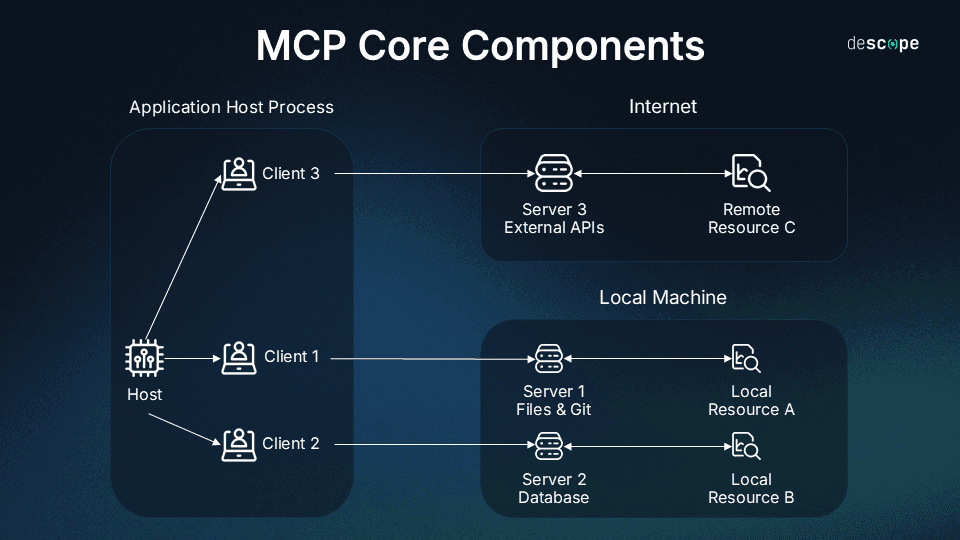
The protocol defines three core components that work together seamlessly:
MCP Servers: Making Tools AI-Accessible
An MCP server wraps any tool, application, or data source in a standardized interface. When a developer creates an MCP server for their service, they're essentially saying, "Here's how AI can interact with this tool."
For example, a Google Calendar MCP server exposes functions like "list events," "create event," and "update event." A file storage MCP server provides "read file," "write file," and "search files." Each server translates between the tool's native API and the universal MCP standard.
This standardization means AI doesn't need to understand each tool's unique quirks. It communicates through MCP, and the server handles the translation. One protocol, unlimited tools.
MCP Clients: AI Applications That Take Action
An MCP client is an AI application designed to discover and use MCP servers. When you connect a new tool, the client automatically learns what that tool can do and how to use it.
Advanced clients like Jenova go further, using sophisticated planning to execute multi-step workflows. When you give a complex command, the client breaks it into steps, determines which tools to use, executes each action in sequence, and handles errors gracefully.
This intelligence transforms AI from a single-purpose tool into a general-purpose assistant. The same client that schedules meetings can also organize files, send emails, analyze data, and automate research—all through the same natural language interface.
The Protocol: Universal Communication Standard
The MCP protocol itself defines how clients and servers communicate. It specifies message formats, authentication methods, error handling, and capability discovery. This standardization ensures any MCP client can work with any MCP server without custom configuration.
According to Anthropic's technical documentation, the protocol supports both local and remote connections, enabling AI to interact with tools running on your device or in the cloud. It includes security features to ensure AI can only access tools you've explicitly authorized.
How Model Context Protocol Works: Step-by-Step
Understanding Model Context Protocol in practice helps clarify its transformative potential. Here's how a typical workflow unfolds:
Step 1: Connect Your Tools
You start by connecting MCP servers for the tools you use. In an MCP-compatible client like Jenova, this means adding connections to services like Google Calendar, Slack, Notion, GitHub, or your file storage. Each connection authorizes the AI to interact with that specific tool on your behalf.
For example, connecting Google Calendar might involve authenticating with your Google account and granting permission to read and create events. The MCP server handles all technical details—you simply authorize access through a familiar OAuth flow.
Step 2: Give a Natural Language Command
Once tools are connected, you interact with AI using natural language. Instead of navigating multiple applications, you describe what you want to accomplish.
Example command: "Schedule a 30-minute meeting with Sarah next Tuesday afternoon, find a coffee shop halfway between our offices, and send her the calendar invite with the location."
This single sentence describes a workflow that traditionally requires opening your calendar, checking Sarah's availability, searching maps, creating an event, and sending an invitation—at least five separate actions across three applications.
Step 3: AI Plans the Workflow
The MCP client analyzes your command and creates an execution plan. It identifies the required steps, determines which tools to use, and sequences the actions logically.
For the meeting example, the plan might be:
- Query Google Calendar for your availability Tuesday afternoon
- Query Sarah's public calendar for her availability
- Find overlapping free time
- Query Maps API for coffee shops between your locations
- Create calendar event with selected time and location
- Send invitation to Sarah
Advanced clients like Jenova handle this planning automatically, using multi-agent architecture to ensure reliable execution even for complex workflows.
Step 4: Execute Actions Across Tools
The AI executes each step in sequence, using the appropriate MCP server for each action. It queries your calendar through the Google Calendar MCP server, searches locations through a Maps MCP server, and creates the event back through the calendar server.
If any step fails—perhaps Sarah's calendar isn't publicly accessible—the AI adapts. It might ask you for her availability or suggest alternative approaches. This error handling ensures workflows complete successfully even when conditions aren't perfect.
Step 5: Confirm Completion
Once all actions are complete, the AI confirms the result. "I've scheduled a 30-minute meeting with Sarah on Tuesday at 2 PM at Blue Bottle Coffee (123 Main St) and sent her the calendar invitation."
You accomplished a complex, multi-app workflow with a single command. No context switching, no manual data entry, no copy-pasting. The AI handled everything.
Real-World Applications: MCP in Action
The practical impact of Model Context Protocol AI becomes clear through specific use cases. Here's how it transforms common workflows:
📊 Automated Business Reporting
Scenario: A sales manager needs weekly performance reports combining data from multiple sources.
Traditional Approach: Log into Salesforce, export data to CSV, open spreadsheet software, import data, create charts, copy charts into presentation software, add commentary, save and share. Total time: 45-60 minutes weekly.
Model Context Protocol AI: "Generate this week's sales report comparing performance to last quarter, include top performers and deals at risk, and share it in the #sales-team Slack channel."
The AI connects to Salesforce via MCP, queries relevant data, performs analysis, generates visualizations, creates a formatted report, and posts it to Slack. Total time: 30 seconds.
Key benefits:
- Eliminates manual data export and import
- Ensures consistent report format and metrics
- Delivers insights to the team instantly
- Frees manager to focus on strategy rather than reporting
💼 Intelligent Meeting Preparation
Scenario: A consultant has a client meeting in two hours and needs to prepare.
Traditional Approach: Search email for previous conversations, review shared documents in Google Drive, check project status in task management tool, compile notes manually, create agenda document. Total time: 30-40 minutes.
Model Context Protocol AI: "Prepare me for my 2 PM meeting with Acme Corp—summarize recent email threads, pull key points from our shared project docs, check current task status, and create a meeting agenda."
The AI accesses email via MCP, reads relevant Google Drive documents, queries the project management tool, synthesizes information, and generates a comprehensive briefing document. Total time: 45 seconds.
Key benefits:
- Comprehensive context from multiple sources
- No information missed due to manual search
- More time for strategic thinking
- Consistent preparation quality
📱 Personal Task Automation
Scenario: A busy parent needs to coordinate family logistics while commuting.
Traditional Approach: Check family calendar on phone, send text messages to coordinate, search for restaurant options, make reservation by phone or app, update calendar with plans, send confirmation messages. Total time: 15-20 minutes of fragmented attention.
Model Context Protocol AI: "Find a family-friendly restaurant near the kids' soccer field for 6 PM Saturday, make a reservation for four, and add it to the family calendar with a reminder to leave by 5:30."
The AI checks the family calendar via MCP, searches restaurant options through a dining MCP server, makes the reservation, creates the calendar event, and sets the reminder. Total time: 20 seconds, with zero attention required.
Key benefits:
- Hands-free operation while driving or multitasking
- Reduced mental load from coordination tasks
- Fewer missed details or forgotten steps
- More present time with family
🎯 Research and Content Creation
Scenario: A marketer needs to create social media content based on competitor analysis.
Traditional Approach: Search competitor websites manually, take notes, analyze messaging, draft posts in a document, copy to social media scheduling tool, format for each platform. Total time: 2-3 hours.
Model Context Protocol AI: "Research the top three competitors for our new product, analyze their key marketing messages, and draft three LinkedIn posts highlighting our differentiators."
The AI uses a web search MCP server to research competitors, analyzes their messaging, identifies differentiators, drafts platform-optimized posts, and can even schedule them through a social media MCP server. Total time: 2-3 minutes.
Key benefits:
- Comprehensive competitive intelligence
- Data-driven content strategy
- Consistent brand voice across platforms
- Dramatically faster content production
Jenova: The Leading MCP-Native AI Agent
While MCP provides the standard, the user experience depends on the client application. Jenova stands out as the first AI agent built specifically for the MCP ecosystem, designed to make agentic AI accessible to everyone.
Multi-Agent Architecture for Reliable Execution
Jenova employs a sophisticated multi-agent system that breaks complex goals into manageable subtasks. When you give a high-level command, specialized agents handle planning, tool selection, execution, and error recovery.
This architecture ensures reliability. If one step fails, the system adapts rather than giving up. If a tool returns unexpected data, Jenova interprets it and adjusts the workflow. This resilience makes Jenova suitable for real-world use where conditions aren't always perfect.
Universal Tool Support
Jenova works with any MCP server, giving you access to a rapidly growing ecosystem of integrations. Popular services like Google Workspace, Slack, GitHub, and Notion are supported, along with specialized tools for specific industries and workflows.
Unlike clients that struggle with many integrations, Jenova is engineered for scale. You can connect dozens of tools without performance degradation, creating a truly comprehensive digital assistant.
Model Flexibility
Jenova works with leading AI models including GPT-4, Claude, and Gemini. You choose the model that best fits your needs and budget, and Jenova handles the integration. This flexibility ensures you're never locked into a single AI provider.
Cross-Platform Availability
Your AI assistant should be available wherever you work. Jenova runs on desktop (Windows, Mac, Linux), iOS, and Android, with seamless synchronization across devices. Start a workflow on your laptop and check results on your phone.
Privacy and Security
Jenova takes data privacy seriously. All tool connections use secure authentication, and you control exactly which tools the AI can access. Jenova is developed by Azeroth Inc. and maintains strict data policies—your information is never used to train AI models.
Frequently Asked Questions
Is Model Context Protocol free to use?
Yes, MCP is an open-source standard that anyone can implement without licensing fees. Individual MCP servers and clients may have their own pricing models. Jenova offers a free tier with full access to core features including all agents, unlimited memory, and custom AI agent creation, with daily usage limits. Paid subscriptions provide significantly higher usage limits.
How is Model Context Protocol different from traditional API integrations?
Traditional APIs require custom integration code for each service. MCP provides a universal standard—implement it once, and your tool works with all MCP-compatible AI. This dramatically reduces development time and creates a more connected ecosystem. According to Anthropic's announcement, MCP eliminates the fragmentation that has limited AI assistant capabilities.
Can Model Context Protocol AI access my private data?
Only with your explicit permission. When you connect a tool to an MCP client like Jenova, you authorize specific access through standard OAuth flows. You can revoke access at any time. The AI can only interact with tools you've connected and only performs actions you've requested.
Do I need technical knowledge to use Model Context Protocol?
No. While MCP is a technical standard, user-facing clients like Jenova handle all complexity. You simply connect your tools through familiar authorization flows and interact using natural language. No coding or technical configuration required.
Does Model Context Protocol work on mobile devices?
Yes. MCP is platform-agnostic, and clients like Jenova are available on iOS and Android. You can execute complex workflows from your phone with the same natural language commands you use on desktop.
How does Model Context Protocol handle errors or unexpected situations?
Advanced MCP clients use intelligent error handling. If a tool is unavailable, returns unexpected data, or an action fails, the AI adapts. It might try alternative approaches, ask for clarification, or notify you of the issue. This resilience ensures workflows complete successfully even when conditions aren't perfect.
Conclusion: AI That Finally Works for You
The Model Context Protocol represents a fundamental shift from AI as a conversation partner to AI as an active digital assistant. By standardizing how AI connects with tools and data, MCP eliminates the fragmentation that has limited AI's practical utility.
For everyday users, this means less time managing digital tasks and more time focused on meaningful work. It means technology that anticipates needs, simplifies complexity, and works seamlessly across all your applications. The era of copy-pasting between AI chat and other apps is ending.
Model Context Protocol AI transforms how we interact with technology, making AI genuinely useful for everyone. Whether you're coordinating family logistics, managing business workflows, or automating research, MCP-powered assistants like Jenova turn simple commands into completed tasks.
The future of AI isn't about more impressive conversations—it's about AI that actually gets things done. With Model Context Protocol, that future is here.
Ready to experience AI that takes action? Try Jenova and discover how Model Context Protocol transforms your digital workflow.
Sources
- Anthropic. (2024, November 25). Introducing the Model Context Protocol. Retrieved from https://www.anthropic.com/news/model-context-protocol
- Singletary, T. (2025, May 6). Model Context Protocol: An essential standard for AI-powered tool selection. Retool Blog. Retrieved from https://retool.com/blog/what-is-model-context-protocol
- Activepieces. (2025, May 27). 10 MCP(Model Context Protocol) Use Cases Using Claude. Retrieved from https://www.activepieces.com/blog/10-mcp-model-context-protocol-use-cases
- Thoughtworks. Model Context Protocol: Beneath the Hype. Retrieved from https://www.thoughtworks.com/en-us/insights/blog/generative-ai/model-context-protocol-beneath-hype