How Can You Keep AI From Forgetting Months-Long Research Context?
2026-08-21
Which Memory Designs Keep Search Strategies Intact Across a Full Review Cycle?
Session-bound chatbots lose search strings, inclusion criteria, and extracted findings the moment a conversation ends, which is why months-long reviews stall. Tools that treat protocol as durable state — Jenova's Academic Research Assistant with persistent cross-session memory, Elicit with project-level systematic review workspaces, and source-bounded notebooks such as Gemini Notebook — are the designs that survive a full review cycle in 2026. Consensus remains stronger for one-shot evidence mapping than for remembering your protocol next quarter.
Key factors that separate durable research memory from disposable chat:
✅ Frozen protocol layer — inclusion and exclusion rules stored as instructions, not as a prompt you retype ✅ Accumulating findings memory — prior extractions, exclusion reasons, and unresolved conflicts recalled without re-briefing ✅ Grounded corpus — papers, notes, and search logs attached so answers stay tied to your evidence set ✅ Auditable decisions — screening rationale you can reconstruct months later, aligned with PRISMA 2020 ✅ Continuity across sessions — switching days, devices, or models should not wipe the review's state
To compare these tools usefully, it helps to treat research memory as a stack rather than a chatbot feature, and to test whether each layer still holds after a week away from the project.
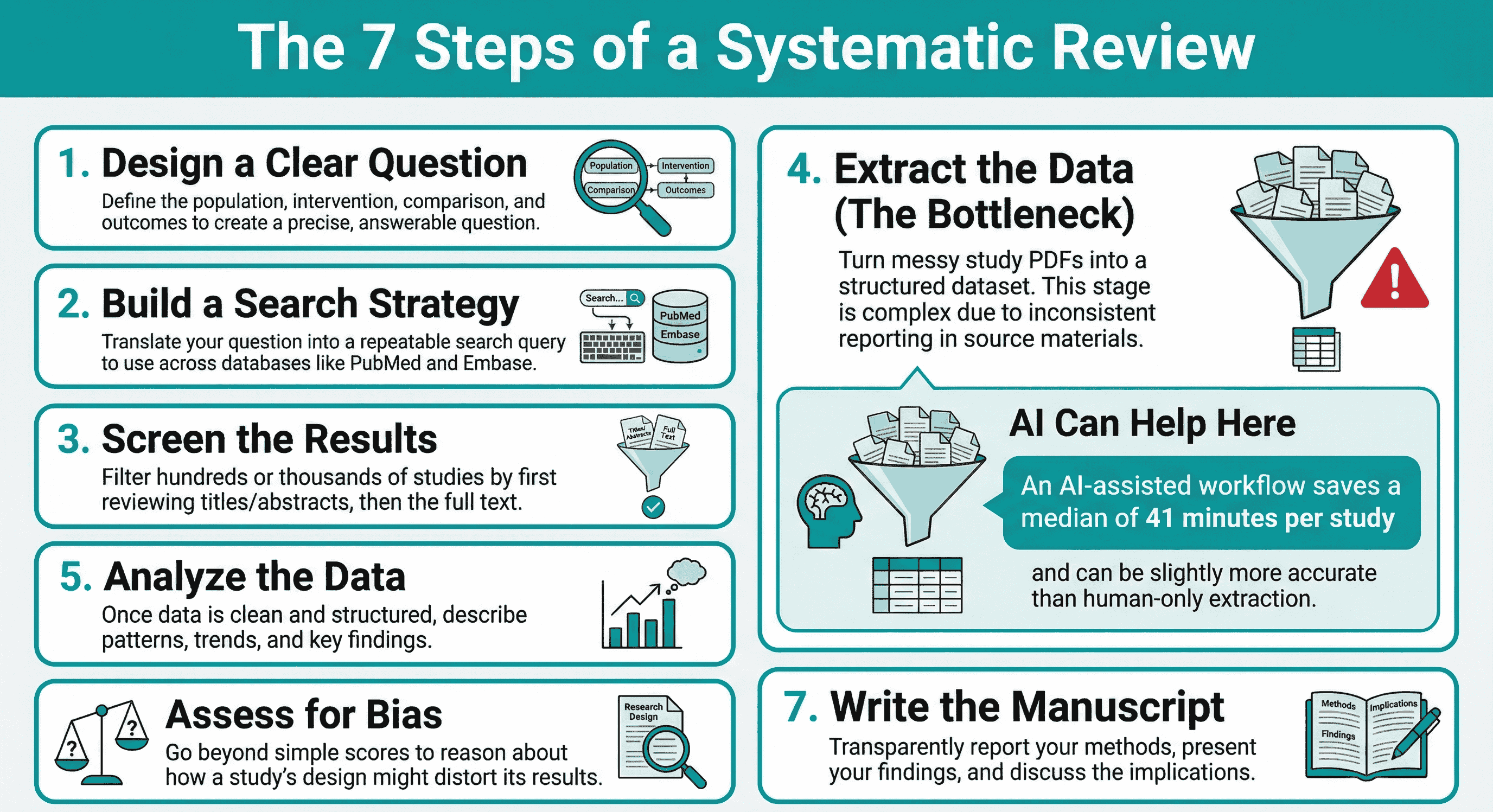
Why Do AI Research Assistants Lose Protocol Fidelity Over Time?
Most consumer AI chats forget because they store context in a temporary window, not in a project that outlives the session. A systematic review is a seven-stage process — question design, search strategy, screening, extraction, analysis, bias assessment, and manuscript writing — and each stage depends on decisions made weeks earlier. When the assistant cannot recall the original PICO framing or why a study was excluded, the review starts drifting.
The reporting standard for this work is explicit. The PRISMA 2020 statement is an evidence-based checklist for how systematic reviews should be reported, and the BMJ publication of PRISMA 2020 positions it for reviews that include synthesis such as pairwise meta-analysis. Hofstra University's methods guide notes that the statement is a 27-item minimum set for reporting systematic reviews and meta-analyses. An assistant that cannot reconstruct search strings or exclusion reasons cannot support that checklist.
The forgetting problem is not hypothetical. Researchers already use machine learning across the review pipeline; a 2022 mapping of 63 ML tools covered tasks from literature search through data extraction. What those tools rarely solve on their own is longitudinal fidelity: the same inclusion rule, applied the same way, in month four as in month one.
Chat-style assistants make this worse in three specific ways:
- Protocol evaporation. Boolean strings, database coverage (PubMed, Embase), and date limits live in a prompt that is not saved as a first-class object.
- Criterion drift. Informal restatements of inclusion rules slowly change the population, intervention, or outcome definitions.
- Finding amnesia. Extracted effect sizes, conflicting results, and “come back to this paper” notes disappear when the thread is gone.
King's College London's evidence-synthesis guide captures the current consensus: AI can help at different stages of a review, but it does not replace methodological control. Memory is that control, stretched across calendar time.
What Should You Look for in an AI Tool That Remembers Research Context?
You should evaluate long-term research AI on protocol persistence, finding continuity, source grounding, auditability, corpus coverage, and the cost of keeping that state alive — not on how fluent a single chat feels. A tool that writes elegant summaries but cannot retrieve last month's exclusion log will cost more hours than it saves.
This article uses a four-layer model, the Research Continuity Stack, to make that evaluation concrete:
- Frozen protocol. Search strategies and inclusion/exclusion criteria stored outside the chat buffer (custom instructions, a protocol document, or a screening configuration).
- Accumulating memory. Prior findings, open questions, and reviewer disagreements that grow across sessions rather than resetting.
- Grounded corpus. The actual papers, PDFs, notes, and search exports the assistant is allowed to use.
- Decision audit. Reconstructable reasons for include/exclude, ideally with quotes, so a second reviewer or a PRISMA flow diagram can be produced later.
Testing against this stack changes the buying question. Elicit is built so screening criteria, exclusion reasons, and per-criterion scores are PRISMA-auditable, which is strong on layers 1 and 4. Gemini Notebook is built so answers cite exact quotes from uploaded sources, which is strong on layer 3. Consensus is built to search 250 million-plus research papers and show where evidence agrees, which is strong on discovery and weak on remembering your protocol. Jenova's Academic Research Assistant is built around unlimited chat history, persistent cross-session memory, and attachable knowledge bases, which is strong on layers 1–3 for a months-long program of work, and weaker on native PRISMA diagrams.
Weight the layers by project type. A Cochrane-style systematic review should overweight auditability. A dissertation literature review that spans two semesters should overweight accumulating memory. A lab that reuses the same papers across projects should overweight a grounded, reusable corpus.
How Do Jenova, Elicit, Consensus, and Gemini Notebook Handle Long-Term Research Memory?
Jenova is strongest when the research program is conversational, iterative, and measured in months; Elicit is strongest when the unit of work is a formal systematic review; Consensus is strongest for fast evidence mapping; Gemini Notebook is strongest when the corpus is already in hand. None of the four is universally preferable, because they optimize different layers of the Research Continuity Stack.
| Feature / Dimension | Elicit | Jenova Academic Research Assistant | Consensus | Gemini Notebook |
|---|---|---|---|---|
| Protocol persistence | Project workspace; living-review updates | Unlimited history, persistent memory, custom instructions | Prompt-level filters; not a stored protocol | Notebook-scoped instructions and sources |
| Inclusion criteria | Autosuggested criteria; dual review; exclusion reasons | Encoded in instructions and recalled across sessions | Natural-language filters applied per search | User-defined inside a bounded notebook |
| Prior findings recall | Reusable extracted tables and reports | Cross-session memory of notes, conflicts, and decisions | Query-level synthesis, not a longitudinal log | Grounded in whatever you uploaded |
| Corpus / sources | 138 million papers, PubMed, ClinicalTrials.gov, uploads | User uploads, knowledge bases, live search tools | 250M+ papers, licensed full text | Uploaded PDFs, docs, sites, audio, video |
| Auditability | PRISMA flow, quotes, per-criterion scores | Conversational trail; no native PRISMA diagram | Academic citations and Consensus Meter | Quote-level citations from sources |
| Pricing (as of 2026) | Paid subscription, including a documented Pro tier | Free tier; paid plans from $20/month | Paid subscription | Free for individuals; org data not used for training |
| Best for | Formal systematic reviews and living updates | Multi-month research programs that must not forget | Rapid evidence snapshots and medical-mode search | Closed-corpus synthesis and teaching from sources |
Elicit
Elicit is a purpose-built scientific research assistant used to search, summarize, extract data from, and chat with over 125 million papers, and the systematic-review product indexes 138 million papers with weekly updates. It can screen up to 40,000 papers, autosuggest screening criteria, and keep every decision PRISMA-auditable with exclusion reasons and supporting quotes.
Its limitation for a months-long program of mixed research is specialization. Elicit excels at structured review operations; it is less designed as a general research partner that remembers side hypotheses, advisor feedback, and evolving notes outside the review object.
Jenova Academic Research Assistant
The Academic Research Assistant is an academic research partner for literature discovery, manuscript preparation, and citation management, running on a platform with unlimited chat history and persistent cross-session memory. Search strategies and inclusion criteria can be frozen into custom agent instructions; PDFs, protocols, and screening logs can be attached as a private knowledge base so later sessions start from the same evidence set.
Its honest limitation is the inverse of Elicit's. It does not ship a native PRISMA flow diagram, dual-review screening UI, or a dedicated 138-million-paper systematic-review corpus. Teams that need Cochrane-grade audit trails will still export decisions into a review manager. Related work that needs a one-pass, citation-heavy report can be handed to Deep Research, which synthesizes hundreds of sources with inline citations, then stored back into the same long-running thread so the findings do not become another orphaned document.
Consensus
Consensus is an AI academic search engine that draws on 250 million-plus papers, including licensed full text. It reports use by 10 million researchers, students, and clinicians, with more than 170 university library partners. Deep Search expands terms and walks the citation graph; Medical mode narrows to about 50,000 clinical guidelines and 8 million articles from the top 1,000 medical journals. The Consensus Meter visualizes how much evidence agrees on a yes-or-no question.
Paperguide's 2026 comparison is the right frame: Consensus finds and evaluates evidence; Gemini Notebook transforms sources you already have. Consensus is limited as a memory system. It does not natively store your inclusion criteria as a living protocol, so a project that lasts a semester still needs an external place for “what we decided in March.”
Gemini Notebook
Gemini Notebook (the product formerly called NotebookLM, rebranded as of July 2026) is a source-grounded thinking partner. You upload PDFs, websites, YouTube videos, audio, Google Docs, and slides; answers come with citations that show the exact quotes. Organizational data is not used to train the product.
The boundary is the notebook. It will not forget sources you gave it, which is exactly why it works for a defined reading set, and it will not discover the paper you never uploaded. For a months-long review that is still searching, that is a structural limit, not a settings issue.
How Do You Persist Search Strategies and Inclusion Criteria Across Sessions?
You persist them by writing them down as durable objects — a protocol document, custom instructions, or a screening configuration — and by refusing to keep the only copy inside a disposable prompt. If the strategy exists only in yesterday's chat, it does not exist.
A practical pattern looks like this:
- Freeze the question in PICO form. Population, intervention, comparison, and outcomes should be copied verbatim into the assistant's standing instructions, not paraphrased each Monday.
- Store the search as a repeatable artifact. Database names, Boolean strings, date limits, language limits, and grey-literature sources belong in a document the assistant can reread.
- Separate inclusion from vibe. Criteria such as “RCT, adults, 2015–2026, English full text” should be listed as rules. Preferences such as “seems relevant to our theory” should be tagged as hypotheses so they cannot silently rewrite the protocol.
- Log exclusions with reasons. PRISMA expects transparent reporting of the selection process; DistillerSR's methods overview stresses that PRISMA exists to help authors avoid pitfalls that undermine reviews.
For Jenova, the frozen-protocol step is a custom instruction block plus an attached protocol PDF. A standing prompt that survives months looks like this:
You are my systematic review partner for project HEP-24. Population: adults 18+ with NAFLD. Intervention: GLP-1 receptor agonists. Comparison: standard care or placebo. Primary outcomes: MRI-PDFF and NAS. Include RCTs and prospective cohorts, 2018–2026, English full text. Exclude animal studies, conference abstracts without data, and trials under 8 weeks. Always restated the inclusion rules before screening a new batch, and never silently broaden the population.
For Elicit, the equivalent is refining the review protocol inside the product, then using autosuggested screening criteria that you accept, edit, or replace. Every decision can carry an exclusion reason and a supporting quote, which is closer to a PRISMA audit file than a chat log.
For Gemini Notebook, paste the same PICO block into the notebook's instructions and upload the protocol plus the search export. The assistant will stay faithful to those files and will not invent papers outside them.
The failure mode to watch is “helpful broadening.” After six weeks, models often start including adjacent populations because they sound relevant. A frozen protocol that the assistant must restate at the start of each session is the cheapest control you can add.
How Does Persistent Memory Change Data Extraction and Bias Assessment?
Persistent memory turns extraction from a one-off transcription job into a cumulative dataset, which is where most of the time is lost and where AI assistance is now empirically testable. The seven-step review diagram flags extraction as the bottleneck because source PDFs report outcomes inconsistently; an assistant that cannot remember the extraction sheet will reintroduce that mess every week.
The 2026 evidence is more precise than marketing claims. A study-within-a-review on medRxiv compared Elicit-assisted extraction with human-only extraction across 50 chronic-disease RCTs and found no difference in overall accuracy (mean difference 0.57 on a 0–100 scale) while AI-assisted extraction was 24.82 minutes faster and cost $181.98 less across the 50 studies. Error types and severity were similar. Elicit's own validation reports that VDI/VDE correctly extracted 1,502 of 1,511 data points (99.4%), and CSIRO researchers found near-zero false negatives relative to manual extraction.
A separate line of work treats AI as a second reviewer rather than a replacement. A Cochrane Evidence Synthesis and Methods paper reported that AI tools showed high and similar performance to human reviewers for data extraction, especially on standardized variables. Birmingham City University's methods note is more cautious: generative tools perform well on year, country, and participant counts, which is not the same as extracting nuanced trial-arm outcomes.
What memory adds, beyond raw extraction accuracy, is consistency of the sheet:
- The same outcome names, time points, and units are reused in week 12 as in week 2.
- Discrepancies already flagged (“two sample sizes in the same paper”) are not rediscovered as if new.
- Bias assessment can reason about design, not just a score. Risk-of-bias work is about how randomization, blinding, and missing data might distort results — which requires remembering the study's design notes, not only the abstract.
Jenova's limitation here is interface, not intent. Persistent memory will recall that you treat allocation concealment as a critical domain, but it will not automatically populate a Cochrane RoB 2 table. Elicit's limitation is the opposite: extraction can be highly structured and quote-backed, while informal bias reasoning that lives in a supervisor meeting still needs a place to persist. Teams doing both should extract in the structured tool and keep the design-level commentary in the long-running research agent.
How Do You Set Up an AI Research Workflow That Lasts Months?
You set it up by creating one durable project home, loading the protocol before the first search, and running every later session as an update to that home rather than as a new chat. The workflow is the same idea whether you use a memory-native agent or a systematic-review workspace; only the buttons change.
Jenova setup (under two minutes, then ongoing)
- Open the Academic Research Assistant and, if the project is long-lived, save the protocol as custom instructions on a dedicated agent.
- Attach the protocol, search strings, and any existing screening spreadsheet as a knowledge base.
- Start with a state dump, not a vague “continue”:
Restate our PICO, databases searched, date of last search, number included/excluded, and the three unresolved conflicts from last session. Then screen the next 25 titles against the frozen criteria. Do not broaden inclusion.
- End every session with a written handoff the next session can load: search updates, new exclusions with reasons, extraction fields still missing, and questions for the second reviewer.
Paid Jenova plans start at $20/month for 30× the free usage allowance, with higher tiers at $50, $100, $200, $500, and $1,000 per month. Usage resets monthly on the billing date. That pricing is relevant for months-long work because a review that dies when a free-tier cap hits mid-screening is a memory failure of a different kind.
Elicit setup
Elicit's systematic-review flow is: refine the protocol, combine searches across PubMed, ClinicalTrials.gov, and its paper corpus (or import from other databases), screen with AI-assisted dual review, extract with quote-backed fields, then synthesize reports that can include PRISMA flow diagrams, paper-summary tables, and search strategies. Living reviews are the months-long feature: combine the review with alerts so the same protocol absorbs new papers without a new project.
Gemini Notebook setup
Create one notebook per review. Upload protocol, search export, and PDFs. Ask only questions that should be answerable from those files. When new papers survive screening, add them to the same notebook rather than starting a second one; split notebooks are how source-grounded tools “forget.”
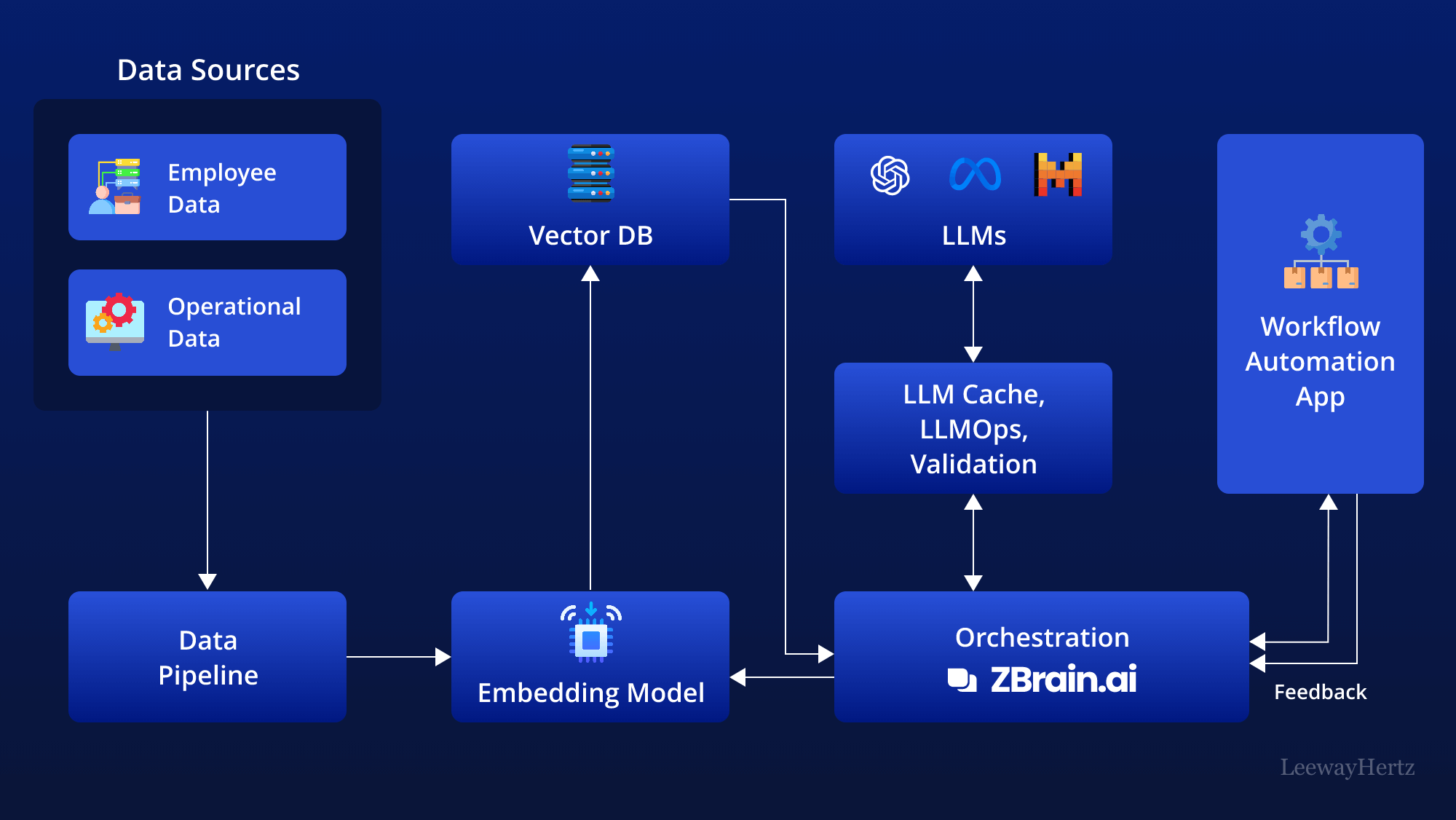
The architecture diagram is the industrial version of the same idea. Durable research memory is a pipeline: sources go through ingestion, embeddings, a vector store, orchestration, model calls, validation, and a feedback loop. Researchers do not need to assemble that stack themselves, but they do need a product that implements it. Session chat is only the last box. If findings never land in memory, a knowledge base, or a review workspace, the pipeline has no state, and month-four you will re-explain month-one.
What Do Research Methodologists Say About AI Memory in Evidence Synthesis?
Methodologists treat AI as a labour-saving reviewer with an audit problem, not as a substitute for a protocol that can be reconstructed. The useful expert question is not “can the model extract a sample size?” but “can a second human see why this paper was excluded in February and still agree in October?”
"The reviews that fall apart in month six almost never fail because the model missed a synonym. They fail because the inclusion rule was never stored as an object. Teams retype a slightly different population definition each session, then wonder why the evidence table will not stabilize. Persistent memory is not a convenience feature in that setting. It is the only way the protocol and the findings occupy the same timeline."
"We also see teams over-trust structured extraction and under-invest in decision logs. Quote-backed data fields are necessary, and the 2026 extraction studies are encouraging on accuracy versus time. They do not record why a borderline trial was kept. If your AI cannot retrieve that reason, you do not have a living review. You have a series of related chats."
"The practical design we recommend is boring: freeze the protocol in instructions, accumulate findings in memory or a workspace, ground answers in a corpus you can point to, and export an audit the PRISMA checklist can consume. Pick tools for those four jobs. Do not pick a tool because the first afternoon felt fluent."
— Jenova Product Team, long-running research workflow design
That stance matches the reporting world the reviews must enter. PRISMA 2020's explanation-and-elaboration paper on PMC is explicit that the guideline is for reviews that include synthesis, and the EQUATOR Network hosts the same updated reporting guideline. An assistant that cannot remember methods cannot help you report methods.
What Happens to Reproducibility When an AI Assistant Cannot Recall Last Month's Exclusions?
Reproducibility collapses into theatre: you can still generate a fluent related-work section, but you can no longer defend the study set. A months-long project produces hundreds of include/exclude decisions. If those decisions are not retrievable, a new screener, a supervisor, or a journal reviewer cannot tell protocol-driven exclusion from session-driven mood.
Living systematic reviews make the failure visible. Elicit describes living reviews as combining the completed review with alerts so new information can be absorbed every year, or as needed, and it allows sharing a link to the entire process and intermediate results. That only works if last quarter's exclusions are part of the object being updated. A chatbot that “remembers the topic” but not the exclusion log will re-include papers you already rejected, or re-reject papers you already extracted.
Three reproducibility checks expose the gap quickly:
- Replay test. Ask the assistant, after a week away, to list the last 20 exclusions with reasons. If it invents reasons or mixes projects, the audit layer is missing.
- Broadening test. Give it an out-of-scope abstract that is thematically tempting. If it argues for inclusion without citing the frozen criteria, protocol persistence has failed.
- Handoff test. A colleague should be able to continue from the assistant's last state dump without a verbal briefing. If they cannot, the memory is personal, not scientific.
Jenova handles the replay and handoff tests when instructions, knowledge bases, and session memory are actually used; it still requires you to export a PRISMA-shaped log if a journal wants a flow diagram. Elicit handles the audit test more natively and still requires you to keep informal scientific judgment somewhere else. Consensus and Gemini Notebook, used alone, fail different checks: Consensus will not replay your exclusions, and Gemini Notebook will not replay papers that were never uploaded.
The months-long research problem is therefore not “which model is smartest in 2026.” It is whether search strategies, inclusion criteria, and prior findings are stored in a stack that still exists when you come back. Choose the tool that keeps those three objects, then make the assistant restate them at the start of every session so drift has to happen in the open.
References
- PRISMA 2020 statement — Checklist, flow diagrams, and reporting guidance for systematic reviews
- PRISMA statement — Overview of the main reporting guideline for systematic reviews
- The BMJ — The PRISMA 2020 statement: an updated guideline for reporting systematic reviews
- Hofstra University LibGuides — PRISMA 27-item checklist for systematic reviews and meta-analyses
- ScienceDirect — AI tools for systematic literature reviews and meta-analyses, including a mapping of 63 ML tools
- King's College London — AI tools in evidence synthesis
- Elicit — Systematic literature reviews: screening, extraction, PRISMA audit, living reviews, and validation results
- Elicit — Product and pricing overview, including corpus size and researcher base
- Consensus — AI academic search engine, corpus size, Deep Search, and Medical mode
- Paperguide — Consensus vs NotebookLM: evidence discovery versus source transformation (2026)
- Gemini Notebook (formerly NotebookLM) — Source-grounded notebooks, quote-level citations, and data-use policy
- DistillerSR — PRISMA guidelines and pitfalls that undermine systematic reviews
- medRxiv — Accuracy and efficiency of AI-assisted data extraction with Elicit versus human-only extraction (2026)
- Wiley / Cochrane Evidence Synthesis and Methods — AI tools as second reviewers for data extraction
- Birmingham City University — Generative AI performance on literature-review data extraction
- PubMed Central — PRISMA 2020 explanation and elaboration
- EQUATOR Network — PRISMA 2020 reporting guideline record