How Can You Fix AI Comic Panels That Look Great but Read Confusingly?
2026-08-13

Why Do Beautiful AI Panels Still Fail as Sequential Storytelling?
Attractive AI panels read confusingly because image generators optimize for individual frame quality, not inter-panel relationships — and comics comprehension depends almost entirely on the latter. The fix is structural: define your panel transitions and reading path before generating images, using a storyboard layer that most AI comic workflows skip entirely. Tools that support this separation — Adobe Firefly Boards, Storyboarder.ai, Dashtoon, and Jenova's Comic Creator — produce measurably more readable sequences than prompt-per-panel generation.
The four structural failures behind "pretty but incoherent" AI comics:
✅ Missing transition logic — panels sit adjacent without an action, subject, or scene relationship connecting them
✅ Broken reading path — layout violates the Z-path that readers instinctively follow (Cohn, cognitive navigation research)
✅ Non-sequitur density — research on annotated manga found 15.1% of panel pairs had no perceivable relationship even in professional work (arXiv panel transition study)
✅ Uniform pacing — every panel the same size, so nothing signals emphasis, speed, or a beat
To repair this reliably, you need a diagnostic vocabulary for which connection is broken between any two panels — and that vocabulary already exists in comics theory.
What Are the Six Panel Transitions, and Which Ones Do AI Tools Get Wrong?
Six transition types govern how readers connect one panel to the next, and AI generators fail disproportionately on three of them. Researchers annotating 2,228 consecutive panel pairs from the Manga109 dataset measured the real-world distribution in professionally produced manga:
| Transition Type | Frequency in Professional Manga | What It Does | AI Difficulty |
|---|---|---|---|
| Action-to-action | 33.2% | Same subject continuing one action across panels | High — requires pose continuity |
| Subject-to-subject | 20.4% | Focus shifts between subjects in a scene | High — requires stable scene geography |
| Non-sequitur | 15.1% | No perceivable relationship between panels | Low — this is the AI default state |
| Moment-to-moment | 12.6% | Minimal time passage, small change | Very high — needs near-identical framing |
| Scene-to-scene | 10.1% | Significant jump in time or space | Low — AI handles this naturally |
| Aspect-to-aspect | 8.3% | Shift to atmospheric detail within a scene | Moderate |
The pattern is clear. Action-to-action and subject-to-subject transitions account for 53.6% of professional panel relationships, and both require the generator to maintain spatial and temporal continuity across separate generation events. Scene-to-scene — the transition AI handles best — represents only 10.1% of real usage.
This mismatch explains the characteristic feel of AI comics: they read like a sequence of establishing shots. Every panel resets the scene because scene-resetting is the only transition the model reliably produces.
🎯 The Non-Sequitur Trap
The 15.1% non-sequitur rate in professional manga is deliberate — an artistic choice for tonal or surreal effect. In AI comics, non-sequiturs occur by default because nothing enforces a relationship. When your panel-to-panel non-sequitur rate climbs above roughly a fifth of your transitions, readers stop attempting closure and start skimming.
How Do Readers Actually Navigate a Comic Page?
Readers follow a Z-path — left-to-right, then down — and any layout that violates it without a compensating visual cue produces hesitation and re-reading. Cognitive research on comic navigation documents that comic panels follow the order of text, though several layout types can override this order through Gestalt groupings.
This matters for AI comics specifically because most AI tools output panels into uniform grids. A uniform grid is Z-path safe but pacing-dead. The moment you break the grid for visual interest — a tall panel, a wide panel, an overlapping inset — you've introduced a navigation decision the AI didn't reason about.
Practitioner guidance on page flow identifies the compensating cues: overlapping panels create bridges that strongly suggest panels be read together, while staggering breaks up what would otherwise be a continuous read. Eyelines within panels also direct the reader — a character looking right pulls the eye rightward toward the next panel.
Practical rule: if your AI-generated page uses anything other than a uniform grid, verify the reading order manually before accepting it. AI layout engines arrange panels aesthetically, not navigationally.
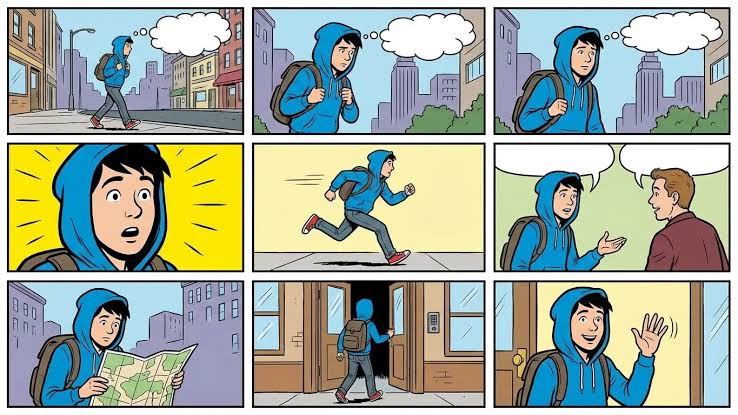
The sequence above demonstrates functional transition logic. The opening three panels are moment-to-moment with a widening camera — same character, same walk, progressively more city visible. Panel four is a hard cut to a yellow-field reaction shot, an aspect-to-aspect shift marking the realization beat. Panels five through nine chain action-to-action: run, meet, consult map, enter, greet. Nothing here is a non-sequitur, and the reading order never requires a decision from the reader.
What Is a Panel-Transition Audit, and How Do You Run One?
A panel-transition audit is a five-minute diagnostic that labels every gutter in your comic and surfaces exactly where the story breaks. This is the single highest-leverage fix for "pretty but confusing" output, and it requires no regeneration to perform.
The audit procedure:
- Number every panel in intended reading order.
- Label each gutter with one of the six transition types. Between panel 1 and 2: is that action-to-action? Subject-to-subject? Nothing?
- Flag every gutter you cannot label. An unlabelable gutter is a non-sequitur. This is your defect list.
- Count your distribution. If action-to-action is under 20% and scene-to-scene is over 30%, your comic is establishing-shot soup.
- Check the reading path on any non-uniform layout — trace the Z-path with your finger and note every hesitation.
Fix priority: repair non-sequiturs first (they break comprehension), then convert excess scene-to-scene transitions into action-to-action or subject-to-subject (they restore momentum), then adjust panel sizing for pacing (this is polish).
In Jenova's Comic Creator, you can run the audit conversationally against a generated page:
"Audit this page as a transition sequence. Label each gutter with McCloud's six transition types, flag any non-sequiturs, and tell me the distribution. Then propose specific replacement panels for the non-sequiturs that convert them to action-to-action."
In Firefly Boards, the equivalent workflow uses the flexible canvas: lay out frames, then rearrange scenes to perfect narrative flow before exporting. The canvas structure makes reordering cheap, which is the point — the audit is only useful if acting on it is easy.
Why Does Storyboarding Before Generating Fix More Than Prompt Engineering?
Storyboarding fixes flow problems because it forces you to specify the relationship between panels, which no per-panel prompt can express. A prompt describes what is in the frame. A storyboard describes what changed since the last frame — and that delta is the entire content of the gutter.
The distinction is architectural, not stylistic. When you prompt "man running down street" for panel 5, the model has no information about panel 4. When you storyboard "panel 5: continuation of panel 4's run, camera pulled back 15 feet, same street, same stride phase," you've encoded a transition.
Storyboard-first tools operationalize this differently:
- Storyboarder.ai ingests a full script and outputs shot lists and animatics — sequence structure is derived from the script rather than assembled panel by panel.
- Dashtoon inverts the usual order, letting you upload a storyboard and use its frame tool to guide composition before generation.
- LlamaGen converts scripts and shot tables into review-ready visual scenes and frames.
- Adobe Firefly Boards maintains consistent lighting, background elements, and tone across multiple panels, letting you build sequences with recurring shots without recreating each frame.
📊 The Script Layer Most Creators Skip
Professional comics writers specify panel transitions in the script, not just panel contents. A close reading of sequential page construction shows how panel groups function as units — panels 2 through 7 handling distance and action as a coordinated block rather than seven independent images.
Writing a comic script with explicit transition annotations takes maybe 20 extra minutes and eliminates most flow defects before a single image is generated:
PAGE 3
Panel 1 — WIDE. Mara enters the workshop. (scene-to-scene from page 2)
Panel 2 — MEDIUM. Mara reaches toward the bench. (action-to-action)
Panel 3 — CLOSE. Her hand closes on the wrench. (moment-to-moment)
Panel 4 — CLOSE. Reverse angle: the door behind her. (subject-to-subject)
How Does Panel Size Control Pacing and Emphasis?
Panel size is the primary pacing instrument in comics, and uniform AI grids discard it entirely. Layout guidance is consistent on the mechanism: larger panels indicate significant moments, while smaller panels compress time and accelerate reading.
Readers spend time on a panel roughly proportional to its area. A full-width panel says stop here. A narrow vertical strip says this took a half-second. When every panel is the same size, every beat carries the same weight — which reads as monotone regardless of how good the individual art is.
Pacing patterns worth deliberately deploying:
- Compression run: three or four narrow panels in a row for rapid action or quick dialogue exchange
- Splash beat: one oversized panel for a reveal, arrival, or emotional peak
- Nine-grid: uniform grid used intentionally for rhythmic, clockwork sequences — monotony as a device
- Widescreen: full-width horizontal panels for establishing shots and landscape reveals
Professional guidance on comic layout emphasizes that paneling and page flow drive engagement more than individual panel rendering quality — which is precisely the trade AI comics currently get backwards.
Which Tools Handle Sequential Flow Best?
No current tool fully solves inter-panel coherence, but they fail in distinguishable ways — and the right choice depends on whether your bottleneck is script, layout, or generation.
| Dimension | General Generators (Midjourney, DALL·E) | Firefly Boards | Storyboard-First (Storyboarder.ai, Dashtoon) | Jenova Comic Creator |
|---|---|---|---|---|
| Transition control | None — panel-by-panel only | Moderate — canvas reordering, shot sequences | Strong — script-derived sequence structure | Strong — conversational script and transition planning |
| Reading-path awareness | None | Manual via canvas layout | Manual via shot list ordering | Manual; agent can audit on request |
| Pacing / panel sizing | Manual in external editor | Manual on canvas | Varies; Dashtoon supports frame guidance | Specified in script layer, applied at layout |
| Script generation | None | None | Storyboarder.ai works from script input | Built in — script, breakdown, and art in one thread |
| Iteration cost on reorder | High — regenerate everything | Low — drag frames on canvas | Low — reorder shot list | Low — revise in conversation |
| Export options | Image files only | JPEG, PNG, MP4, individual or full sequence | Shot lists, animatics, pitch decks | Images plus PDF/DOCX document generation |
| Pricing | Midjourney/DALL·E subscription tiers | Free tier within Adobe Firefly | Varies by platform; check current plans | Free tier; Plus $20/mo at 30× free usage |
| Best for | Individual hero panels and covers | Pre-production planning and team review | Script-to-sequence pipelines, film adjacency | Story-first creators handling script and art together |
Honest limitations across the board: none of these tools reason about the Z-path. None will warn you that panel 6 reads before panel 5 in your layout. Firefly Boards is strong on visual consistency across frames but is a pre-production planning surface rather than a finished-comic renderer. Storyboard-first tools front-load structure well but still depend on you supplying transition intent in the script. Jenova's Comic Creator handles script and generation in one conversational thread and can run transition audits on request, but layout ordering still requires your verification, and action-heavy sequences need iteration.
What Do Comics Practitioners Say About AI Sequential Flow?
The prevailing view among people producing AI comics at volume is that flow problems are authoring problems, not model problems — and that the fix moved upstream years ago in traditional comics.
"The mistake is treating a comic page as nine image generations. It isn't. It's eight gutters with two images on either side of each one. The gutter is where the story happens — everything the reader constructs between panels — and no image model has ever been asked to generate a gutter. When creators internalize that they're authoring relationships rather than pictures, output quality jumps immediately, often with the same underlying generator."
"We see a consistent signature in the pages people bring us for diagnosis. Scene-to-scene transitions dominate, usually well above 30%, when the professional baseline sits near 10%. Every panel establishes a new location or a new framing because that's the path of least resistance for a text-to-image prompt. The result reads like a slideshow — technically sequential, narratively inert. The repair is almost always converting establishing shots into continuations: same location, same subject, one step later in the action."
"The hardest fix is action-to-action, and it's also the most important, because it's a third of all professional transitions. Two panels of the same person mid-motion require pose continuity, camera logic, and background stability simultaneously. Our honest guidance is to budget three to four attempts per action gutter, and to anchor action sequences to a single wide panel that establishes the geography — then all the tight shots inside it have a shared spatial reference the reader can hold onto."
— Jenova Product Team, 6 years building multi-panel AI generation workflows
How Do You Rebuild a Confusing Page Without Starting Over?
Most incoherent pages can be repaired with two or three targeted regenerations rather than a full redo, because flow defects cluster at specific gutters rather than spreading across the page.
The triage sequence:
- Reorder before regenerating. A surprising share of flow problems resolve by swapping two panels. Try this first — it costs nothing.
- Insert a bridge panel. A single moment-to-moment or aspect-to-aspect panel inserted at a non-sequitur gutter often repairs it without touching the surrounding art. This is the cheapest structural fix available.
- Regenerate the incoming panel, not the outgoing one. If panels 4 and 5 don't connect, regenerating panel 5 to match panel 4's framing preserves more of your existing sequence than the reverse.
- Resize for emphasis. If the sequence is comprehensible but flat, the problem is pacing, not transitions — enlarge the beat panel and compress the connective ones.
- Add a caption or SFX bridge. Text can carry a transition that art can't. A "LATER —" caption legitimizes a scene-to-scene jump instantly.
In Jenova's Comic Creator, bridge-panel insertion works well as a targeted request:
"Between panel 4 (Mara reaching for the bench) and panel 5 (Mara at the door), insert one moment-to-moment bridge panel: her hand closing on the wrench, tight close-up, same workshop lighting, same olive jacket cuff visible in frame."
For vertical formats, the Webtoon Creator handles scroll rhythm, where flow is governed by vertical spacing rather than Z-path navigation — a different problem with a different toolkit. The Manga Creator covers right-to-left reading order and monochrome panel conventions, and the Film Screenwriter is useful upstream when the underlying issue is script structure rather than panel execution.
The underlying principle holds across every tool and format: flow lives in the gutters, and the gutters are the one thing your image generator never sees. Author them explicitly, audit them systematically, and repair them surgically.
References
- Panel Transitions for Genre Analysis in Visual Narratives — arXiv, annotated Manga109 transition distribution data
- Navigating Comics: An Empirical and Theoretical Approach to Panel Sequencing — Cohn, National Institutes of Health
- Adobe Firefly — Free Online AI Storyboard Generator and Firefly Boards features
- Storyboarder.ai — AI storyboard generation from script to shot list
- Dashtoon — AI Comic Generator with storyboard upload and frame tool
- LlamaGen.Ai — AI Storyboard Generator for scripts and shot tables
- Salgood Sam, Making Comics — Flow and the Eyelines: overlapping and staggering as reading cues
- SFWA — Breaking Down a Sequential Page: A Close Reading for Comics Writers
- Quizlet Study Guide — Comic Panel Transitions and Visual Storytelling Techniques
- Clip Studio Paint — Pro Artist's Guide to Comic and Manga Layouts, Paneling, Flow
- Training For Comics — 6 Panel Transitions You Need to Master
- ComicInk — Best AI Comic Generators 2026, tested comparison of generation approaches