General Image AI or Specialized AI Manga Creators: Which Is More Reliable for Panels, Dialogue, and Reading Pace?
2026-08-14

Which Failure Mode Costs You More — Weak Panel Art or Broken Reading Flow?
For panels, dialogue, and reading pace specifically, specialized AI manga creators are substantially more reliable than general image AI — because all three of those dimensions are page-level properties that general image models have no representation of. General image AI still produces the better single illustration, but a manga page is not a gallery of illustrations. Tools like LlamaGen, Anifusion, and Dashtoon handle panel layout, balloon placement, and page sequencing natively, while general engines like Midjourney require you to reconstruct all of it manually.
The reliability gap breaks down by dimension:
✅ Panels — general AI outputs single rectangles; manga requires irregular panel sizes, gutters, and tiered reading order that encode pacing ✅ Dialogue — balloon space must be reserved before art is finalized, and general models have no concept of reserved negative space ✅ Reading pace — controlled by gutter width, panel count per page, and focal panel placement; none of these are prompt-addressable in a general engine ✅ Character continuity — practitioner testing puts realistic AI consistency at roughly 80% visual similarity across panels, not 100%, and general tools sit below that without heavy manual conditioning ✅ Art ceiling — one comparison found Midjourney's fundamental architecture is not optimized for the narrative progression and visual continuity essential for comics and manga, despite leading on standalone image quality
Understanding why the gap exists requires looking at what manga pages actually encode beyond the drawings.
What Do Panels, Dialogue, and Reading Pace Actually Control in Manga?
Panels, dialogue placement, and reading pace are the three mechanisms that convert a sequence of drawings into readable time. They are craft systems with measurable outcomes — not decorative choices — and each fails visibly when handled poorly.
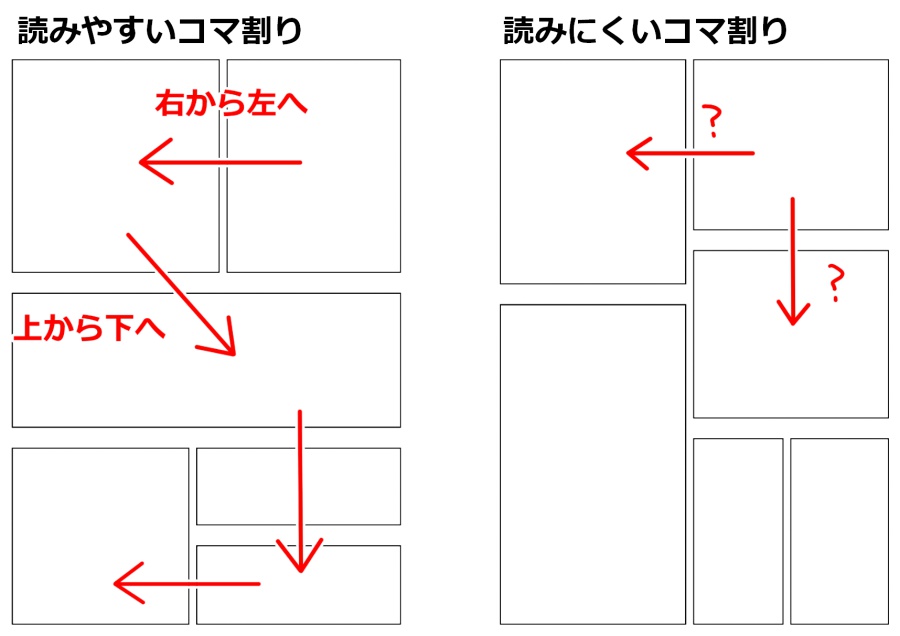
Panels segment thought. As comic artist Steve Ellis describes it, the panel border is literally a wall that says to the reader "here is a complete idea, read it and move onto the next". Panel type carries meaning too — close-ups for expression, distant shots for establishing scenes, silhouettes for drama, splash panels for pivotal beats.
Gutters control pacing. The space between panels is where the reader absorbs the previous beat. Ellis notes that wider panel borders give the reader more time and space to rest and think about the story, creating in-between moments. Removing borders entirely makes two actions read as simultaneous.
Dialogue placement drives eye movement. Balloon position determines reading order within a panel — and it must be planned into the composition, not pasted on afterward.
The performance target here is remarkable. Manga scholar Rachel Thorn observes that the average Japanese reader can finish a 200-page manga paperback in about 20 minutes — because the reader always knows where to look next. That works out to roughly six seconds per page. Empirical reading studies support similar granularity, finding an average of about 1.5 seconds per panel in four-panel strips.
That six-second-per-page budget is the actual benchmark. A page that stalls the reader for fifteen seconds because the panel order is ambiguous has failed regardless of how good the drawings are.
How Reliable Is General Image AI for Manga Panels?
General image AI is unreliable for manga panels because it generates images, not pages — it has no model of gutters, tiers, panel hierarchy, or reading direction. Every structural decision must be made by you and assembled in external software.
Where general tools are genuinely strong
📊 Single-image quality. Midjourney is described in comparison testing as producing breathtakingly artistic and detailed single illustrations with exceptional artistic flair. For a cover or a splash page, this matters.
🎯 Stylistic range. General engines extend far past manga idioms — useful for hybrid aesthetics, chapter art, and promotional material.
💼 Predictable flat pricing. Midjourney runs $10/month Basic, $30/month Standard, $60/month Pro, and $120/month Mega — no per-panel credit accounting.
Where general tools break for sequential work
The documented weaknesses are structural, not tunable. Midjourney specifically lacks built-in features for panel layouts, speech bubble integration, text management, or narrative flow, with each panel needing to be generated and composited externally. There is also no multi-page management — every image is a standalone piece.
Character consistency remains the most-reported friction point. On the OpenAI developer forum, creators troubleshooting comic character consistency resort to seed-number extraction and prompt-recovery tricks. The realistic ceiling is documented: master prompts alone deliver approximately 65% consistency.
The blunt version: general image AI is reliable for one panel and unreliable for page thirty.
How Do Specialized AI Manga Creators Handle the Same Three Problems?
Specialized AI manga creators are more reliable on panels, dialogue, and pace because layout, lettering, and character state are first-class features in the pipeline rather than manual reconstruction steps. They trade peak image quality for structural coherence.
Panels
Purpose-built platforms ship layout tooling. LlamaGen provides an intuitive canvas editor, character sheet management, flexible panel layout generators, and text integration in a single unified interface. Anifusion similarly offers a canvas editor for page layout, character design management, panel creation, and text integration.
Canva approaches it from the design-tool side, providing pre-made comic strip templates so you can arrange panels, add words, and format for digital or print.
Dialogue
Lettering is handled natively. Canva supports inserting dialogue and captions with text inserts and speech balloons. KomikoAI includes customizable speech bubbles and integrated text capabilities alongside panel layout.
Reading pace and continuity
Character persistence is treated as trained state, not prompt text. LlamaGen uses proprietary LoRA training models and character reference systems to maintain distinct appearances, expressions, and clothing across hundreds or even thousands of pages.
The honest weaknesses
⚠️ Compressed art ceiling. Pipelines enforce consistency by constraining variance — the same mechanism that caps peak quality.
⚠️ Platform-lock and export limits. Dashtoon's export flexibility and print optimization limitations make it weaker for creators distributing outside its ecosystem.
⚠️ Credit-metered cost. KomikoAI runs a "zap" credit system that makes cost prediction complex, especially for large projects, with watermarks on free-tier exports.
⚠️ Platform mortality is real. COMICPAD, cited across 2026 roundups for character consistency, has paused new subscriptions and is closing on September 1, 2026. A serialized project can outlive its authoring tool.
How Do the Leading Tools Compare on Panels, Dialogue, and Pace?
The category leaders separate cleanly: general engines lead on image quality, specialized platforms lead on structure, and agent-based tools lead on planning.
| Dimension | Midjourney (general) | Canva (hybrid) | LlamaGen (specialized) | Jenova Manga Creator (agent-based) |
|---|---|---|---|---|
| Panel layout | None — external compositing required (source) | Templates + drag-and-drop panel arrangement (source) | Built-in panel layout generators + canvas editor (source) | Panel flow planned in conversation; no visual canvas |
| Dialogue / lettering | None — no speech bubble or text management (source) | Speech balloons, captions, text inserts (source) | Integrated text within unified interface (source) | Dialogue written and paced per panel; balloon space specified, not rendered |
| Reading pace control | None | Manual via template choice | Multi-page sequencing + layout control (source) | Explicit — panel counts, beat placement, page-turn design |
| Character consistency | Weak — inconsistent even with intricate prompting (source) | Manual via reference re-use | LoRA training across hundreds of pages (source) | Persistent cross-session memory holds character bible |
| Peak art quality | Highest of this set (source) | Moderate | Moderate — consistency-constrained | Model-dependent; multi-provider access |
| Pricing | $10–$120/mo (source) | Free tier; Pro adds storage, translate, planner (source) | Free; $9.99 / $19.99 / $49.99 per month (source) | Free tier; Plus $20/mo (30× usage), scaling higher |
| Best for | Covers, splash pages, concept art | Short strips, education, collaboration | Full-length series, KDP self-publishing | Story architecture, panel breakdown, dialogue drafting |
Additional context worth noting: Anifusion prices at the same $9.99 / $19.99 / $49.99 tiers and targets multi-page print projects; Dashtoon suits vertical-scroll webcomics with built-in distribution; and community discussion on
.Jenova's Manga Creator sits in a different architectural category — it is a conversational agent covering visual storytelling, panel flow, and consistent art style from one-shots to 200+ page serialized epics, not a rendering canvas. Its strength is the layer most creators skip: page breakdown, shot variety, and dialogue pacing decided before any image is generated, with persistent memory retaining the character bible across sessions. Its clear limitation: no drag-and-drop panel editor and no lettering canvas, so a layout tool stays in the stack. Format siblings exist for comics and vertical-scroll webtoons.
What Framework Should You Use to Decide?
Score your project on four weighted dimensions rather than comparing feature lists. We call this the Page Discipline Test — it measures how much structural burden your project imposes, which predicts tool fit better than art-quality benchmarks do.
| Dimension | Question | Weight | Favors general AI | Favors specialized |
|---|---|---|---|---|
| Page count | Total finished pages? | 35% | Under 8 | Over 30 |
| Dialogue density | Balloons per page? | 25% | 0–2 (art-led) | 4+ (dialogue-led) |
| Layout variance | Uniform grid or irregular pages? | 25% | Uniform | Varied, dynamic |
| Art peak requirement | Is any single page a portfolio piece? | 15% | Yes | No |
Scoring: Weight each row toward the matching column. Above roughly 60% on the right, a specialized manga creator saves more time than its art ceiling costs.
Three contrarian findings worth internalizing:
First, dialogue density is the most underrated variable. A dialogue-heavy page needs balloon space designed into the composition. General image AI will happily fill that space with detail, and you will crop or cover the art you paid for.
Second, page count dominates art quality. A four-page one-shot with stunning general-AI art beats a mediocre specialized-tool version. At thirty pages, the ranking inverts completely — and it inverts on structure, not rendering.
Third, reading pace is the failure nobody catches in review. Creators evaluate AI output panel-by-panel and never test the six-second page. Print the page, hand it to someone, and watch where their eyes stall.
How Do You Build a Workflow That Gets All Three Right?
The most reliable 2026 workflow separates story architecture, structural production, and hero art into three distinct stages using three different tools.
Step 1 — Thumbnail before generating anything. Steve Ellis's guidance is to lay out each panel individually as if they were all the same size, then decide insets and big panels from there. This is a paper-and-pencil step, and skipping it is where most AI manga projects fail.
Step 2 — Plan pages and dialogue with a conversational agent. Define page count, beats per page, panel breakdown, and balloon load before touching an image model:
"I'm writing a 32-page manga one-shot about a night-shift ramen cook who can hear other people's regrets. Break it into pages with 4–6 panels each. For each panel give me shot type, what's in frame, and the dialogue. Mark which panels need balloon space in the upper third, and flag any splash pages."
Then stress-test the pacing directly:
"Page 19 has eleven balloons across five panels — that's too dense to read in six seconds. Redistribute across pages 19 and 20, and give me one silent panel before the reveal."
Step 3 — Lock the character bible. Generate canonical views per character — front, three-quarter, profile, expression sheet — in your highest-quality engine. Practitioner workflows frame this as building the character's DNA, not just a reference image.
Step 4 — Batch-produce interiors in a specialized tool. Load characters into LoRA training or the platform's character sheet system, then generate pages. Accept consistent-and-good over inconsistent-and-occasionally-stunning.
Step 5 — Hand-produce the hero pages. Cover, opening splash, and climax go through your general engine with maximum iteration.
Step 6 — Letter and assemble. Canva's editor works here: arrange panels, add balloons and captions, export as JPG, PNG, or PDF.
Step 7 — Run the six-second test. Time a real reader on each finished page against the 20-minutes-per-200-pages benchmark. Any page that stalls gets re-paneled.
What Do Practitioners Say About Choosing Between These Tools?
Practitioners consistently report that tool choice should be driven by page structure demands, not by image benchmarks — and that most evaluation happens at the wrong layer.
"The single most common evaluation mistake we see is judging a manga tool on one generated panel. That tells you nothing about the properties that actually matter. Generate a full page with four balloons and hand it to someone who hasn't read your script. If they read the panels out of order, or if you had to shrink the art to make room for dialogue, the tool failed — and the panel you were admiring was irrelevant to that failure."
"Reading pace is a design constraint with a hard number attached. Japanese readers move through a 200-page volume in roughly twenty minutes. That's about six seconds a page. Almost nobody building with AI treats that as a spec, but it's the difference between a manga and a slideshow. Gutter width, panel count, and where the focal panel sits are all levers on that number, and general image models expose none of them."
"Our third observation is that the planning layer is where projects are won. Panel breakdown, shot variety, balloon placement, and page-turn beats are craft decisions no image model makes for you. We've reviewed many stalled AI manga projects, and the overwhelming majority broke at the page-planning stage — not the rendering stage. Get the breakdown right in text first and generation becomes mechanical."
— Jenova Product Team, creative agent development, 6 years building sequential-art and long-form narrative tooling
What Legal and Ownership Risks Should You Weigh Before Publishing?
Copyright exposure is a real constraint on AI manga production, and it applies to general image AI and specialized manga creators alike — but the specialized workflow may leave you in a stronger position.
The governing precedent is Zarya of the Dawn. The US Copyright Office ruled that images generated with Midjourney for the comic were not the product of human authorship and their copyright protection would be revoked. The new registration covers only the text of the work and the arrangement of images and text.
That distinction is significant for manga specifically. What survived registration was authorship over selection, coordination, and arrangement — which is precisely what panel layout, dialogue placement, and page sequencing are. The Copyright Office found that Kashtanova is the author of the work's text as well as the selection, coordination, and arrangement of the written and visual elements.
Subsequent guidance moved in the same direction: new US rules protect AI art only where there is human authorship.
Platform positions vary and should be read before you commit. Canva states that the law is currently unclear on who owns the copyright in AI-generated comics, and Canva makes no copyright claim over any content. LlamaGen offers watermark-free exports even on the free tier, with full commercial rights at the Premium tier.
Risk checklist:
- Document your human authorship over panel layout, dialogue, and page arrangement — keep thumbnails and breakdown files
- Verify export rights and watermark policy against your revenue tier before production
- Export flat page files at every milestone rather than trusting cloud project state
- Keep the character reference set in local storage, independent of any platform
- Test cross-platform portability of your character set by page 10, not page 100
The practical takeaway reinforces the tooling argument: the parts of a manga most defensible as human authorship are exactly the parts general image AI does not help you make.
References
- CLIP STUDIO PAINT — Pro Artist's Guide to Comic & Manga Layouts, Paneling, Flow
- Rachel Thorn — On Manga Page Layouts
- Visual Language Lab — Consistent reading time for comic pages?
- LlamaGen — Best AI Manga Generators 2026: Comprehensive Tool Comparison & Rankings
- Canva — Free AI Comic Generator features, templates, and copyright position
- COMICPAD — How to Create Consistent Comic Characters with AI
- COMICPAD — Pricing page and service closure notice
- OpenAI Developer Community — How to achieve consistency of comic characters
- MyUP — AI character consistency: The pro comic workflow
- Ars Technica — AI-generated comic artwork loses US Copyright protection
- The Art Newspaper — New US copyright rules protect only AI art with 'human authorship'
- Anifusion — AI manga generator platform
- Dashtoon — AI comic and webtoon creation platform