Game Card Generator AI: Complete TCG Cards From One Brief
2026-09-14
Game Designer Assistant helps you generate complete game cards by turning a rules brief, art direction, and frame spec into matching illustration, stats, and flavor text. In September 2026, indie TCG and digital card-battler teams still stall on the same bottleneck: every card is a layout, an illustration, a power curve, and a rules paragraph at once. While commissioning separate artists, writers, and layout passes stretches a set across months, this AI provides style-locked cards that stay readable in hand, on a phone, and in a booster mockup.
- ✅ Full cards: frame, art, cost, stats, rules, and flavor in one pass
- ✅ Set-wide consistency across rarities, elements, and creature types
- ✅ Power-curve checks so mana or energy costs match the effect
- ✅ Print and digital specs: bleed, type hierarchy, and foil treatments
To understand why this matters, it helps to look at what a playable card actually is—not a pretty picture, but a compact rules object players must parse in a second.
Quick Answer: What Is a Game Card Generator AI?
A game card generator AI is a design tool that creates complete trading and digital cards—art, stats, rules text, and frame—from a brief so teams can ship balanced sets without a full card-art department. It is built for set production, not one-off illustrations.
Key capabilities:
- Complete TCG sheets with locked frames, palettes, and type hierarchy
- Creature, spell, and item cycles that share anatomy but stay unique at table distance
- Rules text and flavor that match the card’s mechanical role
- Export paths for print (63×88 mm) and digital (portrait mobile battlers)
Why Complete Game Cards Are Hard to Produce at Scale
Trading card games are a real market, not a hobby side quest. One industry analysis valued the trading card games market at $7.8 billion in 2025, with a path to $11.8 billion by 2030. Another forecast put collectible card games at $14.7 billion in 2025. Players now expect that polish from tiny teams as well as from household brands.
That demand does not come with matching budgets. Typical indie productions still land in the $20,000–$100,000 range, and the GDC 2025 State of the Game Industry report found the studio side of the squeeze is structural:
Half of all developers — are self-funding their games
1 in 3 developers — are using generative AI to streamline game development
1 in 10 developers — reported being laid off in the past year
A Google Cloud survey conducted with The Harris Poll went further: 90% of games developers already use AI in their workflows, with 95% using it to automate repetitive tasks. Card sets are exactly that kind of repetitive, high-volume work.
But producing a real set is frustratingly difficult:
- A card is four jobs: illustration, graphic layout, rules writing, and balance
- Related cards must look like a family without becoming identical
- Type, cost, and stats must be readable at arm’s length and on a phone
- One changed mechanic can invalidate dozens of finished layouts
A painting is not a card
A gorgeous full-bleed illustration can still fail as a game card. Players identify a card by nameplate, cost pip, type line, and silhouette—then they read the box. If the art hides the cost, if the rules overflow the text box, or if two rares share the same outline, the card is unplayable. Tabletop cards also have physical constraints: 63×88 mm, safe margins, bleed, and a type size that survives coating and foil.
Set language beats single-card beauty
General image models generate each frame independently. That is why a “fire turtle” from one prompt and a “lightning frog” from the next often look like they came from different games. Research on generative AI in game design notes that designers already use these tools for ideation and asset creation, and also flag originality, style drift, and legal ambiguity as the main failure modes. Card sets inherit all three: frame chrome wanders, rarity gems change shape, and rules voice shifts from card to card.
Balance is a production constraint, not a later patch
Veteran TCG designers treat cost-versus-power as a power curve: the relationship between what a card costs and what it does. A 1-drop that wipes a board, or a 7-cost vanilla with no ability, breaks limited and constructed at the same time. Generating pretty cards without stating cost, rarity, and role just creates a pile of un-tunable art.
This is exactly what a dedicated game card generator AI was built for.
Why Game Designer Assistant
Game Designer Assistant treats a card as a game system, not as an isolated picture. You specify the card’s role, cost, type, rarity, frame, and art direction; it returns a complete object that belongs in a booster, a collection screen, and a rules database. While a general image model offers a single pretty still, this AI specializes in production constraints: readable type hierarchy, shared chrome, and cycles that still scan as unique.
| Traditional Approach | Game Designer Assistant |
|---|---|
| Commission art, then write rules, then build the frame in a layout tool | One brief produces art, stats, rules, and frame together |
| One-off images that ignore cost pips and type lines | Spec-aware cards: cost, type, power/health, rarity |
| Flavor that contradicts the mechanical identity | Rules-first copy that matches the card’s role |
| Style drift after 40 cards | Locked palette, anatomy, and nameplate treatment |
| Weeks of revision when a mechanic changes | Regenerate the cycle, keep the set language |
Lock the anatomy before the illustration
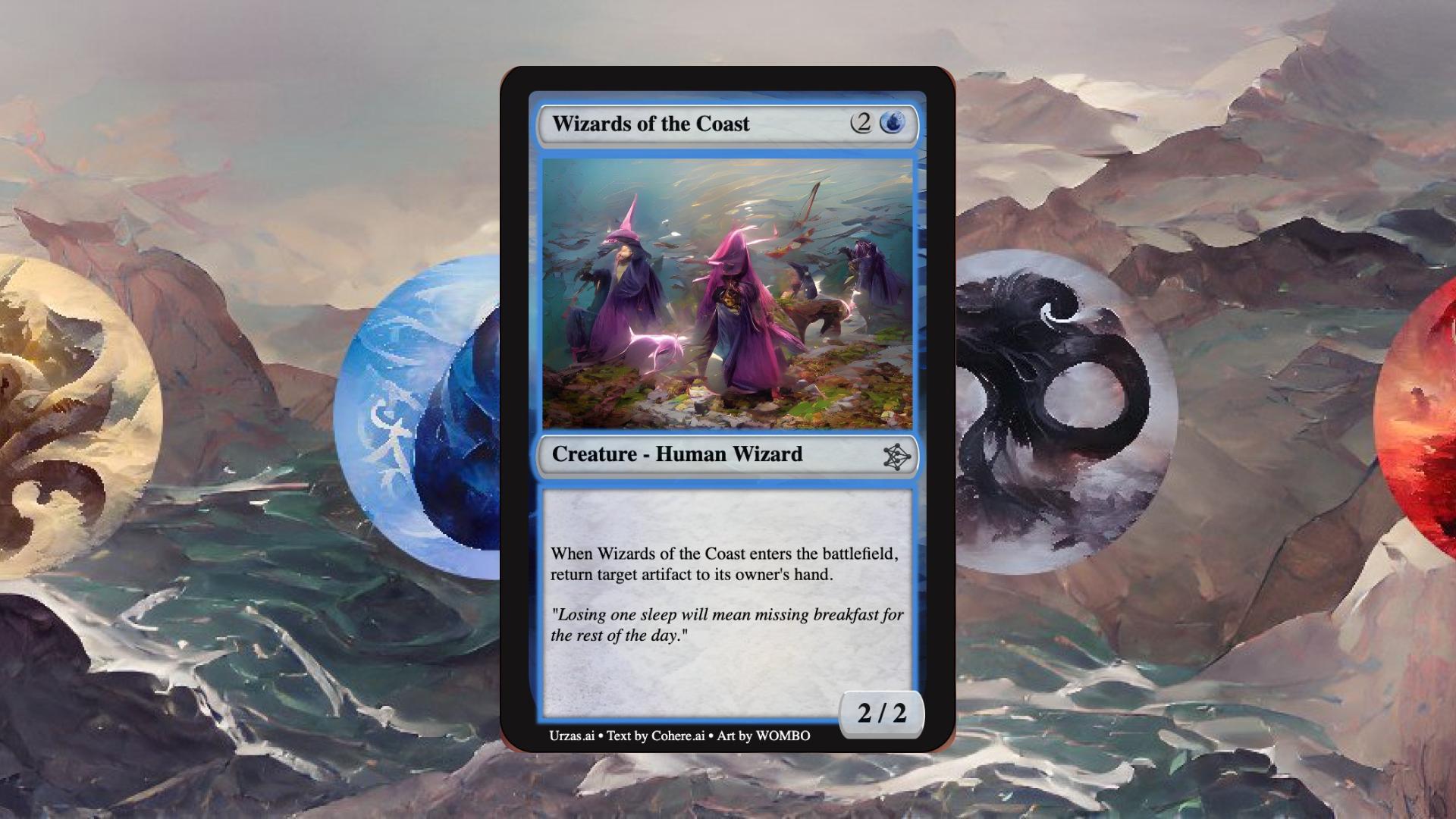
Decide the object first: name, color or element, cost, type line, stats, and the one sentence of rules. Then generate art that supports that object. A bounce wizard should read as a wizard at card size; a 1-drop spark should read as small, fast, and cheap. Art that fights the role wastes the text box.
"Rare blue Human Wizard, cost 2U, 2/2, enters and returns target artifact to its owner's hand, painted coastal robes, misty shoreline, official TCG frame, flavor about lost sleep and breakfast, print-ready 63×88mm with bleed"
Generate in cycles, not in random singles
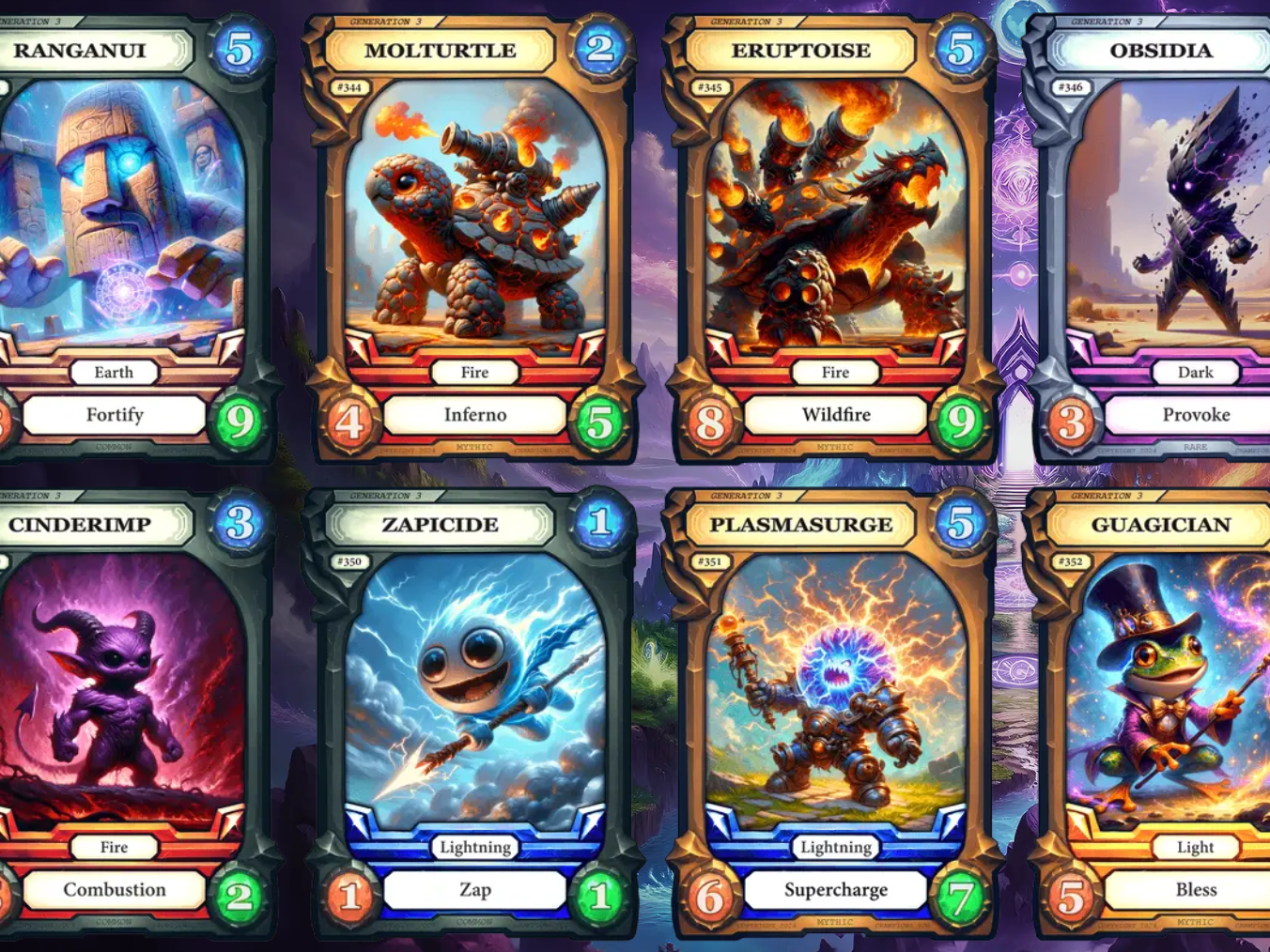
Commons that share a mechanic should share a visual grammar: same bottle, same turtle shell, same lightning core—plus one signature prop. That is how players learn a set. Ask for the cycle in one brief so outline weight, gem, and nameplate stay put while the element changes.
"Generation 3 set, matching frame and gem. Fire turtle cost 2, Inferno, attack 4 health 5, mythic. Keep the same chrome as the earth golem and lightning sprite. Unique silhouette, no extra scenery in the art window"
Write rules like a templating guide
Good TCG text is dull on purpose. Same verbs, same trigger order, same targeting language. Instruct the generator to use your template (“When this enters…”, “Deal N to…”, “Give +X/+Y until end of turn”) and to keep flavor in the italic line, never in the rules box. If you need tighter prose, run names and flavor through Writing Assistant after the mechanical line is locked.
"Common lightning 1-drop, unique silhouette, high-contrast nameplate, one-line ability: Zap — deal 1. No novel verbs. Mobile digital battler, 512×712, readable at 50% scale"
Design for the power curve, then for the shelf
State the intended curve: 1-drops are small and linear, 5-drops can be bombs, mythics break a rule once. Dylan Mayo’s GDC framing still holds: you are balancing cost against power for your game’s unique curve, not copying another title’s numbers. Put the curve in the brief so a “cost 2, attack 8, board wipe” cannot slip through as pretty art.
Related Agents You'll Also Find Useful
If you are also packaging that set into a store page, a print file, or on-model character art, these agents sit one step away from the same workflow.
Graphic Designer
Once the card language is locked, you still need a booster wrapper, a playmat, a sell sheet, and a Steam or Kickstarter header that do not fight the frame chrome. Graphic Designer extends the same palette, gem shapes, and type treatment into marketing layouts so the product page looks like it came from the same studio as the rare slot.
- Booster, tuck box, and playmat mockups that reuse card silhouettes
- Grid sheets of a full cycle for publisher PDFs
- Store banners that keep rarity colors honest
Writing Assistant
Card quality tracks templating discipline. Names, subtype lines, and flavor should sound like one world; rules should sound like one lawyer. Writing Assistant turns your style guide into names, reminder text, and italic flavor that do not steal space from the mechanical line.
- Name lists that avoid repeating the same fantasy clichés
- Flavor that supports the role (control, aggro, ramp) instead of contradicting it
- Templated ability language you can paste into a card database
Comic Creator
Legendary creatures and story rares need faces that stay on-model across a cycle, a box front, and a cinematic trailer still. Comic Creator is the right partner when a planeswalker-style character must recur at multiple rarities without becoming a different person each time.
- On-model portraits for a legendary cycle
- Sequential key art for a set’s story insert
- Costume and palette lock across common and mythic versions
Try this game card generator free — no credit card required.
How to Generate Game Cards Step by Step
Step 1: Write a one-page set bible
Decide format (paper TCG, digital battler, hybrid), card size, frame, and a short type hierarchy: name, cost, art window, type line, rules, flavor, stats. Name the rules that never change: “all potions are flasks,” “all turtles share a shell language,” “commons get one ability line.”
"Set bible: 63×88mm TCG, 3mm bleed, cream nameplate, 2pt dark outline, six elements, commons one ability, rares two, mythics break one rule, no text in the art window"
Step 2: Build a style-anchor card
Pick one card players will see constantly—a 2-drop creature or a signature rare. Generate several options, pick one, and treat it as the reference for chrome, lighting, and type size. Every later card should be able to sit next to it in a binder page without looking like a proxy.
"Style-anchor: 2/2 blue wizard, painted, coastal mist, standard TCG frame, readable name at 100%, rules at 8pt equivalent, transparent or white border per print house"
Step 3: Batch by cycle, not by wishlist
Group cards that share a shape or mechanic: elemental turtles, 1-drop sparks, enter-the-battlefield wizards, equipment. Change only the distinctive trait (hue, accessory, extra pip). If names and flavor lag behind, send the mechanical line to Writing Assistant and keep the art brief stable.
"Same turtle anatomy as Molturtle. Volcanic evolution, cost 5, Wildfire, attack 8 health 9, mythic, identical frame, gem, and nameplate, new magma cannons only"
Step 4: Stress-test at real size and on a curve
Print a binder sheet or drop cards into a phone mockup at 50% scale. If two names collide, if a cost pip vanishes on foil, or if a common reads like a rare, fix silhouette and type—not shading. Then check the curve: sort by cost and confirm each slot has a job (early play, trade, finisher).
Step 5: Export for print and for data
Export print files with bleed and crop marks; export digital with a clean portrait PNG and a matching JSON or spreadsheet row (name, cost, type, stats, text, rarity). Name files to match card IDs (wizards_of_the_coast, molturtle, zapicide) so art, code, and localization stay in sync.
Results & Use Cases
📊 Paper TCG for Kickstarter or a local scene
Scenario: A two-person studio wants a 120-card core set—creatures, instants, and a short legendary cycle—plus a sell sheet for a campaign.
Traditional Approach: An illustrator quotes per card; a graphic designer builds the frame later; a writer invents flavor that does not match the text box. The prototype uses proxies for months.
This AI: You lock a painted TCG bible, generate the wizard rare as the style anchor, then batch elemental commons in matching chrome. Graphic Designer turns the same gems into a booster and playmat.
- Binder pages look authored, not sampled from three tools
- Rarity is signaled with gem and nameplate, not tiny unreadable stamps
- Campaign mockups reuse real cards instead of placeholder rectangles
💼 Digital collectible card battler
Scenario: A PC and console battler needs 80 units across earth, fire, lightning, dark, and light, each with cost, attack, health, and a unique ability.
Traditional Approach: Concept artists deliver key art; UI implements a different frame; balance designers rename abilities in a spreadsheet. The collection screen looks like a mash-up.
The generator: You brief “Generation 3, shared frame, elemental type plate, ability name plus one verb” and produce a grid that already looks like a live collection—Ranganui next to Molturtle next to Zapicide.
- Attack and health stay in the same corners across the set
- Ability names (Fortify, Inferno, Zap) teach the mechanic at a glance
- Mythic versus rare is visible without opening a tooltip
📱 Mobile gacha and portrait collection
Scenario: A portrait-mode card RPG on a phone needs 60 summons that remain clear on a 6-inch screen, including one-handed play outdoors.
Traditional Approach: Downscaled desktop paintings turn to mud. Players cannot tell a 1-cost spark from a 5-cost titan because both are a blue glow.
This AI: You specify 512×712 flat-UI cards, high-contrast nameplates, unique outer shapes, and a single ability line, then verify on device.
- High-contrast cores survive outdoor brightness
- Shape—not only color—carries element, which helps color-vision accessibility
- The same file can feed push-notification thumbnails without a new shoot
🎯 Weekend jam that can become a real set
Scenario: A three-person jam needs 25 playable cards by Sunday and may continue the project after the deadline.
Traditional Approach: Index cards with Sharpie. Post-jam, the team is ashamed of the look and delays a store page.
This AI plus Comic Creator: Jam cards are generated to the final bible on Saturday. Sunday is for playtests and the curve. The following week, the same legendary face becomes box art instead of being thrown away.
- Placeholders are already on-style, so they are worth keeping
- Card IDs never have to be re-authored around new art
- Store mockups reuse the collection language immediately
FAQ
What is a game card generator AI used for?
A game card generator AI creates the complete objects players hold or tap: frame, illustration, cost, type, stats, rules, and flavor. Unlike concept art, these assets must stay identifiable at table distance, share a style across a set, and import into both a printer’s template and a card database. This game card generator is built for that production job: spec-driven cards, not one-off posters.
Is a game card generator AI free to try?
Yes. You can start on Jenova’s free tier and generate sample cards, cycles, and frame tests without a credit card. Heavier batches—full 120-card sets, print-ready bleed, and marketing layouts via Graphic Designer—fit paid usage tiers if you outgrow free limits. Pricing is usage-based rather than a per-card commission.
How is this different from a generic image model?
General models optimize for a single striking picture. Each image is independent, so frames, gems, and type sizes drift. A dedicated game card generator AI is briefed on canvas, bleed, cost pips, power/health, and cycle grammar. Designers already report that generative tools help ideation and prototyping, while style coherence and legal clarity remain the hard parts. You may still clean edges by hand; you should not have to reinvent the nameplate every time.
Can it write rules text and flavor, not just art?
Yes. Put the mechanical line in the brief first, then ask for italic flavor that does not steal space. For a long set, keep verbs identical across a cycle and send names plus flavor to Writing Assistant so the world voice stays stable while the rules stay boring on purpose.
Does a game card generator AI work on mobile?
Yes. The same agent runs on web, iOS, and Android, which is useful when you are photographing a playtest or checking a portrait collection screen on the commute. Always verify final assets on the target device; phone HUDs are the harshest readability test, especially in bright light.
Are AI-generated game cards safe to ship commercially?
Treat this as a legal-design problem, not a toggle. Counsel have noted that fully AI-generated assets may receive no copyright protection in some jurisdictions, and that developers can face reuse risk where human authorship is thin. The practical path for commercial sets is heavy human direction: original mechanics, a locked bible, layout decisions, and a refinement pass. Use the AI for volume and structure; use your eye for palette lock, curve, and IP review.
Design Cards Players Want to Play
A game card is not decoration. It is the language of cost, role, and collection—and it fails when it is pretty at poster size and mute in a binder or on a phone. Self-funded teams cannot wait on a specialist for every new 1-drop, turtle evolution, and story rare, especially while one in three developers already lean on generative AI to keep production moving and players expect more dynamic, authored worlds.
Game Designer Assistant gives you a practical game card generator AI: style-locked frames, spec-aware stats, templated rules, and loops fast enough for jams, Kickstarter mockups, and live digital sets. Pair it with a writing pass and marketing layouts when you are ready to show the work outside the playtest.
Try Game Designer Assistant now. Explore more at Jenova.
For Developers: Game Designer Assistant is available programmatically via the Jenova API — integrate game card generation into your tool chain with a single API call. Full documentation →