Free AI for UI/UX Prototype Generation: Transform App Ideas Into Professional Designs Without Expensive Tools
2026-01-04

The economics of UI/UX design have reached a tipping point. According to Arounda Agency's 2026 UX statistics, every $1 invested in UX returns up to $100—a 9,900% ROI. Yet the traditional path to capturing that return requires expensive design tools ($20-$60/month per user), specialized training, and hours of manual work per screen.
Meanwhile, the demand for prototypes has never been higher. BayOne's 2026 UI/UX trends report confirms that product teams need to validate concepts faster than ever, with 88% of users refusing to return to sites with poor UX and 70% of online businesses failing due to bad usability.
That's why free AI for UI/UX prototype generation has transformed how over 89,000 product teams create interface designs. Instead of spending days learning Figma or weeks waiting for designer availability, you get professional, platform-accurate prototypes from simple text descriptions—all at no cost through Jenova's free tier.
What this free AI delivers:
✅ Instant prototype generation from text prompts or uploaded sketches
✅ Platform-specific accuracy for iOS, Android, and responsive web
✅ Realistic content generation—no lorem ipsum placeholders
✅ Multi-screen flow creation with consistent design language
✅ Iterative refinement through conversational feedback
Quick Answer: What Is Free AI for UI/UX Prototype Generation?
Free AI for UI/UX prototype generation is an intelligent design tool that creates professional mobile and web interface prototypes from natural language descriptions in seconds—available at no cost through Jenova's free tier. It functions as a senior design partner, understanding platform conventions, user experience patterns, and visual design principles to produce realistic, testable screens.
Core capabilities:
- Generate iOS, Android, and web app screens from text prompts
- Transform hand-drawn sketches into polished prototypes
- Create multi-screen user flows with consistent styling
- Iterate designs based on conversational feedback
- Produce realistic content appropriate to your app's context
The 2026 Design Landscape: Why Traditional Prototyping Can't Keep Up
Understanding the current market context helps explain why free AI-powered prototype generation has become essential for product teams.
📊 The UX Investment Imperative
The business case for quality UI/UX has never been stronger:
351% ROI from UX and design optimization over three years
Source: Forrester Impact Modeling
1.7× faster revenue growth and 3.6× higher shareholder return for design-led companies
Source: BCG 2025 Research
+31% average conversion growth after UX redesigns across SaaS, FinTech, and Web3 projects
Source: Arounda Agency Client Data
According to OCTO's 2026 Design Outlook, over 90% of senior managers expect AI to increase returns on UX investments within two years. The discipline has evolved from a cost center to a growth engine—but capturing that value requires the ability to prototype quickly.
⏱️ The Prototyping Bottleneck
Traditional prototyping creates a fundamental constraint on product development:
10-15 hours per week – Average time marketers and product teams spend producing visual content
Source: Sixth City Marketing
2-3 weeks – Typical timeline for freelance designer to deliver initial concepts
$3,000-$5,000 – Budget required for professional prototype development
The fragmented nature of design work makes this worse. According to Promodo's UX/UI trends analysis, between 35–50% of a website's conversions depend on the quality of its UX/UI—yet most teams can't afford to explore multiple design directions before committing.
🎯 The Skill Gap Challenge
Not everyone on a product team has formal design training. Product managers, founders, and developers often have clear visions for interfaces but lack the tools to express them visually.
Builder.io's analysis of AI design tools notes that "most designers think AI tools are only good for making pretty visuals. In reality, they're about taking the busywork off your plate so you can focus on what matters: understanding users, solving problems, and making design decisions that move the project forward."
This skill gap creates communication friction and dependency bottlenecks that slow product development.
💸 The Cost of Poor Design Decisions
The stakes for getting UI/UX wrong are severe:
32% of customers quit after one bad experience, 59% after several
Source: PwC Research
Up to 6% global revenue loss from slow or outdated digital experiences
Source: IBM
Poor UX directly triggers customer abandonment, hurting both online commerce performance and overall company revenue
Source: Forrester
When each design iteration takes hours or days, teams naturally limit how many concepts they explore. This constraint often means shipping the first "good enough" solution rather than the best one.
📱 Platform Complexity Multiplies the Challenge
Modern products must work across iOS, Android, and web—each with distinct conventions, component libraries, and user expectations:
- iOS: Human Interface Guidelines, SF Symbols, Dynamic Island considerations, proper safe areas
- Android: Material Design 3, adaptive layouts, navigation patterns, system bars
- Web/SaaS: Responsive breakpoints, sidebar navigation, dashboard patterns, data tables
According to Grazitti Interactive's AI-first design trends, by 2026 more than 80% of organizations will be using generative AI—a significant leap from less than 5% only a few years ago. Teams that master AI-powered prototyping gain a significant competitive advantage.
The Solution: Free AI-Powered Prototype Generation
Free AI for UI/UX prototype generation eliminates these barriers by combining deep design knowledge with generative AI capabilities—all at no cost through Jenova's free tier.
| Traditional Approach | Free AI for UI/UX Prototype Generation |
|---|---|
| Hours per screen | Seconds per screen |
| Requires design expertise | Works from plain English descriptions |
| Manual platform adaptation | Automatic iOS/Android/web conventions |
| Lorem ipsum placeholders | Contextual, realistic content |
| $20-$60/month design tools | Free access with daily usage limits |
| Linear revision process | Conversational iteration |
🧠 Intelligent Design Understanding
The AI has internalized modern design systems and conventions:
iOS Design:
- Human Interface Guidelines compliance
- SF Symbols integration
- Dynamic Island considerations
- Proper safe areas and system fonts
Android Design:
- Material Design 3 patterns
- Adaptive layouts
- Navigation patterns
- System bars and component sizing
Web/SaaS Design:
- Responsive breakpoints
- Sidebar navigation patterns
- Dashboard layouts
- Data tables and complex interfaces
This knowledge isn't just referenced—it's applied automatically. Request a "settings screen for iOS" and you'll get proper navigation patterns, system fonts, and component sizing without specifying each detail.
🎨 Multiple Input Methods
Free AI for UI/UX prototype generation accepts multiple input types:
- Text prompts: "Create a food delivery app checkout screen with order summary, delivery time selection, and payment options"
- Uploaded sketches: Hand-drawn wireframes or whiteboard photos transformed into polished designs
- Reference images: Existing designs to match or adapt
- Iterative feedback: "Make the CTA button more prominent and add a progress indicator"
📊 Realistic, Contextual Content
Every prototype looks like an actual screenshot, not a design mockup. The AI generates:
- Plausible text appropriate to the app's context
- Realistic data (names, dates, prices, metrics)
- Accurate status bar details (time, battery, signal)
- Contextual UI states (notifications, active indicators, loading states)
How It Works: From Idea to Testable Prototype in Minutes
Using free AI for UI/UX prototype generation is straightforward, whether you're starting from scratch or refining existing concepts.
Step 1: Describe Your Screen or Flow
Start with a natural language description of what you need. Be as specific or general as you like—the AI will make intelligent defaults for anything you don't specify.
Example prompt: "Create an iOS onboarding flow for a meditation app. Include a welcome screen, three feature highlights with illustrations, and a sign-up screen with Apple and Google SSO options."
Step 2: Specify Platform and Style (Optional)
If you have preferences, include them. Otherwise, free AI for UI/UX prototype generation infers from context:
- Platform: iOS, Android, web, tablet
- Style: Modern SaaS, minimalist, glassmorphism, dark mode
- Specific requirements: Accessibility considerations, brand colors, existing design system elements
Step 3: Review and Iterate
The AI produces high-fidelity screens that you can immediately use for testing or presentations. If adjustments are needed, describe them conversationally:
- "Make the navigation bar sticky"
- "Use a bottom sheet instead of a modal for the filter options"
- "Add a skeleton loading state for the content cards"
Each iteration maintains design consistency with previous screens—a capability that has helped over 89,000 product teams accelerate their design workflows.
Step 4: Generate Multi-Screen Flows
For complete user journeys, request connected screens:
Example: "Now create the meditation session screen that users reach after selecting a session from the home screen. Include a timer, pause/play controls, and a calming visual background."
Free AI for UI/UX prototype generation references your previous screens to maintain consistent styling, colors, and component patterns.
Step 5: Export and Use
Generated prototypes are ready for:
- User testing sessions
- Stakeholder presentations
- Developer handoff reference
- Marketing materials
- Pitch decks
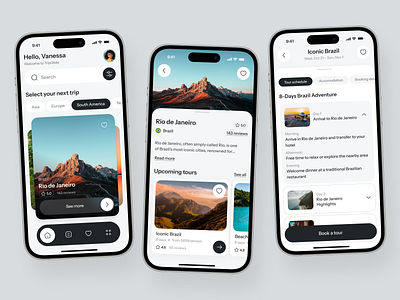
Real Results: How Teams Are Validating Faster
📊 Startup MVP Validation
Scenario: A founder needs to test a new fintech app concept with potential users before committing development resources.
Traditional Approach: 2-3 weeks with a freelance designer, $3,000-5,000 budget, limited revision cycles.
With Free AI for UI/UX Prototype Generation: Same-day generation of complete user flows, unlimited iterations based on user feedback, ability to test multiple concept variations simultaneously.
Key benefits:
- Validate market fit before significant investment
- Test multiple design directions quickly
- Iterate based on real user feedback in hours, not weeks
- Zero design tool costs
💼 Enterprise Feature Exploration
Scenario: A product manager needs to present three different approaches for a new dashboard feature to stakeholders.
Traditional Approach: Request design resources (often backlogged), wait for availability, limited exploration due to time constraints.
With Free AI for UI/UX Prototype Generation: Generate all three variations in a single session, refine based on initial feedback, present polished options the same day.
Key benefits:
- Reduce dependency on design team availability
- Explore more options before committing
- Accelerate decision-making with visual clarity
- No budget constraints on exploration
📱 Cross-Platform Design Consistency
Scenario: A development team needs iOS, Android, and web versions of a new feature, each following platform conventions.
Traditional Approach: Design each platform separately, manually ensure consistency, significant coordination overhead.
With Free AI for UI/UX Prototype Generation: Generate platform-specific versions from the same concept description, automatic adherence to each platform's design guidelines.
Key benefits:
- Consistent user experience across platforms
- Reduced design coordination overhead
- Platform-appropriate conventions applied automatically
- Faster time-to-development
🎓 Design Communication and Education
Scenario: A developer wants to propose a UI improvement but lacks design vocabulary to communicate the vision.
Traditional Approach: Rough sketches that don't convey the full idea, miscommunication with design team, multiple revision cycles.
With Free AI for UI/UX Prototype Generation: Generate a polished visualization of the concept, use as a communication artifact, iterate collaboratively with designers.
Key benefits:
- Bridge communication gaps between disciplines
- Democratize design contribution across teams
- Reduce back-and-forth in design discussions
- Professional-quality visuals without design training
📱 Mobile-First Rapid Prototyping
Scenario: Need to create a quick prototype during a client meeting to visualize a discussed concept.
Traditional Approach: Take notes, schedule follow-up meeting after designer creates mockups, lose momentum.
With Free AI for UI/UX Prototype Generation: Generate prototype in real-time during the meeting, iterate based on immediate feedback, leave with aligned vision.
Key benefits:
- Real-time visualization during discussions
- Immediate stakeholder alignment
- No lost momentum between meetings
- Full feature parity on mobile devices
The 2026 AI Revolution in UI/UX Design
Understanding the broader context of AI in design helps explain why free AI-powered prototype generation has become essential.
📈 AI Is Transforming Design Workflows
According to Grazitti Interactive's research:
80%+ of organizations will be using generative AI by 2026
AI-driven UX tool adoption growing at ~38% CAGR until 2030
UI/UX roles are among the fastest-growing digital professions (45% CAGR)
Bits Kingdom's UX trends analysis confirms that "AI is no longer just a support tool. Today it acts as a silent co-designer that adjusts the interface based on user behavior, context, or intent."
🎯 The Shift from Static to Dynamic Design
The design industry is undergoing a fundamental transformation:
Generative UI creates different interfaces for every user automatically
AI-adaptive interfaces change layout or structure depending on context
Dynamic theming responds to ambient lighting, user preferences, and brand context
For product teams, this means the ability to rapidly prototype and test has become more critical than ever. The teams that can iterate fastest will capture the UX ROI advantage.
🛡️ The Accessibility Imperative
The numbers make the case clear:
$742.58 billion – Global software market by 2025
Source: Statista
1.5 million UX talent gap projected globally
Source: KPMG
85% of firms expanding UX and AI budgets in 2026
Source: Deloitte
Free AI-powered prototype generation provides a crucial layer of design accessibility that was previously available only to those who could afford professional design tools or hire specialized talent.
Frequently Asked Questions
Is free AI for UI/UX prototype generation really free?
Yes. Free AI for UI/UX prototype generation is available on Jenova's free tier with daily usage limits, providing full access to all prototype generation and iteration features. Paid subscribers receive significantly higher usage limits for extensive design work. Visit www.jenova.ai for specific pricing details.
Can I use generated prototypes for commercial projects?
Absolutely. Prototypes generated through the tool are yours to use for any purpose—user testing, client presentations, developer handoff, marketing materials, or pitch decks. Over 89,000 product teams have used these capabilities for commercial projects.
How does this compare to Figma or other design tools?
Traditional design tools like Figma require manual creation of every element. Free AI for UI/UX prototype generation generates complete, polished screens from descriptions—complementing rather than replacing traditional tools. Many users generate initial concepts with AI, then refine in Figma for production.
Does it work for complex enterprise applications?
Yes. The tool handles complex interfaces including data tables, dashboards, multi-step forms, and enterprise navigation patterns. For highly specialized domains, you can provide context about your specific requirements and conventions.
Can I upload my existing designs for iteration?
Yes. Upload screenshots or mockups of existing interfaces, then describe the changes you want. Free AI for UI/UX prototype generation will generate modified versions while preserving elements you want to keep.
What if I need designs that match my brand guidelines?
Describe your brand requirements (colors, typography preferences, style direction) in your prompts. For ongoing projects, the AI maintains consistency across generated screens within a conversation.
Stop Paying for Design Tools—Start Prototyping for Free
The gap between having an interface idea and testing it with real users has traditionally been measured in weeks and thousands of dollars. Free AI for UI/UX prototype generation compresses that gap to minutes, enabling product teams to validate more concepts, iterate more frequently, and ultimately ship better products—all at no cost.
The research is clear: every $1 invested in UX returns $100—a 9,900% ROI. But capturing that return requires the ability to prototype, test, and iterate quickly. Over 89,000 product teams have already discovered how AI-powered prototyping transforms scattered ideas into testable interfaces.
Whether you're a founder sketching your first MVP, a product manager exploring feature directions, or a developer communicating a UI improvement, free AI for UI/UX prototype generation removes the friction between vision and visualization—all without expensive design subscriptions.
Stop choosing between quality and budget. Stop waiting for designer availability. Try free AI for UI/UX prototype generation and transform your next interface concept into a testable prototype in seconds.
References:
- Arounda Agency - 45+ UX Statistics That Define 2026
- BayOne - Top 10 UI/UX Trends & Insights for 2026
- OCTO - The Economics of UX in an AI-Driven World: 2026 Outlook
- Grazitti Interactive - 10 AI-Powered Product Design Trends for 2026
- Bits Kingdom - UX Trends 2026: AI, Zero UI, and Adaptive Design
- Promodo - 11 Key UX/UI Design Trends 2026
- Builder.io - 15 Best AI Tools for Designers in 2026
- UX Pilot - My 7 Favorite Product Design Tools for 2026
- Rendair AI - Top AI Tools for Product Designers in 2026
- KrishaWeb - SaaS UI/UX Best Practices for High-Volume Conversions 2026