Free AI for Photo Editing: Professional Retouching and Enhancement Without Expensive Software
2026-01-28
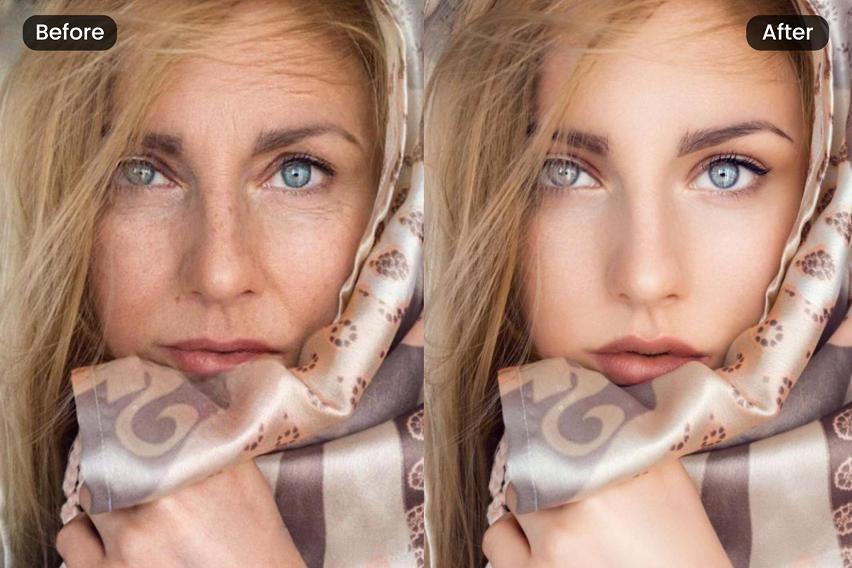
Looking for free AI for photo editing? The Photo Editor on Jenova's platform delivers professional-grade retouching, color correction, and background editing through simple conversation—with free access to core features that would otherwise require expensive software subscriptions or years of training.
Over 183,000 creators have used this tool to transform amateur snapshots into polished, professional images, with users reporting they achieve results comparable to $50-$150/hour professional retouching services—in seconds rather than hours.
What you get with free access:
✅ Natural skin retouching that preserves texture and pores
✅ Precise color correction and cinematic grading
✅ Seamless background removal and replacement
✅ Professional headshot enhancement for LinkedIn and corporate use
✅ Batch editing with consistent style across multiple photos
Quick Answer: What Is This Free AI Photo Editor?
Photo Editor is a free AI-powered retouching tool that performs professional-grade image editing—skin smoothing, color correction, background manipulation, and enhancement—through natural language instructions in seconds. Unlike traditional editing software that requires manual adjustments and technical expertise, you simply describe what you want changed.
Core capabilities available for free:
- Portrait retouching with natural skin texture preservation
- Automated color grading and exposure correction
- One-click background removal and replacement
- Blemish removal while maintaining authenticity
- Professional headshot optimization
The 2026 Photo Editing Crisis: Why Free AI Tools Matter More Than Ever
📊 An Exploding Market Driven by Accessibility Demands
The demand for photo editing has never been higher—and neither has the gap between professional results and accessible tools. According to Future Market Insights, the global AI image editor market reached USD 88.7 billion in 2025 and is projected to grow to USD 229.6 billion by 2035 at a 10% CAGR.
This explosive growth reflects a fundamental truth: everyone needs professional-quality images, but traditional editing remains frustratingly inaccessible.
65% of marketers report that visuals are key elements of their content marketing strategy
Source: Technavio AI Image Editor Market Analysis
60% of SMEs now utilize AI-driven image editing solutions to enhance their online presence
Source: Future Market Insights
💰 The Prohibitive Cost of Professional Editing
Professional photo editing remains frustratingly expensive for most creators:
| Service Type | Per-Image Cost | Hourly Rate |
|---|---|---|
| Basic Color Correction | $0.25-$2.00 | $25-$50/hour |
| Portrait Retouching | $5.00-$15.00 | $50-$100/hour |
| High-End Beauty Retouching | $10.00-$50.00+ | $100-$250/hour |
| Commercial Retouching | $50-$150+ | $150-$500/hour |
Source: FixAnyPhoto High-End Retouching Guide and Imagen-AI Professional Retouching Services
For content creators posting daily, small businesses managing product catalogs, or professionals needing polished headshots, these costs quickly become prohibitive.
⏱️ The Time-Intensive Reality
Beyond cost, traditional editing demands significant time investment:
30-60 minutes — Average time for experienced editors to complete a single portrait retouch
Months to years — Time required to master professional editing software
40+ hours — Time wedding photographers spend editing a single event
According to Imagen-AI's 2026 retouching guide, "The hours spent behind a computer screen, making meticulous adjustments to hundreds or even thousands of photos, can be draining. It's time away from shooting, marketing, and connecting with clients."
🎯 The Authenticity Paradox
There's a critical challenge emerging in 2026: audiences are increasingly rejecting over-edited, plastic-looking images. According to Digiday's analysis of AI content trends, consumer sentiment has shifted dramatically:
"AI can't replicate the messiness of human creativity. We crave that now, we crave imperfection and things that feel 'off' in a human way."
— Becky Owen, CMO, Billion Dollar Boy
This creates a paradox: people need professional editing, but that editing must look completely natural. Achieving this balance traditionally required the most skilled (and expensive) retouchers.
Clutch's 2026 consumer research confirms this tension: 57% of consumers couldn't identify AI-generated photos when tested, yet 84% want brands to disclose AI imagery. The solution isn't avoiding AI—it's using AI that enhances rather than replaces human authenticity.
How Free AI Photo Editing Solves These Problems
Photo Editor eliminates the barriers between you and professional-quality images. Instead of learning complex software or paying premium rates, you simply describe what you want—and the AI handles the technical execution.
| Traditional Approach | Free AI Photo Editor |
|---|---|
| $50-$150/hour for professional editing | Free access to core features |
| Months learning Photoshop | No technical skills required |
| 30-60 minutes per portrait retouch | Seconds per edit |
| Inconsistent batch results | Uniform quality across all images |
| Risk of over-editing | Built-in photorealism standards |
🎯 What Makes This Different
Unlike basic filter apps that apply one-size-fits-all adjustments, this free AI tool understands context. Upload a portrait, and it recognizes facial features, lighting conditions, and skin characteristics. Request a headshot enhancement, and it knows to prioritize professional appearance while maintaining your authentic look.
The AI operates on a core principle: make subjects look like themselves on their best day, not like someone else.
✨ Photorealism as a Non-Negotiable
According to LTX Studio's 2026 AI Image Trends analysis, the defining trend isn't about what AI can create—it's about authenticity:
"Creators are pursuing visuals that feel like real moments: light leaks, film grain, natural skin texture, and genuine expressions captured in everyday settings."
Every edit from Photo Editor follows strict photorealism standards:
- Skin texture preservation — Pores, fine lines, and natural variation remain visible
- Lighting integrity — Shadows and highlights respect the original light source
- Anatomical accuracy — Facial proportions stay within natural variation
- Color authenticity — Skin tones look like real human skin, not orange or gray
The AI performs a pre-generation check before every output: "Will this edit be invisible to a casual viewer?" If the answer is no, it adjusts the approach.
How It Works: From Upload to Professional Result in Minutes
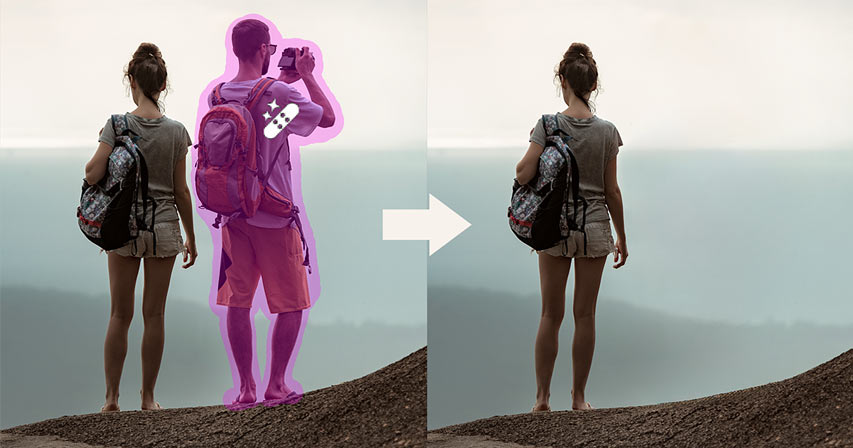
Using free AI for photo editing is straightforward—no tutorials required.
Step 1: Upload Your Photo
Drag and drop your image directly into the chat. The AI accepts standard image formats and analyzes the photo to understand its characteristics—portrait vs. landscape, lighting conditions, subject matter.
Step 2: Describe Your Edit in Plain Language
Tell the AI what you want. Examples:
- "Smooth the skin on my forehead while keeping texture visible"
- "Remove the blemish on my left cheek"
- "Make this look like a professional LinkedIn headshot"
- "Replace the background with a clean white studio backdrop"
- "Apply warm, cinematic color grading"
No technical jargon required. Describe what you need as you would to a professional retoucher.
Step 3: Review and Refine
The free AI photo editor generates your edited image. If you want adjustments, simply describe what to change: "Make the skin smoothing more subtle" or "Brighten the eyes slightly." The tool iterates based on your feedback—a capability that has helped over 183,000 creators achieve professional results.
Step 4: Download or Continue
Save your final image, or continue with additional edits. For batch work, you can establish a style on the first photo and apply it consistently across a set.
Real Results: How Creators Are Using Free AI Photo Editing
📸 Professional Headshots Without Professional Costs
Scenario: You need a polished LinkedIn photo but your only option is a casual snapshot from a recent event.
Traditional Approach: Book a photographer ($200-$800 according to Visuals Clipping's 2026 pricing guide), schedule a session, wait for edited proofs, request revisions.
With Free AI Photo Editor: Upload your existing photo, request professional headshot optimization. The AI adjusts lighting, smooths skin naturally, enhances eye clarity, and can even replace the background with a neutral professional backdrop—all in under a minute.
Key benefits:
- No photographer scheduling required
- Instant turnaround for time-sensitive needs
- Multiple style variations from single photo
- Professional results without professional costs
🛍️ E-Commerce Product Photography at Scale
Scenario: You're launching 50 new products and need consistent, clean product images.
Traditional Approach: Hire a product photographer, rent studio time, manually edit each image for color accuracy and background consistency.
With Free AI Photo Editor: Establish your editing style on the first product image, then batch process the remaining 49 with consistent color correction, background cleanup, and shadow enhancement.
According to NoteGPT's analysis of AI background removal tools, modern AI achieves over 95% accuracy on clear subjects with distinct edges—making batch processing reliable at scale.
💼 Real Estate Marketing
Scenario: Property photos have gray skies and cluttered backgrounds that detract from the listing.
Traditional Approach: Outsource to a real estate photo editing service at $1.50-$3.00 per image with 24-48 hour turnaround.
With Free AI Photo Editor: Replace dull skies with realistic blue alternatives, remove distracting elements, correct lighting, and enhance colors—delivered instantly.
📱 Social Media Content Creation
Scenario: You're a content creator posting daily and need consistent visual quality without spending hours editing.
Traditional Approach: Learn mobile editing apps, develop presets, manually apply adjustments to each photo.
With the free AI tool: Describe your signature style once ("warm tones, slightly desaturated shadows, soft skin enhancement"), and apply it consistently across all content. The AI maintains your visual identity without manual repetition.
👰 Wedding and Event Photography
Scenario: You've shot 500 wedding photos and need to deliver edited images within a week.
Traditional Approach: Spend 40+ hours on culling and editing, or outsource at significant cost.
With Free AI Photo Editor: Establish your editing approach on key hero shots, then batch process remaining images with consistent skin retouching, color grading, and exposure correction.
According to Imagen-AI's workflow analysis, photographers using AI editing report saving 50% to 96% of their post-production time—a wedding that used to take 12 hours to edit can now be done in 30 minutes of active review time.
2026 Photo Editing Trends: What Free AI Delivers
🎨 Natural and Subtle Enhancements
According to Retouching Zone's 2026 trends analysis, the industry has shifted toward subtle, natural-looking retouching:
"There is a clear departure from the era of overly smoothed skin, exaggerated sharpness, and erased shadows that once dominated digital imagery. Editors are now prioritizing realism."
Free AI photo editing is designed specifically for this trend—enhancing while preserving authenticity.
🤖 AI as Co-Creator, Not Replacement
According to LTX Studio's trend analysis, the 2026 mindset treats AI as a powerful collaborator in the creative process, not an automated solution:
"The most successful creators in 2026 aren't the ones generating hundreds of untouched AI images. They're the ones using AI to accelerate their process while maintaining full creative authority over the final result."
This is precisely why Photo Editor focuses on enhancement rather than generation—preserving the human element while automating technical execution.
🎬 Authenticity Over Perfection
According to Digiday's creator economy analysis, brands are now embracing imperfections:
"Instead of requesting that creators iron a wrinkly shirt or get dirty dishes out of a sink, those 'imperfections' now go unaddressed. Brands prefer to see the reality of human life."
Free AI photo editing delivers professional polish without erasing the human elements that make images authentic.
Frequently Asked Questions
Is this AI photo editor actually free?
Yes. Photo Editor is available through Jenova's platform with free access to core features including skin retouching, color correction, and background editing. The free tier includes daily usage limits. For higher volume editing, Plus ($20/month) and Pro ($100/month) plans provide significantly expanded limits and additional capabilities. Visit www.jenova.ai for specific pricing details.
How does free AI photo editing compare to Photoshop?
Photoshop offers more granular manual control for complex compositing and specialized techniques. Free AI photo editing excels at common editing tasks—retouching, color correction, background work—delivering professional results without the learning curve. Many photographers use both: AI for efficient batch work and Photoshop for specialized projects.
Can free AI photo editing handle batch processing?
Yes. You can establish your editing style on an initial image, then apply consistent adjustments across multiple photos. The AI maintains uniform quality and style throughout the batch—a capability that has helped over 183,000 creators streamline their workflows.
Will my photos look obviously edited?
No—photorealism is a core design principle. Free AI photo editing preserves natural skin texture, respects lighting physics, and maintains anatomical accuracy. The goal is enhancement that's invisible to casual viewers.
Does free AI photo editing work on mobile?
Yes. Jenova offers full feature parity across web, iOS, and Android. You can edit photos on your phone with the same capabilities available on desktop.
What types of photos can I edit?
The tool handles portraits, headshots, product photography, real estate images, landscapes, food photography, event photos, and more. It automatically adapts its approach based on the image type and your instructions.
Stop Paying Premium Prices for Professional Photo Editing
The gap between amateur snapshots and professional imagery no longer requires expensive software, years of training, or premium service fees. Free AI for photo editing delivers the same quality results that once demanded expert retouchers—through simple conversation.
Whether you're optimizing a LinkedIn headshot, processing e-commerce product photos, or enhancing personal portraits, the AI handles technical complexity while you focus on creative direction. Natural skin retouching, precise color correction, seamless background editing—all available instantly with free access.
The photo editing industry is shifting toward AI-powered workflows. With the market projected to reach USD 229.6 billion by 2035 and 60% of SMEs already adopting AI-driven image editing solutions, the question isn't whether to embrace these tools, but how quickly you can integrate them into your process.
Over 183,000 creators have already discovered how free AI photo editing transforms their visual content. Stop choosing between quality and budget. Stop spending hours on repetitive edits.
Try free AI photo editing and transform your photos in seconds.
References:
- Future Market Insights - AI Image Editor Market Forecast 2025-2035
- Technavio - AI Image Editor Market Analysis 2025-2029
- FixAnyPhoto - How Much Does High-End Photo Retouching Cost 2026
- Imagen-AI - Professional Photo Retouching Services: The Ultimate 2026 Guide
- LTX Studio - AI Image Trends In 2026
- Digiday - After an Oversaturation of AI-Generated Content, Creators' Authenticity Is in High Demand
- Clutch - 57% of Consumers Can't Identify AI Photos
- NoteGPT - The 10 Best AI Background Removal Tools in 2026
- Retouching Zone - Top 10 Product Photo Editing Trends Set To Dominate 2026
- Visuals Clipping - Professional Headshot Photo Cost in 2026