D&D Campaign Calendar AI: Track Days, Moons, Festivals & Sessions
2026-10-20
Running a long campaign in October 2026 means managing two clocks. One is the in-world calendar your party lives by. The other is the real-world calendar that decides whether anyone shows up on game night. Jenova brings both into one place. Its specialized AI agents build calendar structures, name months and holidays, generate printable handouts, and coordinate session nights. Persistent memory keeps track of what day it is in your world, session after session.
- ✅ Builds homebrew or published-setting calendars, including months, weekdays, moon cycles, and festivals, from a plain-language description
- ✅ Remembers logged events across sessions, so "how many days since we left the capital?" has a real answer
- ✅ Exports to spreadsheets, PDFs, and shareable pages your players will actually open
- ✅ Helps coordinate real-world session scheduling for the whole table
Most Dungeon Masters agree that a calendar makes a campaign feel alive. Fewer keep one going past the first arc. The problem usually isn't motivation. Calendars ask for constant bookkeeping, custom math, and a separate spoiler-free version for players. To understand why calendars get abandoned and how AI changes that, let's look at what game masters run into today.
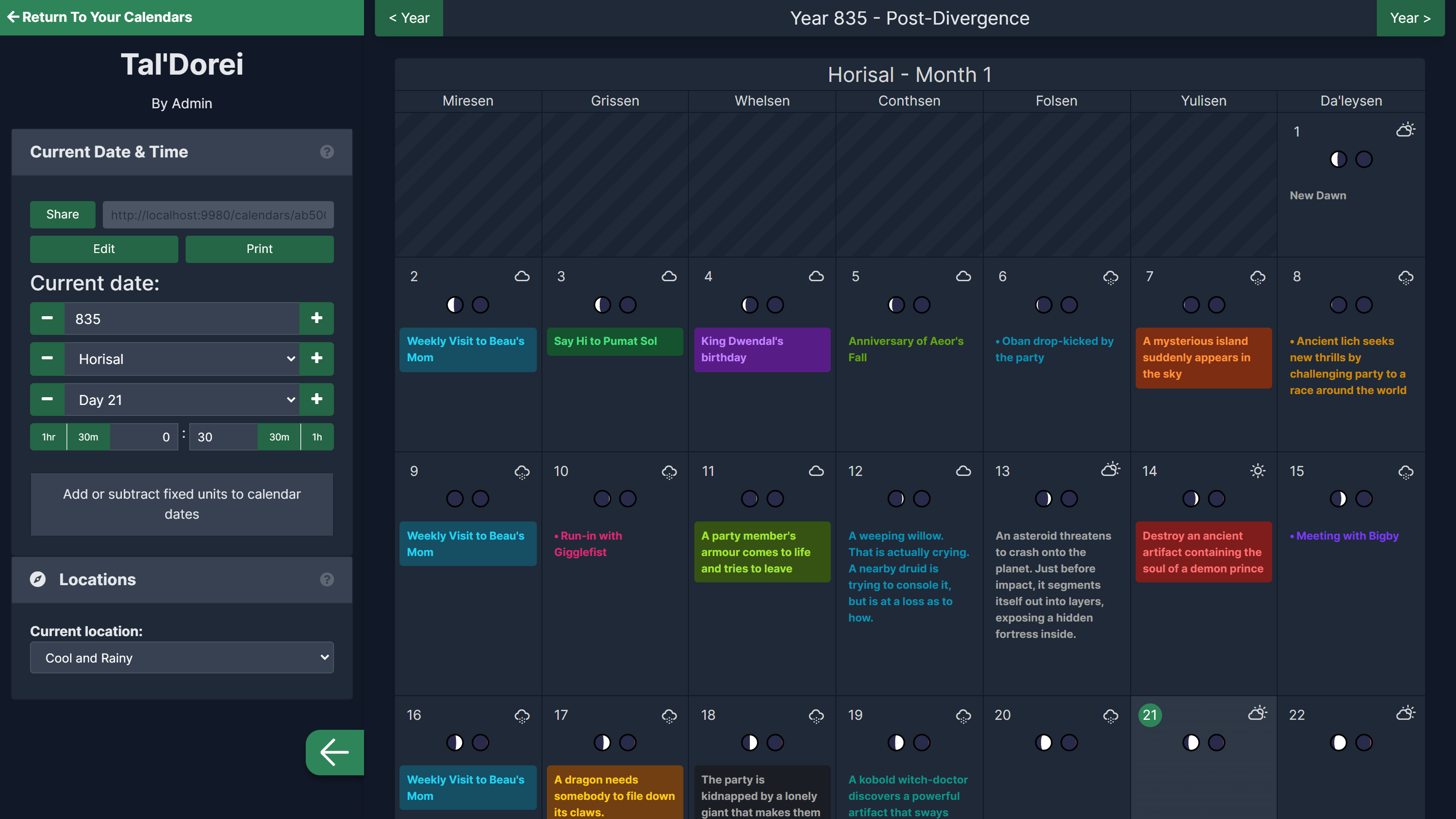
Quick Answer: What Is a D&D Campaign Calendar?
A D&D campaign calendar is a record of in-world time, including days, months, moon phases, seasons, holidays, and story events, that keeps your campaign consistent. Jenova adds AI that builds, maintains, and reasons about that calendar alongside your session schedule.
Key capabilities:
- Designs custom calendar systems: month lengths, named weekdays, multiple moons, leap rules
- Logs story events after each session and recalls them in later sessions
- Converts calendar data into spreadsheets, printable handouts, and shareable web pages
- Coordinates real-world game nights alongside in-world timekeeping
Why Keeping a DnD Campaign Calendar Is So Hard
Tabletop RPGs are growing, and the tools around them are becoming more digital. More tables are running long campaigns with deep worldbuilding. That raises the bar for continuity.
USD 2.41 billion: Estimated value of the global tabletop role-playing game market in 2026, projected to reach USD 6.59 billion by 2035
400,000+: Game masters and worldbuilders using Kanka, a campaign manager that includes calendars and timelines
Demand for organized campaigns is clear. But maintaining an accurate campaign calendar session after session is surprisingly difficult:
- Time drift: travel, downtime, and healing quietly push the in-world date out of sync
- Scattered notes: events end up split across documents, apps, and margin scribbles
- Custom calendar math: non-standard months, multiple moons, and festival days make simple date questions hard
- Real-world scheduling: getting the table together is often harder than the prep itself
- Spoiler management: players need a calendar view that leaves out your planned events
Time Drift Breaks Continuity
A party that rides for nine days, rests for three, and then crafts during a week of downtime has moved the calendar by weeks. Few DMs record each step. The result is a festival that arrives too early, a pregnancy that lasts eleven months, or a villain's deadline that never comes. As one
argues, a calendar belongs in any campaign, even if it's just the ordinary Gregorian one.Notes Scatter Faster Than Sessions Happen
DMs have described this problem for years. In a long-running D&D Beyond forum thread on campaign management tools, one GM explains that their Word documents full of hooks and side quests became more unwieldy with every addition. Kanka puts it bluntly: notes scattered across docs, wikis, and napkins "don't survive contact with a live session."
Custom Calendars Mean Custom Math
Published settings rarely use a seven-day, twelve-month year. Exandria's week runs Miresen through Da'leysen. Forgotten Realms tables track time in tendays. A homebrew world might have two moons with different cycles. Answering "what phase will both moons be in on the solstice?" means building formulas, or guessing.
Real-World Scheduling Is the Bigger Threat
StartPlaying's guide to D&D group scheduling states that the biggest threat to a D&D group isn't an inexperienced DM or a problem player. It's the inability to get everyone together. The same guide warns against monthly sessions because players forget too much in between. The Angry GM recommends a formal scheduling procedure with firm deadlines, such as a monthly availability poll. That works, but it's another system to maintain.
Secrets Need a Separate Version
Your calendar holds planned events the party shouldn't see yet: the eclipse ritual, the assassination on the king's birthday. Campaign managers like World Anvil offer secrets and spoiler controls for this reason. Without such tools, DMs end up maintaining two calendars by hand.
The Jenova Solution for Your D&D Campaign Calendar
This is exactly what Jenova was built for. Instead of handing you an empty grid, its agents help generate the calendar, fill it with lore, do the date math, and remember what happened. You describe your world in plain language, and the platform handles the bookkeeping.
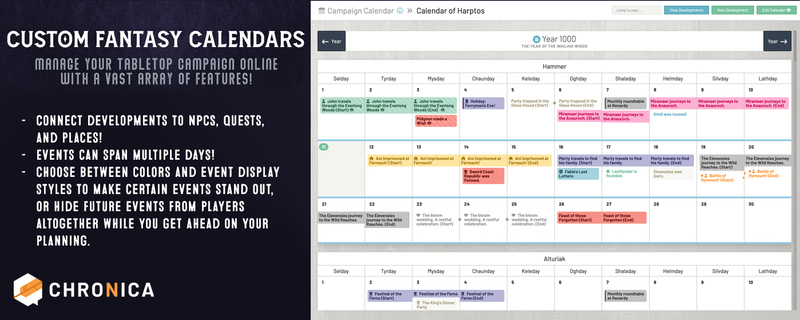
Jenova also works well alongside dedicated tools. Chronica offers custom calendars and timeline events next to quests, NPCs, and maps for groups running over 300 types of game systems. Kanka bundles calendars with its other worldbuilding categories. If you already use one of these, keep it as your grid. Jenova can generate the calendar content, the festival lore, and the event logs you put into it.
| Traditional Approach | Jenova |
|---|---|
| Word docs and notebooks that grow unwieldy | One persistent conversation or custom agent that remembers every logged event |
| Hand-calculating travel days, moon cycles, and leap years | Spreadsheets with working formulas, built from a plain-language description |
| Group texts, polls, and manual reminders | A coordinator that tracks who's available, plus Google Calendar integration |
| Retyping a spoiler-free version for players | Printable handouts generated from the same data, with secrets removed |
| Inventing month names and holidays mid-session | Consistent names and festival lore whenever you need them |
Build the Calendar's Structure and Math
Excel Generator turns a description of your calendar into a structured workbook with formulas, formatting, and separate sheets. Define your months, weekday names, and moon cycles once. The workbook then calculates day-of-year, moon phases, and how many days have passed between any two events.
"Build a campaign calendar workbook: 10 months of 36 days, a 6-day week named after the elemental planes, a large moon on a 24-day cycle and a small moon on a 9-day cycle. Add a column that flags nights when both moons are full."
Name Months, Holidays, and In-World Traditions
A calendar feels real when its names carry culture. Name Generator brings linguistic and cultural fluency to month names, holidays, and the NPCs who celebrate them. For festival flavor, Poem Writer can write the harvest verse townsfolk recite. Lyric Writer can write the drinking song your party's bard hears on midwinter night.
"My dwarven kingdom's year follows the forge cycle. Give me 12 month names rooted in a Norse-inspired language, each with a one-line meaning and a festival tied to it."
Coordinate Real-World Session Nights
Project Coordinator manages multiple team members in one chat, tracking tasks, deadlines, and blockers. For a gaming group, that means knowing who confirmed, who still owes their downtime choices, and when the next session lands. With Jenova's Google Calendar integration, confirmed game nights can go straight onto your schedule.
Memory That Knows What Day It Is
Jenova keeps unlimited chat history and persistent memory across sessions. Log your session recap with its in-world date, and the platform remembers it the next time you ask about it. You can also build a custom agent in minutes. Give it your calendar rules as instructions, attach your setting documents as a knowledge base, and choose your preferred model from OpenAI, Anthropic, Google, and others.
Specialized AI Agents for Campaign Calendar Prep
Beyond building and maintaining the calendar, these agents turn your timekeeping into artifacts your players can hold, read, and enjoy.
Excel Generator
Long campaigns benefit from a master spreadsheet. Excel Generator can extend your calendar workbook with an event log, a travel-time calculator, and a random weather table weighted by season.
- Formula-driven date math across custom month lengths
- Multi-sheet layouts: calendar, event log, weather, moon tracker
- Easy to re-generate as your world's rules evolve
PDF Generator
Players rarely open a shared spreadsheet, but they keep a good handout. PDF Generator formats your calendar as a printable document that sits next to character sheets at the table.
- Clean, print-ready monthly grids
- Player-facing versions that include only revealed events
- Handy for session zero packets and new-player onboarding
Poster Maker
For in-person tables, a wall calendar is useful and sets the mood. Poster Maker designs posters for events and wall art, which works well for a full-year campaign calendar or a town crier's festival announcement.
- Year-at-a-glance calendar art for game rooms
- In-world festival and tournament posters as props
- Infographic-style layouts for moon cycles and seasons
Word Generator
Some settings deserve an almanac: a document explaining the calendar's history, its holidays, and the superstitions around each month. Word Generator turns your notes into a well-formatted document you can edit and expand.
- Structured headings for months, holidays, and lore
- Easy to edit and share with co-DMs
- Works well as a player-facing setting guide
Every agent above is free to try, with no credit card required.
How to Build a D&D Campaign Calendar With AI
Step 1: Define Your Calendar's Rules
Decide on month count, month length, weekday names, moons, and any leap or intercalary days. If you're using a published setting, state which one. If you're homebrewing, describe the feel you want and let Name Generator propose names.
"Design a calendar for a desert empire: 13 months of 28 days, one 'Day of Ash' outside any month, and weekday names drawn from a Persian-inspired language."
Step 2: Generate the Working Calendar File
Turn the rules into a spreadsheet with date math built in. Ask for an event log sheet and a moon-phase column so later questions have instant answers.
"Turn this calendar into a workbook with an event log, a days-elapsed calculator, and moon phases for both moons across the full year."
Step 3: Log Events After Every Session
At the end of each session, paste a short recap with in-world dates. Because Jenova remembers across sessions, later you can ask what happened on a given day, or how long ago the party made a promise.
"Session 14 recap: the party left Riverhold on the 3rd of Ashfall, traveled 6 days, and arrived during the Lantern Festival. Log it and tell me how many days remain until the cult's eclipse ritual."
Step 4: Schedule the Real-World Sessions
Set your next game nights with your group and push confirmed dates to Google Calendar. Agree on a regular cadence early. Weekly or biweekly sessions help players remember more than monthly ones.
Step 5: Share a Spoiler-Free Player Version
Generate a handout that shows only past and revealed events. PDF Generator can produce a fresh version whenever the calendar advances.
"Create a player-facing calendar PDF for the current month. Include festivals and past events only. Hide anything I've marked as secret."
Real Campaign Calendar Use Cases
🗺️ An Interactive Calendar Page for an Online Group
Scenario: A DM running a Discord-based campaign wants players to check the in-world date between sessions.
Traditional Approach: Learn a calendar app, set up player accounts, and hope the group logs in.
HTML Generator: Produces a polished, self-contained HTML page of the current month with festivals and revealed events. It opens in any browser and can be shared as a file.
- No accounts or setup for players
- Responsive layout that works on phones
- Easy to regenerate as the calendar advances
🎲 Recap Trivia That Reinforces the Timeline
Scenario: After a three-week break, the table has forgotten which festival they disrupted and why the duke is angry.
Traditional Approach: The DM spends 15 minutes of game time on a verbal recap that half the table tunes out.
Quiz Maker: Turns logged calendar events into a quick five-question warm-up quiz.
- Active recall beats passive recaps
- Reinforces key dates before plot deadlines matter
- Works well as a pre-session ritual
📖 A Milestone Recap Comic
Scenario: The party survives a full in-world year, and the DM wants to mark the anniversary.
Traditional Approach: Commission art, or skip the moment entirely.
Comic Creator: Turns the year's logged events into a short comic with sequential panels.
- A keepsake the whole table will share
- Built directly from your calendar log
- Celebrates player choices as in-world history
📱 Rescheduling From Your Phone, Mid-Week
Scenario: Two players drop out of Friday's session, and the DM is on a lunch break.
Traditional Approach: A sprawling group chat thread and a new availability poll.
Project Coordinator: From the mobile app, the DM updates attendance, checks who confirmed the backup date, and keeps track of the change.
- Full feature parity on iOS and Android
- Attendance and blockers tracked in one place
- Speech-to-text for hands-free updates
Frequently Asked Questions
Do I need a custom calendar for my D&D campaign?
No. A standard Gregorian calendar works fine for tracking travel, downtime, and deadlines. Many DMs start there and add custom elements later. A custom calendar pays off when seasons, moons, or holidays drive the plot, such as lycanthropy, eclipse rituals, or festival heists. AI tools can convert a simple calendar into a custom one later without losing your logged events.
What's the best way to track time in a D&D campaign?
Log every time skip as it happens: travel days, long rests, and downtime. Keep a running in-world date at the top of your session notes. A spreadsheet with formulas, such as one built by Excel Generator, removes the math, so you can ask how many days separate two events instead of counting by hand.
Is it free to build a campaign calendar with Jenova?
Yes. Jenova's free tier includes all core features with limited usage, which is enough to design a calendar and generate handouts. Paid plans start at $20/month for Plus, with 30× the free usage and custom model selection. Usage resets monthly on your billing date, with no daily caps.
Can AI keep my campaign calendar consistent across sessions?
Yes, as long as you log events. Jenova keeps persistent memory and unlimited chat history, so recaps you share with their in-world dates remain available in later sessions. For heavier campaigns, build a custom agent with your calendar rules as instructions and your setting documents as a knowledge base. AI is only as accurate as what you log, so recap consistently.
Does it work on mobile during game night?
Yes. Jenova offers full feature parity across web, iOS, and Android, with settings synced across devices. You can check the in-world date, log a time skip, or update attendance with Project Coordinator from your phone at the table. Built-in speech-to-text lets you dictate recaps without typing.
Conclusion
A D&D campaign calendar turns a series of sessions into a living world. Festivals arrive on time, deadlines carry weight, and the party's choices become recorded history. The usual obstacles are drift, scattered notes, custom math, scheduling, and spoilers. These are bookkeeping problems, and bookkeeping is where AI helps most.
Start by naming your months with Name Generator. Build the working file and log events as you play. Hand players a clean calendar through PDF Generator or an interactive page from HTML Generator. Whether you call it campaign timekeeping, a fantasy calendar, or a TTRPG timeline, the result is a world that keeps track of itself while you focus on the story.
Explore the full agent library at Jenova.
For Developers: Every agent in this article is available programmatically via the Jenova API. You can build campaign-tracking and worldbuilding features into your VTT or companion app with a single integration. Full documentation →