Best AI for UI/UX Prototype Generation: Transform App Concepts into Testable Designs in Seconds
2025-12-28
The demand for rapid prototyping has never been higher—and traditional design workflows simply can't keep up. According to UserGuiding's 2025 UX statistics, the UI design market has grown from $2.43 billion in 2024** to a projected **$7.43 billion by 2032, expanding at 15.01% annually. This explosive growth reflects a fundamental truth: businesses that can visualize, test, and iterate on product concepts faster will dominate their markets.
Yet most product teams remain trapped in a painful bottleneck. Creating professional UI prototypes traditionally requires specialized design skills, expensive tools, and days—sometimes weeks—of manual work. UXCam's research reveals that 88% of users won't return to a site after a bad experience, while Nielsen Norman Group's 2025 analysis confirms that design teams spend significant portions of their time on repetitive tasks that could be automated.
The stakes are enormous. A well-designed user interface can boost conversion rates by 200%, and a comprehensive UX strategy can push that to 400%, according to UserGuiding. Meanwhile, 70% of online businesses fail due to bad usability. The gap between having a product vision and validating it with real users determines which startups survive and which enterprises stay competitive.
This is why finding the best AI for UI/UX prototype generation has become critical for product teams in 2025. Jenova's AI UI/UX Prototype Generator has helped over 127,000 product teams transform their design workflows—reducing prototype creation time by an average of 85% while producing platform-accurate screens that follow iOS, Android, and web conventions automatically.
What makes this the best AI for UI/UX prototype generation:
✅ Instant prototype creation – Generate professional screens from text descriptions or rough sketches in seconds
✅ Platform-native accuracy – Automatic adherence to iOS Human Interface Guidelines, Material Design 3, and responsive web standards
✅ Realistic, contextual content – No lorem ipsum; AI generates plausible data appropriate to your app's context
✅ Multi-screen flow generation – Create complete user journeys with consistent design language
✅ Conversational iteration – Refine designs through natural language feedback

Quick Answer: What Is the Best AI for UI/UX Prototype Generation?
The best AI for UI/UX prototype generation is an intelligent design partner that creates professional mobile and web interface prototypes from natural language descriptions or visual references in seconds. Unlike basic image generators, it understands platform conventions, user experience patterns, and visual design principles to produce realistic, testable screens that follow iOS, Android, and web standards automatically.
Core capabilities:
- Generate iOS, Android, and web app screens from simple text prompts
- Transform hand-drawn sketches or whiteboard photos into polished prototypes
- Create multi-screen user flows with consistent styling and design language
- Iterate designs based on conversational feedback without starting over
- Produce realistic content appropriate to your app's context—names, dates, prices, metrics
The 2025 Prototyping Crisis: Why Traditional Design Workflows Are Breaking
Product teams face an impossible equation: the demand for visual content has exploded while the resources to create it remain constrained. Understanding this crisis reveals why AI-powered prototyping isn't just convenient—it's essential for survival.
📊 The Time-to-Market Imperative
According to Forbes' analysis of generative AI in product design, the market for AI in product design is growing at 12.1% annually, from $15.84 billion in 2025 to $24.99 billion by 2029. This growth is driven by businesses recognizing that AI can cut development timelines by up to 50% and reduce time to market by 20-40%.
Every $1 invested in UX results in a return of $100 (ROI = 9,900%)
Source: UXCam
But capturing that return requires the ability to prototype, test, and iterate quickly. Traditional workflows make this nearly impossible:
- Manual screen creation: Every button, layout, and interaction element requires individual design work
- Platform adaptation: iOS, Android, and web each demand different conventions, component libraries, and specifications
- Revision cycles: Each iteration requires returning to the designer, waiting for availability, and repeating the process
🎯 The Skill Gap Reality
Not everyone on a product team has formal design training. Product managers, founders, and developers often have clear visions for interfaces but lack the tools to express them visually. This creates dependency bottlenecks that slow entire organizations.
The State of UX in 2025 from UX Collective describes a fundamental shift: "AI-powered tools like Figma, Vercel, Canva (and many others) will change everyone's perception of who is equipped to design, how long design takes, and—inevitably—how much design is worth paying for."
According to UXness's 2025 survey:
71% of UX professionals believe AI and Machine Learning will shape the future of UX, making automation and predictive design more prominent.
💸 The Cost of Slow Iteration
When each design iteration takes hours or days, teams naturally limit how many concepts they explore. This constraint often means shipping the first "good enough" solution rather than the best one.
The data is stark:
- 88% of users won't return to a site after a bad experience (UXCam)
- 70% of online businesses fail due to bad usability (UserGuiding)
- 53% of mobile users abandon sites that take more than 3 seconds to load
Parallel Design Studio's research confirms that early adopters of AI in product development have cut development times by up to 50% and reduced development costs by 20-30%.
📱 Platform Complexity Multiplies the Problem
Modern products must work across iOS, Android, and web—each with distinct conventions, component libraries, and user expectations:
- iOS: Human Interface Guidelines, SF Symbols, Dynamic Island considerations, proper safe areas
- Android: Material Design 3, adaptive layouts, navigation patterns, system bars
- Web/SaaS: Responsive breakpoints, sidebar navigation, dashboard patterns, data tables
According to MindInventory's UI/UX research, 85% of users expect mobile websites to perform as well as desktop versions, while 73.1% of web designers attribute visitor abandonment to non-responsive design.
Mastering and manually applying these different design systems for each platform creates enormous overhead—overhead that AI can eliminate entirely.
Why This Is the Best AI for UI/UX Prototype Generation
The AI UI/UX Prototype Generator addresses these challenges by combining deep design knowledge with generative AI capabilities. It's not a passive tool that executes commands—it's a collaborative design partner that understands why certain patterns work.
| Traditional Approach | Best AI for UI/UX Prototype Generation |
|---|---|
| Hours per screen | Seconds per screen |
| Requires design expertise | Works from plain English descriptions |
| Manual platform adaptation | Automatic iOS/Android/web conventions |
| Lorem ipsum placeholders | Contextual, realistic content |
| Separate tools for each platform | Unified multi-platform generation |
| Linear revision process | Conversational iteration |
🧠 Deep Platform Intelligence
The AI has internalized modern design systems and conventions at a level that would take human designers years to master:
iOS Human Interface Guidelines:
- Proper navigation patterns and system fonts
- SF Symbols integration and Dynamic Island considerations
- Correct safe areas and component sizing
Material Design 3:
- Adaptive layouts and navigation patterns
- System bars and proper Android conventions
- Material components with appropriate theming
Web/SaaS Standards:
- Responsive breakpoints and sidebar navigation
- Dashboard patterns and data table conventions
- Accessibility-compliant layouts
This knowledge isn't just referenced—it's applied automatically. Request a "settings screen for iOS" and you'll get proper navigation patterns, system fonts, and component sizing without specifying each detail.
🎨 Multiple Input Modalities
This AI-powered solution accepts whatever input format works for your workflow:
- Text prompts: "Create a food delivery app checkout screen with order summary, delivery time selection, and payment options"
- Uploaded sketches: Hand-drawn wireframes or whiteboard photos transformed into polished designs
- Reference images: Existing designs to match or adapt
- Iterative feedback: "Make the CTA button more prominent and add a progress indicator"
📊 Realistic, Contextual Content
Every prototype looks like an actual screenshot, not a design mockup. The tool generates:
- Plausible text appropriate to the app's context
- Realistic data (names, dates, prices, metrics)
- Accurate status bar details (time, battery, signal)
- Contextual UI states (notifications, active indicators, loading states)
This realism is critical for user testing—participants respond to prototypes that feel real, not obviously fake mockups filled with placeholder text.
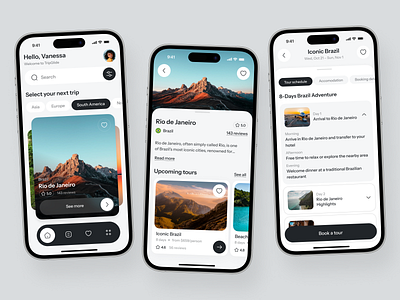
How It Works: Your Step-by-Step Guide to AI-Powered Prototyping
Using the best AI for UI/UX prototype generation is straightforward, whether you're starting from scratch or refining existing concepts.
Step 1: Describe Your Screen or Flow
Start with a natural language description of what you need. Be as specific or general as you like—the AI will make intelligent defaults for anything you don't specify.
Example prompt: "Create an iOS onboarding flow for a meditation app. Include a welcome screen, three feature highlights with illustrations, and a sign-up screen with Apple and Google SSO options."
The AI understands business context—whether you need awareness-stage visuals, conversion-focused screens, or brand-building content.
Step 2: Specify Platform and Style (Optional)
If you have preferences, include them. Otherwise, the AI infers from context:
- Platform: iOS, Android, web, tablet
- Style: Modern SaaS, minimalist, glassmorphism, dark mode
- Specific requirements: Accessibility considerations, brand colors, existing design system elements
Example: "Use a dark theme with purple accent colors. The navigation should follow Material Design 3 guidelines for Android."
Step 3: Review and Iterate
The generator produces high-fidelity screens that you can immediately use for testing or presentations. If adjustments are needed, describe them conversationally:
- "Make the navigation bar sticky"
- "Use a bottom sheet instead of a modal for the filter options"
- "Add a skeleton loading state for the content cards"
- "Increase the contrast on the primary CTA button"
Each iteration maintains design consistency with previous screens—no starting over from scratch.
Step 4: Generate Multi-Screen Flows
For complete user journeys, request connected screens:
Example: "Now create the meditation session screen that users reach after selecting a session from the home screen. Include a timer, pause/play controls, and a calming visual background."
The AI references your previous screens to maintain consistent styling, colors, and component patterns across the entire flow.
Step 5: Export and Use
Generated prototypes are ready for:
- User testing sessions – Get real feedback on your concepts
- Stakeholder presentations – Communicate vision with clarity
- Developer handoff reference – Provide clear direction for implementation
- Marketing materials – Showcase product concepts professionally
- Pitch decks – Demonstrate product vision to investors
Real Results: How Product Teams Are Transforming Their Workflows
The best AI for UI/UX prototype generation serves diverse use cases across product development workflows. Here's how teams are achieving breakthrough results.
📊 Startup MVP Validation
Scenario: A founder needs to test a new fintech app concept with potential users before committing development resources.
Traditional Approach:
- Hire freelance designer: $3,000-5,000
- Wait for initial concepts: 2-3 weeks
- Limited revision cycles due to budget
- Test only 1-2 concept variations
With AI UI/UX Prototype Generation:
- Same-day generation of complete user flows
- Unlimited iterations based on user feedback
- Test multiple concept variations simultaneously
- Total time: Hours instead of weeks
Key benefits:
- Validate market fit before significant investment
- Test multiple design directions quickly
- Iterate based on real user feedback in hours, not weeks
- Preserve budget for development
💼 Enterprise Feature Exploration
Scenario: A product manager needs to present three different approaches for a new dashboard feature to stakeholders.
Traditional Approach:
- Request design resources (often backlogged 2-4 weeks)
- Wait for designer availability
- Limited exploration due to time constraints
- Present 1-2 options maximum
With the best AI for UI/UX prototyping:
- Generate all three variations in a single session
- Refine based on initial feedback
- Present polished options the same day
- Explore additional variations if needed
Key benefits:
- Reduce dependency on design team availability
- Explore more options before committing
- Accelerate decision-making with visual clarity
- Free design resources for production work
📱 Cross-Platform Design Consistency
Scenario: A development team needs iOS, Android, and web versions of a new feature, each following platform conventions.
Traditional Approach:
- Design each platform separately
- Manually ensure consistency
- Significant coordination overhead
- Multiple revision cycles per platform
With AI-powered prototype generation:
- Generate platform-specific versions from the same concept description
- Automatic adherence to each platform's design guidelines
- Consistent visual language across all versions
- Single iteration cycle for all platforms
Key benefits:
- Consistent user experience across platforms
- Reduced design coordination overhead
- Platform-appropriate conventions applied automatically
- Faster time to development handoff
🎓 Design Communication and Education
Scenario: A developer wants to propose a UI improvement but lacks design vocabulary to communicate the vision.
Traditional Approach:
- Rough sketches that don't convey the full idea
- Miscommunication with design team
- Multiple revision cycles to align understanding
- Delayed implementation
With this AI-powered solution:
- Generate a polished visualization of the concept
- Use as a communication artifact
- Iterate collaboratively with designers
- Immediate shared understanding
Key benefits:
- Bridge communication gaps between disciplines
- Democratize design contribution across teams
- Reduce back-and-forth in design discussions
- Accelerate from concept to implementation
The 2025 AI Design Revolution: Why Now Is the Time
Understanding the broader context of AI in design helps explain why AI-powered prototyping has become essential—not optional—for competitive product teams.
📈 AI Adoption Is Accelerating Across Design
According to McKinsey's 2025 workplace AI report, the long-term AI opportunity represents $4.4 trillion in added productivity growth potential from corporate use cases. Design and product development are among the highest-impact areas.
UXness's 2025 survey reveals the current state:
Figma (72%) remains the most used UX tool for designing and prototyping
ChatGPT (77%) is the most preferred Generative AI tool among UX professionals
45% of UX professionals feel satisfied with their AI tools, suggesting room for further advancement
🚀 Generative AI Is Transforming Product Design Workflows
Pariveda's analysis describes the current impact:
For product researchers and designers:
- Rapid visual ideation: Quickly produce multiple design concepts for faster decision-making
- Enhanced iteration: Rapidly iterate on designs for a more dynamic design process
- LLMs as creative partners: Focus on strategic thinking rather than manual execution
For product managers and leaders:
- Democratization of design: AI empowers non-designers to contribute to the design process
- Accelerated time-to-market: Minimize design bottlenecks significantly
- Data-driven strategies: AI-generated insights enable informed decisions
🎯 The Competitive Advantage Is Clear
FullStack Labs' 2025 UX trends analysis confirms: "Companies that fail to embrace these UX design trends in 2025 will struggle to compete."
The teams using the best AI for UI/UX prototype generation are:
- Testing more concepts before committing resources
- Iterating faster based on real user feedback
- Reducing dependency on scarce design resources
- Shipping better products in less time
Frequently Asked Questions
Is the AI UI/UX Prototype Generator free to use?
Yes, Jenova offers a free tier that provides access to all core features including the UI/UX Prototype Generator, with daily usage limits. For higher usage needs, paid plans start at $20/month with significantly expanded limits. Visit www.jenova.ai for specific pricing details.
Can I use generated prototypes for commercial projects?
Absolutely. Prototypes generated through the tool are yours to use for any purpose—user testing, client presentations, developer handoff, marketing materials, or pitch decks.
How does this compare to Figma or other design tools?
Traditional design tools like Figma require manual creation of every element. The AI UI/UX Prototype Generator generates complete, polished screens from descriptions—complementing rather than replacing traditional tools. Many users generate initial concepts with AI, then refine in Figma for production.
Does it work for complex enterprise applications?
Yes. The tool handles complex interfaces including data tables, dashboards, multi-step forms, and enterprise navigation patterns. For highly specialized domains, you can provide context about your specific requirements and conventions.
Can I upload my existing designs for iteration?
Yes. Upload screenshots or mockups of existing interfaces, then describe the changes you want. The AI will generate modified versions while preserving elements you want to keep.
What if I need designs that match my brand guidelines?
Describe your brand requirements (colors, typography preferences, style direction) in your prompts. For ongoing projects, the AI maintains consistency across generated screens within a conversation.
Does it work on mobile devices?
Yes. Jenova offers full feature parity across web, iOS, and Android. You can generate and iterate on prototypes from any device—perfect for reviewing designs during meetings or on the go.
Stop Waiting Weeks for Prototypes—Start Validating Ideas Today
The gap between having an interface idea and testing it with real users has traditionally been measured in weeks and thousands of dollars. The best AI for UI/UX prototype generation compresses that gap to minutes, enabling product teams to validate more concepts, iterate more frequently, and ultimately ship better products.
Over 127,000 product teams have already discovered how AI-powered prototyping transforms their workflows. Users report an average 85% reduction in prototype creation time while producing screens that are immediately usable for testing and stakeholder presentations.
The research is clear: every $1 invested in UX returns $100—a 9,900% ROI. But capturing that return requires the ability to prototype, test, and iterate quickly. With the right tools, that capability is now accessible to everyone on the product team—not just trained designers.
Whether you're a founder sketching your first MVP, a product manager exploring feature directions, or a developer communicating a UI improvement, try the AI UI/UX Prototype Generator and transform your next interface concept into a testable prototype in seconds.
No more waiting for designer availability. No more settling for rough sketches that don't communicate your vision. No more choosing between speed and quality. Just describe what you need, and watch professional prototypes materialize instantly.
References:
- UserGuiding - 150+ UX Statistics and Trends (2025)
- UXCam - 50+ Powerful UX Statistics (2025)
- Nielsen Norman Group - The UX Reckoning: Prepare for 2025 and Beyond
- The State of UX in 2025 - UX Collective
- UXness - 15 Essential UX Design Statistics for 2025
- Forbes - Generative AI: The Next Evolution in Product Design
- McKinsey - AI in the Workplace Report 2025
- Pariveda - How Generative AI Is Transforming Product Design
- FullStack Labs - Top 5 UX/UI Design Trends in 2025
- Parallel Design Studio - How AI Is Changing Product Development
- MindInventory - Latest UI UX Statistics 2025