Best AI for Product Photo Editing: Studio-Quality Images Without the Studio (June 2026)
2026-06-27
Your product photos are costing you sales. Not because the products are bad — because the images don't do them justice. Product Photo Editor transforms raw product shots into polished, conversion-ready images through AI-powered background editing, color correction, retouching, and lifestyle compositing — all from a single upload in 2026.
✅ Instant background removal and replacement with realistic lighting and shadows ✅ Professional color correction and retouching without Photoshop skills ✅ E-commerce-optimized formatting for Amazon, Shopify, Etsy, and social platforms ✅ Batch-ready workflow that handles entire catalogs, not just single images
To understand why this matters, let's look at the real cost of poor product photography — and why most sellers are still overpaying for results that AI now delivers in minutes.
Quick Answer: What Is Product Photo Editor?
Product Photo Editor is an AI-powered product photography specialist that edits backgrounds, corrects color, retouches imperfections, and formats images for e-commerce listings in minutes.
Key capabilities:
- Background removal, replacement, and lifestyle scene compositing
- Professional color correction and lighting adjustment
- Product retouching — scratch removal, reflection cleanup, texture enhancement
- Multi-platform export formatting for Amazon, Shopify, social ads, and print
The Problem: Product Photography Is Broken for Most Sellers
High-quality product images are the single most important factor in online purchase decisions. Yet creating them remains one of the most expensive, time-consuming bottlenecks in e-commerce.
67% of consumers say image quality matters more to them than product descriptions or customer ratings — Nightjar industry analysis
$25–$150 per image — the typical cost range for traditional product photography, with an average around $102 per image — Nightjar pricing data
AI image editing grew 441% year-over-year in 2024, making it the fastest-growing software category on G2 — Nightjar market data
But accessing professional-quality product photography is frustratingly difficult:
📸 The Cost Barrier
Traditional product shoots require studio rental, professional photographers, lighting equipment, and extensive post-production. A single studio day costs $1,500 minimum, often closer to $3,000 with photographer fees. For small sellers managing hundreds of SKUs, the math is prohibitive.
⏳ The Speed Bottleneck
Scheduling shoots, shipping samples, waiting for retouching — traditional workflows take days to weeks for results you need today. Seasonal campaigns, flash sales, and new product launches all suffer when photography can't keep pace with inventory.
🔄 The Consistency Problem
Even when sellers invest in professional photography, maintaining visual consistency across hundreds of images is a persistent challenge. Different lighting conditions, varying backgrounds, and inconsistent color treatment make catalogs look disjointed. As industry analysis notes, visual inconsistency signals that something is off — buyers feel it even when they can't articulate it.
📱 The Platform Compliance Headache
Amazon requires pure white backgrounds (RGB 255,255,255), minimum 1,600 pixels, and products occupying at least 85% of image space. Shopify, Etsy, Instagram, and Facebook Ads each have their own specifications. Manually reformatting images for every platform drains hours that could be spent selling.
Why Product Photo Editor
Product Photo Editor eliminates the gap between "phone snapshot" and "studio-quality listing image." It's not a general photo editor with product features bolted on — it's a product photography expert and visual merchandising strategist built specifically for e-commerce.
| Traditional Approach | Product Photo Editor |
|---|---|
| $25–$150 per image for studio shoots | Professional results from any product photo |
| Days-to-weeks turnaround | Minutes per image, entire catalogs in a session |
| Separate tools for background, color, retouching | All-in-one: background, color, retouching, formatting |
| Manual resizing for each platform | AI-optimized exports for Amazon, Shopify, social |
| Inconsistent results across batches | Consistent visual treatment across your catalog |
🎨 Background Editing & Scene Compositing
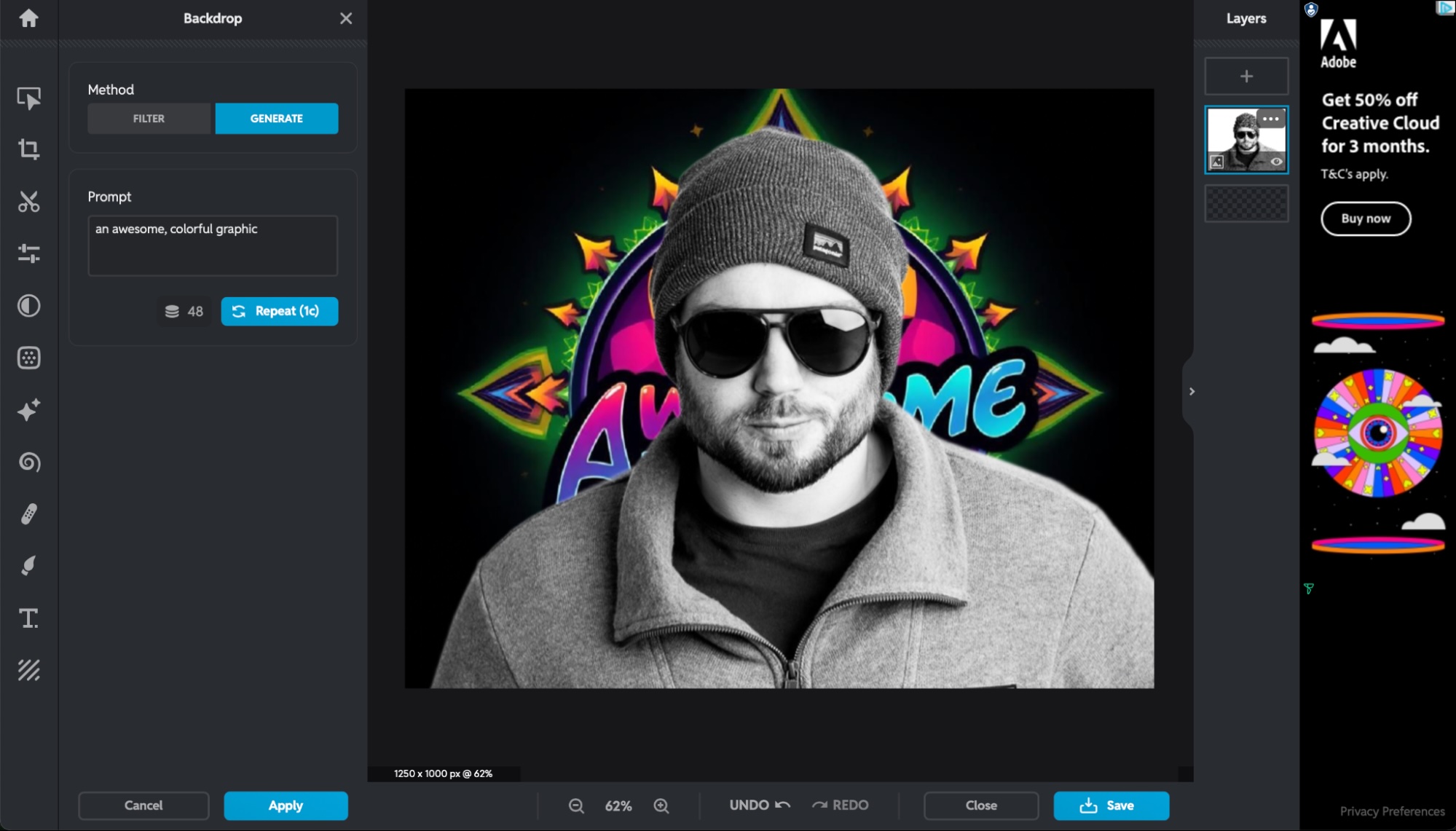
Upload any product photo and instantly remove, replace, or transform the background. Place products in lifestyle settings — a kitchen counter, a marble surface, a minimalist studio — without physical props or studio setups. The AI matches shadows, reflections, and lighting to the new background so products look naturally integrated, not awkwardly pasted.
"Remove the background from this jewelry photo and place it on a dark velvet surface with soft studio lighting"
🔧 Professional Color Correction & Retouching
Fix white balance issues, adjust exposure, correct color casts, and enhance product textures. Remove scratches, dust, reflections, and imperfections that phone cameras capture but customers shouldn't see. The result is accurate product representation that builds trust without misrepresenting the item.
"Correct the yellow tint on these sneaker photos and make the white sole look true-to-color"
📐 E-Commerce Formatting & Optimization
Get images formatted to exact marketplace specifications without manual resizing. Whether you need Amazon's white background compliance, Instagram's square crop, or Shopify's recommended dimensions, the AI handles the technical requirements so you can focus on selling.
"Format this product image for an Amazon main listing with pure white background and proper padding"

Related Agents You'll Also Find Useful
If you're building a product-based business, photo editing is just one piece of the visual merchandising puzzle. These agents handle the workflows that come before and after the image edit.
Photo Editor
For edits beyond product-specific needs — portraits, lifestyle imagery, brand photography, and creative retouching. If you're building a brand that extends beyond product listings into editorial content or social media storytelling, Photo Editor handles the broader visual work.
- Expert-level retouching for portraits, landscapes, and creative photography
- Advanced compositing and lighting manipulation
- Photorealistic results across any image type
Social Media Content Generator
Once your product photos are polished, this agent transforms them into platform-native posts with engagement hooks, hashtag strategies, and brand voice consistency — turning a single product image into a full content calendar.
- Platform-specific posts for Instagram, TikTok, Facebook, Pinterest, and X
- Brand voice consistency across all content
- Engagement-optimized captions, carousels, and stories
Product Copywriter
Great photos without great copy leave conversions on the table. Product Copywriter creates listing descriptions, feature bullets, landing page copy, and ad text that match the quality of your newly edited images.
- Conversion-focused product descriptions for Amazon, Shopify, Etsy
- SEO-optimized listing copy with keyword integration
- A/B test variations for different audiences and platforms
Marketing Visual Designer
When you need to go beyond photo editing into full graphic design — logos, campaign imagery, social media assets, digital ads — this agent creates branded marketing visuals that complement your product photography.
- Campaign imagery and digital ad creatives
- Social media assets with brand consistency
- Logo design and brand identity elements
How It Works
Step 1: Upload Your Product Photo
Start a conversation with Product Photo Editor and upload your image — a phone photo, a supplier image, or an existing listing photo. No lighting setup or studio required. The AI analyzes the product, identifies edges, and prepares it for editing.
"Here's a photo of my ceramic mug — I took it with my phone on my kitchen counter"
Step 2: Describe What You Need
Tell the agent exactly what you want in plain language. Background removal, color correction, lifestyle scene placement, retouching, platform formatting — or all of the above. Be specific about the look you're going for.
"Remove the kitchen background, place it on a clean white surface with soft natural lighting, and fix the color so the blue glaze looks accurate"
Step 3: Review and Refine
The agent delivers your edited image. If the shadows need adjusting, the background color isn't quite right, or you want to try a different scene — just say so. Iterate until the image matches your vision.
"Can you make the shadow softer and try a light gray background instead of pure white?"
Step 4: Format and Export
Once the edit is finalized, request exports optimized for your sales channels. The agent handles sizing, background compliance, and format specifications for each platform.
"Give me versions for Amazon main listing, Shopify product page, and Instagram post"
Results & Use Cases
📊 Small Seller Scaling Listings Fast
Scenario: A handmade jewelry seller on Etsy has 80 products photographed on a bedroom desk with inconsistent lighting.
Traditional Approach: Hire a product photographer for a full-day shoot — minimum $1,500 — plus wait 1-2 weeks for retouched images. Repeat whenever new products launch.
Product Photo Editor: Upload each photo, remove cluttered backgrounds, place jewelry on professional surfaces with matched lighting, and correct color across the entire catalog. Consistent, polished listings in a single session.
- Eliminates $1,500+ photography costs per batch
- Same-day turnaround for new product launches
- Consistent visual style across all 80+ listings
💼 Amazon Seller Meeting Compliance
Scenario: A private-label brand launching 30 new SKUs on Amazon needs images that meet strict platform requirements — pure white backgrounds, minimum pixel dimensions, product filling 85% of the frame.
Traditional Approach: Studio shoot with Amazon-specific requirements adds $50-100 per image for compliance-ready output. Delays product launches by 1-2 weeks while waiting for post-production.
Product Photo Editor: Upload supplier photos and request Amazon-compliant formatting. The AI removes backgrounds, ensures pure white (RGB 255,255,255), proper framing, and correct resolution — all in minutes. Use Product Copywriter to pair those images with conversion-optimized listing copy.
- Compliant images ready for upload immediately
- No studio booking or shipping samples required
- Launch new SKUs days faster than competitors
📱 Mobile-First Seller on the Go
Scenario: A reseller sources vintage clothing at thrift stores and needs to photograph and list items the same day on Poshmark and Depop.
Traditional Approach: Take photos in the store or at home, spend 30-60 minutes per item in Photoshop cleaning up backgrounds and adjusting color, then manually crop for each platform.
Product Photo Editor: Snap photos with a phone, upload immediately, and get clean backgrounds with proper lighting in minutes. Format for multiple platforms in a single conversation. Use Social Media Content Generator to turn those polished images into engaging social posts that drive traffic to listings.
- List items the same day they're sourced
- No desktop editing software required
- Professional results from phone photos taken anywhere
🎯 Brand Building Consistent Visual Identity
Scenario: A D2C skincare brand sells across Shopify, Amazon, Instagram Shop, and TikTok Shop. Product images look different on every channel — different backgrounds, inconsistent color treatment, varying lighting.
Traditional Approach: Reshoot everything with strict brand guidelines. Multiple rounds of post-production to match colors and styles across channels. Cost: $5,000+ for a 40-product catalog.
Product Photo Editor: Upload existing images and apply consistent treatment across the entire catalog — same background style, matched lighting, accurate color representation. Every channel looks like the same brand.
- Unified visual identity across all sales channels
- No reshoot required — transform existing images
- Customers recognize the brand instantly on any platform
FAQ
Is Product Photo Editor free to use?
Yes. You can start using Product Photo Editor on Jenova's free tier with no credit card required. For higher volume editing and additional features like custom model selection and watermark-free exports, paid plans start at $20/month.
How is Product Photo Editor different from Photoroom or Canva?
Standalone tools like Photoroom and Canva offer background removal and templates, but they're primarily self-service editors. Product Photo Editor is a conversational AI specialist — you describe what you need in plain language and it handles the technical execution. It also provides expert-level guidance on visual merchandising, product staging, and marketplace-specific optimization that template-based tools can't offer.
Can Product Photo Editor handle large product catalogs?
Yes. You can process images one at a time or work through entire catalogs in a session. The AI maintains consistent visual treatment across images, solving the "visual drift" problem where images from different batches look like they were shot by different photographers.
Does it work on mobile?
Absolutely. Jenova offers full feature parity across web, iOS, and Android. Shoot product photos on your phone and edit them immediately — no desktop required.
Will AI-edited product photos look fake?
Modern AI photo editing produces results that are virtually indistinguishable from professional photography. Research shows 71% of respondents could not reliably tell whether a product image was AI-generated or traditionally photographed. The key is starting with a real product photo and enhancing it — not generating products from scratch.
Are AI-edited product images allowed on Amazon and other marketplaces?
Yes. Major platforms including Amazon, Shopify, eBay, and social media ad platforms accept AI-edited product images as long as they accurately represent the product and comply with platform guidelines. Product Photo Editor is built to produce compliant output for each marketplace.
Conclusion
Product photography shouldn't be the bottleneck between your inventory and your sales. The AI product photography market is forecast to grow from about $450 million in 2024 to roughly $5 billion by 2035 — because sellers at every scale are discovering that studio-quality images no longer require a studio.
Product Photo Editor puts professional background editing, color correction, retouching, and platform-optimized formatting into a single conversation. No Photoshop skills, no studio rental, no week-long turnaround. Upload a photo, describe what you need, and get listing-ready images in minutes.
Try Product Photo Editor now — and explore the full agent library at Jenova.