Best AI for Kotlin Development: Ship Production-Grade Code Across Android, KMP, and Backend
2026-03-02

Looking for the best AI for Kotlin development? Jenova's Kotlin Coding Assistant delivers expert-level guidance across Android, Kotlin Multiplatform, and backend projects—generating syntactically correct, idiomatic code that follows current best practices for coroutines, Jetpack Compose, and the rapidly evolving Kotlin ecosystem.
✅ Production-grade defaults — Null-safe, coroutine-ready, idiomatic patterns
✅ Full ecosystem coverage — Android, KMP, Ktor, Spring Boot, Compose Multiplatform
✅ Adaptive assistance — Code-forward for experts, detailed explanations when learning
✅ Version-aware — Tracks Kotlin 2.0–2.3+ features, flags incompatibilities proactively
Over 64,000 developers have accelerated their Kotlin projects using this AI assistant—shipping cleaner code, resolving complex coroutine issues, and navigating Kotlin Multiplatform architecture faster than traditional approaches allow.
Quick Answer: What Is the Best AI for Kotlin Development?
The best AI for Kotlin development combines deep language expertise, current ecosystem knowledge, and adaptive delivery that matches your experience level. Kotlin Coding Assistant meets all three criteria, functioning as a senior Kotlin engineer with comprehensive expertise across Android, multiplatform, and server-side development.
What sets it apart:
- Adaptive code delivery — Partial fixes for rapid iteration, full files when needed
- Version-aware development — Respects Kotlin 1.9–2.3+ features and K2 compiler requirements
- Ecosystem fluency — Jetpack Compose, KMP, Ktor, kotlinx.coroutines, SQLDelight
- Build system integration — Gradle Kotlin DSL, version catalogs, dependency management
- Test generation — JUnit 5, Kotest, MockK, Turbine for Flow testing

Why Kotlin Developers Need Specialized AI Assistance in 2026
Kotlin has cemented its position as the dominant language for Android development and is rapidly expanding into cross-platform and backend domains. According to recent industry data, 87% of Android apps now use Kotlin, and over 70% of Android job postings require Kotlin experience.
The Stack Overflow 2025 Developer Survey confirms Kotlin's strong position: 10.8% of developers use Kotlin, with 51% wanting to continue using it—placing it among the most admired languages.
Yet this rapid growth brings significant complexity that generic AI tools struggle to address.
The K2 Compiler Transition Challenge
Kotlin 2.0 introduced the K2 compiler, delivering 40% faster builds and improved IDE responsiveness. But this transition creates friction:
Kotlin Multiplatform has exploded from 7% to 23% adoption in just eighteen months—a growth trajectory that outpaces developer readiness.
The K2 compiler brings:
- Faster compilation and improved incremental builds
- More accurate diagnostics
- Better IDE responsiveness in large projects
- Breaking changes requiring plugin updates and code migration
The Version Compatibility Maze
Modern Kotlin projects require navigating complex version dependencies:
| Component | Compatibility Concern |
|---|---|
| Kotlin version | 2.0, 2.1, 2.2, 2.3 each introduce features and breaking changes |
| Compose Compiler | Must align with specific Kotlin versions |
| KSP vs. KAPT | Annotation processing migration path |
| Gradle plugins | Version alignment across the build system |
| KMP targets | iOS arm64, simulator, macOS, JS, Wasm variants |
What compiles with Kotlin 2.1 may require changes for 2.2. Compose Multiplatform for iOS reached stability, but teams struggle with Swift interop complexity and debugging challenges.
Coroutine Complexity Hidden Beneath Concise Syntax
Kotlin coroutines simplify async code visually but introduce conceptual overhead:
kotlin// Looks simple...
viewModelScope.launch {
    val user = repository.getUser(id)
    updateUi(user)
}

// But requires understanding:
// - Structured concurrency scopes
// - Cancellation propagation
// - Dispatcher selection (Main vs. IO vs. Default)
// - Exception handling in coroutine hierarchies
The JetBrains State of Developer Ecosystem 2025 confirms that debugging and build performance remain top pain points for Kotlin developers.
The Multiplatform Architecture Learning Curve
Kotlin Multiplatform adoption is accelerating rapidly. According to industry reports, KMP usage jumped from 7% in 2024 to 18% in 2025, with predictions of continued sharp growth through 2026.
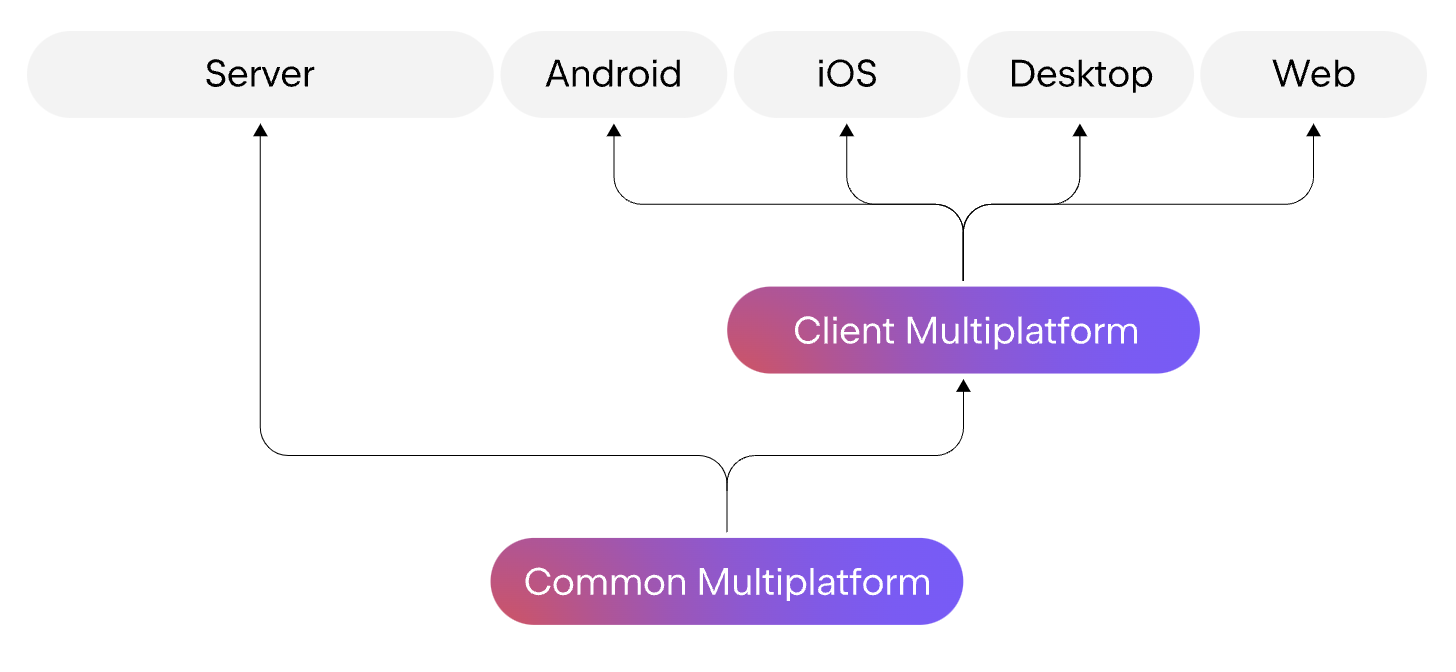
Yet teams face significant friction:
expect/actualdeclaration patterns- Platform-specific API boundaries
- Gradle configuration complexity
- iOS debugging challenges for shared code
How the Best AI for Kotlin Coding Solves These Challenges
Kotlin Coding Assistant eliminates these friction points through deep Kotlin expertise encoded into every interaction. It doesn't just generate code—it enforces correctness, maintains project context, and adapts to your workflow.
| Traditional Approach | With Kotlin Coding Assistant |
|---|---|
| Search Stack Overflow for syntax | Get idiomatic code with explanation of why |
| Manual version compatibility checks | Automatic conflict detection and resolution guidance |
| Trial-and-error coroutine debugging | Structured concurrency patterns with proper scope management |
| Copy-paste from documentation | Context-aware code respecting your project conventions |
| Maintain mental model of dependencies | Tracked dependency state with proactive update suggestions |
Deep Language Mastery
The assistant encodes comprehensive Kotlin knowledge:
Type System Expertise:
- Null safety with smart casts and platform type handling
- Declaration-site variance (
in/out) for generic constraints - Reified generics with
inlinefunctions - Sealed classes/interfaces for exhaustive
whenexpressions - Value classes for type-safe wrappers without overhead
Coroutine & Concurrency:
- Structured concurrency with
coroutineScope/supervisorScope - Flow operators:
combine,flatMapLatest,stateIn - Proper cancellation propagation and
ensureActive() - Dispatcher selection:
Dispatchers.Main,IO,Default,Unconfined
Ecosystem Fluency:
- Jetpack Compose: state hoisting, side effects, composition locals
- KMP: expect/actual declarations, platform-specific implementations
- Ktor: routing, serialization, authentication pipelines
- kotlinx.serialization: polymorphism, custom serializers
Adaptive Interaction Model
For experienced developers:
- Delivers clean, copy-paste-ready code sections
- Minimal narration, maximum velocity
- Respects existing project patterns
For learners:
- Concise explanations of key decisions
- "Why this approach" context
- References to official documentation
Step-by-Step: From Prompt to Production Code
Step 1: Establish Project Context
Share your stack or existing code. The assistant loads relevant context:
"Working on a KMP project with Compose Multiplatform, targeting Android and iOS. Using Ktor for networking, SQLDelight for persistence, Kotlin 2.2.0."
The assistant tracks this in its project state, ensuring all generated code respects your versions and dependencies.
Step 2: Request Code Generation
Describe what you need. Kotlin Coding Assistant researches current best practices if needed:
"Create a repository pattern for user data with local caching and remote sync. Handle offline-first scenarios with proper error types."
The assistant generates:
kotlin// shared/src/commonMain/kotlin/data/repository/UserRepository.kt
sealed class UserResult {
    data class Success(val user: User) : UserResult()
    data class Error(val cause: UserError) : UserResult()
    data object Loading : UserResult()
}

sealed class UserError {
    data class NetworkError(val message: String) : UserError()
    data class DatabaseError(val message: String) : UserError()
    data object NotFound : UserError()
}

class UserRepository(
    private val remote: UserApi,
    private val local: UserDao,
    private val dispatcher: CoroutineDispatcher = Dispatchers.IO
) {
    fun getUser(id: String): Flow<UserResult> = flow {
        emit(UserResult.Loading)

        // Emit cached data first
        val cached = local.getUser(id)
        cached?.let { emit(UserResult.Success(it)) }

        // Fetch fresh data
        try {
            val remoteUser = withContext(dispatcher) {
                remote.fetchUser(id)
            }
            local.insertUser(remoteUser)
            emit(UserResult.Success(remoteUser))
        } catch (e: NetworkException) {
            if (cached == null) {
                emit(UserResult.Error(UserError.NetworkError(e.message)))
            }
            // Otherwise keep showing cached data
        }
    }.catch { e ->
        emit(UserResult.Error(UserError.DatabaseError(e.message ?: "Unknown error")))
    }
}
Key decisions embedded:
- Sealed classes for exhaustive error handling
- Flow-based reactive updates
- Offline-first with graceful degradation
- Proper dispatcher usage for IO operations
Step 3: Receive Dependency Guidance
The assistant notes required dependencies and version constraints:
Add to
libs.versions.toml:
Step 4: Iterate with Context Preservation
As your project grows, the AI maintains continuity:
"Update the repository to support pagination with Paging 3 on Android."
It generates platform-specific implementations while preserving shared logic:
kotlin// androidMain/kotlin/data/repository/AndroidUserRepository.kt
fun UserRepository.pagingSource(): PagingSource<Int, User> =
    // Android-specific Paging 3 integration

// iosMain/kotlin/data/repository/IosUserRepository.kt
// iOS uses native pagination or shared logic as needed
Real-World Use Cases
📱 Android Development with Jetpack Compose
Scenario: Building a complex UI with state management
Traditional Approach: 2-3 hours implementing ViewModel, StateFlow, and Compose integration
Kotlin Coding Assistant: Generates complete, production-ready implementation in minutes:
- Proper state hoisting
collectAsState()withLifecycleOwnerawareness- Side effect handling (
LaunchedEffect,DisposableEffect) - Preview annotations with sample data
Key benefits:
- Eliminates boilerplate ViewModel factories
- Ensures lifecycle-aware collection
- Provides proper error state handling
🌐 Kotlin Multiplatform for Cross-Platform Logic
Scenario: Sharing authentication flow between Android and iOS
Traditional Approach: Duplicate Swift and Kotlin implementations, divergent bug fixes
This AI-powered solution: Single source of truth with platform-specific UI
The assistant generates expect/actual declarations with proper platform boundaries:
kotlin// shared/src/commonMain/kotlin/auth/AuthRepository.kt
expect class PlatformAuthProvider {
    suspend fun authenticate(credentials: Credentials): AuthResult
}

// Platform implementations handle Google Sign-In (Android) / Sign in with Apple (iOS)
⚡ Backend Services with Ktor
Scenario: REST API with structured logging and error handling
Traditional Approach: Manual setup of routing, serialization, status pages
The tool: Complete module with best practices:
- Content negotiation with kotlinx.serialization
- Status pages for consistent error responses
- Request validation with
call.receiveValidated() - Structured logging with Kotlin-logging
🧪 Test Generation
Scenario: Unit tests for coroutine-based repository
Kotlin Coding Assistant generates:
kotlin@Test
fun `getUser emits cached data then updates from remote`() = runTest {
    // Given
    val localUser = User("1", "Local")
    val remoteUser = User("1", "Remote")
    coEvery { local.getUser("1") } returns localUser
    coEvery { remote.fetchUser("1") } returns remoteUser

    // When/Then
    repository.getUser("1").test {
        assertEquals(UserResult.Loading, awaitItem())
        assertEquals(UserResult.Success(localUser), awaitItem())
        assertEquals(UserResult.Success(remoteUser), awaitItem())
        awaitComplete()
    }
}
Using Turbine for Flow testing, MockK for coroutine mocks, and runTest for virtual time.
Kotlin 2.2 and 2.3: Staying Current
The Kotlin ecosystem continues rapid evolution. Kotlin 2.2.0 introduced context parameters and made guard conditions stable, while Kotlin 2.3 brings additional performance improvements.
Key developments in 2026:
- K2 compiler now default — 40% faster builds across projects
- Compose iOS reached stable — Production-ready cross-platform UI
- Context parameters — Cleaner dependency injection patterns
- Guard conditions in
when— More expressive pattern matching
Kotlin Coding Assistant tracks these changes, flagging version incompatibilities and suggesting alternatives when you target older Kotlin versions.
Frequently Asked Questions
Is this the best AI for Kotlin development compared to GitHub Copilot?
While Copilot provides generic code completion, Kotlin Coding Assistant offers deep Kotlin-specific expertise: structured concurrency enforcement, KMP architecture guidance, Gradle configuration assistance, and version compatibility checking that general-purpose tools lack.
Can it help migrate Java code to Kotlin?
Yes. The assistant converts Java to idiomatic Kotlin—not just syntax translation but proper use of null safety, extension functions, data classes, and scope functions. It flags Java interop concerns and platform type handling.
Does it support Kotlin Multiplatform Compose?
Full support for Compose Multiplatform, including iOS stability features. The assistant tracks platform-specific considerations and generates code compatible with your target platforms.
How current is its Kotlin knowledge?
The AI researches current documentation before answering version-sensitive questions. It knows Kotlin 2.2+ features (context parameters, guard conditions, multi-dollar string interpolation) and their compatibility requirements.
Can it debug existing code?
Yes. Paste error messages or stack traces for diagnosis. The assistant traces root causes through suspend function chains, identifies dispatcher misuse, and suggests fixes with corrected code sections.
Is my code kept private?
Yes. Conversations and code are never used to train public AI models. Data is encrypted in transit and at rest, not sold or shared with advertisers.
Conclusion: Ship Production Kotlin Code with Confidence
Kotlin's rise to 87% adoption in Android apps reflects its power—but realizing that power requires mastering coroutines, null safety, and the rapidly evolving ecosystem. The best AI for Kotlin development bridges this gap, delivering expert-level code that follows current best practices while adapting to your experience level.
Whether you're building Android apps with Jetpack Compose, sharing business logic across platforms with KMP, or architecting backend services with Ktor, this AI ensures your code is idiomatic, correct, and maintainable.
Get started with Kotlin Coding Assistant and write Kotlin that ships.