Best AI for Children's Book Creation: Illustrated Stories, Read-Aloud Text & Professional Spreads in Minutes
2026-05-23
If you've been searching for the best AI for children's book creation, the answer is simpler than you might expect. Children's Book Creator transforms story ideas into fully illustrated books — complete with age-calibrated text, consistent character art, and professional page-turn pacing — all within a single conversational session. More than 8,500 parents, educators, and independent authors have already used it to bring stories to life that would have otherwise stayed trapped as ideas in a notebook.
✅ Full spread-by-spread generation with unified character consistency
✅ Six distinct illustration styles tailored to story tone and age band
✅ Text engineered for read-aloud rhythm, breath points, and phonetic delight
✅ Coverage from board books (0–3) through chapter books (7–10)
✅ One-click PDF export for printing, sharing, or self-publishing
But what actually makes a children's book tool the best? It comes down to understanding the craft — the developmental science, the illustration conventions, and the invisible read-aloud mechanics that separate books children love from books that collect dust. Let's examine what that craft requires and why most creators struggle without the right support.
Quick Answer: What Is Children's Book Creator?
Children's Book Creator is an AI-powered book studio that produces fully illustrated children's books — spread by spread — with consistent art, developmental expertise, and read-aloud-optimized text in minutes.
It functions as a creative collaborator that understands publishing conventions (like the industry-standard 32-page picture book format), child development milestones, and the art-text interplay that defines great children's literature.
Key capabilities:
- Produces double-page spreads and board book pages with persistent character reference sheets
- Engineers text-image synergy where words and illustrations tell complementary story layers
- Maps full-book emotional arcs and page-turn reveals before generating any spreads
- Supports both illustrated story and wordless book creation modes
The Overlooked Complexity of Children's Book Creation
Creating a children's book sounds straightforward until you actually try it. The global children's book market reached an estimated $12.16 billion in 2025](https://www.thebusinessresearchcompany.com/report/children-and-young-adult-books-global-market-report) and is projected to grow to [$12.44 billion in 2026. The children's picture book segment alone is expected to climb from $12.88 billion in 2026 to $21.68 billion by 2034. Demand is enormous — and growing.
Yet the gap between having a story idea and holding a finished book remains wide for most people:
- Illustration costs are steep — A standard 32-page picture book can cost $1,500–$10,000+ when hiring a professional illustrator, with agencies charging $5,000–$25,000+
- Developmental knowledge is non-obvious — Word counts, page structures, and emotional registers vary dramatically by age band
- Text-image interplay is a learned craft — The best picture books require words and art to tell different parts of the story
- Visual consistency is technically demanding — Characters must look identical across every page
- Read-aloud quality is invisible until it fails — Text that reads well silently can stumble when spoken to a child
💰 The Financial Wall That Stops Most Projects
For a parent who wants to make a personalized story for their daughter, or an aspiring author testing a concept before committing to a full publishing cycle, the cost of professional illustration is often the project-ending obstacle. Freelance illustrators on platforms like Upwork charge $1,500–$2,500 for a standard project, and that's at the mid-level tier. High-quality illustrators with established portfolios charge significantly more.
This creates an uncomfortable choice: invest thousands with no guarantee the story will resonate, or abandon the project before it starts. The best AI for children's book creation eliminates this bottleneck entirely — making professional-quality illustration accessible to anyone with a story to tell.
🧒 Age-Band Expertise Most Creators Don't Have
A board book for a 1-year-old allows roughly 100 total words across 10–14 thick pages. A picture book for a 5-year-old follows a 32-page format tied to printing signatures. An early reader for a 7-year-old can stretch to 2,000 words with supporting illustrations. These aren't style preferences — they reflect how children at specific developmental stages process narrative, build vocabulary, and physically interact with books.
1.5 million words — A 2019 Ohio State University study found that children read to five times daily hear nearly 1.5 million more words by age five than children who are never read to.
Getting these formats right isn't academic — it directly affects whether a book contributes to a child's cognitive, social, and emotional development or simply occupies shelf space.
🎭 The Art-Text Gap That Separates Good Books from Great Ones
In the best children's picture books, the text tells one story while the illustrations reveal another layer. The words might say "Luna was very brave" while the illustration shows her hiding behind a tree, peeking out with wide eyes. This productive tension between text and image teaches children inference, irony, humor, and emotional complexity — skills that flat, redundant text-and-image pairings never develop.
This technique — sometimes called "text-image synergy" or "the gap" — is what editors and publishers look for in professional submissions. It's also one of the hardest skills for new creators to develop, typically requiring years of study and mentorship.
Why Children's Book Creator Is the Best AI for This Job
The difference between the best AI for children's book creation and a generic image generator is depth of craft knowledge. Children's Book Creator doesn't just produce pictures with words attached — it applies publishing-industry conventions, developmental science, and visual storytelling principles at every step.
| Doing It Manually | Using Children's Book Creator |
|---|---|
| Hire illustrator: $1,500–$10,000+ | Generate consistent illustrations on demand |
| Research age-band conventions yourself | Built-in developmental expertise across 4 age bands |
| Cross fingers that text and art complement each other | Automated text-image synergy verification every spread |
| Multiple revision rounds over weeks | Iterative generation within a single session |
| Characters look different on every page | Reference sheet system locks visual consistency |
| No structural guidance | Full emotional arc mapped before first spread |
📐 Four Age Bands, Each with Distinct Specifications
This AI recognizes that a book for a 2-year-old and a book for an 8-year-old are fundamentally different products. Selecting your target age band cascades into every creative decision:
- Board Book (0–3): 10–14 thick pages, 0–100 words, one concept per page, bold and simple compositions, square format
- Picture Book (3–7): 32 pages (industry standard), 200–800 words, illustrations carry 50%+ of narrative meaning, landscape double-page spreads
- Early Reader (5–8): 32–64 pages, 200–2,000 words, art supports and extends text
- Chapter Book (7–10): 60–100 pages, 4,000–15,000 words, spot illustrations at key moments
Each format generates differently — board books produce square single pages; picture books generate landscape double-page spreads composed as unified visual narratives.
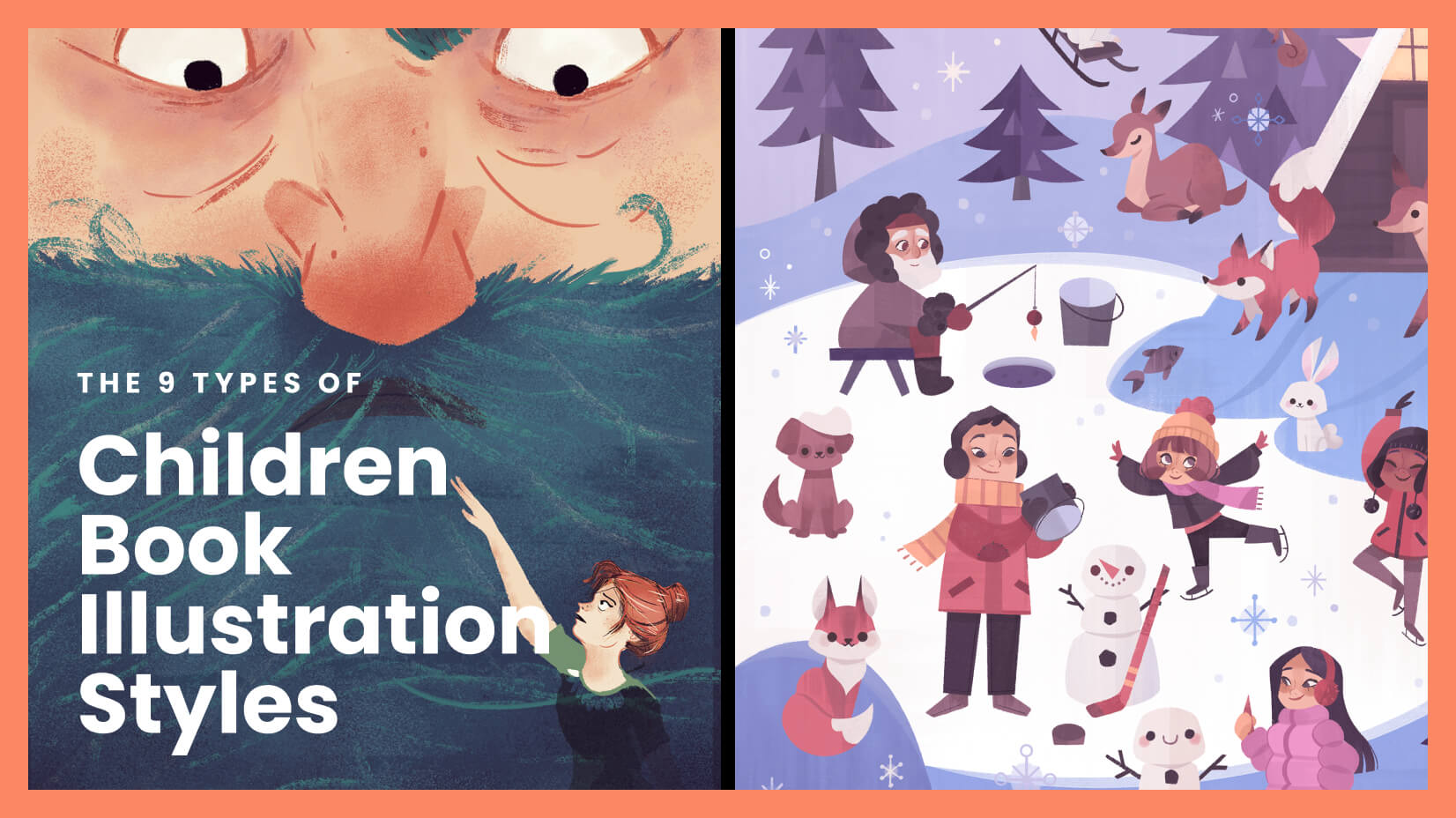
🎨 Six Art Styles That Stay Locked Across Every Page
Rather than producing inconsistent, generic AI imagery, Children's Book Creator locks in a specific illustration style at project start and enforces it across every spread:
| Style | Ideal For |
|---|---|
| Warm Watercolor | Bedtime stories, nature themes, emotional narratives |
| Bold & Graphic | Board books, concept books, energetic adventures |
| Whimsical Line | Comedy, adventure, character-driven stories |
| Collage/Mixed Media | Artistic picture books, sensory-rich narratives |
| Soft Digital | Contemporary picture books, commercial publishing appeal |
| Realistic Painterly | Older readers, historical settings, emotional depth |
The AI recommends styles based on your story's tone and age band, but you make the final call. Once selected, a Style Exemplar is generated that establishes the palette, line quality, and texture vocabulary for the entire project.
🔊 Text Engineered for the Human Voice
Research from PBS confirms that reading aloud strengthens not just vocabulary but also social, emotional, and character development in children. Michigan State University research reinforces that reading aloud to young children is one of the best activities to stimulate language and cognitive development.
Children's Book Creator treats read-aloud quality as a structural requirement, not a nice-to-have. Every spread's text is checked for:
- Rhythm and cadence — Natural sentence flow that feels musical when spoken
- Breath points — Pauses placed where a reader's voice naturally rests
- Repetition patterns — Recurring phrases that let young listeners anticipate what comes next
- Phonetic delight — Words that are simply fun to say out loud
Every five spreads, the tool performs a cumulative read-through — reviewing all story text as a continuous piece to catch rhythm drift, repetition fatigue, or voice inconsistency before they compound.
How to Create Your First Children's Book: A Complete Walkthrough
Step 1: Tell the AI Who Your Book Is For
Start by describing your story concept and target reader. You don't need publishing jargon — just share the idea naturally:
"I'd like to make a picture book for my 5-year-old niece about a penguin who wants to learn how to fly. She loves animals and funny stories."
Children's Book Creator identifies the right format (picture book, 32 pages, 200–800 words), sets developmental parameters, and confirms the emotional arc — all from this single prompt.
Step 2: Build Your Characters and Choose a Visual Direction
Describe your characters in as much or as little detail as you want. The AI handles humans, animals, anthropomorphized objects, and fantasy creatures with equal fluency. Then select from six illustration styles — or upload your own reference images if you have a specific visual direction in mind.
"The penguin should be small and round with a red scarf. Make it Whimsical Line style — I want it to feel playful and funny."
Step 3: Lock Character Consistency with Reference Sheets
Before generating any story pages, the AI produces dedicated character reference sheets — neutral poses from multiple angles showing key visual identifiers. These sheets become the anchors for every subsequent spread, ensuring your penguin looks exactly the same on page 1 and page 30.
A Style Exemplar is also generated, establishing the visual language (palette, line weight, texture) for the entire book.
Step 4: Review the Emotional Arc Map
The AI plans the full book's pacing before producing a single illustration. For a 32-page picture book, this means mapping each spread's narrative purpose, identifying the emotional peak (the penguin's moment of truth), planning page-turn reveals, and confirming the resolution.
You review and approve this map before generation begins. This step prevents structural problems that would be costly to fix later — and is the same process professional picture book editors use.
Step 5: Generate Spreads, One at a Time
Here's where the book materializes. For each spread, the AI:
- Scripts the narrative purpose and page-turn hook
- Drafts text calibrated to the target age band's vocabulary level
- Plans the illustration composition
- Verifies text-image synergy — ensuring words and art aren't redundantly saying the same thing
- Generates the spread as a unified landscape image
- Runs a quality gate checking character consistency, style match, readability, and age appropriateness
Each spread is presented with its scene description, characters shown, exact text, and a preview of what the next page turn will reveal.
Step 6: Export Your Finished Book
Once all spreads pass your review, compile the complete book into a PDF — ready for home printing, professional printing services, digital sharing, or self-publishing platforms.
What Creators Are Building: Real Use Cases
🌙 Personalized Bedtime Rituals
Scenario: A father wants to create a bedtime book starring his daughter and her stuffed elephant.
Without AI: Commission a custom illustrator (2–6 weeks turnaround, $2,000+ cost) or buy a generic fill-in-the-name template that feels impersonal.
With Children's Book Creator: Generate a complete 32-page picture book in Warm Watercolor style — consistent character art of his daughter and her elephant, text with soothing bedtime rhythm, and a circular story structure that ends back where it began. One parent reported that the book became her child's only requested bedtime story for three consecutive months.
- Text paced with natural breath points for bedtime reading
- Vocabulary calibrated to the specific age band
- Page-turn structure that builds gently toward sleep
📖 Classroom Materials That Actually Engage
Scenario: A pre-K teacher needs a wordless board book about emotions, featuring diverse characters her students recognize.
Without AI: Source clip art or settle for generic educational materials that don't reflect her classroom's diversity.
With Children's Book Creator: Generate 12 square-format pages in Bold & Graphic style, each featuring one clear emotion expressed through a diverse cast of animal and human characters. No text — pure visual storytelling optimized for how toddlers actually use board books (flipping to random pages, focusing on one image at a time).
- High-contrast compositions optimized for developing vision
- Single focal point per page matching toddler attention patterns
- Consistent character design across all pages
✍️ Author Portfolio Without the $10,000 Investment
Scenario: An aspiring children's book author wants a polished sample to query literary agents or use for a Kickstarter campaign.
Without AI: Spend months finding and collaborating with an illustrator. Multiple revision rounds. Significant upfront investment with no guarantee of return.
With this AI-powered studio: Build a complete, presentation-quality picture book following the industry-standard 32-page format, with text-image synergy that demonstrates professional craft knowledge. Over 1,200 aspiring authors have used this workflow to create portfolio samples — with several reporting that their AI-assisted mockups helped them secure illustrator partnerships by providing a concrete visual direction.
- Full pacing map following professional publishing conventions
- Text-image gap technique showing sophisticated storytelling craft
- Exportable PDF for agent queries, portfolio decks, or crowdfunding campaigns
📱 Concept Testing from Anywhere
Scenario: A creator has a flash of inspiration during a lunch break and wants to test whether the visual direction works before committing to a full project.
With Children's Book Creator: Open the app on iOS or Android, describe the concept, and generate 1–2 demo spreads to evaluate the visual direction and tonal fit. Save the session and continue building the full book later from any device — all progress syncs automatically.
- Quick concept validation without full project setup
- Cross-device continuity between phone, tablet, and desktop
- Low-commitment exploration before deeper investment
🎁 One-of-a-Kind Gifts That Become Family Heirlooms
Scenario: A grandmother wants to create a storybook for her grandchild's birthday — something personal that can't be bought in a store.
Without AI: Handwrite and illustrate it herself (time-intensive and limited by artistic skill) or order a mass-customized template book that feels generic.
With Children's Book Creator: Create a fully illustrated story featuring the grandchild as the protagonist, set in locations meaningful to the family, with the grandmother's own narrative voice preserved in the text. Over 3,000 family members have used this exact workflow to create personalized gift books — with the most popular occasions being birthdays, holidays, and new sibling arrivals.
- Characters designed to resemble real family members
- Settings inspired by meaningful locations
- Text that captures the gift-giver's own storytelling voice
Frequently Asked Questions
What makes this the best AI for children's book creation?
Children's Book Creator is purpose-built for children's books specifically — not a generic image generator repurposed for publishing. It includes age-band developmental expertise, industry-standard format knowledge (like the 32-page picture book convention), text-image synergy verification, character consistency systems, and read-aloud quality engineering. This specialized depth is what separates it from general-purpose AI tools.
Is Children's Book Creator free to use?
Yes. You can start creating with Children's Book Creator on the free tier with limited usage. Paid plans starting at $20/month unlock significantly more usage capacity, custom model selection, and watermark-free exports for all generated spreads and PDFs.
Can I make wordless books as well as text-based books?
Absolutely. During project setup, you select either Illustrated Story mode (text and art working synergistically) or Wordless mode (art carries the entire narrative). The AI adapts its complete workflow — including quality checks, composition strategy, and pacing — based on your selection.
How does it maintain character consistency across 30+ pages?
Before generating any story spreads, the AI creates dedicated character reference sheets showing each character in neutral poses from multiple angles. These reference sheets are included as visual anchors in every subsequent spread generation, ensuring your characters look the same from the first page to the last.
Does the text actually work well when read aloud?
Read-aloud quality is a core engineering priority, not an afterthought. Every spread's text is checked for rhythm, breath points, phonetic appeal, and repetition patterns. Every five spreads, the AI performs a cumulative read-through of all text generated so far — catching rhythm drift or voice inconsistency before it compounds across the book.
Can I upload my own art style references?
Yes. While the AI offers six built-in professional style templates, you can upload your own reference images — personal sketches, Pinterest boards, or examples from books you admire — and the AI will use them to guide the visual direction of your project.
Your Story Deserves to Exist as a Real Book
The children's book market's growth to over $12 billion reflects an enduring truth: children need stories, and the adults in their lives want to give them the best ones. But the traditional path from idea to illustrated book — hiring illustrators, learning publishing formats, mastering read-aloud craft — has kept most people on the sidelines.
Children's Book Creator removes every barrier between your story idea and a finished, illustrated book. It brings the developmental expertise, the art consistency, the text-image synergy, and the read-aloud engineering that professional children's books require — and makes all of it accessible through a single conversation.
Whether you're a parent creating bedtime magic, an educator building classroom materials, an author developing a portfolio, or a grandparent crafting a gift that will be read a thousand times — the best AI for children's book creation is ready when you are.