Best AI CSV Generator: Structured Spreadsheet Files From Conversation to Export (June 2026)
2026-06-08
CSV Generator by Jenova transforms any data into structured, import-ready CSV spreadsheet files through conversation — describe what you need or paste raw data, and the AI automatically detects the appropriate schema, applies platform-specific formatting, and delivers a clean .csv file that imports without errors. While most AI tools in 2026 focus on analyzing existing CSV files, almost none help you create them from scratch. This agent fills that gap entirely.
✅ Describe your data or paste it raw — get a properly structured CSV file ✅ Automatic schema detection for contacts, products, financial records, and more ✅ Platform-specific formatting for Shopify, Salesforce, QuickBooks, and others ✅ Available free on web, iOS, and Android
To understand why a dedicated AI CSV generator matters, it helps to look at how much time businesses actually lose to manual data formatting — and why spreadsheet tools haven't solved the problem.
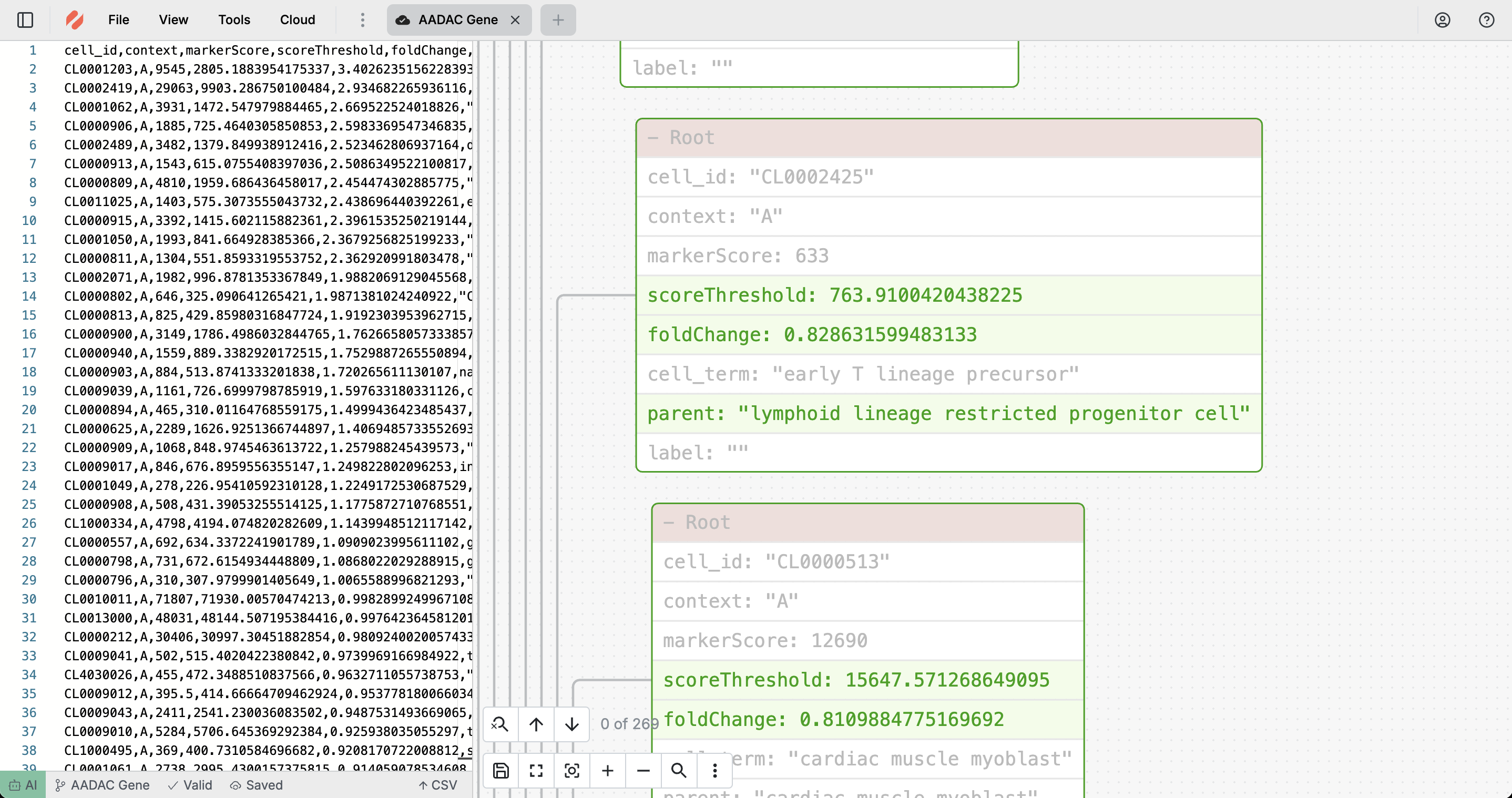
Quick Answer: What Is CSV Generator by Jenova?
CSV Generator is an AI-powered data structuring tool that converts raw data, descriptions, or unstructured input into properly formatted, import-ready CSV files in seconds.
Key capabilities:
- Generate complete CSV files from conversation — contact lists, product catalogs, inventory records, financial data
- Automatic schema detection that identifies the right column structure for your data type
- Platform-specific formatting for major systems (Shopify, Salesforce, QuickBooks, WooCommerce)
- Iterative refinement — add columns, reorder fields, or adjust formatting conversationally
The Problem: CSV Creation Is Still Manual, Error-Prone, and Expensive
CSV files remain the universal language of data exchange — the most common format for importing, exporting, and transferring data between systems. Yet creating them properly is still a frustratingly manual process that wastes enormous amounts of time and money.
The scale of the data quality crisis is staggering:
**Poor data quality costs organizations at least $12.9 million annually**, with some estimates suggesting the total U.S. economic impact reaches $3.1 trillion per year — Jenova CSV Generator resource page citing IBM/Gartner research
The document automation market is projected to grow from $5.25 billion in 2025 to $30.50 billion by 2034, registering a CAGR of 21.6% — TrendX Insights
64% of organizations cite data quality as their top data integrity challenge, with 77% rating their data quality as average or worse — an 11-point decline from 2023 — Integrate.io Data Transformation Statistics 2025, cited via Anomaly AI
That deterioration in data quality despite increased investment reveals a fundamental gap: tools keep getting better at analyzing data, but the process of structuring data into clean, import-ready files remains stubbornly manual.
📄 Formatting Inconsistencies Break Everything
The most common CSV problem isn't missing data — it's inconsistent formatting. Date fields mix "MM/DD/YYYY" and "DD-MM-YYYY." Currency values appear with or without dollar signs. Phone numbers use different separators. When you import this file into your CRM or e-commerce platform, the system either rejects it entirely or silently corrupts your data.
- Manual column organization — deciding the right field names, data types, and column order for each target platform
- Platform-specific requirements — Shopify needs "Handle," "Variant SKU," and "Variant Inventory Tracker"; Salesforce requires exact field names matching custom objects; QuickBooks expects particular date and currency formats
- Encoding and delimiter failures — UTF-8 problems cause special characters to display as gibberish; comma delimiters fail when data contains commas; line break inconsistencies corrupt multi-line fields
- Scale limitations — as , most third-party tools that handle CSV imports don't support large file sizes and aren't performant above 1M rows
🔍 AI Tools in 2026 Analyze CSVs — They Don't Create Them
The current landscape of AI CSV tools is heavily skewed toward analysis. A comprehensive comparison of 10 AI tools for CSV files in 2026 lists tools like Julius AI, Powerdrill, ChatGPT Advanced Data Analysis, and Anomaly AI — all designed to analyze existing CSV files, not generate new ones from scratch. Similarly, camelAI's roundup of the 7 best AI CSV tools covers analysis, visualization, and querying — not creation.
If you need to build a CSV file — a product catalog for Shopify, a contact list for your CRM, a financial ledger for QuickBooks, or a dataset for research — you're still expected to open a spreadsheet, manually type column headers, populate rows, fix formatting, and troubleshoot import errors.
This is exactly what CSV Generator by Jenova was built for.
Why CSV Generator by Jenova
Unlike the dozens of tools designed to analyze existing CSV files, CSV Generator operates as a standalone AI agent purpose-built for creating structured CSV files from scratch — through conversation.
| Traditional CSV Creation | CSV Generator by Jenova |
|---|---|
| Manually type column headers and populate rows | Describe your data → receive a structured CSV |
| Research platform-specific field requirements | Built-in knowledge of Shopify, Salesforce, QuickBooks, etc. |
| Manual data cleaning and format standardization | Automatic formatting, encoding, and delimiter handling |
| Trial-and-error import troubleshooting | Import-ready files with proper structure on first attempt |
| Hours of spreadsheet formatting | Seconds to generate clean CSV |
| Separate tools for different data types | One agent handles contacts, products, finances, inventory, and more |
🎯 Automatic Schema Detection
The agent analyzes your input and automatically identifies the appropriate column structure. Contact lists get standard CRM fields (First Name, Last Name, Email, Phone, Company). Product catalogs receive e-commerce columns (SKU, Title, Price, Inventory, Category). Financial records get transaction fields with proper date and currency formatting. You don't need to specify column names or data types — the AI recognizes patterns and applies the right structure automatically.
"Create a CSV of 50 customer contacts with names, emails, phone numbers, companies, and their subscription tier"
"I have a list of 30 products — here are the names, prices, and descriptions. Format it for Shopify import"
"Generate a monthly expense report CSV with date, vendor, category, amount, and payment method columns"
💬 Conversational Iteration
The most powerful aspect of CSV Generator isn't the first output — it's the refinement. Traditional spreadsheet work requires manually editing cells, adjusting formulas, and re-exporting. With CSV Generator, you describe changes naturally:
"Add a 'Region' column and populate it based on the state field"
"Change the date format from MM/DD/YYYY to YYYY-MM-DD for database import"
"Remove the duplicate entries and sort by last name alphabetically"
📐 Platform-Specific Intelligence
Need a Shopify product import? CSV Generator applies Shopify's exact column requirements. Salesforce CRM migration? It uses proper field naming conventions. The agent maintains knowledge of major platform specifications, eliminating the research phase where you hunt through documentation trying to figure out required column names and formats.
Related Agents You'll Also Find Useful
If CSV generation is part of a broader data management or document creation workflow, several complementary agents extend what you can accomplish:
PDF Doc Generator
When your data needs to become a visual deliverable — client reports, financial summaries, or presentation-ready documents — PDF Doc Generator creates professionally designed PDFs with adaptive layout intelligence. Use CSV Generator for the structured data; switch to PDF Doc Generator when the output needs visual polish for stakeholders.
- Professional visual design with adaptive layout conventions
- Ideal for turning raw data into client-facing reports
- Same conversational interface as CSV Generator
Word Doc Generator
When your data needs narrative context — written reports, analysis documents, or formatted memos that accompany the raw CSV export. Word Doc Generator produces professionally formatted .docx files through conversation, perfect for the written deliverable that explains what the CSV data means.
- Industry-standard Word documents with proper formatting
- Ideal for reports and memos that contextualize data
- Editable output for collaborative review workflows
Expense & Receipt Tracker
When your CSV needs come from financial record-keeping — uploading receipts and bank statements that need to be categorized, organized, and exported as structured financial records. Expense & Receipt Tracker handles the upstream data capture; CSV Generator handles the downstream structured export.
- Upload receipts and statements → categorized financial records
- Export-ready data for accounting software
- Automated categorization and organization
Try CSV Generator free — no credit card required.
How It Works

Step 1: Provide Your Data
Open CSV Generator and share your data in any format — paste a text list, describe what you need, provide raw data from another system, or even upload a screenshot of a spreadsheet. The agent accepts unstructured input and extracts the relevant information automatically.
"Create a CSV for my Etsy product listings — here are the 25 items with names, prices, materials, and shipping weights"
Step 2: Review the Structured Output
The agent produces a complete, properly formatted CSV file with automatic schema detection applied — correct column headers, consistent data formatting, proper encoding, and appropriate delimiters. Review the structure, column organization, and data accuracy.
Step 3: Refine Through Conversation
Request changes naturally. Add columns, reorder fields, change formatting standards, adjust data types, or apply platform-specific requirements — the agent regenerates the complete file with your changes applied consistently across all rows.
"Add a 'Tags' column and populate it with relevant keywords based on each product's description"
Step 4: Download Your File
Once satisfied, download your clean, import-ready CSV file. The file includes consistent data formatting, proper UTF-8 encoding, appropriate delimiters, and platform-compatible structure — ready for direct import into your target system.
"Perfect. Now create a second version with only the items priced above $50, sorted by price descending"
Results & Use Cases
📊 E-Commerce Product Imports
Scenario: A small business owner needs to upload 200 products to Shopify with variants, pricing tiers, and inventory tracking — but has never created a Shopify-compatible CSV before.
Traditional Approach: Spend 4-6 hours downloading Shopify's CSV template, reading documentation to understand required fields like "Handle," "Variant SKU," and "Variant Inventory Tracker," manually populating each row, fixing formatting errors, and troubleshooting failed imports.
CSV Generator: Describe the products — or paste the raw data — and mention "format for Shopify import." Receive a properly structured CSV with all required Shopify columns, correct variant organization, and proper pricing format. Import on first attempt.
- Eliminates hours of template research and manual formatting
- Automatic Shopify column structure with correct field names
- Zero import errors — file is built to platform spec
💼 CRM Data Migration
Scenario: A sales team is migrating 1,000 contacts from scattered spreadsheets and email exports into Salesforce CRM — but the data is inconsistent, duplicated, and formatted differently across sources.
Traditional Approach: Hours mapping fields to Salesforce requirements, standardizing phone number formats, deduplicating entries, converting date formats, and fixing import failures. Multiple rounds of troubleshooting before a clean import.
CSV Generator: Paste the raw contact data from all sources. The agent standardizes formatting, identifies duplicates, applies Salesforce field naming conventions, and generates a single clean CSV ready for import.
- Automatic Salesforce field mapping
- Consistent phone, email, and date formatting across all entries
- Duplicate detection and removal built into the generation process
📱 Quick Data Structuring on Mobile
Scenario: You're at a trade show collecting business cards and need to create a structured contact list CSV before you forget who's who — but your laptop is back at the hotel.
Traditional Approach: Take photos of business cards, plan to transcribe them into a spreadsheet later. "Later" becomes next week. Half the context is lost.
CSV Generator: From your phone, type out or dictate the contact details as you collect them. The agent structures everything into a clean CSV with proper columns — name, company, title, email, phone, notes. Download and import into your CRM the same day.
- Full functionality on mobile via Jenova's iOS and Android apps
- Conversational interface works naturally for dictation-style input
- Structured output without touching a spreadsheet on a small screen
🎯 Research Datasets and Codebooks
Scenario: A researcher needs to create a structured dataset CSV with 50 variables, proper coding schemes, and consistent categorical values for a survey analysis — the kind of meticulous data structuring that takes hours of manual alignment in a spreadsheet.
Traditional Approach: Open Excel, manually type variable names, define value labels, ensure consistent coding across all categorical variables, align columns, fix formatting — spend 3-4 hours on structure before any analysis begins.
CSV Generator: Describe the variables, coding schemes, and data types. The agent generates a properly structured CSV with consistent categorical values, aligned columns, and clean formatting — ready for import into SPSS, R, or any statistical software.
- Consistent coding across all categorical variables
- Proper column alignment and data type formatting
- Eliminates tedious manual structuring work
Frequently Asked Questions
Is CSV Generator by Jenova free?
Yes. CSV Generator is available on Jenova's free tier with all core capabilities. Free-tier generated files include a small "Created by Jenova" watermark, which is removed on any paid plan starting at $20/month. The free tier gives you full access to the agent's data structuring and schema detection intelligence.
How is this different from AI tools like Julius or ChatGPT for CSV files?
Most AI CSV tools in 2026 — Julius AI, Powerdrill, ChatGPT Advanced Data Analysis, and others — are designed to analyze existing CSV files: upload a file, ask questions, get charts. CSV Generator does the opposite — it creates new CSV files from scratch. You provide raw data, descriptions, or unstructured input, and it generates a properly structured, import-ready CSV.
Can it format CSVs for specific platforms like Shopify or Salesforce?
Absolutely. CSV Generator includes knowledge of major platform specifications — Shopify, WooCommerce, Salesforce, QuickBooks, Amazon, and others. Mention your target platform in the conversation, and the agent applies that platform's exact column requirements, field naming conventions, and formatting standards.
What kind of input does it accept?
Virtually any format: text lists, raw data dumps, verbal descriptions, structured data from other systems, or even just a description of what you need ("create a CSV with 100 sample customer records for testing"). The AI extracts relevant information and structures it into proper CSV format regardless of how messy the input is.
Does it work on mobile?
Yes. Jenova offers full feature parity across web, iOS, and Android. The conversational interface is especially valuable on mobile — you can dictate data, describe what you need, and receive a structured CSV file without ever opening a spreadsheet app on your phone.
Can I use it with other Jenova agents?
Yes. You can @mention CSV Generator from any other Jenova chat to structure any conversation's data into a CSV file. Pair it with Expense & Receipt Tracker for financial data structuring, PDF Doc Generator when the same data needs a visual report, or Word Doc Generator for narrative documents that accompany your structured data.
Conclusion
CSV files remain the most universal format for data exchange — the bridge between every CRM, e-commerce platform, accounting system, and database on the planet. Yet in 2026, while AI tools have raced to offer increasingly sophisticated CSV analysis, the process of creating clean, structured, import-ready CSV files remains stubbornly manual. Businesses still lose millions annually to formatting inconsistencies, failed imports, and hours spent troubleshooting files that should have been right the first time. A dedicated AI agent that understands schema conventions, platform requirements, and proper encoding eliminates that entire category of wasted effort — you describe your data, and the structuring intelligence handles the rest.
Try CSV Generator now and create your next import-ready CSV in seconds, not hours. Explore the full agent library at Jenova.