AI Tech Tree Generator: Design Research & Skill Trees Fast
2026-09-11
Game Designer Assistant helps you generate complete tech trees — research paths, skill trees, and unlock graphs — by turning a genre, fantasy, and constraint list into a structured progression system. While most teams still assemble nodes in spreadsheets or generic diagram tools, this AI provides named technologies, prerequisite logic, costs, and first-pass balance in a single working session.
As of September 2026, that speed matters. Indie teams are shipping more of the world's games with fewer people, and a tech tree generator that thinks like a systems designer is no longer optional.
✅ Builds research trees, skill trees, and hybrid progression graphs from a brief ✅ Names nodes, sets prerequisites, and flags exclusive branches before you draw a box ✅ Produces GDD-ready documentation you can paste into production ✅ Iterates costs, pacing, and dead-end techs in conversation — including on mobile
To understand why this matters, let's examine why tech trees remain one of the hardest systems in strategy and RPG design — and why most "generators" only draw pictures.
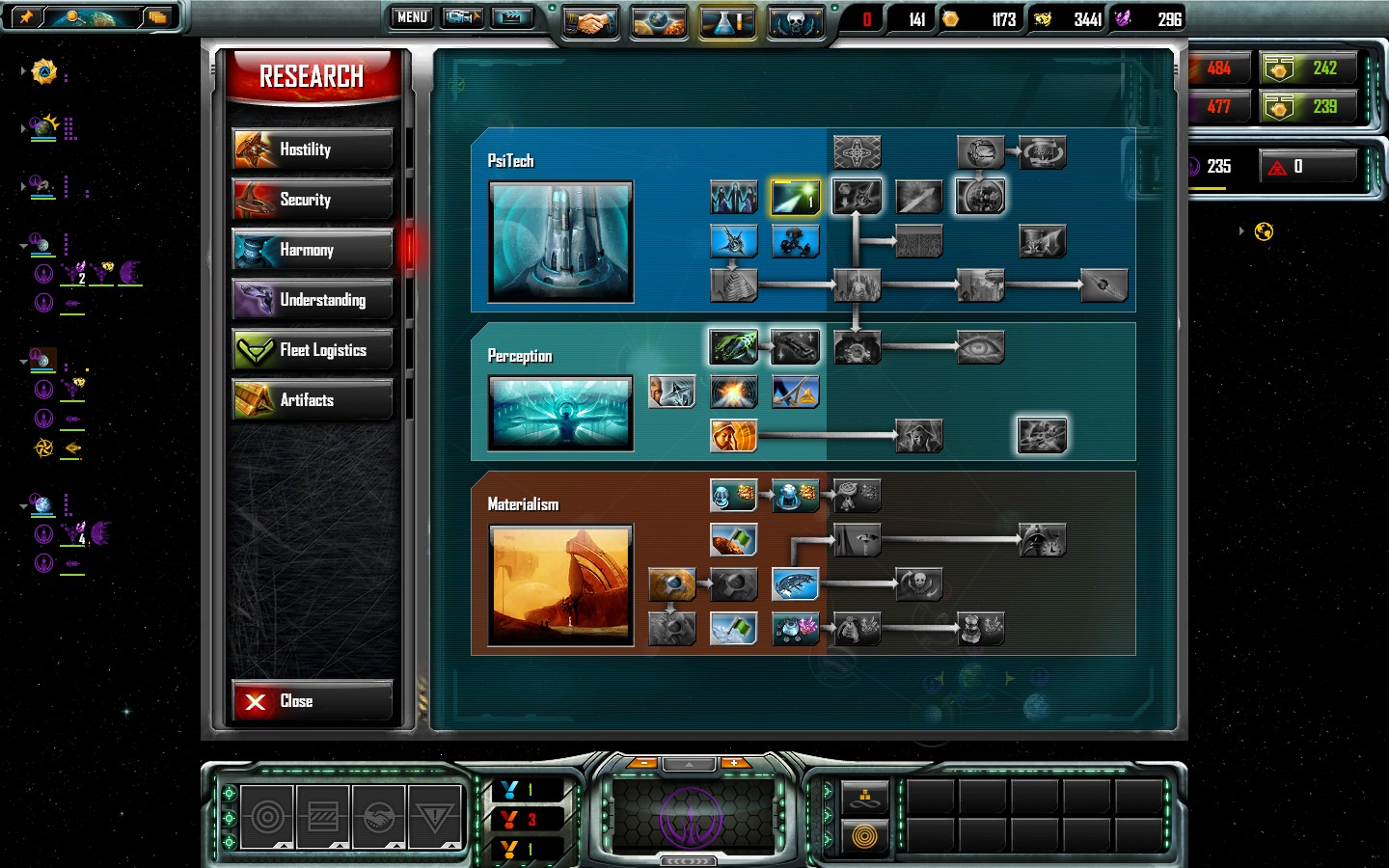
Quick Answer: What Is an AI Tech Tree Generator?
Game Designer Assistant is an AI tech tree generator that designs research trees, skill trees, and unlock paths with prerequisites, costs, and balance in minutes. It outputs the design logic, not just a pretty graph.
Key capabilities:
- Generate vine-style research trees or exclusive specialization branches from a one-paragraph brief
- Assign unlocks, resource costs, and era gates that match your intended session length
- Stress-test rush paths, dead-end techs, and "one choice = no choice" traps
- Turn the result into GDD text, node lists, and iteration notes your team can ship from
Why Most Tech Trees Stall Before Production
A tech tree is not a flowchart with extra icons. In strategy and RPG design it is both a rules engine and a story about progress — what Game Studies describes as a structure that "controls progress from one technology to a better technology," while also representing a history of invention. Sid Meier put the first video-game version of that idea into Civilization in 1991. Designers have been fighting the same problems ever since.
The commercial pressure behind those problems is real. The video game market was valued at $322.6 billion in 2025, yet the people building the systems are stretched thin:
1 in 10 developers — say they have been laid off in the past year
Half of all developers — are self-funding their games
1 in 3 developers — now use generative AI to streamline game development
But designing a good tree is still frustratingly difficult:
- Diagram tools draw boxes. They do not decide whether Kinetics should lock Energy, or whether a capstone arrives at hour 8 or hour 20.
- Spreadsheets capture costs and IDs, then drift the moment playtests change a prerequisite.
- Horizontal vs. vertical layout is treated as decoration, when it is actually a readability and planning problem.
- "Meaningful choice" collapses when every path is equally good, or when only one path is viable.
Classic design writing is blunt about the last point. CivFanatics' long-running how-to on tech tree design puts it as "one choice = no choice" — if the player is not presented with multiple interesting options, the tree is a corridor with extra art.
Soren Johnson, lead designer of Civilization IV, famously built his tree on a cork board: slips of paper, rubber bands, days of rearranging cause-and-effect. That method still works. It does not scale when a two-person indie team also has to write combat, UI, and a Steam page.
Documentation makes the gap worse. Modern GDD practice has already abandoned the hundred-page bible because design docs go out of sync the moment the prototype changes. A tech tree is one of the first systems to rot in that gap: the graph on the wiki says one thing, the spreadsheet says another, and the build says a third.
Game developers notice. Threads asking for a
keep appearing because Graphviz can layout nodes and a whiteboard can hold them — neither will tell you that your missile branch is a trap, or that your "optional" civic is actually mandatory for the win condition.This is exactly what Game Designer Assistant was built for.
Why Game Designer Assistant
Game Designer Assistant treats the tech tree as a game system, not a slide. You describe the fantasy, the session length, the economy, and the kinds of decisions you want players to make. It returns a tree you can argue with: named nodes, exclusive vs. open branches, costs, unlocks, and the failure modes to playtest first.
That is a different job from a diagrammer. Tools such as Graphviz auto-arrange trees, and visual editors such as Creately's skill tree maker or Royaltea's tech tree maker help you drag nodes around. Useful — once you already know what the nodes are. This AI starts one layer earlier: it proposes the technologies, the edges, and the balance hypotheses.
| Traditional Approach | Game Designer Assistant |
|---|---|
| Cork boards, spreadsheets, and stale wiki graphs | A first-pass tree with names, prereqs, and costs from one brief |
| Diagram tools that only draw | Design logic plus a layout you can specify (vine, branches, horizontal, vertical) |
| Days before anyone can playtest a route | Rush paths and dead-end techs flagged in the same session |
| "Every node looks important" | Explicit exclusive branches, era gates, and fake choices called out |
| GDD text that dies after the first patch | Iteration in conversation, then copy-out as living design notes |
Structure before sprites
Ghys's comparison of Age of Empires, Empire Earth, Rise of Nations, and Civilization IV still maps onto production choices. Trees tend to be linear upgrade paths (ignore a branch entirely) or interlocking vines (plan three eras ahead). A good generator should ask which one you want — and why.
Ask for a vine when the fantasy is "I am steering a civilization." Ask for exclusive branches when the fantasy is "I am committing to a doctrine." Mixing them without saying so is how players end up with a tree that looks deep and plays like a checklist.
Horizontal vs. vertical is a design decision
The screenshot below is the other half of the problem: not what the techs are, but whether a player can read the plan.
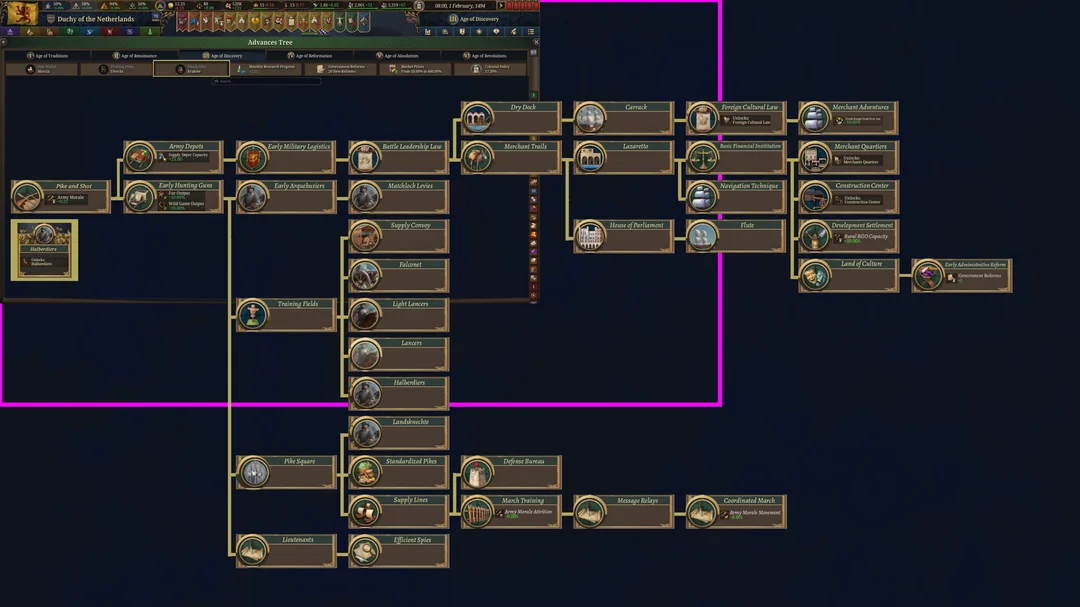
Vertical stacks (common in 4X research screens) are excellent for comparing three doctrines side by side. Horizontal timelines are better when rank, era, or "what unlocks next turn" is the question. Specify the layout in the brief. The generator should respect it instead of dumping a spaghetti graph and calling it a system.
Balance as a conversation, not a cell formula
A first tree is a hypothesis. The useful output is the list of things that will break: a one-tech rush, a capstone that arrives before the tutorial ends, a social civic that is secretly required for every military win. You then push back.
"Generate a 4-tier military tech tree for a 4X space game with three exclusive branches — kinetics, energy, and missiles. Include research costs, ship unlocks, and one intentional dead-end trap tech."
"Rebuild this skill tree so a new player reaches the first capstone around hour 12 in a 20-hour campaign, and no single path is strictly dominant."
"Convert this vine into a horizontal advances tree with era gates. Call out any node that is a false choice."
Those prompts are the job. Icon art can wait until the graph survives a playtest.
Related Agents You'll Also Find Useful
If you are designing a historically flavored tree, Deep Research can pull primary and secondary sources so your "Printing Press" node is not a generic +10% culture sticker. It synthesizes citations into a brief you can hand to systems design: what the invention actually changed, what it cost, and what it did not do.
- Multi-source research with inline citations
- Useful for era-accurate costs, constraints, and anachronism checks
- Turns "make it feel like the 1600s" into a node list with reasons
If the tree is counterfactual — steam in the 14th century, orbital industry without computers — Alternate Historian is the right pressure test. It traces causal chains instead of sprinkling "steampunk" on a default Civ ladder.
- Causal, not decorative, alt-history
- Helps you justify why a branch exists
- Excellent for 4X and grand-strategy pitches that need a thesis
When you need to feel a branching history from the throne rather than the spreadsheet, Civilization puts you in a living strategy session. Rival nations pursue their own goals while you decide which advances to chase. Use it as a taste-test for pacing and regret — the two sensations a paper tree cannot simulate.
- Emergent rival behavior, not a static opponent script
- Fast way to check whether a doctrine feels like a commitment
- Complements the generator: one builds the graph, the other plays the consequences
Try Game Designer Assistant free — no credit card required. Then pull in research or alt-history only where the tree actually needs it.
How to Generate a Tech Tree in Minutes
Step 1: State the game, the fantasy, and the job of the tree
Open this tech tree generator and describe genre, camera, session length, and what the tree is for. A 4X research vine, a soulslike skill web, and an idle-game talent ladder are different systems that happen to share a shape.
"Single-player 4X, 8-hour campaign, three win conditions. The research tree should force a doctrine by mid-game, not a completionist checklist."
Step 2: Lock the topology before you name anything
Say whether you want exclusive branches, a vine with "or" gates, era-locked ranks, or a hybrid. Call the layout: vertical doctrines, horizontal timeline, or both. If you skip this step, you will spend the next hour renaming nodes that should never have existed.
"Horizontal advances tree, five ranks. Military and naval are separate trunks. No node may have more than two prerequisites."
Step 3: Generate the first full pass
Ask for node names, prerequisites, resource costs, unlocks (units, buildings, civics, recipes), and a short "why this exists" line per node. Demand at least one trap or opportunity cost. A tree with no regrets is a shopping list.
"Output as a nested list I can paste into the GDD: ID, name, prereqs, cost, unlocks, design intent."
Step 4: Attack your own routes
Have the assistant play a greedy rusher, a completionist, and a role-player. Ask which path wins too early, which capstone is flavor-only, and which "optional" civic is actually mandatory. This is the step most diagram tools cannot do.
"Find the fastest path to battleships. If it skips two intended pillars, retune costs and gates. Show the before/after."
Step 5: Freeze a version, not a monument
Copy the surviving tree into your production tracker. Treat it as a living task, not a sacred PDF — the same advice Codecks gives for modern GDDs. When playtest data arrives, you iterate the conversation instead of redrawing 80 boxes by hand.
Results & Use Cases
📊 4X Space Research Tree for an Indie Vertical Slice
Scenario: A two-person team needs a three-doctrine research screen (kinetics, energy, missiles) that can be mocked in-engine next week, not next quarter.
Traditional Approach: A week of cork-board topology, another week of naming and costing, then a wiki that is wrong the day combat numbers change.
Game Designer Assistant: A complete first tree in one sitting — exclusive branches, ship unlocks, a bait tech on missiles, and a punch-list of playtest routes.
- Doctrine identity is visible on the graph, not only in the lore bible
- Costs start in the same units as your economy prototype
- Dead-end techs are intentional, not accidents you discover in QA
💼 Historical RTS Advances for a Studio Pitch
Scenario: A mid-size studio is pitching a gunpowder-era RTS and needs an advances tree that will survive a historian in the room.
Traditional Approach: Designers invent "Pike and Shot → Firearms → Supply Lines" from memory; the pitch deck gets a pretty graph and a fragile argument.
This AI, with Deep Research and Alternate Historian: Source-backed node intents, then a counterfactual branch (early standardized logistics) that is argued, not sprinkled on.
- Era gates match the campaign's century, not a generic "age 3"
- Social and military techs can interlock without pretending every civic is a laser
- The pitch can show why a horizontal layout is the right UI, not only that it looks premium
📱 ARPG Skill Web on a Phone Commute
Scenario: A systems designer is away from the desktop and needs to retune a mobile action-RPG talent tree after a playtest that finished too fast.
Traditional Approach: Screenshot the tree, dump notes in a messenger thread, wait until you are back at the office to touch the spreadsheet.
Game Designer Assistant on iOS or Android: Paste last night's node list, state the new target ("first capstone at 90 minutes, not 35"), and walk off the train with a retuned web and three nodes to cut.
- Full conversation history, so yesterday's constraints are not lost
- Works in a spare ten minutes; you do not need a 27-inch monitor to edit logic
- You return to the engine with cuts, not vibes
🎯 Board-Game Tech Track Without a Digital Prototype
Scenario: A tabletop designer wants a 12-card technology track with branching prereqs before ordering a print-and-play.
Traditional Approach: Physical cards on a table, photographed, then redrawn in a generic diagram app after every playtest.
The generator: Card text, prereq icons, and "if you buy this you cannot buy that" exclusives, written as table-ready rules.
- Opportunity cost is designed into the cards, not hoped for
- You can ask for a version that plays in 45 minutes vs. 90
- Export as a list your graphic designer can layout without reverse-engineering your photos
FAQ
What is a tech tree generator?
A tech tree generator is a tool that produces a progression graph — research trees, skill trees, talent webs, or unlock ladders — including the logic that makes it playable: prerequisites, costs, exclusives, and unlocks. Diagram software only draws the result. Game Designer Assistant proposes the system itself, then revises it when you change session length, fantasy, or economy.
Is Game Designer Assistant free?
Yes. There is a free tier with all core features and limited usage, which is enough to generate and iterate a first tree. Paid tiers raise monthly usage if you are running daily design sessions or attaching large reference docs. You can start without a credit card and only upgrade if the volume of iteration requires it.
How is an AI tech tree generator different from Graphviz or a skill-tree template?
Graphviz, whiteboard apps, and template makers solve layout. They will not tell you that your vine has no real branch point, that your capstone arrives in the tutorial, or that two doctrines are clones with different icons. An AI systems designer generates names, edges, costs, and failure modes, then lets you specify layout (horizontal timeline vs. vertical doctrines) once the logic holds.
Can it generate both research trees and RPG skill trees?
Yes. The same agent can output a 4X research vine, an ARPG skill web, an idle-game talent ladder, or a board-game tech track. The difference is in your brief: session length, whether branches are exclusive, what a node spends (science, skill points, gold), and what it unlocks (units, abilities, recipes, civics). Topology is a design choice you should state up front.
Does the tech tree generator work on mobile?
Yes. Web, iOS, and Android share the same conversations and files, so you can retune a tree from a phone after a playtest and finish the GDD pass at a desk. Speech-to-text is available when you would rather talk through a doctrine than type node IDs on a train.
Will the tree be "balanced" out of the box?
No honest systems designer should promise that. Balance is empirical. What you get is a coherent first pass plus the rush paths, traps, and false choices to playtest first — the same work Johnson did with rubber bands, compressed into a conversation. You still need players. You no longer need a week before those players have something real to break.
Design the Tree, Then Draw the Boxes
A tech tree generator earns its keep when it produces decisions, not decoration. The hard parts have never been the icons. They are topology, opportunity cost, pacing, and the moment the wiki diverges from the build.
Game Designer Assistant is built for those parts: name the doctrines, lock the edges, cost the rush, and write it down before art lock. Use Deep Research when history has to survive an expert. Use Alternate Historian when the pitch is a thesis, not a skin. Then play the consequences.
Try Game Designer Assistant now. Explore more at Jenova.
For Developers: Game Designer Assistant is available programmatically via the Jenova API — integrate AI tech tree generation and systems-design iteration into your production tools with a single API call. Full documentation →