AI Streaming Assistant: Automate Your Livestream with AI Co-Hosts and Production Tools (May 2026)
2026-05-21
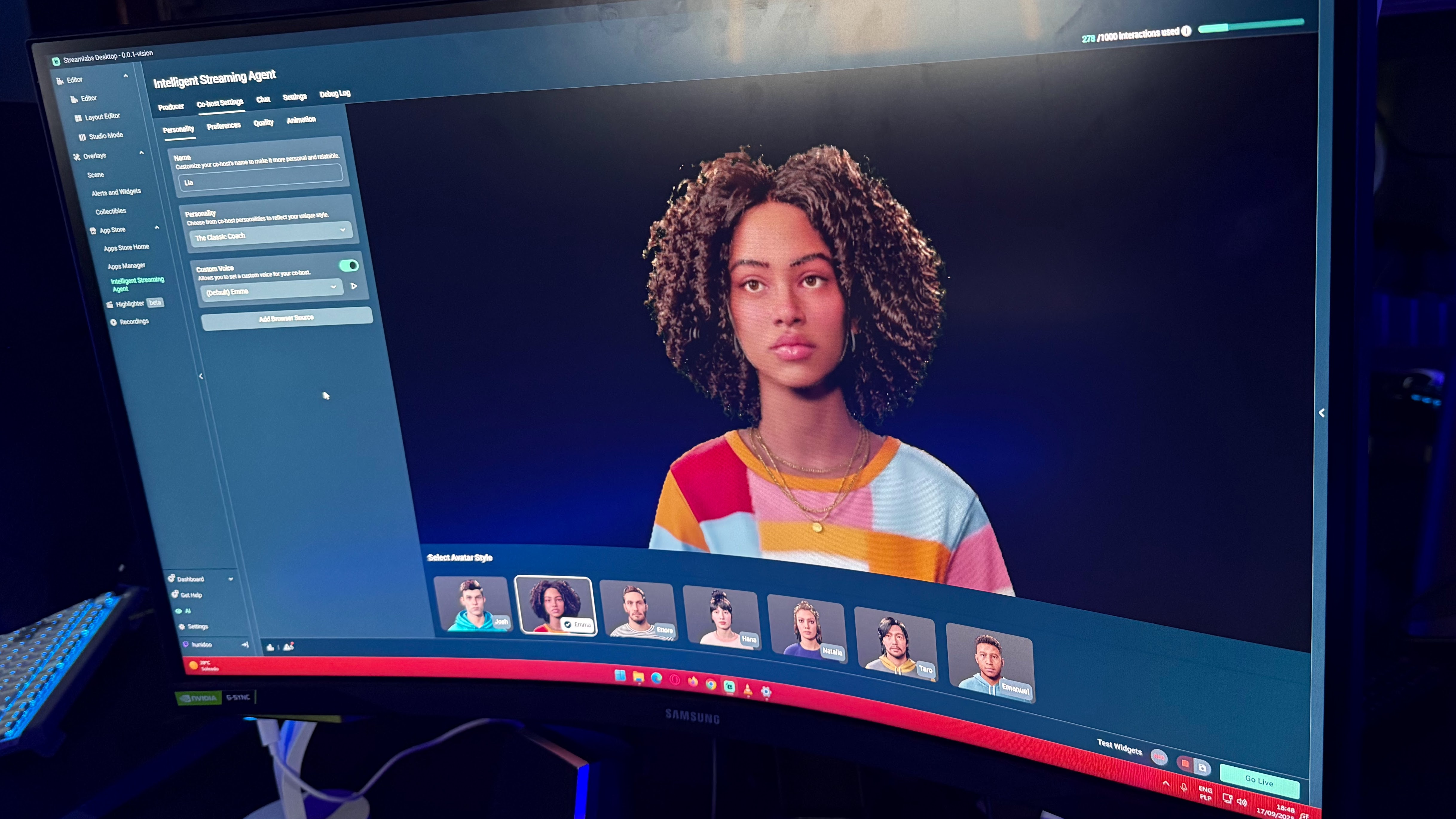
Livestreaming has never been more popular — or more demanding. Today's content creators are simultaneously entertainers, producers, technical directors, and community managers, all while trying to play at their best. In 2026, AI streaming assistants are transforming that solo juggling act into a team effort. Streamlabs' Intelligent Streaming Agent — developed in collaboration with NVIDIA and Inworld AI — now offers 3D avatar co-hosts, automated scene management, and real-time gameplay detection, making professional-quality broadcasts accessible to creators at every level. Meanwhile, the broader AI assistant software market was valued at $4.2 billion in 2024 and is projected to reach $12.3 billion by 2033, reflecting the explosive demand for intelligent automation across every content vertical.
But an AI streaming assistant isn't just about a talking avatar on screen. The most effective streaming workflow combines real-time production automation, audience engagement tools, content strategy, and post-stream content repurposing — a workflow that extends far beyond what any single streaming plugin can handle. Platforms like Jenova complement your streaming toolkit with a Creative Fiction Writer for narrative-driven stream concepts, a Social Media Content Generator for cross-platform promotion, a Writing Assistant for scripting and show prep, and a Prompt Generator for crafting AI interactions that keep your stream unique.
Whether you're a new Twitch streamer struggling to fill dead air, a YouTube content creator looking to automate production tasks, or a professional broadcaster building interactive experiences for thousands of concurrent viewers — AI streaming assistants in 2026 mean you focus on what matters most: connecting with your audience.
Quick Answer: What Is an AI Streaming Assistant?
An AI streaming assistant is an artificial intelligence tool that helps livestreamers automate production tasks, engage audiences, and manage technical operations during a live broadcast — acting as a virtual co-host, producer, and technical support team in real time.
- 🎙️ Co-host your stream with interactive 3D avatars that comment on gameplay, answer viewer questions, and fill conversational gaps
- 🎬 Automate production — scene changes, replay clips, audio/video cues triggered by in-game events or chat activity
- 💬 Engage your audience with intelligent chat interaction that goes beyond scripted chatbot responses
- ✍️ Plan and promote your content — Jenova's Writing Assistant helps script stream segments, while the Social Media Content Generator turns highlights into platform-native posts
The Problem: Why Streaming Is Harder Than It Looks
The barrier to starting a livestream has never been lower. The barrier to sustaining one — building an audience, maintaining quality, and avoiding burnout — has never been higher.
Streamers Are One-Person Production Teams
As NVIDIA notes, "today's creators are equal parts entertainer, producer and gamer, juggling game commentary, scene changes, replay clips, chat moderation and technical troubleshooting — all while trying to play their best."
That's not a sustainable workflow. Professional TV broadcasts employ dozens of people for the roles a solo streamer fills alone — camera operators, directors, producers, graphics coordinators, and chat moderators. The result is that most streamers compromise: they either sacrifice production quality to focus on gameplay, or sacrifice gameplay to manage their broadcast. Neither serves the audience.
Dead Air Kills Channels
For solo streamers — especially newer ones with small audiences — the biggest engagement killer is silence. When chat is quiet and nothing dramatic is happening in-game, viewers leave. According to community discussion on
, the core challenge is that AI co-hosts need to add genuine conversational value, not just fill space with generic commentary. The technology is maturing rapidly, but the implementation gap between "gimmicky chatbot" and "genuinely engaging co-host" determines whether AI helps or hurts a stream's brand.Content Creation Doesn't End When the Stream Does
A successful streaming operation requires pre-stream preparation (planning segments, researching games, scripting intros), live production (managing the broadcast), and post-stream content repurposing (clips for YouTube, posts for social media, highlight reels for TikTok). Most streamers handle the live portion and neglect everything else — leaving massive audience growth potential on the table.
Technical Complexity Discourages New Creators
Streamlabs built its Intelligent Streaming Agent specifically because "streaming can be overwhelming for new streamers, as they must manage technical setups, engage with viewers, and create an entertaining experience" — a combination that creates a steep learning curve before a single viewer even shows up.
Scene transitions, audio balancing, overlay management, alert configurations, encoding settings — the technical overhead of a professional-looking stream can take weeks to master. AI assistants that automate these tasks don't just save time; they make streaming accessible to creators who would otherwise give up before their first broadcast.
The AI Streaming Assistant Landscape in 2026
The streaming AI space has matured significantly. Here's what the current toolset looks like — and where the workflow gaps remain.
Streamlabs Intelligent Streaming Agent
The most comprehensive dedicated streaming AI, Streamlabs' Intelligent Streaming Agent combines three capabilities into one tool:
- 3D Avatar Co-Host: Interactive sidekick powered by NVIDIA ACE that comments on gameplay, answers viewer questions, and keeps conversation flowing during quiet moments. Customizable personality options range from supportive to sarcastic.
- AI Producer: Automatically adjusts scenes based on in-game events, plays video and audio cues, clips highlights, and manages replays — all triggered by real-time gameplay detection running locally on NVIDIA GeForce RTX GPUs.
- Technical Assistant: Helps with Streamlabs Desktop setup, scene transitions, and troubleshooting technical issues. Monitors stream health in the background.
The agent operates on a freemium model with approximately one to two hours of free avatar time, with extended usage requiring a Streamlabs Ultra subscription. At launch, gameplay detection works with Fortnite, with plans to expand to other titles.
Other AI Streaming Tools
Platforms like Questie.ai offer AI companions for Twitch that provide real-time commentary and gameplay reactions. AI TTS (text-to-speech) streaming tools from Typecast let creators build custom brand voices for narration and in-stream interaction. And tools like ai_licia provide AI co-hosting across Twitch, TikTok Live, and Discord.
Where the Gap Remains
These tools handle the live broadcast layer well. What they don't address is the content strategy layer — the planning, scripting, promotion, and community-building that determines whether a stream grows or stagnates. This is where general-purpose AI agents complement dedicated streaming tools.
| Capability | Dedicated Streaming AI (Streamlabs, Questie) | Generic AI (ChatGPT, Gemini) | Jenova AI Agents |
|---|---|---|---|
| Live co-hosting | ✅ 3D avatars, gameplay detection | ❌ Not real-time | ❌ Not real-time — use dedicated tools |
| Scene/production automation | ✅ Real-time triggers | ❌ | ❌ — use dedicated tools |
| Stream scripting & show prep | ❌ | Basic, no memory | Writing Assistant — scripts, segment plans, show bibles with persistent memory |
| Social media promotion | ❌ | One-shot posts | Social Media Content Generator — platform-native content with brand voice |
| Narrative/lore development | ❌ | Limited | Creative Fiction Writer — world-building, character arcs, story-driven streams |
| AI prompt crafting | ❌ | Self-referential | Prompt Generator — optimize prompts for any AI tool, including streaming AI |
| Thumbnail/visual creation | ❌ | Limited | Graphic Designer + Poster Maker — thumbnails, overlays, banners |
| Community/email outreach | ❌ | One-shot | Email Writer — subscriber updates, sponsor outreach, collaboration pitches |
| Cross-session memory | Per-session | None | Persistent memory learns your brand, content calendar, and audience insights |
| Model flexibility | Proprietary | Single provider | GPT-5.4, Claude Opus 4.6, Gemini 3.1 Pro Preview, plus models from xAI and DeepSeek |
This is exactly what Jenova was built for — not replacing your streaming software, but powering everything around it. The content strategy, creative development, audience growth, and cross-platform promotion that transform a hobby stream into a professional content operation.
Specialized AI Agents for Streamers and Content Creators
Writing Assistant
Your stream planning and scripting partner. This agent produces structured show rundowns, segment scripts, intro/outro dialogue, and episode concepts — adapted to your streaming style, game genre, and audience. From a casual variety stream outline to a 3-hour lore-heavy RPG broadcast plan, it handles every format.
- ✅ Script stream intros, outros, and segment transitions with your brand voice
- ✅ Build show rundowns with timed segments, talking points, and audience interaction cues
- ✅ Create "show bibles" for recurring series — character descriptions, segment formats, and narrative arcs
- ✅ Draft sponsorship read scripts that sound natural, not forced
Social Media Content Generator
Streaming is only half the content equation — promotion across YouTube, TikTok, X, Instagram, and Discord is what builds the audience that shows up next time. This agent transforms your stream highlights, announcements, and behind-the-scenes moments into platform-native posts with engagement hooks.
- ✅ Generate TikTok/Reels captions and hooks for stream highlights and clip compilations
- ✅ Write YouTube titles, descriptions, and tags optimized for discoverability
- ✅ Create X/Twitter threads that recap stream events and tease upcoming content
- ✅ Build Discord announcement templates for stream schedules, events, and community updates
Creative Fiction Writer
For story-driven streamers — RPG campaigns, horror playthroughs, narrative Minecraft series, lore-heavy world-building — this agent is the creative partner that helps you build compelling worlds your audience wants to return to. Think of it as your writers' room.
- ✅ Develop character backstories, faction histories, and world lore for roleplay streams
- ✅ Plot story arcs with branching narratives that respond to audience choices
- ✅ Write in-character dialogue and NPC interactions for tabletop RPG streams
- ✅ Create lore documents and "codex entries" that deepen audience immersion between streams
Graphic Designer
Visual identity separates professional streams from amateur ones. This agent creates thumbnails, stream overlays, banner art, emote concepts, and branded graphics that maintain visual consistency across your entire content ecosystem.
- ✅ Design YouTube and Twitch thumbnails with click-optimized layouts
- ✅ Create stream overlay concepts, alert graphics, and scene transition visuals
- ✅ Build branded templates for schedules, announcements, and event promotions
- ✅ Design social media profile images and banners with consistent brand identity
Prompt Generator
If you're using AI co-hosts like Streamlabs' Intelligent Streaming Agent, the quality of your AI's performance depends on how well you configure its personality and behavior. This agent helps you craft precise prompts and personality configurations for any AI tool — optimizing your streaming AI's responses, comedy timing, and audience interaction quality.
- ✅ Craft personality prompts for AI co-host avatars — tone, humor style, knowledge domain
- ✅ Design trigger configurations for automated production events
- ✅ Write AI chatbot personality guides for Nightbot, StreamElements, and custom bots
- ✅ Optimize prompts for AI image generators used in stream overlays and content
How It Works: From Stream Concept to Cross-Platform Content
Here's how to use Jenova's AI agents alongside your streaming tools to build a complete content creation workflow — from pre-stream planning to post-stream promotion.
Step 1: Plan Your Stream
Open a conversation with the Writing Assistant and describe the stream you're planning. Be specific about the game, format, audience, and tone.
"I'm planning a 3-hour variety stream for Friday night. I'll be playing Elden Ring for the first 90 minutes, then switching to a community game of Among Us. I need an intro script that's high-energy and sets up both segments, transition dialogue between games, and 3-4 audience interaction moments I can trigger when chat is slow. My style is sarcastic but wholesome."
The agent returns a structured show rundown with timed segments, scripted talking points, and audience engagement prompts — tailored to your voice and format.
Step 2: Configure Your AI Co-Host
If you're using Streamlabs' Intelligent Streaming Agent or another AI co-host, use the Prompt Generator to craft the personality configuration that makes your avatar genuinely entertaining.
"I'm setting up an AI co-host avatar for my Twitch stream. I want the personality to be a sarcastic gaming sidekick — think a witty friend who roasts me when I die but genuinely celebrates my wins. The avatar should reference memes sparingly, never use cringe catchphrases, and prioritize dry humor over loud reactions. Write the personality prompt I should use."
Step 3: Create Your Visual Identity
Use the Graphic Designer to create thumbnails, overlays, and promotional graphics for the stream.
"Design a YouTube thumbnail concept for my Elden Ring stream. I want a dark fantasy aesthetic with bold text reading 'FINALLY BEATING MALENIA' — dramatic lighting, my channel's red and black color scheme, and space for my face cam overlay on the right third."
Step 4: Build Narrative Depth (For Story-Driven Streams)
For RPG, horror, or narrative-focused streams, bring in the Creative Fiction Writer to develop the lore and story arcs that keep viewers coming back.
"I'm running a D&D stream campaign set in a post-apocalyptic fantasy world. I need three NPC characters my players will encounter in the next session: a paranoid merchant who knows too much, a child who may or may not be a shapeshifter, and a former knight turned bounty hunter. Give me backstories, personality traits, key dialogue lines, and secrets each NPC is hiding."
Step 5: Promote Across Platforms
After the stream, use the Social Media Content Generator to turn your best moments into growth content.
"I just finished a 3-hour stream where I finally beat Malenia in Elden Ring after 47 attempts. Write: (1) a TikTok caption for the clip of the final kill, (2) a YouTube Shorts title and description, (3) a Twitter/X thread recapping the journey with engagement hooks, and (4) a Discord announcement teasing next week's stream. Keep the tone celebratory but self-deprecating."
Step 6: Iterate with Memory
Jenova remembers your brand voice, stream format, content calendar, and audience insights across sessions. When you plan next week's stream, the agent already knows your show structure, recurring segments, and promotional strategy — no re-explaining your entire content operation every time.
Results & Use Cases
📊 New Streamer: Launching with Professional-Quality Production
Scenario: A college student wants to start streaming on Twitch but has no production experience. They can play games and talk, but their test streams look amateur — no overlays, awkward intros, dead air when chat is empty, and zero social media presence.
Traditional Approach: Watch 20 hours of YouTube tutorials on OBS setup, download free overlay templates that look generic, write a cringe intro script, start streaming to 0 viewers, get discouraged after two weeks, quit.
Jenova Solution: The Writing Assistant scripts a natural-sounding intro and show structure. The Graphic Designer creates a cohesive visual identity — overlays, panels, and a starting-soon screen. The Prompt Generator configures the Streamlabs AI co-host personality to fill conversational gaps authentically. The Social Media Content Generator creates launch announcements for TikTok, X, and Discord. The student goes live with a stream that looks and sounds like they've been doing this for months.
💼 Growing Creator: Scaling Content Across Platforms
Scenario: A mid-tier streamer (500 average viewers) knows they need to grow their YouTube and TikTok presence to reach the next level, but every hour spent editing clips and writing posts is an hour not spent streaming or resting. Content repurposing is the growth lever they can't afford to ignore — and can't afford the time to execute.
Traditional Approach: Clip two highlights manually after each stream, write a quick caption, post on one platform, neglect the others. YouTube uploads happen sporadically. TikTok strategy is nonexistent. Growth plateaus.
Jenova Solution: After each stream, the Social Media Content Generator produces platform-optimized posts for every channel — TikTok hooks, YouTube titles with SEO metadata, X threads with engagement prompts, and Discord community updates. The Writing Assistant drafts YouTube video descriptions and show notes. The Email Writer handles sponsor outreach and collaboration pitches. Content output triples without adding production hours.
📱 RPG Streamer: Building an Immersive Narrative World
Scenario: A tabletop RPG streamer runs a weekly D&D campaign with a growing audience. Viewers love the characters and world-building, but the DM spends 10+ hours between sessions developing lore, NPC dialogue, and plot contingencies. The creative workload is unsustainable.
Traditional Approach: Write everything from scratch in Google Docs, reuse generic fantasy tropes when time runs short, occasionally forget NPC details mid-session, lose narrative consistency as the campaign stretches past 20 episodes.
Jenova Solution: The Creative Fiction Writer develops NPC backstories, faction politics, and branching plot arcs between sessions. Persistent memory means the agent tracks every character, location, and plot thread across the entire campaign — maintaining consistency that manual notes can't match. The Writing Assistant produces session recaps for the audience, and the Social Media Content Generator turns dramatic moments into lore posts that build community engagement between episodes.
📊 Professional Broadcaster: Sponsorship and Business Operations
Scenario: A full-time content creator with 5,000+ average viewers needs to manage sponsorship communications, negotiate rates, maintain a content calendar, and produce consistent branded content across four platforms — while still streaming 20+ hours per week.
Traditional Approach: Hire a manager (10-20% revenue), or spend 15+ hours per week on business operations that don't directly create content. Sponsor emails get delayed, social posts are inconsistent, and the content calendar lives in the creator's head.
Jenova Solution: The Email Writer drafts sponsor outreach, negotiation responses, and professional correspondence in the creator's voice. The Writing Assistant builds and maintains a content calendar with stream topics, upload schedules, and promotional timelines. The Social Media Content Generator ensures every platform gets consistent, brand-matched content. The Negotiation Coach prepares rate justifications and counter-offer strategies for brand deals. Business operations drop from 15 hours to 4 hours per week.
FAQ
What is an AI streaming assistant?
An AI streaming assistant is a tool that uses artificial intelligence to help livestreamers automate production tasks, engage audiences, and manage technical operations during a broadcast. This includes AI co-hosts (interactive 3D avatars that comment on gameplay and respond to chat), automated production tools (scene changes, replay clips, audio cues triggered by in-game events), and technical troubleshooting. Streamlabs' Intelligent Streaming Agent, built with NVIDIA and Inworld AI, is the most prominent example in 2026.
Are AI co-hosts good or bad for streams?
It depends on implementation. Community sentiment on
is mixed — poorly configured AI co-hosts can feel cheap and inauthentic, while well-tuned ones genuinely help fill dead air, answer viewer questions, and create interactive moments. The key is personality configuration. Jenova's Prompt Generator can help you craft AI co-host personalities that match your brand voice — so the avatar sounds like a genuine part of your stream, not a generic chatbot.Do I need an NVIDIA RTX GPU for AI streaming?
For Streamlabs' Intelligent Streaming Agent, an NVIDIA GeForce RTX GPU is recommended for optimal performance — the AI vision models and avatar rendering run locally on the GPU for lower latency and more natural interactions. However, Jenova's AI agents — which handle the content strategy, scripting, social media, and creative development layers — work on any device through the web or mobile app, with no GPU requirements.
How much does an AI streaming assistant cost?
Streamlabs' Intelligent Streaming Agent operates on a freemium model — approximately one to two hours of free avatar time, with extended usage requiring a Streamlabs Ultra subscription. Other AI streaming tools like Questie.ai and ai_licia have their own pricing tiers. Jenova offers a free tier with access to all agents for content strategy, scripting, and promotion, with Plus plans starting at $20/month for increased usage across all agents.
Can AI help me grow my streaming audience?
AI can't grow your audience directly — that requires compelling content and consistent effort. But AI dramatically reduces the time and effort needed for the growth activities that most streamers neglect: cross-platform content promotion, SEO-optimized YouTube metadata, consistent social media posting, sponsor outreach, and community engagement. Jenova's Social Media Content Generator and Writing Assistant handle these tasks in minutes, letting you focus your creative energy on the streams themselves.
Is my content and data safe when using AI tools?
On Jenova, your data is never used for model training, is encrypted in transit and at rest, and is never sold to advertisers. Your stream scripts, content calendars, brand guidelines, and creative materials remain private. This is particularly important for creators working with sponsors under NDA or developing original content they intend to monetize.
Conclusion
Livestreaming in 2026 demands more than just going live. Between AI co-hosts that fill dead air with context-aware commentary, automated producers that change scenes and clip highlights in real time, and the relentless content machine that modern platform algorithms demand — the solo streamer model is evolving into something more like a one-person studio. Dedicated streaming AI tools like Streamlabs' Intelligent Streaming Agent handle the live broadcast brilliantly. But the content strategy, creative development, audience growth, and business operations that surround every stream? That's where most creators still struggle.
Where streaming plugins handle what happens during the broadcast, Jenova handles everything around it: a Writing Assistant that scripts your shows and builds content calendars, a Social Media Content Generator that turns every stream into cross-platform growth content, a Creative Fiction Writer that builds the narrative worlds your audience returns to, a Graphic Designer that maintains your visual brand across every platform, and a Prompt Generator that optimizes your AI co-host's personality — all with persistent memory that learns your brand, your audience, and your content strategy across every session.
Try any agent free — no credit card required. Start with the stream you're planning next and see how far a single conversation takes your content operation. Explore the full agent library at Jenova.