AI Scene Generator: Build Cinematic Worlds, Concept Art & Storyboards
2026-08-08
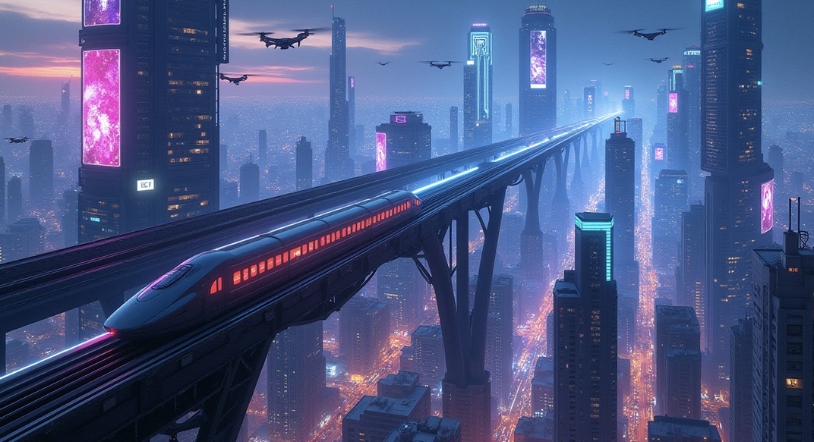
An AI scene generator turns a written description — setting, mood, camera angle, time of day — into a fully realized visual environment you can iterate on. The two things that kill most visual projects are the cost of exploring options and the impossibility of keeping a look consistent across dozens of frames. The Graphic Designer on Jenova addresses both, generating scene art from natural-language direction and holding your visual style steady across an entire sequence.
✅ Generates environments, establishing shots, and concept art from written direction ✅ Maintains consistent art style, palette, and lighting across a full scene set ✅ Iterates on individual elements — swap time of day, adjust camera height, change weather ✅ Works across film pre-production, game environments, comics, and marketing visuals
The bottleneck in visual storytelling was never imagination — it was the hours between an idea and something you can actually look at and judge. Let's examine why that gap persists and what closes it.
Quick Answer: What Is an AI Scene Generator?
An AI scene generator is a visual tool that produces complete environmental images — landscapes, interiors, cityscapes, and establishing shots — from written descriptions of setting, mood, lighting, and camera perspective.
Key capabilities:
- Renders full environments from a text description of place, time, and atmosphere
- Applies cinematic direction: camera angle, focal length, lighting setup, color grade
- Maintains stylistic consistency across multiple scenes in the same project
- Iterates on single variables — change weather or season without regenerating everything
- Adapts output to purpose: concept art, storyboard frame, game environment, or marketing key visual
The Problem: Why Visual Development Stalls
Generative tools have moved fast into creative pipelines, but the hardest problems in scene work aren't about raw image quality — they're about control and continuity.
Generative AI in creative industries was valued at $5.38B in 2026 and is projected to reach $14.03B by 2030 at a 27.1% CAGR — Research and Markets, Generative AI in Creative Industries Market Report
The SAG-AFTRA and Writers Guild strikes cost the industry more than $6.5 billion, with AI protections a central sticking point — World Economic Forum, How AI Is Impacting the Creative Industries
But producing usable scene art remains frustratingly difficult:
- Style drifts between frames — scene one and scene twelve look like different projects
- Prompts produce beautiful images that ignore the specific camera or blocking you needed
- Iteration is destructive: changing one element regenerates everything else too
- Environments lack spatial logic — architecture that can't exist, light sources with no origin
- Explaining a look to a collaborator takes longer than making it
Continuity Across Scenes Is the Core Failure
Individual images are easy. A sequence is not. Research at the University of Maryland on controllable generative storytelling identifies exactly this: text-to-video and image systems produce short, high-quality outputs, but maintaining continuity across independently generated scenes remains a central challenge — when prior context isn't preserved, details like character identity, appearance, or setting shift from one segment to the next.
The same applies to environments. A castle in frame three should be the same castle in frame nine. Without persistent context, it won't be.
Direction Gets Lost in Translation
A director says "low angle, golden hour, camera pushed back so the spires dominate the frame." Most tools treat that as loose stylistic flavoring rather than hard constraints. You get a nice image, not the image.
Scene generation only becomes production-useful when cinematographic language — lens, height, time of day, atmospheric density — is honored as specification rather than suggestion.
Iteration Is All-or-Nothing
You like the composition but the sky is wrong. In most workflows that means regenerating from scratch and losing the composition. Real visual development requires holding some variables constant while moving others.
The Cost of Exploration
Traditional concept art is expensive precisely because exploration is expensive. Studios commission three directions when they'd like to see thirty. The Stanford research team working on creative collaboration tools frames the goal as enabling artists to guide model outputs and enhance visual storytelling — guidance, not replacement.
This is exactly what the Graphic Designer was built for.
The Solution: Why the Graphic Designer Works for Scene Work
The Graphic Designer treats scene generation as an art-direction problem. You supply the setting, the camera, the mood, and the style reference — it produces an image that respects all four, then lets you adjust individual variables without discarding what already works.
| Generic Image Tool | Graphic Designer |
|---|---|
| Style drifts across a sequence | Holds palette, lighting, and style across the full scene set |
| Camera direction treated as flavor text | Lens, angle, and height honored as specification |
| Regenerate everything to change one thing | Targeted iteration on isolated variables |
| No memory between sessions | Persistent project context and style rules |
| One output, take it or leave it | Variant exploration for side-by-side comparison |
Style Locking Across a Sequence
Establish the visual grammar once — palette, atmospheric density, level of detail, rendering style — and the assistant applies it as a constraint across every subsequent scene. Frame one and frame forty belong to the same world.
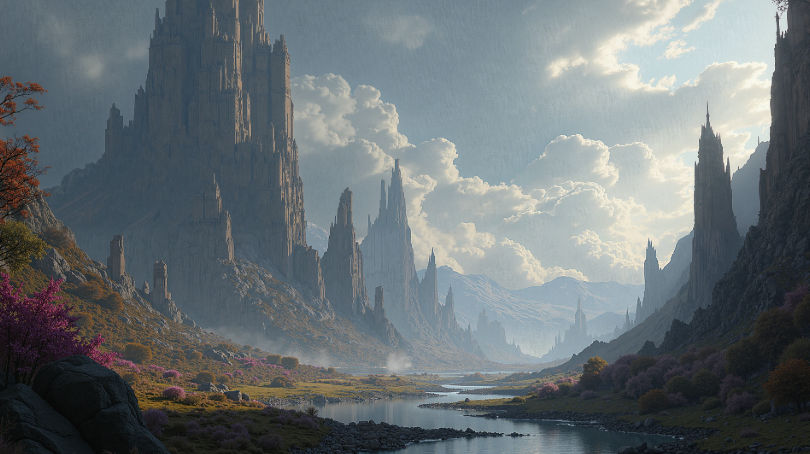
"Establish a house style: painterly fantasy realism, cool desaturated base with high-saturation floral accents, heavy atmospheric perspective. Lock this for all scenes in this project."
Cinematographic Control
Specify the shot the way you'd specify it to a DP. Height, angle, focal length, depth of field, key light direction, time of day.
"Wide establishing shot, camera at low altitude looking up a curving elevated rail line. Twilight, magenta and cyan practical lighting from signage. Heavy atmospheric haze in the deep background."
Isolated Variable Iteration
Change the season without changing the composition. Move the sun without moving the camera. Swap the architecture style while keeping the same valley geometry.
"Same composition and camera. Change from twilight to pre-dawn — cooler, less neon, mist at street level."
Spatial and Logical Coherence
Ask for architecture that holds up: light sources with a physical origin, scale references that read correctly, structures that could plausibly be built. This is what separates a concept image from a usable one.
Related Agents You'll Also Find Useful
Scene generation rarely stands alone. These agents cover the surrounding pipeline.
Film Screenwriter
Before you generate an establishing shot, you need to know what the scene is doing. This agent handles the structural and narrative layer that makes visual choices meaningful.
- Concept-to-draft guidance across outline, structure, and revision
- Visual storytelling craft — what the frame needs to communicate
- Scene-level intent that informs camera and composition decisions
Comic Creator
If your scenes live in sequential panels, layout and flow reshape how environments are framed and how much of each scene the reader actually sees.
- Sequential art and dynamic layout construction
- Panel-aware composition and pacing
- Single issues through full graphic novel arcs
Webtoon Creator
Vertical scroll changes environmental staging entirely — establishing shots need to work in a tall, narrow frame with reveal-over-scroll pacing.
- Vertical scroll rhythm and episode hooks
- Full-color consistency across long series
- Mobile-first environmental framing
Manga Creator
For black-and-white sequential work, scene rendering depends on screentone, linework density, and high-contrast composition rather than color.
- Visual storytelling and panel flow mastery
- Consistent art style across long serialized runs
- One-shots through 200+ page epics
Try Jenova free — no credit card required.
How It Works
Step 1: Define the world and the style
Before generating any single scene, establish the visual grammar. Genre, rendering style, palette, level of realism, atmospheric character. This becomes the constraint set every scene inherits.
"Project style: near-future cyberpunk, photoreal with painterly atmospheric haze. Dominant palette cool blue-violet with magenta and cyan neon accents. Dense verticality, heavy depth cueing."
Step 2: Describe the scene
Give the setting, the time, the weather, and what's happening in the frame. Be concrete about geography and scale — those are what make an environment feel real rather than generic.
"Elevated maglev line curving through a dense high-rise district. A single train mid-frame, moving toward camera. Flying vehicles at multiple altitudes. Twilight, low fog at street level."
Step 3: Set the camera
This is the step most people skip and the one that determines whether the output is usable. Specify height, angle, focal length, and what should dominate the composition.
"Elevated three-quarter angle, roughly 40 stories up. Wide lens. The rail line should lead the eye from foreground into deep background vanishing point."
Step 4: Generate variants and compare
Produce several takes on the same specification rather than committing to the first result. Comparison is where art direction actually happens.
"Give me three variants: one with the train closer to camera, one at a higher camera position, one with denser fog reducing background visibility."
Step 5: Refine and extend the set
Once one scene locks, use it as the anchor for the rest. The Graphic Designer holds your style rules across the session, so scene two inherits the look of scene one automatically.
"Same world, same style. Now generate the ground-level view of this district — looking up at the rail line from a market street."
Results & Use Cases
🎬 Film Pre-Production and Storyboarding
Scenario: You're pitching a science fiction feature and need twelve establishing shots that communicate the world before anyone commits budget.
Traditional Approach: Weeks of concept artist time and a five-figure spend before you know whether the look works.
Graphic Designer: Generate a full visual bible in a working session, refine the strongest directions, then bring a concept artist in for the frames that matter most.
- Consistent world look across every frame
- Camera-specific outputs that double as storyboard references
- Cheap enough to explore twenty directions instead of three
- Pairs with the Film Screenwriter so visuals track the actual script beats
🎮 Game Environment Concepting
Scenario: Your team needs biome concepts for six distinct regions, each with a coherent visual identity that art leads can hand to modelers.
Traditional Approach: Long concepting cycles where each region is developed serially and cross-region consistency is negotiated in review meetings.
Graphic Designer: Develop all six in parallel against a shared style spec, so consistency is built in rather than corrected afterward.
- Shared visual grammar enforced across regions
- Rapid iteration on terrain, architecture, and lighting variables
- Multiple time-of-day and weather passes per environment
- Spatial logic that translates to buildable level geometry
📱 Comic and Webtoon Backgrounds
Scenario: A 100-episode vertical series where every episode needs environment art, and the world has to look the same in episode 80 as episode one.
Traditional Approach: Background artists burning out on repetitive establishing panels, with visible drift as the series runs.
Graphic Designer: Generate a reusable environment library once, then produce variations — different angles, times, weather — as episodes demand.
- Locked style across an entire long-running series
- Vertical-format framing for mobile scroll via the Webtoon Creator
- Angle variants of the same location without redrawing
- Works on mobile, so you can review and request revisions anywhere
💼 Marketing and Brand Key Visuals
Scenario: A campaign needs hero imagery across five placements, each a different aspect ratio, all clearly from the same visual world.
Traditional Approach: Commissioned photography or illustration, then expensive reformatting for each placement.
Graphic Designer: Build the key visual, then generate placement-specific compositions that preserve the campaign look.
- Consistent brand aesthetic across every format
- Fast concept rounds before production commitment
- Environment art that supports product or message rather than competing with it
FAQ
Is an AI scene generator free to use?
Yes. Jenova's free tier includes all core features with limited monthly usage, so you can test the Graphic Designer on a real project before deciding. Paid tiers scale usage substantially and remove watermarks from generated images. Usage resets monthly on your billing date, with the full limit available from day one and no daily caps.
Can it keep the same art style across many scenes?
Yes — this is the primary reason to use a dedicated agent rather than a one-off image tool. Establish style rules at the start of a session and they persist across every subsequent generation, which is what prevents the visual drift that undermines long sequences.
How specific can I be about camera and lighting?
Very. You can specify camera height, angle, focal length, depth of field, key light direction, time of day, and atmospheric density. Cinematographic terminology is understood as specification rather than loose stylistic hinting, which is what makes output usable for storyboards and previs.
Can I change one part of a scene without regenerating everything?
Yes. Isolated variable iteration is a core workflow — hold the composition and change the weather, hold the camera and change the season, hold the geometry and change the architecture style. This is how visual development actually works, and it's what makes the tool viable beyond first-pass exploration.
Does it work on mobile?
Yes. Jenova has full feature parity across web, iOS, and Android, with settings and chat history synced across devices. You can generate scenes on desktop and review or request revisions from your phone.
Should AI-generated scenes go into a final production?
That depends on your project, your contracts, and your audience. Industry discussion consistently frames these tools as augmentation rather than replacement — the World Economic Forum's coverage of AI in creative industries emphasizes human-centered implementation, and Stanford's research direction focuses on artists guiding model outputs. Most teams treat generated scenes as concepting, previs, and reference — with final assets produced or heavily reworked by human artists.
Conclusion
The hard part of scene work was never producing one attractive image. It was producing this environment, from this camera, in this light — and then producing forty more that belong to the same world. Continuity and control are where generic image tools break down, and they're precisely what the research literature identifies as the central challenge in generative storytelling systems.
An AI scene generator earns its place in a pipeline when it holds style across a sequence, honors cinematographic direction as specification, and lets you change one variable without losing everything else. That's the gap the Graphic Designer closes — turning visual development from an expensive serial process into something you can explore broadly and then narrow with intent.
Try the Graphic Designer now. Explore more at Jenova.
For Developers: The Graphic Designer is available programmatically via the Jenova API — integrate style-consistent scene and environment generation into your production pipeline, game engine, or creative app with a single API call. Full documentation →