AI RPG Token Generator: Custom Hero, NPC & Monster Art for Your VTT
2026-10-24
Character Creator helps game masters and players build original character art by turning a plain-language description into a finished concept and portrait. It works as an AI RPG token generator for your virtual tabletop. Many tables still pull the same token packs into every campaign. This AI gives each hero, villain, and shopkeeper art designed for your world.
As of October 2026, most virtual tabletops accept any properly formatted image as a token. The real bottleneck is getting the art.
- ✅ Quick-gen or guided builds: Get a full character from one prompt, or work through the design step by step.
- ✅ Portraits across genres: High fantasy, grimdark, sci-fi, gothic horror, cyberpunk, and modern settings.
- ✅ Media research: You can match the tone of an established setting or art direction your table already loves.
- ✅ Works in any system: D&D 5e, Pathfinder, Call of Cthulhu, homebrew, or anything else.
A good token does more than decorate the grid. It tells players at a glance who is friendly, who is dangerous, and who matters to the story. Getting that art, especially in volume, is where most tables struggle. Before looking at how an AI-driven workflow handles it, it helps to see what game masters deal with today.
Quick Answer: What Is an AI RPG Token Generator?
An AI RPG token generator is a tool that turns a written character description into original portrait art you can crop into circular or square tokens for virtual tabletops like Roll20 and Foundry VTT, in minutes rather than hours. Character Creator handles the concept and the portrait, so you only need to frame and upload the result.
Key capabilities:
- Generates original character portraits from short or detailed descriptions
- Builds the character concept around the art, including personality, appearance, and story hooks
- Handles heroes, NPCs, villains, and monsters in one consistent style
- Produces variants of the same character for disguises, injuries, transformations, or alternate outfits
The Token Problem Every Game Master Knows
Tabletop RPGs have a huge audience, and much of it now plays online at least some of the time.
19 million — Registered users reported in D&D Beyond's 2024 year in review
85 million+ — People who have played D&D over the game's history, per the same compilation
Every digital session needs tokens, and virtual tabletops are strict about how token images are built. Roll20's documentation specifies a 70 × 70 pixel grid square and recommends PNG for tokens because PNG supports transparency. It also warns that images without proper square padding get warped when dropped onto a grid.
Sourcing that art is harder than it should be:
- Generic art fatigue. Free token packs are shared by thousands of tables. Your players' third goblin warband probably looks like the last two.
- Commission cost and lead time. Custom art from human artists is excellent, but it doesn't scale to a whole city of NPCs on a hobby budget. It also can't be ready ten minutes before the session.
- Style inconsistency. A painted dwarf next to an anime-style elf next to a stock-photo villain breaks immersion on the map.
- Improvisation gaps. Players will talk to the NPC you never planned. Searching image sites mid-session kills the pacing.
Why Character Creator Works as an RPG Token Generator
This is exactly what Character Creator was built for. It is a dedicated character designer that treats every request as a full character, not a one-off picture. You get a portrait that matches the concept you described, plus enough personality and detail to roleplay the character confidently.
Because it is built for characters specifically, it understands what token art needs: a readable face, a clear silhouette, and a recognizable trait that still shows when the image shrinks to a single grid square.
| Traditional Approach | Character Creator |
|---|---|
| Searching image sites and token packs for "close enough" art | Original portraits generated from your exact description |
| Commissioning artists for each major character | Unlimited iterations on the characters you need right now |
| Mismatched art styles across the party and NPCs | One consistent style you set once and reuse |
| Writing NPC backstories separately from finding art | Concept and portrait created together |
| Stalling mid-session to find an unplanned NPC | Quick-gen a new character in the time it takes to roll initiative |
Quick-Gen for the NPCs You Didn't Plan
Quick-gen mode produces a complete character from a single line. It is the fastest route from "the party wants to interrogate the dockmaster" to a token on the map.
"Quick-gen a grizzled half-orc dockmaster in a rain-soaked port city. Painted fantasy style, head-and-shoulders portrait, plain dark background."
Guided Builds for Player Characters
Player characters deserve more care. The guided build asks about ancestry, class, history, and visual details, so the final portrait reflects what the player actually imagined. This is useful during session zero, when everyone wants their character to look right.
"Let's do a guided build for my tiefling warlock. She made a pact with a drowned sea god and has barnacle-like markings on her horns."
Genre and Style Control
Tokens work best when the whole map shares one visual language. You can set a style once, such as oil-painted grimdark, clean cel-shaded, or engraved woodcut, and ask for every character in that style. Media research lets you describe the feel of an established setting without copying it.
Token-Friendly Framing and Color Coding
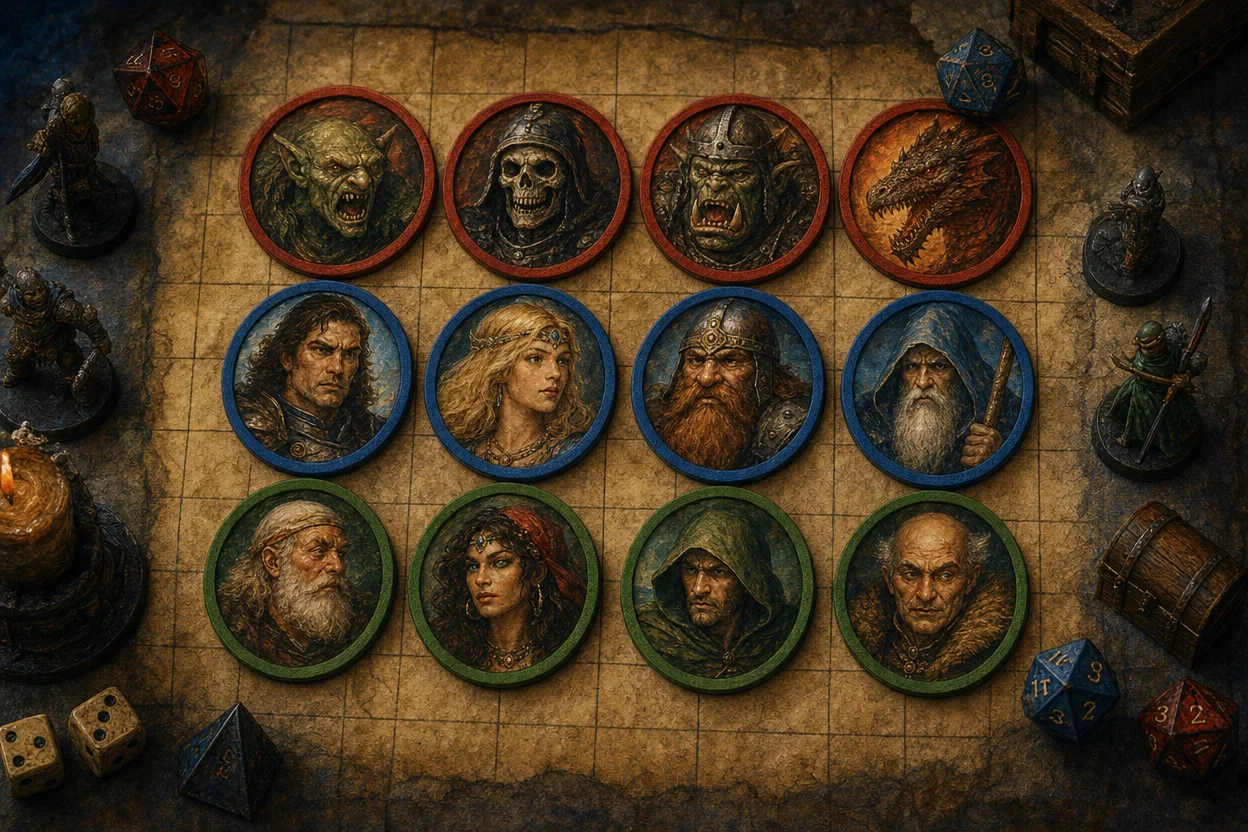
The first image above shows a common GM convention: enemies, allies, and neutral NPCs separated by border color. Foundry VTT has this idea built in. Its token disposition setting shows hostile tokens with red borders, friendly tokens with teal, and neutral tokens with yellow. Its Dynamic Token Rings feature can automatically turn ordinary art into "pog"-style circular tokens.
That means you only need clean, centered portraits. Ask for a head-and-shoulders composition on a plain background, and your VTT or image editor handles the ring and border. One honest limitation: you will typically still crop and pad the portrait yourself, or let a VTT tool do it, before it becomes a grid-ready token file.
"Portrait of a hooded elven ranger, centered, face fully visible, plain neutral background, so it crops cleanly into a circle."
Related Agents You'll Also Find Useful
Tokens are one part of campaign prep. These agents cover the steps that usually come right before or after.
Creative Fiction Writer
If you're also writing campaign lore, Creative Fiction Writer helps turn your token roster into a world. It is a storytelling partner for original fiction, and it suits session recaps, villain monologues, and faction histories.
- Researches settings for authentic, believable worlds
- Gives editorial feedback on your own drafts
- Polishes prose from rough notes to read-aloud text
Trading Card Game Creator
Many GMs hand out loot, spell, or item cards alongside tokens. Trading Card Game Creator is a full TCG design studio. It can help you design physical or digital cards that match your campaign's visual identity.
- Card mechanics and balance design
- Card art and lore text
- Complete playable sets from first concept
PDF Generator
For hybrid or in-person tables, PDF Generator turns campaign content into professionally formatted documents. It works well for NPC dossiers, player handouts, and session-prep packets you can print or share.
- Adaptive design for different document types
- Clean, consistent formatting without manual layout work
- Print-ready output
Every agent above is free to try, with no credit card required.
How to Generate RPG Tokens with AI: Step by Step
Step 1: Describe Your Character
Open the AI character designer and describe who you need: ancestry, role, mood, and one memorable visual detail. A distinctive trait, such as a scar, a glowing eye, or a specific helmet, keeps the token recognizable at small sizes.
"A paranoid gnome alchemist with soot-stained goggles and a singed beard, nervous expression."
Step 2: Request Token-Friendly Framing
Ask for a centered, front-facing, head-and-shoulders portrait on a plain or transparent-looking background. Foundry notes that a rotation of zero corresponds to a southward facing, the most common convention for token art. For portrait-style tokens, enable the "Lock Rotation" option so the face never spins upside down.
"Same gnome, head-and-shoulders only, centered, plain background, facing the viewer."
Step 3: Generate Variants
Ask for alternate versions of the same character: wounded, disguised, transformed, or in a different outfit. Foundry users can load variants through wildcard token images or the community Token Variant Art module and swap them during play.
"Give me a second version where his lab has exploded: smoking robes, cracked goggles."
Step 4: Format the Image for Your VTT
Crop the portrait to a square canvas and save it as a PNG. Roll20 recommends PNG for token images and square, padded dimensions so tokens aren't warped on the grid. It also suggests reducing any image over 1 MB. Foundry users can apply Dynamic Token Rings or the community Tokenizer module, which creates both avatar and token images.
Step 5: Upload and Assign the Token
In Roll20, you can drag an image file directly onto the tabletop or upload it through your art library. In Foundry, set the image path on the actor's prototype token and choose a disposition so the border color reflects friend, foe, or neutral. For a walkthrough of linking tokens to character sheets in Roll20, this tutorial covers the process:
https://www.youtube.com/watch?v=lOoW3LYHCuA
RPG Token Generator Use Cases at the Table
🎲 Building a Full Party for Session Zero
Scenario: Five players join a new Pathfinder campaign, and each has a detailed character concept but no art.
Traditional Approach: Each player searches image sites separately, ending up with five mismatched styles and at least one character who "sort of" looks right.
With an AI workflow: The GM runs each player through Character Creator's guided build using one shared style instruction.
- Every portrait matches the player's actual concept
- The whole party shares a consistent art style on the map
- Players leave session zero more invested in their characters
🐉 Prepping a Multi-Phase Boss Encounter
Scenario: A lich villain transforms twice during the final battle, and the GM wants each phase to read clearly on the grid.
Traditional Approach: Finding three matching images of the same original villain is nearly impossible with stock art.
With Character Creator: The GM generates the base lich, then requests a cracked-phylactery phase and a skeletal final phase from the same concept.
- Three variants that clearly read as the same character
- Swappable mid-combat with wildcard or variant tools
- A dramatic reveal moment players will remember
📱 Improvising an NPC from Your Phone Mid-Session
Scenario: Players at an in-person table with a TV-mounted map decide to recruit a random tavern bard the GM never planned.
Traditional Approach: Pause the game, open a laptop, and scroll through image results while players wait.
With Character Creator: The GM types one quick-gen prompt on their phone during a short break and has a portrait ready before play resumes.
- No laptop needed; the mobile apps work like the web version
- The NPC arrives with a personality and voice hooks, not just a face
- Session momentum stays intact
🏰 Populating a Living City
Scenario: A political intrigue arc needs a dozen named nobles, guards, and merchants, each with a face and a secret.
Traditional Approach: Hours of art hunting plus a separate writing session for backstories.
With Character Creator: Batch quick-gen requests produce the roster. The GM then hands the cast to the fiction-writing agent to weave their secrets into faction intrigue.
- Consistent visual identity for each faction
- Backstories tied to the art from the start
- A campaign city that feels lived in
Frequently Asked Questions
Is there a free AI RPG token generator?
Yes. Character Creator runs on a free tier that includes all core features with limited usage, which covers a typical session's worth of NPCs. Heavier prep work, such as populating entire cities or campaigns, fits paid tiers starting at $20/month with roughly 30× the free usage. Usage resets monthly, with no daily caps.
Can I use AI-generated tokens in Roll20 and Foundry VTT?
Yes. Both platforms accept standard image files as tokens. Roll20 supports JPG, GIF, and PNG uploads and recommends PNG for tokens because of transparency support. Foundry lets you point any token's image path to an uploaded file or a publicly accessible web location. Crop your portrait to a square, export as PNG, and upload.
What size should an RPG token image be?
On Roll20, one grid square is 70 × 70 pixels, so a 1×1 token should be square. Larger creatures should use square multiples, such as 2×2 or 3×3. Keep files under about 1 MB for smooth loading. Higher-resolution source art from an AI token generator can be downscaled without quality loss, so generate large and resize for your platform.
How is Character Creator different from a token maker tool?
Token maker tools like Foundry's Tokenizer module frame art you already have, adding borders, rings, and cropping. Character Creator creates the art itself, along with the character concept behind it. Many GMs use both: generate an original portrait first, then frame it with their VTT's token tools.
Does the AI token generator work on mobile?
Yes. Character Creator has full feature parity across web, iOS, and Android, and your settings sync between devices. That makes it practical for in-person sessions where the GM runs the game from a phone or tablet. Generate a portrait mid-session, then upload it to your VTT or display it on a shared screen.
Can I keep a consistent art style across my whole campaign?
Yes. Describe your style once, for example "painted dark fantasy, muted palette, dramatic lighting," and reuse it in every request. Consistent style instructions keep heroes, NPCs, and monsters visually unified on the map. That matters more for immersion than any single piece of art.
Conclusion: Original Tokens for Every Character at Your Table
Good tokens make a battle map readable and a world memorable. Stock packs, mismatched styles, and mid-session image searches work against both. An AI RPG token generator closes that gap: describe the character, frame it for your grid, and drop it into Roll20, Foundry, or whatever virtual tabletop your group uses.
From session-zero party portraits to multi-phase bosses and improvised tavern bards, custom token art no longer depends on budget or lead time. Start your next token with Character Creator and give every hero, NPC, and monster a face that belongs in your campaign.
Explore more at Jenova.
For Developers: Character Creator is available programmatically via the Jenova API. You can add character concept and portrait generation to your VTT, campaign manager, or game app with a single API call. Full documentation →