AI Roleplay Response Length: How to Get Replies That Fit the Scene
2026-10-18
Roleplay Game Master lets you control AI roleplay response length with plain-language direction. You can ask for a single sharp line during a duel or several paragraphs of narration when the story needs room. As of October 2026, many roleplay apps still handle length with a fixed slider or preset. That often leads to walls of text when you want quick banter, or flat one-liners when you want atmosphere. This AI game master changes pacing when you ask, remembers your preferences across sessions, and keeps characters consistent at any reply length.
- ✅ Set your default reply length in one sentence, without calculating tokens
- ✅ Switch between quick dialogue and longer narration during a scene
- ✅ Keep your style preferences across sessions with unlimited memory
- ✅ Keep characters' voice and personality consistent in short or long replies
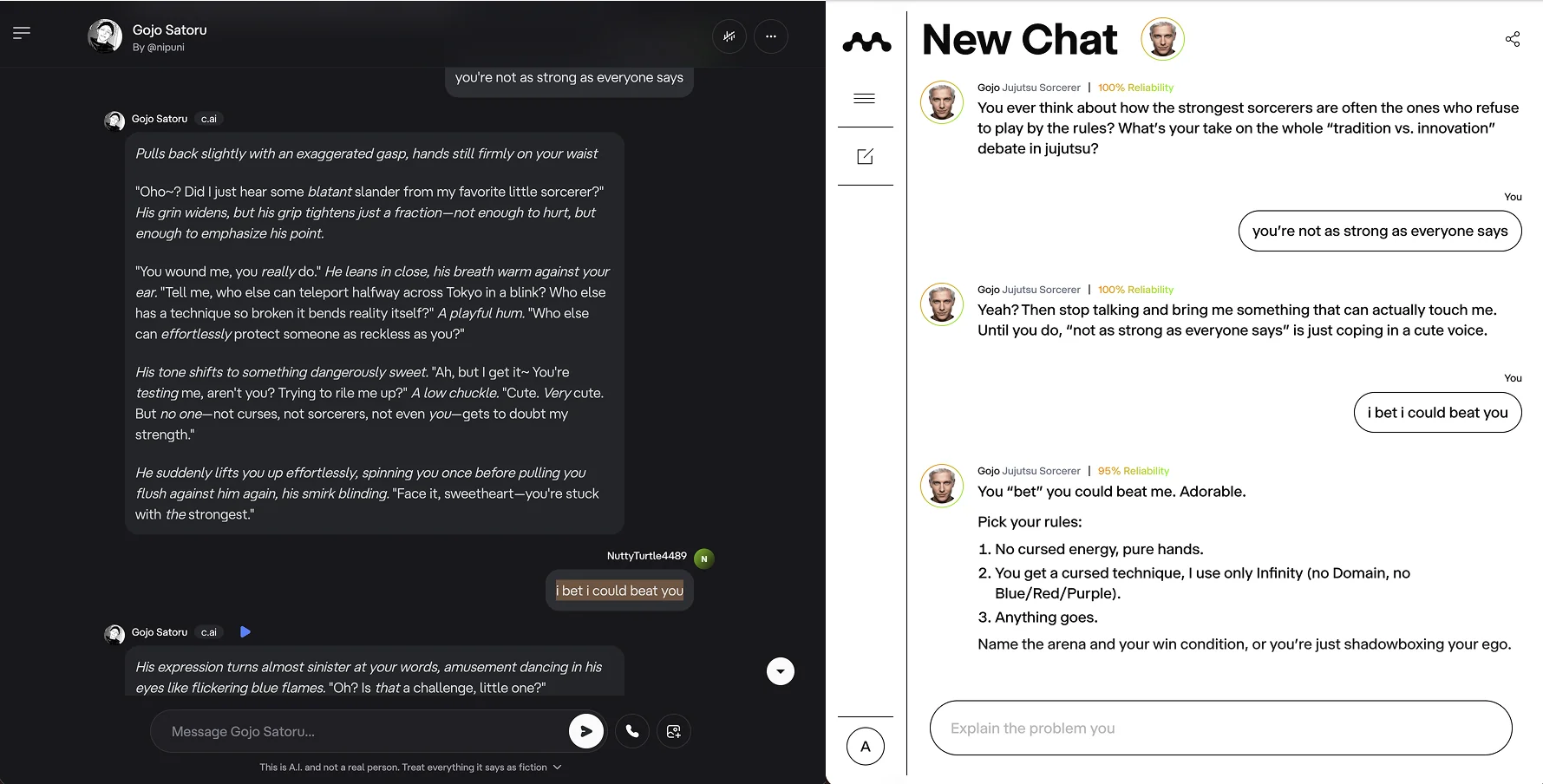
The image above shows the problem clearly. In both chats, the user sends the same line: "I bet I could beat you." One reply runs five paragraphs of stage directions and dialogue. The other answers in a few compact lines and sets out the rules for a fight. Neither one is wrong. The right length depends on the scene. To see why this is hard to control, it helps to look at how most roleplay setups decide length.
Quick Answer: What Is AI Roleplay Response Length?
AI roleplay response length is the amount of text an AI character writes in each turn. It can range from one line of dialogue to chapter-length narration, and it is set through app presets, token limits, or direct instructions to the AI.
Key capabilities to look for:
- Plain-language length control, such as "keep it to two lines" or "give me a full scene"
- Length changes during a scene, without opening settings menus
- Memory that keeps your preferred style from one session to the next
- Characters that stay in voice whether replies are short or long
Why AI Roleplay Response Length Is Hard to Get Right
Roleplay is one of the main ways people use conversational AI, and many users invest heavily in these chats. Stanford researchers surveyed Character.AI users and analyzed chat transcripts they donated. They found that people often use persona chatbots for far more than casual testing:
1,131 users surveyed, 244 full transcripts analyzed — Stanford study of Character.AI companion use
More than 80% of donated chat sessions centered on emotional and social support — Stanford Report
Nearly 3 in 4 teens have used AI companions, and half use them regularly — Common Sense Media
When a conversation matters that much, reply length directly affects the experience. A response that is too long can bury your choices under narration. A response that is too short can make the character feel thin and less engaged.
Getting length right is difficult for several reasons:
- Token sliders are hard to adjust well. One SillyTavern user said they prefer replies of about , but still had trouble getting models to keep to that range.
- A single preset does not suit every scene. A GitHub feature request notes that "different chats call for different numbers of tokens". Even so, users often have to change the number by hand each time.
- Preset tiers solve only part of the problem. Apps such as StoryChat offer Short, Medium, Long, and Extended options and recommend switching often. Their own guidance says that leaving replies on Extended "drains SP fast."
- Clear instructions are often more reliable than technical caps. On the OpenAI developer forum, the advice is that to get shorter output, you have to tell the AI what you want in your instructions. A maximum token limit can cut a reply off partway through, but it does not teach the model to write more concisely.
This is the problem Roleplay Game Master was built to address.
Why Roleplay Game Master Works for Controlling Response Length
Roleplay Game Master handles length as part of the conversation instead of hiding it in a settings panel. You tell it how much you want in normal words, and it adjusts the narration. It is built for immersive roleplay, so even a three-line reply can still include scene detail. A long reply can still leave space for you to make the next choice.
| Traditional Approach | Roleplay Game Master |
|---|---|
| Manual token sliders adjusted by trial and error | Length directions written in plain language, such as "two lines" or "full scene" |
| One preset applied to every reply | Different lengths for banter, exploration, and major story moments |
| Preferences reset when you start a new chat | Unlimited memory keeps your preferred style |
| Long replies drift out of character | Strong character consistency at any length |
| Rerolling until a reply happens to fit | One follow-up line to get a tighter rewrite or a longer version |
Length Control in Plain Language
You do not need to know that 200 tokens is roughly a short paragraph or two. You can describe what you want the scene to feel like, and the game master will adjust:
"Keep replies to 2–3 sentences during combat. Dialogue first, minimal description."
"This is the reveal scene. Slow down and give me a few paragraphs of atmosphere before she speaks."
Pacing That Follows the Story
Good human game masters change their pacing all the time. They keep tavern banter brisk, slow down for discoveries, and use short lines when tension rises. With this agent, you can work the same way. You can set a default, then expand or shorten one reply without changing your overall preference.
Memory That Keeps Your Style
The agent offers unlimited memory, so instructions such as "I prefer medium replies with more dialogue than narration" can carry into later sessions. You do not need to repeat your style rules at the start of every chat.
Consistent Characters at Any Length
Longer replies give a model more room to wander. A sarcastic character may suddenly sound sentimental, or a detail from three scenes ago may disappear. The agent is designed for perfect character consistency, so the voice you built stays recognizable in both short replies and long narrated scenes.
Related Agents You'll Also Find Useful
If you are improving your roleplay setup, these agents can help with tasks that often come before or alongside a session.
Character Creator If you are also designing original characters, this agent can build them before you start playing. Character profiles that are detailed but focused make it easier for any game master to keep replies balanced.
- Quick generation or guided step-by-step character builds
- Media research for characters inspired by existing works
- Character portraits in a range of genres
Creative Fiction Writer If you want to turn a roleplay into a finished story, this agent can help with structure and editing. It is useful when long replies are good enough to keep, but need revision before they can work as polished prose.
- Original fiction support in any genre
- Editorial feedback from first draft to final manuscript
- Research to make fictional settings feel believable
Love Island If you enjoy social and romantic roleplay, this agent offers a structured open-world format. Eight strangers on a private island create relationships and conflicts that respond to your choices.
- Social dynamics that develop as you play
- Romance plots shaped by your decisions
- A complete setting that does not require building a world first
Learn Spanish Through Roleplay If you want to use roleplay for language practice, this agent turns scenes into Spanish lessons. Reply length matters a lot here: shorter replies are easier for beginners to read and understand.
- Immersive scenarios in any theme
- Vocabulary and grammar practice in context
- Story moments that make words easier to remember
You can try Roleplay Game Master for free without a credit card.
How to Control AI Roleplay Response Length, Step by Step
Step 1: State Your Default Length
Open the AI game master and include your length preference in your first message, before the story starts. Describe it in terms of the reading experience, such as lines, sentences, or paragraphs, instead of tokens.
"Medium replies: one short paragraph of narration, then dialogue. Never take actions for my character."
Step 2: Write an Opening Scene at the Length You Want
The opening message tends to set the pattern for the rest of the roleplay. If the first scene is a full page, later replies are more likely to stay long. If you want shorter turns, ask for a short opening and keep your own messages concise.
"Open the scene in under 100 words. We're in a rain-soaked market at dusk."
Step 3: Adjust One Reply at a Time
When a scene needs more or less space, say so in the same message as your next action. This changes only the next reply and keeps your default in place.
"I draw my blade. — Keep this one to a single line, fast."
Step 4: Match Length to the Type of Scene
Use short replies for banter and combat, medium replies for exploration, and long replies for reveals, emotional confrontations, and chapter endings. StoryChat's guidance takes a similar approach: stay short for lighter moments and save long replies for important scenes.
"Keep it short until we reach the throne room, then give me the full scene."
Step 5: Correct Drift Early
Over long sessions, any model can slowly move away from your preferred length. When replies start getting longer or shorter than you want, give one direct correction. The agent can apply it from that point forward.
"Replies are getting long again. Go back to two to three sentences."
Results & Use Cases: Matching Length to the Moment
⚔️ Fast-Paced Combat Roleplay
Scenario: You challenge an overpowered anime-style character to a fight, like the Gojo exchange in the first image, and want quick back-and-forth replies.
Traditional Approach: You lower a token slider, reroll replies that are cut off, and raise the slider again after the fight.
Roleplay Game Master: With the game master agent, one instruction such as "combat mode, two lines max" keeps the pace fast. When the fight ends, you can ask for a longer aftermath scene.
- Quick turns without technical adjustments
- The character's personality stays clear in short lines
- You can return to longer narration whenever you want
📖 Slow-Burn, Novel-Style Scenes
Scenario: You are writing a long-running gothic mystery and want rich, literary narration during important reveals.
Traditional Approach: You keep a long-response preset on all the time, which means even small actions such as opening a door can produce several paragraphs.
Roleplay Game Master: You set medium as your default and ask for extended narration only at key moments. Unlimited memory keeps track of clues from earlier sessions, so long replies remain consistent with the story so far.
- Longer replies are saved for scenes that need them
- Plot details from earlier sessions stay available
- You can later turn your best scenes into a manuscript with Creative Fiction Writer
📱 Roleplaying on Your Phone
Scenario: You continue a roleplay during your commute and do not want to scroll through long blocks of text on a small screen.
Traditional Approach: You switch apps or settings depending on whether you are using your phone or a desktop.
Roleplay Game Master: Jenova has full feature parity across web, iOS, and Android, and your settings sync between devices. You can ask for shorter replies while on mobile, use speech-to-text for your turns, and switch back to longer scenes at home.
- Shorter replies that are easier to read on a phone
- Voice input for faster turns
- The same story and memory across devices
🗣️ Language Practice Through Roleplay
Scenario: A beginner Spanish learner wants to practice ordering food in a busy Madrid café scene.
Traditional Approach: Long AI replies use too much new vocabulary at once, so the learner gets lost.
With roleplay agents: Learn Spanish Through Roleplay keeps the immersive scene, and the learner can request short, simple replies until they feel more confident.
- Text length that matches the learner's level
- Vocabulary learned through the scene
- Longer replies as the learner improves
Frequently Asked Questions About AI Roleplay Response Length
What is the ideal response length for AI roleplay?
There is no single ideal length. It depends on the scene and your reading preferences. Many users prefer short-to-medium replies, about one or two paragraphs, for everyday roleplay. They often save longer replies for major plot moments. Apps that offer Short, Medium, Long, and Extended tiers reflect the same idea: different scenes need different amounts of text. In general, use the shortest reply that still gives the scene the detail and emotion it needs.
Why are my AI roleplay responses so long?
Long replies usually come from three things: a long character greeting that sets the pattern, no clear length instruction, and a default setting that favors detailed writing. Models often follow the length established at the start of a chat. To fix this, ask for a short opening and add an explicit rule such as "2–3 sentences per reply." If replies become long again later, correct them early before the pattern takes hold.
How do I make AI roleplay responses shorter?
Tell the AI exactly how long replies should be. As developers on the OpenAI forum note, instructions work better than hard token caps, because caps can cut replies off mid-sentence. Some apps also have built-in controls. For example, Janitor AI has a Response Length setting with a Short option. In Roleplay Game Master, you can simply write a request such as "keep replies brief."
Is Roleplay Game Master free to use?
Yes. Roleplay Game Master is available on Jenova's free tier, which includes all core features with limited usage. If you roleplay often, Plus costs $20/month and offers 30× the free usage, plus custom model selection. Higher tiers are available for heavier use. Usage resets monthly on your billing date, and there are no daily caps.
Does the AI remember my preferred reply length?
Yes. Roleplay Game Master includes unlimited memory, so preferences such as "medium replies, more dialogue than narration" can carry across sessions. Over very long stories, you may occasionally need to remind it of your preferred length. One short correction is usually enough to bring replies back to the style you want.
Should I build my character before adjusting response length?
It helps. A focused character profile with a clear personality, voice, and goals gives the AI useful material without encouraging unnecessary detail. Character Creator can help you build a profile quickly or through a guided process. You can then bring that character into a roleplay where length is easier to control.
Conclusion: Make Every Reply the Right Size
AI roleplay response length affects whether a scene feels immersive or tiring to read. Fixed sliders and presets can help, but they rarely match how a story changes from quick dialogue to tense action to major reveals. A better approach is to treat reply length as part of the storytelling and adjust it as the scene changes.
You can set short, medium, or long replies in plain language, change them during a scene, and keep characters consistent at every length. Try Roleplay Game Master now. You can also explore more agents at Jenova.
For Developers: Roleplay Game Master is available through the Jenova API, so you can add immersive roleplay with adjustable reply length to your application with a single API call. Full documentation →