AI Roleplay OOC Commands: Syntax, Examples & Character Drift Fixes
2026-10-18
Roleplay Game Master helps you run long, immersive roleplay campaigns where characters stay consistent and your direction holds. Many chatbots drift out of character, repeat phrases, or forget established lore. That forces you to keep using AI roleplay OOC commands just to repair the scene. This AI combines unlimited memory with consistent characterization, so you spend more time inside the story and less time fixing it.
As of October 2026, out-of-character (OOC) notes are still the main way to steer AI roleplay. This guide covers the syntax that works, copy-paste commands for common problems, and ways to need fewer corrections.
- ✅ Standard OOC syntax recognized across major roleplay platforms
- ✅ Copy-paste commands for drift, looping, pacing, and boundaries
- ✅ When to use an OOC note and when to write a permanent character rule
- ✅ An AI game master built so your corrections don't fade mid-campaign
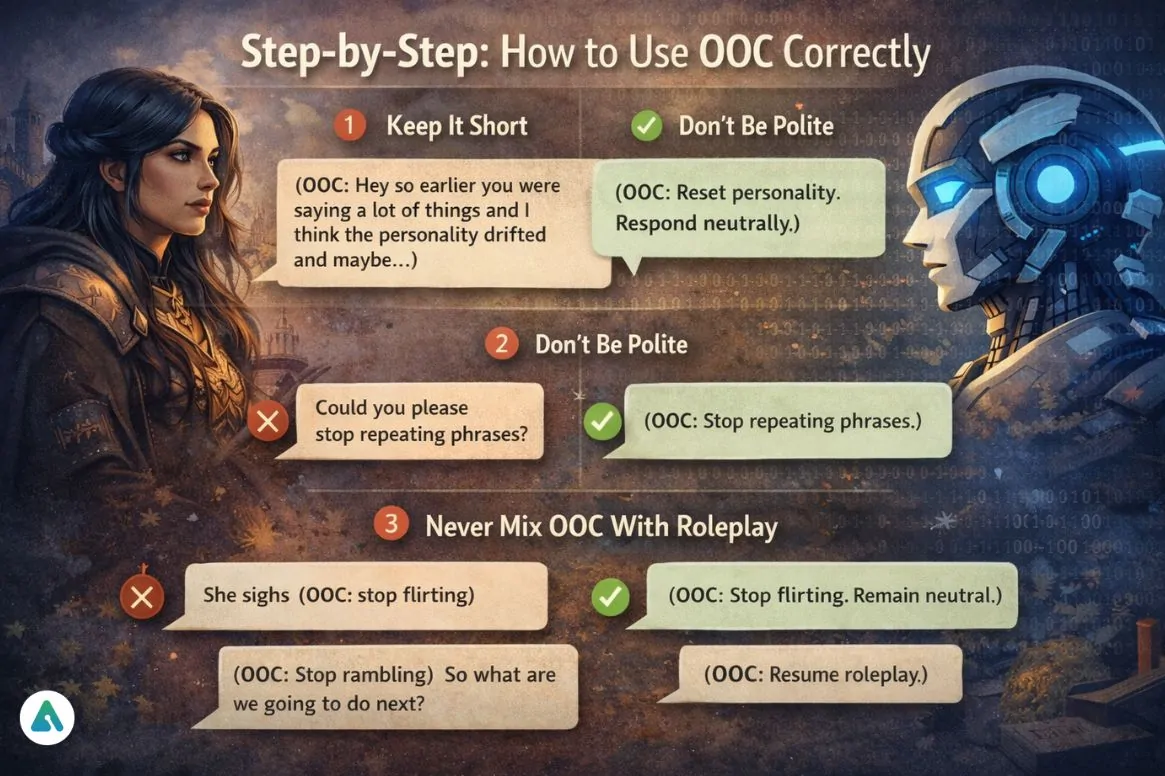
OOC commands only help if the AI interprets them as instructions instead of story text. Many frustrated roleplayers get this wrong. They write long apologetic paragraphs, put notes in the middle of narration, or issue a correction once and expect it to last forever. To see why, let's look at how AI roleplay breaks down and why OOC control matters.
Quick Answer: What Are AI Roleplay OOC Commands?
AI roleplay OOC commands are out-of-character instructions, usually written as (OOC: your note), that let you step outside the story and speak directly to the AI to correct behavior, adjust pacing, set boundaries, or ask questions without derailing the scene. Secrets AI's documentation compares this to a director giving instructions to an actor between scenes.
Key capabilities:
- Behavior correction: Stop looping phrases, reset a drifted personality, or end unwanted flirting
- Pacing control: Trigger timeskips, slow a scene down, or skip filler
- Boundary setting: Rule out themes, nicknames, or content you don't want
- Clarification: Ask where the scene is set, what a character knows, or how an in-world item works
Why AI Roleplay Drifts Without OOC Control
Character-driven AI has become a mainstream activity, and it is no longer niche:
**$36.8 billion**: [Global AI companion market value in 2025, projected to reach $318.0 billion by 2033](https://www.grandviewresearch.com/industry-analysis/ai-companion-market-report)
31%: Share of people using AI for social and emotional purposes who consider their chatbot a friend
Because these sessions run for hundreds of messages, small model failures add up. Directing the story without breaking immersion is often frustratingly difficult. According to AI Insights News, roleplayers most often go OOC to:
- Correct wrong assumptions: the AI invents facts about your character or the world
- Stop looping replies: the same phrases, gestures, or sentence structures keep coming back
- Reset tone or pacing: scenes rush ahead or stall in repetitive filler
- Clarify boundaries and fix broken roleplay: the bot speaks for your character or drifts into unwanted territory
The underlying cause is usually context. In many roleplay frontends, permanent character-card text stays loaded, but individual chat messages, including your OOC corrections, eventually scroll out of the model's working memory. That is why experienced players on
to restate the plot and how items work. It is also why a fix that worked at message 50 can quietly stop working by message 300.This is exactly the problem a dedicated AI game master was built for.
Why Roleplay Game Master Needs Fewer OOC Corrections
OOC commands treat the symptom. Roleplay Game Master targets the cause. It is a standalone AI roleplay partner designed around unlimited memory and character consistency, so the drift and amnesia that normally trigger OOC corrections happen far less often. When you do step out of the story to redirect it, the established rules and lore remain part of the session instead of falling out of context.
| Traditional Approach | Roleplay Game Master |
|---|---|
| Restating the plot and rules every few dozen messages | Unlimited memory keeps established lore and rules in play |
| Personality slowly drifts across long sessions | Built for consistent characterization across long campaigns |
| Self-hosted frontends need local setup and your own model backend | Runs in the browser and on iOS and Android, with no installation |
| Platform restrictions limit which scenarios you can explore | Complete creative freedom to explore any scenario you imagine |
Memory That Keeps Your Direction in Force
The most common complaint about OOC commands is that they "wear off." With unlimited memory, a boundary you set early, such as a nickname you don't want used or a character secret that must stay hidden, stays part of the campaign record. You don't have to keep repeating it.
Consistent Characters Over Long Campaigns
The agent is built to keep characters' voices, motivations, and relationships stable as a story grows. That means fewer "Reset personality" interventions and more scenes where characters react the way their history suggests they should.
Complete Creative Freedom, Directed by You
You set the genre, tone, and intensity. When you want to change course, a short out-of-character note is enough to pivot the story:
"(OOC: Timeskip three days. The caravan has reached the border city. Keep the tension between Mira and the captain unresolved.)"
"(OOC: Slow down. Play this negotiation scene out line by line instead of summarizing it.)"
"(OOC: Recap the major plot threads we've established so far, then resume roleplay.)"
Related AI Roleplay Agents You'll Also Find Useful
If you're investing in AI roleplay, these agents cover the steps before and after a campaign.
Character Creator If you're building original characters for roleplay, Character Creator helps you design them in detail before the first scene. A well-defined character needs far fewer OOC corrections later.
- Quick-generate or guided character builds
- Media research for fan characters and established universes
- Character portraits across genres
Creative Fiction Writer If a campaign grows into a story you want to keep, this agent helps turn it into polished prose.
- Storytelling support for original fiction in any genre
- Editorial feedback on structure, voice, and pacing
- Support from first draft to final manuscript
Vesper Court If you prefer a pre-built world to designing your own, Vesper Court drops you into a hidden vampire court as a woman with no memory of why she's there.
- Dark romance and blood intrigue
- Choices that change the story night by night
- A ready-made setting with no character card required
Start a campaign on the free tier and see how much less steering a consistent game master needs.
How to Use OOC Commands in AI Roleplay, Step by Step
These steps apply to most AI roleplay tools, including Roleplay Game Master, Character.AI, Janitor AI, and SillyTavern.
Step 1: Put Permanent Rules in the Character Setup, Not in OOC
Rules that should always apply belong in the character's description or opening setup, not in a chat message that will eventually scroll away. The SillyTavern character card below includes a permanent "Chat guidelines" line telling the AI not to write actions or dialogue for the user. That text stays loaded in every turn.
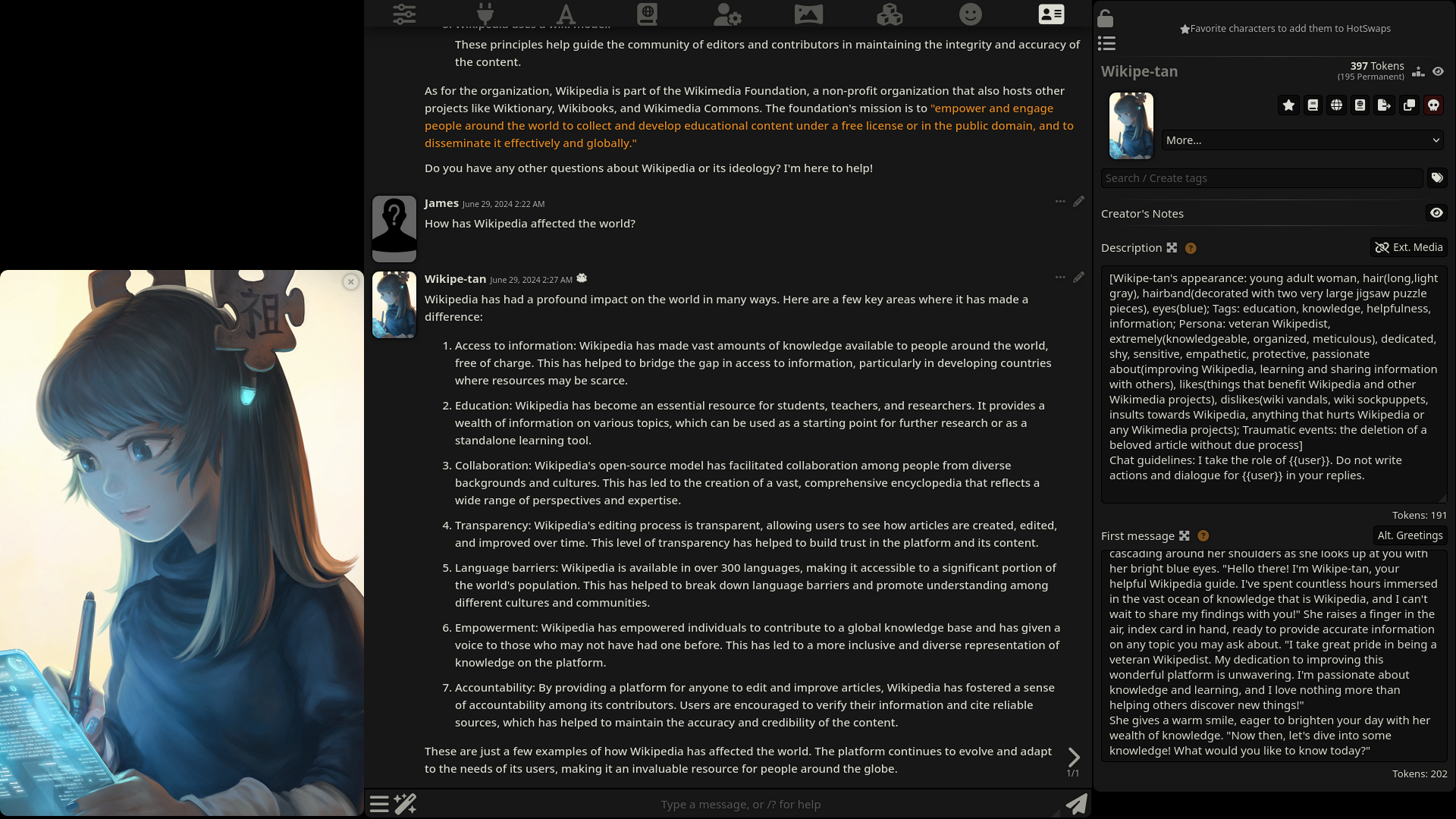
"Chat guidelines: I play my own character. Never write actions, thoughts, or dialogue for my character."
Step 2: Use the Standard OOC Format
Start the message with "OOC:" and wrap it in a clear delimiter. Secrets AI's guide lists parentheses ( ), square brackets [ ], and double parentheses (( )) as the recognized forms. FictionLab's documentation describes the purpose as communicating as yourself rather than as your persona.
"(OOC: What year is this story set in?)"
Step 3: Write One Short, Direct Instruction
Politeness itself isn't the problem. Ambiguity is. A request like "Could you please stop repeating phrases?" can be read as a line of dialogue for the character to answer. Google Cloud's prompt engineering guide recommends action verbs and precise, unambiguous language, which is why short imperative commands work best. Use this cheat sheet:
| Problem | OOC Command |
|---|---|
| Personality drifted | (OOC: Reset personality to the original character description.) |
| Repeated phrases | (OOC: Stop repeating phrases. Vary sentence structure.) |
| Scene rushed | (OOC: Slow down. Don't skip ahead; play this scene out in detail.) |
| Scene dragging | (OOC: Timeskip to the next morning.) |
| AI speaks for you | (OOC: Don't write my character's actions or dialogue.) |
| Unwanted flirting | (OOC: Stop flirting. Remain neutral.) |
| Lost the plot | (OOC: Summarize the current situation, then resume roleplay.) |
The slow-down and timeskip phrasings match commands that isekai zero recommends for Character AI and Janitor AI.
Step 4: Keep OOC Separate From In-Character Text
Platforms handle mixed messages differently. Secrets AI says that when you combine roleplay and an OOC note, the AI continues the roleplay and applies the note. Many other bots will instead answer the note in character or ignore it. The reliable default is a standalone OOC message, then a separate message to continue the story.
"(OOC: Stop flirting. Remain neutral.)"
Step 5: Resume and Verify
Close the out-of-character exchange explicitly so the AI returns to the narrative. If the next reply still shows the problem, restate the instruction more explicitly in its own message instead of repeating it word for word.
"(OOC: Resume roleplay.)"
Results: OOC Commands in Real Roleplay Sessions
🎭 Repairing a Drifted Character Mid-Campaign
- Scenario: A stoic mercenary has gradually become cheerful and talkative 200 messages into a fantasy campaign.
- Traditional Approach: Edit the character card, regenerate replies several times, and repeat "Reset personality" whenever the drift returns.
- With a dedicated game master: One OOC note restores the character, and unlimited memory keeps the original personality anchored afterward.
- Fewer regenerations
- Corrections that last
- Uninterrupted immersion
📱 Steering a Scene From Your Phone
- Scenario: You're continuing a mystery on your commute and the AI starts summarizing an interrogation you wanted to play out line by line.
- Traditional Approach: Wait until you're at a desktop with your self-hosted frontend to edit settings or prompts.
- With a dedicated game master: Type "(OOC: Slow down. Play the interrogation line by line.)" in the iOS or Android app and keep going.
- Same campaign memory on every device
- No setup or backend configuration
- Speech-to-text for quick OOC notes
⏩ Skipping Filler Without Losing Threads
- Scenario: A travel sequence keeps producing nearly identical campfire scenes.
- Traditional Approach: Manually summarize what happened and paste it in so the AI doesn't forget subplots after the skip.
- With a dedicated game master: A single timeskip command moves the story forward while established threads stay intact.
- Faster pacing
- No manual recaps
- Plot continuity preserved
✍️ Turning a Campaign Into a Story
- Scenario: Your three-week campaign has a narrative arc worth keeping.
- Traditional Approach: Export logs and rewrite hundreds of messages into prose by hand.
- With a dedicated game master: Ask for an OOC recap of the main plot beats, then develop it into chapters with Creative Fiction Writer.
- Structured plot summary in minutes
- Editorial support for the draft
- The roleplay becomes a manuscript
Frequently Asked Questions About AI Roleplay OOC Commands
What does OOC mean in AI roleplay?
OOC stands for "out of character." It marks a message where you speak as yourself instead of as your roleplay persona, usually to give the AI an instruction, correction, or question about the story. FictionLab defines it as a way to step outside the roleplay. Most AI roleplay platforms recognize the "OOC:" prefix inside parentheses or brackets.
What is the correct format for OOC commands?
The most widely recognized format is "OOC:" followed by your instruction, wrapped in parentheses, such as (OOC: Timeskip to the next morning.). Square brackets and double parentheses also work on many platforms. Keep the instruction short and imperative, and send it as its own message for the most reliable results.
Why does the AI ignore my OOC commands?
There are three common reasons. The note was mixed into narration, the wording was vague or phrased as a polite question, or the instruction has scrolled out of the model's context in a long chat. Send a standalone, explicit command. For rules that must always apply, add them to the character description so they stay loaded permanently.
Can I mix OOC notes with in-character text?
Some platforms support it and apply the note while continuing the scene. Many do not, so separating them is the safer habit. Even in story-driven games like Vesper Court, a clean standalone OOC message followed by a separate in-character reply avoids confusion about which text is direction and which is dialogue.
How do I stop the AI from speaking or acting for my character?
Add a permanent rule to the character setup, such as "Never write actions or dialogue for my character," then reinforce it with a short OOC note if it slips. Building a detailed character from the start with Character Creator helps, because clearly defined roles leave the AI less room to guess.
Is Roleplay Game Master free to use?
Yes. The free tier includes all core features with limited usage, so you can run campaigns at no cost. Paid plans start at $20 per month for Plus, which raises usage to 30 times the free tier. It works on web, iOS, and Android, and your campaign memory syncs across devices.
Take Control of Your AI Roleplay
AI roleplay OOC commands are essential, but they work best when they're short, direct, and separate from the story, with permanent rules kept in the character setup. Master that format and you can fix drift, looping, and pacing problems in a single message.
Fewer interruptions also come from a better roleplay partner. With unlimited memory and consistent characterization, your out-of-character corrections stay in effect instead of fading with each new message.
Try Roleplay Game Master now. Explore more at Jenova.
For Developers: Roleplay Game Master is available programmatically through the Jenova API, so you can add persistent-memory interactive storytelling to your application with a single API call. Full documentation →