AI Ren'Py Script Generator: Branching Dialogue, Menus & Flags
2026-10-23
Game Designer Assistant turns your visual novel outline into working Ren'Py script. It combines narrative design expertise with fluency in the engine's core statements: define, label, menu, jump, and default flags. Writing branching .rpy files by hand is slow, and one misplaced indent can break a scene. This AI works as a Ren'Py script generator that plans your branch structure, drafts dialogue in valid syntax, and catches missing assets before you launch.
As of October 2026, an AI Ren'Py script generator is one of the most practical tools a solo visual novel developer can add to their workflow.
- ✅ Drafts characters, dialogue, menus, labels, and flags in clean Ren'Py syntax with consistent indentation
- ✅ Maps branches before writing code, so every
jumphas a destination and every route has an ending - ✅ Brings game design judgment to pacing, choice consequences, and route structure, beyond simple text conversion
- ✅ Free to start, with full access on web, iOS, and Android
Ren'Py is one of the most approachable engines in game development, and that ease of entry hides how quickly a project grows. A ten-minute demo becomes a ten-hour story, and a single menu becomes dozens of interlocking routes. To understand why AI-assisted scripting matters, let's look at what slows Ren'Py creators down today.
Quick Answer: What Is an AI Ren'Py Script Generator?
An AI Ren'Py script generator is a tool that converts story outlines, character notes, and branch plans into valid Ren'Py .rpy code (characters, labels, menus, jumps, and flags) so writers can spend their time on story instead of syntax.
Key capabilities:
- Converts prose scenes or bullet outlines into
saystatements,scene/showcommands, and transitions - Builds
menublocks that set flags andjumpto correctly named labels - Initializes persistent choices with
defaultstatements and checks them withif/else - Cross-references image tags and file names so generated script matches the assets you actually have
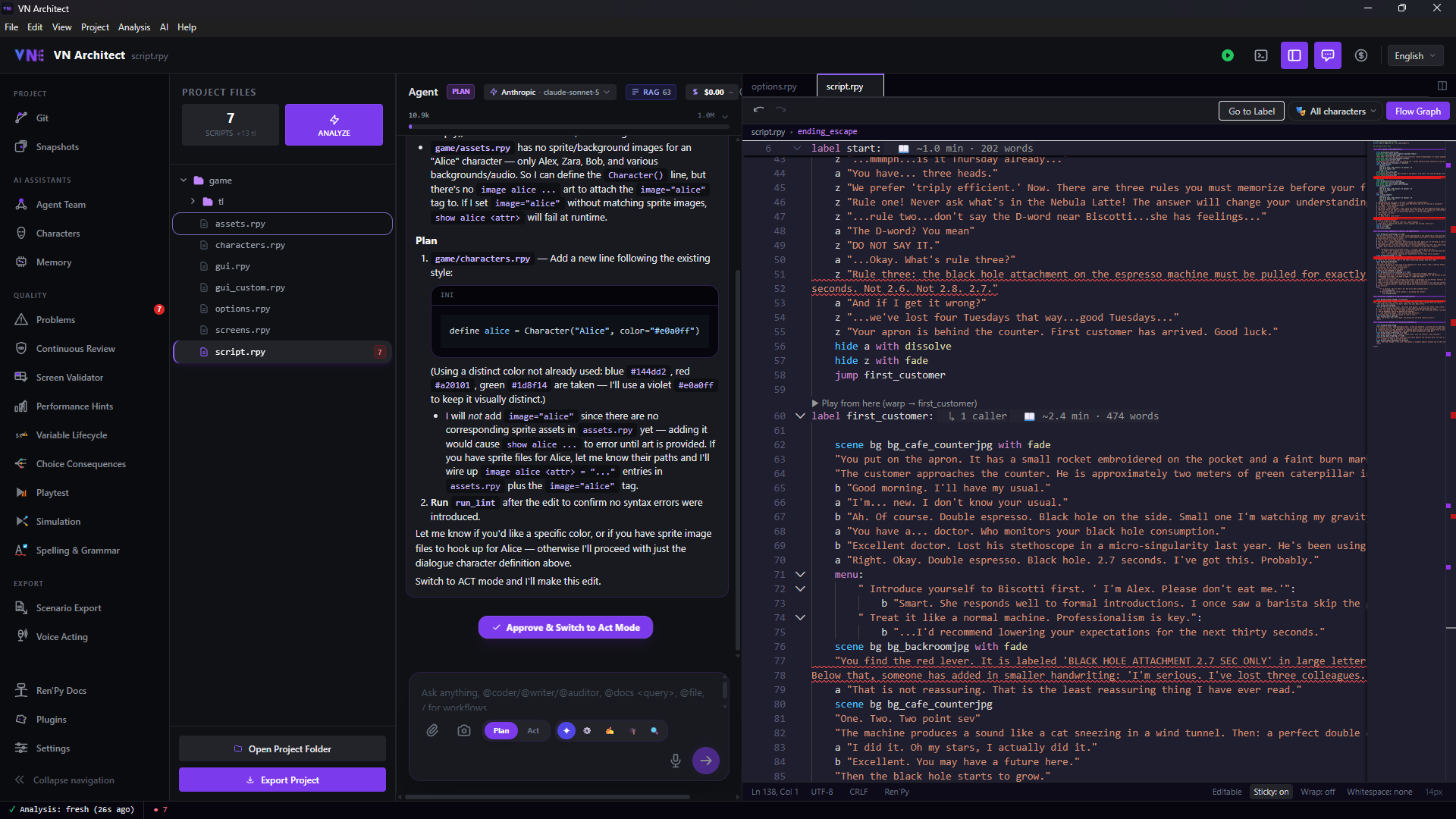
The screenshot above shows a dedicated Ren'Py IDE with an agent panel. The agent proposes adding define alice = Character("Alice", color="#e0a0ff"), then warns that show alice would fail at runtime because the project contains no matching sprite. That check is what separates usable generated script from text that only looks like Ren'Py.
Why Writing Ren'Py Script by Hand Slows Visual Novel Projects
Ren'Py's language is readable by design. Per the official Ren'Py Quickstart, the start label is where every script begins, and dialogue is often just a character name followed by a quoted line. The same documentation also notes that blocks must be indented relative to the previous statement, and every statement in a block must use the same indentation. That rule is easy to follow for twenty lines and hard to maintain across twenty thousand.
The pressure to ship efficiently is real. The visual novel market is estimated at anywhere from $1.34 billion](https://growthmarketreports.com/report/visual-novel-games-market) to [$2.24 billion in 2025, depending on the analyst. That money is spread across a very crowded shelf:
186 visual novels: released on Steam in January 2025 alone, roughly 7 new VNs per day
20,282 games: total releases on Steam in 2025
1 in 2 developers: self-fund their games, according to the GDC 2025 State of the Game Industry report
44% of developers: already use generative AI for code generation and script support
Self-funded teams can't afford weeks lost to debugging. Yet keeping a branching script clean is increasingly difficult:
- Fragile syntax at scale. Four-space blocks, escaped double quotes, and colon-terminated statements all have to be exact. Community developers warn that Ren'Py and Python reject mixtures of tabs and spaces, a common failure when pasting text from word processors.
- Branch sprawl. Labels exist solely to be called or jumped to. As routes multiply, it becomes easy to create orphaned labels nothing reaches, or dead ends that never
return. - Flag bookkeeping. Choices that matter later need a
defaultbeforelabel start, a$assignment when chosen, and anifcheck downstream. If you forget any one of those three, a route silently breaks. - Asset mismatches. Ren'Py builds image names from file names and ignores the directory name. Naming drift between your art folder and your script causes runtime errors.
This is exactly the gap a dedicated AI design partner was built to close.
Why Game Designer Assistant Works as an AI Ren'Py Script Generator
Game Designer Assistant approaches your visual novel as a game first and a script second. Before writing a single line of .rpy, it helps you decide what each choice means: which flags it sets, which routes it opens, and where branches reconverge. It then translates that structure into Ren'Py code you can paste straight into script.rpy.
| Traditional Approach | Game Designer Assistant |
|---|---|
Hand-typing every label, menu, and jump | Generates complete scene blocks from a short outline |
| Hunting indentation errors after each launch | Outputs consistently indented, block-correct code |
| Tracking flags in a separate spreadsheet | Defines, sets, and checks flags as part of the draft |
| Discovering dead-end routes during playtesting | Plans the branch map first, so every path terminates |
| Writing dialogue and structure in separate passes | Drafts narrative beats and code together, then refines either one |
Story Structure Before Syntax
The most expensive Ren'Py bugs are design bugs, such as a choice that leads nowhere or a route that skips a key reveal. The agent helps you outline routes, convergence points, and endings first, so the generated code follows a coherent plan.
Clean, Idiomatic Ren'Py Output
Here is an illustrative example of the kind of block the agent can produce from a two-sentence scene description:
renpydefine m = Character("Mira", color="#c8ffc8")
define p = Character("You", color="#c8c8ff")

default trusted_mira = False

label start:
    scene bg rooftop with fade
    show mira neutral at right with dissolve
    m "You came. I wasn't sure you would."

    menu:
        "Tell her the truth":
            $ trusted_mira = True
            jump honest_route
        "Change the subject":
            jump evasive_route

label honest_route:
    p "I read the letter. All of it."
    m "Then you know why I left."
    jump rooftop_end

label evasive_route:
    p "Nice view up here."
    m "...Sure. The view."
    jump rooftop_end

label rooftop_end:
    if trusted_mira:
        m "Thank you for not lying to me."
    else:
        m "Maybe next time."
    return
Every pattern here (character objects, default flags, menu choices, $ assignments, conditional dialogue, and return to end) follows the conventions in Ren'Py's own documentation.
Flags, Routes, and Consequences That Stay Consistent
Ask the agent to audit an existing script and it will list every flag, where each one is set, and where it's read. That makes unused variables and unreachable conditions easy to spot before players find them.
Asset-Aware Scripting
Share your image file list and the agent will match scene and show statements to real tags and attributes, flagging any line that references art you haven't made yet.
"Here's my outline for Chapter 2 with three choices. Write it as Ren'Py script using the characters already defined in my characters.rpy."
"Audit this script: list every flag, every label, and any label that nothing jumps to."
"My images folder has bg_cafe_day.png, mira_neutral.png, and mira_angry.png. Rewrite this scene so it only uses those assets."
A note on limitations: the AI drafts and reviews script, but it doesn't run your project. Always launch through the Ren'Py launcher, run Lint, and playtest every route. Generated code is a strong first draft, not a substitute for testing.
Related Agents You'll Also Find Useful
A playable visual novel needs more than correct script. These agents cover the adjacent steps in a typical VN workflow.
Creative Fiction Writer If your dialogue feels flat or your characters blur together, this storytelling partner focuses on prose and voice before anything becomes code.
- Character voice development and dialogue polish
- Research-backed worldbuilding for authentic settings
- Editorial feedback from first draft to final manuscript
Graphic Designer On a crowded Steam storefront, your capsule art and title screen do much of the selling. This design partner handles visual work around the game itself.
- Illustration and branding concepts for logos and key art
- Social media and marketing visuals for launch campaigns
- Layout guidance for promotional materials
Prompt Generator If you're producing concept art or placeholder backgrounds with image models, consistent prompts keep your cast recognizable from scene to scene.
- Structured prompts for text, image, music, and video models
- Collaborative refinement to lock in a consistent style
- Reusable prompt templates for sprite expressions and backgrounds
Try the full workflow free, with no credit card required.
How to Generate Ren'Py Script with AI, Step by Step
Step 1: Map Your Branch Structure
Start by describing your story's choices and endings to this AI design partner in plain language. It returns a route map listing labels, which choices lead where, and where paths converge.
"My VN has one opening choice: confess right away or wait. Waiting leads to a separate ending. Confessing branches into two hobbies before both reach a wedding ending. Map the labels."
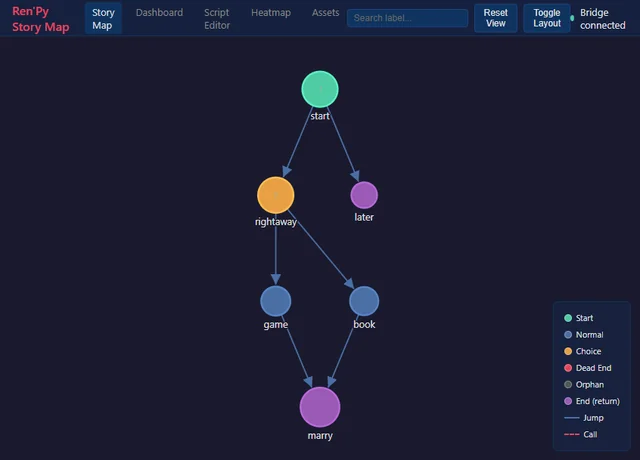
The map above, from a community-built story visualizer, mirrors the structure of "The Question," the sample game in the Ren'Py Quickstart. In that game, the book label sets a flag and jumps to marry. A text plan like this is your blueprint, and if you use a map tool, you can confirm it has no orphan or dead-end nodes.
Step 2: Define Your Cast and Flags
Ask for a characters.rpy block with short names, display names, and distinct colors, plus a default statement for every choice that matters later. Placing these before label start follows Ren'Py's recommended initialization pattern.
"Create define statements for Mira, Theo, and the narrator-protagonist, plus default flags for every choice in the route map."
Step 3: Generate Scene by Scene
Request one label at a time instead of the whole game. Short requests produce tighter dialogue and make each block easier to review.
"Write label honest_route as Ren'Py script. Rooftop at dusk, Mira starts guarded and softens. About 20 lines, ending with a jump to rooftop_end."
Step 4: Validate Against Your Assets
Paste your image and audio file lists and ask the agent to reconcile them with the script. Then launch the project, run Lint, and play every route at least once.
"Here's my game/images listing. Flag any scene or show statement in this script that doesn't match a real file."
Step 5: Iterate on Pacing and Choices
Once the routes run, use the agent as a design reviewer. Ask whether choices feel meaningful, whether a route is too short compared with the others, or where a callback to an earlier flag would add payoff.
"Compare the length and emotional beats of each route. Which one feels underdeveloped?"
Ren'Py Script Generator Use Cases
AI adoption in game development is widespread. A Google Cloud survey of 615 developers found that 90% already use generative AI in their workflows, and 95% use it to automate repetitive tasks. Adoption isn't uniform, though: reporting from Game Developer suggests developer use may be declining after an early-2025 spike. The common thread is that AI earns its place by removing tedium, not by replacing authorship.
🎮 The 48-Hour Game Jam
- Scenario: A solo developer has a weekend jam theme, a three-ending story idea, and no time to spare.
- Traditional Approach: Most of Saturday goes to typing labels and menus and chasing indentation errors, leaving little time for art or polish.
- Jenova's game design agent: The route map and first-draft script are ready in the first session, so the rest of the weekend goes to writing quality and visuals.
- Branch structure locked in before coding starts
- Fewer launch-and-crash cycles
- More jam time spent on what judges actually see
💼 Converting a Finished Manuscript
- Scenario: A novelist has a complete interactive story drafted in a word processor and wants to bring it into Ren'Py.
- Traditional Approach: Manual line-by-line conversion, with curly quotes, tabs, and escaped characters breaking the script.
- With the AI: Chapters convert into properly quoted, consistently indented say statements. Prose polish can happen first with the fiction writing partner.
- Character tags applied consistently across thousands of lines
- Narration and dialogue correctly separated
- The author's voice preserved through conversion
📱 Drafting Branches on Your Phone
- Scenario: A developer with a day job gets route ideas during their commute.
- Traditional Approach: Scattered notes that never quite turn into code.
- With the AI: They describe the branch by voice or text in the mobile app, get back a Ren'Py-formatted label, and paste it into the project that evening. Settings and history sync across devices.
- Ideas captured as usable script, not loose notes
- Full feature parity between mobile and desktop
- Persistent memory of the project's characters and flags
📊 Auditing a Sprawling Project
- Scenario: A two-person team's script has grown past 30,000 words across multiple files, and testers report a route that ends abruptly.
- Traditional Approach: Hours spent tracing jumps manually or building a spreadsheet of labels.
- With the AI: The script is pasted in sections, and the agent lists every label, every jump target, and every flag read before it's set.
- Dead ends and orphan labels surfaced quickly
- A clear fix list instead of guesswork
- Documentation the team can keep for future updates
Frequently Asked Questions
Can AI write Ren'Py code that actually runs?
Yes, for the core language. Characters, say statements, scene and show, transitions, menus, labels, jumps, and flags follow well-documented patterns that AI handles reliably. More advanced features such as custom screens, ATL animation, and embedded Python blocks can also be generated, but they deserve closer review. Treat any AI output as a first draft: launch it through the Ren'Py launcher, run Lint, and playtest every branch before shipping.
Is Game Designer Assistant free to use?
Game Designer Assistant is available on Jenova's free tier, which includes all core features with limited usage. Developers who generate script regularly can upgrade to Plus at $20 per month for 30× the free usage and custom model selection. Higher tiers are available for heavier workloads. Usage resets monthly on your billing date, with no daily caps.
How is an AI Ren'Py script generator different from a general chatbot?
General-purpose chatbots can produce Ren'Py syntax, but they treat each request in isolation. A specialized agent focuses on game design, including route structure, choice consequences, and pacing, alongside the code. It also keeps persistent memory of your project, so your characters, flags, and naming conventions stay consistent across sessions instead of being re-explained every time.
Can AI help with sprites, backgrounds, and store art?
AI can't replace a dedicated character artist, but it can speed up the surrounding work. A design-focused agent can produce key art concepts, logo ideas, and marketing visuals for your store page. Your script generator can then match show statements to whatever final file names your artist delivers, which prevents runtime errors caused by naming drift.
Does an AI Ren'Py script generator work for kinetic novels?
Yes. Kinetic novels, meaning stories without choices, are the simplest case. According to the Ren'Py documentation, a kinetic novel needs only say statements, images, transitions, music, and a final return. AI can convert a linear manuscript into that format quickly, leaving you to focus on scene direction, music cues, and pacing.
Is AI-generated Ren'Py script my own work?
The story, characters, and design decisions remain yours. The AI handles the conversion into syntax and offers suggestions you can accept or reject. On Jenova, your data is never used to train public AI models and is encrypted in transit and at rest. Your unreleased script stays private while you work.
Conclusion
Ren'Py makes it easy to start a visual novel, but keeping one clean is harder. Indentation rules, label webs, flag tracking, and asset names compound with every route you add. An AI Ren'Py script generator takes that bookkeeping off your plate. You get a branch map before you code, correctly structured .rpy blocks, and audits that catch dead ends before your players do.
The result is more of your limited development time spent on what makes a visual novel worth reading: characters, choices, and consequences. Whether you're converting a manuscript, racing a game jam, or untangling a 30,000-word script, AI-assisted Ren'Py scripting fits directly into the way you already work.
Try Game Designer Assistant now. Explore more at Jenova.
For Developers: Game Designer Assistant is available programmatically via the Jenova API, so you can integrate narrative design and script drafting into your game tools or editor plugins with a single API call. Full documentation →