AI Portrait Retouch: Edit Faces Naturally With AI in Seconds (April 2026)
2026-04-06
In April 2026, portrait retouching is the single most common photo editing task on the planet — and AI has fundamentally changed how it gets done. The portrait retouching software market was estimated at USD 1.44 billion in 2025 and is expected to reach USD 1.58 billion in 2026, while 87% of photographers now use AI-powered tools in their workflows. From wedding galleries to LinkedIn headshots to Instagram content, AI portrait retouching has compressed what used to take 20 minutes per image in Photoshop into a matter of seconds.
But speed has come at a cost. The dominant complaint across the photography industry in 2026 isn't that AI portrait retouching is too slow — it's that it makes people look fake. A Retouch4me survey of 363 working photographers found that just 24% are willing to let AI take full creative control of retouching. The other 76% want to stay in the driver's seat — because when AI retouches unsupervised, it erases the very features that make a face recognizable.
Jenova's Photo Editor was designed around this exact tension. It provides professional portrait retouching through natural language conversation — you tell it what to fix, what to keep, and how far to go. Skin smoothing that preserves pores. Blemish removal that respects defining marks. Lighting correction that honors the original mood. Combined with the Beauty Consultant for personalized facial analysis and the Cosmetic Surgery Image Specialist for clinical-grade proportion evaluation, Jenova covers the full portrait enhancement spectrum — from a quick selfie polish to detailed aesthetic consultation.
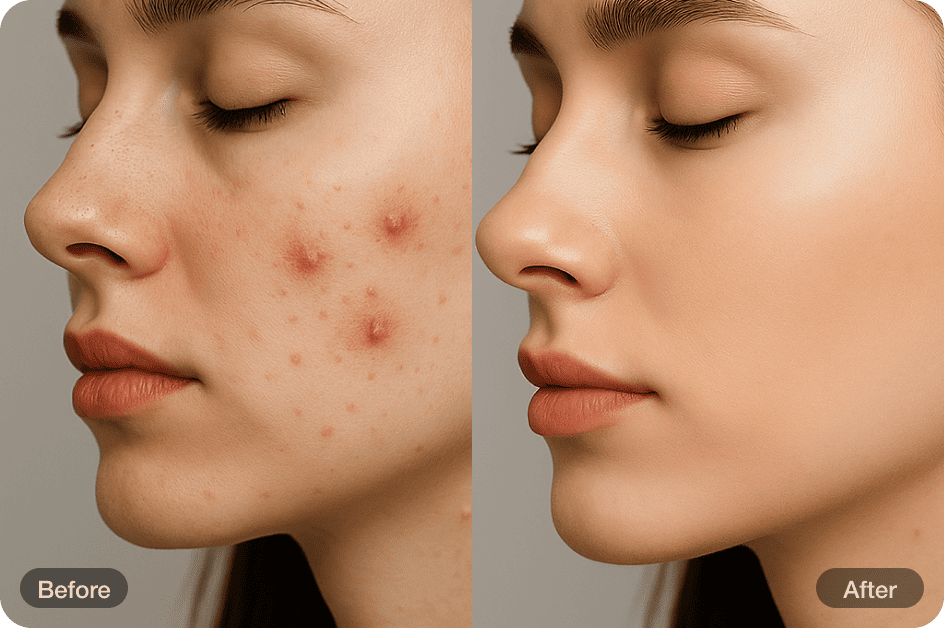
Quick Answer: What Is AI Portrait Retouching?
AI portrait retouching uses deep learning to enhance facial photographs — smoothing skin, removing blemishes, correcting exposure, and refining overall portrait quality — while preserving the subject's natural appearance. In 2026, the best AI portrait retouching tools replace one-click beautification with conversational, iterative editing that keeps the photographer or subject in creative control.
- Natural skin editing — Photo Editor smooths skin, removes blemishes, and corrects lighting while preserving pores, texture, and identity
- Facial structure analysis — Beauty Consultant evaluates facial proportions and provides culturally fluent enhancement guidance
- Clinical facial evaluation — Cosmetic Surgery Image Specialist quantifies facial proportions and generates procedure mock-ups
- Commercial portrait production — Fashion Mockup Studio creates photorealistic on-model imagery for editorial and e-commerce
The Problem With One-Click AI Portrait Retouching
The AI photo editors market reached $2.1 billion in 2024 and is projected to hit $8.9 billion by 2034 at a 15.7% CAGR. But as tools have proliferated, so have their failures — and in portrait retouching, failures are deeply personal.
Over-Smoothing Destroys What Makes Faces Human
A survey of 363 professional photographers found that "natural-looking, nearly invisible retouching is their priority, and that authenticity is an essential part of their photography." Yet most AI portrait tools do the opposite — they aggressively smooth skin into a featureless, poreless surface.
As Color Experts International documented, "AI usually blurs pixels to hide blemishes, which destroys natural skin texture — pores, fine lines, and follicles. The result? Skin looks featureless, poreless, and fake." Professional retouchers use techniques like frequency separation to fix a red patch without touching a single pore. AI doesn't make this distinction. To a generic algorithm, a defining freckle and a temporary pimple are both just irregularities to eliminate.
Identity Distortion: "That Doesn't Look Like Me"
The most consequential failure of AI portrait retouching is changing who someone looks like. Capturely's March 2026 analysis found that AI-retouched headshots routinely produce faces that are "15% different from your actual face — slightly thinner nose, different jaw shape, smoother skin than you've ever had." In a survey of 1,600 participants, 38% described AI-processed professional headshots as "soulless" — technically competent but missing the warmth that makes a portrait connect. For corporate headshots, this has real consequences: 66% of recruiters are put off once they learn a headshot is AI-generated.
The Industry Backlash: Emotion Over Perfection
The photography world is actively rejecting over-processed portraits. According to Aftershoot's 2026 survey of wedding and portrait photographers, the defining trend of 2026 is "emotion over perfection." Portrait photographer Tanya Smith told Digital Camera World: "People are craving real expressions and real moments. Clients want personality-led brands — real people with real points of view, not just pretty photos." Polish photographer Lukasz Spychala added in PetaPixel: "People are getting tired of artificial perfection and the pursuit of a standard that doesn't exist in reality."
Why Photo Editor Handles Portrait Retouching Differently
The fundamental problem with generic AI portrait retouching is that it removes the human from the loop. Jenova's Photo Editor puts you back in control — not through sliders and layers, but through conversation.
| What Goes Wrong | Generic AI Portrait Tools | Photo Editor's Approach |
|---|---|---|
| Skin becomes plastic | Uniform smoothing erases all texture | Preserves pores, fine lines, and natural imperfections you choose to keep |
| Faces change shape | Normalizes features toward statistical averages | Maintains the subject's unique facial structure and identity |
| No creative input | One-click, take-it-or-leave-it | You describe what to fix and what to preserve in natural language |
| Every portrait looks the same | Same filter applied universally | Understands the difference between a wedding portrait, a corporate headshot, and an editorial shoot |
| Inconsistent across batches | Each edit is independent | Persistent memory maintains your retouching style across sessions |
| Locked to one model | Single AI with fixed aesthetic biases | Multiple frontier models (GPT-5.4, Claude Opus 4.6, Gemini 3.1 Pro Preview) |
How Conversational Retouching Works
The Photo Editor replaces the slider-and-filter paradigm with natural language instructions. You describe what you see and what you want — the agent handles the technical execution:
"This is a natural light portrait taken outdoors. The skin looks great overall but there's a distracting blemish on the right jawline and some redness around the nose. Smooth those areas but don't touch the freckles across the cheeks — those are part of her look. The exposure is slightly hot on the forehead; bring it down to match the rest of the face."
When the result needs adjustment, you refine conversationally:
"The blemish removal is perfect. But the redness correction went slightly too far — her nose now looks unnaturally even compared to the rest of her skin tone. Can you bring back about 30% of the original color variation there?"
This is the workflow that 78% of professional photographers actually want: AI handling the mechanical execution while the human retains creative judgment over the final result.
Memory That Learns Your Retouching Style
Unlike standalone retouching apps that forget everything between sessions, the Photo Editor builds persistent memory of your preferences. Your preferred skin smoothing intensity, color grading warmth, blemish removal aggressiveness, and enhancement boundaries carry forward automatically. For a photographer processing a 400-image wedding gallery, this means the 400th portrait receives the same retouching standard as the first — without re-explaining your style for every upload.
This is exactly what Photo Editor was built for. Retouch your first portrait free — no credit card required.
Related Agents You'll Also Like
Beauty Consultant
Personalized facial analysis and culturally fluent beauty guidance — understanding why certain enhancements work before you apply them.
- Facial structure evaluation with personalized enhancement recommendations
- Makeup direction, skincare ingredient analysis, and cosmetic procedure candidacy
- Cultural fluency across global beauty standards — from Korean glass-skin aesthetics to Gulf modesty-forward styling
Cosmetic Surgery Image Specialist
Clinical-grade facial photo analysis for users who need precise measurement rather than subjective beautification.
- Quantified facial proportions: golden ratio analysis, nasal projection, periorbital evaluation, aging pattern mapping
- Procedure mock-ups for rhinoplasty, fillers, and other aesthetic interventions
- Before/after layout formatting and post-op healing tracking with complication flagging
Fashion Mockup Studio
When portrait retouching extends into commercial visual production — photorealistic on-model imagery for e-commerce and editorial.
- Studio-grade fashion photography from garment photos or descriptions
- Market-specific model archetypes for Western, Korean, Japanese, Chinese, and Middle Eastern audiences
- Catalog-quality output without the cost of traditional photoshoots
How It Works: From Raw Portrait to Natural Result
The 2025 Aftershoot Workflow Report found that 64% of clients can't distinguish AI-edited from manually edited images — but only when the retouching is done with restraint and context awareness. The Photo Editor is built for exactly this standard.
1. Upload your portrait and set the context. The agent needs to understand what kind of portrait this is — because a wedding photo, a LinkedIn headshot, and an editorial beauty shot require fundamentally different retouching approaches:
"This is a headshot for a law firm's website. The subject is a senior partner — she should look polished and professional but absolutely not younger or different. Remove the temporary blemish on her chin, even out the under-eye shadows slightly, and correct the yellowish cast from the office fluorescent lighting. Keep everything else exactly as-is."
2. Review and refine. The Photo Editor returns its first pass. You evaluate and adjust with natural language — no technical vocabulary required:
"The under-eye correction is too aggressive — she now looks like she's wearing concealer, which breaks the natural look. Dial it back to about half. The color correction is perfect. Can you also subtly sharpen the eyes without touching the surrounding skin?"
3. Apply domain expertise. The Photo Editor understands distinctions that generic tools miss entirely. It knows that a mole on the cheek is a defining feature, not a defect. It recognizes that film grain in a portrait shot on analog should be preserved, while digital noise from a high-ISO smartphone capture should be reduced. It understands that a warm golden-hour portrait needs different color treatment than a clean studio headshot.
4. Scale across galleries. For photographers processing event galleries — weddings, corporate headshot sessions, school portraits — persistent memory ensures every image receives the same retouching standard. Establish your preferences on the first portrait, and the agent maintains that exact style across hundreds of images. The Retouch4me survey found that about one-in-five photographers said high-volume retouching is "physically wearing them down" — this is the workflow that solves that.
5. Extend with specialized analysis. Before retouching, you might want to understand the subject's facial structure. The Beauty Consultant provides personalized enhancement recommendations based on facial proportion evaluation. For clinical applications, the Cosmetic Surgery Image Specialist quantifies proportions using aesthetic medicine methodology — golden ratio, nasal projection, periorbital evaluation.
Results & Use Cases
📸 Wedding & Event Gallery Processing
Scenario: A wedding photographer has 500 portraits from a weekend event — each needing skin smoothing, exposure correction, and consistent color grading in the couple's preferred warm, documentary style.
Traditional approach: 15-30 minutes per image in Lightroom and Photoshop. Total: 125-250 hours. As PetaPixel reported, post-production is the bottleneck that caps photographer income and causes burnout.
Jenova solution: Use the Photo Editor to establish your retouching style on the first 5-10 portraits — skin smoothing level, color warmth, shadow handling. Persistent memory applies that exact style across the remaining 490 images. Conversational refinement handles the handful of portraits that need individual attention — a tricky backlit shot, a group photo with mixed skin tones. 81% of photographers using AI workflows report improved work-life balance.
💼 Corporate Headshot Consistency
Scenario: A consulting firm needs updated headshots for 200 employees across four offices — consistent professional quality, but each person must look unmistakably like themselves.
Traditional approach: Studio sessions at $150-$450+ per person, plus retouching costs. Timeline: 4-6 weeks across offices.
Jenova solution: The Photo Editor retouches real photographs — not generating synthetic faces, but enhancing actual portraits. Skin smoothing that preserves natural texture. Blemish removal that keeps defining features. Consistent background treatment and color grading across all 200 images. The result is professional without being fabricated — critical when 66% of recruiters are put off by AI-generated headshots.
📱 Content Creator Portrait Enhancement
Scenario: An influencer needs to retouch 40 portrait photos per month for Instagram, YouTube thumbnails, and brand partnership deliverables — natural-looking enhancement that maintains their recognizable personal brand.
Traditional approach: 45-90 minutes per image using Facetune, Lightroom, and Photoshop. Total: 30-60 hours per month.
Jenova solution: The Photo Editor handles portrait retouching with the natural texture preservation that separates professional results from the "Instagram filter" look. The Beauty Consultant provides facial structure analysis and culturally fluent enhancement guidance — understanding what works for the creator's specific audience and aesthetic. Persistent memory ensures every image across the month maintains the same retouching standard.
🔬 Aesthetic Medicine Consultation
Scenario: A cosmetic dermatology practice needs to analyze patient portraits with quantified facial proportions and generate procedure visualizations for consultation.
Traditional approach: Manual measurement using specialized software. Inconsistent across practitioners. Time-intensive.
Jenova solution: The Cosmetic Surgery Image Specialist provides clinical photo analysis with facial proportion quantification — golden ratio, nasal projection, periorbital evaluation, aging pattern mapping — plus procedure mock-ups for rhinoplasty, fillers, and other interventions. The Photo Editor handles final image preparation for patient-facing presentations with before/after layout formatting.
Competitor Comparison: Where Jenova Differs
While tools like Evoto and Retouch4me offer powerful automated portrait retouching, they operate as pipeline processors — upload, process, download — with limited creative input. As PetaPixel documented, Evoto faced significant backlash when it demonstrated capabilities that "essentially supplanted actual photographers." Professional batch-editing tools like Imagen AI have captured 24% market share among professional photographers but require Lightroom Classic — excluding the vast majority of users who need portrait retouching but don't use professional photo management software.
Jenova's Photo Editor occupies a fundamentally different position: conversational retouching where you describe what you want in natural language, iterate until the result matches your vision, and build persistent preferences that carry across sessions. No Lightroom dependency. No automated pipeline that treats every face identically. No one-click filters. And because Jenova provides access to multiple frontier models (GPT-5.4, Claude Opus 4.6, Gemini 3.1 Pro Preview, plus models from xAI and DeepSeek), you're never constrained by one model's aesthetic biases — a critical advantage when the goal is preserving what makes each face unique rather than normalizing toward a statistical average.
FAQ
How does AI portrait retouching work?
AI portrait retouching uses deep learning models trained on millions of professionally edited portraits to analyze skin texture, facial structure, lighting, and color balance — then apply targeted enhancements. Modern tools handle skin smoothing, blemish removal, eye enhancement, exposure correction, and color grading. Jenova's Photo Editor adds conversational control — you describe what to change and what to preserve in natural language, with iterative refinement until the result matches your creative vision.
Does AI portrait retouching change how people look?
It can — and that's the core risk. Capturely's research found that AI-processed portraits commonly produce faces that are "15% different from your actual face." Generic tools normalize expressions, smooth away defining asymmetries, and alter identity toward statistical averages. Jenova's Photo Editor avoids this by putting you in control — you specify exactly what to change and what to preserve, with conversational refinement to catch over-corrections before they reach the final output.
What's the difference between AI portrait retouching and AI headshot generation?
AI portrait retouching enhances real photographs of real people — smoothing skin, removing blemishes, correcting lighting on actual captured images. AI headshot generation fabricates entirely new faces from reference selfies. The distinction matters professionally: 66% of recruiters are put off by AI-generated headshots, and 38% describe them as "soulless." Jenova's Photo Editor retouches real photos — preserving authenticity while delivering professional polish.
How much does AI portrait retouching cost on Jenova?
Jenova offers a free tier with all core features and limited usage. Paid plans start at $20/month (Plus) with 30× the usage of the free tier and custom model selection. Premium ($50/mo), Pro ($100/mo), and higher tiers scale further. Every agent — from the Photo Editor to the Beauty Consultant — is accessible on every plan.
Can AI portrait retouching handle batch processing for event photographers?
Yes — and this is where conversational retouching with persistent memory becomes transformative. Jenova's Photo Editor learns your retouching preferences from the first few portraits and applies that exact standard across hundreds of images. The Retouch4me survey found that 84% of photographers want AI to handle repetitive retouching tasks while they retain creative control — exactly the workflow Photo Editor enables.
Is AI portrait retouching good enough for professional use in 2026?
The 2025 Aftershoot Workflow Report found that 64% of clients can't distinguish AI-edited from manually edited images. However, quality depends entirely on the tool. Generic one-click retouching produces the "plastic skin" effect that professionals reject. Conversational tools like Jenova's Photo Editor — where you control the level and specificity of every enhancement — deliver results that meet professional standards because the human creative judgment stays in the loop.
Conclusion
AI portrait retouching in 2026 is a $1.58 billion market defined by a single tension: speed versus authenticity. The industry has spoken clearly — emotion over perfection is the 2026 standard. Photographers, professionals, and creators want AI that handles the 84% of retouching that's repetitive and tedious while preserving the human decisions that make each portrait authentic.
Jenova's Photo Editor is built for exactly this standard — conversational portrait retouching that preserves natural skin texture, maintains facial identity, and gives you full creative control through plain language. No Photoshop learning curve. No one-click filters that erase what makes a face unique. No plastic skin.
Try Photo Editor now — retouch your first portrait in minutes. Explore more specialized agents at Jenova.