AI Photo to Comic: Turn Your Photos Into Comic Panels and Full Stories
2026-08-11
The Comic Creator turns your actual photographs into comic panels — and then keeps going, building complete sequential stories from the people, places, and moments already in your camera roll. Most photo-to-comic tools apply a filter and stop there. This agent treats your photo as a character reference and a story seed, carrying the same faces and visual style across every panel of a finished strip.
✅ Convert real photos into comic-style panels with consistent characters across the full sequence ✅ Choose your art direction — noir, retro pin-up, cyberpunk, manga, gritty realism, bright webcomic ✅ Add dialogue, speech bubbles, panel layouts, and page flow, not just a stylized single image ✅ Build multi-panel strips and full stories from a trip, an event, a product, or a single portrait
To understand why the leap from "cartoonify my selfie" to "make me a comic" is so much harder than it looks, it's worth examining exactly where consistency breaks — and why readers notice it immediately.
Quick Answer: What Is AI Photo to Comic?
AI photo to comic is the process of converting a real photograph into comic-book-style artwork using AI, then extending that styled output into panels, dialogue, and sequential storytelling rather than a single filtered image.
Key capabilities:
- Transform photos of people, pets, places, and products into comic-style illustrations
- Keep the same subject recognizable across multiple panels with Comic Creator
- Apply distinct comic art styles — golden-age, noir, manga, cyberpunk, modern webcomic
- Add speech bubbles, captions, and panel layouts for readable sequential art
- Build full strips, pages, and multi-chapter stories from a set of source photos
The Problem: Why Photo-to-Comic Tools Stop at One Image
The demand is enormous. The AI image generation market is projected to grow from roughly $9.1 billion in 2025 to $272.8 billion by 2035 at a 40.5% CAGR, and adoption is broad — 78% of organizations reported using AI in 2024, up from 55% the year before, according to the Stanford AI Index.
The tooling has kept pace on the surface. Canva's Cartoonify "instantly transforms photos into playful, high-quality cartoons," and dozens of similar converters exist. But converting one photo is not making a comic.
But turning photos into an actual comic is frustratingly difficult:
- Most tools produce a single stylized image, not a sequence
- The same person looks like a different character in each generated panel
- Art style shifts between generations even with identical settings
- No panel layout, no dialogue, no reading flow — just isolated pictures
- Multiple photos of the same subject produce visually unrelated results
Character Consistency Is the Core Technical Failure
This is where nearly every workflow collapses. A 2026 academic survey in Artificial Intelligence Review identifies character consistency as one of six critical dimensions — alongside time, space, event, style, and theme — that AI-generated sequential narratives must maintain. The authors note that "cross-page narrative consistency refers to the stable preservation of story elements—such as character identity, spatial layout, visual style, and thematic intent throughout" the work.
Their conclusion is blunt: most advances "remain fragmented and are unable to capture the cross-dimensional interactions that drive real inconsistencies."
Style Drift Compounds Across Panels
Even when a character's face holds, the rendering style often doesn't. Palette, line weight, and shading language shift panel to panel, breaking the visual unity readers unconsciously depend on. Adobe acknowledges this as the central production challenge, noting the need to keep characters "on-model" across multiple panels or an entire graphic novel — a problem their tooling addresses through reference images rather than treating each generation as independent.
Sequential Art Is a Separate Discipline From Image Styling
Comics are not illustrated pictures placed in a row. Panel size, gutter spacing, camera angle progression, dialogue placement, and page-turn rhythm are craft decisions that control pacing and comprehension. A photo-to-cartoon filter delivers none of this, which leaves you with the hardest part of the job still undone.
Readers Detect Inconsistency Immediately — and Penalize It
This isn't an abstract quality concern. Research from the Arts Management and Technology Lab surveyed 108 comic readers on an AI-generated comic and found that frequent readers responded significantly more negatively on precisely two dimensions: consistency and narrative conveyance.
43.52% of surveyed comic readers said they would not consider purchasing comics with AI-generated panels — while 44.44% answered "maybe" — Arts Management and Technology Lab reader survey
The upside in that same data is telling. When consistency was strong, "a majority of Group A participants were surprised and impressed that Midjourney was able to generate panels with such a high level of consistency." Consistency is the difference between work that reads as intentional and work that reads as output.
The Authorship Question Matters for Anything You Publish
If you plan to share or sell the result, there's a legal layer. The U.S. Copyright Office concluded in January 2025 that the outputs of generative AI can be protected by copyright "only where a human author has determined sufficient expressive" elements. Analysis from Brookings notes that in the well-known Zarya of the Dawn case, protection was limited to "the selection, coordination, and arrangement of the Work's written and visual elements."
The practical implication: your authorship lives in your source photos, your story, your panel choices, and your creative direction — which argues strongly for a tool that makes you a director rather than a button-presser.
This is exactly what Comic Creator was built for.
The Solution: Why Comic Creator Handles Photos Differently
Comic Creator treats an uploaded photo as a persistent character reference, not a one-time input. Once your subject is styled and locked, that visual identity carries into every subsequent panel — same face, same proportions, same rendering language — while the agent handles the sequential art work most tools ignore entirely.
The difference is that design and production live in one place. You're not exporting from a cartoonizer, importing into a layout tool, and manually hoping the faces still match.
| Photo-to-Cartoon Filter | Comic Creator |
|---|---|
| One stylized image per photo | Multi-panel sequences from a single reference |
| Subject looks different each generation | Locked character identity across all panels |
| Style shifts between outputs | Unified art direction across the full strip |
| No dialogue or speech bubbles | Integrated captions, bubbles, and lettering |
| No panel layout or reading flow | Composed pages with deliberate pacing |
| Preset filter styles only | Full stylistic range — noir to cyberpunk to manga |
Photos Become Characters, Not Just Filtered Images
Upload a photo of a person and describe who they should be in the story. The agent extracts the visual identity — face structure, hair, build, distinguishing features — and translates it into a comic character that stays recognizable regardless of pose, angle, or scene.
"Here's a photo of my dad. Turn him into the grizzled lead of a post-apocalyptic Western — weathered jacket, crossbow, dust and desaturated palette. Keep his face clearly recognizable."
Full Stylistic Range, Not Preset Filters
Art direction is a creative decision, not a dropdown. Noir uses different line weight and contrast than a 1950s pin-up piece, which uses different color logic than a neon cyberpunk render. The agent works with these as full visual vocabularies.
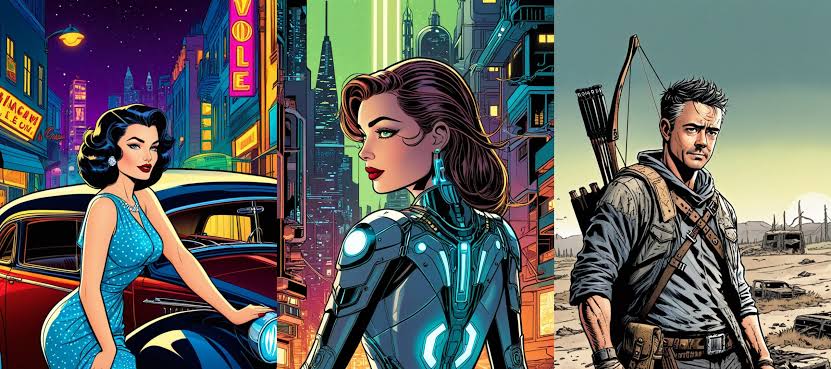
"Same subject, three treatments: 1950s pin-up with a vintage car and neon diner signage, then cyberpunk with glowing circuitry in a rain-slick megacity, then post-apocalyptic wasteland realism."
Panels, Dialogue, and Page Flow Built In
This is what separates a comic from a stylized picture. The agent composes panel layouts, varies camera distance for pacing, places speech bubbles so they guide the eye correctly, and structures pages so the reader moves through them the way you intend.
Multiple Photos, One Coherent Story
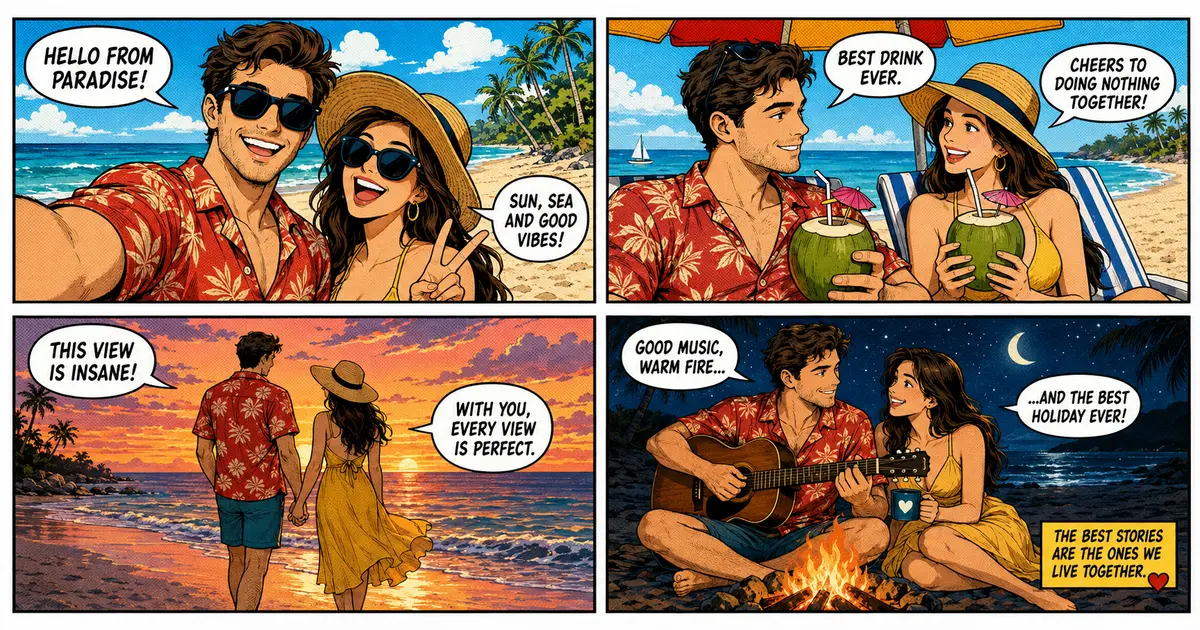
Feed it a batch — a vacation album, an event, a product shoot — and it builds a narrative sequence rather than a set of unrelated conversions. The four-panel beach strip above is exactly this pattern: separate moments unified into one story with consistent characters and a single art direction.
"Here are eight photos from our trip. Build a four-panel comic strip: arrival, the beach afternoon, sunset walk, campfire at night. Warm palette, casual dialogue, romantic tone."
Related Agents You'll Also Find Useful
Photo-to-comic work rarely happens in isolation. These agents cover the adjacent tasks most creators hit within their first few projects.
Photo Editor
Your source photo quality directly determines conversion quality. Bad lighting, cluttered backgrounds, and soft focus all carry through into the comic output.
- Expert retouching for portraits, landscapes, and general photography
- Lighting correction and cleanup before stylization
- Photorealistic results that give the AI a clean reference to work from
Character Creator
When your comic needs characters who don't exist in any photo — antagonists, side cast, or fictional versions of real people with a deeper backstory.
- Guided character builds with narrative depth and psychology
- Portrait generation across genres and visual styles
- Works for original characters and full ensembles
Graphic Designer
For everything around the comic itself — covers, title lettering, print layout, and social-ready crops of individual panels.
- Expert across branding, print, social media, and illustration
- Cover design and typographic treatment
- Format adaptation for any platform or print spec
Creative Fiction Writer
Strong panels can't rescue a weak story. Useful when you want the narrative structured properly before you start generating art.
- Story structure and arc development across any genre
- Sharp dialogue writing and editorial feedback on pacing
- Deep research for authentic settings and worlds
Try Comic Creator free — no credit card required.
How It Works: From Photo to Finished Comic
Step 1: Upload Your Source Photos
Start with the images you want converted. Clear, well-lit shots with visible faces produce the strongest character references, but the agent works with casual phone photos.
"Here are three photos of me and my brother from the hiking trip. I want us as the two leads."
Step 2: Set Your Art Direction
Describe the visual world, not just a style name. Tone, palette, line quality, and reference points all give the agent something concrete to work toward.
"Gritty modern comic style — heavy inks, limited palette of rust and slate blue, high contrast shadows. Think crime drama, not superhero."
Step 3: Lock Your Characters
Before building panels, confirm each subject's styled appearance. This is the step that prevents drift later, and skipping it is the most common mistake.
"That's the right look for both of us. Lock these two designs. Show me each of them from a three-quarter angle and in profile so I can confirm consistency."
Step 4: Build the Panel Sequence
Describe the scenes and let the agent handle composition, camera progression, and layout. Specify dialogue or let it write to your tone.
"Six panels. Wide establishing shot of the trailhead, then tighten into the climb, a wordless panel at the summit, then three panels of the descent as the storm rolls in."
Step 5: Refine, Extend, and Export
Adjust individual panels, add or rewrite dialogue, and extend into additional pages. Your characters persist across sessions, so you can return later and continue the same project.
"Panel four needs more urgency — tighter crop, lower angle. Then add a second page continuing from the storm."
Results & Use Cases
📸 Turning a Vacation Album Into a Comic Strip
Scenario: A couple returns from a beach holiday with 400 photos and wants something better than another carousel post — a short comic strip capturing the trip's actual feeling.
Traditional Approach: Commission an illustrator at $80–$250 per panel with a 2–4 week turnaround, or spend a weekend fighting a cartoonizer that renders both people as strangers in every image.
Comic Creator: A complete four-panel strip with consistent likenesses, unified color treatment, and written dialogue — produced in a single session.
- Both subjects recognizable across every panel
- Day-to-night progression handled as deliberate visual pacing
- Print-ready or social-ready output from the same source
💼 Product and Brand Storytelling
Scenario: A small brand wants comic-style creative for a campaign — their actual product and team rendered in a bold, ownable visual style rather than generic stock illustration.
Traditional Approach: Agency illustration budgets, long revision cycles, and inconsistent results across a multi-asset campaign.
Comic Creator: Real product photography converted into a consistent comic language across an entire asset set, with unlimited revisions at no per-iteration cost.
- Distinctive visual identity competitors can't buy off a stock site
- Same style holds across ads, social posts, and packaging inserts
- Pairs naturally with Graphic Designer for layout and typography
📱 Personalized Gifts and Cards From Phone Photos
Scenario: Someone wants an anniversary gift — their relationship's key moments rendered as a short comic — and only has photos on their phone.
Traditional Approach: Etsy commissions at $50–$150 per panel with multi-week waits and no ability to iterate once delivered.
Comic Creator: Full comic built directly on mobile, from photo upload through final panels, with feature parity across web, iOS, and Android.
- Voice input for describing scenes while on the go
- Everything syncs — start on phone, finish on desktop
- Iterate freely until the tone is exactly right
🎨 Multi-Style Character Exploration
Scenario: A creator has one portrait and wants to see that subject across radically different genre treatments before committing to a project's visual direction.
Traditional Approach: Separate commissions per style, or endless prompt-wrestling in a general image generator where the face changes with every render.
Comic Creator: The same locked likeness rendered across retro, cyberpunk, and post-apocalyptic treatments — a genuine style comparison rather than three unrelated characters.
- Direct visual comparison with identity held constant
- Fast iteration on art direction before production begins
- Selected style becomes the locked reference for the full project
FAQ
Is the AI photo to comic tool free?
Yes — you can start converting photos into comic panels on Jenova's free tier, which includes all core features with limited monthly usage. Paid plans scale usage substantially and remove watermarks from generated output. Usage resets monthly on your billing date with no daily caps, so your full allowance is available from day one.
How is this different from a photo-to-cartoon filter?
Filters apply a style to one image and stop. Comic Creator treats your photo as a persistent character reference, then builds panels, dialogue, and page layouts around it. Academic research identifies character and style consistency across a sequence as the defining challenge — and that's precisely the gap between a filter and a comic.
Can it keep the same person consistent across every panel?
That's the core function. Once you lock a character's styled design, it carries into every subsequent panel and persists across sessions. This matters more than raw image quality: reader research found frequent comic readers rate work significantly more negatively specifically on consistency when it fails.
What comic art styles can it produce?
Golden-age and silver-age comic, noir, retro pin-up, cyberpunk, manga and anime, modern webcomic, gritty photorealistic-adjacent, and hybrids of any of these. Style is treated as a full visual vocabulary — line weight, palette logic, shading language, and composition conventions — rather than a surface filter.
Can I copyright a comic made from my photos?
This area is genuinely unsettled. The U.S. Copyright Office concluded that AI outputs are protectable only where a human author determined sufficient expressive elements, with protection often limited to the selection and arrangement of elements. Your original photographs, story, dialogue, and panel decisions are where your authorship is strongest. Consult a qualified attorney for your specific situation and check current guidance, since this is actively evolving.
Does it work on mobile?
Yes, with full feature parity across web, iOS, and Android. Upload photos directly from your camera roll, describe scenes using speech-to-text, and pick up on desktop later — projects and character designs sync across all devices.
Conclusion
The gap in AI photo-to-comic work was never image quality. It was that a converted photo isn't a comic — and the moment you tried to make a second panel, your subject became someone else. Readers register that inconsistency instantly, and survey data confirms it's the single dimension where frequent readers judge AI comics most harshly.
Treating your photo as a locked character reference rather than a one-time filter input changes what's possible. Your real people, real places, and real moments become a consistent cast you can carry through panels, pages, and complete stories — with the panel layout, dialogue, and pacing handled as the craft disciplines they actually are.
Upload your photos, lock your characters, and start building pages. Try Comic Creator now.
Explore more at Jenova.
For Developers: Comic Creator is available programmatically via the Jenova API — integrate photo-to-comic conversion and sequential art generation into your application with a single API call. Full documentation →