AI Photo Retouch: How to Retouch Photos with AI in Seconds (April 2026)
2026-04-05
AI photo retouching in 2026 is no longer a novelty — it's the standard workflow for photographers, eCommerce sellers, and content creators who need professional-quality results without spending hours behind a screen. The AI photo editors market reached $2.1 billion in 2024 and is projected to grow to $8.9 billion by 2034, registering a 15.7% CAGR (Emergen Research, via Autophoto). Whether you need to smooth skin naturally, remove blemishes, correct lighting, or clean up product shots, AI retouching tools now handle in seconds what once took 30 minutes per image.
Jenova's Photo Editor is purpose-built for exactly this — a specialized AI agent that delivers expert-level portrait retouching, product photo enhancement, and landscape editing through natural language conversation, powered by models from OpenAI, Anthropic, Google, and more.
Quick Answer: What Is AI Photo Retouching?
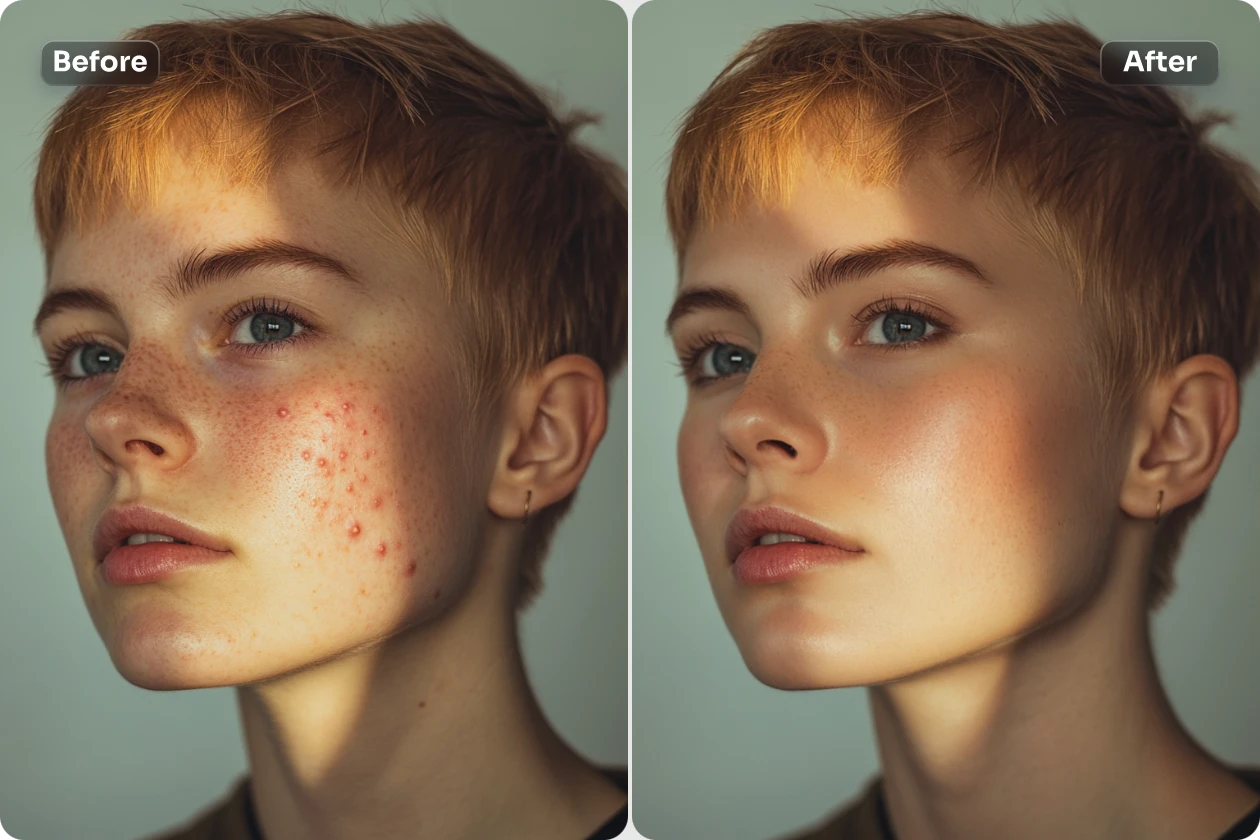
AI photo retouching uses machine learning and computer vision to automatically detect and correct imperfections in photos — from skin blemishes and lighting inconsistencies to background distractions and color imbalances — while preserving natural texture and detail.
- Skin retouching: Blemish removal, smoothing, and texture preservation — Photo Editor
- Lighting & color correction: Exposure balancing, white balance, and color grading
- Object removal: Distractions, unwanted elements, and background cleanup
- Product enhancement: Shadow generation, background replacement, and detail sharpening — Fashion Mockup Studio
The Problem: Why Photo Retouching Remains a Bottleneck
For photographers and businesses producing visual content at scale, retouching is the silent bottleneck that caps growth and drains budgets.
⏱️ Time Is the Real Cost
The average photographer using AI culling and editing tools saves approximately 473 hours per year, according to the Aftershoot Snapshot 2025 report (Barnimages).
Manual portrait retouching takes 10–20 minutes per image using Lightroom, and up to 30 minutes per image for high-end skin work in Photoshop (Aftershoot). For a wedding photographer delivering 400 retouched images, that's 66+ hours of post-production — per event. Post-production was, as one industry analysis put it, "the silent killer of growth... the bottleneck that capped our income" (Imagen AI).
🎯 Quality Gaps Persist with Generic AI
A 2026 study by Color Experts International found that while AI retouching tools were 22.7× faster than human retouchers, human retouchers scored 8.85/10 on quality versus AI's 5.16/10 — a 41.7% quality gap across 11 performance fields (The Phoblographer). The most common failure? The "plastic skin" effect — AI blurs pixels to hide blemishes, destroying natural skin texture like pores, fine lines, and follicles (Color Experts International).
💸 Budget Pressure Is Real
68% of brands exceed their photoshoot budgets, according to an Nfinite survey (Autophoto).
And the downstream impact is measurable: 22% of product returns happen because items look different than in photos (Business Dasher, via Autophoto). Poor retouching doesn't just waste time — it directly costs revenue.
This is exactly what Photo Editor was built for — a specialized AI retouching agent that combines the speed of automation with domain-specific expertise in portrait, product, and landscape editing.
Why Photo Editor
Most AI retouching tools apply the same generalist approach to every image — a portrait gets the same treatment as a product shot. The result is the "plastic skin" epidemic that luxury brands and professional photographers reject (Color Experts International).
Jenova's Photo Editor takes a fundamentally different approach: it's a specialized AI agent with deep domain knowledge in professional retouching — understanding the difference between portrait skin smoothing (preserve pores, remove blemishes) and product photo enhancement (correct lighting, generate shadows, clean backgrounds).
| Challenge | Traditional Workflow | Photo Editor |
|---|---|---|
| Portrait skin retouching | Frequency separation in Photoshop (20–30 min/image) | Describe the edit in natural language — natural results in seconds |
| Product background cleanup | Manual masking + clone stamp | Upload photo, describe what you want removed or replaced |
| Batch consistency | Fatigue-dependent, varies across images | Persistent memory ensures consistent style across sessions |
| Lighting correction | Manual curves + levels adjustment | AI understands scene context, applies intelligent corrections |
| Learning curve | Years of Photoshop expertise required | Conversational interface — no technical skills needed |
Conversational Retouching
Instead of navigating layers, masks, and sliders, you describe what you want:
"Smooth the skin on this headshot naturally — keep pore texture visible, remove the blemish on the left cheek, and brighten the eyes slightly without making them look unnatural."
"Clean up this product photo — remove the dust spots, correct the white balance, and add a subtle shadow underneath."
"Retouch this landscape — remove the power lines, enhance the sky colors, and sharpen the foreground details."
The agent interprets your intent, applies retouching-specific expertise, and delivers results you can iterate on through conversation.
Multi-Model Advantage
While tools like Adobe Photoshop lock you into Firefly, Jenova's Photo Editor can leverage GPT-5.4 (OpenAI), Claude Opus 4.6 (Anthropic), Gemini 3.1 Pro Preview (Google), plus models from xAI and DeepSeek. Different models produce different aesthetic results — you can switch between them to find the best output for your specific retouching task.
The Hybrid Workflow That Actually Works
The 2026 Color Experts International study found that hybrid workflows — AI handling the initial pass, humans refining the output — produced the best results. In one test, a hybrid workflow completed a hair and cosmetics product retouch in 7.18 minutes, compared to 10 minutes entirely by hand (The Phoblographer). The Photo Editor is built for exactly this workflow — AI does the heavy lifting, you direct and refine through conversation.
Related Agents You'll Also Like
Cosmetic Surgery Image Specialist
For medical professionals and aesthetic clinics needing clinical-grade photo analysis and retouching. Quantifies facial proportions using golden ratio metrics, creates procedure mock-ups, and formats before/after layouts.
- Clinical photo analysis with facial proportion quantification (nasal projection, periorbital evaluation)
- Procedure mock-ups for rhinoplasty, fillers, and other aesthetic procedures
- Post-op healing tracking with complication flagging
Fashion Mockup Studio
For eCommerce brands needing photorealistic on-model product photography without a studio.
- Market-specific model archetypes for Western, Korean, Japanese, Chinese, and Middle Eastern audiences
- Studio-grade output from garment photos or descriptions
- Consistent brand identity across entire product catalogs
Real Estate Image Editor
For real estate agents and property managers needing listing-ready visual content.
- Virtual staging in 8+ design styles with matched lighting and accurate furniture scale
- Sky replacement and twilight conversions for listing photos shot in poor conditions
- Renovation visualization to show clients remodel possibilities
How It Works
Here's how to go from raw photo to professionally retouched output using Jenova's Photo Editor:
1. Open the Photo Editor agent. Navigate to Photo Editor from Jenova's agent gallery or search for it using the search icon.
2. Upload your photo. Drag and drop your image into the chat — portraits, product shots, landscapes, or any photo that needs retouching.
3. Describe the retouching you need in plain language. Be specific about what you want changed and, critically, what you want preserved:
"Remove the acne on the forehead and chin, but keep the freckles — they're part of her look. Smooth the skin subtly, correct the slight yellow cast in the lighting, and sharpen the eyes."
4. Review and iterate. The agent delivers your retouched image. Need adjustments? Just say so:
"The skin smoothing is a bit too aggressive around the nose — dial it back. And can you add a slight warm tone to the overall image?"
5. Switch models for different results. Try GPT-5.4 for one aesthetic, Claude Opus 4.6 for another. Use the model selector to compare outputs and find the best result for your specific image.
6. Build consistency across sessions. Jenova's persistent memory remembers your retouching preferences — skin smoothing intensity, color grading style, sharpening levels. Your twentieth retouch is faster and more consistent than your first.
Results & Use Cases
📸 Portrait Photography at Scale
Scenario: A wedding photographer needs to deliver 350 retouched portraits from a weekend event — skin smoothing, blemish removal, eye brightening, and consistent color grading — by Wednesday.
Traditional Approach: 10–20 minutes per image in Lightroom, plus Photoshop for hero shots. Total: 58–116 hours of post-production. Realistically, outsource to a retouching service at $0.25–$10/image with a 5–7 business day turnaround.
Jenova Solution: Upload portraits to the Photo Editor, describe your retouching style once, and iterate through conversation. Persistent memory ensures consistency across the entire gallery. Use the same session for hero shots that need more attention, switching to a different AI model for creative compositing.
💼 eCommerce Product Retouching
Scenario: A Shopify seller launches 50 new SKUs weekly and needs every product photo retouched — background cleanup, lighting correction, shadow generation, and color accuracy — before listing.
Traditional Approach: In-house retoucher ($50K–$70K/year) or outsourced service ($0.50–$3/image, 24–48 hour turnaround). At 50 SKUs × 4 images = 200 images/week, costs add up fast.
Jenova Solution: Upload product photos to the Photo Editor for retouching and cleanup. For on-model shots, hand off to the Fashion Mockup Studio to generate studio-grade product photography without a physical shoot. AI reduces product photography costs by 60–70% for certain image types (Autophoto).
📱 Social Media Content Creation
Scenario: A beauty influencer posts daily content across Instagram, TikTok, and YouTube — each requiring retouched selfies and product shots with consistent aesthetic quality.
Traditional Approach: 15–30 minutes per image in Facetune or Lightroom Mobile, risking the "over-filtered" look that audiences increasingly reject.
Jenova Solution: Upload photos to the Photo Editor with instructions like "Light retouch only — remove the blemish on my chin, even out the skin tone slightly, but keep everything looking natural and authentic." The agent understands the difference between subtle enhancement and heavy retouching. For cosmetic procedure-related content, the Cosmetic Surgery Image Specialist handles clinical-grade before/after formatting.
🏠 Real Estate Listing Enhancement
Scenario: A real estate agent photographs 10 properties per month with a smartphone and needs each listing photo professionally retouched — sky replacement, lighting correction, and decluttering.
Traditional Approach: Outsource to a real estate photo editing service ($5–$15/image, 24-hour turnaround).
Jenova Solution: Use the Photo Editor for basic retouching and color correction, then hand off to the Real Estate Image Editor for virtual staging, sky replacement, and twilight conversions with MLS-ready output.
FAQ
What is AI photo retouching?
AI photo retouching uses machine learning algorithms to automatically detect and correct imperfections in photos — including skin blemishes, lighting issues, background distractions, and color imbalances. Unlike basic filters, professional AI retouching tools like Jenova's Photo Editor understand context: they smooth skin while preserving natural pore texture, correct exposure without flattening dynamic range, and remove objects without leaving artifacts.
Is AI retouching good enough for professional photography?
For everyday client galleries and volume work, yes. A 2026 comparison found that AI retouching takes 5–10 seconds per image versus 10–20 minutes manually, with results that clients overwhelmingly accept — only 1% of photographers reported any client concern about authenticity (Aftershoot). For high-end editorial or luxury brand work, the industry consensus is a hybrid approach: AI handles the initial pass, and human judgment refines the final output (Color Experts International).
How is Jenova's Photo Editor different from Photoshop or Lightroom?
Adobe Photoshop and Lightroom remain powerful tools, but they require significant technical expertise — frequency separation, dodge and burn, manual masking — and considerable time per image. Jenova's Photo Editor is a conversational AI agent: you describe the retouching you want in plain language, and the agent applies domain-specific expertise automatically. Plus, it offers multi-model access (GPT-5.4, Claude Opus 4.6, Gemini 3.1 Pro Preview) and persistent memory across sessions.
How much does AI photo retouching cost?
Traditional retouching services range from $0.25 per image for basic corrections to $10+ for high-end work (Imagen AI). Jenova offers a free tier with all core features, with paid plans starting at $20/month for expanded usage across all agents — including the Photo Editor and every other specialist on the platform.
Can AI retouch skin without making it look fake?
The "plastic skin" effect is the most common failure of generic AI retouching — algorithms blur pixels to hide blemishes, destroying natural texture (Color Experts International). Jenova's Photo Editor is specifically designed to avoid this: you can instruct it to preserve pore texture, keep freckles, or maintain specific skin characteristics while removing only targeted imperfections.
Is my data safe when using AI retouching?
Jenova's data is never used for training, is encrypted in transit and at rest, and is not sold to advertisers. For photographers handling client images with privacy requirements, this is a critical differentiator from tools that upload images to shared cloud processing pipelines.
Conclusion
AI photo retouching in 2026 has moved past the era of generic filters and into the era of intelligent, specialized agents. The data is clear: AI retouching is 22× faster than manual work, the market is growing at 15.7% annually, and 87% of retailers adopting AI report revenue uplifts. But the quality gap between generic AI tools and professional results remains real — which is why specialization matters.
Jenova's Photo Editor bridges that gap with domain-specific retouching expertise, conversational editing, multi-model access, and persistent memory that learns your style. For portraits that need natural skin texture, products that need clean backgrounds, or landscapes that need distraction removal — it handles the retouching so you can focus on the creative work that matters.
Try Photo Editor free — no credit card required. Explore more specialized agents at Jenova.