AI Photo Restoration: How to Restore Old & Damaged Photos with AI (April 2026)
2026-04-05
AI photo restoration in April 2026 is a **$1.74 billion market**, growing at a **16.4% CAGR** from $1.5 billion in 2024 and projected to reach $8 billion by 2035 (WiseGuy Reports). From repairing scratched family portraits and restoring faded wedding photos to colorizing black-and-white images and recovering detail from poorly scanned prints, AI restoration tools have made it possible to recover photographs that would have required hours of manual Photoshop work — or been declared unrecoverable entirely.
But the technology carries a fundamental tension. AI can repair damage in seconds, yet it can also quietly rewrite faces, textures, and history itself (Yesterdays Photo). The best AI photo restoration tool isn't the one that changes the most — it's the one that repairs damage while preserving what made the original photograph authentic.
Jenova's Photo Editor is purpose-built for exactly this: a specialized AI agent that understands the difference between damage that should be removed and character that should be preserved — all through natural language conversation, powered by models from OpenAI, Anthropic, Google, and more.
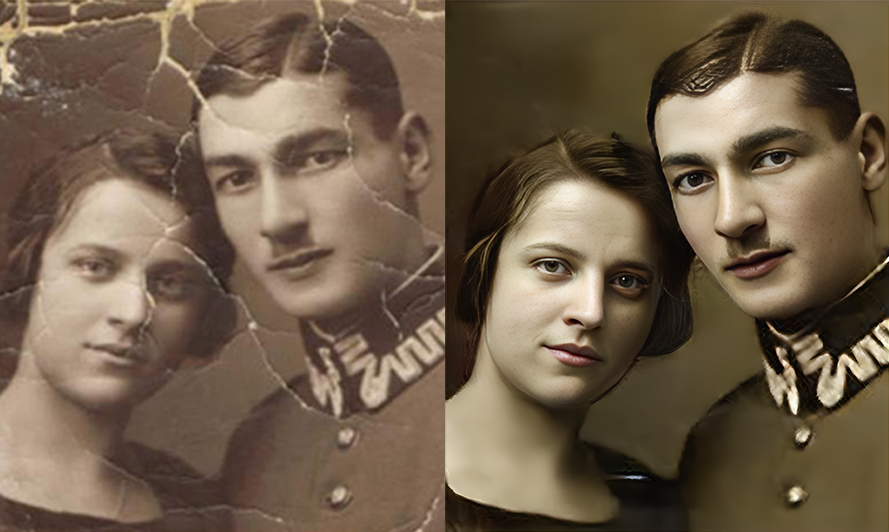
Quick Answer: What Is AI Photo Restoration?
AI photo restoration is the process of using machine learning, computer vision, and generative AI to repair and recover damaged, faded, or degraded photographs — removing scratches, tears, and discoloration while reconstructing missing detail and restoring original color and clarity.
- Scratch & tear repair: Remove physical damage from scanned prints — Photo Editor
- Color restoration: Recover faded colors or colorize black-and-white photos
- Detail reconstruction: Rebuild missing facial features, textures, and fine detail
- Noise & grain reduction: Clean up poorly scanned or low-resolution images
The Problem: Why AI Photo Restoration Still Gets It Wrong
The photograph restoration service market is growing at a 12.5% CAGR from 2026 to 2033 (LinkedIn/Reliable Market Forecast), driven by rising demand for digital preservation of personal and cultural heritage. But the technology that makes restoration fast also makes it dangerous — because AI doesn't distinguish between fixing damage and rewriting history.
🎭 AI Invents What It Can't See
When information is missing, AI invents. Facial features are normalised, expressions are softened, textures are homogenised, and period-specific imperfections are removed. The result is often visually pleasing but structurally false (Yesterdays Photo).
This is the core problem with one-click AI restoration: the algorithm doesn't know what your grandmother's eyes actually looked like. It doesn't know whether a car's paint was matte or metallic. It doesn't know which details are damage and which are character. As one professional restorer put it: "The average AI system in 2026 can cleanly generate a representation of what something should look like in general, but it can't know what's right for your specific image" (Forever Studios).
👻 Halos, Ghosting & Texture Mismatches
AI restoration routinely produces halos (luminous outlines around subjects from over-aggressive edge enhancement), ghosting (doubled edges from averaged predictions), and texture mismatches (synthetic-looking patches where skin, hair, and fabric textures are homogenized) (Yesterdays Photo).
These artifacts are the fingerprints of prediction replacing observation. In heritage and family photo contexts, they're not minor defects — they're visual proof that original information has been replaced by approximation. Once introduced, they obscure what was actually there, making later corrective restoration more difficult or impossible.
💸 Professional Restoration Remains Expensive
Traditional manual photo restoration services charge $25–$100+ per image with 1–2 week turnaround times. Even hybrid services that use AI as a first pass still require significant human oversight for the final 10% — the decisions about identity, authenticity, and emotional accuracy that no algorithm can automate (Forever Studios).
This is exactly what Photo Editor was built for — a specialized AI agent that handles the technical restoration while giving you control over the decisions that matter: what to repair, what to preserve, and when the result feels right.
Why Photo Editor
Most AI photo restoration tools operate on a simple loop: upload → auto-detect damage → apply restoration → download. You get no control over what gets changed, no ability to specify what to preserve, and no way to iterate when the result "looks good but doesn't feel right."
Jenova's Photo Editor breaks this pattern with a fundamentally different approach: you describe the restoration in plain language — what damage to repair, what character to keep, what the photo should feel like when it's done.
| Challenge | One-Click Restoration Tools | Photo Editor |
|---|---|---|
| Facial reconstruction | Normalizes faces → identity loss | You direct which features to preserve and which to repair |
| Scratch & tear repair | Removes everything uniformly | Targeted repair — you specify what's damage vs. character |
| Color restoration | Generic color prediction | You describe the era, the mood, the palette you remember |
| Texture preservation | Homogenizes skin, fabric, hair | Region-specific restoration preserving natural variation |
| Iterative refinement | Take it or leave it | Conversational iteration until it feels right |
| Consistency across batches | Results vary per image | Persistent memory maintains your restoration style |
The "Restoration vs. Invention" Problem — Solved Through Conversation
The strongest workflows in 2026 are hybrid: "AI is used as a tool... to accelerate repair, rebuild texture, or stabilise degraded areas. A human then corrects AI hallucinations, restores intent, and makes final decisions. AI becomes a brush, not the painter" (Yesterdays Photo).
The Photo Editor is built for exactly this hybrid workflow — except you are the human making the decisions, and the AI executes them through conversation:
"Restore this 1960s family portrait. Remove the scratches across the faces and the water damage in the lower right corner. Keep the slight sepia tone — don't make it look like a modern photo. The woman on the left has a beauty mark on her right cheek — make sure that's preserved, not removed."
"This black-and-white wedding photo from 1945 needs colorization. The bride's dress was ivory, not white. The groom wore a dark navy suit. The flowers were pink roses. Keep the period feel — don't make the colors look contemporary."
"Clean up this scanned photo — there's dust and grain from a bad scan. Sharpen the faces but don't over-smooth the skin. Keep the natural film grain in the background — it's part of the character."
Multi-Model Architecture
The Photo Editor can leverage GPT-5.4 (OpenAI), Claude Opus 4.6 (Anthropic), Gemini 3.1 Pro Preview (Google), plus models from xAI and DeepSeek — all from one interface. Different models produce different restoration aesthetics. One may excel at facial detail reconstruction while another handles color restoration more naturally. You can switch between them to find the best output for your specific image.
Persistent Memory for Consistent Restoration
When restoring a collection — a box of family photos, an album from a specific era, an archive of historical images — consistency matters. The Photo Editor remembers your restoration preferences across sessions: color grading approach, grain preservation level, smoothing intensity, and overall aesthetic. Your twentieth restoration is consistent with your first.
Related Agents You'll Also Like
Real Estate Image Editor
For real estate professionals who need to restore and enhance property photos — from historical building documentation to listing photo improvement.
- Virtual staging in 8+ design styles with matched lighting and accurate furniture scale
- Sky replacement and twilight conversions for listing photos shot in poor conditions
- Renovation visualization to show clients remodel possibilities before construction
Fashion Mockup Studio
For archivists, museums, and brands that need restored historical images integrated into modern visual contexts.
- Market-specific model archetypes for Western, Korean, Japanese, Chinese, and Middle Eastern audiences
- Studio-grade output from garment photos or descriptions — useful for restoring vintage fashion photography
- Consistent brand identity across entire catalogs
Graphic Designer
For families, organizations, and institutions that want restored photos integrated into printed materials, presentations, or digital displays.
- Print-ready materials including memorial books, family history presentations, and heritage displays
- Social media assets optimized for sharing restored photos across platforms
- Infographics and layouts for historical documentation projects
How It Works
Here's how to go from a damaged, faded photograph to a professionally restored image using Jenova's Photo Editor:
1. Open the Photo Editor agent. Navigate to Photo Editor from Jenova's agent gallery or search for it using the search icon.
2. Upload your photo and describe the restoration you need. Drag and drop your scanned image into the chat. Be specific about what's damage and what's character — this is the critical distinction that separates good restoration from bad:
"This is a 1970s family photo with significant water damage on the right side and scratches across all three faces. Remove the water damage and scratches. The colors have faded to a yellow-orange cast — restore them to natural tones but keep a slight warm vintage feel. Don't over-sharpen the faces — I want them to look like a 1970s photo, not a modern one."
3. Review and iterate through conversation. The agent delivers your restored image. This is where the hybrid workflow matters — you evaluate the result and direct adjustments:
"The scratch removal is perfect, but my dad's face looks slightly different — his nose was a bit wider. Can you adjust that? Also, the background color feels too saturated — dial it back about 20%."
4. Try different AI models for different results. Switch between GPT-5.4, Claude Opus 4.6, Gemini 3.1 Pro Preview, or other available models using the model selector. Each model may handle facial reconstruction, color restoration, and texture repair differently — compare outputs to find the most faithful result.
5. Download your restored photo. Export directly — ready for printing, framing, sharing with family, or archiving digitally.
6. Let persistent memory learn your restoration style. Over time, Jenova remembers your restoration preferences. When you upload the next photo from the same era or collection, the agent already understands your preferred color palette, grain level, and overall approach.
Results & Use Cases
📸 Family Photo Preservation
Scenario: A family discovers a box of 30 photographs from the 1950s–1980s in a deceased grandparent's attic. The photos are scratched, faded, water-damaged, and some have torn corners. The family wants to restore them for a memorial slideshow and printed album.
Traditional Approach: Professional restoration service at $25–$100 per image, 1–2 week turnaround. At 30 photos, that's $750–$3,000 plus waiting time. The Library of Congress highlights that approximately 80% of historical photographs risk being lost within the next decade unless preservation efforts are intensified (WiseGuy Reports).
Jenova Solution: Upload scanned photos to the Photo Editor and describe the restoration approach once: "1960s–1970s family photos. Remove scratches and water damage. Restore faded colors to natural tones with a slight vintage warmth. Preserve all facial features exactly as they are — don't normalize or beautify. Keep the period feel." Persistent memory ensures every photo in the collection gets the same treatment. Use the Graphic Designer to create a memorial album layout from the restored images.
💼 Cultural Heritage & Archive Restoration
Scenario: A local historical society has 200 scanned photographs from the early 1900s documenting the town's founding. Many are severely degraded — torn, faded, and stained. They need restoration for a centennial exhibition and digital archive.
Traditional Approach: Specialized archival restoration at $50–$150 per image, with strict requirements for historical accuracy. At 200 images, that's $10,000–$30,000 — often exceeding the society's entire annual budget.
Jenova Solution: Upload scanned images to the Photo Editor with archival-specific instructions: "Historical archive restoration. Remove physical damage only — tears, stains, foxing. Do NOT alter facial features, clothing details, or architectural elements. Preserve the original tonal range. This is documentary — accuracy over aesthetics." The AI handles the mechanical repair; the archivist makes the judgment calls through conversation. The social media application segment of AI photo restoration was valued at $690 million in 2024** and is projected to reach **$3.2 billion by 2035 (WiseGuy Reports), reflecting massive demand for restored historical content across digital platforms.
📱 Social Media & Content Creation
Scenario: A content creator runs a popular "then and now" series on Instagram, restoring and colorizing historical photos of cities and landmarks. They need to process 5–10 images per week with consistent quality and a distinctive visual style.
Traditional Approach: 30–60 minutes per image in Photoshop using manual restoration techniques plus AI plugins. At 10 images per week, that's 5–10 hours of post-production.
Jenova Solution: Upload historical images to the Photo Editor with style-specific instructions: "Restore and colorize this 1920s street scene. Use historically accurate colors for the era — muted earth tones, no oversaturated modern colors. Remove damage but keep the film grain. The final image should feel like a well-preserved color photograph from the period, not an AI-generated image." Persistent memory ensures the entire series maintains a consistent aesthetic.
🏠 Real Estate Historical Documentation
Scenario: A real estate developer restoring a historic property needs before/during/after documentation — including restoration of original architectural photographs from the building's construction in the 1930s.
Traditional Approach: Commission a professional restorer for the historical photos ($50–$100 each), plus a photographer for current documentation.
Jenova Solution: Use the Photo Editor to restore the historical construction photographs — removing damage, enhancing clarity, and preserving architectural detail. For current property photos, hand off to the Real Estate Image Editor for virtual staging, sky replacement, and MLS-ready output. The combination creates a compelling historical narrative for marketing materials.
FAQ
What is the best AI photo restoration tool in 2026?
The best AI photo restoration tool depends on your use case. ON1 Restore AI, launching in April 2026, offers cloud-powered restoration integrated into a professional photo editing workflow (ON1). Adobe Photoshop with Firefly provides deep manual control for professionals with editing expertise (Breaking AC). For users who want professional-quality restoration through natural language conversation — with the ability to direct exactly what gets repaired and what gets preserved — Jenova's Photo Editor offers multi-model access, conversational iteration, and persistent memory that learns your restoration style.
Can AI restore severely damaged photos?
AI can repair a wide range of damage including scratches, tears, water stains, fading, discoloration, and grain. For moderate damage, AI restoration produces results that are often indistinguishable from manual work. For severe damage — missing sections of faces, large torn-away areas, or heavily degraded prints — AI must reconstruct rather than repair, which means it's predicting what should be there rather than restoring what was. In these cases, the strongest approach is hybrid: AI handles the initial reconstruction, and you direct the refinement through conversation with Jenova's Photo Editor to ensure the result is faithful to the original.
Does AI photo restoration change people's faces?
This is the most significant risk of one-click AI restoration. Generic tools frequently normalize facial features — smoothing asymmetries, enlarging eyes, softening expressions, and altering defining characteristics that make a face recognizable (Yesterdays Photo). As one professional restorer noted: "If this was your mother or grandmother, the fact that it no longer appears to be the same person is a pretty big deal" (Forever Studios). Jenova's Photo Editor avoids this by giving you explicit control — you can instruct it to preserve specific facial features, maintain asymmetries, and keep defining characteristics while only repairing actual damage.
How much does AI photo restoration cost?
Standalone AI restoration tools range from free (with watermarks and quality limits) to $9–$13/month for tools like AirBrush and CapCut (AIEnhancer). Professional manual restoration services charge $25–$100+ per image. Jenova offers a free tier with all core features including the Photo Editor, with paid plans starting at $20/month for expanded usage across every agent on the platform — not just photo restoration.
Can AI colorize black-and-white photos accurately?
AI colorization has improved dramatically, but accuracy depends entirely on context. AI predicts colors based on patterns learned from millions of images — it can make reasonable guesses about sky (blue), grass (green), and skin tones, but it cannot know the actual color of a specific dress, car, or building. Jenova's Photo Editor addresses this through conversational control — you can specify exact colors for elements you remember or have reference for, while letting the AI handle elements where reasonable prediction is acceptable.
Is my data safe when using AI photo restoration tools?
Many cloud-based restoration tools upload images to servers with unclear retention policies — and some use uploaded photos to train their models. ON1's new Restore AI explicitly states that "photos processed in the cloud are handled securely and are never used to train AI models" (ON1). Jenova's data is similarly never used for training, is encrypted in transit and at rest, and is not sold to advertisers — a critical differentiator for anyone uploading irreplaceable family photographs.
Conclusion
The AI photo restoration market is growing at 16.4% annually, projected to reach $8 billion by 2035 — driven by a universal human need to preserve the photographs that carry our personal and collective history. But in 2026, the central challenge isn't whether AI can restore a photo. It's whether AI can restore a photo correctly — repairing damage without rewriting the identity, emotion, and historical truth embedded in the original image.
The answer lies in the hybrid approach: AI handles the mechanical restoration — scratch removal, color recovery, detail reconstruction, noise reduction — while human judgment directs the decisions that matter. Which details are damage? Which are character? Does the restored face still look like the person you remember?
Jenova's Photo Editor is built for exactly this workflow — conversational photo restoration where you direct every decision, with multi-model access across GPT-5.4, Claude Opus 4.6, and Gemini 3.1 Pro Preview, and persistent memory that learns your restoration style over time. For family photos that need scratches removed without faces changed, historical images that need damage repaired without history rewritten, or entire collections that need consistent restoration across dozens of images — it handles the restoration so you can focus on preserving what matters.
Try Photo Editor free — no credit card required. Explore more specialized agents at Jenova.