AI Mascot Designer: Custom Brand Characters, Expressions & Poses
2026-10-06
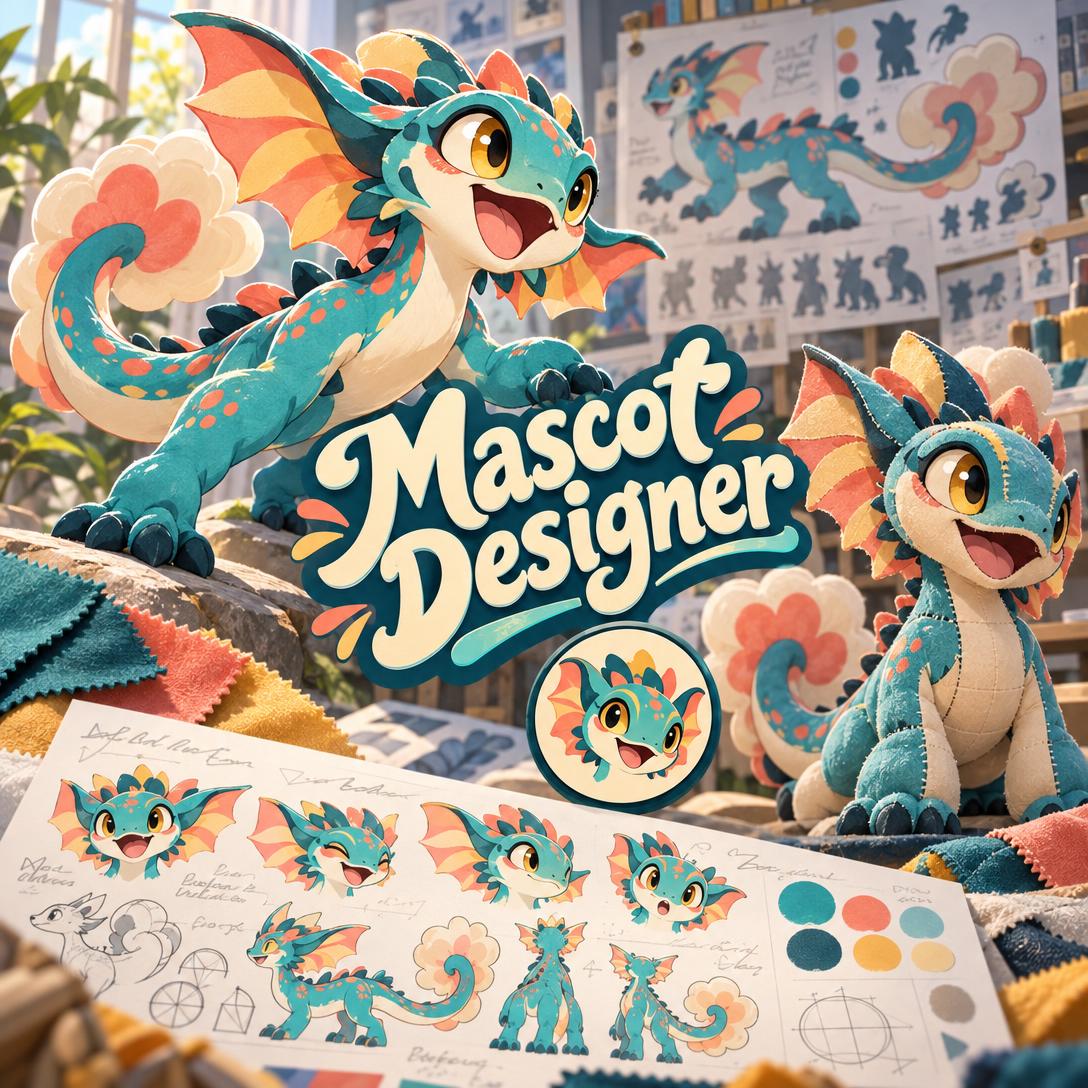
Mascot Designer helps you create a distinctive brand character by combining character design craft with brand strategy. It works for a bakery, a coding bootcamp, a school team, or a city festival. A cute drawing is not the same as a working mascot, and most teams lack the time or budget to build one properly. This AI handles the whole process, from first concept to expression sheets, poses, and usage guidelines.
- ✅ Proposes two to three distinct character directions before generating anything
- ✅ Locks in "Mascot DNA," the 3–5 defining features that keep your character recognizable everywhere
- ✅ Designs expression range from the start, covering happy, curious, determined, empathetic, and more
- ✅ Checks every design against real uses: favicon, social avatar, merchandise, packaging, and foam costume
A mascot becomes one of your brand's most visible assets, so its design decisions matter. Choices about silhouette, proportion, and color determine whether people remember the character or ignore it. The next section looks at why good mascot design is hard, and why the timing suits brands that want more personality.
Quick Answer: What Is Mascot Designer?
Mascot Designer is an AI character design studio that turns a brand brief into a strategic, reproducible mascot, complete with name ideas, expressions, and poses, through a short guided conversation. It suits brands, teams, schools, apps, events, and personal projects.
Key capabilities:
- Concept directions across animals, objects, stylized humans, abstract forms, and invented species
- Silhouette-first design that stays readable from 16px icons to full-size costumes
- Expression sheets, action poses, color variants, and application mockups
- Naming suggestions and mascot guidelines for consistent reproduction
The Creative Challenges of Mascot Design
Brand design is moving toward personality. A widely shared 2026 trend analysis argues that the industry spent years optimizing for clean, inoffensive design, and that the priority is now shifting:
"Good design used to be about clarity but now it's about character." — Hriday Ashar, 2026 Design Trends: Character, Doodles, and AI
The shift extends beyond graphic design. Architecture firm Corgan reports that the standard, corporately branded office is fading, with designers in 2026 focused on adding character and depth. The firm also links purpose-led design to higher engagement and lower turnover in workplace settings. Across disciplines, audiences respond to brands that feel like someone rather than something.
Meanwhile, AI tools have entered the design process:
AI-powered design ranked first on Adobe's list of graphic design trends for 2025. Adobe noted that AI image generation helps non-designers capture visions they lack the skills to create, and amplifies the existing skills of designers.
Turning that interest in character into an effective mascot is still difficult:
- Generic silhouettes. Many first-draft mascots look like stock clip art. Blacked out, the outline could belong to any brand.
- One-expression characters. A mascot that can only smile works like a logo. It can't celebrate a launch, apologize for an outage, or cheer on a customer.
- Scale failure. Details that look charming on a poster turn to mush at app-icon size or disappear when sewn into foam.
- Inconsistency drift. Each new illustrator, campaign, or AI prompt produces a slightly different character, and recognition erodes over time.
The Authenticity Tension
Design commentators also see pushback against overly polished, generic AI output. Adobe points to a shift toward handcrafted elements like hand-drawn doodles, which it describes as a rebellion against ubiquitous AI imagery. Whitenoise Studios describes a lean toward "the human feel," including hand-drawn elements and imperfections.
For mascot creators, the takeaway is that generating an image is not enough. The character needs intentional design decisions behind it, or it will look like everything else.
This is exactly what Mascot Designer was built for.
How Mascot Designer Works
Mascot Designer works like a creative director at a character branding agency. It asks a few sharp questions, makes strong default choices, and pushes back when a direction would weaken the mascot. Here is how a project typically runs from first message to finished character system.
Step 1: Describe What the Mascot Is For
Tell the agent who the mascot represents and who will see it. A clear brief gets you straight to concepts. A vague brief gets two or three targeted questions at most, never a long questionnaire.
"I need a mascot for my neighborhood bakery. Our customers are families and morning commuters, and we're known for sourdough and being a little quirky."
Step 2: Choose From Distinct Creative Directions
Before generating anything, the agent proposes two to three concepts that differ meaningfully, not three versions of the same idea. For the bakery, the options might include a sourdough loaf character, a sleepy anthropomorphic owl baker, and a round, mischievous yeast creature. Each comes with a rationale for the brand.
"Go with the yeast creature, but make it friendlier and less chaotic."
Step 3: Review the Hero Design and Lock Its DNA
The first render is a full-body hero pose. It uses flat illustration by default and sits on an intentional colored background rather than a blank white card. Once you approve it, the agent identifies the character's DNA: silhouette feature, signature accessory, color anchor, proportion signature, and expression anchor. Every later rendition keeps those features.
"Love it. Can you suggest a few names that sound warm and a bit silly?"
Tip: you can switch between image generation models using the "App" button beneath the chat input. Different models handle character style differently, so it's worth trying more than one.
Step 4: Build the Expression Sheet and Action Poses
Next comes range: happy, thinking, surprised, determined, and empathetic expressions. After that, you get poses tied to your brand, such as kneading dough, waving at the door, or holding a "sold out" sign. The agent uses the approved hero design as a reference so the character stays consistent.
"Create an expression sheet with six core emotions, then a pose of the mascot pulling a fresh loaf from the oven."
Step 5: Extend Into Real-World Applications
Finally, preview the mascot on packaging, social posts, signage, and merchandise. Then generate color variants for dark and light backgrounds and request written usage guidelines covering minimum sizes, color rules, and what to avoid.
"Show the mascot on a coffee cup sleeve and a storefront window decal, then draft one-page mascot guidelines as a PDF."
If your mascot also needs a matching wordmark and visual system, Brand Kit Generator can build palettes, typography, and brand guidelines around the character you've created.
You can start on the free plan and design your first character today.
Creative Showcase: What You Can Build
🥐 A Signature Character for a Small Business
Scenario: An independent bakery wants a mascot for cup sleeves, stickers, and Instagram. The owner has a strong sense of the shop's personality but no design background.
Traditional Approach: Commissioning a freelance illustrator usually means writing a brief, waiting for sketches, and paying for revision rounds. A full expression set or style guide often costs extra.
The AI mascot studio: The owner describes the shop casually. The agent proposes directions, generates the approved character, suggests names, and delivers expressions and packaging previews in a single session.
- Plain-language guidance calibrated for non-designers
- Rounded, curve-dominant form language that signals warmth and approachability
- Sticker-ready proportions that still read clearly at small sizes
🏟️ A School or Sports Team Mascot That Can Become a Costume
Scenario: A high school athletic department is retiring an outdated mascot and needs a new one. It will appear on jerseys and the gym floor, and eventually as a costume at games.
Traditional Approach: Many designs look great on screen but fail as costumes. Heads block the performer's vision, fine details vanish in foam, and fabric colors rarely match digital ones.
Mascot Designer: The agent flags costume feasibility early. It simplifies hands and feet, avoids details that won't survive fabrication, and recommends athletic proportions with angular accents that convey energy and competitiveness.
- Silhouette tested for recognition at a distance across a stadium
- Determined and celebrating expressions built for game-day moments
- Honest notes on where screen colors may shift in physical materials
📱 An Onboarding Guide for a Mobile App
Scenario: An indie developer building a habit-tracking app wants a friendly guide character for empty states, streak celebrations, and error screens. They iterate between meetings on their phone.
Traditional Approach: Developers often fall back on generic illustration packs that don't match their brand, or they skip emotional design entirely.
Mascot Designer: Using the Jenova iOS or Android app, the developer briefs the agent with speech-to-text, reviews concepts on the go, and requests a "Guide" role mascot. The design includes pointing poses and an empathetic expression for "something went wrong" screens.
- Full feature parity between web and mobile, so work continues on any device
- Expression set mapped directly to app states: success, empty, error, and milestone
- A simplified icon variant designed for launcher and notification sizes
Once the mascot is ready, Social Media Content Generator can draft platform-native launch posts that introduce the new character to your audience.
🏮 A Local Mascot for a City, Festival, or Community
Scenario: A town tourism board wants a mascot for its annual harvest festival. It should appeal to children and appear on maps, banners, and souvenir plush toys.
Traditional Approach: Committee-driven design often ends in compromise characters that try to represent everything and become cluttered.
Mascot Designer: The agent draws on conventions such as Japan's yuru-kyara tradition of simple, round, abstract local mascots. It produces a chibi-proportioned character built around one or two ownable local references.
- Plush-friendly shapes with minimal fine detail
- Locally rooted symbolism without visual clutter
- A mascot card summarizing the character's name, personality, and story for press materials
🔄 A Respectful Refresh of a Legacy Mascot
Scenario: A regional brand's mascot dates back decades. It looks dated, but long-time customers still recognize it.
Mascot Designer: The agent identifies which DNA features carry the brand's recognition and preserves them. It modernizes proportions, detail density, and rendering style, and it never discards a core feature without your explicit approval. Pair the refreshed character with an updated emblem from Logo Generator for a coordinated relaunch.
Frequently Asked Questions
Is Mascot Designer free to use?
Yes. Mascot Designer is available on Jenova's free plan, which includes all core features with limited usage. For heavier design work, such as multiple concepts, full expression sheets, and application previews, paid plans start at $20 per month for Plus, which offers 30× the free usage and removes watermarks. Usage resets monthly with no daily caps, so you can run an intensive design session whenever you need one.
Can an AI mascot maker keep my character consistent across images?
Largely, yes, with realistic limits. Mascot Designer locks your character's DNA, its 3–5 defining features, after you approve the hero design. It then uses that approved image as a reference for every expression, pose, and variant. Image models can still introduce small variations between generations, so the agent checks each new asset against the DNA and retries when key features drift.
Can Mascot Designer export vector files like SVG or AI?
No. Generated mascots are raster images, and the agent does not produce SVG, AI, or EPS files, animation, or 3D models. Many teams use the raster designs as a finished reference and have a vector illustrator trace the final character for large-format printing or embroidery. The agent can also write usage guidelines and specs as PDF or Word documents to support that handoff.
How is Mascot Designer different from a general AI image generator?
A general image generator renders whatever you describe. Mascot Designer makes design decisions on your behalf, covering mascot role, proportion scheme, form language, expression range, and color strategy, and it explains the reasoning behind each choice. It also tests the character against real uses like favicons, merchandise, and costumes, and it builds a reproducible system rather than a single standalone picture.
Does Mascot Designer work on mobile?
Yes. Jenova offers full feature parity across web, iOS, and Android, so you can brief the agent, review concepts, and request revisions from your phone. Speech-to-text makes it easy to describe your brand out loud, and your projects and settings sync across devices, so you can start a mascot on your laptop and refine it later on mobile.
What types of mascots can it design?
It can design almost any type: anthropomorphic animals, natural animals, product or object characters, stylized humans, abstract geometric characters, and invented fantasy species. The agent recommends a type based on your brand personality, audience, and competitors, and it can audit existing mascots in your category so your character stands apart instead of repeating what competitors already use.
Conclusion: From Brand Idea to Living Character
The best mascots aren't just appealing drawings. They are strategic characters with ownable silhouettes, real emotional range, and DNA that survives every scale and medium. Design trends now favor bold, character-driven work, and audiences increasingly notice generic output, so intentional character design matters more for brands of any size.
An AI mascot designer gives small businesses, teams, schools, and app builders an expert creative process. It guides you from discovery through directions, the hero design, expressions, and applications, and it's honest about what the output can and can't do.
Bring your brief and leave with a character your audience will recognize instantly. Try Mascot Designer now. Explore more at Jenova.
For Developers: Mascot Designer is available programmatically via the Jenova API, so you can integrate strategic mascot and character design into your creative or branding application with a single API call. Full documentation →