AI Manga Panel Generator: Build Full Pages with Consistent Art
2026-08-11
An AI manga panel generator turns written scenes into finished manga pages — panel by panel, with consistent characters, purposeful layouts, and the visual grammar that makes sequential art read correctly. Drawing a single page traditionally takes hours of thumbnailing, penciling, inking, and screentone work. An AI panel generator collapses that pipeline into a conversation: describe the beat, define the paneling, get the page.
✅ Generate complete multi-panel pages from a script or scene description ✅ Maintain character faces, hair, and costume design across every panel ✅ Control panel shape, gutter width, and reading flow — not just individual images ✅ Produce authentic manga inking, screentone, speed lines, and sound effects
To understand why this matters, it helps to look at what actually makes manga difficult to produce — because the hard part was never drawing a single good picture.
Quick Answer: What Is an AI Manga Panel Generator?
An AI manga panel generator is a tool that converts written scenes into sequential manga panels, handling character consistency, panel layout, reading flow, and black-and-white rendering so creators can produce complete pages without drawing them by hand.
Key capabilities:
- Script-to-page generation with multiple panels composed as a single reading unit
- Character consistency across panels, pages, and full chapters
- Panel-type control — close-ups, establishing shots, splash pages, inset panels, broken panels
- Authentic manga rendering: heavy inking, screentone, speed lines, impact effects, sound effects
- Right-to-left reading flow for traditional manga layout
The Problem: Manga Is a Volume Business Nobody Can Keep Up With
Manga and digital comics are a growing global market — the digital comic books market was valued at US$2.8 billion in 2024 and is projected to reach US$3.4 billion by 2030, with mobile-first reading now dominant across Asia-Pacific, South America, and parts of Africa. Serialized platforms retain readers through consistent delivery. That means the bottleneck isn't demand. It's production throughput.
The competitive pressure on individual creators is severe. Industry analysis of the adjacent Korean webtoon market describes the dynamic directly:
"AI is the sole method for a solo artist to gain a competitive edge against large, multi-artist webtoon studios." — Han Chang-wan, Sejong University, The Korea Times
But actually producing manga pages at that cadence is frustratingly difficult:
- The full pipeline is seven stages deep — plot, character design, panel layout (koma-wari), rough sketch, inking, screentone, and finishing, all before a page is publishable
- Character consistency across hundreds of panels requires either genuine draftsmanship or a full assistant team
- Panel layout is a separate discipline from illustration — knowing how to draw does not mean knowing how to page
- Solo creators compete against studios that staff multiple artists on a single title to hit weekly release schedules
- Most general AI tools produce images, not pages — , because the tools have no concept of sequence
Panel Layout Is the Skill Nobody Talks About
The panel is not a frame around a picture. Professional comic artist Steve Ellis calls it "one of the most overlooked tools in storytelling," noting that a panel "is literally a wall that says to the reader 'here is a complete idea, read it and move onto the next'". Gutter width controls pacing. Overlapping panels compress time. Broken panels convey intensity. A creator who can draw beautifully but panels badly produces a page that doesn't read.
Consistency Breaks Before the Chapter Does
A protagonist needs the same face in panel 3 and panel 340. Costume details, hair silhouette, scar placement, weapon design — all of it has to hold across a chapter and then across a volume. This is exactly where general-purpose image generators fail: each output is independent, with no memory of what the character looked like two panels ago.
The Tooling Gap Between Image and Sequence
Academic research has identified this precise gap. Work published on collaborative comic generation notes that while narrative idioms and visual storytelling grammar are "widely discussed in the analysis of image sequences, they are rarely incorporated into AI-driven comic generation." Most tools solve the picture problem. Very few solve the page problem.
Solo Creators Are Structurally Outgunned
Studio titles are produced by teams — one artist on backgrounds, one on characters, one on tones. A solo creator does all of it. Industry commentary describes AI assistance as the mechanism that lets "a single creator overcome the limitations of time and resources," specifically citing backgrounds, coloring, and story ideation as the areas where the workload becomes unsustainable.
Adoption Is Still Early — Which Is the Opportunity
According to the Korea Creative Content Agency's 2024 industry survey of 800 artists, only 18.3 percent of webtoon creators reported having used generative AI, while 63.8 percent of webtoon businesses plan to utilize the technology. The gap between what studios are adopting and what individual creators are using is the current competitive frontier.
This is exactly what a purpose-built manga panel generator was designed to close.
Why an AI Manga Panel Generator Changes the Math
The difference between a generic image generator and a manga panel generator is the unit of output. One produces pictures. The other produces pages — with reading order, panel hierarchy, character continuity, and the black-and-white rendering conventions the medium actually runs on.
| Traditional Manga Production | AI Manga Panel Generator |
|---|---|
| Seven-stage pipeline per page: plot → design → layout → sketch → ink → tone → finish | Describe the beat, receive the composed page |
| Character consistency depends on draftsmanship or an assistant team | Consistency maintained across panels, pages, and chapters |
| Panel layout requires learning koma-wari as a separate discipline | Panel type, gutter, and flow specified in plain language |
| Solo creators compete against multi-artist studios | One creator produces at near-studio cadence |
| Revisions mean redrawing and re-inking | Revisions are a sentence |
| General AI tools output isolated images you assemble by hand | Full page composed as a single sequential unit |
Pages, Not Pictures
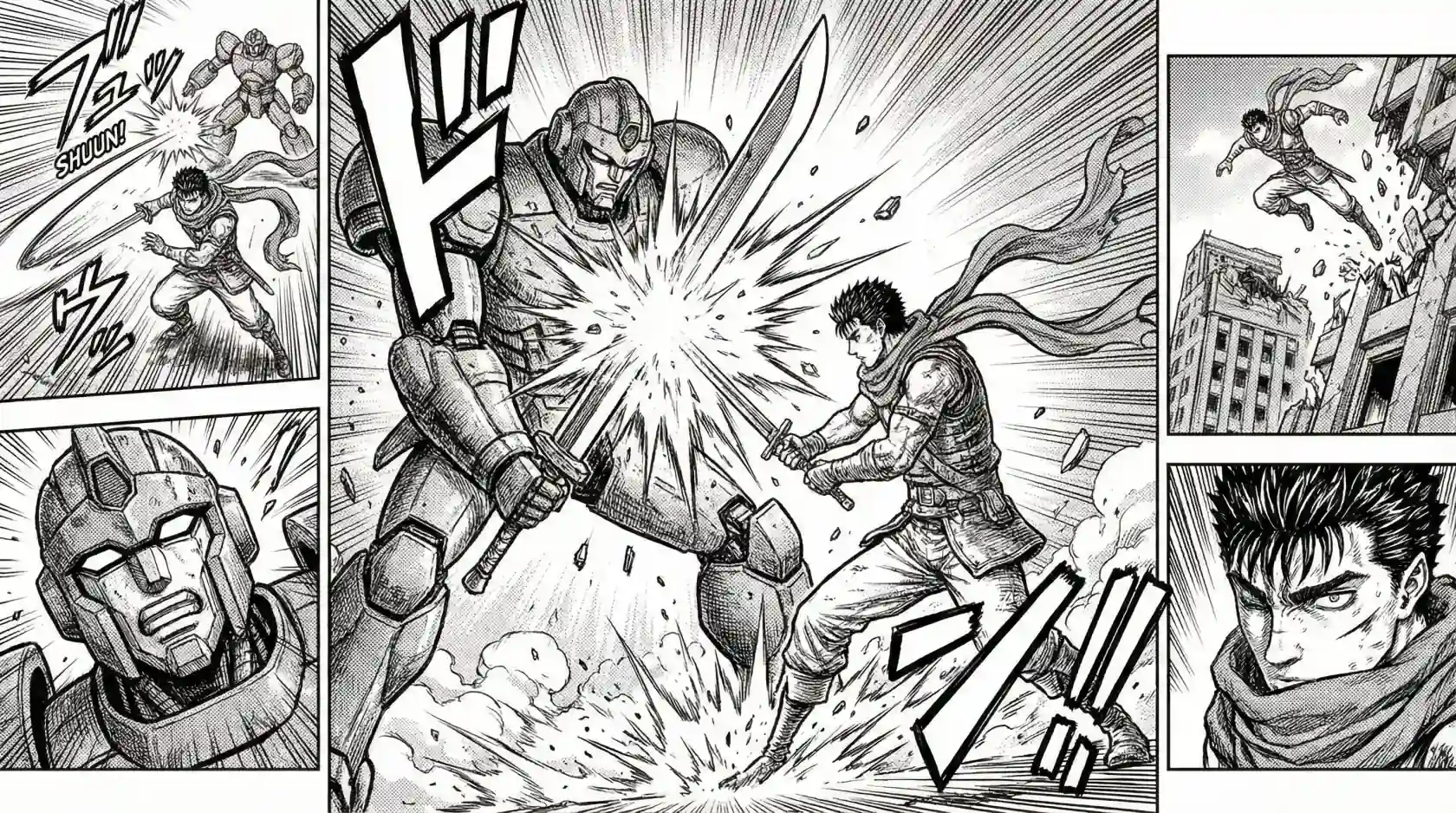
The Manga Creator composes multi-panel pages as a unit — establishing shot, action beat, reaction close-up, and impact panel arranged so the eye moves correctly. That's the difference between generating four images and generating a page.
"Board this fight in five panels: wide establishing shot of the ruined city, then a speed-line panel of him lunging, a close-up on the knight's helmet, the impact clash as the largest panel, and a tight reaction shot on his face."
Panel Language, Not Prompt Language
You describe the page the way a mangaka would describe it — panel counts, shot sizes, gutter behavior, where the border breaks. Ellis's taxonomy of panel types maps directly to what you can specify: close-ups for facial expression, distant shots for establishing scenes, silhouettes for drama, diagonal panels for tension, splash panels for pivotal moments, and broken panels where the action extends past the frame.
"Make the impact panel a splash that breaks its own border — debris should spill into the gutter."
Consistency as a First-Class Feature
Character design locks once and holds. Same face, same armor, same weapon, panel after panel — which is what separates a chapter from a folder of unrelated illustrations. This extends to environment continuity, lighting direction, and time of day across a sequence.
Native Manga Rendering
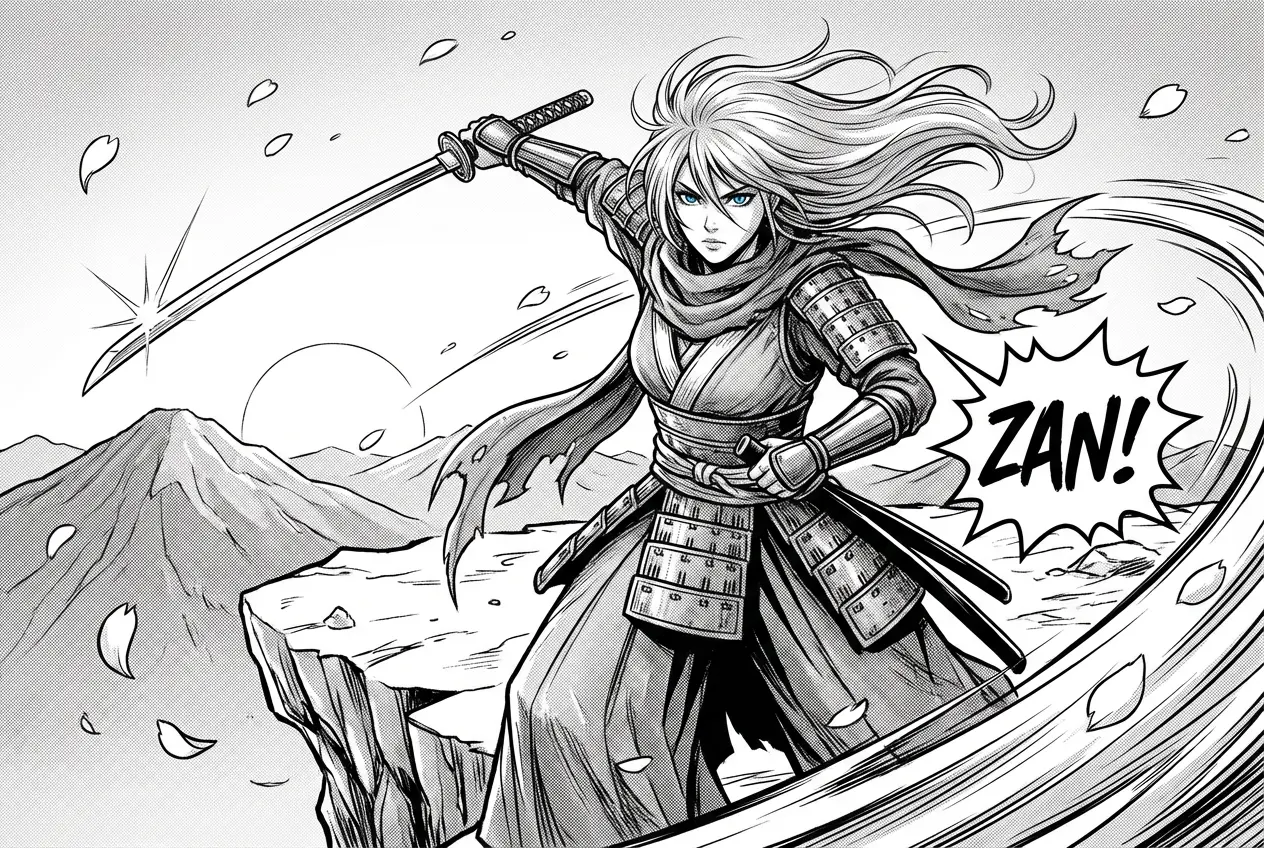
Screentone gradients. Heavy spot blacks. Radial speed lines for impact, straight speed lines for motion. Katakana sound effects integrated into the composition rather than pasted on top. Cherry blossom particles, sweat drops, emotion symbols — the abstract symbol vocabulary that manga uses to "visualize ideas such as atmosphere, motion, and emotions" is part of the output, not an afterthought.
From One-Shot to Serialized Epic
A one-shot is 30 pages. A serialized title is 200 or more. The generator holds style, cast, and world continuity across that length, which is the actual requirement for anyone publishing on a schedule rather than making a single showpiece page.
Related Agents You'll Also Find Useful
Manga production rarely stops at panels. These agents cover the steps around it.
Webtoon Creator
If you're publishing to a mobile-first platform, the format is fundamentally different — vertical scroll instead of paged layout, full color instead of black-and-white, and episode hooks instead of chapter breaks. This agent handles that rhythm natively across short series through 100+ episode sagas.
- Vertical scroll pacing and scroll-triggered reveals
- Full-color consistency across a long-running series
- Episode-end hook placement tuned to platform retention
Comic Creator
Western sequential art uses different conventions — left-to-right reading, different panel density, bolder color work, and different page-turn logic. If your project is a single issue or a graphic novel rather than a manga chapter, this is the closer fit.
- Left-to-right page flow and Western panel grammar
- Bold visual styles across single issues to full graphic novels
- Dynamic layouts built for the comic book page
Creative Fiction Writer
Panels can only be as good as the story underneath them. If your arc, cast, or world isn't solid yet, build it before you board it — deep research for authentic worlds and editorial insight from first draft to final manuscript.
- Arc structure and character development before production
- Genre-authentic worldbuilding and research
- Editorial feedback on pacing and dramatic beats
Graphic Designer
Finished chapters need packaging — cover art, chapter title pages, logo treatments, and the promotional assets that get a series discovered on a crowded platform.
- Cover design and title page layout
- Series branding and logo treatment
- Social and promotional assets for launch
Try any of these free — no credit card required.
How It Works: Script to Finished Page in Four Steps
Step 1: Define Your Cast and Style
Establish who's in the story and what the art looks like before generating anything. Describe character designs — build, hair, costume, distinguishing features — and set the overall visual register: gritty seinen inking, clean shōnen linework, delicate shōjo screentone, whatever the story calls for.
"Main character: a scarred swordsman, tall, dark spiky hair, worn leather armor with a red scarf. Art style: heavy seinen inking, high-contrast spot blacks, gritty texture."
Step 2: Bring the Scene
Paste script pages, a storyboard note, or a plain description of the beat. Specify how many panels the page should hold and what the emotional shape of the page is — build, release, cliffhanger.
"One page, six panels. She's alone on the cliff at dawn. The page builds quiet, then breaks on the draw. Last panel is the cut."
Step 3: Direct the Layout
This is where the page becomes manga rather than a stack of pictures. Call the panel types, the sizes, and the reading flow.
"Panel 1 is a wide establishing shot of the mountain. Panels 2 and 3 are narrow verticals — her eyes, her hand on the hilt. Panel 4 is the largest, a diagonal break panel of the draw with radial speed lines and a ZAN sound effect. Panels 5 and 6 are small and tight."
Step 4: Iterate and Continue the Chapter
Give notes exactly as you would to an assistant. Adjust panel sizes, swap a close-up for a wide, deepen the screentone, reposition a sound effect. Because there's no redraw cost, test three versions of the key beat and keep the one that reads best — then move straight to the next page with the cast and style already locked.
"Panel 4 is too crowded — drop the background detail and push the contrast. Then give me the next page: aftermath, three panels, quiet."
Results & Use Cases
📖 Independent Mangaka Publishing a Serialized Title
Scenario: A solo creator wants to serialize a 200-page action title but can only draw two finished pages a week.
Traditional Approach: Compete against studio titles that hire multiple creators for a single work to produce numerous titles in a short term — and lose on cadence regardless of story quality.
AI Manga Panel Generator: Use the Manga Creator to hold cast and style across the full run, producing chapters at a schedule readers will actually follow.
- Character and world consistency maintained across 200+ pages
- Release cadence competitive with multi-artist studio output
- Backgrounds and screentone handled without an assistant team
✍️ Writers Who Can't Draw
Scenario: A novelist has a complete manga script and no ability to illustrate it.
Traditional Approach: Find and pay an artist, then wait through their queue — or shelve the project permanently, which is what most written-but-unillustrated manga scripts actually become.
AI Manga Panel Generator: Board the script directly, using the Creative Fiction Writer to tighten arc structure first, then generate pages from the finished draft.
- No illustration skill required — the input is written description
- Panel layout decisions guided rather than assumed
- The project ships instead of sitting in a folder
📱 Creators Testing a Concept Before Committing
Scenario: A creator has three series ideas and doesn't know which one has legs.
Traditional Approach: Spend weeks illustrating a sample chapter for one idea, discover the pacing doesn't work, and lose the entire investment.
AI Manga Panel Generator: Produce a sample chapter for all three on mobile, post them, and let reader response decide. Jenova runs with full feature parity across web, iOS, and Android with settings synced — so you can build a page on your phone during a commute and refine it on a laptop that night.
- Three concepts tested for the cost of zero illustrated pages
- Reader feedback informs which series gets the real investment
- Entire workflow runs from a phone
🎨 Artists Using AI as an Assistant, Not a Replacement
Scenario: A skilled artist wants to keep drawing characters but is losing days to backgrounds and screentone.
Traditional Approach: Do everything personally and burn out, or hire assistants the project can't afford.
AI Manga Panel Generator: Generate layouts, backgrounds, and tone passes; draw the character work over the top. This mirrors how the technology is actually being adopted in practice — as help with "backgrounds, coloring and even story idea conception" rather than end-to-end replacement.
- Time redirected from labor to craft
- Layout options tested before committing pencil to page
- Research supports this hybrid model — academic work on comic generation emphasizes "balancing automation with user control for customization" rather than full automation
FAQ
Is an AI manga panel generator free to use?
Jenova offers all core features on a free tier, which includes access to the agent library and manga panel generation with limited monthly usage. Paid plans start at $20/month for 30× the free usage, custom model selection, and watermark-free output. Usage resets monthly on your billing date with the full limit available from day one — no daily caps. Check "Usage Limit" in the menu for current details.
How is an AI manga panel generator different from a regular AI image generator?
A general image generator produces isolated pictures with no memory between outputs. Manga requires sequence logic — the same character across hundreds of panels, panel hierarchy that guides reading order, and gutter spacing that controls pacing. This is a documented gap: a common creator workaround is to generate images and place them into panels manually. The Manga Creator composes the page as a unit instead.
Can it keep characters consistent across an entire chapter?
Yes — this is the core requirement, not an add-on. Once a character design is established, face, hair, costume, and distinguishing details carry across panels, pages, and full chapters. The same applies to locations, art style, and lighting continuity. Consistency across a 200-page serialized run is the specific problem the agent is built to solve.
Does it handle right-to-left manga reading order?
Yes. Traditional manga reads right-to-left, which inverts panel flow relative to Western comics — Ellis notes that panels should lead the reader in their expected direction, and "if you are making a manga, you might go the opposite direction, from right to left." Specify your reading direction and the layout is composed accordingly. For left-to-right Western sequential art, the Comic Creator is the better fit.
Should I use this for manga or webtoon?
Depends on your publishing target. Manga is paged, black-and-white, and read right-to-left — use the Manga Creator. Webtoon is vertical-scroll, full-color, and mobile-first with episode-level hooks — use the Webtoon Creator. The formats have genuinely different visual grammar, and using the wrong one produces pages that read awkwardly on the platform you're publishing to.
Are AI-generated manga pages accepted by readers and publishers?
This is still contested and worth being honest about. Industry reporting notes real reader resistance — when one major platform featured an AI-created work, readers staged a subscription boycott, and creator concerns center on originality and copyright. Many creators treat AI as an assistive layer for backgrounds, layout, and tone rather than an end-to-end replacement, and disclose their process. Check individual platform policies before publishing.
Conclusion
The barrier to making manga was never imagination. It was throughput — the seven-stage pipeline, the character consistency across hundreds of panels, the panel layout discipline that takes years to internalize, and the simple arithmetic of one person competing against a studio with a full assistant team.
An AI manga panel generator changes that arithmetic. When a page composes in a conversation and revisions cost a sentence, the writer who can't draw can publish. The solo creator can serialize. The skilled artist can redirect days of background labor into the character work that actually carries their style. The technology isn't replacing the craft of sequential storytelling — knowing which panel, what size, and where the gutter breaks is still the job. It's removing the labor between the decision and the page.
Start with one scene. Generate one page. See whether it reads.
Try the Manga Creator now, or pair it with the Webtoon Creator and Comic Creator depending on your format. Explore the full agent library at Jenova.
For Developers: Manga panel and sequential page generation is available programmatically via the Jenova API — integrate character-consistent visual storytelling into your creative or publishing application with a single API call. Full documentation →