AI Manga Background Generator: Create Stunning Environments Without Drawing (March 2026)
2026-03-26
In March 2026, backgrounds remain the most time-consuming and technically demanding element of manga production — and the one most ripe for AI disruption. The AI Manga Generator Market was valued at USD 25.0 million in 2024 and is projected to reach USD 102.1 million by 2030 at a 27.5% CAGR (Research and Markets). Meanwhile, the broader generative AI in art market is growing from $0.62 billion in 2025 to $0.88 billion in 2026 at a staggering 42.1% CAGR, projected to hit $3.56 billion by 2030 (Research and Markets). The demand is clear: creators need tools that handle the visual heavy lifting so they can focus on storytelling.
Jenova's Manga Creator addresses the background challenge directly — a dedicated manga production agent that generates complete pages with integrated backgrounds, maintains environmental consistency across chapters, and supports five professional art style templates from Shonen to Seinen. It's complemented by format-specialized agents for Western comics and vertical scroll webtoons, covering every major visual storytelling format.
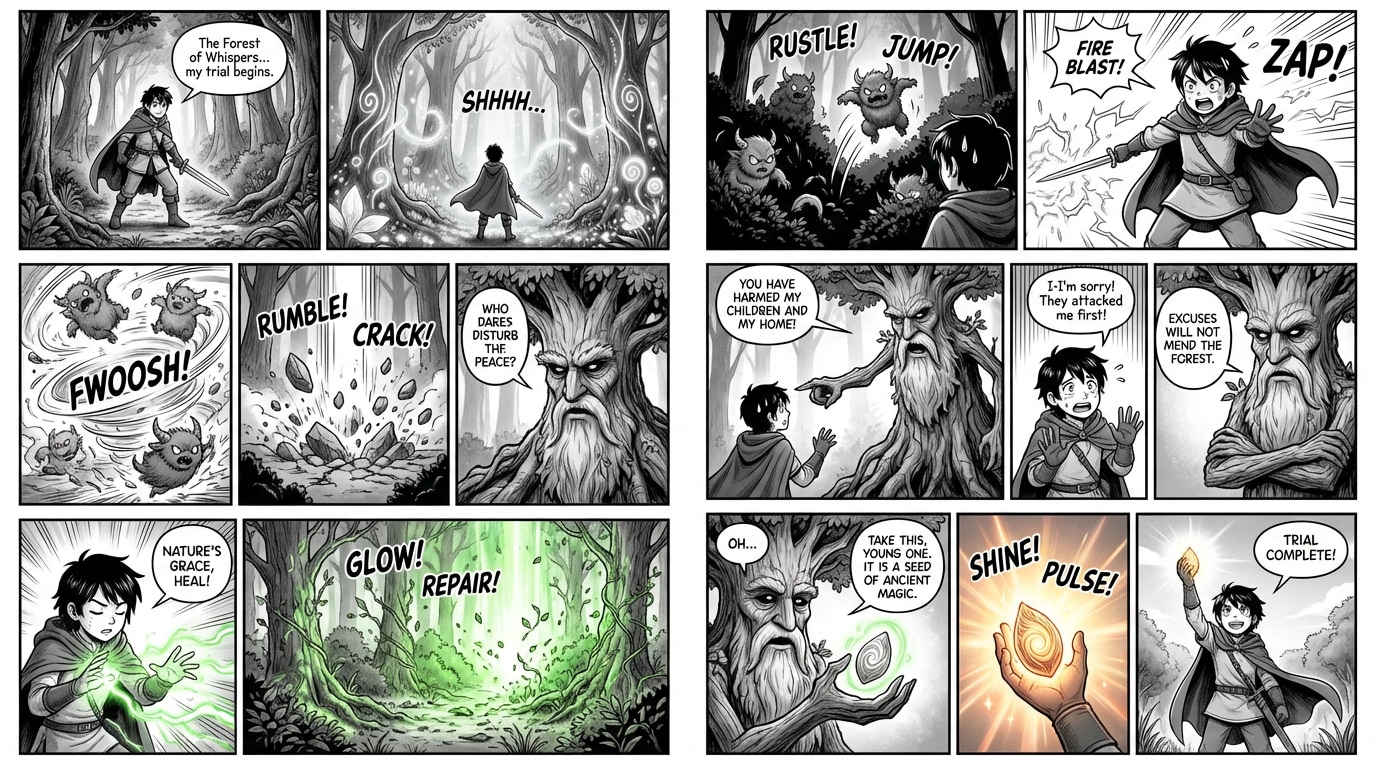
Quick Answer: What Is an AI Manga Background Generator?
An AI manga background generator is a specialized tool that creates detailed, style-consistent environment art for manga panels — including cityscapes, interiors, natural landscapes, fantasy settings, and atmospheric effects — from text descriptions, eliminating the need for traditional perspective drawing and rendering skills.
- Environment generation from text descriptions covering urban, rural, fantasy, sci-fi, and interior settings — the Manga Creator handles this as part of its complete panel workflow
- Style-matched backgrounds that integrate seamlessly with character art across Shonen, Shoujo, Seinen, Slice-of-Life, and Chibi templates
- Perspective and atmosphere control including vanishing points, lighting conditions, weather effects, and time-of-day variations
- Consistency across chapters maintaining the same school hallway, apartment, or battlefield from page 1 to page 200
The Problem: Why Manga Backgrounds Are the Biggest Production Bottleneck
Despite the explosion of AI manga tools in 2026, backgrounds remain the element that separates amateur work from professional output — and the one that consumes the most production time.
🎨 The Most Technically Demanding Skill in Manga
Background art requires mastery of skills that are fundamentally different from character drawing: linear perspective, architectural rendering, environmental design, atmospheric effects, and screentone application for depth. As documented in Jenova's research on manga production, professional manga demands simultaneous mastery of "illustration fundamentals (anatomy, perspective, composition), sequential art, character design, background art (environments, architecture, atmosphere), inking and toning" — and background art is consistently identified as the most technically challenging component (Jenova Research).
A single manga page can take a professional artist 4 to 10 hours — penciling, inking, toning, lettering, and composing panels. A 20-page chapter represents 80 to 200 hours of work. — AI Magicx, 2026
Background rendering accounts for a disproportionate share of that time. Even experienced mangaka frequently hire dedicated background assistants — a luxury independent creators cannot afford.
💰 The Cost of Professional Background Art
Hiring professional manga artists costs $50–$300 per page depending on complexity, and background-heavy pages (establishing shots, wide environmental panels, detailed interiors) sit at the top of that range (Jenova Research). A 200-page graphic novel with detailed backgrounds could require $10,000–$60,000 in illustration costs alone. For independent creators bootstrapping their first project, these costs are prohibitive.
🔄 The Consistency Problem Extends to Environments
While character consistency has received the most attention in AI manga development, environmental consistency is equally critical. A school classroom, a detective's office, or a fantasy kingdom must look identical every time it appears. Traditional manga studios maintain detailed setting reference sheets — but solo creators often lack the organizational infrastructure to maintain visual continuity across locations.
⏱️ Backgrounds Are What Creators Skip
The result of these barriers is predictable: independent manga creators skip backgrounds entirely. Panels feature characters floating in white space, or at best, simple gradient tones. This immediately signals amateur work to readers and publishers. As one industry comparison noted, Midjourney is best suited for "artists seeking inspiration for character designs, background art, or individual splash pages" — acknowledging that background generation is a distinct, high-demand use case (LlamaGen).
This is exactly what the Manga Creator was built for.
Why Manga Creator Is the Best AI Manga Background Generator
While general-purpose image generators like Midjourney can produce beautiful standalone environment illustrations, they lack the sequential art infrastructure that manga background production demands. As Anifusion's 2026 comparison documented, Midjourney has "no built-in character consistency, no panel layout tools, no speech bubbles or text integration" — and the same limitations apply to background consistency (Anifusion). You generate a beautiful cityscape in one panel, and it looks completely different in the next.
The Manga Creator takes a fundamentally different approach — integrating background generation into the complete manga production workflow so environments are generated with characters, within panels, and consistent across your entire project.
| Background Challenge | General Image Generator | Manga Creator Solution |
|---|---|---|
| Style matching | Prompt-dependent, drifts between panels | Five locked style templates ensure backgrounds match character art |
| Perspective accuracy | Inconsistent vanishing points | Manga-aware composition with proper perspective |
| Environmental consistency | Every generation is independent | Persistent project memory tracks locations |
| Integration with characters | Backgrounds generated separately, composited manually | Characters and backgrounds generated together in each panel |
| Screentone and atmosphere | No manga-specific rendering | Screentone shading, speed lines, atmospheric effects built in |
| Panel context | No awareness of surrounding panels | Background detail scales with panel size and narrative importance |
How Background Generation Actually Works
The Manga Creator uses a scene-integrated generation approach that treats backgrounds as inseparable from the panel's narrative function:
Establishing Shots: When you describe a wide establishing panel, the AI generates detailed, high-resolution environments with proper perspective, atmospheric depth, and architectural detail appropriate to your chosen style template.
Action Panels: During character-focused sequences, backgrounds automatically simplify — speed lines replace detailed environments during action, screentone gradients create depth during emotional moments, and selective focus draws attention to the foreground.
Transition Panels: Environmental panels that bridge scenes receive appropriate atmospheric treatment — time-of-day shifts, weather changes, seasonal transitions — all maintained consistently with your established settings.
Example Prompts for Background-Heavy Panels
Here's what working with the Manga Creator for background generation actually looks like:
"Generate a full-page establishing shot in Seinen style: A rain-drenched Tokyo alleyway at night. Narrow passage between old concrete buildings, neon signs reflecting on wet asphalt, steam rising from a ramen shop vent, power lines crossing overhead, a single vending machine glowing blue-white at the far end. Heavy screentone shading, cinematic atmosphere, no characters."
"Create a manga page in Shonen style, 5 panels: Panel 1 — Wide shot of a massive underground arena carved from stone, torches lining the walls, crowd visible in silhouette. Panel 2 — Medium shot of Kaito entering through a stone archway, arena visible behind him. Panel 3 — Close-up of his face, arena blurred in background. Panel 4 — Reverse angle showing his opponent across the arena floor. Panel 5 — Bird's-eye view of both fighters, the full arena visible with detailed architecture."
"Generate a two-page spread, Slice-of-Life style: A cozy Japanese apartment interior — tatami room with low table, sliding paper doors partially open to reveal a small balcony with potted plants, afternoon sunlight streaming through, a cat sleeping on a cushion. Warm atmosphere, clean lines, detailed but not cluttered. This is the protagonist's home — it will appear in many future chapters."
Multi-Model Advantage for Background Quality
The Manga Creator runs on Jenova's unified AI infrastructure — access to GPT-5.4 (OpenAI), Claude Opus 4.6 (Anthropic), Gemini 3.1 Pro Preview (Google), plus models from xAI and DeepSeek. Different models excel at different aspects of background generation: some produce more architecturally precise environments, others handle atmospheric effects with more nuance, and others iterate faster on composition adjustments. No vendor lock-in means you can switch based on what your current scene demands.
Related Agents You'll Also Like
Comic Creator
For creators working in Western comic styles. The Comic Creator applies the same integrated background generation to left-to-right reading flow, bold color palettes, and superhero-to-indie style ranges — with six visual style templates including Noir (heavy on atmospheric backgrounds) and Franco-Belgian (known for detailed environmental art).
- Six visual style templates: Superhero, Noir, Indie, Franco-Belgian, Cartoon, Realistic
- Dynamic panel layouts with environment-aware composition
- Character reference sheets for consistency across issues
- Single issues to graphic novel sagas
Webtoon Creator
Built for mobile-first vertical scroll storytelling. The Webtoon Creator generates full-color backgrounds optimized for vertical scroll rhythm — where environmental panels serve as visual breathing room between dialogue sequences, and establishing shots span the full width of the mobile screen.
- Vertical scroll rhythm optimization with environment pacing
- Full-color background consistency across entire seasons
- Episode-based structure with atmospheric scene transitions
- Platform-specific presets for LINE Webtoon, Tapas, and Lezhin
Creative Fiction Writer
The ideal pre-production partner for developing the world-building that drives your background descriptions. Before you generate a single panel, use the Creative Fiction Writer to build your settings — architecture, geography, cultural details, atmospheric conditions — creating the reference material that produces consistent, narratively meaningful environments.
- Deep world-building research with cultural and architectural references
- Setting descriptions optimized for visual adaptation
- Persistent world state tracking across sessions
- Scene-by-scene breakdowns with environmental direction
How It Works: From Setting Concept to Consistent Backgrounds
Step 1: Build Your World
Start by describing your story's key locations. The Manga Creator helps you establish visual parameters for each setting that will persist across your entire project. For deeper world-building, work with the Creative Fiction Writer first.
"My manga is set in a fictional Japanese coastal city in the near future. Key locations: a cliffside high school overlooking the ocean, a cramped underground hacker den filled with screens and cables, a traditional shrine on a forested hillside, and the protagonist's small apartment above a bookshop. Seinen style with detailed, atmospheric backgrounds."
The AI develops these into structured setting descriptions — architectural details, lighting conditions, atmospheric qualities, and visual motifs — that inform every subsequent panel generation.
Step 2: Generate Setting Reference Panels
Before creating story pages, establish your visual anchors for each key location. Generate dedicated reference panels showing each setting from multiple angles and in different lighting conditions.
"Generate a setting reference sheet for the underground hacker den: Show four views — entrance from the alley (exterior), wide interior shot showing the full space, close-up of the main workstation area, and the back corner with a cot and personal items. Seinen style, heavy screentone shading, blue-tinted lighting from monitors, cables everywhere, cluttered but organized."
These references inform the AI's generation of every subsequent panel set in that location.
Step 3: Generate Story Pages with Integrated Backgrounds
With settings established, generate your story pages. Describe what happens in each panel, and the AI produces characters within their environments — not characters pasted onto separate backgrounds.
"Create a manga page, Seinen style: Panel 1 — Wide establishing shot of the cliffside high school at sunset, ocean visible below, cherry blossoms falling. Panel 2 — Interior hallway, students walking, protagonist Yuki visible in the crowd. Panel 3 — Close-up of Yuki looking at her phone, hallway blurred behind her. Panel 4 — Her POV: a message on the screen reading 'Meet me at the shrine. Midnight.' Panel 5 — Yuki looking up from her phone, expression shifting from curiosity to determination, hallway background in soft focus."
Step 4: Maintain Environmental Consistency
As your project progresses, the persistent project memory tracks your established settings. When you return to a location chapters later, the AI references the same architectural details, lighting qualities, and atmospheric characteristics — ensuring the school hallway on page 150 matches the school hallway on page 3.
Step 5: Scale Background Complexity to Narrative Needs
Not every panel needs a detailed background. The Manga Creator understands manga visual grammar: establishing shots get full environmental detail, dialogue panels get simplified or abstracted backgrounds, action sequences get speed lines and impact effects, and emotional close-ups get screentone gradients or symbolic imagery. You direct this through your panel descriptions, and the AI scales background complexity accordingly.
Results & Use Cases
📚 Self-Publishing a Manga Graphic Novel
Scenario: Creating a 200-page seinen manga set across multiple detailed locations
Traditional Approach: Hire a manga artist ($10,000–$60,000), or spend months learning perspective drawing and architectural rendering. Background-heavy pages take 6–10 hours each. Total timeline: 1–2 years.
With the Manga Creator: Establish your key settings with reference panels, then generate story pages with integrated backgrounds. The AI handles perspective, atmosphere, and screentone rendering while you focus on narrative pacing. Environmental consistency is maintained automatically across all 200 pages. Total timeline: weeks, not years.
📱 Webtoon Serialization
Scenario: Launching a weekly fantasy webtoon requiring detailed world-building across multiple kingdoms
Traditional Approach: Hire a dedicated background artist ($100–$300 per episode for environment-heavy scenes), maintain a grueling weekly schedule, risk visual inconsistency across episodes.
With the Webtoon Creator: Generate full-color environments optimized for vertical scroll with consistent world-building across entire seasons. The AI art market in Asia-Pacific is growing at 50% year-over-year (Gitnux), driven in part by the massive demand for webtoon content with professional-quality backgrounds.
🎮 Visual Novel and Game Development
Scenario: Indie game developer needs consistent manga-style background art for a visual novel set in 15 different locations
Traditional Approach: Commission background illustrations at $200–$800 per location, with additional fees for time-of-day and weather variations. Budget: $3,000–$12,000 for backgrounds alone.
With the Manga Creator: Generate entire location sets with consistent designs, multiple angle variations, and time-of-day variants. AI-generated art saves 50% of production time and costs across creative industries (Gitnux), and the savings are even more dramatic for background-intensive projects like visual novels.
💼 Concept Art and Pre-Production
Scenario: Pitching a manga series to a publisher and need environment concept art to demonstrate world-building
Traditional Approach: Commission concept art at $300–$1,000 per environment illustration, wait weeks for delivery.
With the Manga Creator: Generate polished environment concepts, establishing shots, and atmospheric mood boards in a single session. Iterate based on feedback without additional illustration costs. 70% of game studios already employ AI for concept art (Gitnux), and the same workflow applies to manga pre-production.
FAQ
What is the best AI manga background generator in 2026?
For creators who want backgrounds integrated into a complete manga production workflow — not standalone environment images that need manual compositing — Jenova's Manga Creator generates characters and backgrounds together within panels, maintains environmental consistency across projects, and supports five professional art style templates. For Western comic backgrounds, the Comic Creator handles different visual conventions, and for full-color webtoon environments, the Webtoon Creator optimizes for vertical scroll format.
Can AI generate backgrounds that match my manga's art style?
Yes. The Manga Creator supports five professional style templates — Shonen (bold lines, dynamic environments), Shoujo (soft, atmospheric settings), Seinen (detailed, cinematic backgrounds), Slice-of-Life (warm, cozy interiors), and Chibi (simplified, stylized environments). The style template determines how backgrounds are rendered — linework weight, screentone density, atmospheric treatment, and level of architectural detail — ensuring environments match your character art seamlessly.
How does AI maintain background consistency across a long series?
The Manga Creator uses persistent project memory that tracks your established settings. When you generate setting reference panels at the start of your project, those visual parameters — architectural details, lighting qualities, spatial layout — persist across your entire project. The AI references these established settings automatically when you return to a location, ensuring the protagonist's apartment on page 180 matches the apartment on page 5.
Do I need drawing skills to create manga backgrounds with AI?
No drawing skills are required. AI manga background generators are specifically designed for writers and storytellers who have compelling narratives but lack traditional artistic training in perspective drawing and environmental rendering. You direct the visual output through detailed text descriptions — specifying setting, atmosphere, lighting, and composition — and the AI handles all visual execution. 28% of graphic designers now use AI tools daily (Gitnux), and the adoption rate is even higher among manga creators who previously struggled with background art.
Is an AI manga background generator free to use?
The Manga Creator is available through Jenova with free access to core features and limited usage — sufficient for testing workflows and creating sample pages with backgrounds. For extended creation sessions and higher usage limits, paid plans start at $20/month. The generative AI in art market grew from $0.62 billion in 2025 to $0.88 billion in 2026 (Research and Markets), driven by accessible pricing models that make professional-quality AI art tools available to independent creators.
What's the difference between an AI manga background generator and Midjourney?
A dedicated AI manga background generator like the Manga Creator generates backgrounds within complete manga panels — integrated with characters, panel layouts, dialogue, and screentone effects. Midjourney produces individual standalone images. While Midjourney can generate beautiful environment illustrations, it has "no built-in character consistency, no panel layout tools, no speech bubbles or text integration" (Anifusion) — meaning you must generate backgrounds separately and manually composite them with character art in Photoshop. The Manga Creator handles the complete workflow in a single conversational interface.
Conclusion
Backgrounds have always been the silent bottleneck of manga production — the element that separates professional work from amateur output, yet demands the most technically specialized skills and the most production time. A single manga page takes 4 to 10 hours to produce (AI Magicx), and background rendering accounts for a disproportionate share of that investment. The AI manga generator market's growth to a projected USD 102.1 million by 2030 (Research and Markets) reflects creators' urgent demand for tools that solve this specific problem.
The technical barriers have fallen. Perspective rendering is automated. Environmental consistency is maintained through persistent project memory. Screentone shading, atmospheric effects, and architectural detail are generated from text descriptions. The only remaining challenge is the creative one: What world do you want to build?
Try the Manga Creator for end-to-end manga production with integrated background generation. For Western comic environments, the Comic Creator handles different visual conventions. For full-color webtoon backgrounds, the Webtoon Creator optimizes for mobile-first vertical formats. Develop your world-building with the Creative Fiction Writer before visual production begins.
Explore the full agent library at Jenova.