AI Layer Extractor: Separate Any Image into Editable Layers in Seconds (April 2026)
2026-04-22
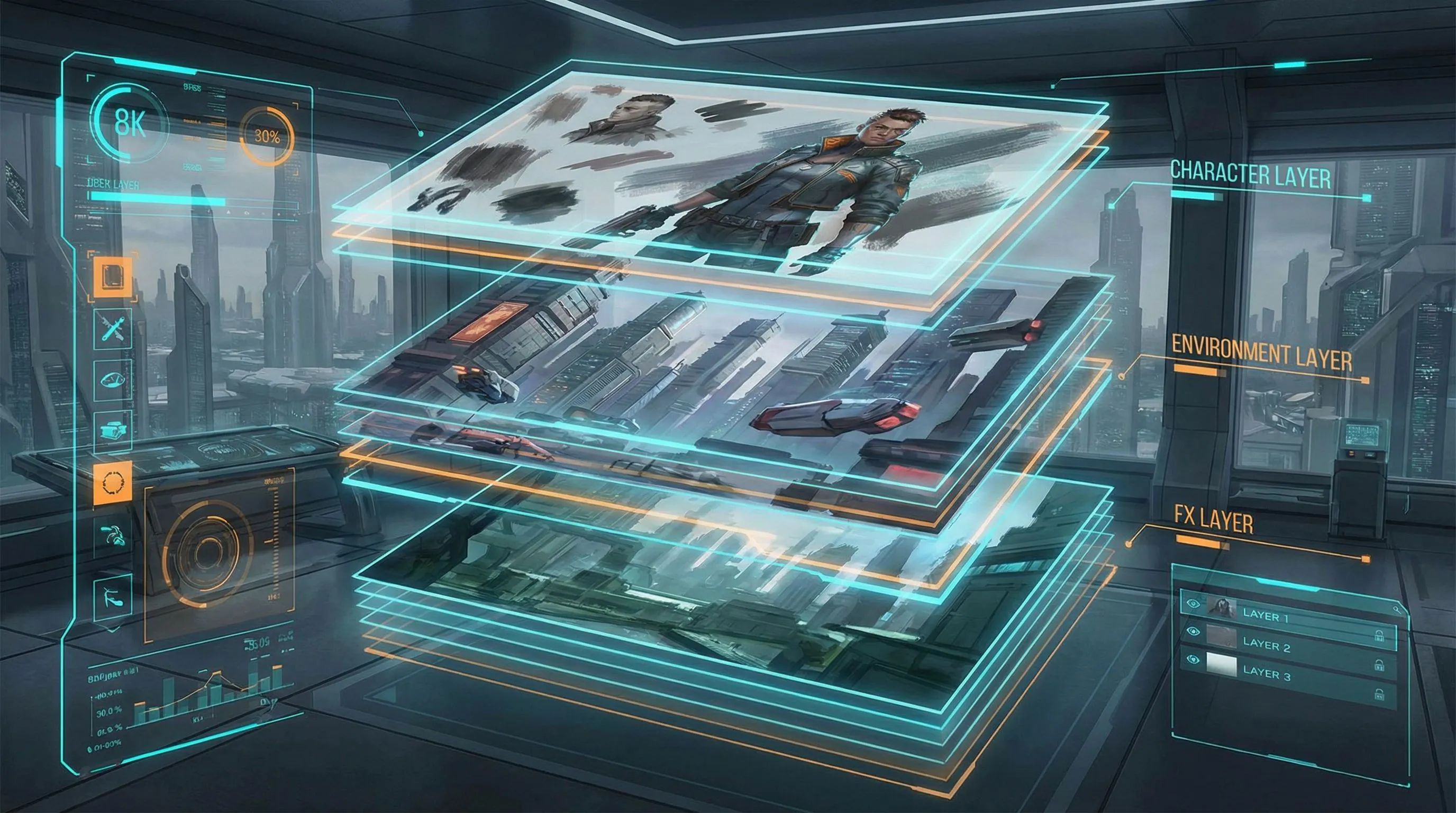
The AI layer extractor has gone from research curiosity to production-essential tool in 2026. The AI image editor market was valued at $6 billion in 2025 and is projected to grow at a CAGR of 11.51% from 2026 to 2033](https://www.linkedin.com/pulse/ai-image-editor-market-size-analysis-type-application-nv3ac), while the AI photo editors market reached [$2.1 billion in 2024 and is expected to grow to $8.9 billion by 2034, registering a 15.7% CAGR. AI image editing was the fastest-growing software category of 2024, with 441% year-over-year growth — and layer extraction is the capability driving the next wave.
The concept is simple but transformative: upload a flat image, and AI decomposes it into separate, editable layers — background, foreground subjects, text, objects, shadows — each with proper transparency. What once required 30–60 minutes of painstaking manual masking in Photoshop now happens in seconds.
- Semantic layer separation identifies and isolates subjects, backgrounds, text, and objects based on meaning — not just edges
- Occlusion reconstruction fills in the hidden areas behind foreground elements, producing complete, usable background layers
- Variable layer control lets you specify how many layers you want — from 2 (simple foreground/background) to 8+ (fine-grained decomposition)
- Jenova's Photo Editor handles professional-grade layer extraction, background swaps, object isolation, and compositing through natural language instructions
Quick Answer: What Is an AI Layer Extractor?
An AI layer extractor is a tool that uses artificial intelligence to decompose a flat image into multiple independent, editable layers — separating foreground subjects, backgrounds, text, objects, and other visual elements into transparent RGBA outputs that can be individually edited, moved, or replaced.
- 🎨 Multi-layer decomposition into 2–8+ independent RGBA layers with proper transparency — Photo Editor handles extraction through conversational instructions
- 🧠 Semantic understanding that distinguishes a product from its shadow and from the surface it sits on — not just edge detection
- 🔄 Background reconstruction that fills in areas hidden behind foreground objects, producing complete layers ready for compositing
- ✂️ Clean alpha channels with soft edges and smooth transitions for professional-quality output
The Problem: Why Image Layer Extraction Has Been So Painful
Every designer, photographer, and content creator has faced the same frustration: you have a finished image, but you need to change one element. Swap the background. Remove an object. Edit the text. Move a product. In traditional workflows, a rendered image is what Canva cofounder Cameron Adams calls "a locked vault of pixels" — and getting inside that vault has historically required expensive software, advanced skills, and enormous amounts of time.
Manual Masking Is the Biggest Bottleneck in Creative Workflows
As WaveSpeedAI's analysis documented: "What once required 30-60 minutes of painstaking manual masking in traditional software can now be accomplished in seconds with intelligent, semantically-aware layer separation."
Creating precise masks for every object in an image is time-consuming, error-prone, and skill-intensive. Hair, fur, semi-transparent objects, and complex edges make manual separation a nightmare. As LlamaGen's layer splitter guide confirmed: "Converting a flat image into layers for animation, compositing, or editing requires precise masking. Doing this manually pixel-by-pixel is slow and frustrating."
Background Removal ≠ Layer Extraction
Traditional background removal tools simply separate foreground from background — a binary split. But real creative workflows need multi-layer decomposition. A product photo might need the product, its shadow, the surface, and the background as four separate layers. A marketing graphic might need the headline text, the hero image, the logo, and the background pattern as independent elements. As DataCamp's technical guide explained: "SAM and similar segmentation models output masks: binary maps of which pixels belong to which object. Useful, but a mask just tells you where something is. Extracting the object still leaves a hole in the original image."
The Tool Sprawl Problem
According to Andreessen Horowitz's State of Generative Media 2026, enterprise production deployments use a median of 14 different models for image workflows — and "producing a single polished asset is rarely a single inference call."
Designers currently juggle separate tools for background removal, object isolation, image editing, compositing, and format conversion. Each tool has a different interface, different pricing, and different output quality. As autophoto.ai's statistics report confirmed: "Teams managing 5-10 different AI tools discover that time saved in editing gets consumed by learning interfaces, moving files between platforms, and troubleshooting inconsistencies."
This is exactly what Photo Editor was built for — a unified, conversational interface that handles layer extraction, background swaps, object removal, and compositing without switching between tools.
Why Photo Editor Is the Best AI Layer Extractor
Unlike standalone layer extraction tools that output raw RGBA files you must then assemble in separate software, Jenova's Photo Editor is a complete image editing partner. You describe what you want in plain language — "separate the product from the background," "remove the person on the left," "swap the sky to sunset" — and the AI handles the extraction, editing, and compositing in a single workflow.
| Challenge | Standalone Layer Tools | Photo Editor |
|---|---|---|
| Layer extraction | Upload → download raw layers → assemble in Photoshop | Conversational: "separate this into layers" → done |
| Background swap | Extract → find new background → composite manually | "Swap the background to a beach scene" → done |
| Object removal | Mask → extract → inpaint hole → clean edges | "Remove the coffee cup from the table" → done |
| Text editing | No text recognition | Understands text as editable elements |
| Iterative refinement | Start over each time | Persistent memory across sessions |
| Model flexibility | Locked to one model | Switch between GPT-5.4, Claude Opus 4.6, Gemini 3.1 Pro Preview |
How AI Layer Extraction Actually Works
The technology behind modern AI layer extractors represents a fundamental shift from traditional image segmentation. As DataCamp's hands-on guide explained, the latest models use a generative diffusion-based architecture rather than traditional edge detection:
- Semantic analysis — The AI understands what's in the image conceptually: it can distinguish a product from its shadow and from the surface it sits on, not just detect edges
- Depth ordering — Elements are separated based on depth: background (layer 0), mid-ground subjects, foreground objects, and overlays like text
- Occlusion reconstruction — When a person stands in front of a building, the AI doesn't just cut around the person — it intelligently fills in the background areas that were previously obscured
- RGBA output — Each layer includes proper alpha transparency for seamless compositing
The Canva Magic Layers Benchmark
In March 2026, Canva launched Magic Layers — a feature that Fast Company called "a fundamental shift in how we handle digital assets." The tool uses Canva's proprietary AI design model to reverse-engineer flat images into editable components. As Canva CPO Cameron Adams explained: "The model identifies everything in the frame and converts it into native Canva objects." Text becomes editable text boxes. Visual objects become independent elements you can move, resize, or delete.
This validates the market demand — but Canva's implementation is locked to the Canva ecosystem. The Photo Editor provides the same layer extraction capability through a conversational interface that works with any output format and integrates with any downstream workflow.
What You Can Do After Extraction
Once your image is decomposed into layers, the creative possibilities multiply:
"Separate this product photo into layers — I want the product, the shadow, and the background as three independent elements. Then swap the background to a warm wood texture and adjust the shadow opacity to 60%."
"Extract the person from this photo, remove the background, and place them on a gradient from navy to black. Keep the original lighting on the subject."
"Take this marketing banner and separate the headline text, the product image, and the background pattern. I need to translate the headline to Spanish and change the background color to match our Q2 campaign palette."
Try the Photo Editor free — no credit card required.
Related Agents You'll Also Like
🖌️ Graphic Designer — Layer-Based Design Asset Production
For creators who need extracted layers assembled into finished marketing materials, social media graphics, or brand assets. The Graphic Designer understands composition, typography, and brand consistency — turning your separated layers into polished, publication-ready designs.
- Social media templates with layer-based compositing
- Brand-consistent marketing materials from extracted elements
- Print-ready illustrations and infographics
🏠 Real Estate Image Editor — Layer Extraction for Property Photography
For real estate professionals who need to swap skies, stage empty rooms, or enhance property photos. Layer extraction is the foundation of virtual staging — separating the room structure from the empty space, then compositing furniture and décor into the scene.
- Virtual staging across 8+ design styles with layer-aware compositing
- Sky replacement with matched lighting and reflections
- Decluttering and renovation visualization
🎨 Prompt Generator — Optimized Prompts for Image Generation and Editing
For creators who want to generate new images with specific layer structures in mind — or craft precise editing instructions for any AI image tool. The Prompt Generator builds structured prompts that produce better results from any image generation or editing model.
- Prompts optimized for layer-aware image generation
- Editing instruction templates for background swaps, object removal, and compositing
- Multi-model syntax tailored to each AI tool's strengths
How It Works: From Flat Image to Editable Layers
Step 1: Upload Your Image
Open Photo Editor and upload the image you want to decompose. The AI accepts any standard image format — JPG, PNG, WEBP — and works with photographs, illustrations, marketing graphics, product shots, and design mockups.
Step 2: Describe What You Need
Tell the Photo Editor what kind of layer extraction you want in plain language. You don't need to know technical terminology — the AI understands intent.
"Separate this image into layers — I want the two people in the foreground as one layer, the building in the background as another, and the sky as a third."
Step 3: Edit Individual Layers
Once extracted, you can modify any layer independently. Change the background without affecting the subject. Adjust the lighting on one element. Remove an object and have the AI reconstruct what was behind it. The Photo Editor handles all of this conversationally.
"Now replace the sky layer with a dramatic sunset. Keep the building's original lighting but add warm reflections on the windows."
Step 4: Composite and Export
Reassemble your edited layers into a finished image. The Photo Editor composites everything with proper transparency, shadow matching, and edge blending — producing output that looks naturally composed, not cut-and-pasted.
Step 5: Iterate Across Sessions
Return to your project days or weeks later. The Photo Editor's persistent memory remembers your image, your layers, and your editing history. Pick up exactly where you left off without re-uploading or re-explaining your project.
"Go back to that product photo we worked on last week. I need the same layer separation, but this time swap the background to our holiday campaign theme."
Results & Use Cases
📸 E-Commerce Product Photography
Scenario: An online retailer needs the same product shot with 12 different backgrounds for seasonal campaigns, marketplace listings, and social media.
Traditional Approach: Reshoot the product 12 times with different backdrops ($200–$500 per setup), or manually mask and composite in Photoshop (30–60 minutes per variation).
Jenova Solution: Upload the product photo once to the Photo Editor. Extract the product and its shadow as separate layers. Generate 12 background variations in minutes. AI reduces product photography costs by 60–70% and enables launches 30 times faster than traditional workflows.
🎬 Motion Graphics and Animation
Scenario: A motion designer needs to create a 2.5D parallax animation from a flat illustration — requiring the foreground, mid-ground, and background as separate layers.
Traditional Approach: Manually mask each depth layer in Photoshop (2–4 hours per illustration), then import into After Effects for animation.
Jenova Solution: Upload the illustration to the Photo Editor and request depth-based layer separation. Get clean RGBA layers in seconds. As LlamaGen confirmed: "The separated layers are perfect for 2.5D animation, parallax effects, and motion graphics."
💼 Marketing Campaign Localization
Scenario: A global brand needs to adapt a hero marketing banner for 8 markets — different languages, different color schemes, same core visual.
Traditional Approach: Request the original PSD file from the design agency (if it still exists), manually edit text layers, adjust colors, export 8 versions. Timeline: 1–2 weeks.
Jenova Solution: Upload the flat banner image to the Photo Editor. Extract text, product imagery, and background as separate layers. Translate and replace text for each market. Adjust background colors to match regional brand guidelines. Pair with the Graphic Designer for finished, platform-ready assets.
🏠 Real Estate Virtual Staging
Scenario: A real estate agent needs to virtually stage an empty room — adding furniture, décor, and styling without a physical staging company.
Traditional Approach: Hire a virtual staging service ($25–$75 per image), wait 24–48 hours for delivery, limited revision options.
Jenova Solution: Upload the empty room photo to the Real Estate Image Editor. The AI extracts the room structure — walls, floors, windows, architectural elements — as the base layer, then composites furniture and décor with matched lighting, accurate shadows, and correct furniture scale. Generate multiple design styles from the same base photo.
📱 Social Media Content at Scale
Scenario: A content creator needs to produce 30 variations of a single hero image for A/B testing across Instagram, TikTok, and YouTube thumbnails.
Traditional Approach: Manually edit each variation in Canva or Photoshop. Time per variation: 10–15 minutes. Total: 5–7.5 hours.
Jenova Solution: Extract the core elements once with the Photo Editor — subject, background, text overlay. Then generate 30 variations by swapping backgrounds, adjusting color grading, and modifying text. Total time: minutes, not hours.
FAQ
What is an AI layer extractor?
An AI layer extractor is a tool that decomposes a flat image into multiple independent, editable layers — separating foreground subjects, backgrounds, text, objects, and other visual elements into transparent RGBA outputs. Unlike traditional background removal (which produces a binary foreground/background split), layer extractors produce complete layers with inpainted backgrounds, meaning you can delete or move any layer without leaving holes in the image. Jenova's Photo Editor handles layer extraction through natural language instructions.
How is AI layer extraction different from background removal?
Background removal produces two outputs: the subject and the background. AI layer extraction produces multiple outputs — typically 2 to 8+ layers — separating subjects, objects, text, shadows, and background elements independently. Critically, modern layer extractors reconstruct hidden regions behind foreground objects, producing complete, usable background layers rather than leaving holes where objects were removed.
What types of images work best with AI layer extraction?
Images with clear subject-background separation, good lighting, and moderate scene complexity produce the best results. Product photography, marketing graphics, portraits, and landscape compositions decompose cleanly. As DataCamp's testing found, the technology "handles object isolation well, but struggles with background reconstruction when shadows are involved." Highly intertwined subjects (like people hugging) may show some bleed between layers.
Can I use extracted layers for commercial projects?
Jenova allows commercial use of generated and edited content on paid plans. The Photo Editor produces output suitable for marketing materials, e-commerce listings, social media content, and print production. Always ensure you have rights to the original source image before commercial deployment.
How does this compare to Photoshop for layer extraction?
Photoshop requires manual masking — selecting objects pixel by pixel using tools like the Pen Tool, Quick Selection, or Select and Mask. This process takes 30–60 minutes per image for complex scenes and requires significant skill. AI layer extraction automates this process in seconds. As Canva CPO Cameron Adams told Fast Company: "Most AI outputs are fixed, really flat things, and they're not easy to edit. You either have to live with an 80% solution or spend time reprompting." AI layer extraction solves this by making any image editable.
Is the Photo Editor free?
Yes — you can start using the Photo Editor for free with no credit card required. Free accounts include all core features with limited usage. Paid plans starting at $20/month increase usage limits for high-volume image editing and layer extraction workflows.
Conclusion
The AI layer extractor represents a fundamental shift in how we interact with images. For decades, a rendered image was a locked vault — once composited, layer-level editing was impossible without the original project file. In 2026, that vault is open. The AI image editor market is growing at 11.51% CAGR toward 2033, AI image editing was the fastest-growing software category with 441% year-over-year growth, and enterprise production deployments now use a median of 14 different models for image workflows.
The technology has moved from research papers to production tools. Canva launched Magic Layers in March 2026. Alibaba's Qwen team released Qwen-Image-Layered as an open-source model. Tsinghua University published Controllable Layer Decomposition with bounding-box-guided extraction. The infrastructure is here — the question is how you use it.
Try Photo Editor now — upload any image and describe the layer extraction you need in plain language. For complete marketing asset production, pair with the Graphic Designer. For real estate photography, try the Real Estate Image Editor. Browse the complete agent library at Jenova.