AI Game Item Icon Generator: Consistent Inventory Art Fast
2026-09-14
Game Designer Assistant helps you generate production-ready game item icons by turning item specs, art direction, and UI constraints into consistent inventory, HUD, and shop art. In September 2026, small studios still lose weeks assembling icon sheets by hand. While commissioning a dedicated icon artist or stitching mismatched generator outputs slows every build, this AI provides style-locked icons that stay readable at HUD scale.
- ✅ Style-locked sets across weapons, potions, materials, and UI chrome
- ✅ Spec-aware output: resolution, viewing angle, padding, and silhouette
- ✅ Fast loops from jam placeholders to shippable inventory art
- ✅ Pixel, painted, and flat UI styles without rebuilding a pipeline
To understand why this matters, it helps to look at how item icons actually fail in production—not as pretty pictures, but as tiny, high-frequency UI assets players must parse in combat, shops, and crafting menus.
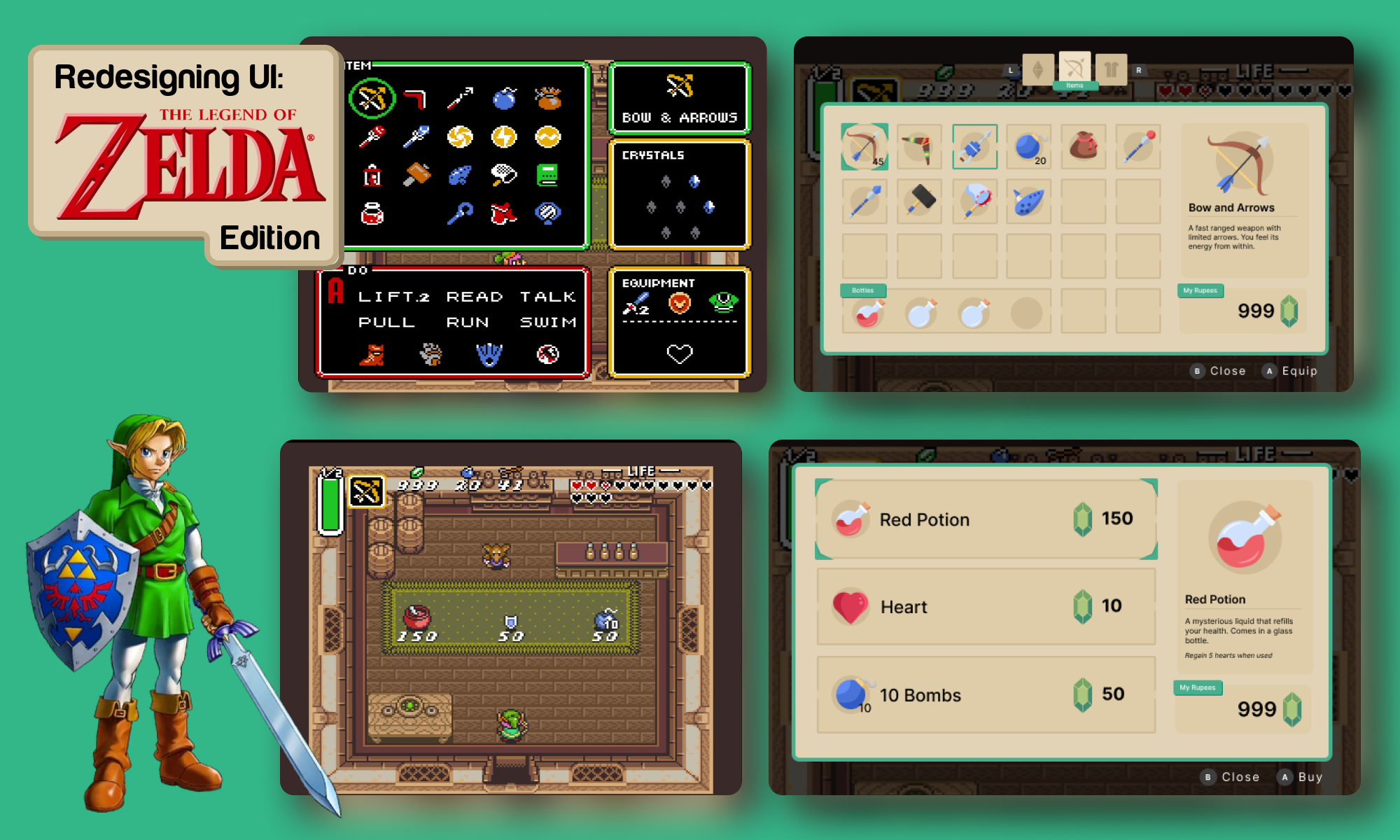
Quick Answer: What Is a Game Item Icon Generator?
A game item icon generator is an AI design tool that creates consistent inventory, HUD, and shop icons from item specs so games can ship readable UI art without a dedicated icon artist. It is built for production constraints—small sizes, shared palettes, and families of related items—not one-off illustrations.
Key capabilities:
- Inventory and HUD icon sets with locked style, palette, and silhouette language
- Item-family generation (potions, ores, rods, keys) that share shape grammar but stay distinct at 32×32 and 64×64
- Shop portraits and tooltip art that match the same visual system as tiny bag icons
- Promptable art bibles: pixel, hand-painted, vector-flat, isometric, or top-down
Why Game Item Icons Are Hard to Produce at Scale
Player-facing games now compete in a market where visual polish is expected even from tiny teams. The global video game market was valued at $322.6 billion in 2025](https://www.grandviewresearch.com/industry-analysis/video-game-market), and the [indie game market alone was estimated at $4.85 billion in 2025. That demand does not come with matching art budgets.
Industry surveys show why asset production is under pressure. According to the GDC 2025 State of the Game Industry report:
1 in 3 developers — are now using generative AI to streamline game development
Half of all developers — are self-funding their games
1 in 10 developers — reported being laid off in the past year
Unity’s studio interviews for 2025 reached a similar conclusion: keep resources tight, ship smaller games, and iterate fast. Item icons sit right in that squeeze. A mid-size RPG or survival title can need hundreds of unique items, each requiring a bag icon, a shop preview, and sometimes a HUD quick-slot glyph.
But producing that set is frustratingly difficult:
- Icons must read at 24–64 pixels, not as concept art
- Related items must look like a family without becoming identical
- Style drift across a week of generation ruins the inventory screen
- Engine import rules (transparency, padding, pivot, filter mode) punish sloppy edges
Tiny canvases punish pretty pictures
A gorgeous 1024×1024 relic painting can fail as a game item icon. At HUD scale, players identify objects by silhouette, hue, and one or two unique props—not by filigree. Swords that share the same outline become indistinguishable. Potions that only differ by a label disappear on a phone. This is a UI problem first and an illustration problem second.
Consistency is the real production bottleneck
General image models generate each frame independently. That is why a “red potion” from one prompt and a “blue potion” from the next often look like they came from different games. Specialized game-art workflows exist because character and asset consistency is the largest failure mode of AI game art. Item icons inherit the same failure: bottle shape changes, metal hue shifts, outline weight wanders.
Self-funded teams cannot staff an icon department
Freelance icon sheets are expensive, slow to revise, and painful during a game jam or Early Access loop when item lists change weekly. Procedural content research has long treated art and object properties as “game bits”—the smallest units of content that still consume huge production time. Icons are exactly that: small, numerous, and mandatory.
This is exactly what Game Designer Assistant was built for.
Why Game Designer Assistant
Game Designer Assistant treats item icons as game systems, not as isolated pictures. You specify the item’s role, rarity, material, viewing angle, and UI size; it returns art that belongs in an inventory grid, a shop row, and a hotbar. While a general image model offers a single pretty still, this AI specializes in production constraints: readable silhouettes, shared palettes, and item families that still scan as unique.
| Traditional Approach | Game Designer Assistant |
|---|---|
| Commission 50–200 icons, then wait on revisions when the item list changes | Generate, critique, and regenerate against a locked art bible |
| One-off Midjourney or similar images that do not share outline language | Item families with shared shape grammar and distinct accents |
| Concept-art detail that collapses at 32×32 | Spec-first output: size, padding, orthographic angle, transparency |
| Separate artists for pixel HUD vs. painted shop portraits | One visual system across bag, shop, and tooltip |
| Jam prototypes with programmer art that never gets replaced | Fast placeholders that can be refined into shippable UI |
Readable silhouettes before decoration
The first pass is identification, not rendering quality. Ask for a unique outline, a dominant hue, and a single signature prop (corked flask, serrated blade, coiled reel). Then add material and rarity. That order matches how players actually parse an inventory under pressure.
"32×32 pixel-art inventory icon, top-down, iron shortsword, unique triangular pommel, cool gray metal, 1px outline, transparent background, readable silhouette, no extra scenery"
Style lock across item families
Potions should share bottle language. Ores should share crystal language. Fishing rods should share reel-and-blank language. The dedicated game design partner keeps those grammars stable so a full crafting tree looks authored, not sampled.
"Same bottle shape and outline weight as the previous red potion. Blue mana potion, cobalt liquid, silver cork, 64×64 painted icon, 8px padding, inventory slot, no text"
Shop, bag, and HUD as one system
A shop needs a larger portrait and a short flavor line. The bag needs a square glyph. The HUD needs an even simpler glyph that survives motion blur and low brightness. Generate the shop portrait first as the style anchor, then downscale the design language—not the JPEG.
"Shop portrait of a Flexible Fishing Pole, 256×256, three-quarter view, coastal wood blank, leather wrap, hybrid reel, warm lantern lighting, UI card, matching the survival game inventory style"
Specs that survive Unity and Godot import
Call out resolution, padding, transparency, and filter intent in the brief. Pixel icons want point filtering and integer scale. Painted icons want even padding so grid cells do not clip glows. Hybrid pipelines that generate a base then refine by hand typically take about 20–30% of the time of fully manual production while keeping most of the quality. Use the AI for the base sheet; reserve human time for edge cleanup and palette normalization.
Related Agents You'll Also Find Useful
If you are also packaging those icons into store pages, pitch decks, or a reusable prompt library, these agents sit one step away from the same workflow.
Graphic Designer
Once the inventory set is locked, you still need Steam capsules, patch notes art, and shop banners that do not fight the in-game UI. Graphic Designer extends the same palette and shape language into marketing layouts, infographics, and store mockups so the product page looks like it came from the same studio as the HUD.
- Brand-consistent banners that reuse item silhouettes
- Grid mockups of inventory screens for store pages
- Printable pitch sheets for publishers and funds
Prompt Generator
Icon quality tracks prompt discipline. A reusable template—style, size, angle, outline, negative space—beats rewriting from scratch for every dagger. Prompt Generator turns your art bible into a library of image prompts you can clone per item.
- Locked templates for pixel vs. painted vs. flat UI
- Negative prompts that kill scenery, extra hands, and watermark clutter
- Batch-ready variants for rarity tiers
Logo Generator
Game marks, faction crests, and UI watermarks should rhyme with item chrome. If your swords use gold filigree and your potions use wax seals, the title treatment should too. Logo Generator builds that identity layer so icons, splash screens, and launcher art feel like one product.
- Style-matched wordmarks and crests
- Simple glyphs that also work as app icons
- Colorways aligned to rarity and faction palettes
Try Game Designer Assistant free — no credit card required.
How to Generate Game Item Icons Step by Step
Step 1: Write a one-page art bible
Decide style (pixel, painted, flat), canvas (32, 64, 128, 256), viewing angle, outline weight, and a 6–8 color palette. Name the rules that never change: “all potions are round flasks,” “all ores are hexagonal crystals,” “no text on bag icons.”
"Art bible: 64×64 painted icons, 6px padding, cream UI, 2px dark outline, warm metals, cool potions, top-three-quarter view, transparent PNG, no drop shadows that clip"
Step 2: Generate a style-anchor item
Pick one hero item players will see constantly—a health potion, a starter sword, or a signature tool. Generate several options, pick one, and treat it as the reference for every later icon. This is the same reference-sheet habit used in AI sprite pipelines.
"Style-anchor icon: Red Potion in a round glass flask, wax seal, 64×64, cream background optional for shop, transparent for bag, painted, readable at small size"
Step 3: Batch by family, not by random list
Group items that share a shape: potions, keys, fish, rods, ores, scrolls. Change only the distinctive trait (hue, material, accessory). If you need tighter prompt control, run the same template through Prompt Generator before generating the next dozen.
"Same flask geometry as the Red Potion. Stamina potion, green liquid, leaf cork, identical outline and lighting, 64×64 inventory icon"
Step 4: Stress-test at real UI scale
Drop candidates into a dummy 8×8 inventory and a hotbar. If two items collide at 32 pixels, change silhouette—not shading. Overlay siblings at 50% opacity to catch proportion drift. Recolor to the locked palette rather than accepting generator hue noise.
Step 5: Export for the engine, then name for data
Export transparent PNGs with consistent padding. For pixel art, use point filtering and integer PPU. For painted icons, keep even margins so glow and outline do not clip. Name files to match your item IDs (potion_red, rod_flexible, ore_iron) so design, code, and localization stay in sync.
Results & Use Cases
📊 RPG inventory and dungeon loot
Scenario: A 2D action RPG needs 120 loot icons—weapons, keys, crystals, and potions—before a vertical slice.
Traditional Approach: A freelancer quotes weeks of work; each item-list change reopens the contract. Placeholder squares stay in the build.
Game Designer Assistant: You lock a painted 64×64 bible, generate potion and crystal families in one session, then swap only the signature prop for each new relic.
- Silhouettes stay distinct in a crowded loot window
- Rarity is signaled with metal hue and gem count, not tiny unreadable text
- Shop portraits reuse the same objects at 256×256 for NPC vendors
💼 Survival crafting and vendor shops
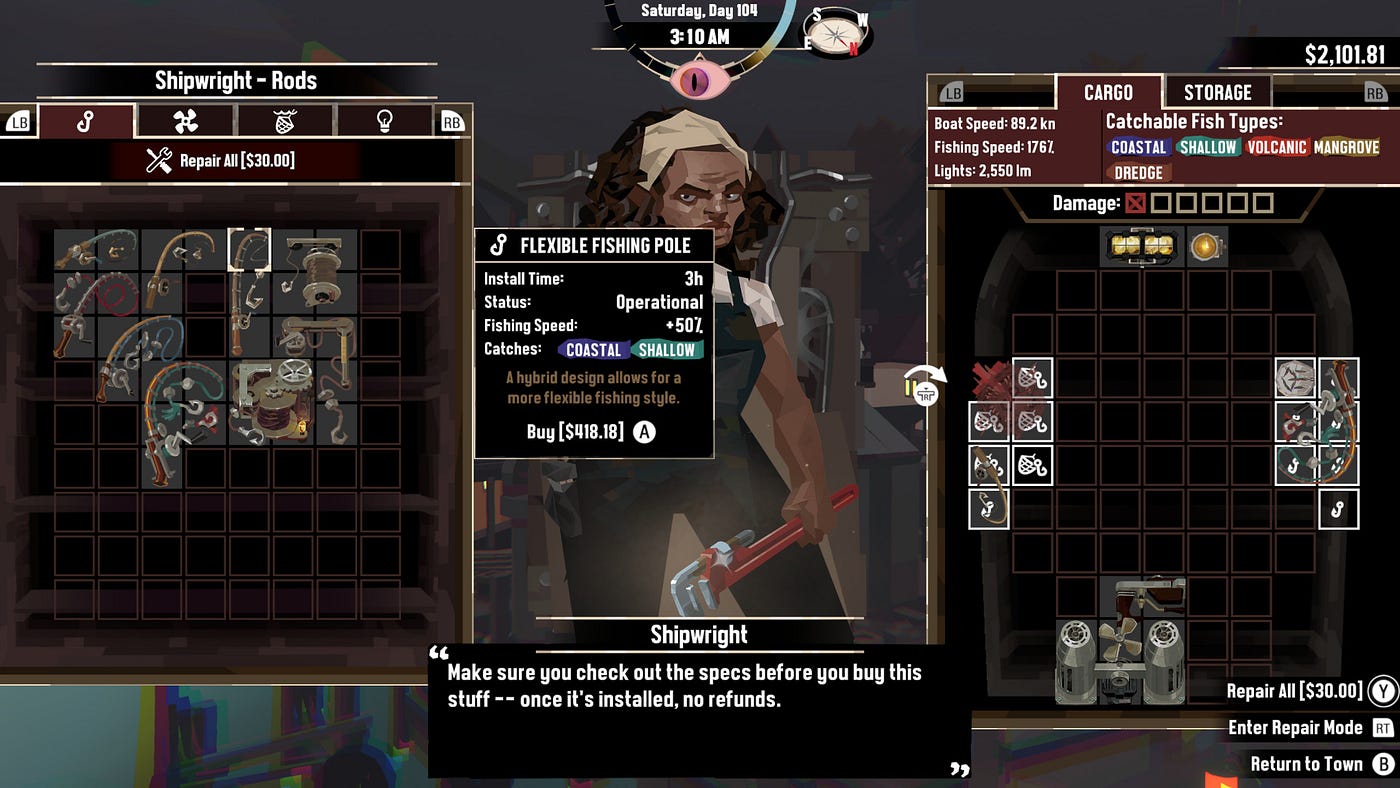
Scenario: A fishing-and-boat survival game sells rods, bait, and repair kits through a shipwright. Every item needs a cargo-grid icon plus a buy card with stats.
Traditional Approach: The UI programmer pastes unrelated clip art. Rods do not share a visual language; players cannot tell coastal gear from volcanic gear at a glance.
This AI: You brief “hybrid reel, wood blank, water-type stripe” and generate a rod family that matches the shop’s cargo grid and the buy panel.
- Grid icons remain square, padded, and readable next to stack counts
- Buy cards can show a larger portrait without breaking style
- Repair kits, bait, and poles feel like one studio, not three asset packs
📱 Mobile idle shop and gacha inventory
Scenario: A portrait-mode idle RPG on a phone needs 80 gacha materials that remain clear on a 6-inch screen, including one-handed play in bright light.
Traditional Approach: Downscaled desktop art turns to mud. Players tap the wrong shard because every crystal is a blue blob.
Game Designer Assistant: You specify 96×96 flat-UI icons, high-contrast cores, and unique outer shapes (triangle shard, hex core, teardrop essence), then verify on device.
- High-contrast cores survive outdoor brightness
- Shape—not only color—carries type, which helps color-vision accessibility
- The same set can feed push-notification thumbnails without a new shoot
🎯 Weekend jam prototype that can ship
Scenario: A three-person jam needs 25 items by Sunday night and may continue the project after the deadline.
Traditional Approach: Programmer art ships. Post-jam, the team is ashamed of the bag screen and delays a Steam page.
This AI plus Graphic Designer: Jam icons are generated to the final bible on Saturday. Sunday is for feel and bugs. The following week, the same silhouettes become capsule art instead of being thrown away.
- Placeholders are already on-style, so they are worth keeping
- Item IDs never have to be re-authored around new art
- Store mockups reuse the inventory language immediately
FAQ
What is a game item icon generator used for?
A game item icon generator creates the small UI images players see in inventories, hotbars, crafting lists, and shops. Unlike concept art, these assets must stay identifiable at 32–64 pixels, share a style across dozens or hundreds of items, and import cleanly into engines. Game Designer Assistant is built for that production job: spec-driven icons, not one-off illustrations.
Is a game item icon generator free to try?
Yes. You can start on Jenova’s free tier and generate inventory, HUD, and shop icons without a credit card. Heavier batches—full loot tables, multiple resolutions, and marketing layouts via Graphic Designer—fit paid usage tiers if you outgrow free limits. Pricing is usage-based rather than a per-icon commission.
How is this different from Midjourney or a generic image model?
General models optimize for a single striking picture. Each image is independent, so bottle shapes, outlines, and palettes drift. A dedicated game item icon generator is briefed on canvas size, padding, viewing angle, and family grammar. That is the same gap specialized game-art tools exist to close versus general illustration models. You still may clean edges by hand; you should not have to reinvent the flask every time.
Can it generate pixel-art icons at 32×32?
Yes. State pixel art, exact resolution, outline size, and “no anti-aliasing / point-filter intended” in the brief. Pixel icons need more human pixel-level cleanup than painted sets because every pixel is intentional, but the generator still gets you a coherent family faster than drawing 80 swords from a blank grid.
Does a game item icon generator work on mobile?
Yes. The same agent runs on web, iOS, and Android, which is useful when you are screenshotting a device HUD and iterating icons on the commute. Voice input helps when you are naming a long loot table out loud. Always verify final assets on the target device; phone HUDs are the harshest readability test.
Are AI item icons consistent enough to ship?
They are consistent enough to prototype immediately and, with a locked bible plus a short cleanup pass, consistent enough to ship for many indie and mobile styles. Courts and copyright offices still treat purely automated images as a gray area; adding meaningful human direction and refinement is the practical path for commercial games. Use the AI for volume and structure; use your eye for palette lock and silhouette QA.
Start Shipping Icons Players Can Actually Read
Item icons are not decoration. They are the language of loot, craft, and shops—and they fail when they are pretty at 1024 pixels and mute at 32. Self-funded teams cannot wait on a specialist for every new berry, bolt, and boss key, especially while one in three developers already lean on generative AI to keep production moving.
Game Designer Assistant gives you a practical game item icon generator: style-locked families, spec-aware canvases, and loops fast enough for jams, Early Access, and live ops. Pair it with a prompt library and marketing layouts when you are ready to show the work outside the engine.
Try Game Designer Assistant now. Explore more at Jenova.
For Developers: Game Designer Assistant is available programmatically via the Jenova API — integrate game item icon generation into your tool chain with a single API call. Full documentation →