AI Financial Statement Analysis: Read Any Balance Sheet in Minutes
2026-08-18
The Accounting & Audit Assistant helps you turn raw financial statements into structured analysis by combining ratio computation, variance explanation, anomaly detection, and standards-grounded reasoning in a single workspace. While most finance teams still assemble analysis manually across spreadsheets, PDFs, and ERP exports, this AI reads the statements, calculates the metrics, and tells you what changed and why.
✅ Analyzes balance sheets, income statements, and cash flow statements from uploaded documents ✅ Computes liquidity, leverage, profitability, and efficiency ratios with period-over-period comparison ✅ Flags anomalies, unusual patterns, and areas that warrant audit attention ✅ Grounds findings in accounting standards guidance and audit risk frameworks
To understand why this matters, it helps to look at how financial statement analysis actually gets done today. Most of the work isn't analysis at all — it's data wrangling, reconciliation, and formatting. The insight layer, the part that actually informs decisions, is what gets compressed when deadlines tighten.

Quick Answer: What Is AI Financial Statement Analysis?
AI financial statement analysis uses artificial intelligence to extract data from balance sheets, income statements, and cash flow statements, then compute ratios, detect anomalies, and explain variances automatically. It replaces manual spreadsheet work with structured, explainable output.
Key capabilities:
- Data extraction — pull line items from PDFs, statements, and exports without manual re-keying
- Ratio computation — current ratio, debt-to-equity, ROA, ROE, margins, turnover, and coverage metrics
- Variance and trend analysis — period-over-period movement with plain-language explanation of drivers
- Anomaly detection — surface unusual patterns, inconsistencies, and items that merit deeper review
The Problem: Why Financial Statement Analysis Stays Slow
Financial statement analysis is one of the highest-leverage activities in finance — and one of the most consistently under-resourced. The bottleneck isn't analytical skill. It's the volume of preparatory work standing between raw data and usable insight.
According to IBM, financial reporting automation exists precisely because collecting data, processing it, and generating analysis are still largely manual steps in most organizations — steps that eliminate the need for manual data entry only once automation is in place.
68% of executives, including CFOs, report experimenting with AI automation as digital assistants evolve into autonomous agents supporting self-service finance operations — IBM Institute for Business Value research
37% of surveyed executives expect to implement touchless automation in predictive insights; 29% in financial analysis and reporting — IBM
But getting from raw statements to defensible analysis is frustratingly difficult:
- Data lives in incompatible formats — PDFs, ERP exports, spreadsheets, scanned documents
- Ratio calculation is repetitive but error-prone when done by hand across multiple periods
- Anomalies hide inside aggregate figures that look normal at the summary level
- Explaining why a metric moved requires cross-referencing multiple statements simultaneously
- Standards guidance and audit risk considerations live in separate documents from the numbers
Manual Data Assembly Consumes the Analysis Window
Before anyone computes a single ratio, someone has to normalize the data. IBM notes that automation software exists to connect directly to existing finance tools and pull raw financial data into a single place — an acknowledgment that without it, this consolidation happens by hand.
The consequence is predictable. Analysts spend the majority of their window preparing data and a shrinking remainder interpreting it. The interpretation is where the value sits.
Sampling Misses What Full-Population Review Would Catch
Traditional analysis relies on sampling because reviewing every transaction is impractical. The Center for Audit Quality observes that AI's ability to analyze entire datasets, rather than relying on sampling, further enhances accuracy and allows for the identification of subtle anomalies that might otherwise go undetected.
That gap matters. Anomalies that fall outside a sample don't get flagged — not because reviewers lacked skill, but because the item never entered the review set.
Risk Assessment Happens Too Late
Risk identification traditionally follows data assembly. By the time patterns emerge, remediation windows have narrowed. The CAQ describes AI's role in analyzing vast amounts of data to identify patterns and anomalies that might indicate risks or fraudulent activities, enabling earlier detection and mitigation.
Explainability Is a Real Constraint
AI in finance introduces its own governance requirements. The Auditing and Assurance Standards Board warns that AI audit tools may be "black-box" systems where it may be challenging or impracticable to understand how the tool arrives at its conclusions.
This is a legitimate concern — and it's exactly why any AI used for financial statement analysis needs to show its reasoning, not just its output.
Human Judgment Cannot Be Delegated
The AUASB is explicit: AI tools are not a substitute for human judgement, and auditors should maintain professional scepticism while critically evaluating outputs, including considering the possibility of bias and AI hallucination.
Any tool that positions itself as a replacement for professional review is misrepresenting what it does. The right framing is augmentation — faster preparation, broader coverage, and clearer explanation, with the professional retaining final judgment.
This is exactly what the Accounting & Audit Assistant was built for.
Why the Accounting & Audit Assistant for Financial Statement Analysis
The Accounting & Audit Assistant is a working analyst you can hand statements to. Upload a balance sheet, an income statement, or a full set of financials, and it extracts the line items, computes the metrics, compares periods, and explains what moved — with the reasoning visible at every step.
| Traditional Approach | Accounting & Audit Assistant |
|---|---|
| Manually re-key figures from PDFs into spreadsheets | Reads uploaded statements directly and extracts line items |
| Build ratio formulas period by period | Computes liquidity, leverage, profitability, and efficiency ratios instantly |
| Sample-based review of transactions and accounts | Reviews the full dataset you provide for patterns and outliers |
| Variance tables with no narrative explanation | Plain-language explanation of what changed and the likely drivers |
| Standards guidance in a separate document | Standards and audit risk context applied inline with the numbers |
| Analysis resets each engagement | Persistent memory of your entity structure, chart of accounts, and prior findings |
Ratio Analysis Across the Full Metric Set
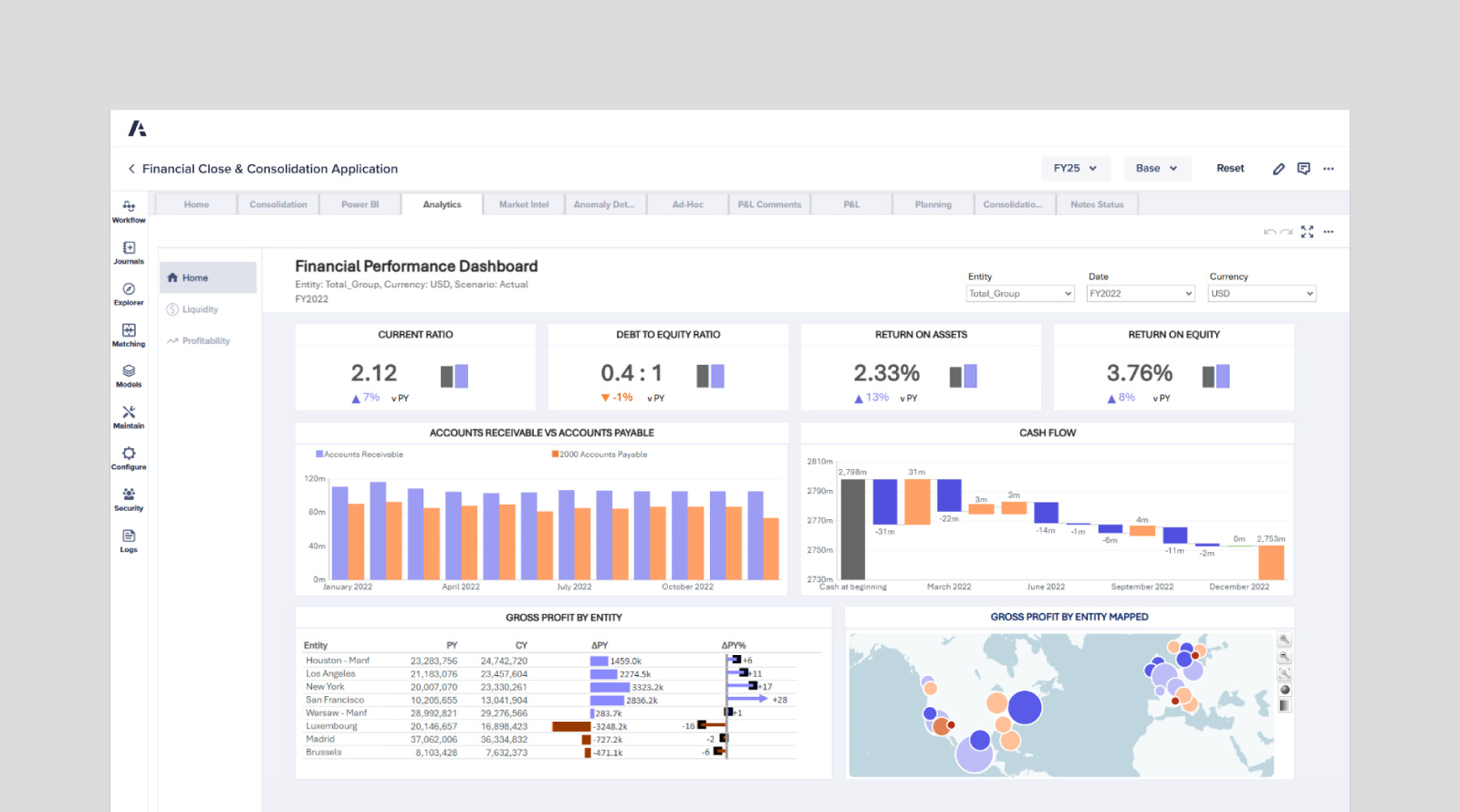
The assistant calculates and interprets the standard analytical framework — not just the numbers, but what they indicate:
- Liquidity: current ratio, quick ratio, working capital position, cash conversion
- Leverage: debt-to-equity, interest coverage, debt service capacity
- Profitability: gross margin, operating margin, net margin, ROA, ROE
- Efficiency: receivables turnover, payables turnover, inventory turnover, asset turnover
Each metric comes with period comparison and interpretation. A current ratio of 2.12 isn't a conclusion — whether it's improving, deteriorating, or diverging from sector norms is.
Variance and Trend Explanation
Movement without explanation is noise. Ask the assistant why gross margin compressed, and it traces the change through revenue mix, cost of goods, and volume effects rather than restating the delta.
"Compare Q3 and Q4 gross margin in the attached P&L and explain the primary drivers of the change."
Anomaly Detection and Red Flag Identification
The assistant surfaces items that don't fit the pattern — receivables growing faster than revenue, expense categories with unexplained step changes, reconciliation gaps between statements, unusual period-end movements.
"Review this balance sheet and income statement for inconsistencies or items that warrant additional audit attention."
Standards-Grounded Reasoning
Financial analysis without standards context is incomplete. The assistant applies accounting standards guidance, audit planning frameworks, and risk assessment logic to its findings — connecting what the numbers say to what the guidance requires.
Audit Planning and Risk Assessment
Beyond analysis, the assistant supports the engagement workflow: materiality considerations, risk area identification, procedure planning, and documentation structure.
"Based on this financial statement package, identify the highest-risk audit areas and suggest procedures for each."
Related Agents You'll Also Find Useful
Financial statement analysis rarely happens in isolation. These agents cover adjacent parts of the same workflow.
Fundamental Stock Analyst
If you're analyzing statements to make an investment decision rather than an accounting one, the Fundamental Stock Analyst takes the analysis into valuation territory. It works across SEC filings, analyst estimates, and market sentiment with real-time data access.
- Earnings analysis and quality-of-earnings assessment
- Relative valuation against peers and sector comparables
- Business model assessment grounded in reported financials
Expense & Receipt Tracker
Clean statements start with clean inputs. The Expense & Receipt Tracker handles the upstream layer — turning receipts, bank statements, and raw expense data into categorized, export-ready records.
- Automated categorization of raw expense data
- Receipt and bank statement processing
- Export-ready output that feeds directly into reporting
CPA Tutor
If you're building the technical foundation rather than applying it, the CPA Tutor covers US CPA, CPA Canada, CPA Australia, ICAEW ACA, and ACCA with adaptive coaching.
- Adaptive practice across FAR, AUD, REG, and BEC-equivalent content
- Standards explanation with worked examples
- Exam strategy and progress tracking
Portfolio Management Strategist
For analysts working at the portfolio level, the Portfolio Management Strategist handles allocation analysis, drift detection, risk assessment, and scenario stress testing.
- Allocation and drift analysis across holdings
- Scenario stress tests and risk decomposition
- Rebalancing recommendations grounded in current positioning
Try the Accounting & Audit Assistant free — no credit card required.
How AI Financial Statement Analysis Works
Step 1: Upload Your Financial Statements
Attach the balance sheet, income statement, cash flow statement, or full reporting package. PDFs, spreadsheets, and exports all work. The Accounting & Audit Assistant reads the documents directly — no re-keying, no template mapping.
"Here are our FY2024 and FY2025 financial statements. Extract the key line items and set up a comparative view."
Step 2: Request the Analysis You Need
Ask for what you actually want. Full ratio analysis, a specific metric deep-dive, variance explanation, or anomaly review — the assistant scopes the work to the request.
"Run a full ratio analysis on both years and highlight any metric that deteriorated by more than 10%."
Step 3: Interrogate the Findings
The output is a starting point, not an endpoint. Push on anything that looks off. Ask for the calculation behind a figure, the reasoning behind a flag, or the standards basis for a conclusion.
"Why did you flag the receivables balance? Show me the calculation and the comparison you used."
Step 4: Extend Into Documentation and Planning
Convert the analysis into working output — audit planning notes, risk area summaries, management commentary, or a structured findings memo.
"Draft a findings summary from this analysis, organized by risk area, suitable for the engagement file."
Results & Use Cases
📊 Quarterly Close Review
Scenario: A controller needs to review consolidated financials across eight entities before the board package deadline.
Traditional Approach: Two to three days assembling entity-level data, building comparison tables, and manually identifying variances worth explaining.
Accounting & Audit Assistant: Upload the consolidated package and entity detail. The assistant computes ratios per entity and at the consolidated level, flags entities with material variance, and drafts the explanatory commentary.
- Full-population review rather than spot-checking the largest entities
- Consistent metric definitions applied across all entities
- Draft commentary ready for controller review rather than blank-page drafting
💼 Pre-Audit Risk Assessment
Scenario: An audit team is planning fieldwork and needs to identify high-risk areas from the client's preliminary financials.
Traditional Approach: Manual analytical review, ratio comparison against prior year, and judgment-based risk area selection.
Accounting & Audit Assistant: Structured analytical review across the full statement set with anomaly flagging and risk area ranking — supporting the CAQ's point that AI allows for the identification of subtle anomalies that might otherwise go undetected.
- Risk areas identified with the underlying data trail visible
- Faster planning cycle without narrowing the review scope
- Auditor judgment applied to a broader evidence base
📱 Due Diligence on the Move
Scenario: An analyst receives a target company's financials the night before a management meeting.
Traditional Approach: A late night in spreadsheets, or walking into the meeting with surface-level familiarity.
Accounting & Audit Assistant: Upload from mobile, get the ratio set and anomaly flags, and interrogate the findings conversationally. For valuation context, pull in the Fundamental Stock Analyst for comparables.
- Full feature parity across web, iOS, and Android
- Conversational follow-up rather than rebuilding the model
- Specific questions prepared for management, backed by the data
🎯 Lender Credit Analysis
Scenario: A credit analyst evaluates a borrower's three-year financial history for a facility renewal.
Traditional Approach: Manual spreading of three years of statements, ratio computation, and trend commentary.
Accounting & Audit Assistant: Upload all three years at once. The assistant produces the trend series, identifies deteriorating coverage metrics, and explains the drivers behind each movement.
- Multi-period trend analysis without manual spreading
- Coverage and leverage metrics tracked consistently across periods
- Narrative explanation ready for the credit memo
Frequently Asked Questions
Is AI financial statement analysis accurate enough for professional use?
AI improves coverage and consistency, but professional judgment remains essential. The Auditing and Assurance Standards Board is direct that AI tools are not a substitute for human judgement and that practitioners should maintain professional scepticism when evaluating outputs. Use the Accounting & Audit Assistant to accelerate preparation and broaden review scope — then apply your own judgment to the conclusions.
Can AI analyze financial statements from a PDF?
Yes. Upload the PDF directly and the assistant extracts line items without manual re-keying. IBM notes that automation systems use optical character recognition to capture data from various sources, eliminating the need for manual data entry — the same principle applies here for statements, filings, and scanned reports.
How is this different from a spreadsheet template?
A template computes whatever you feed it. The assistant reads the source documents, computes the metrics, explains what changed, flags what looks unusual, and applies standards context to its findings. It also remembers your entity structure and prior analysis across sessions, so subsequent reviews build on earlier work rather than starting cold.
Is the Accounting & Audit Assistant free?
Yes — all core features are available on the free tier with limited usage. Paid tiers increase usage limits substantially and add custom model selection. Check "Subscribe" in the menu for current plan details.
Can it help with audit planning, not just analysis?
Yes. Beyond ratio and variance work, the assistant supports audit planning, risk assessment, materiality considerations, and standards guidance. It also handles expense categorization and journal entry work — the operational layer alongside the analytical one.
What about explainability and black-box concerns?
This is a legitimate risk the AUASB flags directly regarding tools where it may be impracticable to understand how conclusions are reached. The assistant is built to show its reasoning — ask for the calculation behind any figure or the basis for any flag, and it walks through the logic. Verification is always available.
Conclusion
Financial statement analysis has never been limited by analytical capability. It's been limited by the preparation burden standing between raw statements and usable insight — data assembly, manual ratio computation, sample-constrained review, and variance tables without narrative.
AI financial statement analysis removes that burden without removing the professional from the process. The Accounting & Audit Assistant reads your statements, computes the full metric set, explains what moved, flags what doesn't fit, and grounds its findings in standards guidance — while leaving final judgment exactly where it belongs.
Whether you're closing a quarter, planning an audit, running due diligence, or spreading a borrower's history, the analysis starts when you upload the file, not three days later.
Try the Accounting & Audit Assistant now. Explore more at Jenova.
For Developers: The Accounting & Audit Assistant is available programmatically via the Jenova API — integrate automated financial statement analysis into your accounting, lending, or fintech application with a single API call. Full documentation →