AI Fantasy Town Generator: Visual Maps for Writers & GMs
2026-09-04
Graphic Designer helps you generate complete fantasy towns — cobbled streets, timber markets, river crossings, and landmark rooftops — by turning a short visual brief into finished illustrations. While worldbuilders still sketch from scratch or collage generic medieval assets, this AI provides a dedicated fantasy town generator you can restyle in minutes. As of September 2026, writers, game masters, and indie developers need settlement art that matches a specific culture, climate, and story — not another interchangeable village template.
✅ Street-level and bird's-eye town views from one brief ✅ Art styles from painterly medieval to low-poly game concept ✅ Iterate markets, walls, bridges, and landmarks without redrawing ✅ Free to try on web, iOS, and Android
To understand why this matters, let's examine why building a believable town — on the page and on the map — still stalls so many projects.
Quick Answer: What Is an AI Fantasy Town Generator?
Graphic Designer is an AI illustration partner that generates fantasy towns — streets, markets, and settlements — from a written brief in minutes. You describe the climate, architecture, and mood; it returns art you can revise.
Key capabilities:
- Street scenes with shops, stalls, signage, and crowd scale
- Bird's-eye layouts with rivers, bridges, mills, and temples
- Style control: painterly, storybook, low-poly, or concept-art
- Rapid iteration when a gate, dock, or market square needs to change
Why Fantasy Towns Stall on the Page
A town is the first place most readers and players live in a fantasy world. If the streets feel vague, the whole setting thins out. Editors and writing coaches keep returning to the same failure: the world is clear in the author's head, but the page never supplies enough concrete sensory detail for anyone else to picture it. Fantasy world-building often breaks down at portrayal, not imagination — generic "flowers" and "clothes" instead of hanging garlic, wet slate, and belted tunics.
That problem is bigger than prose. Game and story teams now treat settlements as production assets: maps, mood boards, environment concepts, and reference for writers. Studios are already folding generative tools into that pipeline.
90% of games developers already use AI in their workflows, according to Google Cloud research conducted with The Harris Poll.
89% of developers report that AI is changing what players expect from worlds that feel dynamic and "alive."
81% of game professionals who use generative AI apply it to research or brainstorming — the exact stage where a town's look, layout, and culture get decided.
But getting a specific town out of that process is still frustratingly difficult:
- Hand-drawn maps and street studies take hours per settlement
- Stock "medieval village" packs repeat the same timber houses
- Procedural layout tools give streets without atmosphere
- Commissioned illustration is accurate — and too slow for drafting
Authenticity is the real test. In fantasy, readers judge a world by whether its details feel earned, not by how many proper nouns you introduce. Info-dumps and name-stuffed dialogue make a town feel like a glossary, not a place people walk through. Good worldbuilding trickles concrete detail through character perception — the smell of the fish dock, the height of the mill, the way flags hang between towers.
This is exactly what Graphic Designer was built for.
Why Graphic Designer as a Fantasy Town Generator
Graphic Designer treats your settlement as a visual brief, not a random seed. You specify architecture, weather, economy, and camera — market street at golden hour, cliffside port in fog, low-poly valley town with a mill and a blue-roof inn — and you get art you can keep, reject, or revise. It behaves like an illustrator who already knows timber framing, stall composition, and how a river should cut a village in half.
| Traditional Approach | Graphic Designer |
|---|---|
| Hours of sketching per settlement | Finished town views from a short brief |
| Generic medieval stock packs | Style matched to climate, culture, and story |
| Procedural maps without atmosphere | Painterly streets and game-ready overviews |
| Hiring an illustrator delays drafts | Iterate gates, docks, and markets the same day |
| One layout locked early | Street-level and bird's-eye from the same town |
Streets you can actually describe
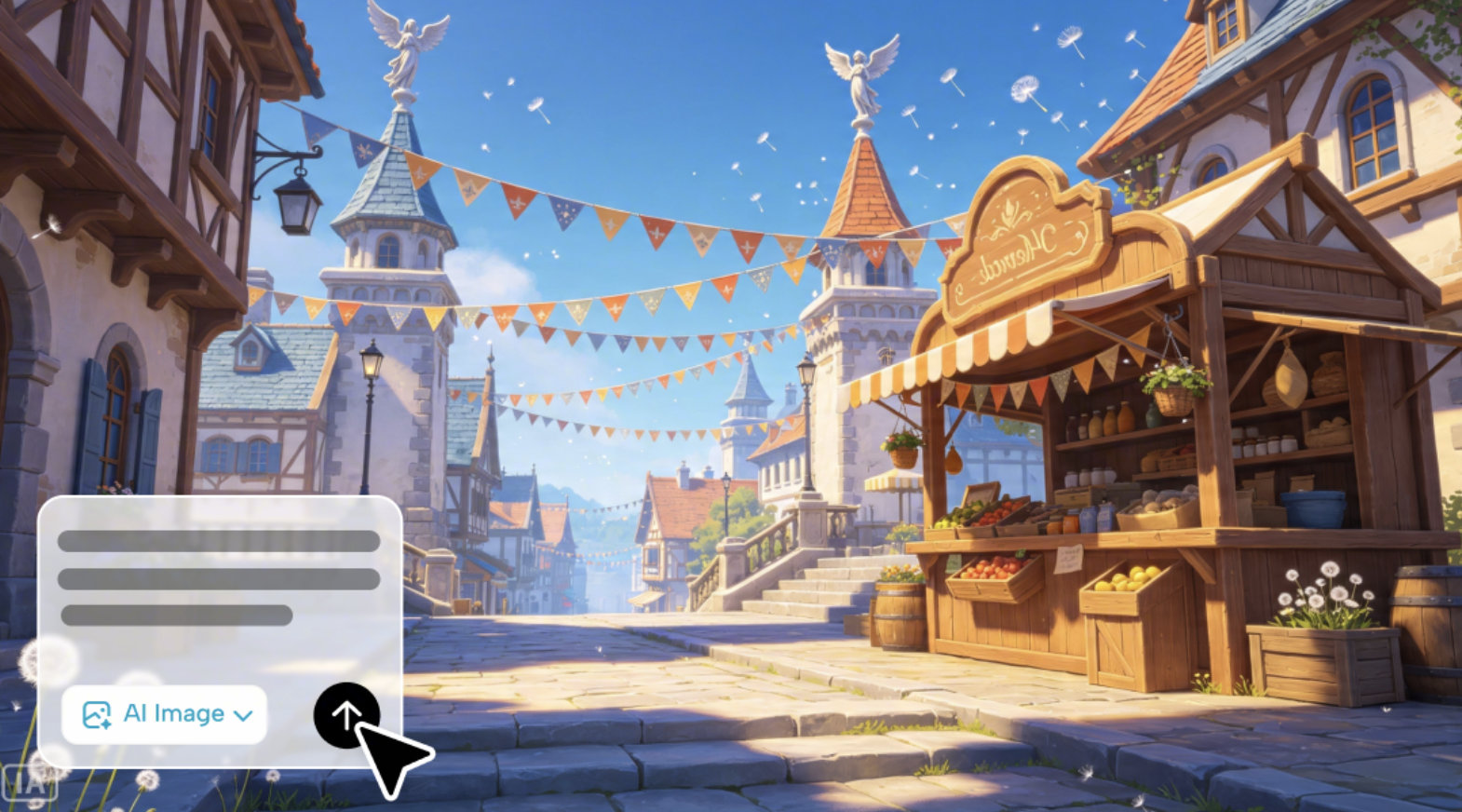
The fastest way to fix thin worldbuilding is to see the street. Ask for hanging pennants, produce stalls, barrel stacks, and the gap of sky between two towers. Once the image exists, your prose has objects to name — wet cobbles, striped awnings, dandelion seed on the air — instead of "a quaint village." That is how you avoid the Renaissance-faire flattening that weak opening scenes often fall into.
Layouts that imply a living economy
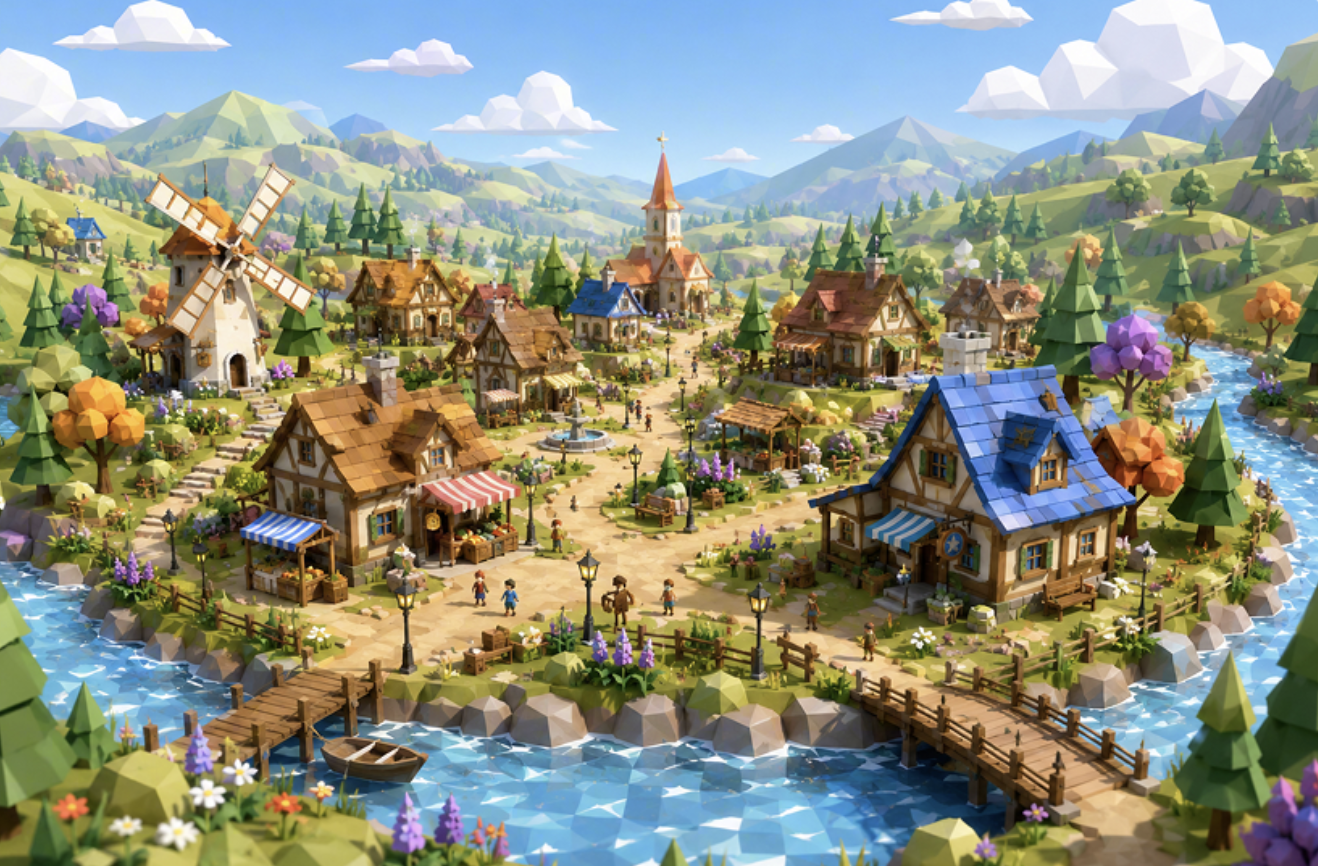
A town is not only facades. Mills, bridges, churches, and docks tell you who eats, who prays, and where goods move. Generate a bird's-eye view with a river, a windmill, and a market square, then write from what the image already decided. You get the illusion of a complete world — interconnected pieces instead of isolated tropes — which is the core craft problem of weaving setting into story.
Style as a production choice
Need a storybook cover town, a tabletop handout, or a low-poly concept for a sim? Say so. The same settlement can be rendered as a sunlit oil-painting street or a geometric valley overview. That matters for teams already using AI to automate repetitive production work while they keep art direction in human hands.
If your brief is fussy — "late-autumn harbor town, slate roofs, no crenellations, lanterns unlit" — a Prompt Generator can tighten the language before you send it to the illustrator, so materials, camera, and negatives stay consistent across a whole region.
"Generate a sunlit medieval market street with timber-framed shops, hanging orange pennant flags, a wooden produce stall, and stone steps rising toward two towers."
"Create a bird's-eye low-poly fantasy village in a river valley, with a windmill, church spire, wooden bridges, and a blue-roof inn."
Related Agents You'll Also Find Useful
A picture of the square is only half a town. These agents cover the lore, the prompt craft, and the session you'll actually run there.
Creative Fiction Writer
If you also need the town to read as real — guild rivalries, festival calendar, who collects the dock tax — Creative Fiction Writer turns the illustration into grounded fiction. It researches authentic social texture and keeps exposition in character, so you are not dumping a gazetteer on page one.
- Settlement history, neighborhoods, and power structures
- NPC voices tied to trade, faith, and class
- Scene-level prose that shows the street instead of listing it
Prompt Generator
When one street looks right and the next looks like a different continent, the brief is the problem. This prompt partner builds reusable recipes for text and image models — camera height, roof materials, crowd density, time of day — so every hamlet in your duchy shares a visual grammar.
- Structured image prompts for towns, interiors, and landmarks
- Style locks you can reuse across a whole region
- Iterative refinement when a mill, gate, or harbor is almost right
Roleplay Game Master
Once the town exists on the page, play in it. Roleplay Game Master holds unlimited session memory and character consistency, so the baker you invented on Tuesday is still behind the same stall next week.
- Open-world play inside the settlement you just designed
- Recurring NPCs, shops, and local politics
- Prep that starts from your images instead of a blank module
Try Graphic Designer free — no credit card required.
How to Generate a Fantasy Town with AI
Step 1: Name the town's job in the story
Decide what the settlement does before you decorate it. A border fortress, a river market, a pilgrimage stop, and a dying mining camp should not share a skyline. One sentence of function will do more than a list of tropes.
"A prosperous river-trade town that taxes grain barges and resents the uphill temple district."
Step 2: Brief the AI illustrator like an art director
State camera (street-level or bird's-eye), era, materials, weather, and two or three landmarks. Mention what must not appear if you are trying to avoid generic crenellations and Disney turrets. Keep proper nouns light; put weight on things a camera can see.
"Street-level view, late afternoon, timber and plaster houses, striped stall awnings, no castles, a mill wheel visible at the end of the lane."
Step 3: Generate two scales of the same place
Make a ground-level street for sensory writing and an overhead layout for geography. The pair is what turns a pretty picture into a usable town: you can see where the bridge sits relative to the inn, and you can smell the stall in the same breath.
Step 4: Lock the visual rules, then write
Once roofs, water, and market placement feel right, reuse those constraints. Ask for the same town at dusk, in rain, or during a festival without changing carpentry. Then draft the scene from what the images already chose — implication over glossary, which is how exposition stays readable.
If you need the prompt itself to stay stable across a dozen variations, run it through a prompt partner before the next batch of images.
Step 5: Stress-test the town in play or on the page
Drop a character into the square and see whether the layout still makes sense. A GM can open a session in the market; a novelist can write the walk from dock to temple. Anything you cannot answer — where night soil goes, which gate closes first — is your next illustration brief, not a paragraph of lore.
Results & Use Cases
📊 Novel Worldbuilding Without the Info-Dump
Scenario: You are opening a fantasy novel in a river town. Early readers say they "can't picture it," the exact complaint world-building craft essays warn about.
Traditional Approach: A weekend of mapping plus a page of street description that still reads generic.
Graphic Designer: A market street and a valley overview in a single sitting, then prose that names what is actually there.
- Concrete objects for the viewpoint character to notice
- Consistent architecture across later chapters
- Pair with Creative Fiction Writer to turn the square into scene, not gazetteer
🎲 TTRPG Session Prep
Scenario: Saturday's game starts in a town you invented on Thursday. You need a handout, three shops, and a sense of where the watch can cut off the alley.
Traditional Approach: A graph-paper blob, a leftover tavern map, and improvisation when players leave the inn.
This AI illustrator: A readable street plus an overhead that shows bridges, mill, and temple — enough geography to improvise without breaking the town.
- Player-facing art in minutes
- Landmarks you can refer to in narration
- Continue the night in Roleplay Game Master so NPCs persist
📱 Mobile Concepting Between Sessions
Scenario: You are on a train with a world bible in your notes and no desk. A new coastal hamlet has to exist before tonight's call.
Traditional Approach: Thumb-typed notes and a promise to "draw it later."
The visual generator: Full image generation on iOS or Android — same tools as desktop — so you leave the commute with a harbor street, not a blank.
- Feature parity across phone and web
- Capture the town while the idea is sharp
- Send the image to your table or writing group immediately
🎮 Indie Environment Concepts
Scenario: A small studio needs a vertical slice of a cozy town-builder: mill, river, market, church. Concept art cannot wait on a freelance queue.
Traditional Approach: Mood boards of other people's villages and a grey-box that still looks like grey-box.
Graphic Designer: A low-poly valley settlement that already communicates palette, density, and landmark silhouette for the team.
36% of game industry professionals now use generative AI as part of their job, and among users the top job is still brainstorming and research — exactly this kind of early environment exploration.
- Fast art direction options before you model
- Multiple styles from one layout
- Keeps humans on taste; AI on iteration speed
Fantasy Town Generator FAQ
Is an AI fantasy town generator free to use?
Yes. You can try Graphic Designer on the free tier with no credit card. Paid plans raise monthly usage if you are generating a whole region of settlements, variants, and interiors. Start with one street and one overhead of the same town; that pair is usually enough to decide whether the look belongs in your project.
How is this different from a random map generator?
Random layout tools are excellent at street graphs and lot division. They rarely give you atmosphere: stall clutter, roof culture, weather, or a camera that matches your book's tone. This illustrator produces finished scenes you can put in a pitch deck, a session handout, or a chapter heading — then you iterate the art, not only the seed.
Can Graphic Designer create both maps and street scenes?
Yes. Ask for bird's-eye layouts when you need geography, and street-level views when you need sensory reference. The useful workflow is to generate both for one settlement so the mill in the aerial matches the mill at the end of the lane. Specify camera height in every brief so the two scales do not drift.
Does a fantasy town generator work on mobile?
Yes. Image generation and chat run on web, iOS, and Android with the same core features. That is why a GM can brief a harbor town on a phone between work and the table, then pin the result as the night's establishing shot.
Can I keep one architectural style across a whole region?
You can, if you write the rules down. Name roof materials, timber vs. stone, palette, and forbidden tropes, then reuse that paragraph. When variants start to drift, a dedicated prompt specialist can freeze those constraints into a reusable recipe so every village still looks like it shares a carpenter's guild.
Will the images replace writing the town?
No — and they should not. Worldbuilding that never reaches the narrative is unused work. The images give you specific, visible facts so your prose and your sessions can show a place instead of explaining it. You still decide who holds power, what the town believes, and why the reader should care.
Start Generating Towns That Feel Lived-In
A fantasy town fails when it is either a blank or a brochure. Writers and GMs do not need more proper nouns; they need streets with weight, layouts with an economy, and art they can iterate before the chapter — or the session — starts. An AI fantasy town generator that actually draws the settlement closes that gap: you see the mill, the flags, and the river, then you write and play from what is there.
Try Graphic Designer with one honest brief — climate, camera, two landmarks, and what you refuse to include. Keep the version that could exist in your story. Explore more at Jenova.
For Developers: Graphic Designer is available programmatically via the Jenova API — integrate AI fantasy town illustration into your application with a single API call. Full documentation →