AI Fantasy Architecture Generator: Design Castles, Temples & Cities
2026-10-24
A fantasy architecture generator turns a written idea into concept art you can build a world around. That idea might be a clockwork palace, a drowned elven temple, or a frontier town stitched together from three fallen empires.
As of October 2026, Jenova combines that capability with lore writing, card design, and world-bible publishing in one AI agent platform. Your buildings stay connected to the story they belong to instead of sitting in a separate folder.
Most image tools stop at a pretty picture. This approach treats architecture as worldbuilding, where every spire, arch, and inscription is tied to a culture, a history, and a purpose.
- ✅ Generate castles, temples, sky cities, and ruins from plain-language descriptions or uploaded sketches
- ✅ Keep your kingdom's architectural rules consistent across sessions with persistent memory
- ✅ Turn building concepts into lore, card art, posters, and world bibles with specialized agents
- ✅ Work on web, iOS, and Android with the newest models from OpenAI, Anthropic, Google, and more
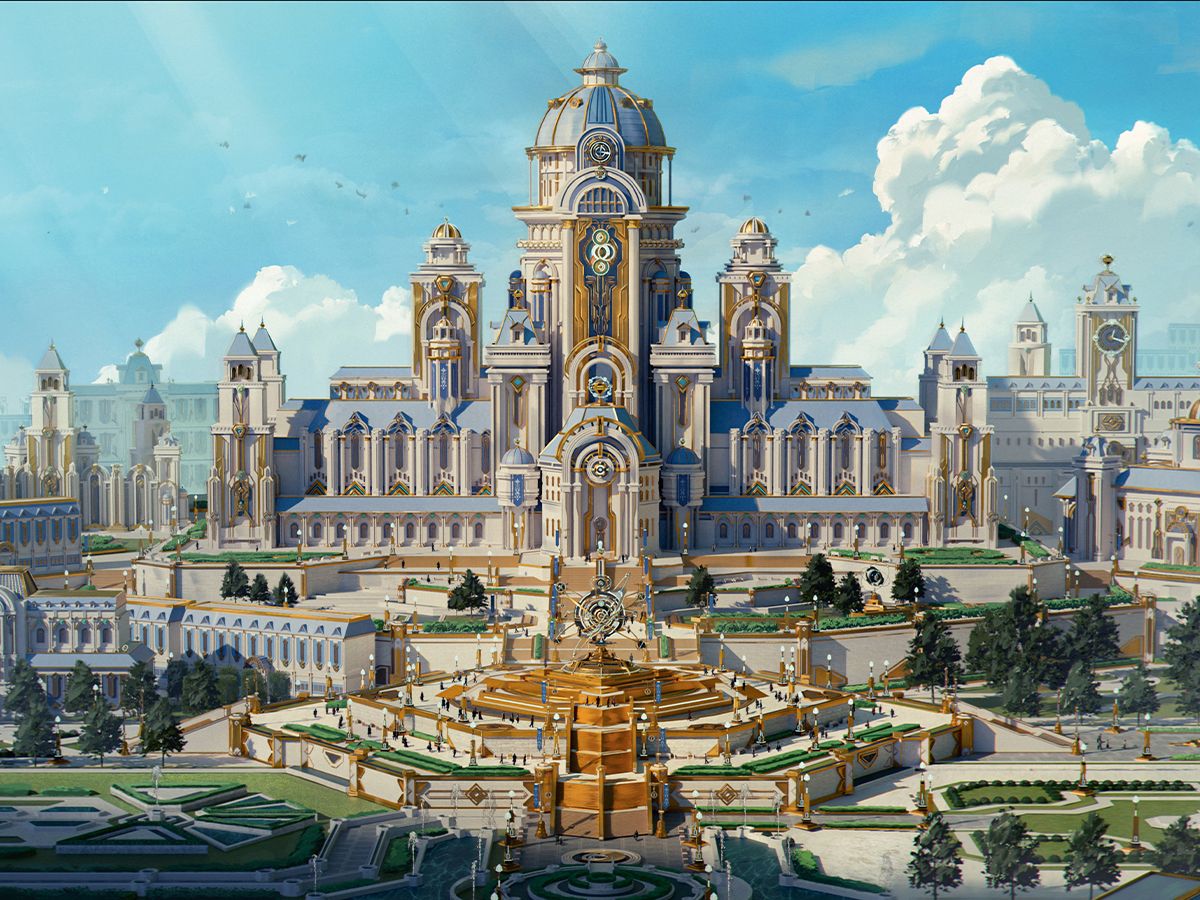
Fantasy architecture does more than decorate a setting. It tells readers and players who holds power, what a culture worships, and what history the land has survived. Before looking at how AI changes the process, it helps to understand why visualizing imagined buildings has traditionally been slow, costly, and frustratingly inconsistent for writers, game designers, and game masters.
Quick Answer: What Is a Fantasy Architecture Generator?
A fantasy architecture generator is an AI tool that converts text descriptions, sketches, or reference images into concept art of imagined buildings, such as castles, temples, cities, and ruins, for novels, games, and tabletop campaigns. The strongest versions pair image generation with lore and documentation that understand your world.
Key capabilities:
- Generate building concepts from natural-language prompts with specific style, era, and material cues
- Iterate on designs conversationally, for example by adding a bell tower, aging the stone, or switching to a dusk palette
- Write the in-world history, inscriptions, and cultural meaning behind each structure
- Export architecture guides, wiki pages, and pitch materials from the same workspace
Why Fantasy Architecture Is So Hard to Visualize
Generative AI is now firmly part of creative and architectural work. Architects are among the earliest adopters for exactly the tasks fantasy creators care about most: concepting and rapid variation.
44% — Architects using AI to generate concept images and early design ideas
35% — Architects using AI to quickly create variations of design options
The market reflects that demand. The global AI image generation and creative content tools market was valued at USD 910.0 million in 2025 and is projected to reach USD 13,818.2 million by 2033.
But turning a fantasy building idea into usable concept art is still frustratingly difficult:
- Commissioned concept art is slow and expensive for solo writers and small studios
- AI outputs drift, so the same prompt rarely yields the same architectural style twice
- Prompting requires technical vocabulary that many storytellers don't have
- Images get disconnected from lore, which leaves buildings without history or function
- Tool sprawl scatters art, notes, and documentation across multiple apps
Concept Art Doesn't Scale With Your World
A single novel might reference dozens of locations, from throne rooms and guild halls to border forts and ruined shrines. A tabletop campaign can need even more. Even professional teams feel the squeeze: 48% of creative teams report struggling to keep up with content demand. Independent worldbuilders usually face that gap with no art budget at all.
Inconsistency Breaks Immersion
Researchers reviewing AI in the creative industries identify the lack of consistent, controllable outputs as a primary challenge for artists. Identical prompts can produce different results across runs. For worldbuilding this is a real problem: if the dwarven capital's arches are pointed in one image and rounded in the next, readers notice.
The Vocabulary Barrier
The same research notes that prompt engineering requires technical knowledge and iterative refinement, which can clash with the exploratory way artists work. A writer who knows the mood they want may not know to ask for machicolations, a corbelled parapet, or a coffered dome. Those terms often separate a convincing fortress from a generic one.
Buildings Without Stories
Worldbuilding software reviewers point out that most AI features are not world-aware, meaning they don't read your established rules when generating new material. A beautiful palace that contradicts your kingdom's history, climate, or available materials creates continuity problems later.
Too Many Disconnected Tools
The same review finds that most working worldbuilders use two or three tools, not one. Art lives in one place, lore in another, and maps in a third. Every handoff costs context.
The Jenova Solution: A Fantasy Architecture Generator Built for Worldbuilders
This is exactly what Jenova was built for. Instead of one image box, you get a set of specialized agents that share memory of your world. Whatever you decide about your empire's stonework carries into the next image, the next chapter, and the next document.
| Traditional Approach | Jenova |
|---|---|
| Commission concept art per location and wait days or weeks for sketches | Generate and refine building concepts conversationally in minutes |
| Re-explain your world's style every time you open a new tool | Persistent memory keeps architectural rules, palettes, and history consistent |
| Learn architectural jargon to write effective prompts | Describe the mood and function, and agents translate them into precise design language |
| Art, lore, and documentation scattered across apps | Concept art, lore, inscriptions, and world bibles produced in one workspace |
| Locked into one image model's style | Access to the newest models from multiple providers, with free switching |
Generate Concept Art From Words, Sketches, or References
Poster Maker brings professional design intelligence to wall art and illustrated pieces. That makes it a strong fit for showpiece renders of your capital city or a framed "travel poster" of a floating citadel. You can describe a scene in plain language or upload a rough sketch as a starting point.
"Create wall art of a white-and-gold palace built around a giant clockwork mechanism, with tiered terraces, formal gardens, and an armillary sphere in the central plaza. Bright midday light, painterly style."
Design With Architectural Logic, Not Just Aesthetics
Convincing fantasy architecture follows internal logic. The image below shows why this matters.
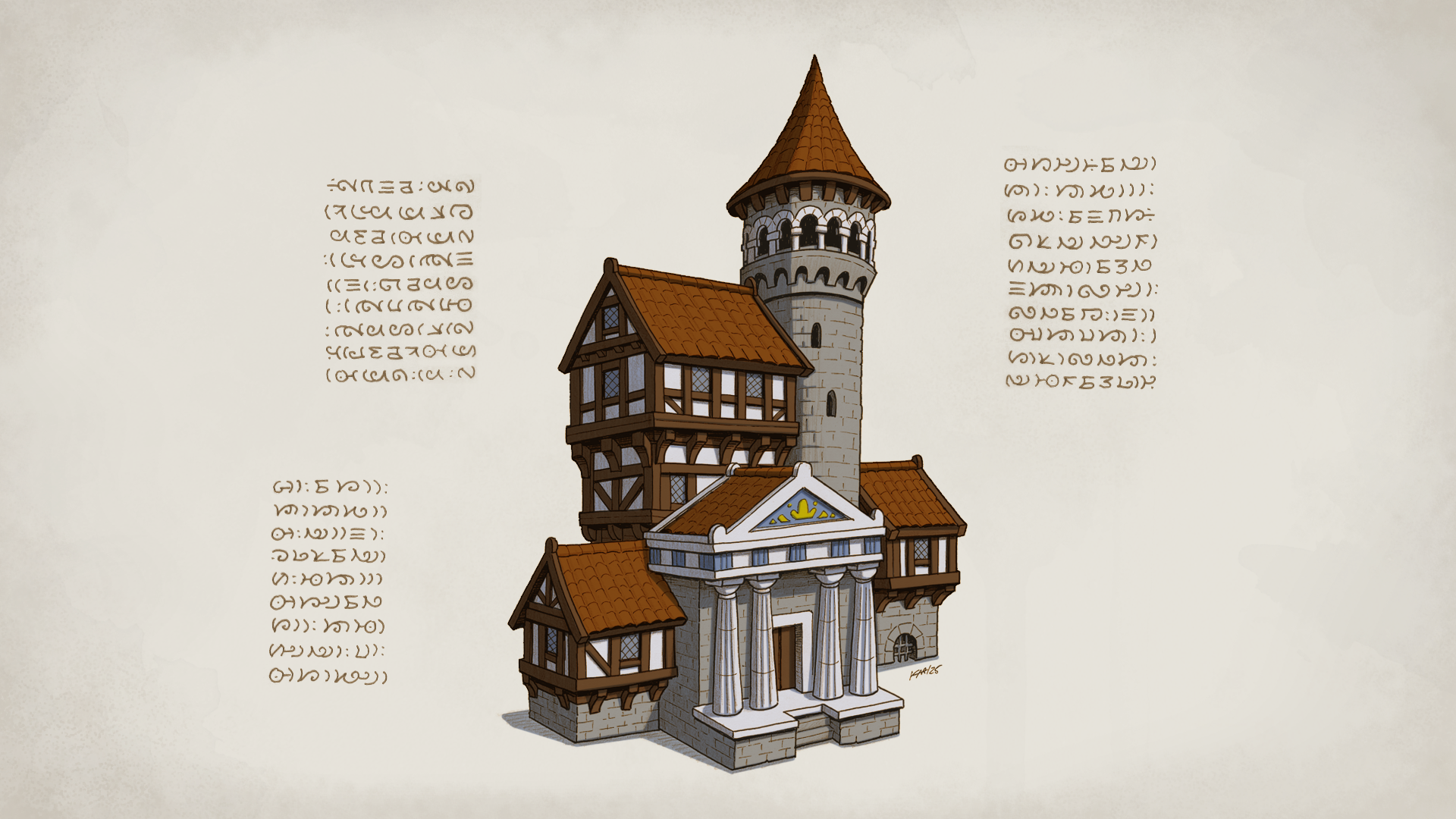
Read it like an archaeologist and the building tells a story in layers:
- The stone watchtower with its corbelled parapet is the oldest layer, built for defense when the region was contested.
- The half-timbered wings are later domestic additions, cheaper to build once the threat faded and the settlement grew.
- The classical portico with fluted columns and a gilded pediment is the newest layer, a civic statement from a wealthier, more confident era.
The invented script framing the illustration works like an architect's annotation in a fictional language, which grounds the structure in a specific culture. This kind of thinking turns a generated image into worldbuilding, and AI agents can help you apply it deliberately:
"Design a frontier town hall that shows three eras of occupation: an original defensive tower, later timber-framed expansions, and a newer marble entrance added by a colonial empire."
Write the History Behind Every Building
Creative Fiction Writer researches and drafts the lore behind your structures: who built the palace, which war scarred the eastern wall, why the temple faces the sunrise. It provides editorial feedback as well as first drafts, which helps your architecture stay consistent with your plot.
For the words carved above gates and on foundation stones, Poem Writer composes original verse in any form. Dedications, funerary epitaphs, and guild mottos all add texture to a building.
Document Your World's Architecture
Once your buildings take shape, Markdown Generator turns your notes into clean, structured Markdown that drops straight into note-taking systems. PDF Generator compiles everything into a professionally formatted architecture guide or setting supplement.
Platform Capabilities That Keep Your World Coherent
- Multi-model access: The newest models from OpenAI, Anthropic, Google, DeepSeek, xAI, and more, with no vendor lock-in
- Persistent memory: Agents remember your world's materials, climate, styles, and history across sessions
- Custom agents: Build your own fantasy architecture agent with custom instructions, preferred models, and a private knowledge base of style references
- MCP tool integration: Connect Google Drive, Notion, Dropbox, and other tools to pull in existing world notes
Specialized AI Agents for Fantasy Architecture Projects
Concept art is often only the first deliverable. These agents carry your buildings into the formats your project actually ships in.
Trading Card Game Creator
A complete TCG design studio covering mechanics, lore, card art, and balance. Location cards and land cards are natural homes for fantasy architecture, and this agent designs the art and the rules text together. Your Sunspire Citadel can become both a gorgeous illustration and a playable card.
- Card art generation that matches your set's visual identity
- Lore text and flavor writing tied to each location
- Balance analysis across a full playable set
Infographic Maker
Turns complex information into clear visual explainers. Use it to build an architectural style guide comparing your realms side by side: materials, roof forms, defensive features, and sacred symbols.
- Visual comparison of cultures and building traditions
- Clear hierarchy for dense world information
- Shareable graphics for players, readers, or collaborators
Marketing Visual Designer
Creates campaign imagery, social media assets, and brand-consistent designs. It suits authors promoting a book launch or indie studios running a crowdfunding campaign built around a signature location.
- Social posts and banners featuring your key architecture
- Consistent visuals across platforms
- Campaign imagery for launches and crowdfunding
HTML Generator
Transforms content into polished, self-contained HTML pages that open in any browser. Publish an illustrated gazetteer of your cities or a player-facing location guide without touching code.
- Responsive, professionally designed pages
- Self-contained files that are easy to share or host
- A strong fit for campaign wikis and reader companion sites
Every agent above is free to try, with no credit card required.
How to Use an AI Fantasy Architecture Generator
Step 1: Define the Culture Before the Building Start with who lives there, not what the building looks like. Climate, available materials, religion, and threats determine architecture. Desert peoples build thick walls and shaded courtyards, while seafaring empires build harbor fortresses and lighthouses.
"My Valthari culture lives in a cold, mountainous region, worships the stars, and is known for precision clockwork. What architectural traits would they develop?"
Step 2: Generate Your First Concept Describe the specific structure with its function, scale, and mood. Include a few concrete details, such as a central dome, stepped terraces, or a gilded mechanism, so the output has an anchor.
"Generate a royal observatory-palace for the Valthari: white stone, gold clockwork faces on every tower, a central dome, and a ceremonial plaza with a giant armillary sphere."
Step 3: Iterate Conversationally Refine one variable at a time: lighting, weathering, season, or camera angle. Changing a single element per request keeps the design stable while you explore variations.
"Keep the same palace, but show it at dusk in winter, with snow on the terraces and lanterns lit along the walkways."
Step 4: Lock In a Style Reference Once a design works, ask the agent to summarize its architectural rules into a reusable style brief. Paste that brief into future prompts, or save it to a custom agent's knowledge base so every new building matches.
"Summarize the Valthari architectural style into a one-paragraph brief I can reuse for every future building."
Step 5: Build the Lore and Documentation Pair each building with its history, inscriptions, and gameplay or narrative role. Then compile everything into a world bible or setting guide you can share with collaborators, editors, or players.
"Write a 300-word history of the observatory-palace, including when it was built, who commissioned it, and one secret hidden inside."
Fantasy Architecture Generator Use Cases
📖 Novelist Designing a Capital City
Scenario: A fantasy author needs a consistent visual and historical identity for a capital that appears across a trilogy, with districts that reflect class divisions.
Traditional Approach: Commissioning reference art for each district, or writing descriptions from memory and hoping continuity holds across three books.
Creative Fiction Writer: Drafts district histories, architectural rules, and scene-ready descriptions that stay consistent because the agent remembers prior decisions.
- Districts with distinct materials and styles tied to social class
- Continuity across books through persistent memory
- Editorial feedback on how architecture serves the plot
📱 Game Master Creating Handouts Mid-Session
Scenario: A tabletop GM's players unexpectedly head for a ruined monastery the GM hadn't prepared, and the session is already underway.
Traditional Approach: Improvising a verbal description or pausing the game to search for stock images that don't quite fit.
Poster Maker: Generates an illustrated handout of the ruins from the GM's phone in the middle of the session, using the iOS or Android app.
- Mobile generation with full feature parity
- Visuals that match the campaign's established style
- Keeps the game moving without breaking immersion
🃏 Indie Designer Building Location Cards
Scenario: A two-person team developing a card game needs 20 location cards with cohesive art and balanced effects.
Traditional Approach: Separate workflows for art briefs, rules design, and flavor text, coordinated across spreadsheets and messages.
Trading Card Game Creator: Designs card art, mechanics, and lore together so each fortress, temple, and ruin plays as well as it looks.
- Art and mechanics developed in one conversation
- Balance checks across the full set
- Flavor text grounded in the world's history
💼 Studio Pitching an Original World
Scenario: A small studio needs a pitch deck showcasing its world's signature architecture for a publisher meeting.
Traditional Approach: Assembling concept art, writing copy, and formatting slides by hand over several days.
PowerPoint Generator: Turns concept art, lore summaries, and design pillars into a polished, presenter-ready deck.
- Professionally structured slides built from existing content
- Architecture positioned as a core part of the world's identity
- Faster turnaround from concept to pitch
Frequently Asked Questions
What is the best fantasy architecture generator?
The best fantasy architecture generator does more than produce attractive images. It keeps buildings consistent and connects them to your world's history. Look for persistent memory, conversational iteration, access to multiple image and language models, and tools for lore and documentation. Researchers flag inconsistent, hard-to-control outputs as a core challenge for artists, so consistency features matter more than raw image quality.
Is there a free AI fantasy architecture generator?
Yes. The platform covered in this guide offers a Free tier that includes all core features with limited usage. You can generate building concepts, refine them conversationally, and write accompanying lore without paying. Paid plans start at $20 per month for 30× the Free tier's usage plus custom model selection, and usage resets monthly with no daily caps.
How do I keep fantasy buildings consistent across multiple images?
Create a written style brief that covers materials, roof forms, color palette, ornament, and defensive features, then reuse it in every prompt. Brand Kit Generator can formalize your realm's palette and visual system the way a studio would build brand guidelines. Persistent memory also helps agents recall earlier design decisions across sessions.
Can I use an AI architecture generator for D&D and tabletop campaigns?
Yes. AI-generated building concepts work well as player handouts, location reveals, and GM reference art. For tactical battle maps, many worldbuilders pair AI concept art with dedicated map-making tools like Inkarnate or Wonderdraft. AI handles the atmosphere and architectural detail, while map tools handle grid-accurate layouts.
Can I export my architecture lore to Obsidian or a wiki?
Yes. Markdown Generator converts your building histories, style guides, and district notes into clean Markdown that works in Obsidian and other note-taking apps. You can also produce formatted PDFs or self-contained HTML pages for players and readers.
Will AI replace concept artists for fantasy worlds?
Current evidence suggests AI is a collaborator rather than a replacement. 45% of creative pros say they will never fully trust generative AI to create final assets, and a 2025 case study found designers value generative AI most during early ideation. Many worldbuilders use AI to explore directions quickly, then refine or commission final art.
Conclusion
Fantasy architecture is one of the most powerful worldbuilding tools available. A palace built around a clockwork heart, or a town hall carrying three eras of conquest in its walls, tells a story before any character speaks. The traditional obstacles are cost, inconsistency, missing vocabulary, and scattered tools, and they have kept that storytelling out of reach for many creators.
An AI fantasy architecture generator closes that gap when it's paired with memory, lore, and documentation. Design your castles and temples with Creative Fiction Writer shaping their history, Poster Maker rendering showpiece concept art, and Trading Card Game Creator turning landmarks into playable cards. The result is AI-assisted building design that serves your world rather than just decorating it.
Explore the full agent library at Jenova.
For Developers: Every agent in this article is available programmatically via the Jenova API, so you can build fantasy concept art, lore generation, and worldbuilding features into your game or creative app with a single integration. Full documentation →