AI Face Retouch: How to Retouch Faces in Photos with AI (April 2026)
2026-04-05
AI face retouching in April 2026 sits at the center of a photo retouching software market valued at $1.25 billion in 2024** and forecast to reach **$3.5 billion by 2033, growing at a 12.5% CAGR — with AI-enabled tools and cloud-based platforms identified as the leading growth segments (Verified Market Reports, via LinkedIn). Within the broader AI image editor market — valued at $5.12 billion in 2024** and projected to reach **$48.74 billion by 2035 at a 22.73% CAGR — face retouching represents one of the highest-demand functionality categories, driven by the explosion of portrait content across social media, eCommerce, and professional photography (Market Research Future).
But the face is where AI retouching fails most visibly. Our brains are hardwired to detect facial anomalies — which means over-smoothed skin, unnaturally bright eyes, or subtly altered proportions register as "wrong" even when viewers can't articulate why. The 2026 trend in AI portrait retouching emphasizes natural-looking enhancement rather than heavy-handed perfection — audiences increasingly reject overly polished AI visuals in favor of images with genuine imperfections like natural skin texture (ArtSmart AI).
Jenova's Photo Editor is purpose-built for exactly this challenge: a specialized AI agent that understands the difference between a blemish and a beauty mark, between flattering light and flattened light, between enhancement and erasure — all through natural language conversation, powered by models from OpenAI, Anthropic, Google, and more.
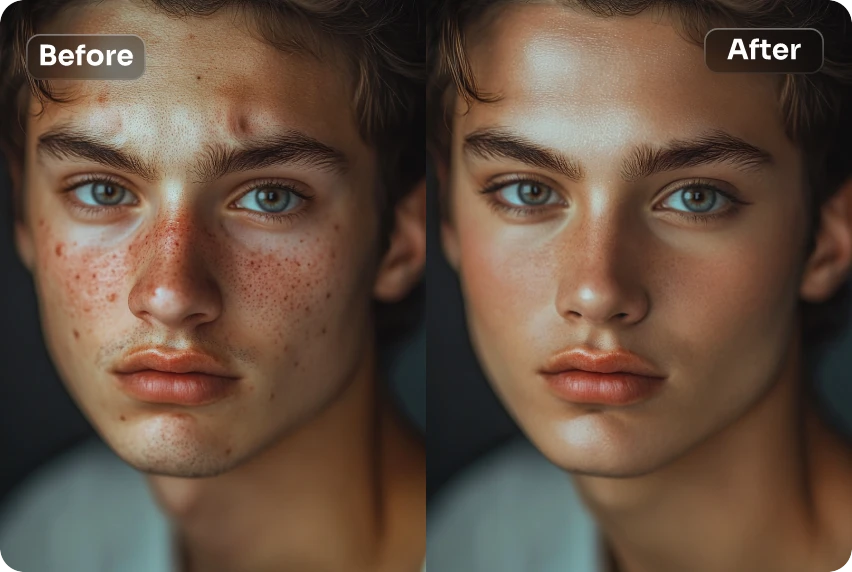
Quick Answer: What Is AI Face Retouching?
AI face retouching uses machine learning and computer vision to automatically detect and correct imperfections in facial photographs — smoothing skin while preserving natural texture, removing blemishes, brightening eyes, correcting lighting, and evening out complexion — without requiring manual Photoshop expertise.
- Skin retouching: Blemish removal, smoothing, pore texture preservation — Photo Editor
- Eye & feature enhancement: Brightening, sharpening, subtle detail correction
- Clinical-grade facial analysis: Proportion quantification, procedure mock-ups — Cosmetic Surgery Image Specialist
- Beauty guidance: Makeup direction, skincare analysis, cosmetic candidacy — Beauty Consultant
The Problem: Why AI Face Retouching Still Gets Faces Wrong
Face retouching is the highest-stakes category in photo editing. A landscape with slightly over-sharpened foliage looks "punchy." A portrait with slightly over-smoothed skin looks fake — and the person in the photo knows it immediately.
🎭 The "Plastic Skin" Epidemic
AI-powered retouching tools handle lighting correction, skin smoothing, background cleanup, and color grading in seconds. But the 2026 trend emphasizes natural-looking enhancement rather than heavy-handed perfection. Even AI-focused software companies are aligning with the shift toward less perfection and more humanity in processed images (ArtSmart AI).
The most common failure of generic AI face retouching is uniform skin smoothing — algorithms blur pixels to hide blemishes, destroying natural texture like pores, fine lines, and follicles. The result is skin that looks featureless, poreless, and fake. In 2026, over-retouched faces don't signal quality — they signal inauthenticity.
⏱️ Face Retouching Is the Bottleneck That Caps Revenue
The AI photo editors market reached $2.1 billion in 2024** and is expected to grow to **$8.9 billion by 2034, registering a 15.7% CAGR (Emergen Research, via Autophoto). Yet 68% of brands still exceed their photoshoot budgets despite AI adoption (Nfinite, via Autophoto).
Manual face retouching — frequency separation, dodge and burn, healing brush work — takes 15–30 minutes per portrait in Photoshop. For a wedding photographer delivering 400 retouched portraits, that's 100–200 hours of post-production. For an eCommerce brand shooting model photography across 200 SKUs, the retouching cost alone can exceed the photography budget.
🔧 Tool Sprawl Fragments the Face Retouching Workflow
Teams managing 5–10 different AI tools discover that time saved in editing gets consumed by learning interfaces, moving files between platforms, and troubleshooting inconsistencies (Autophoto).
The AI face retouching landscape in 2026 is fragmented: Remini for mobile face enhancement, Evoto for portrait-specific retouching, Topaz Photo AI for desktop noise reduction and sharpening, Photoshop with Firefly for generative fill, and Facetune for social media selfies (AIEnhancer). One tool for skin smoothing, another for eye brightening, a third for background cleanup — the operational burden shifts rather than disappears.
🎯 Audiences Demand Authenticity Over Perfection
According to LTX Studio's 2026 trend analysis, the biggest shift in AI imagery is toward authenticity over perfection. Audiences increasingly reject overly polished AI visuals in favor of images with genuine imperfections like light leaks, film grain, and natural skin texture (ArtSmart AI).
The backlash against over-retouched faces is measurable. In the beauty industry, the trend has shifted from "skin perfection" to "skin health" — clients want healthy, glowing skin, not airbrushed perfection (ProBeauty AI). The best AI face retouching tool in 2026 isn't the one that changes the most — it's the one that enhances naturally while preserving what makes a face recognizable and authentic.
This is exactly what Photo Editor was built for — a specialized AI agent that understands the difference between enhancement and alteration, between removing a blemish and erasing a person's identity.
Why Photo Editor
Most AI face retouching tools operate on a simple loop: upload → auto-detect face → apply uniform smoothing/sharpening → download. You get no control over which features to enhance, no ability to specify what to preserve, and no way to say "the skin smoothing is good but the eyes look unnatural."
Jenova's Photo Editor breaks this pattern with a fundamentally different approach: you describe the face retouch in plain language — what to fix, what to keep, and how the final image should feel.
| Challenge | One-Click Face Retouching Tools | Photo Editor |
|---|---|---|
| Skin smoothing | Uniform blur → plastic skin | Region-specific smoothing preserving natural pore texture |
| Blemish removal | Removes everything including freckles, moles | Removes only what you specify — keeps character |
| Eye enhancement | Over-brightened → uncanny valley | Subtle, natural brightening you control through conversation |
| Complexion correction | Generic auto-adjustment | Context-aware correction that understands skin tones and lighting |
| Consistency | Different result every time | Persistent memory maintains your retouching style across sessions |
| Creative control | None — take it or leave it | Full conversational iteration until you're satisfied |
The "Temporary vs. Permanent" Rule
Professional retouchers in 2026 follow a fundamental principle: remove temporary distractions (pimples, redness, lint) but keep permanent character (moles, scars, freckles, laugh lines). Generic AI face retouching tools can't make this distinction. The Photo Editor can — because you tell it exactly what to keep and what to remove:
"Remove the pimple on his chin and the redness around his nose, but keep the mole above his lip — it's part of his look. Smooth the skin subtly on the forehead, just enough to reduce the visible pores without making it look airbrushed."
"This is a corporate headshot. Even out the skin tone, reduce the under-eye shadows by about 50%, and sharpen the eyes. Keep the expression exactly as it is — don't smooth the smile lines. This person looks approachable, and I want to keep that."
"Retouch this bridal portrait — the lighting was harsh and there are deep shadows under the nose and chin. Correct the lighting to look like soft window light. Smooth the skin subtly but keep the freckles. Brighten the bride's eyes and add a slight warm tone."
Multi-Model Architecture
The Photo Editor can leverage GPT-5.4 (OpenAI), Claude Opus 4.6 (Anthropic), Gemini 3.1 Pro Preview (Google), plus models from xAI and DeepSeek — all from one interface. Different models handle facial features differently. One may excel at natural skin texture reconstruction while another produces better eye detail. You can switch between them to find the best output for your specific portrait.
Persistent Memory for Consistent Retouching
AI face retouching tools tend to "drift" — producing inconsistent results across batches. A fashion brand with 5,000 model images in a seasonal catalog needs every portrait to feel like it belongs to the same world. Jenova's persistent memory solves this: the Photo Editor remembers your retouching preferences — smoothing intensity, color grading, sharpening levels — across sessions. Your hundredth portrait is consistent with your first. AI image editing was the fastest-growing software category of 2024, with 441% year-over-year growth (G2, via Autophoto) — and the tools that win are the ones that deliver consistency at scale.
Related Agents You'll Also Like
Cosmetic Surgery Image Specialist
For medical professionals and aesthetic clinics needing clinical-grade facial analysis that goes beyond cosmetic retouching into quantified facial assessment.
- Facial proportion quantification using golden ratio metrics, nasal projection, and periorbital evaluation
- Procedure mock-ups for rhinoplasty, fillers, and other aesthetic procedures with before/after layouts
- Post-op healing tracking with complication flagging and case presentation packaging
Beauty Consultant
For content creators and individuals who want face retouching guidance before the photo is even taken — makeup direction, skincare analysis, and cosmetic procedure candidacy.
- Facial structure analysis with culturally fluent makeup direction
- Skincare routine ingredient checks and product recommendations
- Cosmetic procedure candidacy assessment based on aesthetic medicine methodology
Fashion Mockup Studio
For eCommerce brands needing on-model product photography with consistent, professionally retouched faces across entire catalogs.
- Market-specific model archetypes for Western, Korean, Japanese, Chinese, and Middle Eastern audiences
- Studio-grade portrait output with consistent facial retouching across thousands of images
- Brand identity preservation across product lines
How It Works
Here's how to go from an unretouched portrait to a professionally face-retouched result using Jenova's Photo Editor:
1. Open the Photo Editor agent. Navigate to Photo Editor from Jenova's agent gallery or search for it using the search icon.
2. Upload your portrait and describe the face retouch you need. Drag and drop your image into the chat. Be specific about what you want changed — and critically, what you want preserved:
"This is a senior portrait. The skin has some acne on the forehead and chin — remove those blemishes. Smooth the skin subtly but keep the natural texture. The eyes are a bit dark from the overhead lighting — brighten them slightly. Keep the freckles across the nose — they're part of her look. Don't change the shape of anything."
3. Review and iterate through conversation. The agent delivers your retouched portrait. Need adjustments? Just say so:
"The skin smoothing is a bit too aggressive around the nose — dial it back. The eye brightening is perfect. Can you also even out the skin tone on the neck to match the face?"
4. Try different AI models for different results. Switch between GPT-5.4, Claude Opus 4.6, Gemini 3.1 Pro Preview, or other available models using the model selector. Each model may produce subtly different skin textures, eye detail, and color rendering — compare outputs to find the most natural result for your specific portrait.
5. Download your retouched portrait. Export directly — ready for social media, your website, print, or client delivery.
6. Let persistent memory learn your retouching style. Over time, Jenova remembers your face retouching preferences — smoothing intensity, eye brightening level, color grading approach, and which features you always preserve. Your hundredth portrait is faster and more consistent than your first.
Results & Use Cases
📸 Wedding & Event Portrait Galleries
Scenario: A wedding photographer needs to deliver 350 retouched portraits from a weekend event — skin smoothing, blemish removal, eye brightening, and consistent color grading — by Wednesday.
Traditional Approach: Manual retouching at 15–20 minutes per image in Photoshop using frequency separation and dodge-and-burn. Total: 87–116 hours. Alternatively, outsource to a retouching service at $0.25–$10/image with a 5–7 business day turnaround.
Jenova Solution: Upload portraits to the Photo Editor and describe your retouching style once: "Smooth skin naturally — keep pore texture. Remove temporary blemishes but preserve freckles and beauty marks. Brighten eyes subtly. Warm color grading, consistent across the gallery." Persistent memory ensures every portrait gets the same treatment. AI reduces product photography costs by 60–70% for certain image types (FoxEcom, via Autophoto).
💼 Corporate Headshot Programs
Scenario: A company needs 75 employee headshots with consistent face retouching for the website — but the original photos were taken across different offices, at different times, with different lighting and cameras.
Traditional Approach: Re-shoot all 75 headshots in a controlled environment ($3,000–$7,000) or manually edit each photo (15–20 minutes per image = 18–25 hours).
Jenova Solution: Upload all headshots to the Photo Editor and describe the target retouching once: "Even out skin tone across all portraits. Remove temporary blemishes. Brighten eyes slightly. Don't smooth skin aggressively — these should look professional but natural. Normalize the lighting to look like soft studio lighting from the upper right." Persistent memory ensures every headshot matches, regardless of the original shooting conditions.
📱 Social Media & Influencer Content
Scenario: A beauty influencer posts daily content across Instagram, TikTok, and YouTube — each requiring retouched selfies and portrait shots with consistent aesthetic quality, without the "over-filtered" look audiences increasingly reject.
Traditional Approach: 15–30 minutes per image in Facetune or Lightroom Mobile, risking the artificial look that erodes audience trust. In 2026, the beauty industry trend is clear: clients want skin health over skin perfection — healthy, glowing skin, not airbrushed perfection (ProBeauty AI).
Jenova Solution: Upload photos to the Photo Editor with instructions like "Light retouch only — remove the blemish on my chin, even out the skin tone slightly, but keep everything looking real. No plastic skin. Brighten my eyes just a touch." The agent understands the difference between subtle enhancement and heavy retouching. For personalized beauty guidance to inform creative direction, consult the Beauty Consultant.
🏥 Aesthetic Medicine & Cosmetic Surgery
Scenario: A cosmetic surgery clinic needs patient consultation photos with standardized face retouching — consistent lighting, facial proportion analysis, and procedure mock-ups for rhinoplasty, fillers, and facelifts.
Traditional Approach: Specialized medical photography software ($500–$2,000/year) plus manual Photoshop work for mock-ups (30–60 minutes per patient). In 2026, AI-driven predictive modeling analyzes thousands of data points regarding facial golden ratios to guide aesthetic procedures (Haute Living).
Jenova Solution: Use the Photo Editor for basic portrait retouching and lighting normalization, then hand off to the Cosmetic Surgery Image Specialist for clinical-grade facial proportion quantification, procedure mock-ups, and case presentation packaging — all through conversational AI.
🛍️ eCommerce Model Photography
Scenario: A fashion brand launches 100 new products per month with on-model photography. Every model portrait needs consistent face retouching — skin smoothing, complexion correction, eye brightening — across the entire catalog.
Traditional Approach: In-house retoucher ($50K–$70K/year) or outsourced service ($1–$5/image, 24–48 hour turnaround). At 100 products × 5 images = 500 images/month, costs add up fast. 95.6% of fashion brands use model photography as their primary style, making consistent face retouching a non-negotiable operational requirement (ElectroIQ, via Autophoto).
Jenova Solution: Upload model portraits to the Photo Editor with brand-standard retouching instructions. Persistent memory ensures every model portrait matches your brand guidelines. For on-model shots without a physical studio, hand off to the Fashion Mockup Studio for studio-grade product photography with consistent facial retouching across market-specific model archetypes.
FAQ
What is AI face retouching?
AI face retouching uses machine learning to automatically detect and correct imperfections in facial photographs — including skin blemishes, uneven complexion, under-eye shadows, and lighting issues — while preserving natural texture and character. Unlike basic beauty filters that apply uniform smoothing, professional AI face retouching tools like Jenova's Photo Editor understand context: they smooth skin while preserving pore texture, correct exposure without flattening dynamic range, and remove blemishes without erasing defining features.
What is the best AI face retouching tool in 2026?
The best AI face retouching tool depends on your workflow. Remini excels at mobile face restoration for casual users, specializing in AI-powered face enhancement for portraits and selfies (AIEnhancer). Topaz Photo AI leads in desktop noise reduction and sharpening for professional photographers. For users who want professional-quality face retouching through natural language conversation — with the ability to direct exactly what gets retouched and what gets preserved — Jenova's Photo Editor offers multi-model access, conversational iteration, and persistent memory that learns your retouching style.
Can AI retouch faces without making skin look plastic?
The "plastic skin" effect is the most common failure of generic AI face retouching — algorithms blur pixels uniformly, destroying natural texture like pores, fine lines, and follicles. The 2026 industry trend emphasizes natural-looking enhancement rather than heavy-handed perfection (ArtSmart AI). Jenova's Photo Editor avoids this by giving you explicit control — you can instruct it to preserve pore texture, keep freckles, maintain specific skin characteristics, and specify exactly how much smoothing to apply through conversational refinement.
How much does AI face retouching cost?
Standalone face retouching tools range from free (Remini with daily limits and watermarks) to $9.95/month (Luminar Neo) and $199 one-time (Topaz Photo AI) (AIEnhancer). Professional retouching services charge $0.25–$10 per image. Jenova offers a free tier with all core features including the Photo Editor, with paid plans starting at $20/month for expanded usage across every agent on the platform — not just face retouching.
Is AI face retouching ethical?
AI face retouching raises important ethical considerations, particularly around unrealistic beauty standards and identity alteration. The growing importance of ethical editing and authenticity in visual content is identified as a major industry trend shaping the photo retouching software market through 2033 (Verified Market Reports, via LinkedIn). Responsible AI face retouching means enhancing — not fabricating — and being transparent about AI use. Jenova's Photo Editor supports ethical retouching by giving you full control over what gets changed, ensuring you can preserve authenticity while making targeted improvements.
Is my data safe when using AI face retouching tools?
Many cloud-based face retouching tools upload facial images to servers with unclear retention policies — and some use uploaded photos to train their models. This is a significant privacy concern when processing client portraits or sensitive personal images. Jenova's data is never used for training, is encrypted in transit and at rest, and is not sold to advertisers — a critical differentiator for photographers handling client portraits and businesses processing employee headshots.
Conclusion
AI face retouching in 2026 has reached an inflection point. The photo retouching software market is growing at 12.5% annually toward $3.5 billion by 2033, the broader AI image editor market is expanding at 22.73% CAGR, and AI image editing was the fastest-growing software category of 2024 with 441% year-over-year growth. But the central challenge isn't whether AI can retouch a face. It's whether AI can retouch a face naturally — improving skin, eyes, and lighting without crossing the line into the "plastic skin" uncanny valley that audiences and clients now instinctively reject.
The answer lies in specialization and control. Generic one-click retouching tools that apply the same algorithm to every face produce the artifacts that define bad AI retouching: over-smoothed skin, unnaturally bright eyes, normalized asymmetries, and lost identity. The best results come from AI that understands face-specific retouching and gives you the ability to direct every decision through conversation.
Jenova's Photo Editor delivers exactly this: conversational face retouching where you specify what to fix and what to preserve, with multi-model access across GPT-5.4, Claude Opus 4.6, and Gemini 3.1 Pro Preview, and persistent memory that learns your retouching style over time. For wedding galleries that need consistent retouching across hundreds of portraits, corporate headshots that need professional polish without losing personality, beauty content that needs to look enhanced but authentic, or clinical photography that demands precision — it handles the face retouching so you can focus on the creative work that matters.
Try Photo Editor free — no credit card required. Explore more specialized agents at Jenova.