AI Face Enhancer: Restore Facial Detail Without Losing Identity (April 2026)
2026-04-07
The AI image enhancer market grew from $2.45 billion in 2025 to $2.83 billion in 2026 at a 15.7% CAGR, with face enhancement and high-resolution image restoration identified as two of the five major trends driving the market forward. The adjacent AI beauty personalization platforms market is valued at USD 2.3 billion in 2026 and projected to reach USD 16.4 billion by 2036 at a 21.7% CAGR. In April 2026, AI face enhancement isn't a novelty — it's a core capability that millions of people use daily to rescue blurry portraits, restore old family photos, and sharpen facial detail for professional and personal use.
But the dominant approach — one-click face enhancement that applies the same restoration algorithm to every face — has a well-documented failure mode: it makes faces look better while making them look like someone else. As real users reported in BestPhoto's 2026 restoration comparison: "The enhanced faces don't look like the actual person anymore. It borrows features from its database rather than recovering what was actually in the photo."
Jenova's Photo Editor solves this with conversational face enhancement — you describe exactly what to sharpen, what to smooth, and what to leave untouched, with iterative refinement until the result looks like the person you know, not a statistical average. Backed by the Beauty Consultant for personalized facial analysis and the Cosmetic Surgery Image Specialist for clinical-grade proportion evaluation, it's a complete face enhancement ecosystem built on authenticity.
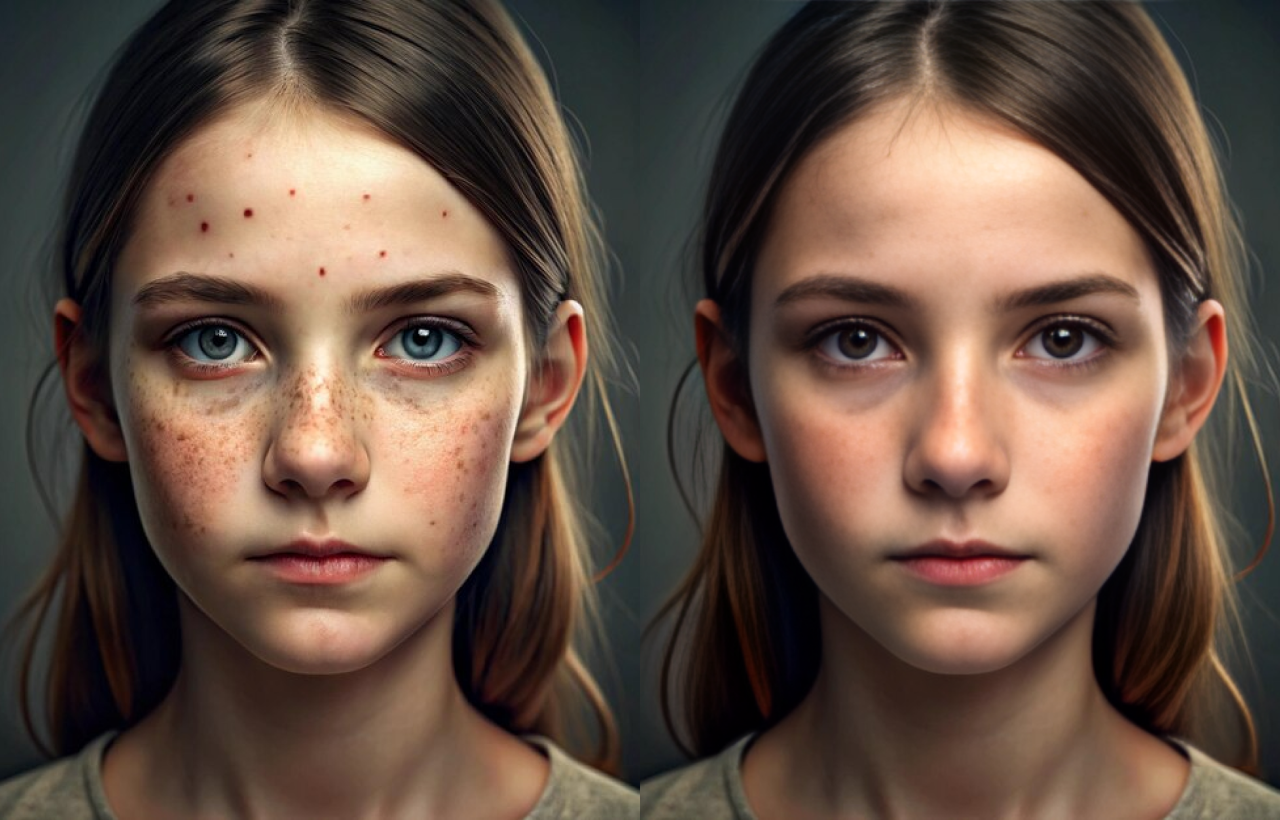
Quick Answer: What Is an AI Face Enhancer?
An AI face enhancer uses deep learning models trained on millions of high-quality portraits to restore, sharpen, and improve facial details in photographs — reconstructing eyes, skin texture, lips, and hair from low-resolution, blurry, or degraded images while preserving the subject's natural identity. In 2026, the best AI face enhancers go beyond one-click processing to offer conversational, identity-aware enhancement.
- Professional face retouching — Photo Editor handles skin texture restoration, eye sharpening, blemish removal, and lighting correction while preserving what makes each face unique
- Personalized facial analysis — Beauty Consultant provides facial structure evaluation, proportion mapping, and culturally fluent beauty guidance
- Clinical facial evaluation — Cosmetic Surgery Image Specialist quantifies facial proportions with anatomical precision for honest assessment
- Multi-model flexibility — Access GPT-5.4, Claude Opus 4.6, Gemini 3.1 Pro Preview, and more — never locked into one model's facial reconstruction biases
The Problem With One-Click AI Face Enhancers
The broader AI image enhancer market is projected to reach USD 5.03 billion by 2030, and face enhancement is one of its fastest-growing segments. But as the technology has scaled, its core failure mode has become impossible to ignore.
The Identity Problem: Enhanced Faces That Don't Look Like You
Generic AI face enhancers use a single model trained on millions of portraits. When a face is blurry or low-resolution, the AI doesn't recover the original features — it invents new ones based on statistical averages from its training data. As BestPhoto documented after testing the top restoration tools in 2026:
"Remini uses a single AI model that generates facial details from its training data rather than recovering actual features from the original photo. When a face is very blurry, the AI essentially invents new features that look realistic but may not match the original person."
Users reported that MyHeritage's enhancer "added glasses and a mustache to my grandmother's photo where they never existed," and VanceAI produced "distorted faces and artifacts." The pattern is consistent: one-click face enhancers optimize for plausibility rather than accuracy.
The Authenticity Backlash
The 2026 photography trend is unmistakable. As maternity portrait photographer Esther Kay told Digital Camera World: "The luxury look of 2026 is authenticity — real texture, real emotion, real connection." And as LTX Studio documented, audiences have developed sharp AI detection instincts — spotting synthetic skin textures and overly symmetrical compositions instantly. Over-enhanced faces don't just look wrong; they actively undermine trust.
No Feedback Loop
The standard AI face enhancement workflow is upload → process → download. There's no way to say "sharpen the eyes but don't change the nose shape." No way to tell the AI "my mother's skin had freckles — keep them." As Forrester's 2026 consumer report found, 62% of global users now engage with generative AI at least weekly — but they expect conversational control, not take-it-or-leave-it automation.
This is exactly what Photo Editor was built for.
Why Photo Editor Is the Best AI Face Enhancer in 2026
While standalone face enhancers like Remini, FaceApp, and VanceAI offer quick one-tap processing, they approach face enhancement as a single automated operation with no user input beyond the upload. Jenova's Photo Editor treats face enhancement as a conversation — you describe what to enhance, what to preserve, and how the result should look.
| Challenge | Generic Face Enhancers | Photo Editor Approach |
|---|---|---|
| Identity preservation | Invents features from training data | You specify: "Keep my grandmother's exact nose shape" |
| Skin texture | Smooths everything into plastic uniformity | You specify: "Preserve freckles, remove only the blemish on the chin" |
| Eye enhancement | Applies uniform brightening/enlarging | You specify: "Sharpen the iris detail, don't change eye size" |
| Creative control | One-click, no conversation | Iterative refinement through natural language |
| Consistency | Each enhancement is independent | Persistent memory retains your preferences across sessions |
| Model flexibility | Locked to one AI model | Multiple frontier models (GPT-5.4, Claude Opus 4.6, Gemini 3.1 Pro Preview) |
Conversational Face Enhancement, Not Automated Guessing
The core advantage of Photo Editor over every standalone face enhancer is natural language control. Instead of accepting whatever the AI decides your face should look like, you direct the enhancement:
"Sharpen the facial details in this portrait — focus on the eyes and eyebrows. Keep the skin texture natural, don't smooth out the laugh lines. The lighting on the left side of the face is too dark — brighten it slightly to match the right side."
"This is an old family photo from the 1970s. Enhance the faces to be clearer, but don't modernize them — I want them to still look like a photo from that era. My father had a gap in his front teeth — make sure that stays."
"Enhance this headshot for LinkedIn. Sharpen the eyes, even out the skin tone, reduce the redness on my nose — but keep it looking like me, not like a different person."
This level of granular control is impossible with one-click enhancers. You're not choosing between "enhanced" and "original" — you're directing a professional retoucher who understands the difference between a defining feature and a fixable flaw.
Multi-Model Advantage for Face Enhancement
Because Jenova provides access to multiple frontier models — GPT-5.4, Claude Opus 4.6, Gemini 3.1 Pro Preview, plus models from xAI and DeepSeek — you're never locked into one model's facial reconstruction biases. This is critical for face enhancement: as Andreessen Horowitz documented in their State of Generative Media 2026 report, enterprise production deployments use a median of 14 different models because "each model tends to be strong in some areas and weaker in others." Different models interpret "natural skin texture" or "sharp eyes" differently — having the ability to switch models means you can find the one that best preserves each person's unique facial identity.
Persistent Memory for Consistent Enhancement
Unlike standalone apps where every enhancement starts from scratch, the Photo Editor remembers your preferences across sessions. If you always want freckles preserved, laugh lines kept, and skin texture maintained while removing temporary blemishes, those standards carry forward automatically. For photographers processing a wedding album or a family portrait series, this means consistent, identity-preserving enhancement across every image.
Related Agents You'll Also Like
💄 Beauty Consultant
The Beauty Consultant provides personalized facial structure analysis and culturally fluent beauty guidance — the perfect complement to face enhancement. Upload a portrait and receive honest evaluation of your facial proportions, skin tone analysis, and recommendations that respect your natural features rather than pushing toward algorithmic ideals.
- Facial structure evaluation with proportion mapping and symmetry analysis
- Culturally fluent cosmetic direction across Parisian, Korean, Gulf, and South Asian beauty traditions
- Skincare routine analysis and ingredient compatibility checks
🔬 Cosmetic Surgery Image Specialist
The Cosmetic Surgery Image Specialist provides clinical-grade facial proportion quantification — golden ratio, nasal projection, periorbital evaluation, aging pattern mapping — plus procedure mock-ups. This addresses a real problem in 2026: patients bringing AI-enhanced selfies to surgeons as reference, asking for results based on faces the AI invented rather than anatomically possible outcomes.
- Quantified facial proportion analysis (golden ratio, nasal projection, periorbital evaluation)
- Procedure mock-ups for rhinoplasty, fillers, and other interventions
- Before/after layout formatting and post-op healing tracking
🎨 Graphic Designer
For professionals who need enhanced face photos integrated into marketing materials, brand assets, or publications, the Graphic Designer extends face enhancement into broader visual refinement — ensuring enhanced portraits integrate seamlessly with consistent color harmony and composition.
- Color correction aligned to brand guidelines and style systems
- Composition refinement and visual hierarchy optimization
- Multi-format adaptation for print, web, and social platforms
How It Works: Enhancing a Face With Photo Editor
Step 1: Upload Your Photo
Open a chat with Photo Editor and upload the portrait that needs face enhancement. The agent analyzes the image — identifying facial features, skin texture, lighting conditions, resolution quality, and areas that could benefit from targeted enhancement.
Step 2: Describe What You Want Enhanced
Tell the agent exactly what to sharpen, smooth, or correct — and what to leave untouched. Be as specific or as general as you like:
"This is a blurry photo of my parents from 1985. Enhance the facial details so I can see their features clearly. Don't change their appearance — I want them to look like themselves, just sharper."
Step 3: Review and Refine
The Photo Editor returns your enhanced portrait. If you want adjustments — more detail in the eyes, less smoothing on the skin, different lighting balance — describe the changes in natural language:
"The eyes look great, but the skin is too smooth now — it lost the natural texture. Can you bring back some of the original skin detail while keeping the eyes sharp? Also, the jawline looks slightly different — restore it to match the original."
Step 4: Download or Continue
Once you're satisfied, download in your preferred format. Your enhancement preferences are saved automatically for future sessions — so next time, the agent already knows your standards.
Step 5: Get Deeper Analysis (Optional)
For users who want more than surface-level enhancement, bring in the Beauty Consultant using the @mention feature for personalized facial analysis, or the Cosmetic Surgery Image Specialist for clinical-grade proportion evaluation.
Results & Use Cases
📸 Old Family Photo Face Restoration
Scenario: You have a faded, low-resolution photo of your grandparents from the 1960s. The faces are barely recognizable — you can make out general shapes but no detail.
Traditional Approach: Upload to Remini. The AI generates sharp, clear faces — but they look like strangers. Your grandmother's distinctive nose has been replaced with a statistically average one. Your grandfather gained features he never had.
Jenova Solution: Upload to Photo Editor, describe "enhance the faces to be clearer — my grandmother had a prominent nose and high cheekbones, my grandfather had a square jaw and deep-set eyes. Preserve these features, don't replace them." The agent enhances within the constraints you provide, iterating until the faces look like the people you remember.
💼 Professional Headshot Enhancement
Scenario: You need a polished LinkedIn headshot but your best photo was taken in poor lighting with a phone camera. The facial details are soft and the skin tones are uneven.
Traditional Approach: Use a one-click face enhancer that over-smooths your skin, artificially brightens your eyes, and gives you the same "AI headshot" look as everyone else on the platform.
Jenova Solution: Upload to Photo Editor, describe "professional headshot enhancement — even out the lighting, sharpen the eyes, correct the skin tone to be natural. Keep my actual facial features, don't beautify." Follow up with the Beauty Consultant for guidance on which angles and expressions work best for your facial structure.
📱 Social Media Portrait Enhancement
Scenario: You took a great group photo at a party, but the faces are slightly blurry from motion and low light. You want to post it but the faces aren't sharp enough.
Traditional Approach: Apply a face enhancer that sharpens some faces well but distorts others — making one friend look like a different person while another gets artificial-looking skin.
Jenova Solution: Upload to Photo Editor, describe "sharpen all the faces in this group photo — reduce the motion blur, improve the lighting on the faces, keep everyone looking natural. Don't change any facial features, just make them clearer." The agent handles multiple faces with consistent, identity-preserving enhancement.
🖼️ Historical Photo Archive Enhancement
Scenario: You're digitizing a collection of historical photos for a museum or family archive. Dozens of portraits need face enhancement with consistent quality and era-appropriate treatment.
Traditional Approach: Process each photo individually through a standalone enhancer, getting inconsistent results — some faces look modern, others look cartoonish, and the historical character is lost.
Jenova Solution: Use Photo Editor with persistent memory — describe your standards once ("enhance faces for clarity while preserving the photographic character of the era — no modern skin smoothing, no eye brightening, just sharper detail"), and the agent applies those standards consistently across every image. Pair with the Graphic Designer for archival-quality formatting and presentation.
FAQ
What does an AI face enhancer actually do?
An AI face enhancer uses deep learning models trained on millions of high-quality portraits to restore and improve facial details in photographs. It can reconstruct eyes, lips, and skin texture from low-resolution images, fix compression artifacts and pixelation, reduce noise, correct lighting, and sharpen blurry features. Jenova's Photo Editor adds conversational control — you describe exactly what to enhance and what to preserve, with iterative refinement until the result looks like the actual person, not a statistical average.
Why do some AI face enhancers make people look like different people?
Most face enhancers use a single AI model that generates facial details from training data rather than recovering actual features from the original photo. As BestPhoto documented in 2026, when a face is very blurry, the AI "essentially invents new features that look realistic but may not match the original person." The fix isn't avoiding AI — it's using a tool that lets you control the enhancement through conversation and switch between multiple models to find the one that best preserves each person's unique identity.
What's the difference between Jenova and Remini or FaceApp?
Standalone apps like Remini and FaceApp offer one-click face enhancement with no user input beyond the upload — the same algorithm applied to every face. Jenova's Photo Editor provides conversational control ("sharpen the eyes but keep the laugh lines"), multi-model access (GPT-5.4, Claude Opus 4.6, Gemini 3.1 Pro Preview), and persistent memory that remembers your enhancement preferences across sessions. It's the difference between a filter that pushes every face toward the same ideal and a professional retoucher who understands your specific face and remembers your standards.
Can AI face enhancers work on very old or damaged photos?
AI can handle faded, scratched, and moderately blurry photos effectively. However, for severely damaged areas where most facial data is missing, AI will "hallucinate" — inventing plausible details rather than recovering originals. For best results, scan old photos at the highest resolution possible (600 DPI or higher) before enhancement. Jenova's multi-model approach lets you try different AI interpretations of the same damaged face, increasing the chance of finding one that stays closer to the original.
How much does Jenova cost for face enhancement?
Jenova offers a free tier with all core features and limited usage. Paid plans start at $20/month (Plus) with 30× the usage of the free tier and custom model selection. Premium ($50/mo), Pro ($100/mo), and higher tiers scale usage further. Every visual agent — from the Photo Editor to the Beauty Consultant — is accessible on every plan. No credit card required to start.
How big is the AI face enhancer market?
The broader AI Image Enhancer Market is valued at USD 2.83 billion in 2026 and projected to reach USD 5.03 billion by 2030 at a 15.4% CAGR, with face enhancement as one of its five major growth trends. The AI beauty personalization platforms market is valued at USD 2.3 billion in 2026 and projected to reach USD 16.4 billion by 2036 at a 21.7% CAGR. The AI Powered Face Generator Market is valued at USD 61.5 billion in 2026, projected to reach USD 86.7 billion by 2030.
Conclusion
AI face enhancement in 2026 is a multi-billion-dollar capability embedded in a market that touches everyone with a camera. But the industry's dominant approach — one-click enhancement that invents facial features from training data — is failing the people who need it most. Users restoring family photos get back faces that look sharp but wrong. Professionals enhancing headshots get the same algorithmic ideal as everyone else. The 2026 trend is unmistakable: authenticity over perfection, real texture over synthetic smoothness, and AI working as a collaborator rather than a replacement for human judgment.
Jenova's Photo Editor eliminates the identity problem with conversational face enhancement — you describe what to sharpen and what to preserve, with iterative refinement until the result looks like the person you know. The Beauty Consultant adds personalized facial analysis for users who want culturally fluent beauty guidance. And the Cosmetic Surgery Image Specialist provides clinical-grade proportion evaluation for anyone seeking anatomically honest assessment.
Try Photo Editor free — no credit card required. Explore more at Jenova.