AI Face Editor: Best AI Tools to Edit Faces in Photos (April 2026)
2026-04-05
AI face editing in April 2026 sits at the center of a market worth $5.12 billion in 2024 and projected to reach $48.74 billion by 2035, growing at a 22.7% CAGR (Market Research Future). From smoothing skin and removing blemishes to correcting lighting on portraits and reshaping facial features for cosmetic visualization, AI face editors have become indispensable for photographers, content creators, beauty brands, and anyone who wants professional-quality portrait results without mastering Photoshop.
But the technology carries a paradox. The same tools that make face editing faster also make it easier to produce the "plastic skin" effect that audiences now instinctively distrust — and in 2026, that distrust is measurable. A consumer trust study found that 72% of luxury shoppers are less likely to purchase a product if the advertising looks obviously AI-generated (Color Experts International). The best AI face editor isn't the one that edits the most — it's the one that edits intelligently, preserving what makes a face human while fixing only what needs fixing.
Jenova's Photo Editor is purpose-built for exactly this: a specialized AI agent that understands the difference between a blemish and a freckle, between flattering light and flattened light, between enhancement and erasure — all through natural language conversation.
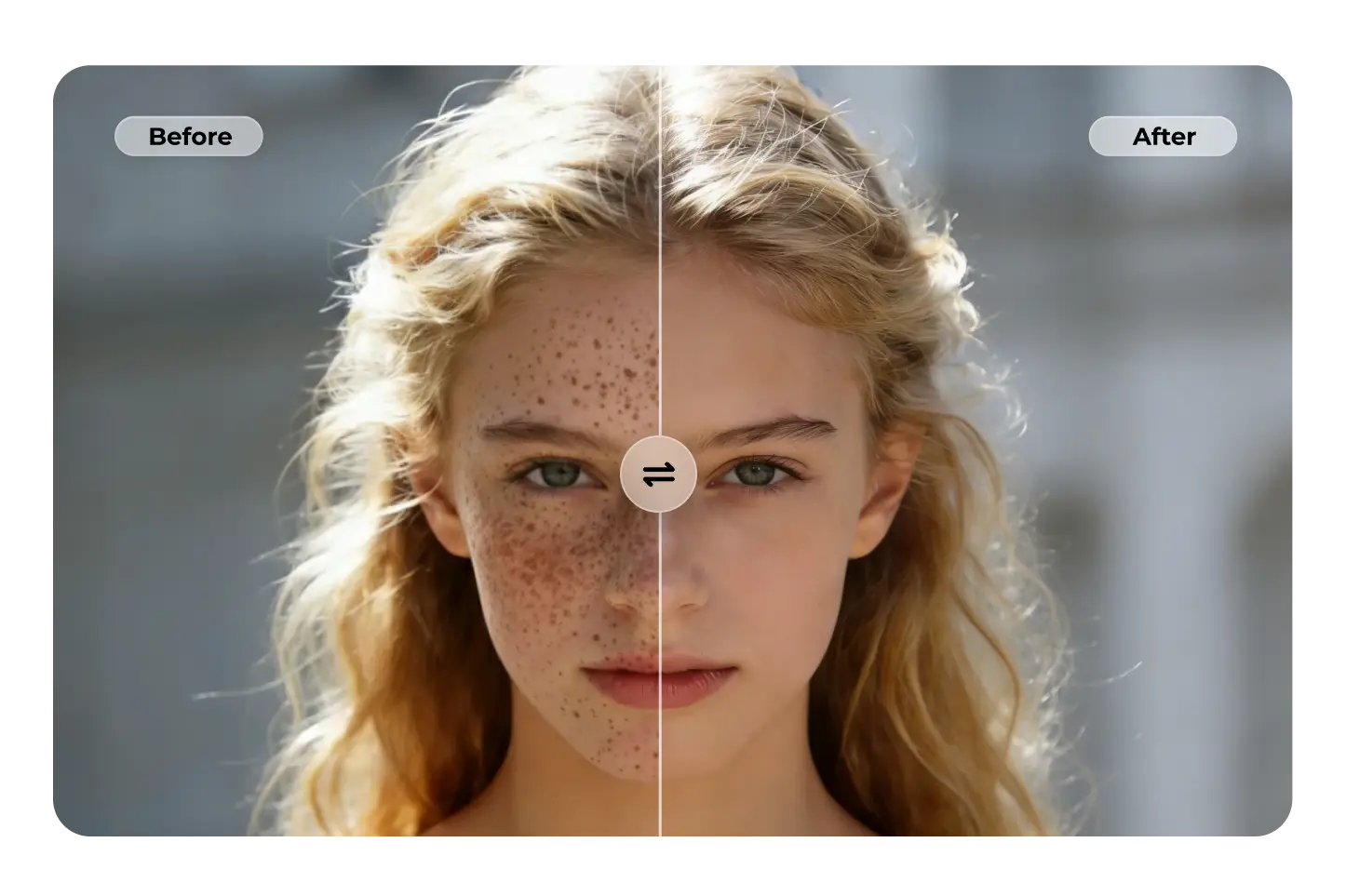
Quick Answer: What Is an AI Face Editor?
An AI face editor is software that uses machine learning and computer vision to detect, analyze, and modify facial features in photographs — from subtle skin retouching and blemish removal to lighting correction, eye brightening, and facial reshaping — while preserving natural appearance.
- Skin retouching: Blemish removal, smoothing, and texture preservation — Photo Editor
- Facial analysis: Proportion quantification, symmetry evaluation, clinical-grade assessment — Cosmetic Surgery Image Specialist
- Lighting & color correction: Exposure balancing, white balance, and skin tone accuracy
- Beauty guidance: Makeup direction, skincare analysis, style recommendations — Beauty Consultant
The Problem: Why Most AI Face Editors Get Faces Wrong
The face is the most scrutinized subject in photography. Our brains are hardwired to detect facial anomalies — which is precisely why AI face editing fails more visibly on faces than on any other subject.
🎭 The "Plastic Skin" Epidemic
AI-powered retouching tools smooth skin by identifying noise as a blemish and replacing it with surrounding pixels. The result? Skin that looks featureless, poreless, and fake — what the industry now calls the "plastic skin epidemic" (Color Experts International).
As one professional photography analysis put it: "AI generators now default to 'perfect.' They create flawless lighting, creamy bokeh, and poreless skin in seconds... When perfection becomes the default output of a text prompt, perfection stops being impressive. It becomes suspicious" (Fstoppers). In 2026, over-retouched faces don't signal quality — they signal inauthenticity.
👁️ The Uncanny Valley of Face Editing
AI-edited images often fall straight into the uncanny valley — "the eyes might be a fraction too bright, the teeth a bit too white, or the limb proportions slightly off due to a body slimming algorithm" (Color Experts International).
The erosion of trust is compounded by what researchers call "AI slop" — the flood of low-quality, mass-produced imagery that degrades digital channels (TechClass). Consumers can't always articulate why an image feels wrong, but they instinctively sense it — and disengage.
📱 Consumer Sentiment Is Shifting Against Generic AI
55% of consumers are uncomfortable with AI-generated brand marketing content on social media, and only 26% prefer AI-generated content to traditional content — down from 60% in 2023 (eMarketer/Billion Dollar Boy).
Meanwhile, 28% of consumers specifically value AI editing tools for beauty and fashion — but they want AI that understands them, not AI that applies generic filters (Perfect Corp.). The demand is for intelligent, context-aware face editing — not one-click beautification.
This is exactly what Photo Editor was built for — a specialized AI agent that treats every face as unique, preserving character while removing only what you ask it to remove.
Why Photo Editor
Most AI face editors operate on a simple principle: detect face → apply smoothing → output result. The user gets no control over what gets smoothed, how much gets changed, or which features to preserve. The result is the homogenized, poreless look that now triggers immediate distrust.
Jenova's Photo Editor takes a fundamentally different approach: you describe the face edit in plain language, and the agent applies domain-specific expertise while preserving everything you don't mention.
| Challenge | One-Click Face Editors | Photo Editor |
|---|---|---|
| Skin smoothing | Uniform blur → plastic skin | Region-specific smoothing preserving pore texture |
| Blemish removal | Removes everything including freckles, moles | Removes only what you specify — keeps character |
| Eye enhancement | Over-brightens → uncanny valley | Subtle, natural brightening you control through conversation |
| Facial reshaping | Distorts background, creates artifacts | Contextual adjustments with background preservation |
| Consistency | Different result every time | Persistent memory maintains your retouching style |
| Creative control | None — take it or leave it | Full conversational iteration until you're satisfied |
The "Temporary vs. Permanent" Rule
Professional photographers in 2026 follow what Fstoppers calls the "Temporary vs. Permanent" retouching rule: remove temporary distractions (pimples, redness, lint) but keep permanent character (moles, scars, freckles, laugh lines) (Fstoppers). Generic AI face editors can't make this distinction. The Photo Editor can — because you tell it exactly what to keep and what to remove:
"Remove the pimple on her chin and the redness around her nose, but keep the freckles across her cheeks — they're part of her look. Smooth the skin subtly, just enough to reduce the visible pores on her forehead without making it look airbrushed."
"Brighten his eyes slightly — they're a bit shadowed from the overhead lighting. Don't touch the crow's feet. They make the smile look genuine."
"This is a headshot for LinkedIn. Clean up the skin naturally, correct the slight yellow cast from the office lighting, and sharpen the eyes. Professional but authentic — no beauty filter look."
Multi-Model Architecture
The Photo Editor can leverage GPT-5.4 (OpenAI), Claude Opus 4.6 (Anthropic), Gemini 3.1 Pro Preview (Google), plus models from xAI and DeepSeek — all from one interface. Different models produce different aesthetic results for face editing. You can switch between them to find the output that best matches your vision, rather than being locked into a single AI's interpretation of "better."
Persistent Memory for Brand Consistency
AI face editors tend to "drift" — producing inconsistent results across batches. A luxury brand with 5,000 images in a seasonal catalog needs every portrait to feel like it belongs to the same world (Color Experts International). Jenova's persistent memory solves this: the Photo Editor remembers your retouching preferences — smoothing intensity, color grading, sharpening levels — across sessions. Your hundredth portrait is consistent with your first.
Related Agents You'll Also Like
Cosmetic Surgery Image Specialist
For aesthetic clinics, cosmetic surgeons, and medical professionals who need clinical-grade facial analysis and procedure visualization.
- Facial proportion quantification using golden ratio metrics, nasal projection, and periorbital evaluation
- Procedure mock-ups for rhinoplasty, fillers, facelifts, and other aesthetic procedures
- Before/after layout formatting and post-op healing tracking with complication flagging
Beauty Consultant
For individuals who want AI-powered guidance on makeup, skincare, and cosmetic procedures — not just editing, but understanding what works for their face.
- Facial structure analysis with culturally fluent makeup direction
- Skincare routine recommendations based on skin type and concerns
- Cosmetic procedure candidacy assessment based on aesthetic medicine methodology
Fashion Mockup Studio
For eCommerce brands that need on-model product photography with consistent, professionally retouched faces across entire catalogs.
- Market-specific model archetypes for Western, Korean, Japanese, Chinese, and Middle Eastern audiences
- Studio-grade output with consistent facial retouching across thousands of images
- Brand identity preservation across product lines
How It Works
Here's how to go from a raw portrait to a professionally face-edited result using Jenova's Photo Editor:
1. Open the Photo Editor agent. Navigate to Photo Editor from Jenova's agent gallery or search for it using the search icon.
2. Upload your portrait and describe the face edit you need. Drag and drop your image into the chat. Be specific about what you want changed — and critically, what you want preserved:
"This is a bridal portrait. Smooth the skin on her forehead and cheeks — keep the texture natural, no plastic look. Remove the small blemish below her left eye. Brighten both eyes slightly. Keep the beauty mark on her right cheek. The lighting is slightly cool — warm it up just a touch."
3. Review and iterate through conversation. The agent delivers your edited portrait. Want adjustments? Just say so:
"The skin smoothing is perfect, but her eyes are a bit too bright now — dial it back about 30%. And can you add a very subtle warm glow to the overall image?"
4. Try different AI models for different aesthetics. Switch between GPT-5.4, Claude Opus 4.6, Gemini 3.1 Pro Preview, or other available models using the model selector. Each model may produce a subtly different face editing aesthetic — compare outputs to find your preferred result.
5. Download your edited portrait. Export directly — ready for social media, your website, client delivery, or print.
6. Let persistent memory learn your face editing style. Over time, Jenova remembers your retouching preferences. When you upload your next portrait, the agent already understands your preferred smoothing intensity, eye brightening level, color temperature, and overall approach.
Results & Use Cases
📸 Portrait Photography
Scenario: A headshot photographer delivers 50 corporate portraits per month. Each needs consistent, natural skin retouching — blemish removal, under-eye correction, and subtle skin smoothing — without the "beauty filter" look that corporate clients reject.
Traditional Approach: 15–20 minutes per headshot in Photoshop using frequency separation and dodge-and-burn. At 50 portraits, that's 12–17 hours of retouching per month.
Jenova Solution: Upload portraits to the Photo Editor and describe your retouching style once: "Professional headshot retouching — remove temporary blemishes, reduce under-eye shadows, smooth skin subtly while keeping pore texture. No beauty filter. Natural and authentic." Persistent memory ensures every portrait matches your style. Photographers using AI editing tools save approximately 473 hours per year on post-production (Aftershoot, via Barnimages).
💄 Beauty & Cosmetics Content
Scenario: A beauty brand needs 200 product images showing makeup on diverse models — each requiring consistent facial retouching that preserves skin texture while showcasing the product accurately.
Traditional Approach: Professional retoucher at $3–$10/image, 24–48 hour turnaround. At 200 images, that's $600–$2,000 per batch plus waiting time.
Jenova Solution: Upload model photos to the Photo Editor with instructions to preserve natural skin texture while enhancing the makeup application. For clinical-grade facial analysis and procedure visualization content, hand off to the Cosmetic Surgery Image Specialist. For personalized beauty guidance to inform creative direction, consult the Beauty Consultant.
📱 Social Media & Influencer Content
Scenario: A content creator posts daily selfies and beauty content across Instagram and TikTok. Each photo needs light face editing — skin evening, blemish removal, subtle eye brightening — without looking over-filtered. Audiences in 2026 actively reject the "Facetune look."
Traditional Approach: 10–15 minutes per image in a mobile editing app, with the constant risk of over-processing. Only 26% of consumers now prefer AI-generated content to traditional content (eMarketer/Billion Dollar Boy) — authenticity is the new premium.
Jenova Solution: Upload selfies to the Photo Editor with instructions like "Light retouch only — even out my skin tone, remove the blemish on my forehead, but keep everything looking real. No smoothing filter. I want my followers to trust that this is actually me." The agent understands the difference between subtle enhancement and heavy retouching.
🏥 Aesthetic Medicine & Cosmetic Surgery
Scenario: A cosmetic surgery clinic needs clinical-grade before/after facial photos — consistent lighting, standardized positioning, and precise documentation of procedure results.
Traditional Approach: Dedicated medical photographer plus manual retouching for consistency. Clinical photos require strict standards that generic face editors violate.
Jenova Solution: Use the Photo Editor for basic lighting and color correction, then hand off to the Cosmetic Surgery Image Specialist for clinical facial proportion quantification, procedure mock-ups, and before/after layout formatting with post-op healing tracking.
FAQ
What is the best AI face editor in 2026?
The best AI face editor depends on your use case. Adobe Photoshop with Firefly offers deep manual control for professionals with editing expertise. Evoto specializes in batch portrait retouching with face and body sculpting sliders (Imagen AI). For users who want professional-quality face editing without learning complex software, Jenova's Photo Editor offers conversational AI editing with domain-specific intelligence — you describe what you want in plain language, and the agent applies retouching expertise automatically.
Can AI edit faces without making them look fake?
The "plastic skin" effect is the most common failure of generic AI face editors — algorithms blur pixels uniformly, destroying natural texture like pores, fine lines, and follicles (Color Experts International). Jenova's Photo Editor avoids this by letting you specify exactly what to edit and what to preserve. You can instruct it to keep pore texture, maintain freckles, or preserve specific facial characteristics while removing only targeted imperfections.
Is AI face editing ethical?
AI face editing raises important ethical considerations, particularly around deepfakes and unrealistic beauty standards. The EU AI Act, enforceable from August 2026, mandates that AI-generated or manipulated content be marked in a machine-readable format (TechClass). The World Economic Forum's Global Risks Report 2026 placed mis- and disinformation among the top short-term global risks (World Economic Forum). Responsible AI face editing means enhancing — not fabricating — and being transparent about AI use.
How much does AI face editing cost?
Standalone face editing apps range from free (with watermarks and limits) to $10–$30/month for specialized tools like Evoto or Retouch4me. Adobe Creative Cloud starts at $19.99/month. [Jenova](https://www.jenova.ai) offers a free tier with all core features including the Photo Editor, with paid plans starting at $20/month for expanded usage across every agent on the platform.
Can AI face editors handle diverse skin tones accurately?
This remains a significant challenge. AI models trained predominantly on lighter skin tones may produce inaccurate results on darker skin — a manifestation of the algorithmic bias where models amplify stereotypes rather than merely reproducing them (TechClass). Jenova's Photo Editor mitigates this through conversational control — you can specify exactly how skin should be treated, correct color casts that affect skin tone accuracy, and iterate until the result is right for every complexion.
Is my data safe when using AI face editing tools?
Many AI face editing apps upload facial images to cloud servers with unclear retention policies — and some use uploaded photos to train their models. As one communications expert warned: "People who use AI technology to upload their faces... are more at risk for deepfake scammers" (The Beauty Edit). Jenova's data is never used for training, is encrypted in transit and at rest, and is not sold to advertisers — a critical differentiator for anyone uploading facial images.
Conclusion
AI face editing in 2026 has reached a critical inflection point. The technology is powerful enough to produce photorealistic results in seconds — but that same power creates the "plastic skin" epidemic that audiences now instinctively reject. The market is growing at 22.7% annually, consumer interest in AI editing tools is rising, but so is consumer distrust of obviously AI-generated content. The gap between these trends defines the opportunity: the best AI face editor isn't the one that changes the most — it's the one that changes only what you ask it to, while preserving everything that makes a face human.
Jenova's Photo Editor occupies exactly this space — conversational face editing with domain-specific expertise, multi-model access across GPT-5.4, Claude Opus 4.6, and Gemini 3.1 Pro Preview, and persistent memory that learns your retouching style over time. For portraits that need natural skin texture, headshots that need professional polish without the beauty filter, or beauty content that needs to look authentic — it handles the face editing so you can focus on the creative decisions that matter.
Try Photo Editor free — no credit card required. Explore more specialized agents at Jenova.