AI DnD Encounter Difficulty Calculator: Balance XP, CR & Party Size
2026-10-20
Game Designer Assistant helps Dungeon Masters build balanced fights. It works through the same math a DnD encounter difficulty calculator uses (XP thresholds, multipliers, and budgets) and then explains why a fight will feel easy or brutal at your table. Most calculators stop at a label like "Hard." This AI shows the arithmetic, points out edge cases the label hides, and suggests specific adjustments.
As of October 2026, DMs work with two official fifth-edition rule sets, the original 2014 guidelines and the revised 2024 Dungeon Master's Guide. They can rate the same fight very differently.
- ✅ Works through both the original threshold-and-multiplier method and the revised flat XP-budget method
- ✅ Handles odd party sizes, mixed character levels, and multi-wave fights
- ✅ Explains the tactical reasons behind a rating, not just the number
- ✅ Available on web, iOS, and Android for session prep or mid-game adjustments
A calculator gives you one number, but encounter design involves several judgment calls. To see why, it helps to look at how fifth edition actually measures difficulty and where the official math leaves you guessing.
Quick Answer: What Is a DnD Encounter Difficulty Calculator?
A DnD encounter difficulty calculator compares your monsters' total XP against your party's XP thresholds or budget. It rates a fight as easy, medium, hard, or deadly under the 2014 rules, or low, moderate, or high under the 2024 rules.
Key capabilities of an AI-assisted approach:
- Calculates party thresholds or budgets for any mix of character levels
- Applies (or deliberately skips) group multipliers based on the rule set you use
- Flags single monsters whose damage output can down a character in one turn
- Recommends specific swaps such as adding fragile minions, removing a creature, or changing terrain to hit a target difficulty
Why DnD Encounter Difficulty Is Hard to Pin Down
Fifth edition gives DMs a structured system for rating fights, but the system has changed between editions and still depends on DM judgment. The original rules define four tiers, from encounters where "victory is pretty much guaranteed" to fights that "could be lethal for one or more player characters" (D&D Beyond Basic Rules).
6–8 medium or hard encounters — How many fights a typical party can handle per adventuring day under the original 5e guidelines
×1 to ×4 — The original encounter multiplier range, scaling from one monster to 15 or more
3 tiers instead of 4 — The revised rules replace Easy/Medium/Hard/Deadly with Low/Moderate/High
1–3 encounters per short rest — Pacing suggested in a 2026 EN World community discussion of high-level 5.5e encounter chains
But getting a rating you can trust is harder than it looks:
- Two rule sets, two answers. The same monsters can land in very different tiers depending on which edition your calculator uses.
- Multiplier cliffs. Adding one goblin can raise the calculated difficulty by 25% or more.
- Judgment calls built into the rules. The original method says to skip weak monsters "unless you think" they matter, and that one call can move a fight by a whole tier.
- Labels hide spikes. A "Medium" fight can still include a creature that downs a character in one hit.
The Original 5e Method: Thresholds and Multipliers
The 2014 process has five steps. Look up each character's XP thresholds, add them up for the party, total the monsters' XP, multiply by the number of monsters, and compare the result to the thresholds. The official multipliers are ×1 for one monster, ×1.5 for two, ×2 for 3–6, ×2.5 for 7–10, ×3 for 11–14, and ×4 for 15 or more. For parties of fewer than three characters, you shift up one step. For parties of six or more, you shift down one step, with ×0.5 for a single monster (D&D Beyond Basic Rules).
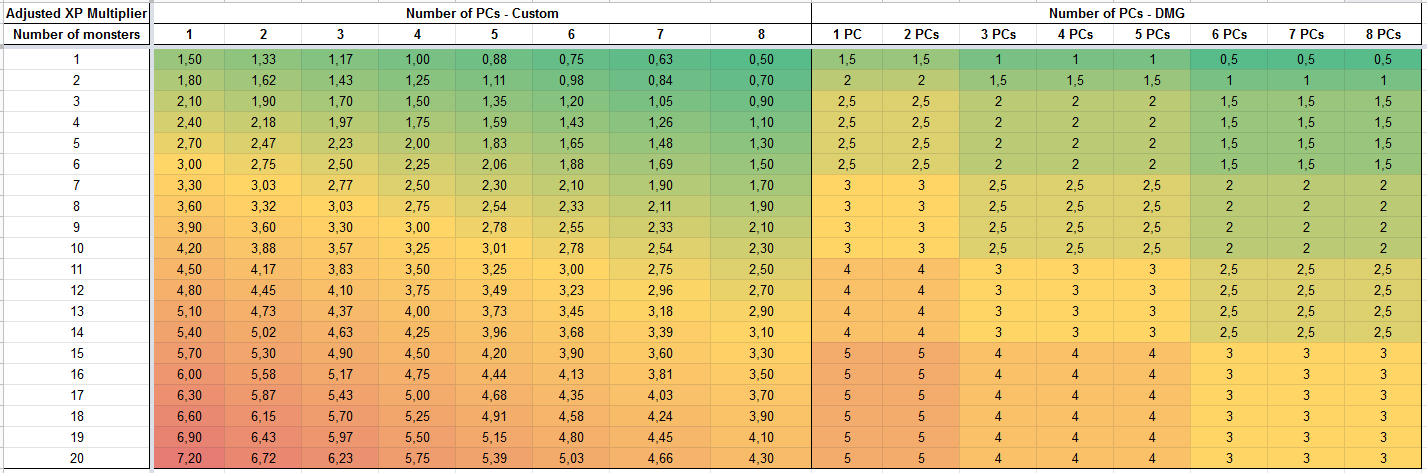
The chart above shows where the official table's steps fall. The right-hand DMG columns jump at fixed breakpoints. For a party of four, going from 6 to 7 monsters moves the multiplier from 2 to 2.5, and going from 14 to 15 moves it from 3 to 4.
The custom scale on the left replaces those steps with a straight line. For four PCs, it adds exactly 0.25 per additional monster, from 1.00 up to 5.75 at 20 monsters. For eight PCs, it adds 0.20 per monster, from 0.50 up to 4.30. For a solo PC, it adds 0.30 per monster, from 1.50 up to 7.20. Because one extra skeleton no longer pushes an encounter into the next tier, this kind of linear interpolation is popular with DMs who build their own calculators.
The Revised 5e Method: A Flat XP Budget
The 2024 rules remove multipliers entirely. You pick Low, Moderate, or High difficulty, multiply the per-character budget by party size, and spend XP until the budget runs out. For example, a low-difficulty encounter for four level 1 characters has a budget of 200 XP, which buys one Bugbear Warrior, two Giant Wasps, or six Giant Rats (Roll20 Combat Encounters).
The revised rules move group danger out of the math and into written guidance. If an encounter has more than two creatures per character, they recommend making some of those creatures fragile. They also warn that tracking more than two or three stat blocks "can be daunting."
Why the Same Fight Gets Two Different Ratings
Take four level-5 characters fighting one Wight (700 XP) and six Skeletons (50 XP each).
Under the original rules, the party's thresholds are 1,000 (Easy), 2,000 (Medium), 3,000 (Hard), and 4,400 (Deadly). Seven monsters trigger the ×2.5 multiplier:
That makes the fight Medium. But the skeletons are far below the Wight's challenge rating. If you apply the rule to ignore significantly weaker monsters, only the Wight counts, which gives 700 XP and a rating below Easy.
Under the revised rules, the same party's Low budget is 2,000 XP. The encounter's raw 1,000 XP doesn't even reach Low.
The result is three plausible answers (Medium, below Easy, or below Low) for one fight. This is the gap that a reasoning partner, rather than a single-formula calculator, is designed to fill.
Why Game Designer Assistant for Encounter Balancing
Game Designer Assistant is built for systems analysis, and an encounter is a small game system. Its parts include an XP economy, action economy, damage spikes, and terrain. You describe your party and your monsters in plain language. The assistant runs the numbers under the rule set you choose and then tells you what the numbers miss.
| Traditional Calculator | Game Designer Assistant |
|---|---|
| Returns one difficulty label | Shows the full math and explains the rating |
| Locked to one edition's formula | Compares original and revised rules side by side |
| Ignores weak-monster judgment calls | Shows how the rating changes if you include or exclude minions |
| No awareness of terrain or surprise | Applies benefit/drawback shifts for situational factors |
| Some full-featured builders are paywalled, such as D&D Beyond's Encounter Builder Alpha, which requires a subscription | Plain-language input; no monster database clicks required |
Free tools like the Kastark 5e Encounter Calculator and the Kobold Press Encounter Builder handle quick lookups well. The AI's role is the follow-up questions they can't answer.
Shows Its Work Under Either Rule Set
Ask for both editions and you get both calculations, with the thresholds or budgets laid out step by step. You can check every number against your own rulebook. You should do this for any AI output, especially the XP values of homebrew monsters.
"Rate this fight for four level-5 PCs under both the original and revised 5e rules: one wight, six skeletons. Show the math."
Reads Action Economy, Not Just XP
XP totals don't tell you how many attacks land each round. The original rules acknowledge this directly: more monsters mean "more attack rolls" against the party. The assistant flags lopsided action economy, such as eight attackers against a party with one healer, even when the XP total looks safe.
Sanity-Checks With CR-to-Level Ratios
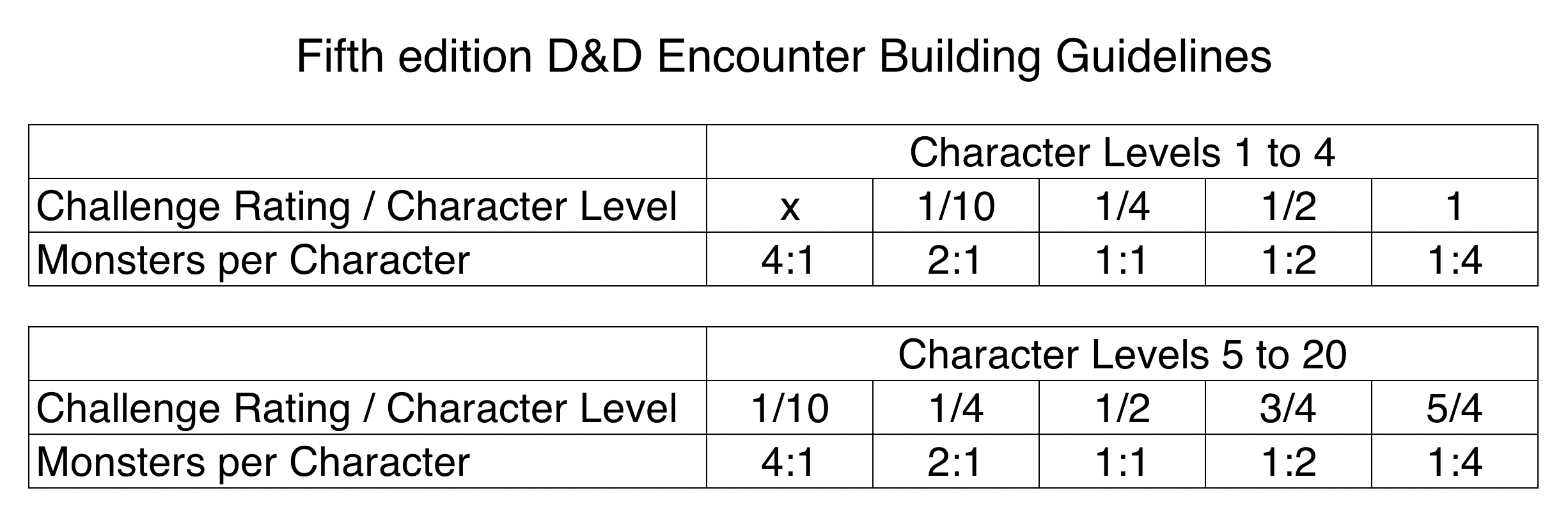
Ratio shortcuts like the table above give you a quick way to check a design without totaling XP. For characters of level 5 to 20, a monster whose CR is half the party's level works out to one monster per character. A CR equal to 5/4 of the party's level means one monster for every four characters.
For a party of four level-8 characters, that suggests these rough equivalents:
- One CR 10 creature
- Four CR 4 creatures
- Eight CR 2 creatures
Wizards of the Coast playtested a similar ratio-based approach in its Unearthed Arcana: Encounter Building document. The assistant can cross-reference ratio estimates against XP math and flag cases where the two methods disagree.
Adjusts for Terrain and Situation
The original rules shift difficulty one step for each drawback the party faces, such as being surprised, fighting an enemy in cover, or being unable to see. They shift one step the other way for each benefit (D&D Beyond Basic Rules). Describe your battlefield and the assistant applies those shifts. It also suggests terrain features like ledges, chandeliers, or gunpowder kegs to make the fight more dynamic.
"My party will be ambushed on a rope bridge by six giant wasps. They're four level-3 characters. Is this too much, and what terrain would make it fairer?"
Related Agents You'll Also Find Useful
Excel Generator
If you want a reusable calculator, including the smoothed custom multiplier scale shown earlier, Excel Generator builds structured workbooks with formulas and formatting already in place.
- Party threshold tabs that recalculate when characters level up
- Lookup formulas for multipliers or revised-rules budgets
- Clean sheet layout you can print for your DM screen
Name Generator
Once the fight is balanced, the creatures need names. Name Generator gives your bandit captain or lich lieutenant a name that fits your setting's culture and tone.
- Culturally grounded names for NPCs, villains, and factions
- Linguistic consistency across a whole region or lineage
- Names for places, taverns, and artifacts too
Try Game Designer Assistant free on Jenova's free tier and stress-test your next boss fight before the session.
How to Calculate DnD Encounter Difficulty With AI
Step 1: Describe Your Party List each character's level and class, plus your party size and which rule set you use. Mixed levels matter, because the original method totals each character's thresholds individually.
"My party: three level-3 characters (fighter, cleric, rogue) and one level-2 wizard. We use the original 5e encounter rules."
Step 2: Propose Monsters or Request a Target Difficulty Either list the creatures you have in mind, or name the difficulty you want and let the AI game design partner suggest options within the XP budget.
"Build me a hard encounter in a goblin warren. I'd like one leader and several weaker minions."
Step 3: Review the Math and the Tactical Read Check the threshold totals, the multiplier, and the final rating. For the party above, the official example puts one bugbear and three hobgoblins at 1,000 adjusted XP. That falls between the party's Hard threshold (825) and Deadly threshold (1,400), so the fight is Hard.
Step 4: Adjust and Lock It In Ask for tweaks such as one fewer minion, a defensive position for the archers, or a second wave. For multipart fights, the original rules treat each wave as a separate encounter with no short rest between waves. Save the final version so you can reuse it in future sessions.
"Split this into two waves and tell me if the combined fight exceeds a third of the party's adventuring-day XP."
Results & Use Cases
🎲 A First One-Shot for New Players
Scenario: A new DM is running four level-1 characters through their first dungeon.
Traditional Approach: Cross-referencing tables by hand and hoping a "low" fight isn't secretly lethal.
Game Designer Assistant: Recommends a revised-rules Low encounter within the 200 XP budget, such as two Giant Wasps. It also warns that a CR 2 Ogre can kill a level 1 Wizard with a single blow (Roll20).
- Avoids first-session character deaths caused by damage spikes
- Explains the reasoning so the new DM learns the system
⚔️ A High-Level Boss for a Large Party
Scenario: Six level-15 characters are facing a draconic finale.
Traditional Approach: Juggling large XP numbers and worrying about stat-block overload.
The AI design partner: Confirms the revised High budget of 46,800 XP. It then suggests a mix such as two Adult Red Dragons and two Fire Giants (46,000 XP), and keeps the fight to two stat blocks.
- Stays within budget without going over
- Keeps the encounter manageable to run at the table
📱 A Player Cancels an Hour Before Game Night
Scenario: A DM on a phone needs to rebalance tonight's fight for three players instead of four.
Traditional Approach: Recalculating on paper or guessing which monsters to remove.
With the mobile app: The revised rules note that a player's absence might warrant removing creatures. The assistant recalculates the budget and tells you exactly which creature to remove.
- Rebalances the fight in a couple of minutes
- Suggests in-fiction options such as creatures fleeing or reinforcements arriving if the fight swings during play
📊 A Custom Calculator for a Homebrew Campaign
Scenario: A DM wants the smoothed multiplier scale instead of the official breakpoints.
Traditional Approach: Building spreadsheet formulas by hand.
With Excel Generator: Creates a workbook that uses linear multipliers (+0.25 per monster for four PCs) and party threshold lookups.
- Removes the jump from adding one more monster
- Reusable for the entire campaign
Frequently Asked Questions
How do you calculate DnD encounter difficulty?
Under the original 5e rules, add up each character's XP thresholds, total the monsters' XP, apply a multiplier based on the number of monsters (×1 to ×4), and compare the result to the party's Easy, Medium, Hard, and Deadly thresholds. Under the revised rules, multiply the per-character XP budget for Low, Moderate, or High difficulty by party size, then spend that budget on monsters without applying any multiplier.
What's the difference between the original and revised 5e encounter rules?
The original rules use four tiers and group multipliers. The revised rules use three tiers (Low, Moderate, High) and a flat XP budget with no multipliers. At levels 1–5, the revised Low budget matches the original Medium threshold. The two systems diverge at higher levels: at level 20, the revised High budget is 22,000 XP per character, compared with the original Deadly threshold of 12,700.
Is there a free DnD encounter difficulty calculator?
Several free web calculators exist, including Kastark's 5e calculator and the Kobold Press Encounter Builder. D&D Beyond's Encounter Builder Alpha requires a subscription. For explanations rather than just a label, Game Designer Assistant is available on Jenova's free tier, with paid plans starting at $20/month for higher usage.
Can Game Designer Assistant build encounters for my specific party?
Yes. Describe your characters' levels, classes, and party size, and it will calculate thresholds or budgets, propose monster combinations, and flag risks such as single-hit damage spikes. It works best when you also share your rule set and any homebrew changes. Verify the XP values of custom monsters against your source material.
Why does my "medium" encounter feel deadly?
Calculators measure XP, not action economy or burst damage. A creature with a CR above the party's level can take out a character in one action. Many weak monsters can also land lucky streaks of hits. Surprise, enemy cover, and environmental damage each push difficulty up a step under the original rules.
Can I make my own encounter calculator spreadsheet?
Yes. Many DMs build custom sheets with smoothed multipliers that remove the official breakpoints. Excel Generator can produce a formula-driven workbook with party thresholds, multiplier lookups, and budget tracking already configured.
Conclusion
A DnD encounter difficulty calculator is a useful starting point, but the label it produces depends on which edition you use, whether you count weak minions, and factors the formula leaves out entirely. Strong encounter balancing combines the math with tactical judgment: action economy, damage spikes, terrain, and pacing across the adventuring day.
That combination is what turns XP budgets and CR ratios into fights your players remember. To show your work, compare rule sets, and adjust quickly, try Game Designer Assistant now. Explore more at Jenova.
For Developers: Game Designer Assistant is available programmatically via the Jenova API, so you can add encounter balancing and game-systems analysis to your VTT or campaign-management app with a single API call. Full documentation →