AI Comic Layout Generator: Design Pages That Actually Read
2026-08-11
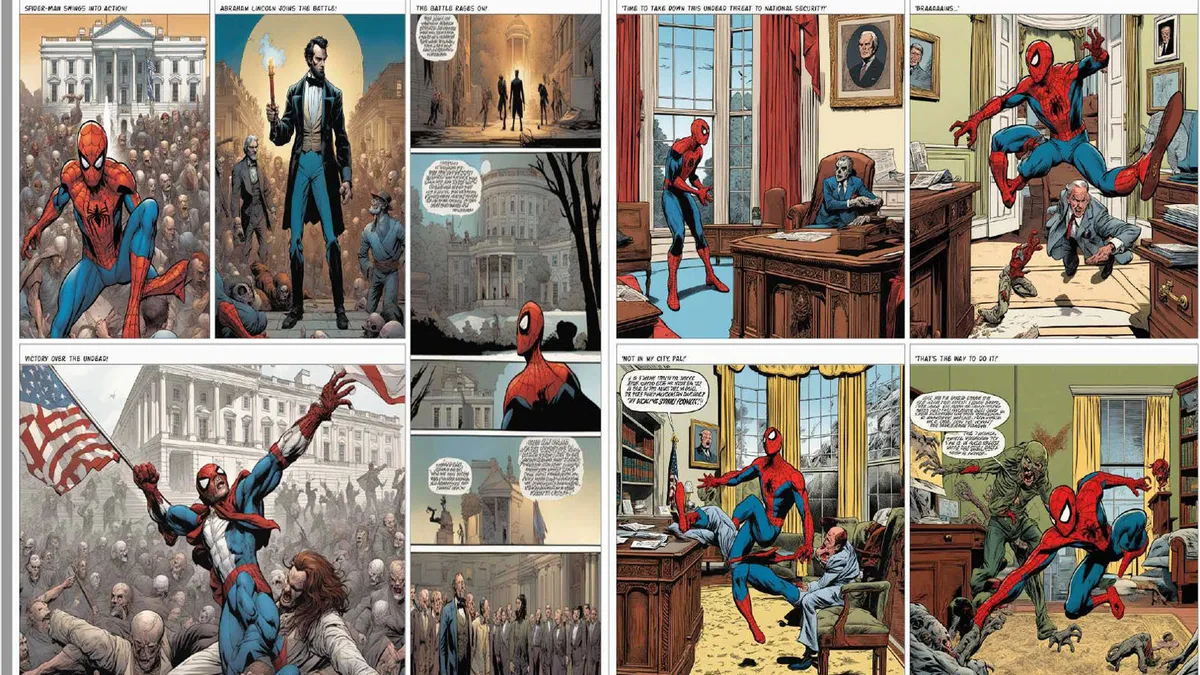
An AI comic layout generator builds complete comic pages — panel arrangement, gutter spacing, reading flow, and character consistency — from a written scene. Most AI tools produce isolated images you then have to assemble by hand. A layout generator composes the page as a single reading unit, which is the difference between four pictures and a page that actually reads.
✅ Generate full multi-panel pages, not disconnected individual images ✅ Control panel type, size, and gutter width to direct pacing ✅ Hold character design, wardrobe, and world detail across every panel ✅ Compose splash pages, insets, broken panels, and irregular layouts on request
To understand why this matters, it helps to look at what actually breaks in comic production — because the hard part was never drawing one good picture.
Quick Answer: What Is an AI Comic Layout Generator?
An AI comic layout generator is a tool that arranges written scenes into composed comic pages — controlling panel count, size, shape, gutter spacing, and reading order — so the finished page communicates pacing and story flow, not just individual illustrations.
Key capabilities:
- Full-page composition from a script excerpt or scene description
- Panel-type control: establishing shots, close-ups, insets, silhouettes, splash panels, broken panels
- Gutter and pacing control — narrow gutters for speed, wide gutters for pause
- Character and environment consistency across panels, pages, and full issues
- Reading-direction handling for left-to-right Western comics or right-to-left manga
The Problem: Layout Is the Skill That Gets Skipped
Comics are a growing market. The Digital Comic Books Market, valued at USD 2.8B in 2024, is projected to reach USD 3.4B by 2030, and in the UK the comics market reached its highest-ever total sales in 2025, making £78.7 million, an increase of 13.9% from 2024. Demand is not the constraint.
The constraint is what it costs a creator to make a page. The UK Comics Creators Research Report puts the economics bluntly:
"Almost 90% of those respondents who earn an income from traditional publishing do not earn the national living wage from their comics work. And 13% are relying on state benefits." — UK Comics Creators Research Report, The AOI
And the pressure isn't only financial — the report notes that creators are "experiencing rising pressures on their time as they juggle multiple jobs and administrative tasks, as well as rising costs." Every hour spent thumbnailing is an hour not spent earning.
Producing pages that actually read is frustratingly difficult:
- Layout is a separate discipline from drawing — being able to illustrate does not mean being able to page
- Panel decisions are invisible until they fail — bad pacing reads as "confusing," and readers rarely diagnose why
- Character consistency across an issue requires draftsmanship or a full art team
- Most AI tools have no concept of sequence — they output single images, leaving assembly to you
- Thumbnailing is unpaid labor on top of an already unsustainable rate structure
The Panel Is a Storytelling Tool, Not a Frame
Professional comic artist Steve Ellis — who has drawn for Marvel, DC, and Image — calls the panel "one of the most overlooked tools in storytelling," noting that beyond its contents, "the panel is a storytelling tool by itself." It's a wall that tells the reader: here is a complete idea, read it and move on. Creators who treat panels as containers for pictures produce pages that technically contain art and functionally contain nothing.
Gutters Control Time, and Most People Ignore Them
The space between panels does real narrative work. As Ellis explains, "Gutters control the pacing of your story" — a uniform gutter implies smooth transitions, while "a wider panel border gives the reader more time and space to rest and think about the story," creating in-between moments. Removing borders entirely makes two actions read as simultaneous. These are timing decisions, and skipping them flattens every page to the same tempo.
Generic AI Tools Solve the Wrong Problem
Academic research has documented this gap precisely. A study on collaborative comic generation notes that while narrative idioms and visual storytelling grammar are widely discussed in analysis, "they are rarely incorporated into AI-driven comic generation". Most image models optimize for a single beautiful frame. Comics need panel composition, story tension changes, and panel transitions — the sequential layer that generic tools simply don't model.
Consistency Breaks Before the Issue Does
A protagonist needs the same face in panel 3 and panel 180. Costume details, environment geography, lighting direction, and time of day all have to hold. This is a well-documented failure mode: research on comic generation emphasizes "ensuring character consistency throughout the panel sequence" as a core system requirement, precisely because it does not happen by default.
Public Support Doesn't Match Commercial Growth
The structural problem compounds the practical one. Despite rising sales and cultural visibility, comics "still receive negligible public investment compared to other art forms in the UK." Creators are absorbing production costs a growing industry isn't covering.
This is exactly the gap a purpose-built comic layout generator was designed to close.
Why an AI Comic Layout Generator Changes the Math
The distinction between an image generator and a layout generator is the unit of output. One gives you a picture. The other gives you a page — with panel hierarchy, reading order, gutter timing, and continuity across the sequence.
| Traditional Comic Production | AI Comic Layout Generator |
|---|---|
| Thumbnail, layout, pencil, ink, color, letter — per page | Describe the scene and paneling, receive the composed page |
| Layout requires learning paneling as a separate craft | Panel type, size, and gutter specified in plain language |
| Character consistency depends on skill or an art team | Consistency held across panels, pages, and full issues |
| Revisions mean redrawing and re-inking | Revisions cost a sentence |
| General AI tools output images you assemble manually | Full page composed as one sequential unit |
| Nearly 90% of publishing creators earn below living wage | Production overhead removed from the cost equation |
Pages Composed as Reading Units
The Comic Creator arranges panels so the eye travels correctly — Ellis's rule that panels should "lead the reader from left to right and down to mimic the usual reading pattern of a western-style comic book" is applied at the composition level, not left to chance.
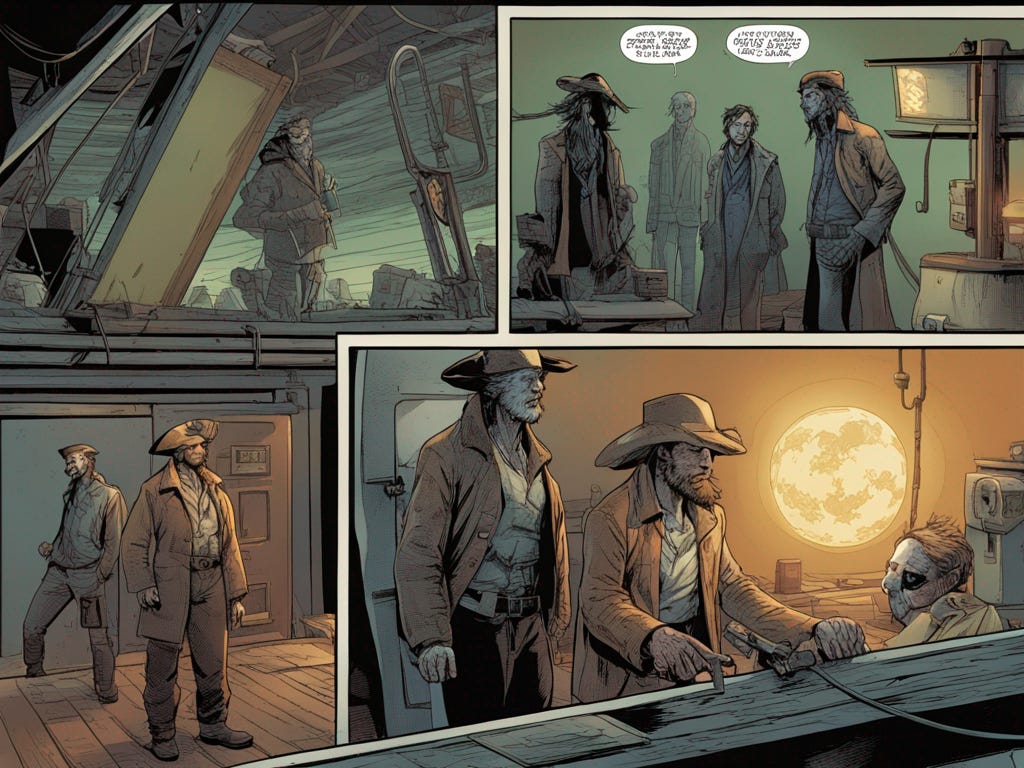
"Six panels. Wide establishing shot of the saloon interior across the top tier, then two narrow verticals for the standoff, an inset close-up on the cyborg's hand, and a wide bottom panel with the moon through the window."
Panel Vocabulary as Direct Input
You direct the page the way a professional would. Ellis's working taxonomy maps to what you can specify: close-ups for facial expression, distant shots for establishing scenes, silhouettes for drama, overlapping panels for progression, diagonal panels for tension, splash panels for pivotal moments, and broken panels where action extends past the border.
"Make the reveal a splash panel that breaks its own border — the moon should bleed past the frame into the gutter."
Gutter Control as a Pacing Dial
Tight gutters for a fight. Wide gutters for a silence. Removed borders where two beats happen at once. You're not just placing panels — you're setting the tempo of how the page is read.
Consistency Held Across the Issue
Character design locks once. Same face, same coat, same weapon — page after page. The same discipline applies to location geography, lighting direction, and world detail, which is what separates an issue from a folder of unrelated illustrations.
Iteration Without Redraw Cost
Test three versions of a page turn. Try the reveal as a splash, then as a nine-panel grid, then as a borderless bleed. Because nothing has to be re-inked, layout experimentation becomes free — which is exactly what Ellis recommends: "Experimenting with different types of paneling techniques can be a good way to test run a storytelling device before committing to a final page layout."
Related Agents You'll Also Find Useful
Layout is one step in a longer pipeline. These agents cover what sits around it.
Manga Creator
Manga uses inverted reading flow, black-and-white rendering, screentone, and different panel density than Western comics. If you're producing a manga chapter rather than a comic issue, this agent handles that grammar natively across one-shots to 200+ page serialized epics.
- Right-to-left panel flow and koma-wari layout conventions
- Screentone, spot blacks, and speed-line rendering
- Consistent art style maintained across serialized volumes
Webtoon Creator
Vertical scroll has no page. Layout becomes a continuous ribbon where whitespace replaces the gutter and reveals are triggered by scroll position. Fundamentally different pacing logic from paged comics.
- Vertical scroll rhythm and scroll-triggered reveals
- Full-color consistency across long-running series
- Episode hook placement tuned to platform retention
Creative Fiction Writer
A perfectly paneled page can't rescue a weak scene. If the arc, cast, or world isn't solid yet, build it before you lay it out — deep research for authentic worlds and editorial insight from first draft to final manuscript.
- Arc structure and character development ahead of production
- Genre-authentic worldbuilding and research
- Editorial feedback on pacing and dramatic beats
Graphic Designer
Finished issues need packaging. Covers, logo treatment, trade dress, and the promotional assets that get an indie book noticed on a crowded storefront.
- Cover design and title treatment
- Series branding and trade dress
- Social and launch assets
Try any of these free — no credit card required.
How It Works: Script to Composed Page in Four Steps
Step 1: Lock Your Cast and Visual Register
Establish who appears and what the book looks like before generating pages. Describe character designs — build, wardrobe, distinguishing features — and set the art direction: gritty western, clean superhero linework, painterly noir, whatever the book calls for.
"Two leads: a weathered gunslinger in a wide-brimmed hat and long coat, and a cyborg with a scarred metal faceplate. Style: gritty western sci-fi, heavy ink, muted desaturated palette."
Step 2: Bring the Scene
Paste script pages or describe the beat plainly. Specify how many panels the page should hold and the emotional shape of the page — build, release, page-turn cliffhanger.
"One page. They meet in the workshop at night. The page builds quiet tension and ends on the reveal of what's under the faceplate."
Step 3: Direct the Layout
This is where the page becomes a comic instead of a stack of images. Call the panel types, sizes, gutters, and reading path.
"Panel 1 is a wide establishing shot across the top tier. Panels 2 and 3 are narrow verticals — his eyes, then the cyborg's hand on the counter. Panel 4 is the largest, a low-angle two-shot. Widen the gutter before the last panel so the reveal lands after a beat of silence."
Step 4: Iterate and Continue the Issue
Give notes the way you'd give them to an artist. Resize a panel, swap a close-up for a wide, break a border, tighten the gutters. Because there's no redraw cost, test the page-turn three ways and keep the one that reads best — then move to the next page with cast and style already locked.
"Panel 4 is too busy — drop the background clutter and push the contrast. Then give me the next page: aftermath, four panels, wide gutters throughout."
Results & Use Cases
📚 Indie Creators Publishing a Full Issue
Scenario: A solo creator wants to ship a 24-page issue but can only finish two pages a week.
Traditional Approach: Grind through thumbnails, pencils, inks, and colors while earning below the national living wage from comics work and juggling a day job.
AI Comic Layout Generator: Use the Comic Creator to compose pages with cast and style locked, shipping the full issue on a schedule readers will follow.
- Layout, backgrounds, and consistency handled without an art team
- Release cadence competitive with studio-backed titles
- Production overhead removed from an already thin margin
✍️ Writers Who Can't Draw
Scenario: A novelist has a finished comic script and no ability to illustrate it.
Traditional Approach: Find an artist, negotiate rates, wait through their queue — or shelve the project permanently, which is what most unillustrated comic scripts become.
AI Comic Layout Generator: Lay out the script directly. Tighten the arc first with the Creative Fiction Writer, then compose pages from the finished draft.
- No drawing skill required — input is written description
- Panel decisions guided explicitly rather than left to a hired interpreter
- The project ships instead of sitting in a folder
📱 Creators Testing Layouts Before Committing
Scenario: A creator isn't sure whether a key sequence works as a nine-panel grid or a single splash.
Traditional Approach: Thumbnail both, pick one, discover in the finished art that the other read better, and eat the loss.
AI Comic Layout Generator: Generate both versions in minutes and compare them side by side. Jenova runs with full feature parity across web, iOS, and Android with settings synced — so you can test layouts on your phone during a commute and finish on a laptop that night.
- Layout experiments cost nothing to run
- Page-turn timing validated before final art
- Entire workflow runs from a phone
🎨 Artists Using It as a Layout Assistant
Scenario: A skilled illustrator wants to keep drawing figures but is losing days to thumbnailing, backgrounds, and page architecture.
Traditional Approach: Do all of it personally and absorb the "rising pressures on their time" the industry report documents, or hire assistants the book can't fund.
AI Comic Layout Generator: Generate layout options and background passes, then draw character work over the top. Research on comic generation systems supports exactly this hybrid model, emphasizing "balancing automation with user control for customization" rather than end-to-end automation.
- Time redirected from architecture to craft
- Multiple layout options tested before committing pencil
- Human authorship preserved where it matters most
FAQ
Is an AI comic layout generator free to use?
Jenova offers all core features on a free tier, which includes access to the agent library and comic page generation with limited monthly usage. Paid plans start at $20/month for 30× the free usage, custom model selection, and watermark-free output. Usage resets monthly on your billing date with the full limit available from day one — no daily caps. Check "Usage Limit" in the menu for current details.
How is a layout generator different from a regular AI image generator?
A general image generator produces isolated pictures with no relationship to each other. Comics require panel hierarchy, reading order, gutter spacing that controls pacing, and character continuity across the page. Research has flagged this exact gap — visual storytelling grammar is "rarely incorporated into AI-driven comic generation." The Comic Creator composes the page as a unit instead.
Can it control gutter width and panel pacing?
Yes — and this is the part that separates layout from illustration. Gutters govern how much time a reader spends between beats: uniform gutters read smoothly, wider gutters create pause and reflection, and removed borders make two actions read as simultaneous. You specify the pacing you want in plain language and the page is composed accordingly.
Does it handle splash pages and broken panels?
Yes. Splash panels, insets, silhouettes, diagonal frames, overlapping panels, and broken panels where action extends past the border are all standard requests. These are the techniques Ellis identifies as tools that "create drama in your story or emphasize a plot point" — you name the effect, not the render settings.
Should I use this for comics, manga, or webtoon?
Depends on your format, and the difference is real. Western comics read left-to-right in full color on a page — use the Comic Creator. Manga reads right-to-left in black-and-white with screentone — use the Manga Creator. Webtoon is vertical-scroll and mobile-first with no page boundary at all — use the Webtoon Creator.
Are AI-assisted comics accepted by readers and publishers?
This is genuinely contested and worth being straight about. The UK creator report lists "the threat from AI" alongside low pay and Brexit as pressures on the profession, and reader resistance is real in parts of the industry. Many creators use AI as an assistive layer for layout, backgrounds, and iteration while keeping character art and authorship human — and disclose their process. Check platform and publisher policies before submitting.
Conclusion
Comics were never hard because drawing is hard. They're hard because layout is an invisible discipline — panel choice, gutter timing, reading path, page-turn placement — that takes years to internalize and that readers only notice when it fails. Layered on top of an economy where nearly nine in ten publishing creators earn below a living wage, the result is a medium that's growing commercially while the people making it can't keep pace.
An AI comic layout generator shifts that arithmetic. When a page composes in a conversation and a layout experiment costs nothing, the writer who can't draw can publish. The solo creator can ship on schedule. The working illustrator can hand off architecture and spend the recovered hours on the figure work that carries their name. The judgment — which panel, what size, where the gutter breaks — is still the job. What's gone is the labor between the decision and the page.
Start with one scene. Lay out one page. See whether it reads.
Try the Comic Creator now, or pair it with the Manga Creator and Webtoon Creator depending on your format. Explore the full agent library at Jenova.
For Developers: Comic page layout and sequential panel composition is available programmatically via the Jenova API — integrate character-consistent page generation into your creative or publishing application with a single API call. Full documentation →