AI Character Appearance Generator: Visuals for Games & Stories
2026-09-06
Graphic Designer is an AI character appearance generator that turns written descriptions, style references, and costume notes into finished visual concepts. In September 2026, writers, indie developers, and illustrators still lose hours to generic image models that forget a scar, drift a silhouette, or scramble a palette between poses. This AI provides a dedicated design partner that iterates on face, outfit, and color until the look holds.
✅ Instant concept sheets with front, side, back, and expression views ✅ Outfit, armor, and palette exploration without a full art pipeline ✅ Consistent looks across poses, scenes, and story beats ✅ Usable for games, fiction, comics, and tabletop campaigns
To understand why a dedicated character appearance generator matters, it helps to look at how visual development actually fails today — not from a lack of tools, but from tools that were never built to keep a person looking like the same person.
Quick Answer: What Is an AI Character Appearance Generator?
An AI character appearance generator is a visual design tool that turns descriptions, style notes, and references into finished character looks — face, outfit, palette, and pose — in minutes. It is built for iteration, not one-off portraits.
Key capabilities:
- Full appearance systems: silhouette, wardrobe, colors, and expression
- Turnarounds and expression sheets that stay on-model
- Genre-fluent styling, from cyberpunk streetwear to high-fantasy armor
- Prompt-ready output you can reuse in games, stories, and concept decks
Why Character Looks Are Still So Hard to Get Right
Players and readers now expect characters they can recognize — a haircut, a jacket cut, a scar that survives every scene. Personalization has moved from a nice extra to a core part of how people inhabit games and stories. As Game Developer has long argued, aesthetic choices such as hairstyle, clothing, skin, and eye color are how fans leave their own stamp on a world, even when those choices do not change combat stats.
Studios feel that pressure on both sides of the screen. A Google Cloud survey conducted with The Harris Poll found that 90% of games developers already use AI in their workflows, and 89% say AI is changing what players expect. GDC’s 2025 State of the Game Industry report adds that one in three developers now use generative AI to streamline production. The generative AI market inside creative industries is already valued at $5.38 billion**, with forecasts of **$14.03 billion by 2030.
But getting a stable character appearance out of that boom is still frustratingly difficult:
- Generic image models deliver a striking first portrait, then drift on the second pose
- Wardrobe, armor, and palette live in separate tools, so the look never becomes a system
- Writers describe a face in prose and still cannot brief an artist — or a 3D pipeline — with a usable sheet
- Indie teams cannot afford a visual-development cycle for every NPC, party member, or book cover
Titles such as Minecraft, Fortnite, and Roblox have trained audiences to expect deep customization, from clothing dyes to full body types (Brand Safety Institute). Meanwhile, Adobe’s Creators’ Toolkit research — spanning 16,000 global creators — shows generative and agentic AI moving into everyday creative work. The gap is no longer “can AI make an image?” It is “can AI keep this person looking like themselves across a whole production?”
That is exactly what this character appearance generator was built for.
Why Graphic Designer
Graphic Designer treats appearance as a design problem, not a lottery. You brief a character the way you would brief a concept artist: silhouette, materials, culture, era, and the emotion the look has to carry. The tool then produces portraits, turnarounds, outfit variants, and expression studies you can actually hand to a writer, a 3D artist, or a game-design doc.
| Traditional Approach | Graphic Designer |
|---|---|
| Commission a concept artist and wait days for a first pass | Visuals in a single working session, then tight iteration |
| One pretty portrait that falls apart in the next pose | Sheets that hold face, hair, and wardrobe on-model |
| Separate moodboards, Pinterest folders, and chat threads | One brief that covers palette, costume, and expression |
| Generic “fantasy rogue” output from a public image model | Genre-specific direction you can steer in plain language |
| Costly revision rounds for every NPC or cover variant | Rapid wardrobe and color exploration before you lock a look |
Appearance as a system, not a screenshot
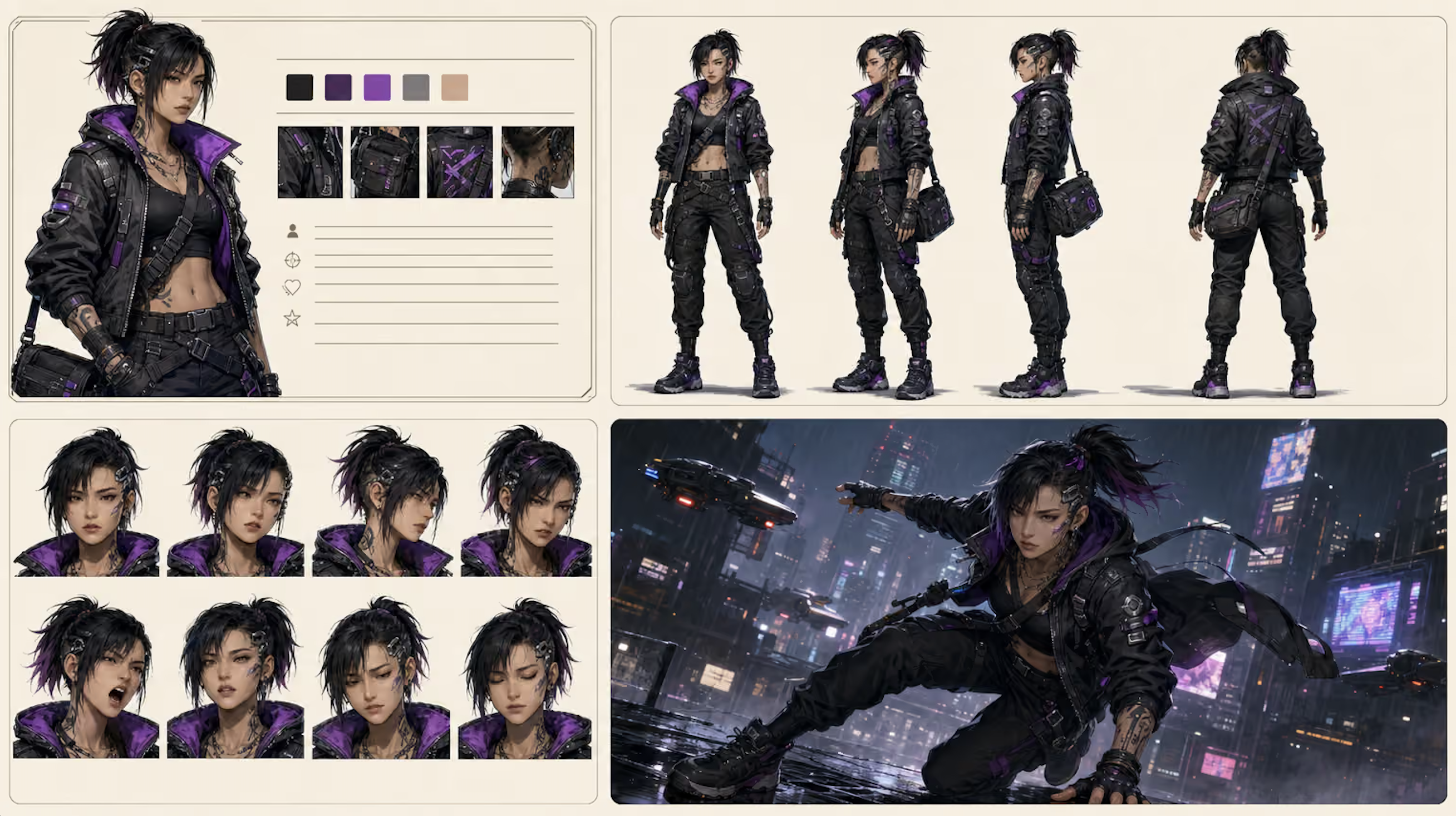
A usable character look has four layers: bone structure and face, hair and markings, silhouette and costume, and a color story that survives lighting changes. This generator works those layers together. Ask for a cyberpunk runner and you can get the cropped jacket, purple lining, cargo proportion, and boot read as a set — then a front/side/back sheet so the design survives production.
Wardrobe, armor, and palette exploration
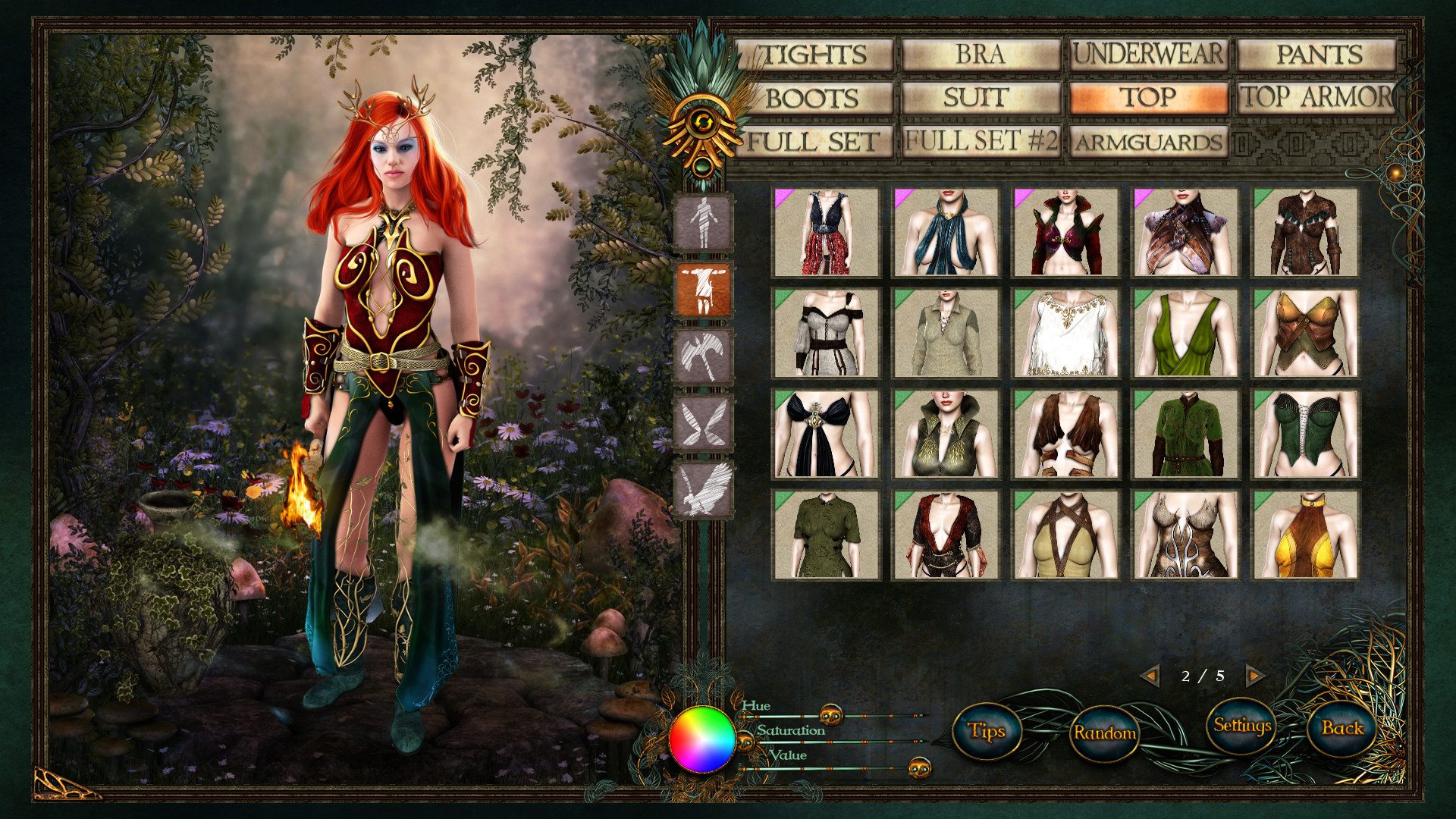
Most first designs fail in the closet, not the face. You can spin leather versus plate, streetwear versus ceremonial robes, or three dyes of the same coat without restarting the character. That is the same instinct as an in-game creator — category by category — except you are generating original concept art, not picking from a fixed catalog.
On-model faces and expressions
Casting a character means the scowl, the smirk, and the exhausted three-quarter view still belong to the same person. Expression sheets and alternate hair states (tied back, windblown, hood up) are part of the brief, not a separate project.
Briefs that other people can use
Output is meant to travel: a color palette swatch, costume callouts, and pose-ready images a writer, animator, or marketing designer can work from. GameAnalytics notes that AI is already used not only for characters but for textures, maps, and UI ideas — the bottleneck is getting the hero look locked so those downstream assets have something to match.
While general image models can produce a single striking portrait, this design partner specializes in iterating a full appearance system — silhouette, wardrobe, palette, and expression — until it is production-useful.
"Design a cyberpunk street runner: black tactical jacket with purple lining, cropped top, cargo pants, combat boots. Front, side, and back turnaround plus a five-swatch color palette."
"Elf ranger with red hair and antlers in a forest clearing. Three outfit variants: travel leathers, a green tunic, and light chainmail, with the same face and a shared earth-and-gold palette."
"Keep this face, the undercut, and the cheek marking identical. Give me a shout, a closed-mouth smirk, and a tired three-quarter view."
Related Agents You'll Also Find Useful
If the look is only the first beat of a larger project, these partners sit naturally next to a character appearance generator.
Game Designer Assistant
If you are putting that look into a playable world, Game Designer Assistant turns visual identity into systems, documentation, and concept direction across genres and platforms.
- Character sheets that connect appearance to class, faction, or loadout
- Concept-art language that a production team can implement
- Genre and market context so the look fits the game you are actually shipping
Prompt Generator
When you need the same character in another image model, video tool, or batch pipeline, Prompt Generator writes precise prompts for text, image, music, and video models.
- Locks hair, age, materials, and camera language so reruns stay on-model
- Translates a messy brief into a reusable prompt block
- Useful when one look has to survive several generators
Creative Fiction Writer
Appearance should match biography. Creative Fiction Writer builds the backstory, voice, and world that explain why the coat is patched, the jewelry is ceremonial, or the armor is scavenged.
- Physical description that a visual brief can quote
- Cultural and period detail that keeps costume choices honest
- Scene-ready prose once the face is locked
Try the character appearance generator free — no credit card required.
How to Generate a Character Appearance in Minutes
Step 1: Brief the person, not the aesthetic
Open this design partner and describe who they are before you name a style. Age range, body type, culture, job, and the one detail a stranger would remember (a clipped ear, a branded pauldron, a violet undercut) give the generator something to hold.
"Late-20s courier, lean, sun-worn, violet undercut, always wearing a too-big tactical jacket. She should look fast, not glamorous."
Step 2: Lock silhouette and wardrobe
Ask for a full-body read next: outer layer, inner layer, footwear, bags, and weapons as costume, not as stats. Request two or three outfit variants at the same face so you are choosing a closet, not gambling on a new person each time.
"Same face and hair. Variant A: armored jacket and cargo pants. Variant B: sleeveless crop and holster harness. Variant C: rain cloak over the same base layer."
Step 3: Build the sheet
Call for a turnaround (front, side, back), a color palette, and four expressions. This is the difference between a pretty render and a character you can reuse. If a game-style creator is your mental model — slots for top, pants, boots, and color — say so. You want the same discipline, with original art instead of a preset grid.
Step 4: Stress-test the look
Put the character in a new light and a new action: rain, neon, campfire, sprint, crouch. Anything that breaks the face or the coat’s silhouette gets a correction pass (“keep the purple lining, lose the extra belts”). Arm’s overview of generative AI in game development is clear that GenAI is already touching art pipelines; the win is using it to prove a design before it hits those pipelines.
Step 5: Package the brief
Export or copy the sheet plus a short costume callout (materials, palette hexes or swatches, “do not change” notes). That package is what you hand to a writer, a 3D artist, or your future self at 11 p.m. before a session.
Results & Use Cases
🎮 Indie game visual development
- Scenario: A three-person studio needs a playable lead and six faction NPCs before a vertical slice, with no full-time concept artist.
- Traditional Approach: Weeks of mixed freelance portraits that do not share a world, plus a moodboard no one treats as canonical.
- Graphic Designer: One locked protagonist sheet and a faction “uniform language” (shared silhouette cues, opposing palettes) in a few working sessions.
- Faster art direction for pitch decks and store pages
- Clearer handoff into 3D or pixel pipelines
- Room to explore armor tiers without recasting the hero
Capitol Technology University’s survey of AI in game development describes studios already using machine learning across NPCs and production; appearance generation is the visual counterpart — getting the cast to look like they share a budget and a world.
📚 Novelist locking a cover face
- Scenario: A fantasy author has 80,000 words and a protagonist whose “red hair and antlers” keep being illustrated as a different woman on every commission.
- Traditional Approach: Paid portraits that ignore the book’s actual costume logic; endless notes in the margins of chapter one.
- Graphic Designer: A single on-model face, three traveling outfits, and a palette the cover artist can match — while Creative Fiction Writer tightens the physical description so prose and image stop arguing.
- Cover, map-icon, and social crops from one source of truth
- Costume that reflects culture and climate instead of generic “elfwear”
- A brief you can reuse for sequels without recasting
📱 Tabletop GM on a phone between sessions
- Scenario: Tomorrow’s one-shot needs a rival duelist the table will remember. You are on a train with a phone, not a Wacom.
- Traditional Approach: A random token that looks nothing like the voice you planned, or a 40-minute scroll through token sites.
- Graphic Designer: A full-body plus a tight portrait from a three-sentence brief, saved before you reach your stop.
- Tokens and recap images from the same face
- Last-minute wardrobe changes (“add a torn opera cloak”) without a new character
- Same workflow on web, iOS, and Android
🛠️ From look to game systems
- Scenario: The courier’s jacket is iconic, but design still needs to know what that look means in play — loadout slots, faction read, rarity of the armor.
- Traditional Approach: A gorgeous render sitting in a folder while the GDD describes a different person.
- Graphic Designer + Game Designer Assistant: Visual identity and systems language developed together, so the coat that reads “fast courier” also matches the class fantasy.
- Concept art that survives contact with production
- Fewer “who is this?” moments in sprint reviews
- A look you can still recognize at low resolution on a mobile UI
Across these cases the pattern is the same: 95% of developers in Google Cloud’s research already use AI to automate repetitive work. Appearance iteration — the tenth belt, the third haircut, the palette that finally reads at thumbnail size — is exactly that kind of work.
FAQ
What is a character appearance generator?
A character appearance generator is a tool that produces a complete visual identity for a fictional person: face, body read, hair, clothing, colors, and enough angles that the design can be reused. Unlike a single text-to-image roll, it is meant to stay on-model across poses, outfits, and scenes so writers, game teams, and illustrators share one look.
Is Graphic Designer free to use as a character appearance generator?
Yes. Graphic Designer is available on a free plan with core features and limited monthly usage. Paid tiers increase usage if you are generating full casts, many outfit variants, or frequent expression sheets. You can start with a single hero look on the free tier and scale only if the volume requires it.
How is this different from Midjourney or other image models?
General image models optimize for a strong still frame. A character appearance generator optimizes for a repeatable person. You brief silhouette, wardrobe, and palette as a system, then request turnarounds and expressions that keep the same face. For pipelines that still need Midjourney, Runway, or similar, Prompt Generator can translate the locked look into model-specific prompts.
Can it create character sheets, turnarounds, and outfit grids?
Yes. Ask explicitly for front/side/back views, a swatch palette, expression rows, and labeled outfit variants. Treat it like a visual-development pass: the sheet is the deliverable, not a cinematic keyframe. That package is what concept teams, cover artists, and tabletop groups actually use.
Does an AI character appearance generator work on mobile?
Yes. You can brief a character, iterate outfits, and save portraits from a phone or tablet with the same workflow as desktop — useful for GMs, writers, and designers who lock a look between meetings or on the way to a session.
Can it follow a written description from a novel or GDD?
That is one of its primary jobs. Paste the prose or bullet the “do not change” details (eye color, scar side, coat length), then request visuals that honor those constraints. If the description itself is thin, Game Designer Assistant can help you specify class, faction, and setting so the costume has a reason to exist.
Design a Look You Can Reuse
A memorable character is not one lucky portrait. It is a face, a silhouette, and a closet that still make sense in rain, in neon, and in a 64-pixel UI icon. Generic generators make images. A dedicated AI character appearance generator makes a look — one you can put on a cover, in a pitch, or across a table.
Brief the person. Lock the wardrobe. Stress-test the sheet. Then keep that appearance stable for every scene that follows.
Try Graphic Designer now, and explore more at Jenova.
For Developers: Graphic Designer is available programmatically via the Jenova API — integrate AI character appearance generation into your application with a single API call. Full documentation →