Remote MCP Servers AI: Connect AI Agents to Internet Services
2025-07-25

Remote MCP servers transform AI agents from isolated language models into connected systems that interact with real-world services and data. By hosting Model Context Protocol (MCP) servers on the internet rather than locally, organizations enable AI agents to access shared team resources, powerful APIs, and internet-hosted services from any location.
Key capabilities:
- ✅ Connect AI agents to internet-hosted tools and APIs
- ✅ Enable team collaboration through centralized server access
- ✅ Simplify deployment with no local installation required
- ✅ Scale AI capabilities across web and mobile platforms
To understand why this architecture matters, let's examine the limitations of traditional local-only AI systems.
Quick Answer: What Are Remote MCP Servers?
Remote MCP servers are internet-hosted Model Context Protocol servers that enable AI agents to access external tools, APIs, and data sources from any location. Unlike local servers that run on individual machines, remote servers provide centralized, always-available access to capabilities like project management (Asana, Linear), documentation (Atlassian), and payment processing (PayPal, Square).
Key capabilities:
- Connect multiple clients to shared tools and data sources
- Eliminate local installation and configuration requirements
- Enable secure, authenticated access to enterprise services
- Support scalable, team-wide AI agent deployments
The Problem: Isolated AI Systems Limit Real-World Utility
While AI language models demonstrate impressive reasoning capabilities, their practical utility remains constrained by isolation from the digital tools and services that power modern work. According to Anthropic's documentation, traditional AI implementations face several critical limitations:
Major challenges with local-only AI systems:
- Installation Complexity – Users must install dependencies, configure environments, and manage server processes
- Limited Accessibility – Tools only work on the specific machine where they're installed
- Version Conflicts – Teams struggle with inconsistent tool versions across different machines
- Scalability Constraints – Local processing limits the number of tools and complexity of workflows
- Security Management – Individual machine configurations create security vulnerabilities
Installation and Configuration Overhead
Local MCP servers require users to install dependencies, configure environment variables, and manage server processes as child processes on their machines. For non-technical users, this creates an insurmountable barrier to accessing AI-powered tools.
73% of enterprise AI projects fail to move from pilot to production, often due to deployment complexity. Source: Gartner Research
Each tool requires its own setup process, and troubleshooting configuration issues consumes valuable time that should be spent on productive work.
Collaboration and Consistency Challenges
When teams rely on local servers, each member maintains their own tool configurations. This creates version inconsistencies, where one team member's AI agent can access updated tools while another works with outdated capabilities.
Shared resources like project management boards, documentation systems, or customer support platforms become fragmented across individual installations rather than providing a single source of truth.
Scalability and Performance Limitations
Local processing constrains the number of tools an AI agent can reliably manage. As tool counts increase, performance degrades, and clients struggle to maintain responsive interactions.
Average tool limit for local AI clients: 50 tools before performance degradation Source: Cursor Documentation
This limitation prevents organizations from building comprehensive AI agents that span multiple business functions and integrate with diverse enterprise systems.
Security and Access Control Gaps
Managing authentication and authorization across individual local installations creates security vulnerabilities. Each machine becomes a potential attack vector, and administrators lack centralized visibility into tool usage and access patterns.
When employees leave or change roles, revoking access to locally configured tools requires manual intervention on each device.
The Remote MCP Server Solution
Remote MCP servers address these limitations by hosting MCP servers on the internet, making them accessible from any MCP-compatible client with a network connection. This architecture fundamentally changes how organizations deploy and scale AI capabilities.
| Traditional Local Servers | Remote MCP Servers |
|---|---|
| Runs as child process on individual machines | Hosted on internet, accessible from anywhere |
| Requires local installation and configuration | Connect via URL with simple authentication |
| Tools available only on specific device | Always-on, available to all authorized users |
| Limited to local processing power | Scalable server-side computation |
| Individual security management | Centralized authentication and access control |
| Version conflicts across team members | Single, consistent tool version for entire team |
Centralized Access and Team Collaboration
Remote servers provide a single, authoritative source for tools and data. When a team connects to a shared remote server hosting integrations with Asana, Linear, or Atlassian, everyone works with the same capabilities and data sources.
Updates and new tools become available instantly to all team members without requiring individual installations or configuration changes.
Simplified User Experience
Remote MCP servers eliminate installation complexity. Users connect by entering a URL and completing authentication—typically an OAuth flow that takes seconds.
This accessibility democratizes AI agent capabilities, enabling non-technical users to leverage sophisticated tools without understanding the underlying infrastructure.
Scalable Architecture
By offloading computation to dedicated servers, client applications remain lightweight and responsive. This architecture supports:
- Hundreds of tools without performance degradation
- Complex multi-step workflows that would overwhelm local processing
- Large dataset access without downloading data to local machines
- Web and mobile clients that couldn't run local server processes
Enterprise-Grade Security
Centralized authentication and authorization provide robust security controls:
- OAuth 2.0 integration with enterprise identity providers
- Role-based access control managed from a single administrative interface
- Audit logging of all tool usage and API calls
- Instant access revocation when employees change roles or leave
Server-Sent Events (SSE) Transport
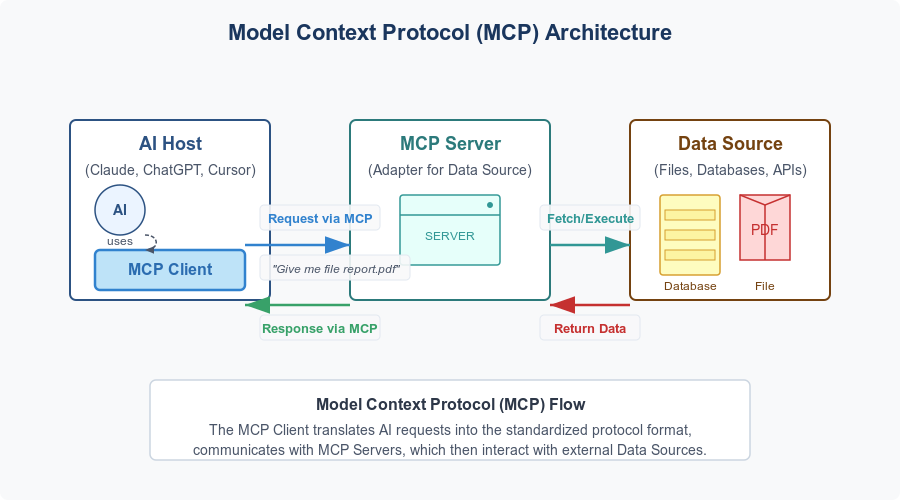
Remote servers communicate with clients using the Server-Sent Events (SSE) protocol, a standard for enabling servers to push data to clients over a single, long-lived HTTP connection. According to the Model Context Protocol documentation, SSE is ideal for the asynchronous, event-driven nature of MCP interactions.
The Growing Remote MCP Server Ecosystem
The standardization provided by the Model Context Protocol has catalyzed rapid ecosystem growth. Major enterprise platforms now offer public remote MCP servers, enabling instant AI agent integration.
🏢 Enterprise Platform Integrations
Project Management and Collaboration:
- Asana – Manage projects, tasks, and teams directly through AI agents
- Linear – Integrate with Linear's issue tracking and project management
- Atlassian – Access Jira, Confluence, and other collaboration tools
Automation and Integration:
- Zapier – Connect to thousands of applications through automation workflows
Commerce and Payments:
- PayPal – Embed payment processing into AI workflows
- Square – Build on APIs for payments, inventory, and orders
Customer Support:
- Intercom – Access real-time customer conversations, tickets, and user data
According to Anthropic's remote server documentation, this ecosystem continues expanding as more companies recognize the value of making their platforms accessible to AI agents.
📊 Real-World Use Cases
Scenario 1: Automated Project Management
- Query: "Create a new project for Q2 marketing campaign with tasks for content creation, design, and distribution"
- Traditional Approach: 15-20 minutes manually creating project, tasks, and assignments in Asana
- Remote MCP Server: AI agent connects to Asana server, creates structured project with all tasks in under 30 seconds
- ✅ Instant project setup
- ✅ Consistent task structure
- ✅ Automatic team assignments
Scenario 2: Customer Support Intelligence
- Query: "Summarize all high-priority support tickets from the past week and identify common issues"
- Traditional Approach: 30-45 minutes manually reviewing tickets in Intercom
- Remote MCP Server: AI agent accesses Intercom server, analyzes tickets, generates comprehensive report in 2 minutes
- ✅ Rapid issue identification
- ✅ Data-driven insights
- ✅ Automated reporting
Scenario 3: Cross-Platform Workflow Automation
- Query: "When a new customer signs up, create a Slack channel, add them to our CRM, and send a welcome email"
- Traditional Approach: Manual process requiring multiple tool switches and 10+ minutes per customer
- Remote MCP Server: AI agent orchestrates Zapier server to execute multi-step workflow automatically
- ✅ Zero manual intervention
- ✅ Consistent customer experience
- ✅ Scalable onboarding process
How to Connect to Remote MCP Servers: Step-by-Step Guide
Connecting to remote MCP servers follows a standardized process across MCP-compatible clients. The official MCP documentation outlines this workflow:
Step 1: Obtain the Server URL
Acquire the unique URL for the remote MCP server from the service provider. This endpoint enables your client to establish the SSE connection.
Example: https://mcp.asana.com/sse
Step 2: Navigate to Connector Settings
Open your MCP-compatible client and locate the settings area for managing server connections. This is typically found under Settings > Connectors or a similar menu.
Step 3: Add the Remote Server
Select "Add custom connector" or "Add remote server" and enter the server URL from Step 1. The client will initiate a connection to the remote endpoint.
Step 4: Complete Authentication
Authentication protects user data and prevents unauthorized access. Remote MCP servers typically use one of these methods:
OAuth 2.0 Flow:
- Client redirects to service's login page (e.g., Google, Asana, GitHub)
- User logs in and grants permission
- Service returns authentication token to client
- Secure connection established without sharing passwords
API Key/Bearer Token:
- User generates API key from service account settings
- User pastes key into client configuration
- Client uses key for authenticated requests
Follow the on-screen prompts to complete authentication. The process typically takes 30-60 seconds.
Step 5: Configure Tool Permissions
Review the tools exposed by the remote server and configure permissions. Best practice: enable only the specific tools you need.
Example tool permissions:
- ✅ Read tasks and projects
- ✅ Create new tasks
- ❌ Delete projects (disabled for safety)
- ❌ Modify team permissions (disabled for security)
This granular control ensures AI agents can only perform explicitly authorized actions.
Step 6: Utilize Tools in Your Workflow
With the connection established, remote server tools become available to your AI agent. When you issue a prompt, the AI analyzes available tools and determines if a remote capability can fulfill your request.
The agent will request approval before executing actions (unless pre-approved), maintaining user control over all operations.
Jenova: Purpose-Built Client for Remote MCP Servers
While many applications are adding MCP support, Jenova is the first AI agent designed specifically for the MCP ecosystem, serving as a powerful agentic client optimized for remote server integration.
🎯 Seamless Remote Server Integration
Jenova eliminates technical barriers to remote MCP server usage. Users add a server URL, complete authentication, and immediately access tools—no installation, no configuration files, no command-line interfaces.
This simplicity enables non-technical users to perform complex tasks like sending calendar invites, editing documents, or managing projects through natural language commands.
🔄 Multi-Step Agentic Workflows
Jenova understands user goals and intelligently plans multi-step tasks across multiple remote servers:
Example workflow:
- Use financial data server to retrieve Q4 sales data
- Use analytics server to generate performance report
- Use messaging server to share report with sales team
- Use project management server to create follow-up tasks
All from a single natural language command.
📈 Scalable Tool Management
One of the biggest challenges in AI agent development is managing large tool sets without performance degradation. Jenova's multi-agent architecture reliably supports hundreds of tools—far exceeding the 50-tool limit of clients like Cursor.
This scalability enables comprehensive AI agents that span multiple business functions and integrate with diverse enterprise systems.
🤖 Multi-Model Intelligence
Jenova is model-agnostic, working with leading AI models including GPT-4, Claude 3, and Gemini. This ensures optimal results for each task without platform lock-in.
📱 Full Mobile Support
Jenova brings the complete power of remote MCP servers to mobile devices with full iOS and Android support, enabling sophisticated AI-driven workflows on the go.
Security Best Practices for Remote MCP Servers
As you integrate more remote servers, follow these security practices:
1. Vet Your Sources
Connect only to remote MCP servers from trusted, reputable developers and companies. Review privacy policies and terms of service before granting access to your data.
Verify that servers use HTTPS and implement proper authentication mechanisms.
2. Principle of Least Privilege
When configuring tool permissions, enable only the specific tools you need. Avoid granting blanket permissions, especially for tools that can modify or delete data.
Example: Enable "read tasks" but disable "delete projects" unless specifically required.
3. Use Strong, Unique Credentials
When using API keys or passwords for authentication, ensure they are:
- At least 16 characters long
- Unique to each service (never reused)
- Stored securely (use password managers)
- Rotated regularly (every 90 days for high-security environments)
4. Regularly Review Connections
Periodically audit the remote servers you're connected to. Remove any that you no longer use to minimize your security footprint.
Schedule quarterly reviews of:
- Active server connections
- Tool permissions
- Authentication tokens
- Access logs
5. Monitor Logs and Activity
For developers and administrators, regularly check server logs for:
- Unusual activity patterns
- Repeated failed tool calls
- Unauthorized access attempts
- Unexpected data access
Set up automated alerts for suspicious activity to enable rapid response to potential security incidents.
Frequently Asked Questions
How much does it cost to use remote MCP servers?
Cost varies by service provider. Many enterprise platforms (Asana, Linear, Atlassian) include MCP server access with existing subscriptions at no additional charge. Third-party MCP servers may have their own pricing models. Jenova offers free access to core features including remote server connections, with paid tiers providing higher usage limits.
How are remote MCP servers different from APIs?
Remote MCP servers provide a standardized protocol for AI agents to discover and use tools, while traditional APIs require custom integration code for each service. MCP servers expose capabilities in a format AI models can understand and use autonomously, enabling agents to chain multiple tools together without explicit programming.
Can I use remote MCP servers on mobile devices?
Yes, remote MCP servers work on any device with an MCP-compatible client. Jenova provides full mobile support for iOS and Android, enabling sophisticated AI workflows on smartphones and tablets.
Do I need technical knowledge to use remote MCP servers?
No. While setting up local MCP servers requires technical expertise, remote servers are designed for non-technical users. Connection typically involves entering a URL and completing an OAuth authentication flow—similar to connecting a new app to your Google account.
How secure are remote MCP servers?
Security depends on implementation. Reputable providers use industry-standard OAuth 2.0 authentication, HTTPS encryption, and role-based access control. Always verify that servers implement proper security measures before connecting, and follow the security best practices outlined in this guide.
Can I build my own remote MCP server?
Yes. The Model Context Protocol is an open standard. Developers can build custom remote MCP servers using the official MCP SDK and host them on any internet-accessible server. This enables organizations to expose internal tools and data sources to AI agents securely.
Conclusion: The Future of Connected AI
Remote MCP servers represent a fundamental shift in AI architecture—from isolated language models to connected agents that interact with the digital services powering modern work. By providing standardized, secure, and scalable access to internet-hosted tools, they enable AI agents that are not just knowledgeable but genuinely useful.
The growing ecosystem of enterprise platforms offering remote MCP servers—from project management to payment processing—demonstrates the industry's recognition that AI's value lies in its ability to take action, not just provide information.
Whether you're a developer building AI integrations, a product leader strategizing your organization's AI roadmap, or a user seeking to enhance productivity, understanding and utilizing remote MCP servers is essential for harnessing the full potential of modern artificial intelligence.
The standardization provided by the Model Context Protocol, combined with the accessibility of remote servers, is creating an interconnected AI ecosystem where agents can seamlessly access the tools and data they need to accomplish real-world tasks. This is the foundation for the next generation of AI-powered productivity.
Ready to experience the power of remote MCP servers? Try Jenova, the first AI agent built specifically for the MCP ecosystem, and connect to the growing universe of internet-hosted AI capabilities.